" height="1.90314px" id="wtDTm6bEW" transform="translate(26.225 0)" width="2.4723000000000006px"/><path d="M 0.557 0 L 1.438 0 C 1.746 0 1.995 0.25 1.995 0.559 L 1.995 1.344 C 1.995 1.653 1.746 1.903 1.438 1.903 L 0.557 1.903 C 0.25 1.903 0 1.653 0 1.344 L 0 0.559 C 0 0.25 0.25 0 0.557 0 Z" fill="rgb(29, 28, 27)" height="1.9031500000000001px" id="GnmDnNra_" transform="translate(36.408 2.728)" width="1.9953000000000003px"/><path d="M 6.224 0 L 0.558 0 C 0.25 0 0 0.25 0 0.559 L 0 1.344 C 0 1.653 0.25 1.903 0.558 1.903 L 6.224 1.903 C 6.531 1.903 6.781 1.653 6.781 1.344 L 6.781 0.559 C 6.781 0.25 6.531 0 6.224 0 Z" fill="rgb(29, 28, 27)" height="1.9031500000000001px" id="hKTQ3dbw4" transform="translate(34.261 5.456)" width="6.781100000000002px"/><path d="M 6.955 0 L 0.558 0 C 0.25 0 0 0.25 0 0.559 L 0 1.344 C 0 1.653 0.25 1.903 0.558 1.903 L 6.955 1.903 C 7.263 1.903 7.513 1.653 7.513 1.344 L 7.513 0.559 C 7.513 0.25 7.263 0 6.955 0 Z" fill="rgb(29, 28, 27)" height="1.9031500000000001px" id="G1Zzk9CUU" transform="translate(28.298 8.243)" width="7.513100000000001px"/><path d="M 7.123 0 L 0.558 0 C 0.25 0 0 0.25 0 0.559 L 0 1.344 C 0 1.653 0.25 1.903 0.558 1.903 L 7.123 1.903 C 7.431 1.903 7.681 1.653 7.681 1.344 L 7.681 0.559 C 7.681 0.25 7.431 0 7.123 0 Z" fill="rgb(29, 28, 27)" height="1.9030999999999985px" id="fm7cHxIfJ" transform="translate(0 10.972)" width="7.68067px"/><path d="M 13.447 0 L 0.558 0 C 0.25 0 0 0.25 0 0.559 L 0 1.344 C 0 1.653 0.25 1.903 0.558 1.903 L 13.447 1.903 C 13.755 1.903 14.004 1.653 14.004 1.344 L 14.004 0.559 C 14.004 0.25 13.755 0 13.447 0 Z" fill="rgb(29, 28, 27)" height="1.9030999999999985px" id="LowSwDrtg" transform="translate(9.552 10.972)" width="14.0044px"/><path d="M 0.558 0 L 8.212 0 C 8.52 0 8.77 0.25 8.77 0.559 L 8.77 1.344 C 8.77 1.653 8.52 1.903 8.212 1.903 L 0.558 1.903 C 0.25 1.903 0 1.653 0 1.344 L 0 0.559 C 0 0.25 0.25 0 0.558 0 Z" fill="rgb(29, 28, 27)" height="1.9030999999999985px" id="xRiKc2od7" transform="translate(27.041 10.972)" width="8.769900000000003px"/><path d="M 0.557 0 L 5.4 0 C 5.708 0 5.958 0.25 5.958 0.559 L 5.958 1.344 C 5.958 1.653 5.708 1.903 5.4 1.903 L 0.557 1.903 C 0.25 1.903 0 1.653 0 1.344 L 0 0.559 C 0 0.25 0.25 0 0.557 0 Z" fill="rgb(29, 28, 27)" height="1.9031500000000001px" id="JWdNVicde" transform="translate(36.796 8.243)" width="5.957599999999999px"/><path d="M 1.438 0 L 0.558 0 C 0.25 0 0 0.25 0 0.559 L 0 1.344 C 0 1.653 0.25 1.903 0.558 1.903 L 1.438 1.903 C 1.746 1.903 1.995 1.653 1.995 1.344 L 1.995 0.559 C 1.995 0.25 1.746 0 1.438 0 Z" fill="rgb(29, 28, 27)" height="1.9031500000000001px" id="RfFYVCT_T" transform="translate(28.717 5.456)" width="1.9953000000000003px"/><path d="M 0.558 0 L 2.895 0 C 3.203 0 3.453 0.25 3.453 0.559 L 3.453 1.406 C 3.453 1.714 3.203 1.964 2.895 1.964 L 0.558 1.964 C 0.25 1.964 0 1.714 0 1.406 L 0 0.559 C 0 0.25 0.25 0 0.558 0 Z" fill="rgb(29, 28, 27)" height="1.964299999999998px" id="dngJ6MU2p" transform="translate(16.183 24.582)" width="3.4525000000000006px"/><path d="M 1.706 0 L 0.558 0 C 0.25 0 0 0.25 0 0.559 L 0 1.406 C 0 1.714 0.25 1.964 0.558 1.964 L 1.706 1.964 C 2.014 1.964 2.263 1.714 2.263 1.406 L 2.263 0.559 C 2.263 0.25 2.014 0 1.706 0 Z" fill="rgb(29, 28, 27)" height="1.964299999999998px" id="N_fstvKmR" transform="translate(22.18 24.582)" width="2.2631999999999977px"/><path d="M 0.558 0 L 5.544 0 C 5.852 0 6.101 0.25 6.101 0.559 L 6.101 1.406 C 6.101 1.714 5.852 1.964 5.544 1.964 L 0.558 1.964 C 0.25 1.964 0 1.714 0 1.406 L 0 0.559 C 0 0.25 0.25 0 0.558 0 Z" fill="rgb(29, 28, 27)" height="1.964299999999998px" id="t55XLYcgb" transform="translate(25.486 24.582)" width="6.101399999999998px"/><path d="M 1.976 0 L 0.558 0 C 0.25 0 0 0.25 0 0.559 L 0 1.406 C 0 1.714 0.25 1.964 0.558 1.964 L 1.976 1.964 C 2.284 1.964 2.533 1.714 2.533 1.406 L 2.533 0.559 C 2.533 0.25 2.284 0 1.976 0 Z" fill="rgb(29, 28, 27)" height="1.964299999999998px" id="ZrEKTVTAe" transform="translate(28.542 21.854)" width="2.5334000000000003px"/><path d="M 0.557 0 L 1.438 0 C 1.746 0 1.995 0.25 1.995 0.559 L 1.995 1.406 C 1.995 1.714 1.746 1.964 1.438 1.964 L 0.557 1.964 C 0.25 1.964 0 1.714 0 1.406 L 0 0.559 C 0 0.25 0.25 0 0.557 0 Z" fill="rgb(29, 28, 27)" height="1.964299999999998px" id="Z0fPTp9aR" transform="translate(11.425 24.582)" width="1.9953000000000003px"/><path d="M 0 0.559 C 0 0.251 0.251 0 0.558 0 L 1.438 0 C 1.745 0 1.995 0.251 1.995 0.559 L 1.995 1.405 C 1.995 1.713 1.745 1.964 1.438 1.964 L 0.558 1.964 C 0.251 1.964 0 1.713 0 1.405 Z" fill="rgb(29, 28, 27)" height="1.964299999999998px" id="Tj_PDHFDh" transform="translate(20.635 27.308)" width="1.9954px"/><path d="M 0.557 0 L 1.342 0 C 1.65 0 1.899 0.25 1.899 0.559 L 1.899 1.406 C 1.899 1.714 1.65 1.964 1.342 1.964 L 0.557 1.964 C 0.25 1.964 0 1.714 0 1.406 L 0 0.559 C 0 0.25 0.25 0 0.557 0 Z" fill="rgb(29, 28, 27)" height="1.9643000000000015px" id="AYq9dXkKz" transform="translate(18.686 30.036)" width="1.8994px"/><path d="M 0.558 0 L 5.768 0 C 6.076 0 6.326 0.25 6.326 0.559 L 6.326 1.344 C 6.326 1.653 6.076 1.903 5.768 1.903 L 0.558 1.903 C 0.25 1.903 0 1.653 0 1.344 L 0 0.559 C 0 0.25 0.25 0 0.558 0 Z" fill="rgb(29, 28, 27)" height="1.9031500000000001px" id="rspevfJcx" transform="translate(12.157 8.243)" width="6.325900000000001px"/><path d="M 3.285 0 L 0.558 0 C 0.25 0 0 0.25 0 0.559 L 0 1.344 C 0 1.653 0.25 1.903 0.558 1.903 L 3.285 1.903 C 3.593 1.903 3.842 1.653 3.842 1.344 L 3.842 0.559 C 3.842 0.25 3.593 0 3.285 0 Z" fill="rgb(29, 28, 27)" height="1.9031500000000001px" id="XRUAhGnph" transform="translate(23.887 2.728)" width="3.8424000000000014px"/><path d="M 0.558 0 L 5.644 0 C 5.952 0 6.202 0.25 6.202 0.559 L 6.202 1.344 C 6.202 1.653 5.952 1.903 5.644 1.903 L 0.558 1.903 C 0.25 1.903 0 1.653 0 1.344 L 0 0.559 C 0 0.25 0.25 0 0.558 0 Z" fill="rgb(29, 28, 27)" height="1.9031500000000001px" id="VsaVVIfke" transform="translate(21.528 5.456)" width="6.201600000000003px"/><path d="M 3.06 0 L 0.558 0 C 0.25 0 0 0.25 0 0.559 L 0 1.344 C 0 1.653 0.25 1.903 0.558 1.903 L 3.06 1.903 C 3.369 1.903 3.618 1.653 3.618 1.344 L 3.618 0.559 C 3.618 0.25 3.369 0 3.06 0 Z" fill="rgb(29, 28, 27)" height="1.9030999999999985px" id="wiAKEgyId" transform="translate(40.819 10.972)" width="3.6182000000000016px"/><path d="M 0.558 0 L 17.318 0 C 17.626 0 17.875 0.25 17.875 0.559 L 17.875 1.345 C 17.875 1.653 17.626 1.903 17.318 1.903 L 0.558 1.903 C 0.25 1.903 0 1.653 0 1.345 L 0 0.559 C 0 0.25 0.25 0 0.558 0 Z" fill="rgb(29, 28, 27)" height="1.9032px" id="FIE0ufK9m" transform="translate(6.666 13.7)" width="17.87506px"/><path d="M 6.426 0 L 0.558 0 C 0.25 0 0 0.25 0 0.559 L 0 1.345 C 0 1.653 0.25 1.903 0.558 1.903 L 6.426 1.903 C 6.734 1.903 6.984 1.653 6.984 1.345 L 6.984 0.559 C 6.984 0.25 6.734 0 6.426 0 Z" fill="rgb(29, 28, 27)" height="1.9032000000000018px" id="ut9UWny3L" transform="translate(22.892 19.156)" width="6.983599999999999px"/><path d="M 0.558 0 L 22.151 0 C 22.459 0 22.709 0.25 22.709 0.559 L 22.709 1.344 C 22.709 1.653 22.459 1.903 22.151 1.903 L 0.558 1.903 C 0.25 1.903 0 1.653 0 1.344 L 0 0.559 C 0 0.25 0.25 0 0.558 0 Z" fill="rgb(29, 28, 27)" height="1.9030999999999985px" id="VULnffgbk" transform="translate(9.552 16.428)" width="22.7089px"/><path d="M 7.886 0 L 0.558 0 C 0.25 0 0 0.25 0 0.559 L 0 1.345 C 0 1.653 0.25 1.903 0.558 1.903 L 7.886 1.903 C 8.194 1.903 8.443 1.653 8.443 1.345 L 8.443 0.559 C 8.443 0.25 8.194 0 7.886 0 Z" fill="rgb(29, 28, 27)" height="1.9032000000000018px" id="adZTYr4MR" transform="translate(6.078 19.156)" width="8.44303px"/><path d="M 0.558 0 L 2.211 0 C 2.519 0 2.769 0.25 2.769 0.559 L 2.769 1.406 C 2.769 1.714 2.519 1.964 2.211 1.964 L 0.558 1.964 C 0.25 1.964 0 1.714 0 1.406 L 0 0.559 C 0 0.25 0.25 0 0.558 0 Z" fill="rgb(29, 28, 27)" height="1.964299999999998px" id="bwdUdEmCH" transform="translate(13.784 21.854)" width="2.768600000000001px"/><path d="M 2.424 0 L 0.558 0 C 0.25 0 0 0.25 0 0.559 L 0 1.406 C 0 1.714 0.25 1.964 0.558 1.964 L 2.424 1.964 C 2.732 1.964 2.982 1.714 2.982 1.406 L 2.982 0.559 C 2.982 0.25 2.732 0 2.424 0 Z" fill="rgb(29, 28, 27)" height="1.964299999999998px" id="PUvesMJEj" transform="translate(23.556 21.854)" width="2.982199999999999px"/><path d="M 0.558 0 L 2.241 0 C 2.55 0 2.799 0.25 2.799 0.559 L 2.799 1.406 C 2.799 1.714 2.55 1.964 2.241 1.964 L 0.558 1.964 C 0.25 1.964 0 1.714 0 1.406 L 0 0.559 C 0 0.25 0.25 0 0.558 0 Z" fill="rgb(29, 28, 27)" height="1.964299999999998px" id="Wo2W7J3Zj" transform="translate(8.672 21.854)" width="2.799050000000001px"/><path d="M 6.661 0 L 0.558 0 C 0.25 0 0 0.25 0 0.559 L 0 1.345 C 0 1.653 0.25 1.903 0.558 1.903 L 6.661 1.903 C 6.969 1.903 7.219 1.653 7.219 1.345 L 7.219 0.559 C 7.219 0.25 6.969 0 6.661 0 Z" fill="rgb(29, 28, 27)" height="1.9032px" id="PpPVZXp9j" transform="translate(27.041 13.7)" width="7.218900000000001px"/><path d="M 0.621 1.905 C 0.218 1.905 0 1.687 0 1.283 L 0 0.622 C 0 0.218 0.218 0 0.621 0 L 11.225 0 C 11.628 0 11.846 0.218 11.846 0.622 L 11.846 1.283 C 11.846 1.687 11.628 1.905 11.225 1.905 L 6.934 1.905 L 6.934 14.926 C 6.934 15.33 6.716 15.548 6.313 15.548 L 5.537 15.548 C 5.134 15.548 4.916 15.33 4.916 14.926 L 4.916 1.905 Z" fill="rgb(29, 28, 27)" height="15.54825px" id="xr32fxeO6" transform="translate(52.177 8.243)" width="11.845599999999997px"/><path d="M 0.621 0 C 0.218 0 0 0.218 0 0.622 L 0 14.924 C 0 15.328 0.218 15.546 0.621 15.546 L 1.357 15.546 C 1.76 15.546 1.978 15.328 1.978 14.924 L 1.978 0.622 C 1.978 0.218 1.76 0 1.357 0 Z" fill="rgb(29, 28, 27)" height="15.546050000000001px" id="oSsO_UPVN" transform="translate(90.476 8.243)" width="1.9779000000000053px"/><path d="M 0.62 15.546 C 0.217 15.546 0 15.328 0 14.924 L 0 0.622 C 0 0.218 0.217 0 0.62 0 L 1.396 0 C 1.799 0 2.017 0.218 2.017 0.622 L 2.017 13.632 L 8.981 13.632 C 9.384 13.632 9.602 13.85 9.602 14.254 L 9.602 14.924 C 9.602 15.328 9.384 15.546 8.981 15.546 Z" fill="rgb(29, 28, 27)" height="15.546050000000001px" id="Sgj4z5osO" transform="translate(116.749 8.243)" width="9.602000000000004px"/><path d="M 1.974 14.924 C 1.974 15.328 1.756 15.546 1.353 15.546 L 0.621 15.546 C 0.218 15.546 0 15.328 0 14.924 L 0 0.622 C 0 0.218 0.218 0 0.621 0 L 1.357 0 C 1.76 0 1.978 0.218 1.978 0.622 L 1.978 5.747 C 2.634 4.721 3.806 4.079 5.309 4.079 C 8.18 4.079 10.356 6.358 10.356 9.948 C 10.356 13.538 8.18 15.817 5.309 15.817 C 3.801 15.817 2.627 15.175 1.971 14.145 L 1.971 14.922 Z M 8.36 9.95 C 8.36 7.362 6.881 5.928 5.121 5.928 C 3.361 5.928 1.863 7.362 1.863 9.95 C 1.863 12.539 3.361 13.972 5.121 13.972 C 6.881 13.972 8.36 12.539 8.36 9.95 Z" fill="rgb(29, 28, 27)" height="15.81665px" id="q13jjj7xd" transform="translate(138.401 8.243)" width="10.355999999999995px"/><path d="M 4.457 11.738 C 0.961 11.738 -0.019 9.872 0 8.318 C 0.005 7.929 0.253 7.735 0.645 7.735 L 1.344 7.735 C 1.748 7.735 1.922 7.949 1.961 8.352 C 2.063 9.315 2.693 9.907 4.433 9.907 C 6.174 9.907 7.012 9.269 7.012 8.289 C 7.012 7.425 6.522 7.108 5.305 6.899 L 3.209 6.539 C 1.453 6.238 0.29 5.247 0.29 3.468 C 0.29 1.467 1.774 0 4.518 0 C 7.263 0 8.838 1.491 8.814 3.23 C 8.81 3.614 8.553 3.808 8.165 3.808 L 7.457 3.808 C 7.054 3.808 6.908 3.595 6.851 3.202 C 6.749 2.477 6.159 1.818 4.518 1.818 C 2.878 1.818 2.249 2.508 2.249 3.403 C 2.249 4.175 2.695 4.516 3.81 4.714 L 5.906 5.083 C 7.72 5.404 8.98 6.292 8.98 8.198 C 8.98 9.976 7.908 11.74 4.455 11.74 Z" fill="rgb(29, 28, 27)" height="11.739799999999999px" id="tJ8syeWTW" transform="translate(150.024 12.325)" width="8.980269730401375px"/><path d="M 9.146 7.997 C 9.146 8.813 9.175 9.983 9.282 10.799 C 9.334 11.223 9.155 11.465 8.728 11.465 L 8.068 11.465 C 7.685 11.465 7.467 11.319 7.428 11.022 L 7.317 10.181 C 6.724 11.157 5.565 11.659 4.145 11.659 C 1.579 11.659 0 10.142 0 8.078 C 0 6.27 1.27 5.157 3.433 5.002 L 6.589 4.78 C 7.162 4.741 7.186 4.688 7.186 4.153 L 7.186 3.682 C 7.186 2.438 6.434 1.807 4.79 1.807 C 3.145 1.807 2.472 2.425 2.405 3.289 C 2.376 3.697 2.235 3.916 1.823 3.916 L 1.067 3.916 C 0.675 3.916 0.427 3.717 0.422 3.328 C 0.407 1.51 1.74 0 4.792 0 C 7.798 0 9.162 1.427 9.155 3.736 Z M 7.188 7.298 L 7.188 6.244 C 6.955 6.327 6.678 6.386 6.363 6.415 L 3.598 6.676 C 2.59 6.775 1.997 7.163 1.997 8.099 L 1.999 8.099 C 1.999 9.188 2.886 9.97 4.4 9.97 C 6.169 9.97 7.188 8.9 7.188 7.298 Z" fill="rgb(29, 28, 27)" height="11.658999999999999px" id="QPESIZvku" transform="translate(126.854 12.325)" width="9.290755130109668px"/><path d="M 5.224 0 C 8.313 0 10.295 2.255 10.295 5.456 L 10.295 5.694 C 10.295 6.098 10.077 6.316 9.674 6.316 L 1.998 6.316 C 2.168 8.547 3.447 9.898 5.407 9.898 C 6.768 9.898 7.598 9.363 7.934 8.431 C 8.06 8.078 8.243 7.892 8.618 7.892 L 9.33 7.892 C 9.746 7.892 9.994 8.125 9.923 8.538 C 9.598 10.433 7.834 11.74 5.409 11.74 L 5.407 11.738 C 2.168 11.738 0 9.424 0 5.797 C 0 2.169 2.135 0 5.224 0 Z M 5.222 1.74 C 3.494 1.74 2.405 2.818 2.074 4.64 L 8.282 4.64 C 8.054 2.842 6.949 1.74 5.222 1.74 Z" fill="rgb(29, 28, 27)" height="11.739799999999999px" id="PKmyQkwJE" transform="translate(104.541 12.325)" width="10.295000000000002px"/><path d="M 4.459 11.194 C 4.099 11.194 3.877 11.039 3.746 10.703 L 0.091 1.021 C -0.024 0.72 -0.031 0.511 0.076 0.297 C 0.178 0.094 0.381 0 0.732 0 L 1.274 0 C 1.633 0 1.86 0.155 1.986 0.495 L 4.958 8.503 L 5.123 9.018 L 5.289 8.503 L 8.262 0.495 C 8.388 0.155 8.615 0 8.974 0 L 9.517 0 C 9.865 0 10.07 0.092 10.172 0.297 C 10.279 0.511 10.275 0.72 10.157 1.021 L 6.502 10.703 C 6.371 11.039 6.149 11.194 5.79 11.194 Z" fill="rgb(29, 28, 27)" height="11.1941px" id="uUQr5Yl4B" transform="translate(93.807 12.595)" width="10.248961642504256px"/><path d="M 5.407 11.738 C 2.167 11.738 0 9.424 0 5.797 C 0 2.169 2.133 0 5.221 0 C 8.31 0 10.292 2.255 10.292 5.456 L 10.292 5.694 C 10.292 6.098 10.075 6.316 9.672 6.316 L 1.995 6.316 C 2.165 8.547 3.446 9.898 5.404 9.898 C 6.768 9.898 7.596 9.363 7.931 8.431 C 8.058 8.078 8.241 7.892 8.615 7.892 L 9.328 7.892 C 9.744 7.892 9.992 8.125 9.918 8.538 C 9.593 10.433 7.829 11.74 5.404 11.74 Z M 8.282 4.64 C 8.053 2.842 6.949 1.74 5.221 1.74 C 3.494 1.74 2.405 2.818 2.074 4.64 Z" fill="rgb(29, 28, 27)" height="11.739799999999999px" id="zo1nSBuSF" transform="translate(78.397 12.325)" width="10.29249999999999px"/><path d="M 3.057 10.677 C 3.163 11.026 3.392 11.192 3.756 11.192 L 3.749 11.194 L 4.987 11.194 C 5.35 11.194 5.579 11.028 5.69 10.679 L 8.173 2.654 L 8.237 2.401 L 8.3 2.654 L 10.787 10.679 C 10.894 11.028 11.123 11.194 11.487 11.194 L 12.733 11.194 C 13.096 11.194 13.325 11.028 13.432 10.679 L 16.418 1.006 C 16.516 0.7 16.512 0.498 16.41 0.288 C 16.307 0.089 16.109 0.002 15.76 0.002 L 15.218 0.002 C 14.848 0.002 14.626 0.168 14.519 0.522 L 12.094 8.547 L 12.046 8.761 L 11.999 8.542 L 9.506 0.517 C 9.4 0.168 9.171 0.002 8.807 0.002 L 7.683 0.002 C 7.319 0.002 7.091 0.168 6.984 0.517 L 4.492 8.542 L 4.449 8.745 L 4.405 8.551 L 1.98 0.519 C 1.874 0.166 1.649 0 1.281 0 L 0.728 0 C 0.38 0 0.181 0.087 0.079 0.286 C -0.021 0.493 -0.028 0.698 0.07 1.004 Z" fill="rgb(29, 28, 27)" height="11.194099999999999px" id="uboloLX99" transform="translate(61.282 12.598)" width="16.489163442184434px"/></svg>)
チュートリアル
Video Segmentation API: How to Extract Structured Data From Video

TwelveLabs
Pegasus 1.5's video segmentation API turns a plain-language description into timestamped, schema-compliant JSON for every matching moment across any video, with no training data, preprocessing, or ingestion pipeline. It processes videos up to 2 hours in a single pass, supports up to 10 segment types with 20 custom fields each, and benchmarks 30%+ better segmentation accuracy than Gemini 2.0 Pro.
Pegasus 1.5's video segmentation API turns a plain-language description into timestamped, schema-compliant JSON for every matching moment across any video, with no training data, preprocessing, or ingestion pipeline. It processes videos up to 2 hours in a single pass, supports up to 10 segment types with 20 custom fields each, and benchmarks 30%+ better segmentation accuracy than Gemini 2.0 Pro.
2026/07/14
7 minutes
記事へのリンクをコピー
A video segmentation API takes any video and returns every event you care about as timestamped, schema-compliant JSON: no preprocessing pipeline, no training data, no ingestion step.
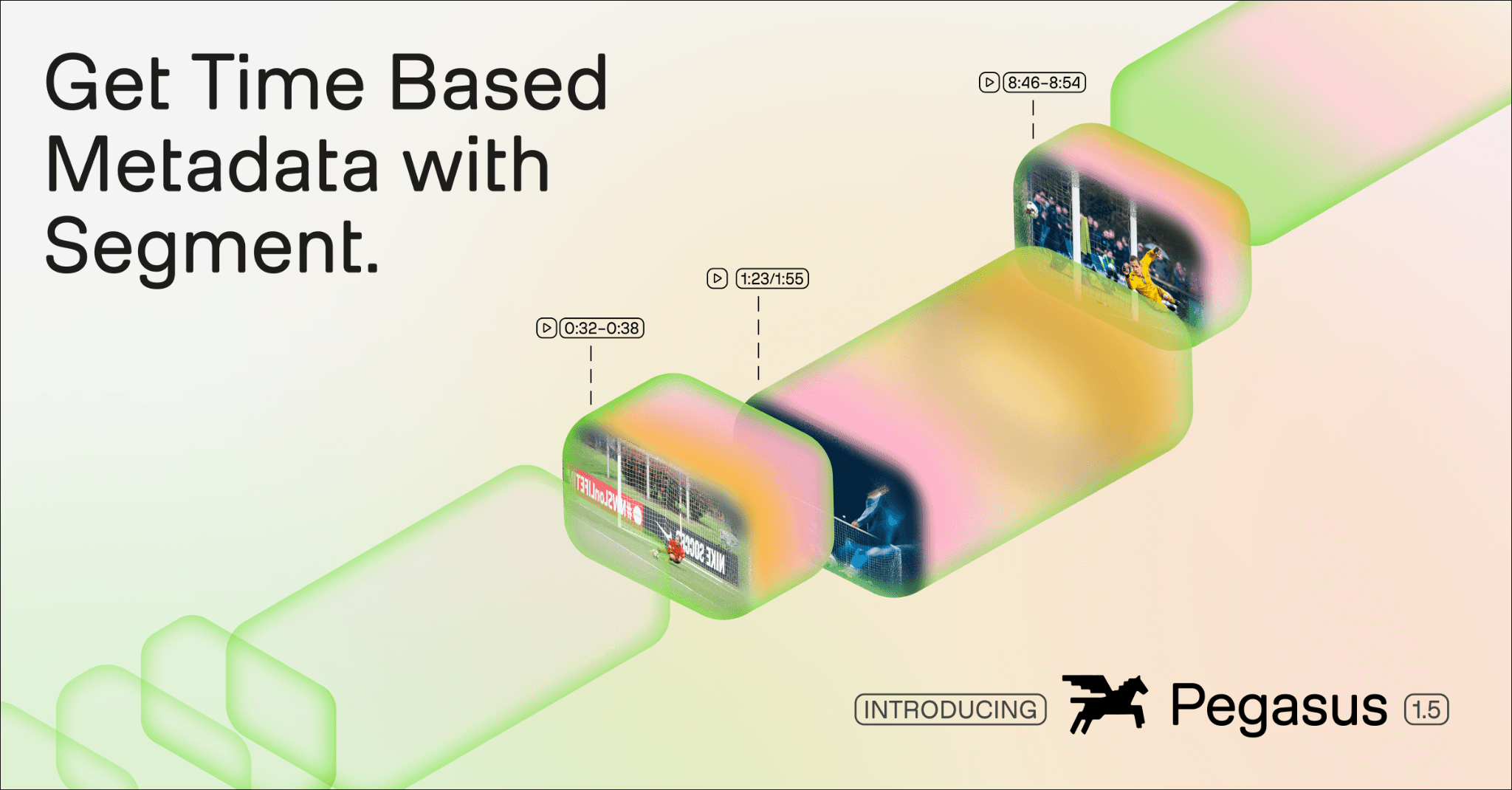
You write a plain-language description of what to find: "every dunk," "every moment our logo appears," "every speaker change", and the API finds every matching instance across your footage, complete with start/end timestamps and custom field values. The output is schema-compliant JSON ready to feed directly into your downstream systems.
That's the core capability of Pegasus 1.5's Segment feature. This post covers how it works, what you can define, where it outperforms existing approaches, and which teams it's built for.
TL;DR: A video segmentation API takes a plain-language description of what to find in any video and returns every matching moment as timestamped, schema-compliant JSON, in a single API call. Pegasus 1.5 processes videos up to 2 hours long with no ingestion pipeline, no training data, and no preprocessing. Define up to 10 segment types with 20 custom fields each. Output integrates directly with databases, pipelines, and AI agent frameworks. Benchmarks show 30%+ better segmentation accuracy than Gemini 2.0 Pro.
Why existing approaches can't extract structured video data
Most organizations already know they have a video data problem. The harder realization is that the common fixes don't actually solve it. They just push the problem around.
Frame extraction captures fragments, not events
Sampling individual frames misses everything that happens between frames: transitions, actions, sequences. A dunk isn't a frame; it's a 4-second event. A speaker change happens at a precise moment. Frame extraction gives you pixels, not meaning, and certainly not timestamps tied to events.
Transcript search is blind to visual action
Text search works on what's spoken. A logo appearance, a camera cut, a product placement, an athletic play: none of those are in the transcript. The most operationally important moments in most video libraries are never spoken aloud. Transcript search finds words, not events.
Manual tagging doesn't scale
Hiring specialists to review footage and add metadata is expensive, slow, and completely impractical against a growing archive. A team of three annotators working on broadcast sports footage can't keep pace with a single weekend of games. The backlog grows faster than any team can clear it.
General LLMs hit a wall on video
General-purpose models weren't designed for temporal reasoning. They struggle with structured output schemas, can't reliably handle anything over an hour, and aren't built to find specific events: they're built to respond to prompts. Coercing a chat model into a video segmentation workflow produces inconsistent results at best.
Key takeaway
Most enterprises can tell you what videos they have, but they can't tell you what's in them. A purpose-built video segmentation API closes that gap without requiring a pipeline rebuild.
How a video segmentation API works: define, point, get JSON
The workflow has three steps. None of them require model training, data preprocessing, or a custom ingestion pipeline.
Step 1: Define a segment schema
Write a plain-language description of what to find. This is your segment definition: "every time the speaker changes," "every dunk," "every moment our logo appears on screen." You can define up to 10 segment types per request. Each definition supports up to 20 custom output fields, from simple string labels to rich event descriptions.
Step 2: Point it at any video, up to two hours
Pass a URL or file directly to the API. No ingestion pipeline, no preprocessing, no indexing step. Pegasus 1.5 processes up to 2 hours of video in a single pass: more than twice what competing models handle. That covers full-length broadcast footage, long-form events, and feature films without splitting or preprocessing.
Step 3: Get structured, timestamped JSON back
Every matching segment is returned as schema-compliant JSON with start/end timestamps and your custom field values. The output is ready to feed directly into downstream pipelines, databases, or AI agent frameworks.
{
  "id": "scoring_play",
  "segments": [
    {
      "start": "00:08:46",
      "end": "00:08:54",
      "description": "Player #24 dunks on a fast-break pass",
      "event_type": "dunk"
    },
    {
      "start": "00:01:23",
      "end": "00:01:55",
      "description": "Overtime begins, game tied 58-58",
      "event_type": "game_state_change"
    }
  ]
}
{
  "id": "scoring_play",
  "segments": [
    {
      "start": "00:08:46",
      "end": "00:08:54",
      "description": "Player #24 dunks on a fast-break pass",
      "event_type": "dunk"
    },
    {
      "start": "00:01:23",
      "end": "00:01:55",
      "description": "Overtime begins, game tied 58-58",
      "event_type": "game_state_change"
    }
  ]
}
Example output: schema-compliant JSON with start/end timestamps and custom fields.
Schema design: up to 10 definitions, 20 custom fields each
The schema is the most underappreciated part of this workflow. It's what transforms a general-purpose model into a domain-specific extraction tool: without training.
Multiple event types in one request
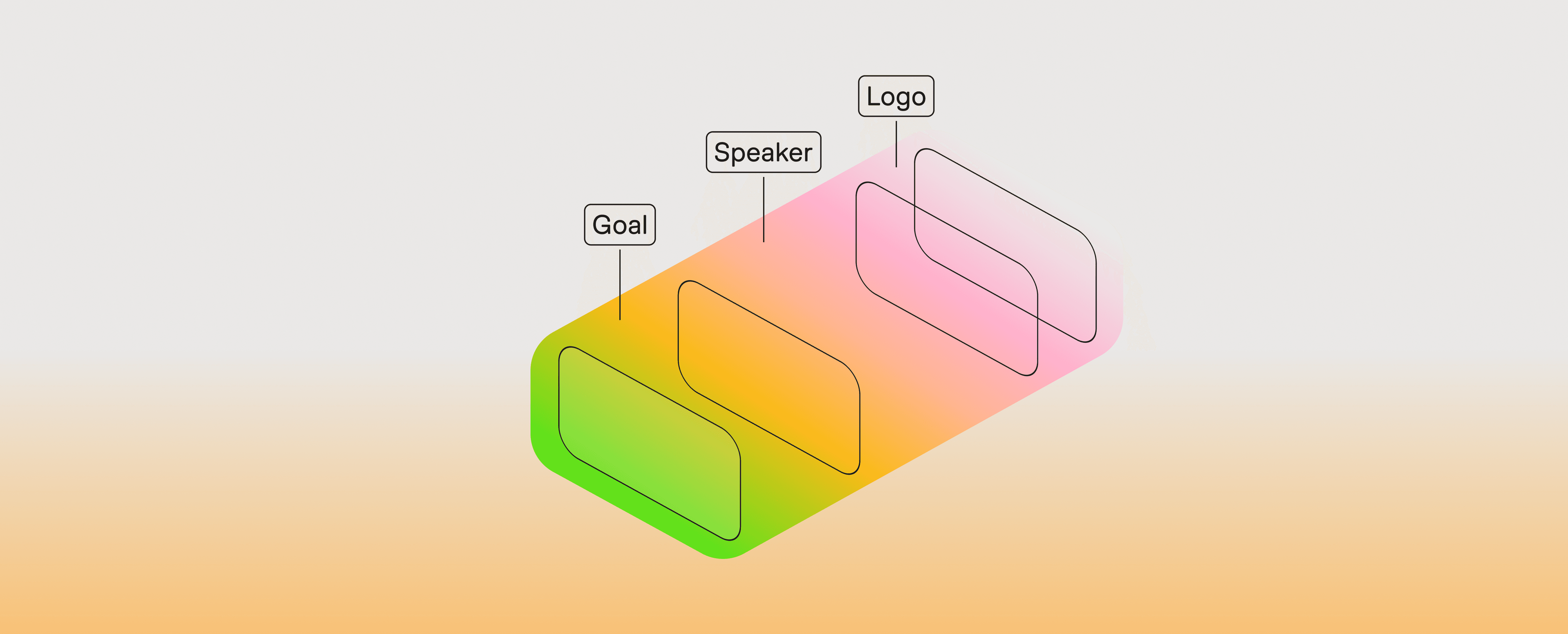
A single API call can carry up to 10 segment definitions. For sports, that means scoring_play, camera_cut, brand_appearance, and player_spotlight all returned together in one structured response. For content ops, it's topic_change, ad_break, and speaker_intro simultaneously. You're not making separate calls for each event type: everything comes back in one pass.
20 custom fields per segment
Each segment definition supports up to 20 custom output fields. Fields can be simple string labels ("event_type": "dunk") or rich descriptions ("description": "Player #24 dunks on a fast-break pass"). You define the schema to match what your downstream system expects: not what a generic model happens to output.
Zero training data required
Segment definitions are plain language. "Every time the brand logo appears on screen." "Every moment a forklift enters a restricted zone." "Every camera cut to a crowd reaction shot." The model applies your taxonomy zero-shot across every video in your library. You don't need annotated examples to get started. You need a clear description of what matters to you.
On-the-fly processing: no ingestion pipeline needed
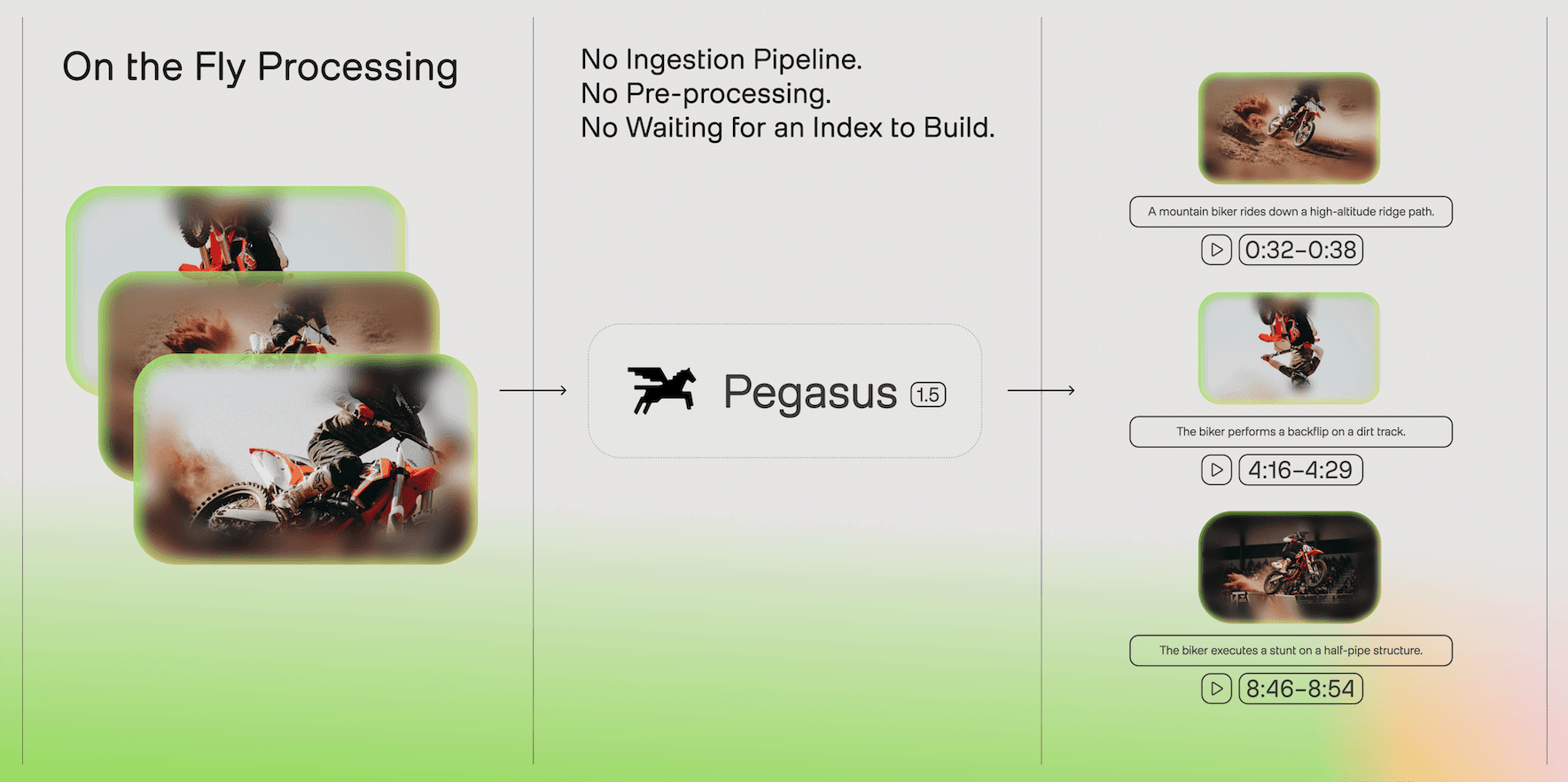
Most video AI workflows assume you've already indexed your library. Segment doesn't. There's no ingestion step, no preprocessing, no special upload format.
Pass any publicly accessible URL or a file directly to the API. Pegasus 1.5 handles the rest: processing the full video, extracting segments against your schema, and returning structured output. For teams that want to test against a single video before committing to a full pipeline, this matters: you get value immediately, with one API call, before building anything.
The 2-hour limit is meaningful in practice. Competing models cap out under an hour, which means broadcast footage, long-form events, and feature-length content require splitting, stitching, and deduplication logic on your side. Pegasus 1.5 handles them in a single pass.
Multimodal prompting: find by image, not just text
Segment also supports image-based queries, a capability that opens use cases text prompts can't reach.
Pair a reference image with a text description. Pass a photo of your brand logo alongside "every moment this logo appears on screen." Pass a headshot of an athlete alongside "every play this player is involved in." Pegasus 1.5 finds every matching visual moment, timestamped, without any training or custom detection code.
Where this matters most
Logo placement tracking for sponsor reporting. Athlete detection for performance analytics. Product appearance monitoring for brand safety. These are the use cases that matter most to media and sports workflows, and they're the ones that text-only queries can't reliably handle. Multimodal prompting closes that gap.
How Pegasus 1.5 compares to existing approaches
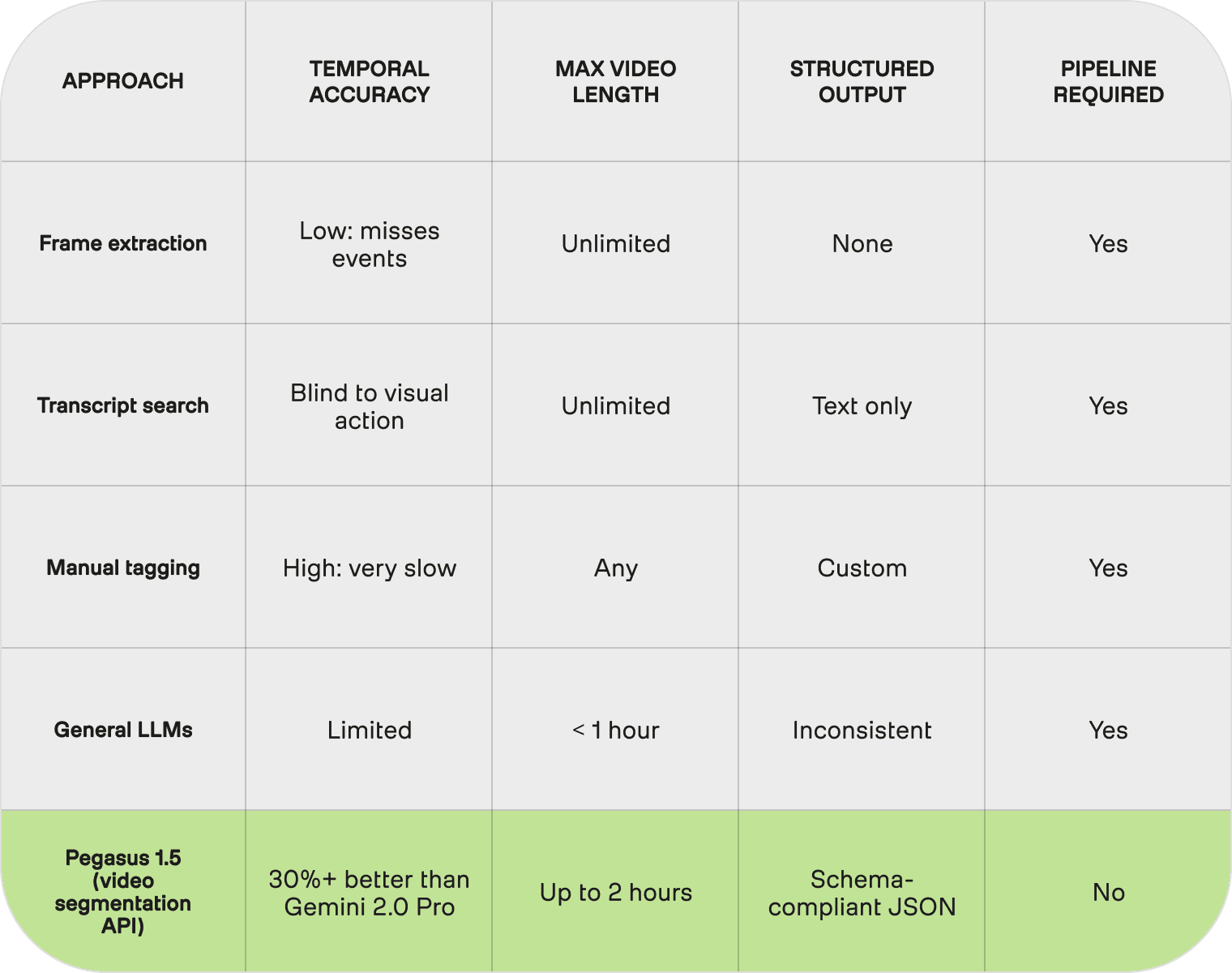
The choice isn't just Pegasus 1.5 vs. another model: it's Pegasus 1.5 vs. the approaches most teams currently use. Here's how the options stack up on the dimensions that actually matter for structured video data extraction.
Note
The 30%+ better segmentation figure is measured against Gemini 2.0 Pro on TwelveLabs' internal benchmark dataset. "30% better segmentation isn't a benchmark win. It's the difference between metadata you can act on and metadata you have to clean up."
Who uses a video segmentation API, and for what
The capability is domain-agnostic. The taxonomy changes; the workflow doesn't.
Sports analytics
Scoring plays, tactical formations, player actions, camera angles: labeled across an entire season of broadcast footage in a fraction of the time manual review would require. Output feeds directly into performance analytics tools, automated highlight systems, and coaching platforms.
Media and entertainment
Scene detection, speaker changes, B-roll categorization, ad break identification. Content operations teams that once manually tagged every segment of every episode can run the entire back catalog through a single API call and get structured metadata out the other side.
Brand monitoring
Logo appearances, product placements, sponsor visibility: tracked across broadcast, streaming, and social video simultaneously. Pass your brand asset as a reference image and get timestamped placement data for every appearance, across every piece of content.
Content operations and AI agents
Structured video metadata is the input layer for AI agents that need to reason about what's in a video library. Chapter generation, content moderation, archival search, compliance monitoring, all of these downstream workflows start with the same need: timestamped, schema-compliant data about what's on screen, when. Segment provides that foundation.
Enterprise readiness
Pegasus 1.5 ships with a 12-month deprecation policy and enterprise SLA support. The API output integrates directly with databases, downstream pipelines, and AI agent frameworks: no custom reformatting. For teams managing large-scale archives or building production workflows on top of video metadata, that stability matters.
For technical teams: one endpoint, a JSON schema, results. Up to 10 segment definitions and 20 custom fields each. Pass any URL or file directly: no indexing, no ingestion pipeline. Output integrates with databases, pipelines, and AI agent frameworks out of the box.
For business leaders: no new headcount, no custom ML project. Define a schema once: apply it retroactively across decades of footage. Unlock automation across archiving, compliance, content ops, and AI workflows without rebuilding your infrastructure.
Get started
Pegasus 1.5 is built for time-based metadata extraction. To see what it returns against your own footage, use the free Playground: upload a video, define a segment schema, and get timestamped structured output in real time. No setup required.
Try it now:
playground.twelvelabs.io: free Playground, no setup required.
Learn more:
Introducing Pegasus 1.5 : (how it was built, the evaluation dataset, what RL training taught the research team)
A video segmentation API takes any video and returns every event you care about as timestamped, schema-compliant JSON: no preprocessing pipeline, no training data, no ingestion step.
You write a plain-language description of what to find: "every dunk," "every moment our logo appears," "every speaker change", and the API finds every matching instance across your footage, complete with start/end timestamps and custom field values. The output is schema-compliant JSON ready to feed directly into your downstream systems.
That's the core capability of Pegasus 1.5's Segment feature. This post covers how it works, what you can define, where it outperforms existing approaches, and which teams it's built for.
TL;DR: A video segmentation API takes a plain-language description of what to find in any video and returns every matching moment as timestamped, schema-compliant JSON, in a single API call. Pegasus 1.5 processes videos up to 2 hours long with no ingestion pipeline, no training data, and no preprocessing. Define up to 10 segment types with 20 custom fields each. Output integrates directly with databases, pipelines, and AI agent frameworks. Benchmarks show 30%+ better segmentation accuracy than Gemini 2.0 Pro.
Why existing approaches can't extract structured video data
Most organizations already know they have a video data problem. The harder realization is that the common fixes don't actually solve it. They just push the problem around.
Frame extraction captures fragments, not events
Sampling individual frames misses everything that happens between frames: transitions, actions, sequences. A dunk isn't a frame; it's a 4-second event. A speaker change happens at a precise moment. Frame extraction gives you pixels, not meaning, and certainly not timestamps tied to events.
Transcript search is blind to visual action
Text search works on what's spoken. A logo appearance, a camera cut, a product placement, an athletic play: none of those are in the transcript. The most operationally important moments in most video libraries are never spoken aloud. Transcript search finds words, not events.
Manual tagging doesn't scale
Hiring specialists to review footage and add metadata is expensive, slow, and completely impractical against a growing archive. A team of three annotators working on broadcast sports footage can't keep pace with a single weekend of games. The backlog grows faster than any team can clear it.
General LLMs hit a wall on video
General-purpose models weren't designed for temporal reasoning. They struggle with structured output schemas, can't reliably handle anything over an hour, and aren't built to find specific events: they're built to respond to prompts. Coercing a chat model into a video segmentation workflow produces inconsistent results at best.
Key takeaway
Most enterprises can tell you what videos they have, but they can't tell you what's in them. A purpose-built video segmentation API closes that gap without requiring a pipeline rebuild.
How a video segmentation API works: define, point, get JSON
The workflow has three steps. None of them require model training, data preprocessing, or a custom ingestion pipeline.
Step 1: Define a segment schema
Write a plain-language description of what to find. This is your segment definition: "every time the speaker changes," "every dunk," "every moment our logo appears on screen." You can define up to 10 segment types per request. Each definition supports up to 20 custom output fields, from simple string labels to rich event descriptions.
Step 2: Point it at any video, up to two hours
Pass a URL or file directly to the API. No ingestion pipeline, no preprocessing, no indexing step. Pegasus 1.5 processes up to 2 hours of video in a single pass: more than twice what competing models handle. That covers full-length broadcast footage, long-form events, and feature films without splitting or preprocessing.
Step 3: Get structured, timestamped JSON back
Every matching segment is returned as schema-compliant JSON with start/end timestamps and your custom field values. The output is ready to feed directly into downstream pipelines, databases, or AI agent frameworks.
{
  "id": "scoring_play",
  "segments": [
    {
      "start": "00:08:46",
      "end": "00:08:54",
      "description": "Player #24 dunks on a fast-break pass",
      "event_type": "dunk"
    },
    {
      "start": "00:01:23",
      "end": "00:01:55",
      "description": "Overtime begins, game tied 58-58",
      "event_type": "game_state_change"
    }
  ]
}
Example output: schema-compliant JSON with start/end timestamps and custom fields.
Schema design: up to 10 definitions, 20 custom fields each
The schema is the most underappreciated part of this workflow. It's what transforms a general-purpose model into a domain-specific extraction tool: without training.
Multiple event types in one request
A single API call can carry up to 10 segment definitions. For sports, that means scoring_play, camera_cut, brand_appearance, and player_spotlight all returned together in one structured response. For content ops, it's topic_change, ad_break, and speaker_intro simultaneously. You're not making separate calls for each event type: everything comes back in one pass.
20 custom fields per segment
Each segment definition supports up to 20 custom output fields. Fields can be simple string labels ("event_type": "dunk") or rich descriptions ("description": "Player #24 dunks on a fast-break pass"). You define the schema to match what your downstream system expects: not what a generic model happens to output.
Zero training data required
Segment definitions are plain language. "Every time the brand logo appears on screen." "Every moment a forklift enters a restricted zone." "Every camera cut to a crowd reaction shot." The model applies your taxonomy zero-shot across every video in your library. You don't need annotated examples to get started. You need a clear description of what matters to you.
On-the-fly processing: no ingestion pipeline needed
Most video AI workflows assume you've already indexed your library. Segment doesn't. There's no ingestion step, no preprocessing, no special upload format.
Pass any publicly accessible URL or a file directly to the API. Pegasus 1.5 handles the rest: processing the full video, extracting segments against your schema, and returning structured output. For teams that want to test against a single video before committing to a full pipeline, this matters: you get value immediately, with one API call, before building anything.
The 2-hour limit is meaningful in practice. Competing models cap out under an hour, which means broadcast footage, long-form events, and feature-length content require splitting, stitching, and deduplication logic on your side. Pegasus 1.5 handles them in a single pass.
Multimodal prompting: find by image, not just text
Segment also supports image-based queries, a capability that opens use cases text prompts can't reach.
Pair a reference image with a text description. Pass a photo of your brand logo alongside "every moment this logo appears on screen." Pass a headshot of an athlete alongside "every play this player is involved in." Pegasus 1.5 finds every matching visual moment, timestamped, without any training or custom detection code.
Where this matters most
Logo placement tracking for sponsor reporting. Athlete detection for performance analytics. Product appearance monitoring for brand safety. These are the use cases that matter most to media and sports workflows, and they're the ones that text-only queries can't reliably handle. Multimodal prompting closes that gap.
How Pegasus 1.5 compares to existing approaches
The choice isn't just Pegasus 1.5 vs. another model: it's Pegasus 1.5 vs. the approaches most teams currently use. Here's how the options stack up on the dimensions that actually matter for structured video data extraction.
Note
The 30%+ better segmentation figure is measured against Gemini 2.0 Pro on TwelveLabs' internal benchmark dataset. "30% better segmentation isn't a benchmark win. It's the difference between metadata you can act on and metadata you have to clean up."
Who uses a video segmentation API, and for what
The capability is domain-agnostic. The taxonomy changes; the workflow doesn't.
Sports analytics
Scoring plays, tactical formations, player actions, camera angles: labeled across an entire season of broadcast footage in a fraction of the time manual review would require. Output feeds directly into performance analytics tools, automated highlight systems, and coaching platforms.
Media and entertainment
Scene detection, speaker changes, B-roll categorization, ad break identification. Content operations teams that once manually tagged every segment of every episode can run the entire back catalog through a single API call and get structured metadata out the other side.
Brand monitoring
Logo appearances, product placements, sponsor visibility: tracked across broadcast, streaming, and social video simultaneously. Pass your brand asset as a reference image and get timestamped placement data for every appearance, across every piece of content.
Content operations and AI agents
Structured video metadata is the input layer for AI agents that need to reason about what's in a video library. Chapter generation, content moderation, archival search, compliance monitoring, all of these downstream workflows start with the same need: timestamped, schema-compliant data about what's on screen, when. Segment provides that foundation.
Enterprise readiness
Pegasus 1.5 ships with a 12-month deprecation policy and enterprise SLA support. The API output integrates directly with databases, downstream pipelines, and AI agent frameworks: no custom reformatting. For teams managing large-scale archives or building production workflows on top of video metadata, that stability matters.
For technical teams: one endpoint, a JSON schema, results. Up to 10 segment definitions and 20 custom fields each. Pass any URL or file directly: no indexing, no ingestion pipeline. Output integrates with databases, pipelines, and AI agent frameworks out of the box.
For business leaders: no new headcount, no custom ML project. Define a schema once: apply it retroactively across decades of footage. Unlock automation across archiving, compliance, content ops, and AI workflows without rebuilding your infrastructure.
Get started
Pegasus 1.5 is built for time-based metadata extraction. To see what it returns against your own footage, use the free Playground: upload a video, define a segment schema, and get timestamped structured output in real time. No setup required.
Try it now:
playground.twelvelabs.io: free Playground, no setup required.
Learn more:
Introducing Pegasus 1.5 : (how it was built, the evaluation dataset, what RL training taught the research team)




プラットフォーム
©
2026年
TwelveLabs, Inc. All Rights Reserved.

プラットフォーム
©
2026年
TwelveLabs, Inc. All Rights Reserved.

プラットフォーム
©
2026年
TwelveLabs, Inc. All Rights Reserved.