" height="1.90314px" id="wtDTm6bEW" transform="translate(26.225 0)" width="2.4723000000000006px"/><path d="M 0.557 0 L 1.438 0 C 1.746 0 1.995 0.25 1.995 0.559 L 1.995 1.344 C 1.995 1.653 1.746 1.903 1.438 1.903 L 0.557 1.903 C 0.25 1.903 0 1.653 0 1.344 L 0 0.559 C 0 0.25 0.25 0 0.557 0 Z" fill="rgb(29, 28, 27)" height="1.9031500000000001px" id="GnmDnNra_" transform="translate(36.408 2.728)" width="1.9953000000000003px"/><path d="M 6.224 0 L 0.558 0 C 0.25 0 0 0.25 0 0.559 L 0 1.344 C 0 1.653 0.25 1.903 0.558 1.903 L 6.224 1.903 C 6.531 1.903 6.781 1.653 6.781 1.344 L 6.781 0.559 C 6.781 0.25 6.531 0 6.224 0 Z" fill="rgb(29, 28, 27)" height="1.9031500000000001px" id="hKTQ3dbw4" transform="translate(34.261 5.456)" width="6.781100000000002px"/><path d="M 6.955 0 L 0.558 0 C 0.25 0 0 0.25 0 0.559 L 0 1.344 C 0 1.653 0.25 1.903 0.558 1.903 L 6.955 1.903 C 7.263 1.903 7.513 1.653 7.513 1.344 L 7.513 0.559 C 7.513 0.25 7.263 0 6.955 0 Z" fill="rgb(29, 28, 27)" height="1.9031500000000001px" id="G1Zzk9CUU" transform="translate(28.298 8.243)" width="7.513100000000001px"/><path d="M 7.123 0 L 0.558 0 C 0.25 0 0 0.25 0 0.559 L 0 1.344 C 0 1.653 0.25 1.903 0.558 1.903 L 7.123 1.903 C 7.431 1.903 7.681 1.653 7.681 1.344 L 7.681 0.559 C 7.681 0.25 7.431 0 7.123 0 Z" fill="rgb(29, 28, 27)" height="1.9030999999999985px" id="fm7cHxIfJ" transform="translate(0 10.972)" width="7.68067px"/><path d="M 13.447 0 L 0.558 0 C 0.25 0 0 0.25 0 0.559 L 0 1.344 C 0 1.653 0.25 1.903 0.558 1.903 L 13.447 1.903 C 13.755 1.903 14.004 1.653 14.004 1.344 L 14.004 0.559 C 14.004 0.25 13.755 0 13.447 0 Z" fill="rgb(29, 28, 27)" height="1.9030999999999985px" id="LowSwDrtg" transform="translate(9.552 10.972)" width="14.0044px"/><path d="M 0.558 0 L 8.212 0 C 8.52 0 8.77 0.25 8.77 0.559 L 8.77 1.344 C 8.77 1.653 8.52 1.903 8.212 1.903 L 0.558 1.903 C 0.25 1.903 0 1.653 0 1.344 L 0 0.559 C 0 0.25 0.25 0 0.558 0 Z" fill="rgb(29, 28, 27)" height="1.9030999999999985px" id="xRiKc2od7" transform="translate(27.041 10.972)" width="8.769900000000003px"/><path d="M 0.557 0 L 5.4 0 C 5.708 0 5.958 0.25 5.958 0.559 L 5.958 1.344 C 5.958 1.653 5.708 1.903 5.4 1.903 L 0.557 1.903 C 0.25 1.903 0 1.653 0 1.344 L 0 0.559 C 0 0.25 0.25 0 0.557 0 Z" fill="rgb(29, 28, 27)" height="1.9031500000000001px" id="JWdNVicde" transform="translate(36.796 8.243)" width="5.957599999999999px"/><path d="M 1.438 0 L 0.558 0 C 0.25 0 0 0.25 0 0.559 L 0 1.344 C 0 1.653 0.25 1.903 0.558 1.903 L 1.438 1.903 C 1.746 1.903 1.995 1.653 1.995 1.344 L 1.995 0.559 C 1.995 0.25 1.746 0 1.438 0 Z" fill="rgb(29, 28, 27)" height="1.9031500000000001px" id="RfFYVCT_T" transform="translate(28.717 5.456)" width="1.9953000000000003px"/><path d="M 0.558 0 L 2.895 0 C 3.203 0 3.453 0.25 3.453 0.559 L 3.453 1.406 C 3.453 1.714 3.203 1.964 2.895 1.964 L 0.558 1.964 C 0.25 1.964 0 1.714 0 1.406 L 0 0.559 C 0 0.25 0.25 0 0.558 0 Z" fill="rgb(29, 28, 27)" height="1.964299999999998px" id="dngJ6MU2p" transform="translate(16.183 24.582)" width="3.4525000000000006px"/><path d="M 1.706 0 L 0.558 0 C 0.25 0 0 0.25 0 0.559 L 0 1.406 C 0 1.714 0.25 1.964 0.558 1.964 L 1.706 1.964 C 2.014 1.964 2.263 1.714 2.263 1.406 L 2.263 0.559 C 2.263 0.25 2.014 0 1.706 0 Z" fill="rgb(29, 28, 27)" height="1.964299999999998px" id="N_fstvKmR" transform="translate(22.18 24.582)" width="2.2631999999999977px"/><path d="M 0.558 0 L 5.544 0 C 5.852 0 6.101 0.25 6.101 0.559 L 6.101 1.406 C 6.101 1.714 5.852 1.964 5.544 1.964 L 0.558 1.964 C 0.25 1.964 0 1.714 0 1.406 L 0 0.559 C 0 0.25 0.25 0 0.558 0 Z" fill="rgb(29, 28, 27)" height="1.964299999999998px" id="t55XLYcgb" transform="translate(25.486 24.582)" width="6.101399999999998px"/><path d="M 1.976 0 L 0.558 0 C 0.25 0 0 0.25 0 0.559 L 0 1.406 C 0 1.714 0.25 1.964 0.558 1.964 L 1.976 1.964 C 2.284 1.964 2.533 1.714 2.533 1.406 L 2.533 0.559 C 2.533 0.25 2.284 0 1.976 0 Z" fill="rgb(29, 28, 27)" height="1.964299999999998px" id="ZrEKTVTAe" transform="translate(28.542 21.854)" width="2.5334000000000003px"/><path d="M 0.557 0 L 1.438 0 C 1.746 0 1.995 0.25 1.995 0.559 L 1.995 1.406 C 1.995 1.714 1.746 1.964 1.438 1.964 L 0.557 1.964 C 0.25 1.964 0 1.714 0 1.406 L 0 0.559 C 0 0.25 0.25 0 0.557 0 Z" fill="rgb(29, 28, 27)" height="1.964299999999998px" id="Z0fPTp9aR" transform="translate(11.425 24.582)" width="1.9953000000000003px"/><path d="M 0 0.559 C 0 0.251 0.251 0 0.558 0 L 1.438 0 C 1.745 0 1.995 0.251 1.995 0.559 L 1.995 1.405 C 1.995 1.713 1.745 1.964 1.438 1.964 L 0.558 1.964 C 0.251 1.964 0 1.713 0 1.405 Z" fill="rgb(29, 28, 27)" height="1.964299999999998px" id="Tj_PDHFDh" transform="translate(20.635 27.308)" width="1.9954px"/><path d="M 0.557 0 L 1.342 0 C 1.65 0 1.899 0.25 1.899 0.559 L 1.899 1.406 C 1.899 1.714 1.65 1.964 1.342 1.964 L 0.557 1.964 C 0.25 1.964 0 1.714 0 1.406 L 0 0.559 C 0 0.25 0.25 0 0.557 0 Z" fill="rgb(29, 28, 27)" height="1.9643000000000015px" id="AYq9dXkKz" transform="translate(18.686 30.036)" width="1.8994px"/><path d="M 0.558 0 L 5.768 0 C 6.076 0 6.326 0.25 6.326 0.559 L 6.326 1.344 C 6.326 1.653 6.076 1.903 5.768 1.903 L 0.558 1.903 C 0.25 1.903 0 1.653 0 1.344 L 0 0.559 C 0 0.25 0.25 0 0.558 0 Z" fill="rgb(29, 28, 27)" height="1.9031500000000001px" id="rspevfJcx" transform="translate(12.157 8.243)" width="6.325900000000001px"/><path d="M 3.285 0 L 0.558 0 C 0.25 0 0 0.25 0 0.559 L 0 1.344 C 0 1.653 0.25 1.903 0.558 1.903 L 3.285 1.903 C 3.593 1.903 3.842 1.653 3.842 1.344 L 3.842 0.559 C 3.842 0.25 3.593 0 3.285 0 Z" fill="rgb(29, 28, 27)" height="1.9031500000000001px" id="XRUAhGnph" transform="translate(23.887 2.728)" width="3.8424000000000014px"/><path d="M 0.558 0 L 5.644 0 C 5.952 0 6.202 0.25 6.202 0.559 L 6.202 1.344 C 6.202 1.653 5.952 1.903 5.644 1.903 L 0.558 1.903 C 0.25 1.903 0 1.653 0 1.344 L 0 0.559 C 0 0.25 0.25 0 0.558 0 Z" fill="rgb(29, 28, 27)" height="1.9031500000000001px" id="VsaVVIfke" transform="translate(21.528 5.456)" width="6.201600000000003px"/><path d="M 3.06 0 L 0.558 0 C 0.25 0 0 0.25 0 0.559 L 0 1.344 C 0 1.653 0.25 1.903 0.558 1.903 L 3.06 1.903 C 3.369 1.903 3.618 1.653 3.618 1.344 L 3.618 0.559 C 3.618 0.25 3.369 0 3.06 0 Z" fill="rgb(29, 28, 27)" height="1.9030999999999985px" id="wiAKEgyId" transform="translate(40.819 10.972)" width="3.6182000000000016px"/><path d="M 0.558 0 L 17.318 0 C 17.626 0 17.875 0.25 17.875 0.559 L 17.875 1.345 C 17.875 1.653 17.626 1.903 17.318 1.903 L 0.558 1.903 C 0.25 1.903 0 1.653 0 1.345 L 0 0.559 C 0 0.25 0.25 0 0.558 0 Z" fill="rgb(29, 28, 27)" height="1.9032px" id="FIE0ufK9m" transform="translate(6.666 13.7)" width="17.87506px"/><path d="M 6.426 0 L 0.558 0 C 0.25 0 0 0.25 0 0.559 L 0 1.345 C 0 1.653 0.25 1.903 0.558 1.903 L 6.426 1.903 C 6.734 1.903 6.984 1.653 6.984 1.345 L 6.984 0.559 C 6.984 0.25 6.734 0 6.426 0 Z" fill="rgb(29, 28, 27)" height="1.9032000000000018px" id="ut9UWny3L" transform="translate(22.892 19.156)" width="6.983599999999999px"/><path d="M 0.558 0 L 22.151 0 C 22.459 0 22.709 0.25 22.709 0.559 L 22.709 1.344 C 22.709 1.653 22.459 1.903 22.151 1.903 L 0.558 1.903 C 0.25 1.903 0 1.653 0 1.344 L 0 0.559 C 0 0.25 0.25 0 0.558 0 Z" fill="rgb(29, 28, 27)" height="1.9030999999999985px" id="VULnffgbk" transform="translate(9.552 16.428)" width="22.7089px"/><path d="M 7.886 0 L 0.558 0 C 0.25 0 0 0.25 0 0.559 L 0 1.345 C 0 1.653 0.25 1.903 0.558 1.903 L 7.886 1.903 C 8.194 1.903 8.443 1.653 8.443 1.345 L 8.443 0.559 C 8.443 0.25 8.194 0 7.886 0 Z" fill="rgb(29, 28, 27)" height="1.9032000000000018px" id="adZTYr4MR" transform="translate(6.078 19.156)" width="8.44303px"/><path d="M 0.558 0 L 2.211 0 C 2.519 0 2.769 0.25 2.769 0.559 L 2.769 1.406 C 2.769 1.714 2.519 1.964 2.211 1.964 L 0.558 1.964 C 0.25 1.964 0 1.714 0 1.406 L 0 0.559 C 0 0.25 0.25 0 0.558 0 Z" fill="rgb(29, 28, 27)" height="1.964299999999998px" id="bwdUdEmCH" transform="translate(13.784 21.854)" width="2.768600000000001px"/><path d="M 2.424 0 L 0.558 0 C 0.25 0 0 0.25 0 0.559 L 0 1.406 C 0 1.714 0.25 1.964 0.558 1.964 L 2.424 1.964 C 2.732 1.964 2.982 1.714 2.982 1.406 L 2.982 0.559 C 2.982 0.25 2.732 0 2.424 0 Z" fill="rgb(29, 28, 27)" height="1.964299999999998px" id="PUvesMJEj" transform="translate(23.556 21.854)" width="2.982199999999999px"/><path d="M 0.558 0 L 2.241 0 C 2.55 0 2.799 0.25 2.799 0.559 L 2.799 1.406 C 2.799 1.714 2.55 1.964 2.241 1.964 L 0.558 1.964 C 0.25 1.964 0 1.714 0 1.406 L 0 0.559 C 0 0.25 0.25 0 0.558 0 Z" fill="rgb(29, 28, 27)" height="1.964299999999998px" id="Wo2W7J3Zj" transform="translate(8.672 21.854)" width="2.799050000000001px"/><path d="M 6.661 0 L 0.558 0 C 0.25 0 0 0.25 0 0.559 L 0 1.345 C 0 1.653 0.25 1.903 0.558 1.903 L 6.661 1.903 C 6.969 1.903 7.219 1.653 7.219 1.345 L 7.219 0.559 C 7.219 0.25 6.969 0 6.661 0 Z" fill="rgb(29, 28, 27)" height="1.9032px" id="PpPVZXp9j" transform="translate(27.041 13.7)" width="7.218900000000001px"/><path d="M 0.621 1.905 C 0.218 1.905 0 1.687 0 1.283 L 0 0.622 C 0 0.218 0.218 0 0.621 0 L 11.225 0 C 11.628 0 11.846 0.218 11.846 0.622 L 11.846 1.283 C 11.846 1.687 11.628 1.905 11.225 1.905 L 6.934 1.905 L 6.934 14.926 C 6.934 15.33 6.716 15.548 6.313 15.548 L 5.537 15.548 C 5.134 15.548 4.916 15.33 4.916 14.926 L 4.916 1.905 Z" fill="rgb(29, 28, 27)" height="15.54825px" id="xr32fxeO6" transform="translate(52.177 8.243)" width="11.845599999999997px"/><path d="M 0.621 0 C 0.218 0 0 0.218 0 0.622 L 0 14.924 C 0 15.328 0.218 15.546 0.621 15.546 L 1.357 15.546 C 1.76 15.546 1.978 15.328 1.978 14.924 L 1.978 0.622 C 1.978 0.218 1.76 0 1.357 0 Z" fill="rgb(29, 28, 27)" height="15.546050000000001px" id="oSsO_UPVN" transform="translate(90.476 8.243)" width="1.9779000000000053px"/><path d="M 0.62 15.546 C 0.217 15.546 0 15.328 0 14.924 L 0 0.622 C 0 0.218 0.217 0 0.62 0 L 1.396 0 C 1.799 0 2.017 0.218 2.017 0.622 L 2.017 13.632 L 8.981 13.632 C 9.384 13.632 9.602 13.85 9.602 14.254 L 9.602 14.924 C 9.602 15.328 9.384 15.546 8.981 15.546 Z" fill="rgb(29, 28, 27)" height="15.546050000000001px" id="Sgj4z5osO" transform="translate(116.749 8.243)" width="9.602000000000004px"/><path d="M 1.974 14.924 C 1.974 15.328 1.756 15.546 1.353 15.546 L 0.621 15.546 C 0.218 15.546 0 15.328 0 14.924 L 0 0.622 C 0 0.218 0.218 0 0.621 0 L 1.357 0 C 1.76 0 1.978 0.218 1.978 0.622 L 1.978 5.747 C 2.634 4.721 3.806 4.079 5.309 4.079 C 8.18 4.079 10.356 6.358 10.356 9.948 C 10.356 13.538 8.18 15.817 5.309 15.817 C 3.801 15.817 2.627 15.175 1.971 14.145 L 1.971 14.922 Z M 8.36 9.95 C 8.36 7.362 6.881 5.928 5.121 5.928 C 3.361 5.928 1.863 7.362 1.863 9.95 C 1.863 12.539 3.361 13.972 5.121 13.972 C 6.881 13.972 8.36 12.539 8.36 9.95 Z" fill="rgb(29, 28, 27)" height="15.81665px" id="q13jjj7xd" transform="translate(138.401 8.243)" width="10.355999999999995px"/><path d="M 4.457 11.738 C 0.961 11.738 -0.019 9.872 0 8.318 C 0.005 7.929 0.253 7.735 0.645 7.735 L 1.344 7.735 C 1.748 7.735 1.922 7.949 1.961 8.352 C 2.063 9.315 2.693 9.907 4.433 9.907 C 6.174 9.907 7.012 9.269 7.012 8.289 C 7.012 7.425 6.522 7.108 5.305 6.899 L 3.209 6.539 C 1.453 6.238 0.29 5.247 0.29 3.468 C 0.29 1.467 1.774 0 4.518 0 C 7.263 0 8.838 1.491 8.814 3.23 C 8.81 3.614 8.553 3.808 8.165 3.808 L 7.457 3.808 C 7.054 3.808 6.908 3.595 6.851 3.202 C 6.749 2.477 6.159 1.818 4.518 1.818 C 2.878 1.818 2.249 2.508 2.249 3.403 C 2.249 4.175 2.695 4.516 3.81 4.714 L 5.906 5.083 C 7.72 5.404 8.98 6.292 8.98 8.198 C 8.98 9.976 7.908 11.74 4.455 11.74 Z" fill="rgb(29, 28, 27)" height="11.739799999999999px" id="tJ8syeWTW" transform="translate(150.024 12.325)" width="8.980269730401375px"/><path d="M 9.146 7.997 C 9.146 8.813 9.175 9.983 9.282 10.799 C 9.334 11.223 9.155 11.465 8.728 11.465 L 8.068 11.465 C 7.685 11.465 7.467 11.319 7.428 11.022 L 7.317 10.181 C 6.724 11.157 5.565 11.659 4.145 11.659 C 1.579 11.659 0 10.142 0 8.078 C 0 6.27 1.27 5.157 3.433 5.002 L 6.589 4.78 C 7.162 4.741 7.186 4.688 7.186 4.153 L 7.186 3.682 C 7.186 2.438 6.434 1.807 4.79 1.807 C 3.145 1.807 2.472 2.425 2.405 3.289 C 2.376 3.697 2.235 3.916 1.823 3.916 L 1.067 3.916 C 0.675 3.916 0.427 3.717 0.422 3.328 C 0.407 1.51 1.74 0 4.792 0 C 7.798 0 9.162 1.427 9.155 3.736 Z M 7.188 7.298 L 7.188 6.244 C 6.955 6.327 6.678 6.386 6.363 6.415 L 3.598 6.676 C 2.59 6.775 1.997 7.163 1.997 8.099 L 1.999 8.099 C 1.999 9.188 2.886 9.97 4.4 9.97 C 6.169 9.97 7.188 8.9 7.188 7.298 Z" fill="rgb(29, 28, 27)" height="11.658999999999999px" id="QPESIZvku" transform="translate(126.854 12.325)" width="9.290755130109668px"/><path d="M 5.224 0 C 8.313 0 10.295 2.255 10.295 5.456 L 10.295 5.694 C 10.295 6.098 10.077 6.316 9.674 6.316 L 1.998 6.316 C 2.168 8.547 3.447 9.898 5.407 9.898 C 6.768 9.898 7.598 9.363 7.934 8.431 C 8.06 8.078 8.243 7.892 8.618 7.892 L 9.33 7.892 C 9.746 7.892 9.994 8.125 9.923 8.538 C 9.598 10.433 7.834 11.74 5.409 11.74 L 5.407 11.738 C 2.168 11.738 0 9.424 0 5.797 C 0 2.169 2.135 0 5.224 0 Z M 5.222 1.74 C 3.494 1.74 2.405 2.818 2.074 4.64 L 8.282 4.64 C 8.054 2.842 6.949 1.74 5.222 1.74 Z" fill="rgb(29, 28, 27)" height="11.739799999999999px" id="PKmyQkwJE" transform="translate(104.541 12.325)" width="10.295000000000002px"/><path d="M 4.459 11.194 C 4.099 11.194 3.877 11.039 3.746 10.703 L 0.091 1.021 C -0.024 0.72 -0.031 0.511 0.076 0.297 C 0.178 0.094 0.381 0 0.732 0 L 1.274 0 C 1.633 0 1.86 0.155 1.986 0.495 L 4.958 8.503 L 5.123 9.018 L 5.289 8.503 L 8.262 0.495 C 8.388 0.155 8.615 0 8.974 0 L 9.517 0 C 9.865 0 10.07 0.092 10.172 0.297 C 10.279 0.511 10.275 0.72 10.157 1.021 L 6.502 10.703 C 6.371 11.039 6.149 11.194 5.79 11.194 Z" fill="rgb(29, 28, 27)" height="11.1941px" id="uUQr5Yl4B" transform="translate(93.807 12.595)" width="10.248961642504256px"/><path d="M 5.407 11.738 C 2.167 11.738 0 9.424 0 5.797 C 0 2.169 2.133 0 5.221 0 C 8.31 0 10.292 2.255 10.292 5.456 L 10.292 5.694 C 10.292 6.098 10.075 6.316 9.672 6.316 L 1.995 6.316 C 2.165 8.547 3.446 9.898 5.404 9.898 C 6.768 9.898 7.596 9.363 7.931 8.431 C 8.058 8.078 8.241 7.892 8.615 7.892 L 9.328 7.892 C 9.744 7.892 9.992 8.125 9.918 8.538 C 9.593 10.433 7.829 11.74 5.404 11.74 Z M 8.282 4.64 C 8.053 2.842 6.949 1.74 5.221 1.74 C 3.494 1.74 2.405 2.818 2.074 4.64 Z" fill="rgb(29, 28, 27)" height="11.739799999999999px" id="zo1nSBuSF" transform="translate(78.397 12.325)" width="10.29249999999999px"/><path d="M 3.057 10.677 C 3.163 11.026 3.392 11.192 3.756 11.192 L 3.749 11.194 L 4.987 11.194 C 5.35 11.194 5.579 11.028 5.69 10.679 L 8.173 2.654 L 8.237 2.401 L 8.3 2.654 L 10.787 10.679 C 10.894 11.028 11.123 11.194 11.487 11.194 L 12.733 11.194 C 13.096 11.194 13.325 11.028 13.432 10.679 L 16.418 1.006 C 16.516 0.7 16.512 0.498 16.41 0.288 C 16.307 0.089 16.109 0.002 15.76 0.002 L 15.218 0.002 C 14.848 0.002 14.626 0.168 14.519 0.522 L 12.094 8.547 L 12.046 8.761 L 11.999 8.542 L 9.506 0.517 C 9.4 0.168 9.171 0.002 8.807 0.002 L 7.683 0.002 C 7.319 0.002 7.091 0.168 6.984 0.517 L 4.492 8.542 L 4.449 8.745 L 4.405 8.551 L 1.98 0.519 C 1.874 0.166 1.649 0 1.281 0 L 0.728 0 C 0.38 0 0.181 0.087 0.079 0.286 C -0.021 0.493 -0.028 0.698 0.07 1.004 Z" fill="rgb(29, 28, 27)" height="11.194099999999999px" id="uboloLX99" transform="translate(61.282 12.598)" width="16.489163442184434px"/></svg>)
チュートリアル
複数ソースの法的証拠レポート:AWS BedrockおよびNeMo Retrieverを介したTwelveLabsによる調査プラットフォームの構築
リシケシュ・ヤダフ
開発者は、ビデオインテリジェンス向けのAWS Bedrock経由のTwelve Labs MarengoおよびPegasusと、ドキュメント検索向けのNVIDIA NeMo Retrieverを使用することで、マルチソースの法的証拠調査プラットフォームを構築できます。これにより、12の異なるビデオソースにまたがる自然言語クエリ、カメラフィード間のエンティティ追跡、およびタイムスタンプ付きの結果を伴う自動コンプライアンス分析が可能になります。
開発者は、ビデオインテリジェンス向けのAWS Bedrock経由のTwelve Labs MarengoおよびPegasusと、ドキュメント検索向けのNVIDIA NeMo Retrieverを使用することで、マルチソースの法的証拠調査プラットフォームを構築できます。これにより、12の異なるビデオソースにまたがる自然言語クエリ、カメラフィード間のエンティティ追跡、およびタイムスタンプ付きの結果を伴う自動コンプライアンス分析が可能になります。
2026/04/25
16分
記事へのリンクをコピー
Introduction
Legal teams processing video evidence face a compounding problem. A single case can involve 40+ hours of footage from dashcams, bodycams, CCTV systems, doorbell cameras, and insurance submissions; all in different formats, resolutions, and timestamps. Investigators spend $200-500/hour in paralegal time manually reviewing this content. Miss a critical 10-second clip buried in hour 23 of camera feed 7, and the case outcome changes.
The traditional approach (manual review, basic metadata tagging, frame-by-frame analysis) doesn't scale. Legal teams need to search across disparate sources simultaneously, reconstruct timelines from fragmented footage, and identify critical moments without watching every second of video.
This tutorial demonstrates how to build a legal evidence investigation platform using TwelveLabs through AWS Bedrock for video intelligence and NVIDIA NeMo Retriever for document search. The result: investigators search 12 video sources with natural language queries ("find the red sedan" or "show me when the person entered the building"), get ranked results with exact timestamps, and generate structured compliance reports in minutes instead of days.
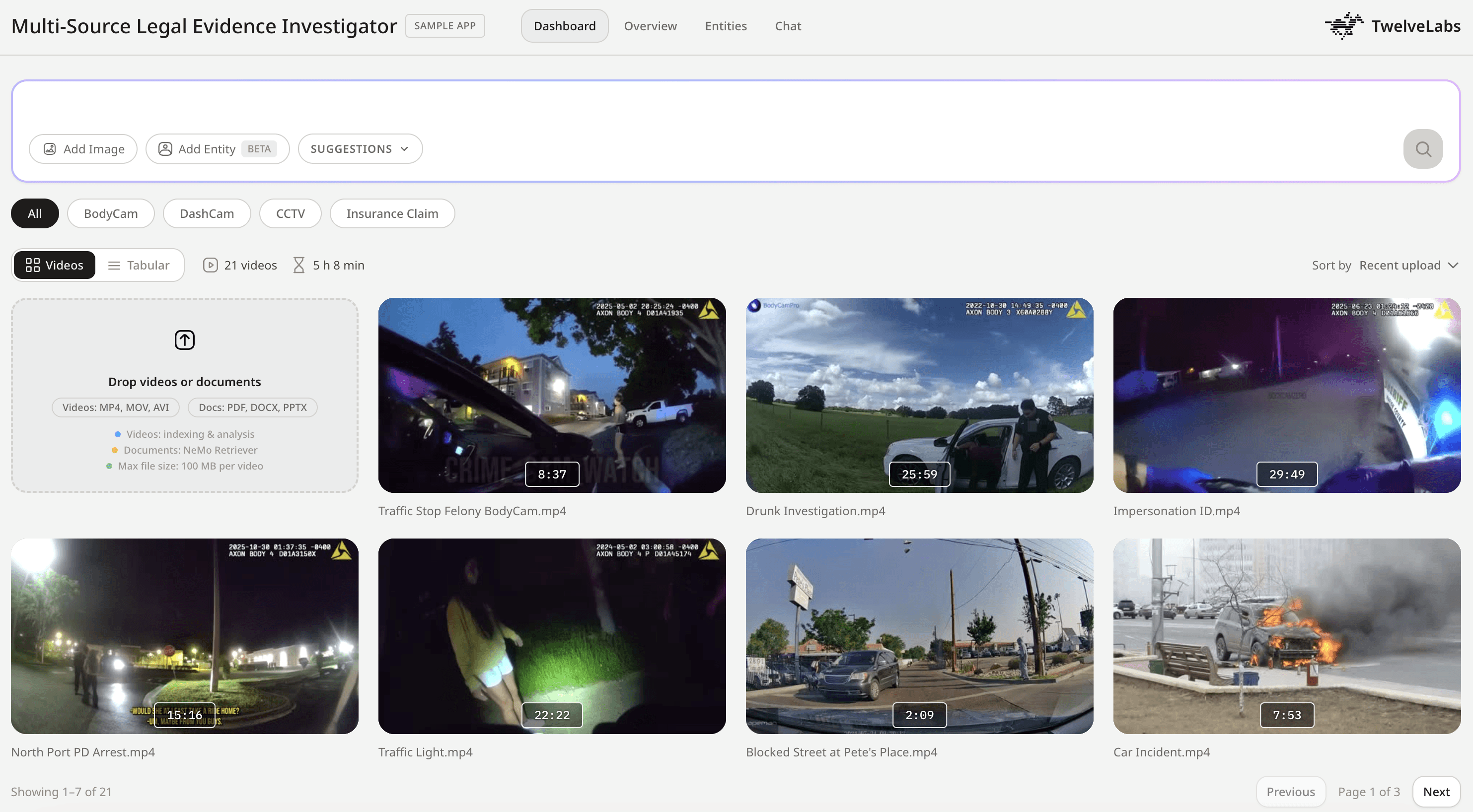
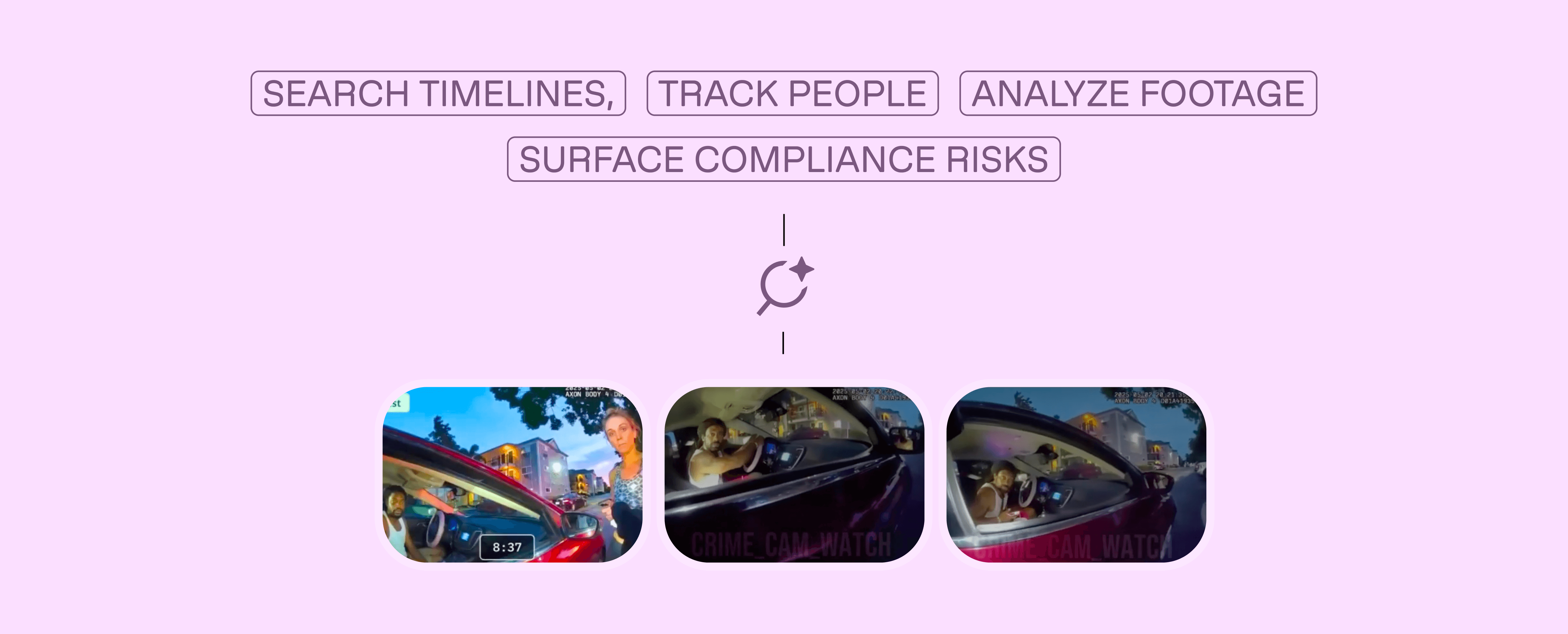
What you'll build: A multi-source evidence investigator that ingests mixed-format surveillance footage, enables cross-source semantic search, performs automated compliance analysis, and reconstructs chronological timelines from disparate video sources.
Time investment: 40 hours of evidence review becomes 4 hours of targeted investigation.
You can explore the demo of the application here: Legal Evidence Investigator Application
You can check out the source code here: GitHub Repository
Demo Application
This demonstration shows how the platform handles real investigative workflows: searching across multiple video sources, identifying critical moments with precise timestamps, generating structured compliance analysis, and providing an interactive Q&A interface for deeper investigation.
Key capabilities demonstrated:
Cross-source search across 12+ disparate video formats
Entity tracking (find specific person/vehicle across all sources)
Automated compliance analysis with risk categorization
Timeline reconstruction showing sequential evidence
Conversational video Q&A with clickable timestamps
System Architecture: Why Single-Index Multi-Source Design Matters
The core architectural decision in this application addresses a fundamental constraint: TwelveLabs search operates at the index level: you search one index per request, not individual videos. This shapes everything.
The naive approach would create one index per video source. This fails immediately: you'd need 12 separate search requests to find a person across 12 cameras, then manually merge and sort results in application logic. Slow, complex, brittle.
The correct approach uses a single-index multi-source strategy: all evidence videos live in one TwelveLabs index, differentiated by rich metadata tagging. One search query hits all sources simultaneously. Results come back pre-ranked by relevance, grouped by source video, with metadata filters enabling scoped searches when needed ("only bodycam footage" or "only footage from Main Street location").

System components:
Video ingestion pipeline: Upload mixed-format footage to S3 → Index via
twelvelabs.marengo-embed-3-0-v1:0through Bedrock → Store multimodal embeddings with source metadataDocument ingestion pipeline: Extract text from PDFs → Chunk intelligently → Embed via
nvidia/llama-nemotron-embed-vl-1b-v2→ Store in document indexHybrid retrieval layer: Parallel search across video embeddings (Marengo) and document chunks (NeMo) → Merge results → Return unified response
Analysis engine: Generate structured compliance reports via
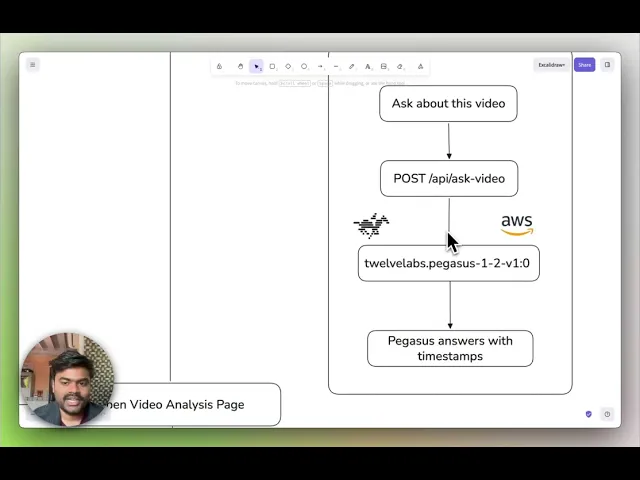
twelvelabs.pegasus-1-2-v1:0including title, risk categories, detected objects, face timelines, and transcript segmentsConversational interface: Video Q&A with clickable timestamp citations
This architecture delivers cross-source search without sacrificing performance. Single-request latency stays under 3 seconds even with 12 indexed videos because the index-level search pattern is optimized for exactly this scenario.
Preparation: What You Need Before Building
1 - AWS Bedrock Access for TwelveLabs Models
Set up AWS credentials with permissions for:
Amazon Bedrock runtime and model access
S3 for video storage and Bedrock async output
Access to these TwelveLabs models through Bedrock:
twelvelabs.marengo-embed-3-0-v1:0(multimodal video embeddings)twelvelabs.pegasus-1-2-v1:0(video analysis and reasoning)
Why these models: Marengo generates the searchable representations of video content (the "encoder"), while Pegasus performs reasoning and structured analysis (the "interpreter"). You need both: Marengo makes video searchable, Pegasus makes it understandable.
2 - S3 Bucket Configuration
Create one S3 bucket structured for:
Video uploads and storage
Bedrock async embedding output location (required for batch jobs)
Generated thumbnails and analysis artifacts
Document storage
Why S3-based: Bedrock's async embedding API requires S3 input/output locations. This also enables scalable storage without hitting local disk limits.
3 - NVIDIA API Key
Get an NVIDIA API key to access:
nvidia/llama-nemotron-embed-vl-1b-v2for document chunk embeddings
Why NeMo Retriever: Legal evidence isn't just video; it's police reports, witness statements, insurance forms. NeMo handles text retrieval while TwelveLabs handles video, giving you multimodal search across all evidence types.
4 - Clone and Configure
git clone https://github.com/Hrishikesh332/tl-compliance-intelligence
cd
git clone https://github.com/Hrishikesh332/tl-compliance-intelligence
cd
Follow backend environment setup in .env.example:
AWS credentials (Access Key ID, Secret Access Key, region)
S3 bucket name and Bedrock output path
NVIDIA API key
Application-specific settings (index configuration, match thresholds)
Implementation Deep Dive
Part 1: Video Ingestion and Embedding Generation
The ingestion pipeline transforms uploaded surveillance footage into searchable multimodal embeddings. This happens asynchronously because Bedrock's embedding jobs can take several minutes for hour-long videos.
1.1 - Starting the Marengo Embedding Job
When a video uploads, the system immediately stores it in S3 and kicks off a Bedrock async embedding job:
Source: backend/app/services/bedrock_marengo.py (Line 111)
def start_video_embedding(
    s3_uri: str,
    output_s3_uri: str,
    bucket_owner: str | None = None,
) -> dict:
    client = get_bedrock_client()
    owner = bucket_owner
    body = {
        "inputType": "video",
        "video": {
            "mediaSource": media_source_s3(s3_uri, owner),
            "embeddingOption": ["visual", "audio"],
            "embeddingScope": ["clip", "asset"],
        },
    }
    resp = client.start_async_invoke(
        modelId=MARENGO_MODEL_ID,
        modelInput=body,
        outputDataConfig={"s3OutputDataConfig": {"s3Uri": output_s3_uri}},
    )
    return {
        "invocation_arn": resp.get("invocationArn", ""),
        "status": "pending",
    }
def start_video_embedding(
    s3_uri: str,
    output_s3_uri: str,
    bucket_owner: str | None = None,
) -> dict:
    client = get_bedrock_client()
    owner = bucket_owner
    body = {
        "inputType": "video",
        "video": {
            "mediaSource": media_source_s3(s3_uri, owner),
            "embeddingOption": ["visual", "audio"],
            "embeddingScope": ["clip", "asset"],
        },
    }
    resp = client.start_async_invoke(
        modelId=MARENGO_MODEL_ID,
        modelInput=body,
        outputDataConfig={"s3OutputDataConfig": {"s3Uri": output_s3_uri}},
    )
    return {
        "invocation_arn": resp.get("invocationArn", ""),
        "status": "pending",
    }
Why embeddingScope: ["clip", "asset"] matters: This generates embeddings at two levels:
Clip embeddings (6-second segments): Enable granular search -> find the exact 8-second window where a person appears
Asset embeddings (whole video): Enable video-level similarity and grouping
Both are necessary: clip embeddings power precise temporal search, asset embeddings enable "find videos similar to this one" workflows.
Why async processing is required: A 2-hour video generates 1,200 clip embeddings (2 hours ÷ 6 seconds per clip). This takes time. Async processing lets users upload multiple videos simultaneously without blocking the UI while embeddings are generated in the background.
1.2 - Background Job Queue and Completion Polling
The system maintains an in-memory queue of pending embedding jobs and polls Bedrock for completion:
Source: backend/app/utils/video_helpers.py (Line 104)
while True:
        job = bedrock_queue.get()
        task_id = job["task_id"]
        s3_uri = job["s3_uri"]
        output_uri = job["output_uri"]
        filename = job["filename"]
        meta = job["meta"]
        log.info("[QUEUE] Processing Bedrock start for %s (%s)", filename, task_id)
        success = False
        for attempt in range(1, max_retries + 1):
            try:
                result = start_video_embedding(s3_uri, output_uri)
                arn = result.get("invocation_arn", "")
                log.info("[QUEUE] Bedrock started for task_id=%s", task_id)
                video_tasks[task_id]["status"] = "indexing"
                video_tasks[task_id]["invocation_arn"] = arn
                video_tasks[task_id]["output_s3_uri"] = output_uri
                for rec in vs_index():
                    if rec.get("id") == task_id:
                        rec.setdefault("metadata", {})["status"] = "indexing"
                        break
                vs_save()
                with bedrock_poller_lock:
                    bedrock_poller_jobs.append({
                        "task_id": task_id,
                        "invocation_arn": arn,
                        "output_s3_uri": output_uri,
                        "started_at": time.monotonic(),
                    })
                success = True
                break
while True:
        job = bedrock_queue.get()
        task_id = job["task_id"]
        s3_uri = job["s3_uri"]
        output_uri = job["output_uri"]
        filename = job["filename"]
        meta = job["meta"]
        log.info("[QUEUE] Processing Bedrock start for %s (%s)", filename, task_id)
        success = False
        for attempt in range(1, max_retries + 1):
            try:
                result = start_video_embedding(s3_uri, output_uri)
                arn = result.get("invocation_arn", "")
                log.info("[QUEUE] Bedrock started for task_id=%s", task_id)
                video_tasks[task_id]["status"] = "indexing"
                video_tasks[task_id]["invocation_arn"] = arn
                video_tasks[task_id]["output_s3_uri"] = output_uri
                for rec in vs_index():
                    if rec.get("id") == task_id:
                        rec.setdefault("metadata", {})["status"] = "indexing"
                        break
                vs_save()
                with bedrock_poller_lock:
                    bedrock_poller_jobs.append({
                        "task_id": task_id,
                        "invocation_arn": arn,
                        "output_s3_uri": output_uri,
                        "started_at": time.monotonic(),
                    })
                success = True
                break
What this accomplishes: The queue processor updates task status from "pending" to "indexing," stores the Bedrock invocation ARN for tracking, and hands off to a separate polling thread. That poller checks job completion every 30 seconds, loads finished embeddings from S3, and marks videos as "ready" when processing completes.
Why retry logic matters: Bedrock has rate limits. The retry mechanism with exponential backoff ensures jobs eventually succeed even during high-volume uploads, preventing silent failures that would leave videos in permanent "pending" state.
Design pattern: Videos and entities share the same vector index, differentiated by type metadata. Documents use a separate chunk-based index. This gives unified video+entity search while keeping document retrieval independent.
1.3 - Document Ingestion with Semantic Chunking
Documents require different processing than video. PDFs are extracted, split into semantic chunks (by section when possible), embedded via NeMo, and stored as searchable records:
Source: backend/app/services/nemo_retriever.py (Line 688)
def ingest_document(file_path: str, doc_id: str, filename: str) -> dict:
    extra: dict = {}
    try:
        pdf_info = store_pdf_document(file_path, doc_id)
        extra.update(pdf_info)
    except Exception as exc:
        log.warning("Could not persist PDF for %s (%s)", doc_id, type(exc).__name__)
    ext = os.path.splitext(file_path)[1].lower()
    chunks: list[str] = []
    sections: list[str] = []
    if ext == ".pdf":
        try:
            pairs = split_into_semantic_chunks(file_path)
            sections = [s for s, _ in pairs]
            chunks = [t for _, t in pairs]
            log.info("Smart PDF chunking produced %d chunks for doc %s", len(chunks), doc_id)
        except Exception as exc:
            log.warning("Smart PDF extraction failed for doc %s, falling back to NeMo (%s)", doc_id, type(exc).__name__)
    if not chunks:
        chunks = extract_document(file_path)
    if not chunks:
        log.warning("No content extracted for doc %s", doc_id)
        return {"doc_id": doc_id, "chunks": 0, "status": "empty"}
    embeddings = embed_texts(chunks)
    add_chunks(
        doc_id, filename, chunks, embeddings,
        sections=sections or None,
        extra_metadata=extra or None,
    )
    return {"doc_id": doc_id, "chunks": len(chunks), "status": "ready"}
def ingest_document(file_path: str, doc_id: str, filename: str) -> dict:
    extra: dict = {}
    try:
        pdf_info = store_pdf_document(file_path, doc_id)
        extra.update(pdf_info)
    except Exception as exc:
        log.warning("Could not persist PDF for %s (%s)", doc_id, type(exc).__name__)
    ext = os.path.splitext(file_path)[1].lower()
    chunks: list[str] = []
    sections: list[str] = []
    if ext == ".pdf":
        try:
            pairs = split_into_semantic_chunks(file_path)
            sections = [s for s, _ in pairs]
            chunks = [t for _, t in pairs]
            log.info("Smart PDF chunking produced %d chunks for doc %s", len(chunks), doc_id)
        except Exception as exc:
            log.warning("Smart PDF extraction failed for doc %s, falling back to NeMo (%s)", doc_id, type(exc).__name__)
    if not chunks:
        chunks = extract_document(file_path)
    if not chunks:
        log.warning("No content extracted for doc %s", doc_id)
        return {"doc_id": doc_id, "chunks": 0, "status": "empty"}
    embeddings = embed_texts(chunks)
    add_chunks(
        doc_id, filename, chunks, embeddings,
        sections=sections or None,
        extra_metadata=extra or None,
    )
    return {"doc_id": doc_id, "chunks": len(chunks), "status": "ready"}
Smart chunking strategy: The system attempts section-based splitting first (preserving document structure), then falls back to paragraph-based chunking if structure detection fails. This matters for legal documents where section headers ("Incident Timeline," "Witness Statements") provide important retrieval context.
Embedding model selection: nvidia/llama-nemotron-embed-vl-1b-v2 generates embeddings optimized for passage retrieval. Each chunk gets its own vector, enabling precise document search at the paragraph level rather than whole-document matching.
Metadata preservation: The system stores original section headers and document links alongside chunk text, so retrieval results can point investigators back to the source paragraph in the original PDF.
Embedding generation via NVIDIA API:
Source: backend/app/services/nemo_retriever.py (Line 515)
def embed_via_requests(texts: list[str], input_type: str) -> list[list[float]]:
    """Call NVIDIA embeddings API directly with requests"""
    import requests
    t0 = time.perf_counter()

    resp = requests.post(
        "https://integrate.api.nvidia.com/v1/embeddings",
        headers={
            "Authorization": f"Bearer {NVIDIA_API_KEY}",
            "Content-Type": "application/json",
        },
        json={
            "input": texts,
            "model": EMBED_MODEL,
            "encoding_format": "float",
            "input_type": input_type,
        },
        timeout=60,
    )
    resp.raise_for_status()
    data = resp.json()
    vectors = [d["embedding"] for d in data["data"]]
    first_dim = len(vectors[0]) if vectors else 0
    return vectors
def embed_via_requests(texts: list[str], input_type: str) -> list[list[float]]:
    """Call NVIDIA embeddings API directly with requests"""
    import requests
    t0 = time.perf_counter()

    resp = requests.post(
        "https://integrate.api.nvidia.com/v1/embeddings",
        headers={
            "Authorization": f"Bearer {NVIDIA_API_KEY}",
            "Content-Type": "application/json",
        },
        json={
            "input": texts,
            "model": EMBED_MODEL,
            "encoding_format": "float",
            "input_type": input_type,
        },
        timeout=60,
    )
    resp.raise_for_status()
    data = resp.json()
    vectors = [d["embedding"] for d in data["data"]]
    first_dim = len(vectors[0]) if vectors else 0
    return vectors
The input_type parameter: NeMo distinguishes between "passage" (document chunks being indexed) and "query" (search requests). This improves retrieval accuracy by optimizing embeddings for their intended use: passages are embedded for storage, queries are embedded for matching.
1.4 - Creating Searchable Entity Records from Face Images
Legal investigations often require tracking specific individuals across multiple camera sources. The entity system enables this by converting face images into searchable embeddings:
Image embedding generation:
def embed_image(media_source: dict) -> list[float]:
    return invoke_embedding_model({
        "inputType": "image",
        "image": {"mediaSource": media_source},
    })
def embed_image(media_source: dict) -> list[float]:
    return invoke_embedding_model({
        "inputType": "image",
        "image": {"mediaSource": media_source},
    })
This uses Marengo's image embedding capability to generate a visual representation of a face. Unlike text embeddings, image embeddings capture visual features directly (facial structure, appearance, clothing) making them suitable for visual matching across video frames.
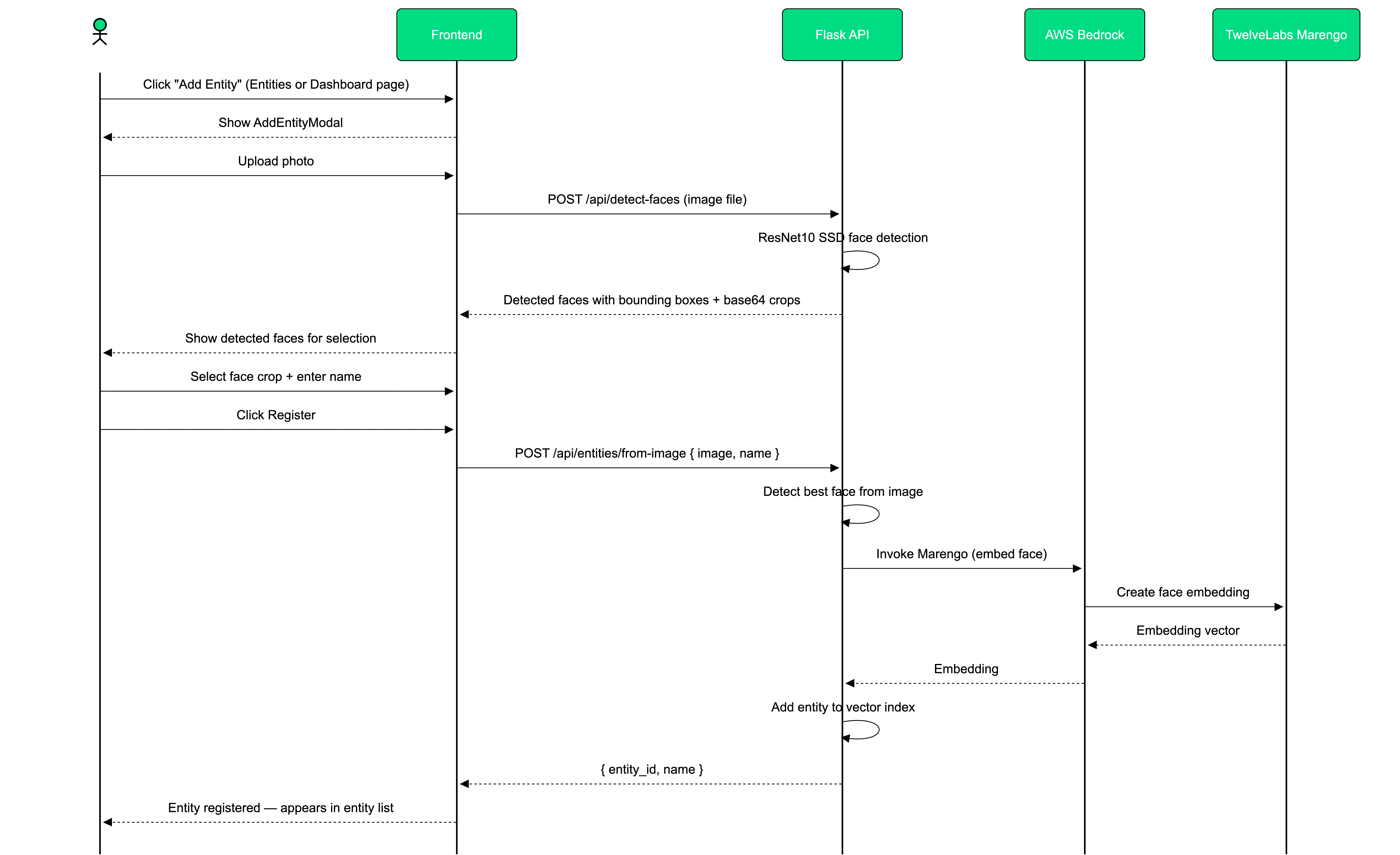
Entity creation from uploaded face image:
@entities_bp.route("/entities/from-image", methods=["POST"])
def api_entities_from_image():
    if "image" not in request.files:
        return jsonify({"error": "No 'image' file provided"}), 400

    file = request.files["image"]
    if file.filename == "":
        return jsonify({"error": "Empty filename"}), 400

    data = request.form or {}
    name = data.get("name") or (request.get_json(silent=True) or {}).get("name") or ""
    if not name.strip():
        return jsonify({"error": "Missing 'name'"}), 400

    image_bytes = file.read()
    faces = detect_and_crop_faces(image_bytes, min_confidence=ENTITY_FACE_MIN_CONFIDENCE)
    if not faces:
        return jsonify(
            {"error": "No face detected in image. Use a clear, front-facing photo with good lighting."}
        ), 404

    best = faces[0]
    face_b64 = best["image_base64"]
    embed_b64 = best.get("embedding_crop_base64") or face_b64

    import base64

    face_bytes = base64.b64decode(embed_b64)
    media = media_source_base64(face_bytes)

    try:
        embedding = embed_image(media)
    except Exception:
        return jsonify({"error": "Internal server error"}), 500

    entity_id = name.strip().lower().replace(" ", "-")
    rec = index_add(
        id=entity_id,
        embedding=embedding,
        metadata={"name": name.strip(), "face_snap_base64": face_b64},
        type="entity",
    )

    return jsonify(
        {
            "indexId": FIXED_INDEX_ID,
            "entity": {"id": rec["id"], "name": name.strip()},
            "face_snap_base64": face_b64,
        }
    )
@entities_bp.route("/entities/from-image", methods=["POST"])
def api_entities_from_image():
    if "image" not in request.files:
        return jsonify({"error": "No 'image' file provided"}), 400

    file = request.files["image"]
    if file.filename == "":
        return jsonify({"error": "Empty filename"}), 400

    data = request.form or {}
    name = data.get("name") or (request.get_json(silent=True) or {}).get("name") or ""
    if not name.strip():
        return jsonify({"error": "Missing 'name'"}), 400

    image_bytes = file.read()
    faces = detect_and_crop_faces(image_bytes, min_confidence=ENTITY_FACE_MIN_CONFIDENCE)
    if not faces:
        return jsonify(
            {"error": "No face detected in image. Use a clear, front-facing photo with good lighting."}
        ), 404

    best = faces[0]
    face_b64 = best["image_base64"]
    embed_b64 = best.get("embedding_crop_base64") or face_b64

    import base64

    face_bytes = base64.b64decode(embed_b64)
    media = media_source_base64(face_bytes)

    try:
        embedding = embed_image(media)
    except Exception:
        return jsonify({"error": "Internal server error"}), 500

    entity_id = name.strip().lower().replace(" ", "-")
    rec = index_add(
        id=entity_id,
        embedding=embedding,
        metadata={"name": name.strip(), "face_snap_base64": face_b64},
        type="entity",
    )

    return jsonify(
        {
            "indexId": FIXED_INDEX_ID,
            "entity": {"id": rec["id"], "name": name.strip()},
            "face_snap_base64": face_b64,
        }
    )
The face detection step: Uses OpenCV's ResNet10 SSD detector to isolate faces before embedding. This preprocessing ensures Marengo receives a clean face crop rather than a full scene, improving match accuracy during search. The detector returns confidence scores, only faces above the minimum threshold are processed.
Why entity records live in the video index: Storing entity embeddings alongside video embeddings enables direct similarity search. When an investigator searches for "person-of-interest-x," the system compares that entity's embedding against all video clip embeddings in one retrieval operation.
Part 2: Cross-Source Search and Retrieval
Once videos and documents are indexed, the platform enables unified search across all sources. This is where the single-index architecture delivers its value: one query, all sources, ranked results.
2.1 - Video Content Search with Multimodal Embeddings
The search flow supports three query types through a single interface:
Text queries: Natural language descriptions ("person in red jacket")
Image queries: Upload a screenshot, find matching footage
Entity queries: Search for a previously registered person/object
Source: backend/app/routes/search.py (Line 30)
def search_video_index(
    data: dict,
    *,
    request_query: str = "",
    request_top_k: int | None = None,
    image_bytes: bytes | None = None,
) -> tuple[list[dict], str, str | None]:

    query_emb, display_query, is_entity_search, err = get_search_embedding_from_request(
        data,
        request_query=request_query,
        image_bytes=image_bytes,
    )
def search_video_index(
    data: dict,
    *,
    request_query: str = "",
    request_top_k: int | None = None,
    image_bytes: bytes | None = None,
) -> tuple[list[dict], str, str | None]:

    query_emb, display_query, is_entity_search, err = get_search_embedding_from_request(
        data,
        request_query=request_query,
        image_bytes=image_bytes,
    )
Input normalization: get_search_embedding_from_request() handles all query types and returns a single embedding vector. Text queries get embedded via Marengo's text encoder, image queries via image encoder, entity queries retrieve the stored embedding directly. The search logic downstream doesn't care about input type—it just sees a vector to match.
Entity search optimization:
for r in results:
    meta = r.get("metadata", {})
    clips = []
    output_uri = meta.get("output_s3_uri") or f"{S3_EMBEDDINGS_OUTPUT}/{r['id']}"

    if is_entity_search:
        clips = clips_above_threshold(
            query_emb,
            output_uri,
            min_score=ENTITY_CLIP_MIN_SCORE,
            visual_only=True,
            max_clips=clips_per_video,
        )

    if not clips:
        clips = clip_search(
            query_emb,
            output_uri,
            top_n=clips_per_video,
            min_score=clip_min_score,
            visual_only=is_entity_search,
        )
for r in results:
    meta = r.get("metadata", {})
    clips = []
    output_uri = meta.get("output_s3_uri") or f"{S3_EMBEDDINGS_OUTPUT}/{r['id']}"

    if is_entity_search:
        clips = clips_above_threshold(
            query_emb,
            output_uri,
            min_score=ENTITY_CLIP_MIN_SCORE,
            visual_only=True,
            max_clips=clips_per_video,
        )

    if not clips:
        clips = clip_search(
            query_emb,
            output_uri,
            top_n=clips_per_video,
            min_score=clip_min_score,
            visual_only=is_entity_search,
        )
The scoring difference: Entity searches use visual_only=True and higher match thresholds because face matching requires stronger visual similarity than general content search. Text queries can match via audio transcription or visual content (either modality counts). Entity queries must match visually.
Clip-level grounding:
out.append({
        "id": r["id"],
        "score": r["score"],
        "metadata": meta,
        "clips": clips,
    })

return out, display_query, None
out.append({
        "id": r["id"],
        "score": r["score"],
        "metadata": meta,
        "clips": clips,
    })

return out, display_query, None
Results include not just which videos match, but exactly where in each video the match occurs. An investigator searching for "person exiting vehicle" gets results like:
Video: "Dashcam - Main St" → Clips at 00:03:42-00:03:48, 00:07:15-00:07:21
Video: "CCTV - Parking Lot" → Clip at 00:12:03-00:12:09
This clip-level precision eliminates "search for needle, still get entire haystack" problems common in video search systems.
2.2 - Entity-Aware Video Search: Finding People Across Sources
Entity search enables investigators to track specific individuals across multiple unrelated camera sources. Upload a face image once, search all footage:
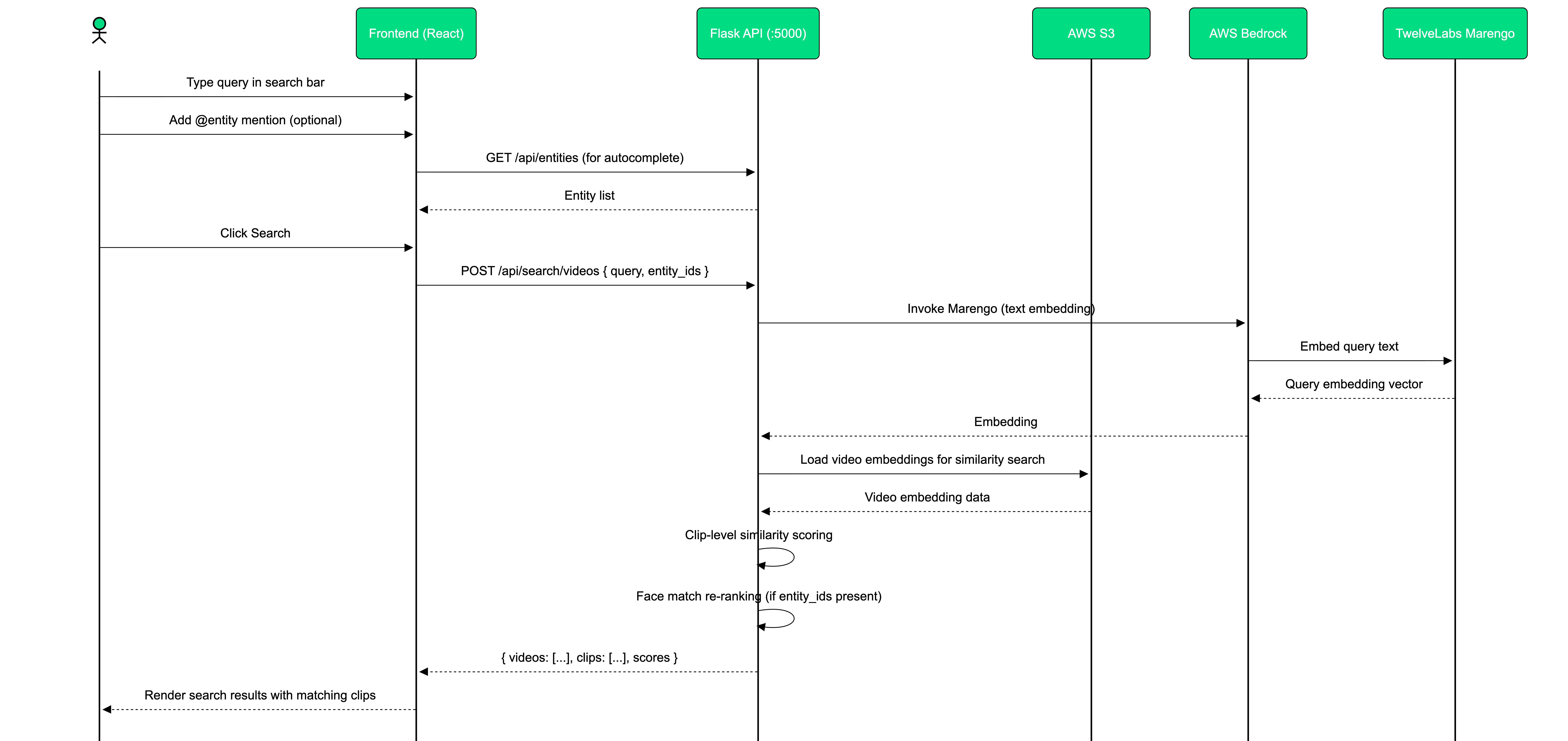
How it works:
Entity embedding (generated during entity creation) is loaded from index
System retrieves clip embeddings for each indexed video from S3 Bedrock output
Similarity scoring identifies clips where the entity likely appears
Videos are ranked by match strength and consistency (how many clips matched, how strong the scores)
Why this is faster than runtime face detection: Pre-computing clip embeddings during ingestion means search only performs similarity comparison, not face detection. Comparing 10,000 clip embeddings against an entity embedding takes milliseconds. Running face detection on 10,000 clips would take hours.
Match threshold tuning: The system uses ENTITY_CLIP_MIN_SCORE to filter weak matches. Setting this too low produces false positives (similar-looking people). Setting it too high misses valid matches (same person in different lighting/angles). The demo uses 0.75 as a balance point; your production system should make this user-configurable.
2.3 - Hybrid Search: Video + Document Retrieval
Legal evidence isn't just video. Investigators need to cross-reference footage with police reports, witness statements, and insurance forms. Hybrid search runs video and document retrieval in parallel:
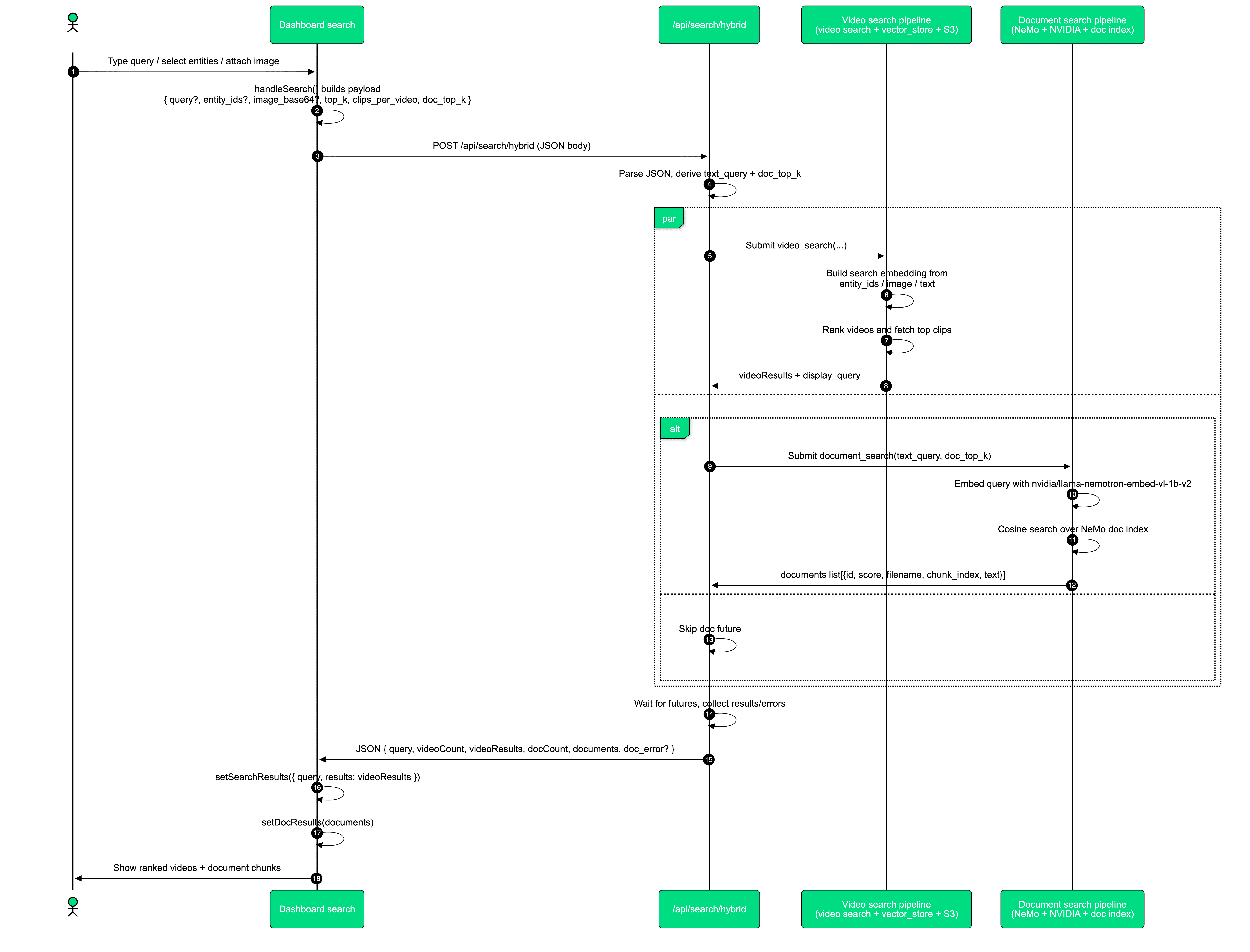
Document search implementation:
def search_document_index(text_query: str, doc_top_k: int) -> list[dict]:
    from app.services.nemo_retriever import embed_query, search_docs
    t0 = time.perf_counter()
    log.info("[DOC_SEARCH] Started doc search top_k=%d", doc_top_k)
    query_emb = embed_query(text_query)
    docs = search_docs(query_emb, top_k=doc_top_k)
    return docs
def search_document_index(text_query: str, doc_top_k: int) -> list[dict]:
    from app.services.nemo_retriever import embed_query, search_docs
    t0 = time.perf_counter()
    log.info("[DOC_SEARCH] Started doc search top_k=%d", doc_top_k)
    query_emb = embed_query(text_query)
    docs = search_docs(query_emb, top_k=doc_top_k)
    return docs
Parallel execution pattern: The hybrid search handler starts video and document searches simultaneously using threading, then merges results once both complete. This keeps total latency close to the slower of the two searches rather than their sum.
Result merging strategy: Video results and document results are kept separate in the response (not interleaved by score) because they serve different investigative purposes. Videos provide visual evidence, documents provide corroborating narrative. Investigators review them differently.
For complete hybrid search implementation: View source
Part 3: Structured Compliance Analysis and Reporting
Search finds evidence. Analysis interprets it. The platform uses Pegasus through Bedrock to generate structured compliance reports from raw footage:
3.1 - Generating Structured Video Analysis
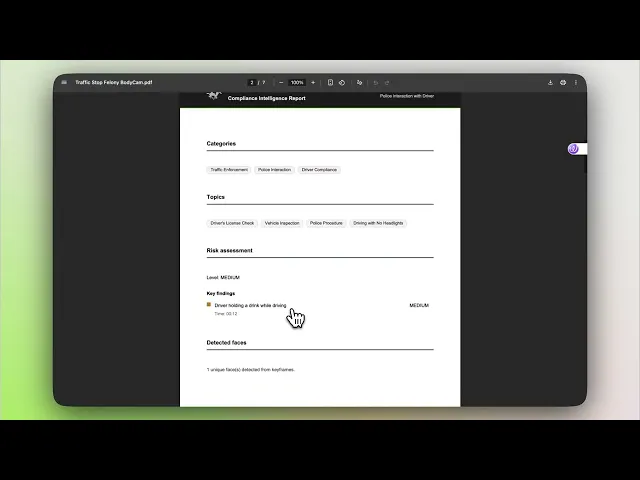
Pegasus transforms unstructured video into structured legal documentation: categorized risk levels, detected persons, timestamped transcripts, and compliance summaries.
Source: backend/app/services/bedrock_pegasus.py (Line 72)
body: dict = {
    "inputPrompt": prompt[:4000],
    "mediaSource": {
        "s3Location": {
            "uri": s3_uri,
            "bucketOwner": owner,
        }
    },
}
if temperature is not None:
    body["temperature"] = temperature
if response_schema is not None:
    body["responseFormat"] = {"jsonSchema": response_schema}
body: dict = {
    "inputPrompt": prompt[:4000],
    "mediaSource": {
        "s3Location": {
            "uri": s3_uri,
            "bucketOwner": owner,
        }
    },
}
if temperature is not None:
    body["temperature"] = temperature
if response_schema is not None:
    body["responseFormat"] = {"jsonSchema": response_schema}
Temperature setting: Using temperature: 0 for compliance analysis ensures deterministic, repeatable output. The same video always produces the same analysis structure, critical for legal documentation where consistency matters.
Response schema enforcement: The jsonSchema parameter instructs Pegasus to return structured JSON rather than free-form text. This guarantees parse-able output and eliminates post-processing fragility.
Bedrock model invocation:
response = client.invoke_model(
    modelId=model_id,
    body=payload,
    contentType="application/json",
    accept="application/json",
)
response = client.invoke_model(
    modelId=model_id,
    body=payload,
    contentType="application/json",
    accept="application/json",
)
The response contains generated text extracted from Bedrock's JSON response format. This text represents Pegasus's interpretation of the video content based on the provided prompt instructions.
Analysis prompt and parsing:
Source: backend/app/routes/videos.py (Line 335)
raw_text = pegasus_analyze_video(
    s3_uri,
    get_video_analysis_prompt(),
    temperature=0,
)
log.info("[ANALYSIS] Pegasus response received in %.1fs (len=%d)", time.perf_counter() - t0, len(raw_text or ""))
analysis_dict = parse_video_analysis_response(raw_text)
raw_text = pegasus_analyze_video(
    s3_uri,
    get_video_analysis_prompt(),
    temperature=0,
)
log.info("[ANALYSIS] Pegasus response received in %.1fs (len=%d)", time.perf_counter() - t0, len(raw_text or ""))
analysis_dict = parse_video_analysis_response(raw_text)
The analysis prompt (view source) instructs Pegasus to:
Categorize the video content (traffic incident, workplace safety, criminal activity, etc.)
Identify risk levels and specific risk factors
Extract timestamped transcript segments
Detect persons of interest with descriptions
Generate a compliance-focused summary
Parsing strategy: parse_video_analysis_response() handles malformed JSON gracefully (recovers triple-backtick wrapping, trailing commas, incomplete responses) because LLM outputs aren't always perfectly formatted. Robust parsing prevents analysis failures from minor formatting issues.
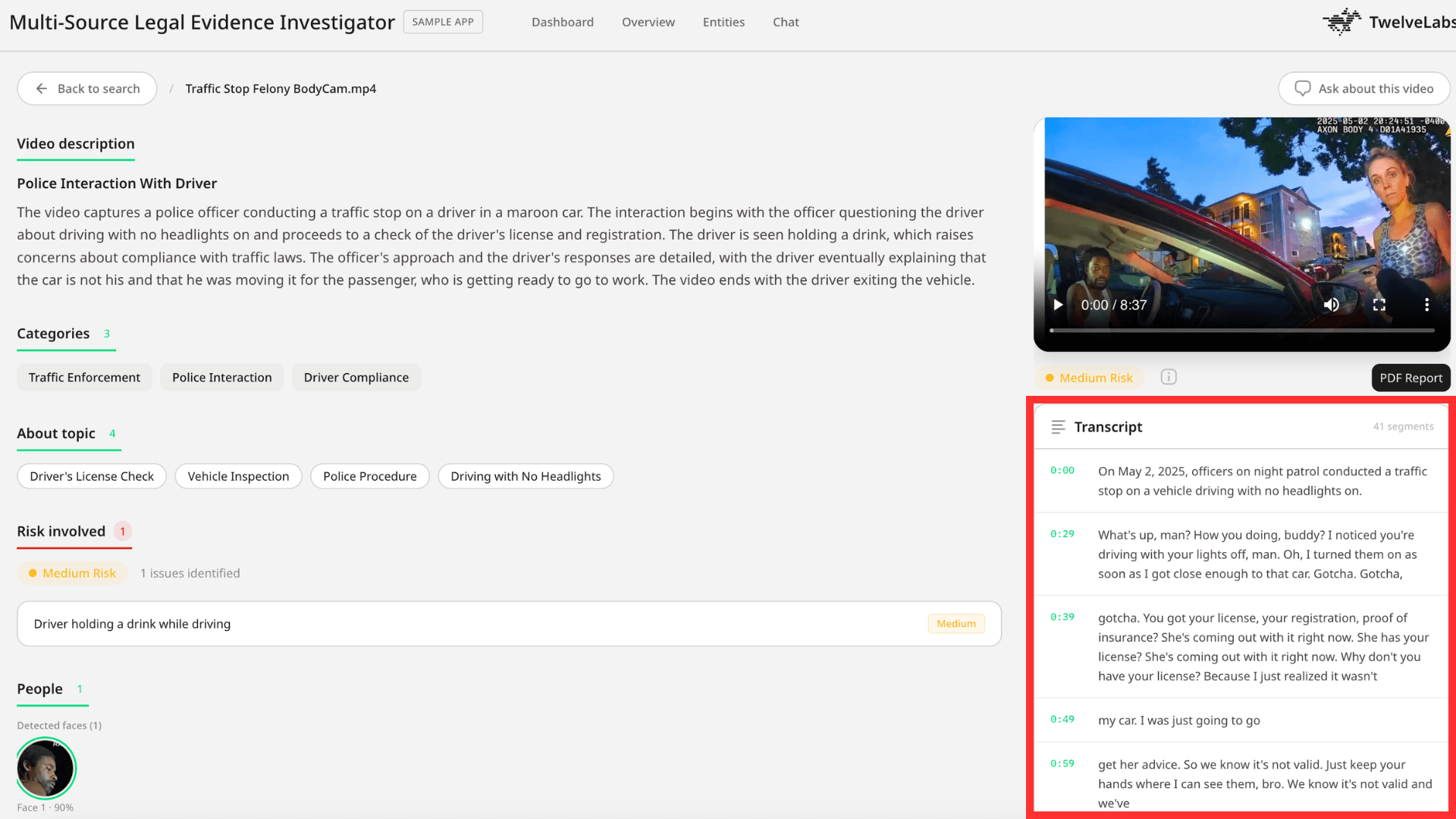
Transcript generation: The system runs a separate Pegasus call optimized for transcription, requesting timestamped segments in structured JSON. This produces ordered transcript entries with start/end times, enabling investigators to jump directly to spoken content.
3.2 - Object Detection and Face Keyframe Extraction
Beyond basic transcription, the platform identifies detected objects and useful face keyframes with precise timestamps (the specific moments where faces appear clearly):
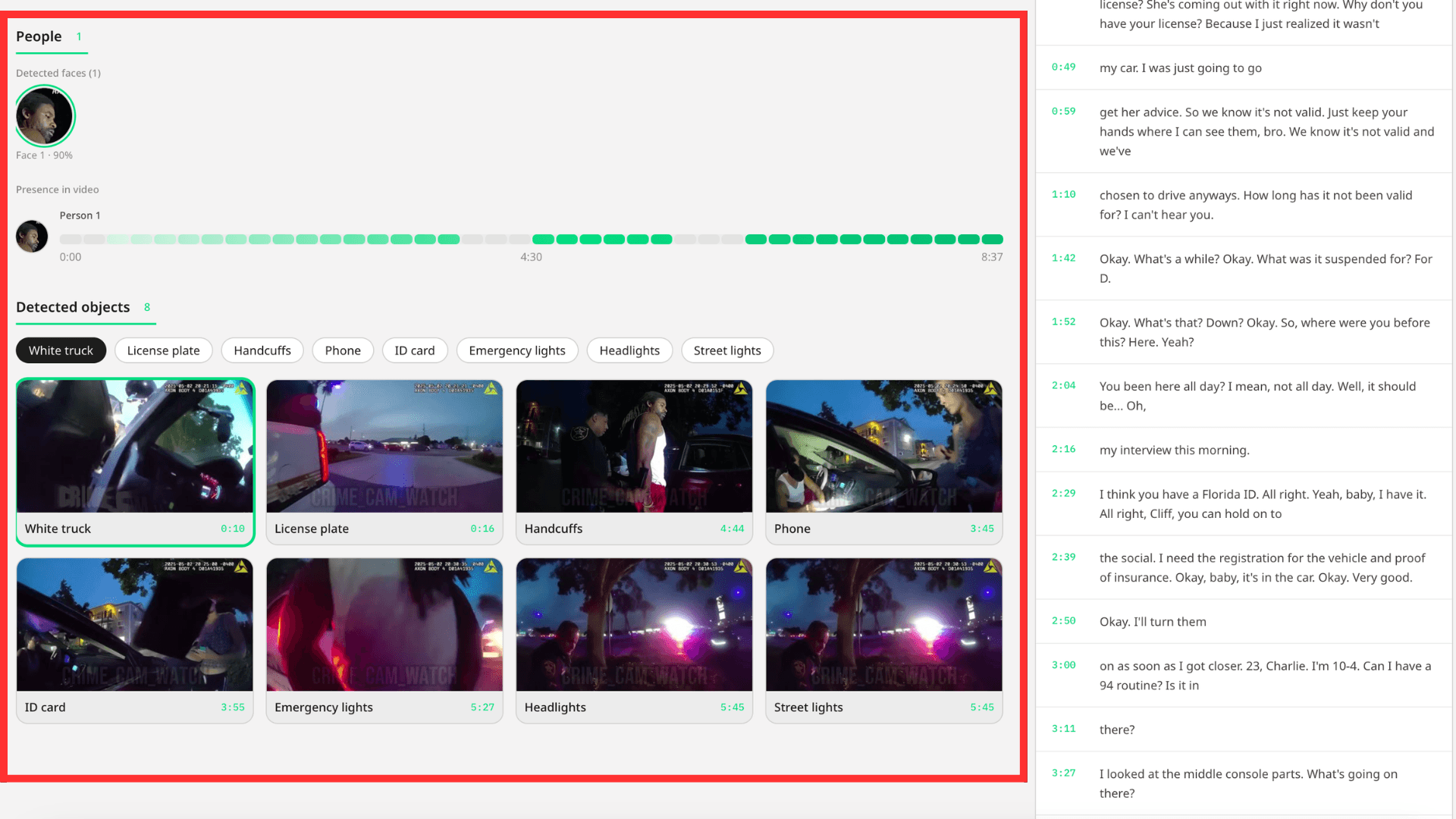
Source: backend/app/routes/videos.py (Line 707)
raw_response = pegasus_analyze_video(s3_uri, get_detect_prompt())
log.info("[INSIGHTS] Pegasus response received in %.1fs (%d chars)", time.perf_counter() - t0, len(raw_response or ""))

detect_data = parse_detect_response(raw_response)
objects_raw = detect_data["objects"]
face_keyframes = detect_data["face_keyframes"]
raw_response = pegasus_analyze_video(s3_uri, get_detect_prompt())
log.info("[INSIGHTS] Pegasus response received in %.1fs (%d chars)", time.perf_counter() - t0, len(raw_response or ""))

detect_data = parse_detect_response(raw_response)
objects_raw = detect_data["objects"]
face_keyframes = detect_data["face_keyframes"]
The detection prompt (view source) asks Pegasus to identify:
Objects: Vehicles, weapons, physical evidence, environmental details
Face keyframes: Timestamps where faces appear with sufficient clarity for identification
Why keyframes matter: Not every frame containing a face is useful. Faces seen from behind, in motion blur, or poorly lit don't help identification. Pegasus selects keyframes where faces are frontal, well-lit, and clear; the frames an investigator would actually screenshot for evidence.
Post-processing: Once Pegasus returns keyframes and objects, the system extracts those specific frames, generates thumbnails, and stores them for quick review. This eliminates re-processing video every time an investigator needs to see a face.
3.3 - Face Presence Timeline: Where Does This Person Appear?
After detecting faces, the system builds a presence timeline showing when each detected person appears throughout the video:
Source: backend/app/routes/videos.py (Line 1027)
if use_marengo:
    # Marengo-based presence, match each face embedding to clip embeddings
    for j, emb in enumerate(face_embeddings):
        if not emb:
            continue
        clips = clips_above_threshold(
            emb,
            output_uri,
            min_score=FACE_PRESENCE_MATCH_THRESHOLD,
            visual_only=True,
            max_clips=50,
        )
        for clip in clips:
            c_start = float(clip.get("start", 0.0))
            c_end = float(clip.get("end", c_start + 0.5))
            for i in range(n_segments):
                s0 = i * seg_dur
                s1 = (i + 1) * seg_dur
                if c_end > s0 and c_start < s1:
                    presence_by_face[j]["segment_presence"][i] = 1
if use_marengo:
    # Marengo-based presence, match each face embedding to clip embeddings
    for j, emb in enumerate(face_embeddings):
        if not emb:
            continue
        clips = clips_above_threshold(
            emb,
            output_uri,
            min_score=FACE_PRESENCE_MATCH_THRESHOLD,
            visual_only=True,
            max_clips=50,
        )
        for clip in clips:
            c_start = float(clip.get("start", 0.0))
            c_end = float(clip.get("end", c_start + 0.5))
            for i in range(n_segments):
                s0 = i * seg_dur
                s1 = (i + 1) * seg_dur
                if c_end > s0 and c_start < s1:
                    presence_by_face[j]["segment_presence"][i] = 1
How the timeline is constructed:
Video is divided into fixed-duration segments (e.g., 30-second windows)
Each detected face gets its embedding compared against all clip embeddings
Clips scoring above threshold are marked as "person present"
Matched clips are mapped onto the segment timeline
Result: A binary presence map showing which segments contain each person
Why this matters for investigations: An investigator can see at a glance: "Person A appears in segments 3, 7, 12, and 18" without watching the entire video. Click segment 7, jump directly to that 30-second window, confirm visual match.
The threshold trade-off: FACE_PRESENCE_MATCH_THRESHOLD controls sensitivity. Higher values reduce false positives but may miss valid appearances (different angles, lighting changes). Lower values catch more instances but produce more false matches requiring manual review. The demo uses 0.70 - production systems should let investigators adjust this per-case.
Operational Considerations for Production Deployment
This demo proves the concept. Deploying to production requires addressing several operational concerns:
Scalability: The single-index approach works for demos (12 videos) but needs architectural adjustments for production loads (1,000+ videos per case). Consider index partitioning strategies or migrating to a dedicated vector database for clip-level embeddings.
Cost management: Bedrock charges per embedding generation. A 2-hour video generates ~1,200 clip embeddings. Processing 100 hours of footage per case means 60,000+ embeddings. Plan for batch processing, caching strategies, and reuse of embeddings across related cases.
Security and compliance: Legal evidence requires chain-of-custody tracking, access controls, and audit logs. The demo stores videos in S3; production needs encryption at rest, role-based access, and immutable audit trails.
Accuracy validation: Entity matching and timeline reconstruction should include confidence scores and require human review before being submitted as legal evidence. AI-generated analysis supports investigators but doesn't replace human judgment.
Format handling: The demo assumes standard video codecs. Production systems must handle corrupted files, non-standard formats, encrypted footage, and low-quality sources gracefully.
Conclusion
This application demonstrates how video intelligence transforms legal evidence review from a time-intensive manual process into a targeted investigation workflow. By combining TwelveLabs through AWS Bedrock for video understanding with NeMo Retriever for document search, investigators can:
Search 12+ disparate video sources simultaneously with natural language queries
Track specific individuals or vehicles across unrelated camera feeds
Reconstruct chronological timelines from fragmented footage
Generate structured compliance analysis with risk categorization
Access transcript segments and detected objects with precise timestamps
The efficiency gain: Manual review of 40 hours of multi-source footage takes an investigator 40-60 hours. This platform reduces that to 4-6 hours of targeted review so that investigators spend time validating findings instead of hunting for them.
For legal tech ISVs building evidence management platforms, this architecture provides a reference implementation showing how TwelveLabs integrates into existing workflows without requiring wholesale platform rewrites. The single-index multi-source pattern, hybrid video+document retrieval, and structured analysis capabilities translate directly to production legal tech products.
Additional Resources
TwelveLabs on AWS Bedrock: Learn more about model access
NeMo Retriever documentation: Explore document retrieval capabilities
TwelveLabs sample applications: Browse additional use cases
Join the TwelveLabs community: Discord
Next steps:
Clone the reference implementation
Configure AWS Bedrock access and test with your video sources
Adapt the single-index architecture to your specific legal workflows
Integrate with your existing evidence management systems
Introduction
Legal teams processing video evidence face a compounding problem. A single case can involve 40+ hours of footage from dashcams, bodycams, CCTV systems, doorbell cameras, and insurance submissions; all in different formats, resolutions, and timestamps. Investigators spend $200-500/hour in paralegal time manually reviewing this content. Miss a critical 10-second clip buried in hour 23 of camera feed 7, and the case outcome changes.
The traditional approach (manual review, basic metadata tagging, frame-by-frame analysis) doesn't scale. Legal teams need to search across disparate sources simultaneously, reconstruct timelines from fragmented footage, and identify critical moments without watching every second of video.
This tutorial demonstrates how to build a legal evidence investigation platform using TwelveLabs through AWS Bedrock for video intelligence and NVIDIA NeMo Retriever for document search. The result: investigators search 12 video sources with natural language queries ("find the red sedan" or "show me when the person entered the building"), get ranked results with exact timestamps, and generate structured compliance reports in minutes instead of days.
What you'll build: A multi-source evidence investigator that ingests mixed-format surveillance footage, enables cross-source semantic search, performs automated compliance analysis, and reconstructs chronological timelines from disparate video sources.
Time investment: 40 hours of evidence review becomes 4 hours of targeted investigation.
You can explore the demo of the application here: Legal Evidence Investigator Application
You can check out the source code here: GitHub Repository
Demo Application
This demonstration shows how the platform handles real investigative workflows: searching across multiple video sources, identifying critical moments with precise timestamps, generating structured compliance analysis, and providing an interactive Q&A interface for deeper investigation.
Key capabilities demonstrated:
Cross-source search across 12+ disparate video formats
Entity tracking (find specific person/vehicle across all sources)
Automated compliance analysis with risk categorization
Timeline reconstruction showing sequential evidence
Conversational video Q&A with clickable timestamps
System Architecture: Why Single-Index Multi-Source Design Matters
The core architectural decision in this application addresses a fundamental constraint: TwelveLabs search operates at the index level: you search one index per request, not individual videos. This shapes everything.
The naive approach would create one index per video source. This fails immediately: you'd need 12 separate search requests to find a person across 12 cameras, then manually merge and sort results in application logic. Slow, complex, brittle.
The correct approach uses a single-index multi-source strategy: all evidence videos live in one TwelveLabs index, differentiated by rich metadata tagging. One search query hits all sources simultaneously. Results come back pre-ranked by relevance, grouped by source video, with metadata filters enabling scoped searches when needed ("only bodycam footage" or "only footage from Main Street location").
System components:
Video ingestion pipeline: Upload mixed-format footage to S3 → Index via
twelvelabs.marengo-embed-3-0-v1:0through Bedrock → Store multimodal embeddings with source metadataDocument ingestion pipeline: Extract text from PDFs → Chunk intelligently → Embed via
nvidia/llama-nemotron-embed-vl-1b-v2→ Store in document indexHybrid retrieval layer: Parallel search across video embeddings (Marengo) and document chunks (NeMo) → Merge results → Return unified response
Analysis engine: Generate structured compliance reports via
twelvelabs.pegasus-1-2-v1:0including title, risk categories, detected objects, face timelines, and transcript segmentsConversational interface: Video Q&A with clickable timestamp citations
This architecture delivers cross-source search without sacrificing performance. Single-request latency stays under 3 seconds even with 12 indexed videos because the index-level search pattern is optimized for exactly this scenario.
Preparation: What You Need Before Building
1 - AWS Bedrock Access for TwelveLabs Models
Set up AWS credentials with permissions for:
Amazon Bedrock runtime and model access
S3 for video storage and Bedrock async output
Access to these TwelveLabs models through Bedrock:
twelvelabs.marengo-embed-3-0-v1:0(multimodal video embeddings)twelvelabs.pegasus-1-2-v1:0(video analysis and reasoning)
Why these models: Marengo generates the searchable representations of video content (the "encoder"), while Pegasus performs reasoning and structured analysis (the "interpreter"). You need both: Marengo makes video searchable, Pegasus makes it understandable.
2 - S3 Bucket Configuration
Create one S3 bucket structured for:
Video uploads and storage
Bedrock async embedding output location (required for batch jobs)
Generated thumbnails and analysis artifacts
Document storage
Why S3-based: Bedrock's async embedding API requires S3 input/output locations. This also enables scalable storage without hitting local disk limits.
3 - NVIDIA API Key
Get an NVIDIA API key to access:
nvidia/llama-nemotron-embed-vl-1b-v2for document chunk embeddings
Why NeMo Retriever: Legal evidence isn't just video; it's police reports, witness statements, insurance forms. NeMo handles text retrieval while TwelveLabs handles video, giving you multimodal search across all evidence types.
4 - Clone and Configure
git clone https://github.com/Hrishikesh332/tl-compliance-intelligence
cd
Follow backend environment setup in .env.example:
AWS credentials (Access Key ID, Secret Access Key, region)
S3 bucket name and Bedrock output path
NVIDIA API key
Application-specific settings (index configuration, match thresholds)
Implementation Deep Dive
Part 1: Video Ingestion and Embedding Generation
The ingestion pipeline transforms uploaded surveillance footage into searchable multimodal embeddings. This happens asynchronously because Bedrock's embedding jobs can take several minutes for hour-long videos.
1.1 - Starting the Marengo Embedding Job
When a video uploads, the system immediately stores it in S3 and kicks off a Bedrock async embedding job:
Source: backend/app/services/bedrock_marengo.py (Line 111)
def start_video_embedding(
    s3_uri: str,
    output_s3_uri: str,
    bucket_owner: str | None = None,
) -> dict:
    client = get_bedrock_client()
    owner = bucket_owner
    body = {
        "inputType": "video",
        "video": {
            "mediaSource": media_source_s3(s3_uri, owner),
            "embeddingOption": ["visual", "audio"],
            "embeddingScope": ["clip", "asset"],
        },
    }
    resp = client.start_async_invoke(
        modelId=MARENGO_MODEL_ID,
        modelInput=body,
        outputDataConfig={"s3OutputDataConfig": {"s3Uri": output_s3_uri}},
    )
    return {
        "invocation_arn": resp.get("invocationArn", ""),
        "status": "pending",
    }
Why embeddingScope: ["clip", "asset"] matters: This generates embeddings at two levels:
Clip embeddings (6-second segments): Enable granular search -> find the exact 8-second window where a person appears
Asset embeddings (whole video): Enable video-level similarity and grouping
Both are necessary: clip embeddings power precise temporal search, asset embeddings enable "find videos similar to this one" workflows.
Why async processing is required: A 2-hour video generates 1,200 clip embeddings (2 hours ÷ 6 seconds per clip). This takes time. Async processing lets users upload multiple videos simultaneously without blocking the UI while embeddings are generated in the background.
1.2 - Background Job Queue and Completion Polling
The system maintains an in-memory queue of pending embedding jobs and polls Bedrock for completion:
Source: backend/app/utils/video_helpers.py (Line 104)
while True:
        job = bedrock_queue.get()
        task_id = job["task_id"]
        s3_uri = job["s3_uri"]
        output_uri = job["output_uri"]
        filename = job["filename"]
        meta = job["meta"]
        log.info("[QUEUE] Processing Bedrock start for %s (%s)", filename, task_id)
        success = False
        for attempt in range(1, max_retries + 1):
            try:
                result = start_video_embedding(s3_uri, output_uri)
                arn = result.get("invocation_arn", "")
                log.info("[QUEUE] Bedrock started for task_id=%s", task_id)
                video_tasks[task_id]["status"] = "indexing"
                video_tasks[task_id]["invocation_arn"] = arn
                video_tasks[task_id]["output_s3_uri"] = output_uri
                for rec in vs_index():
                    if rec.get("id") == task_id:
                        rec.setdefault("metadata", {})["status"] = "indexing"
                        break
                vs_save()
                with bedrock_poller_lock:
                    bedrock_poller_jobs.append({
                        "task_id": task_id,
                        "invocation_arn": arn,
                        "output_s3_uri": output_uri,
                        "started_at": time.monotonic(),
                    })
                success = True
                break
What this accomplishes: The queue processor updates task status from "pending" to "indexing," stores the Bedrock invocation ARN for tracking, and hands off to a separate polling thread. That poller checks job completion every 30 seconds, loads finished embeddings from S3, and marks videos as "ready" when processing completes.
Why retry logic matters: Bedrock has rate limits. The retry mechanism with exponential backoff ensures jobs eventually succeed even during high-volume uploads, preventing silent failures that would leave videos in permanent "pending" state.
Design pattern: Videos and entities share the same vector index, differentiated by type metadata. Documents use a separate chunk-based index. This gives unified video+entity search while keeping document retrieval independent.
1.3 - Document Ingestion with Semantic Chunking
Documents require different processing than video. PDFs are extracted, split into semantic chunks (by section when possible), embedded via NeMo, and stored as searchable records:
Source: backend/app/services/nemo_retriever.py (Line 688)
def ingest_document(file_path: str, doc_id: str, filename: str) -> dict:
    extra: dict = {}
    try:
        pdf_info = store_pdf_document(file_path, doc_id)
        extra.update(pdf_info)
    except Exception as exc:
        log.warning("Could not persist PDF for %s (%s)", doc_id, type(exc).__name__)
    ext = os.path.splitext(file_path)[1].lower()
    chunks: list[str] = []
    sections: list[str] = []
    if ext == ".pdf":
        try:
            pairs = split_into_semantic_chunks(file_path)
            sections = [s for s, _ in pairs]
            chunks = [t for _, t in pairs]
            log.info("Smart PDF chunking produced %d chunks for doc %s", len(chunks), doc_id)
        except Exception as exc:
            log.warning("Smart PDF extraction failed for doc %s, falling back to NeMo (%s)", doc_id, type(exc).__name__)
    if not chunks:
        chunks = extract_document(file_path)
    if not chunks:
        log.warning("No content extracted for doc %s", doc_id)
        return {"doc_id": doc_id, "chunks": 0, "status": "empty"}
    embeddings = embed_texts(chunks)
    add_chunks(
        doc_id, filename, chunks, embeddings,
        sections=sections or None,
        extra_metadata=extra or None,
    )
    return {"doc_id": doc_id, "chunks": len(chunks), "status": "ready"}
Smart chunking strategy: The system attempts section-based splitting first (preserving document structure), then falls back to paragraph-based chunking if structure detection fails. This matters for legal documents where section headers ("Incident Timeline," "Witness Statements") provide important retrieval context.
Embedding model selection: nvidia/llama-nemotron-embed-vl-1b-v2 generates embeddings optimized for passage retrieval. Each chunk gets its own vector, enabling precise document search at the paragraph level rather than whole-document matching.
Metadata preservation: The system stores original section headers and document links alongside chunk text, so retrieval results can point investigators back to the source paragraph in the original PDF.
Embedding generation via NVIDIA API:
Source: backend/app/services/nemo_retriever.py (Line 515)
def embed_via_requests(texts: list[str], input_type: str) -> list[list[float]]:
    """Call NVIDIA embeddings API directly with requests"""
    import requests
    t0 = time.perf_counter()

    resp = requests.post(
        "https://integrate.api.nvidia.com/v1/embeddings",
        headers={
            "Authorization": f"Bearer {NVIDIA_API_KEY}",
            "Content-Type": "application/json",
        },
        json={
            "input": texts,
            "model": EMBED_MODEL,
            "encoding_format": "float",
            "input_type": input_type,
        },
        timeout=60,
    )
    resp.raise_for_status()
    data = resp.json()
    vectors = [d["embedding"] for d in data["data"]]
    first_dim = len(vectors[0]) if vectors else 0
    return vectors
The input_type parameter: NeMo distinguishes between "passage" (document chunks being indexed) and "query" (search requests). This improves retrieval accuracy by optimizing embeddings for their intended use: passages are embedded for storage, queries are embedded for matching.
1.4 - Creating Searchable Entity Records from Face Images
Legal investigations often require tracking specific individuals across multiple camera sources. The entity system enables this by converting face images into searchable embeddings:
Image embedding generation:
def embed_image(media_source: dict) -> list[float]:
    return invoke_embedding_model({
        "inputType": "image",
        "image": {"mediaSource": media_source},
    })
This uses Marengo's image embedding capability to generate a visual representation of a face. Unlike text embeddings, image embeddings capture visual features directly (facial structure, appearance, clothing) making them suitable for visual matching across video frames.
Entity creation from uploaded face image:
@entities_bp.route("/entities/from-image", methods=["POST"])
def api_entities_from_image():
    if "image" not in request.files:
        return jsonify({"error": "No 'image' file provided"}), 400

    file = request.files["image"]
    if file.filename == "":
        return jsonify({"error": "Empty filename"}), 400

    data = request.form or {}
    name = data.get("name") or (request.get_json(silent=True) or {}).get("name") or ""
    if not name.strip():
        return jsonify({"error": "Missing 'name'"}), 400

    image_bytes = file.read()
    faces = detect_and_crop_faces(image_bytes, min_confidence=ENTITY_FACE_MIN_CONFIDENCE)
    if not faces:
        return jsonify(
            {"error": "No face detected in image. Use a clear, front-facing photo with good lighting."}
        ), 404

    best = faces[0]
    face_b64 = best["image_base64"]
    embed_b64 = best.get("embedding_crop_base64") or face_b64

    import base64

    face_bytes = base64.b64decode(embed_b64)
    media = media_source_base64(face_bytes)

    try:
        embedding = embed_image(media)
    except Exception:
        return jsonify({"error": "Internal server error"}), 500

    entity_id = name.strip().lower().replace(" ", "-")
    rec = index_add(
        id=entity_id,
        embedding=embedding,
        metadata={"name": name.strip(), "face_snap_base64": face_b64},
        type="entity",
    )

    return jsonify(
        {
            "indexId": FIXED_INDEX_ID,
            "entity": {"id": rec["id"], "name": name.strip()},
            "face_snap_base64": face_b64,
        }
    )
The face detection step: Uses OpenCV's ResNet10 SSD detector to isolate faces before embedding. This preprocessing ensures Marengo receives a clean face crop rather than a full scene, improving match accuracy during search. The detector returns confidence scores, only faces above the minimum threshold are processed.
Why entity records live in the video index: Storing entity embeddings alongside video embeddings enables direct similarity search. When an investigator searches for "person-of-interest-x," the system compares that entity's embedding against all video clip embeddings in one retrieval operation.
Part 2: Cross-Source Search and Retrieval
Once videos and documents are indexed, the platform enables unified search across all sources. This is where the single-index architecture delivers its value: one query, all sources, ranked results.
2.1 - Video Content Search with Multimodal Embeddings
The search flow supports three query types through a single interface:
Text queries: Natural language descriptions ("person in red jacket")
Image queries: Upload a screenshot, find matching footage
Entity queries: Search for a previously registered person/object
Source: backend/app/routes/search.py (Line 30)
def search_video_index(
    data: dict,
    *,
    request_query: str = "",
    request_top_k: int | None = None,
    image_bytes: bytes | None = None,
) -> tuple[list[dict], str, str | None]:

    query_emb, display_query, is_entity_search, err = get_search_embedding_from_request(
        data,
        request_query=request_query,
        image_bytes=image_bytes,
    )
Input normalization: get_search_embedding_from_request() handles all query types and returns a single embedding vector. Text queries get embedded via Marengo's text encoder, image queries via image encoder, entity queries retrieve the stored embedding directly. The search logic downstream doesn't care about input type—it just sees a vector to match.
Entity search optimization:
for r in results:
    meta = r.get("metadata", {})
    clips = []
    output_uri = meta.get("output_s3_uri") or f"{S3_EMBEDDINGS_OUTPUT}/{r['id']}"

    if is_entity_search:
        clips = clips_above_threshold(
            query_emb,
            output_uri,
            min_score=ENTITY_CLIP_MIN_SCORE,
            visual_only=True,
            max_clips=clips_per_video,
        )

    if not clips:
        clips = clip_search(
            query_emb,
            output_uri,
            top_n=clips_per_video,
            min_score=clip_min_score,
            visual_only=is_entity_search,
        )
The scoring difference: Entity searches use visual_only=True and higher match thresholds because face matching requires stronger visual similarity than general content search. Text queries can match via audio transcription or visual content (either modality counts). Entity queries must match visually.
Clip-level grounding:
out.append({
        "id": r["id"],
        "score": r["score"],
        "metadata": meta,
        "clips": clips,
    })

return out, display_query, None
Results include not just which videos match, but exactly where in each video the match occurs. An investigator searching for "person exiting vehicle" gets results like:
Video: "Dashcam - Main St" → Clips at 00:03:42-00:03:48, 00:07:15-00:07:21
Video: "CCTV - Parking Lot" → Clip at 00:12:03-00:12:09
This clip-level precision eliminates "search for needle, still get entire haystack" problems common in video search systems.
2.2 - Entity-Aware Video Search: Finding People Across Sources
Entity search enables investigators to track specific individuals across multiple unrelated camera sources. Upload a face image once, search all footage:
How it works:
Entity embedding (generated during entity creation) is loaded from index
System retrieves clip embeddings for each indexed video from S3 Bedrock output
Similarity scoring identifies clips where the entity likely appears
Videos are ranked by match strength and consistency (how many clips matched, how strong the scores)
Why this is faster than runtime face detection: Pre-computing clip embeddings during ingestion means search only performs similarity comparison, not face detection. Comparing 10,000 clip embeddings against an entity embedding takes milliseconds. Running face detection on 10,000 clips would take hours.
Match threshold tuning: The system uses ENTITY_CLIP_MIN_SCORE to filter weak matches. Setting this too low produces false positives (similar-looking people). Setting it too high misses valid matches (same person in different lighting/angles). The demo uses 0.75 as a balance point; your production system should make this user-configurable.
2.3 - Hybrid Search: Video + Document Retrieval
Legal evidence isn't just video. Investigators need to cross-reference footage with police reports, witness statements, and insurance forms. Hybrid search runs video and document retrieval in parallel:
Document search implementation:
def search_document_index(text_query: str, doc_top_k: int) -> list[dict]:
    from app.services.nemo_retriever import embed_query, search_docs
    t0 = time.perf_counter()
    log.info("[DOC_SEARCH] Started doc search top_k=%d", doc_top_k)
    query_emb = embed_query(text_query)
    docs = search_docs(query_emb, top_k=doc_top_k)
    return docs
Parallel execution pattern: The hybrid search handler starts video and document searches simultaneously using threading, then merges results once both complete. This keeps total latency close to the slower of the two searches rather than their sum.
Result merging strategy: Video results and document results are kept separate in the response (not interleaved by score) because they serve different investigative purposes. Videos provide visual evidence, documents provide corroborating narrative. Investigators review them differently.
For complete hybrid search implementation: View source
Part 3: Structured Compliance Analysis and Reporting
Search finds evidence. Analysis interprets it. The platform uses Pegasus through Bedrock to generate structured compliance reports from raw footage:
3.1 - Generating Structured Video Analysis
Pegasus transforms unstructured video into structured legal documentation: categorized risk levels, detected persons, timestamped transcripts, and compliance summaries.
Source: backend/app/services/bedrock_pegasus.py (Line 72)
body: dict = {
    "inputPrompt": prompt[:4000],
    "mediaSource": {
        "s3Location": {
            "uri": s3_uri,
            "bucketOwner": owner,
        }
    },
}
if temperature is not None:
    body["temperature"] = temperature
if response_schema is not None:
    body["responseFormat"] = {"jsonSchema": response_schema}
Temperature setting: Using temperature: 0 for compliance analysis ensures deterministic, repeatable output. The same video always produces the same analysis structure, critical for legal documentation where consistency matters.
Response schema enforcement: The jsonSchema parameter instructs Pegasus to return structured JSON rather than free-form text. This guarantees parse-able output and eliminates post-processing fragility.
Bedrock model invocation:
response = client.invoke_model(
    modelId=model_id,
    body=payload,
    contentType="application/json",
    accept="application/json",
)
The response contains generated text extracted from Bedrock's JSON response format. This text represents Pegasus's interpretation of the video content based on the provided prompt instructions.
Analysis prompt and parsing:
Source: backend/app/routes/videos.py (Line 335)
raw_text = pegasus_analyze_video(
    s3_uri,
    get_video_analysis_prompt(),
    temperature=0,
)
log.info("[ANALYSIS] Pegasus response received in %.1fs (len=%d)", time.perf_counter() - t0, len(raw_text or ""))
analysis_dict = parse_video_analysis_response(raw_text)
The analysis prompt (view source) instructs Pegasus to:
Categorize the video content (traffic incident, workplace safety, criminal activity, etc.)
Identify risk levels and specific risk factors
Extract timestamped transcript segments
Detect persons of interest with descriptions
Generate a compliance-focused summary
Parsing strategy: parse_video_analysis_response() handles malformed JSON gracefully (recovers triple-backtick wrapping, trailing commas, incomplete responses) because LLM outputs aren't always perfectly formatted. Robust parsing prevents analysis failures from minor formatting issues.
Transcript generation: The system runs a separate Pegasus call optimized for transcription, requesting timestamped segments in structured JSON. This produces ordered transcript entries with start/end times, enabling investigators to jump directly to spoken content.
3.2 - Object Detection and Face Keyframe Extraction
Beyond basic transcription, the platform identifies detected objects and useful face keyframes with precise timestamps (the specific moments where faces appear clearly):
Source: backend/app/routes/videos.py (Line 707)
raw_response = pegasus_analyze_video(s3_uri, get_detect_prompt())
log.info("[INSIGHTS] Pegasus response received in %.1fs (%d chars)", time.perf_counter() - t0, len(raw_response or ""))

detect_data = parse_detect_response(raw_response)
objects_raw = detect_data["objects"]
face_keyframes = detect_data["face_keyframes"]
The detection prompt (view source) asks Pegasus to identify:
Objects: Vehicles, weapons, physical evidence, environmental details
Face keyframes: Timestamps where faces appear with sufficient clarity for identification
Why keyframes matter: Not every frame containing a face is useful. Faces seen from behind, in motion blur, or poorly lit don't help identification. Pegasus selects keyframes where faces are frontal, well-lit, and clear; the frames an investigator would actually screenshot for evidence.
Post-processing: Once Pegasus returns keyframes and objects, the system extracts those specific frames, generates thumbnails, and stores them for quick review. This eliminates re-processing video every time an investigator needs to see a face.
3.3 - Face Presence Timeline: Where Does This Person Appear?
After detecting faces, the system builds a presence timeline showing when each detected person appears throughout the video:
Source: backend/app/routes/videos.py (Line 1027)
if use_marengo:
    # Marengo-based presence, match each face embedding to clip embeddings
    for j, emb in enumerate(face_embeddings):
        if not emb:
            continue
        clips = clips_above_threshold(
            emb,
            output_uri,
            min_score=FACE_PRESENCE_MATCH_THRESHOLD,
            visual_only=True,
            max_clips=50,
        )
        for clip in clips:
            c_start = float(clip.get("start", 0.0))
            c_end = float(clip.get("end", c_start + 0.5))
            for i in range(n_segments):
                s0 = i * seg_dur
                s1 = (i + 1) * seg_dur
                if c_end > s0 and c_start < s1:
                    presence_by_face[j]["segment_presence"][i] = 1
How the timeline is constructed:
Video is divided into fixed-duration segments (e.g., 30-second windows)
Each detected face gets its embedding compared against all clip embeddings
Clips scoring above threshold are marked as "person present"
Matched clips are mapped onto the segment timeline
Result: A binary presence map showing which segments contain each person
Why this matters for investigations: An investigator can see at a glance: "Person A appears in segments 3, 7, 12, and 18" without watching the entire video. Click segment 7, jump directly to that 30-second window, confirm visual match.
The threshold trade-off: FACE_PRESENCE_MATCH_THRESHOLD controls sensitivity. Higher values reduce false positives but may miss valid appearances (different angles, lighting changes). Lower values catch more instances but produce more false matches requiring manual review. The demo uses 0.70 - production systems should let investigators adjust this per-case.
Operational Considerations for Production Deployment
This demo proves the concept. Deploying to production requires addressing several operational concerns:
Scalability: The single-index approach works for demos (12 videos) but needs architectural adjustments for production loads (1,000+ videos per case). Consider index partitioning strategies or migrating to a dedicated vector database for clip-level embeddings.
Cost management: Bedrock charges per embedding generation. A 2-hour video generates ~1,200 clip embeddings. Processing 100 hours of footage per case means 60,000+ embeddings. Plan for batch processing, caching strategies, and reuse of embeddings across related cases.
Security and compliance: Legal evidence requires chain-of-custody tracking, access controls, and audit logs. The demo stores videos in S3; production needs encryption at rest, role-based access, and immutable audit trails.
Accuracy validation: Entity matching and timeline reconstruction should include confidence scores and require human review before being submitted as legal evidence. AI-generated analysis supports investigators but doesn't replace human judgment.
Format handling: The demo assumes standard video codecs. Production systems must handle corrupted files, non-standard formats, encrypted footage, and low-quality sources gracefully.
Conclusion
This application demonstrates how video intelligence transforms legal evidence review from a time-intensive manual process into a targeted investigation workflow. By combining TwelveLabs through AWS Bedrock for video understanding with NeMo Retriever for document search, investigators can:
Search 12+ disparate video sources simultaneously with natural language queries
Track specific individuals or vehicles across unrelated camera feeds
Reconstruct chronological timelines from fragmented footage
Generate structured compliance analysis with risk categorization
Access transcript segments and detected objects with precise timestamps
The efficiency gain: Manual review of 40 hours of multi-source footage takes an investigator 40-60 hours. This platform reduces that to 4-6 hours of targeted review so that investigators spend time validating findings instead of hunting for them.
For legal tech ISVs building evidence management platforms, this architecture provides a reference implementation showing how TwelveLabs integrates into existing workflows without requiring wholesale platform rewrites. The single-index multi-source pattern, hybrid video+document retrieval, and structured analysis capabilities translate directly to production legal tech products.
Additional Resources
TwelveLabs on AWS Bedrock: Learn more about model access
NeMo Retriever documentation: Explore document retrieval capabilities
TwelveLabs sample applications: Browse additional use cases
Join the TwelveLabs community: Discord
Next steps:
Clone the reference implementation
Configure AWS Bedrock access and test with your video sources
Adapt the single-index architecture to your specific legal workflows
Integrate with your existing evidence management systems




プラットフォーム
©
2026年
TwelveLabs, Inc. All Rights Reserved.

プラットフォーム
©
2026年
TwelveLabs, Inc. All Rights Reserved.

プラットフォーム
©
2026年
TwelveLabs, Inc. All Rights Reserved.