" height="1.90314px" id="wtDTm6bEW" transform="translate(26.225 0)" width="2.4723000000000006px"/><path d="M 0.557 0 L 1.438 0 C 1.746 0 1.995 0.25 1.995 0.559 L 1.995 1.344 C 1.995 1.653 1.746 1.903 1.438 1.903 L 0.557 1.903 C 0.25 1.903 0 1.653 0 1.344 L 0 0.559 C 0 0.25 0.25 0 0.557 0 Z" fill="rgb(29, 28, 27)" height="1.9031500000000001px" id="GnmDnNra_" transform="translate(36.408 2.728)" width="1.9953000000000003px"/><path d="M 6.224 0 L 0.558 0 C 0.25 0 0 0.25 0 0.559 L 0 1.344 C 0 1.653 0.25 1.903 0.558 1.903 L 6.224 1.903 C 6.531 1.903 6.781 1.653 6.781 1.344 L 6.781 0.559 C 6.781 0.25 6.531 0 6.224 0 Z" fill="rgb(29, 28, 27)" height="1.9031500000000001px" id="hKTQ3dbw4" transform="translate(34.261 5.456)" width="6.781100000000002px"/><path d="M 6.955 0 L 0.558 0 C 0.25 0 0 0.25 0 0.559 L 0 1.344 C 0 1.653 0.25 1.903 0.558 1.903 L 6.955 1.903 C 7.263 1.903 7.513 1.653 7.513 1.344 L 7.513 0.559 C 7.513 0.25 7.263 0 6.955 0 Z" fill="rgb(29, 28, 27)" height="1.9031500000000001px" id="G1Zzk9CUU" transform="translate(28.298 8.243)" width="7.513100000000001px"/><path d="M 7.123 0 L 0.558 0 C 0.25 0 0 0.25 0 0.559 L 0 1.344 C 0 1.653 0.25 1.903 0.558 1.903 L 7.123 1.903 C 7.431 1.903 7.681 1.653 7.681 1.344 L 7.681 0.559 C 7.681 0.25 7.431 0 7.123 0 Z" fill="rgb(29, 28, 27)" height="1.9030999999999985px" id="fm7cHxIfJ" transform="translate(0 10.972)" width="7.68067px"/><path d="M 13.447 0 L 0.558 0 C 0.25 0 0 0.25 0 0.559 L 0 1.344 C 0 1.653 0.25 1.903 0.558 1.903 L 13.447 1.903 C 13.755 1.903 14.004 1.653 14.004 1.344 L 14.004 0.559 C 14.004 0.25 13.755 0 13.447 0 Z" fill="rgb(29, 28, 27)" height="1.9030999999999985px" id="LowSwDrtg" transform="translate(9.552 10.972)" width="14.0044px"/><path d="M 0.558 0 L 8.212 0 C 8.52 0 8.77 0.25 8.77 0.559 L 8.77 1.344 C 8.77 1.653 8.52 1.903 8.212 1.903 L 0.558 1.903 C 0.25 1.903 0 1.653 0 1.344 L 0 0.559 C 0 0.25 0.25 0 0.558 0 Z" fill="rgb(29, 28, 27)" height="1.9030999999999985px" id="xRiKc2od7" transform="translate(27.041 10.972)" width="8.769900000000003px"/><path d="M 0.557 0 L 5.4 0 C 5.708 0 5.958 0.25 5.958 0.559 L 5.958 1.344 C 5.958 1.653 5.708 1.903 5.4 1.903 L 0.557 1.903 C 0.25 1.903 0 1.653 0 1.344 L 0 0.559 C 0 0.25 0.25 0 0.557 0 Z" fill="rgb(29, 28, 27)" height="1.9031500000000001px" id="JWdNVicde" transform="translate(36.796 8.243)" width="5.957599999999999px"/><path d="M 1.438 0 L 0.558 0 C 0.25 0 0 0.25 0 0.559 L 0 1.344 C 0 1.653 0.25 1.903 0.558 1.903 L 1.438 1.903 C 1.746 1.903 1.995 1.653 1.995 1.344 L 1.995 0.559 C 1.995 0.25 1.746 0 1.438 0 Z" fill="rgb(29, 28, 27)" height="1.9031500000000001px" id="RfFYVCT_T" transform="translate(28.717 5.456)" width="1.9953000000000003px"/><path d="M 0.558 0 L 2.895 0 C 3.203 0 3.453 0.25 3.453 0.559 L 3.453 1.406 C 3.453 1.714 3.203 1.964 2.895 1.964 L 0.558 1.964 C 0.25 1.964 0 1.714 0 1.406 L 0 0.559 C 0 0.25 0.25 0 0.558 0 Z" fill="rgb(29, 28, 27)" height="1.964299999999998px" id="dngJ6MU2p" transform="translate(16.183 24.582)" width="3.4525000000000006px"/><path d="M 1.706 0 L 0.558 0 C 0.25 0 0 0.25 0 0.559 L 0 1.406 C 0 1.714 0.25 1.964 0.558 1.964 L 1.706 1.964 C 2.014 1.964 2.263 1.714 2.263 1.406 L 2.263 0.559 C 2.263 0.25 2.014 0 1.706 0 Z" fill="rgb(29, 28, 27)" height="1.964299999999998px" id="N_fstvKmR" transform="translate(22.18 24.582)" width="2.2631999999999977px"/><path d="M 0.558 0 L 5.544 0 C 5.852 0 6.101 0.25 6.101 0.559 L 6.101 1.406 C 6.101 1.714 5.852 1.964 5.544 1.964 L 0.558 1.964 C 0.25 1.964 0 1.714 0 1.406 L 0 0.559 C 0 0.25 0.25 0 0.558 0 Z" fill="rgb(29, 28, 27)" height="1.964299999999998px" id="t55XLYcgb" transform="translate(25.486 24.582)" width="6.101399999999998px"/><path d="M 1.976 0 L 0.558 0 C 0.25 0 0 0.25 0 0.559 L 0 1.406 C 0 1.714 0.25 1.964 0.558 1.964 L 1.976 1.964 C 2.284 1.964 2.533 1.714 2.533 1.406 L 2.533 0.559 C 2.533 0.25 2.284 0 1.976 0 Z" fill="rgb(29, 28, 27)" height="1.964299999999998px" id="ZrEKTVTAe" transform="translate(28.542 21.854)" width="2.5334000000000003px"/><path d="M 0.557 0 L 1.438 0 C 1.746 0 1.995 0.25 1.995 0.559 L 1.995 1.406 C 1.995 1.714 1.746 1.964 1.438 1.964 L 0.557 1.964 C 0.25 1.964 0 1.714 0 1.406 L 0 0.559 C 0 0.25 0.25 0 0.557 0 Z" fill="rgb(29, 28, 27)" height="1.964299999999998px" id="Z0fPTp9aR" transform="translate(11.425 24.582)" width="1.9953000000000003px"/><path d="M 0 0.559 C 0 0.251 0.251 0 0.558 0 L 1.438 0 C 1.745 0 1.995 0.251 1.995 0.559 L 1.995 1.405 C 1.995 1.713 1.745 1.964 1.438 1.964 L 0.558 1.964 C 0.251 1.964 0 1.713 0 1.405 Z" fill="rgb(29, 28, 27)" height="1.964299999999998px" id="Tj_PDHFDh" transform="translate(20.635 27.308)" width="1.9954px"/><path d="M 0.557 0 L 1.342 0 C 1.65 0 1.899 0.25 1.899 0.559 L 1.899 1.406 C 1.899 1.714 1.65 1.964 1.342 1.964 L 0.557 1.964 C 0.25 1.964 0 1.714 0 1.406 L 0 0.559 C 0 0.25 0.25 0 0.557 0 Z" fill="rgb(29, 28, 27)" height="1.9643000000000015px" id="AYq9dXkKz" transform="translate(18.686 30.036)" width="1.8994px"/><path d="M 0.558 0 L 5.768 0 C 6.076 0 6.326 0.25 6.326 0.559 L 6.326 1.344 C 6.326 1.653 6.076 1.903 5.768 1.903 L 0.558 1.903 C 0.25 1.903 0 1.653 0 1.344 L 0 0.559 C 0 0.25 0.25 0 0.558 0 Z" fill="rgb(29, 28, 27)" height="1.9031500000000001px" id="rspevfJcx" transform="translate(12.157 8.243)" width="6.325900000000001px"/><path d="M 3.285 0 L 0.558 0 C 0.25 0 0 0.25 0 0.559 L 0 1.344 C 0 1.653 0.25 1.903 0.558 1.903 L 3.285 1.903 C 3.593 1.903 3.842 1.653 3.842 1.344 L 3.842 0.559 C 3.842 0.25 3.593 0 3.285 0 Z" fill="rgb(29, 28, 27)" height="1.9031500000000001px" id="XRUAhGnph" transform="translate(23.887 2.728)" width="3.8424000000000014px"/><path d="M 0.558 0 L 5.644 0 C 5.952 0 6.202 0.25 6.202 0.559 L 6.202 1.344 C 6.202 1.653 5.952 1.903 5.644 1.903 L 0.558 1.903 C 0.25 1.903 0 1.653 0 1.344 L 0 0.559 C 0 0.25 0.25 0 0.558 0 Z" fill="rgb(29, 28, 27)" height="1.9031500000000001px" id="VsaVVIfke" transform="translate(21.528 5.456)" width="6.201600000000003px"/><path d="M 3.06 0 L 0.558 0 C 0.25 0 0 0.25 0 0.559 L 0 1.344 C 0 1.653 0.25 1.903 0.558 1.903 L 3.06 1.903 C 3.369 1.903 3.618 1.653 3.618 1.344 L 3.618 0.559 C 3.618 0.25 3.369 0 3.06 0 Z" fill="rgb(29, 28, 27)" height="1.9030999999999985px" id="wiAKEgyId" transform="translate(40.819 10.972)" width="3.6182000000000016px"/><path d="M 0.558 0 L 17.318 0 C 17.626 0 17.875 0.25 17.875 0.559 L 17.875 1.345 C 17.875 1.653 17.626 1.903 17.318 1.903 L 0.558 1.903 C 0.25 1.903 0 1.653 0 1.345 L 0 0.559 C 0 0.25 0.25 0 0.558 0 Z" fill="rgb(29, 28, 27)" height="1.9032px" id="FIE0ufK9m" transform="translate(6.666 13.7)" width="17.87506px"/><path d="M 6.426 0 L 0.558 0 C 0.25 0 0 0.25 0 0.559 L 0 1.345 C 0 1.653 0.25 1.903 0.558 1.903 L 6.426 1.903 C 6.734 1.903 6.984 1.653 6.984 1.345 L 6.984 0.559 C 6.984 0.25 6.734 0 6.426 0 Z" fill="rgb(29, 28, 27)" height="1.9032000000000018px" id="ut9UWny3L" transform="translate(22.892 19.156)" width="6.983599999999999px"/><path d="M 0.558 0 L 22.151 0 C 22.459 0 22.709 0.25 22.709 0.559 L 22.709 1.344 C 22.709 1.653 22.459 1.903 22.151 1.903 L 0.558 1.903 C 0.25 1.903 0 1.653 0 1.344 L 0 0.559 C 0 0.25 0.25 0 0.558 0 Z" fill="rgb(29, 28, 27)" height="1.9030999999999985px" id="VULnffgbk" transform="translate(9.552 16.428)" width="22.7089px"/><path d="M 7.886 0 L 0.558 0 C 0.25 0 0 0.25 0 0.559 L 0 1.345 C 0 1.653 0.25 1.903 0.558 1.903 L 7.886 1.903 C 8.194 1.903 8.443 1.653 8.443 1.345 L 8.443 0.559 C 8.443 0.25 8.194 0 7.886 0 Z" fill="rgb(29, 28, 27)" height="1.9032000000000018px" id="adZTYr4MR" transform="translate(6.078 19.156)" width="8.44303px"/><path d="M 0.558 0 L 2.211 0 C 2.519 0 2.769 0.25 2.769 0.559 L 2.769 1.406 C 2.769 1.714 2.519 1.964 2.211 1.964 L 0.558 1.964 C 0.25 1.964 0 1.714 0 1.406 L 0 0.559 C 0 0.25 0.25 0 0.558 0 Z" fill="rgb(29, 28, 27)" height="1.964299999999998px" id="bwdUdEmCH" transform="translate(13.784 21.854)" width="2.768600000000001px"/><path d="M 2.424 0 L 0.558 0 C 0.25 0 0 0.25 0 0.559 L 0 1.406 C 0 1.714 0.25 1.964 0.558 1.964 L 2.424 1.964 C 2.732 1.964 2.982 1.714 2.982 1.406 L 2.982 0.559 C 2.982 0.25 2.732 0 2.424 0 Z" fill="rgb(29, 28, 27)" height="1.964299999999998px" id="PUvesMJEj" transform="translate(23.556 21.854)" width="2.982199999999999px"/><path d="M 0.558 0 L 2.241 0 C 2.55 0 2.799 0.25 2.799 0.559 L 2.799 1.406 C 2.799 1.714 2.55 1.964 2.241 1.964 L 0.558 1.964 C 0.25 1.964 0 1.714 0 1.406 L 0 0.559 C 0 0.25 0.25 0 0.558 0 Z" fill="rgb(29, 28, 27)" height="1.964299999999998px" id="Wo2W7J3Zj" transform="translate(8.672 21.854)" width="2.799050000000001px"/><path d="M 6.661 0 L 0.558 0 C 0.25 0 0 0.25 0 0.559 L 0 1.345 C 0 1.653 0.25 1.903 0.558 1.903 L 6.661 1.903 C 6.969 1.903 7.219 1.653 7.219 1.345 L 7.219 0.559 C 7.219 0.25 6.969 0 6.661 0 Z" fill="rgb(29, 28, 27)" height="1.9032px" id="PpPVZXp9j" transform="translate(27.041 13.7)" width="7.218900000000001px"/><path d="M 0.621 1.905 C 0.218 1.905 0 1.687 0 1.283 L 0 0.622 C 0 0.218 0.218 0 0.621 0 L 11.225 0 C 11.628 0 11.846 0.218 11.846 0.622 L 11.846 1.283 C 11.846 1.687 11.628 1.905 11.225 1.905 L 6.934 1.905 L 6.934 14.926 C 6.934 15.33 6.716 15.548 6.313 15.548 L 5.537 15.548 C 5.134 15.548 4.916 15.33 4.916 14.926 L 4.916 1.905 Z" fill="rgb(29, 28, 27)" height="15.54825px" id="xr32fxeO6" transform="translate(52.177 8.243)" width="11.845599999999997px"/><path d="M 0.621 0 C 0.218 0 0 0.218 0 0.622 L 0 14.924 C 0 15.328 0.218 15.546 0.621 15.546 L 1.357 15.546 C 1.76 15.546 1.978 15.328 1.978 14.924 L 1.978 0.622 C 1.978 0.218 1.76 0 1.357 0 Z" fill="rgb(29, 28, 27)" height="15.546050000000001px" id="oSsO_UPVN" transform="translate(90.476 8.243)" width="1.9779000000000053px"/><path d="M 0.62 15.546 C 0.217 15.546 0 15.328 0 14.924 L 0 0.622 C 0 0.218 0.217 0 0.62 0 L 1.396 0 C 1.799 0 2.017 0.218 2.017 0.622 L 2.017 13.632 L 8.981 13.632 C 9.384 13.632 9.602 13.85 9.602 14.254 L 9.602 14.924 C 9.602 15.328 9.384 15.546 8.981 15.546 Z" fill="rgb(29, 28, 27)" height="15.546050000000001px" id="Sgj4z5osO" transform="translate(116.749 8.243)" width="9.602000000000004px"/><path d="M 1.974 14.924 C 1.974 15.328 1.756 15.546 1.353 15.546 L 0.621 15.546 C 0.218 15.546 0 15.328 0 14.924 L 0 0.622 C 0 0.218 0.218 0 0.621 0 L 1.357 0 C 1.76 0 1.978 0.218 1.978 0.622 L 1.978 5.747 C 2.634 4.721 3.806 4.079 5.309 4.079 C 8.18 4.079 10.356 6.358 10.356 9.948 C 10.356 13.538 8.18 15.817 5.309 15.817 C 3.801 15.817 2.627 15.175 1.971 14.145 L 1.971 14.922 Z M 8.36 9.95 C 8.36 7.362 6.881 5.928 5.121 5.928 C 3.361 5.928 1.863 7.362 1.863 9.95 C 1.863 12.539 3.361 13.972 5.121 13.972 C 6.881 13.972 8.36 12.539 8.36 9.95 Z" fill="rgb(29, 28, 27)" height="15.81665px" id="q13jjj7xd" transform="translate(138.401 8.243)" width="10.355999999999995px"/><path d="M 4.457 11.738 C 0.961 11.738 -0.019 9.872 0 8.318 C 0.005 7.929 0.253 7.735 0.645 7.735 L 1.344 7.735 C 1.748 7.735 1.922 7.949 1.961 8.352 C 2.063 9.315 2.693 9.907 4.433 9.907 C 6.174 9.907 7.012 9.269 7.012 8.289 C 7.012 7.425 6.522 7.108 5.305 6.899 L 3.209 6.539 C 1.453 6.238 0.29 5.247 0.29 3.468 C 0.29 1.467 1.774 0 4.518 0 C 7.263 0 8.838 1.491 8.814 3.23 C 8.81 3.614 8.553 3.808 8.165 3.808 L 7.457 3.808 C 7.054 3.808 6.908 3.595 6.851 3.202 C 6.749 2.477 6.159 1.818 4.518 1.818 C 2.878 1.818 2.249 2.508 2.249 3.403 C 2.249 4.175 2.695 4.516 3.81 4.714 L 5.906 5.083 C 7.72 5.404 8.98 6.292 8.98 8.198 C 8.98 9.976 7.908 11.74 4.455 11.74 Z" fill="rgb(29, 28, 27)" height="11.739799999999999px" id="tJ8syeWTW" transform="translate(150.024 12.325)" width="8.980269730401375px"/><path d="M 9.146 7.997 C 9.146 8.813 9.175 9.983 9.282 10.799 C 9.334 11.223 9.155 11.465 8.728 11.465 L 8.068 11.465 C 7.685 11.465 7.467 11.319 7.428 11.022 L 7.317 10.181 C 6.724 11.157 5.565 11.659 4.145 11.659 C 1.579 11.659 0 10.142 0 8.078 C 0 6.27 1.27 5.157 3.433 5.002 L 6.589 4.78 C 7.162 4.741 7.186 4.688 7.186 4.153 L 7.186 3.682 C 7.186 2.438 6.434 1.807 4.79 1.807 C 3.145 1.807 2.472 2.425 2.405 3.289 C 2.376 3.697 2.235 3.916 1.823 3.916 L 1.067 3.916 C 0.675 3.916 0.427 3.717 0.422 3.328 C 0.407 1.51 1.74 0 4.792 0 C 7.798 0 9.162 1.427 9.155 3.736 Z M 7.188 7.298 L 7.188 6.244 C 6.955 6.327 6.678 6.386 6.363 6.415 L 3.598 6.676 C 2.59 6.775 1.997 7.163 1.997 8.099 L 1.999 8.099 C 1.999 9.188 2.886 9.97 4.4 9.97 C 6.169 9.97 7.188 8.9 7.188 7.298 Z" fill="rgb(29, 28, 27)" height="11.658999999999999px" id="QPESIZvku" transform="translate(126.854 12.325)" width="9.290755130109668px"/><path d="M 5.224 0 C 8.313 0 10.295 2.255 10.295 5.456 L 10.295 5.694 C 10.295 6.098 10.077 6.316 9.674 6.316 L 1.998 6.316 C 2.168 8.547 3.447 9.898 5.407 9.898 C 6.768 9.898 7.598 9.363 7.934 8.431 C 8.06 8.078 8.243 7.892 8.618 7.892 L 9.33 7.892 C 9.746 7.892 9.994 8.125 9.923 8.538 C 9.598 10.433 7.834 11.74 5.409 11.74 L 5.407 11.738 C 2.168 11.738 0 9.424 0 5.797 C 0 2.169 2.135 0 5.224 0 Z M 5.222 1.74 C 3.494 1.74 2.405 2.818 2.074 4.64 L 8.282 4.64 C 8.054 2.842 6.949 1.74 5.222 1.74 Z" fill="rgb(29, 28, 27)" height="11.739799999999999px" id="PKmyQkwJE" transform="translate(104.541 12.325)" width="10.295000000000002px"/><path d="M 4.459 11.194 C 4.099 11.194 3.877 11.039 3.746 10.703 L 0.091 1.021 C -0.024 0.72 -0.031 0.511 0.076 0.297 C 0.178 0.094 0.381 0 0.732 0 L 1.274 0 C 1.633 0 1.86 0.155 1.986 0.495 L 4.958 8.503 L 5.123 9.018 L 5.289 8.503 L 8.262 0.495 C 8.388 0.155 8.615 0 8.974 0 L 9.517 0 C 9.865 0 10.07 0.092 10.172 0.297 C 10.279 0.511 10.275 0.72 10.157 1.021 L 6.502 10.703 C 6.371 11.039 6.149 11.194 5.79 11.194 Z" fill="rgb(29, 28, 27)" height="11.1941px" id="uUQr5Yl4B" transform="translate(93.807 12.595)" width="10.248961642504256px"/><path d="M 5.407 11.738 C 2.167 11.738 0 9.424 0 5.797 C 0 2.169 2.133 0 5.221 0 C 8.31 0 10.292 2.255 10.292 5.456 L 10.292 5.694 C 10.292 6.098 10.075 6.316 9.672 6.316 L 1.995 6.316 C 2.165 8.547 3.446 9.898 5.404 9.898 C 6.768 9.898 7.596 9.363 7.931 8.431 C 8.058 8.078 8.241 7.892 8.615 7.892 L 9.328 7.892 C 9.744 7.892 9.992 8.125 9.918 8.538 C 9.593 10.433 7.829 11.74 5.404 11.74 Z M 8.282 4.64 C 8.053 2.842 6.949 1.74 5.221 1.74 C 3.494 1.74 2.405 2.818 2.074 4.64 Z" fill="rgb(29, 28, 27)" height="11.739799999999999px" id="zo1nSBuSF" transform="translate(78.397 12.325)" width="10.29249999999999px"/><path d="M 3.057 10.677 C 3.163 11.026 3.392 11.192 3.756 11.192 L 3.749 11.194 L 4.987 11.194 C 5.35 11.194 5.579 11.028 5.69 10.679 L 8.173 2.654 L 8.237 2.401 L 8.3 2.654 L 10.787 10.679 C 10.894 11.028 11.123 11.194 11.487 11.194 L 12.733 11.194 C 13.096 11.194 13.325 11.028 13.432 10.679 L 16.418 1.006 C 16.516 0.7 16.512 0.498 16.41 0.288 C 16.307 0.089 16.109 0.002 15.76 0.002 L 15.218 0.002 C 14.848 0.002 14.626 0.168 14.519 0.522 L 12.094 8.547 L 12.046 8.761 L 11.999 8.542 L 9.506 0.517 C 9.4 0.168 9.171 0.002 8.807 0.002 L 7.683 0.002 C 7.319 0.002 7.091 0.168 6.984 0.517 L 4.492 8.542 L 4.449 8.745 L 4.405 8.551 L 1.98 0.519 C 1.874 0.166 1.649 0 1.281 0 L 0.728 0 C 0.38 0 0.181 0.087 0.079 0.286 C -0.021 0.493 -0.028 0.698 0.07 1.004 Z" fill="rgb(29, 28, 27)" height="11.194099999999999px" id="uboloLX99" transform="translate(61.282 12.598)" width="16.489163442184434px"/></svg>)
제품
Elevating AI Content Creation with Sora 2 and TwelveLabs MCP
Developers can build AI-powered video creation workflows by combining the Twelve Labs MCP server with the Sora 2 MCP server, using Sora 2 to generate video content and Twelve Labs to index, analyze, and extract actionable insights for brand compliance, metadata generation, multilingual transcription, and targeted ad personalization.
Hrishikesh Yadav
제품
Elevating AI Content Creation with Sora 2 and TwelveLabs MCP
Developers can build AI-powered video creation workflows by combining the Twelve Labs MCP server with the Sora 2 MCP server, using Sora 2 to generate video content and Twelve Labs to index, analyze, and extract actionable insights for brand compliance, metadata generation, multilingual transcription, and targeted ad personalization.
Hrishikesh Yadav
2025. 12. 24.
8 Minutes
링크 복사하기
Migration notice: The TwelveLabs MCP server documented on this page has moved to mcp-alpic.twelvelabs.io/try. Update your MCP client configuration to use the new URL. The previous URL, mcp.twelvelabs.io/try, will be retired on July 15, 2026.
Introduction
This guide cuts straight to the core: leveraging the power of TwelveLabs MCP to supercharge your AI video generation workflows. Forget compatibility headaches; integrating MCP ensures seamless, system-wide collaboration, enabling effortlessly complex, chained pipelines across various compliant tools and servers.
Specifically, you will discover how to forge an impactful, production-ready workflow for social media and beyond by combining TwelveLabs MCP with cutting-edge video generation tools like the Sora 2 MCP server. Injecting video intelligence into every step of the pipeline unlocks richer, smarter, and truly dynamic content. We cover essential strategies and practical applications, from cinematic filmmaking and content creation to precision-targeted advertising.
Ready to build? Start now with the installation and configuration steps in the installation guide, or skip the reading and jump straight into the detailed tutorial video for a complete hands-on setup and prompting masterclass.
Integrating the TwelveLabs MCP on Claude Desktop
Step 1: Access the Setup Guide
Follow the official installation guide: https://mcp-install-instructions.alpic.cloud/servers/twelvelabs-mcp
This resource provides the definitive, step-by-step procedure for adding the TwelveLabs MCP server to your chosen MCP client.
Step 2: Obtain Your TwelveLabs API Key
Log in to your TwelveLabs account and retrieve your API key. This key is non-negotiable for setup, enabling the MCP server to securely and seamlessly access TwelveLabs APIs on your behalf.
Step 3: Select Your Preferred MCP Client
The setup guide contains specific instructions tailored for major clients, including Claude Desktop, Cursor, Goose, VS Code, and Claude Code. Choose your environment.
Step 4: Connect and Validate
After installation, confirm the TwelveLabs MCP server is correctly registered within your client's toolset. A successful connection verifies that your client is ready to execute TwelveLabs tools with zero friction.
Content Creation Workflow using TwelveLabs and Sora 2 MCP
Setup of Sora2 MCP
Clone the repository: https://github.com/Hrishikesh332/sora2-mcp
Make sure to install the required npm packages, set your OpenAI API key in the
.envfile, and configure it properly in the MCP server settings inside Claude Desktop. Also, ensure to read the README thoroughly to know more about the available tools.MCP Server Config for the Sora 2
{
  "mcpServers": {
    "sora-server": {
      "command": "node",
      "args": ["/ABSOLUTE/PATH/TO/sora-mcp/dist/stdio-server.js"],
      "env": {
        "OPENAI_API_KEY": "your-openai-api-key-here",
        "DOWNLOAD_DIR": "/Users/yourname/Downloads/sora"
      }
    }
  }
}
{
  "mcpServers": {
    "sora-server": {
      "command": "node",
      "args": ["/ABSOLUTE/PATH/TO/sora-mcp/dist/stdio-server.js"],
      "env": {
        "OPENAI_API_KEY": "your-openai-api-key-here",
        "DOWNLOAD_DIR": "/Users/yourname/Downloads/sora"
      }
    }
  }
}
Steps for Effective Usage
Get started by configuring your environment with the TwelveLabs MCP and the Sora 2 Video Generation MCP within your preferred MCP client server. The workflow kicks off with your prompt—the scene definition, narration, or detailed video specifications. For Sora 2 MCP, if you're aiming for a personalized, input-driven video, make sure to provide the reference input path.
Upon initiation, Sora 2 MCP delivers multiple scene-aligned video variations based on your script. The critical next step is indexing these generated videos using the TwelveLabs MCP. Once indexing and monitoring are complete, you can run deep analysis on all indexed videos. This is where you extract the value: generating editor instructions for maximum engagement, producing accurate transcripts, verifying brand consistency, or determining the optimal scene alignment and sequence.
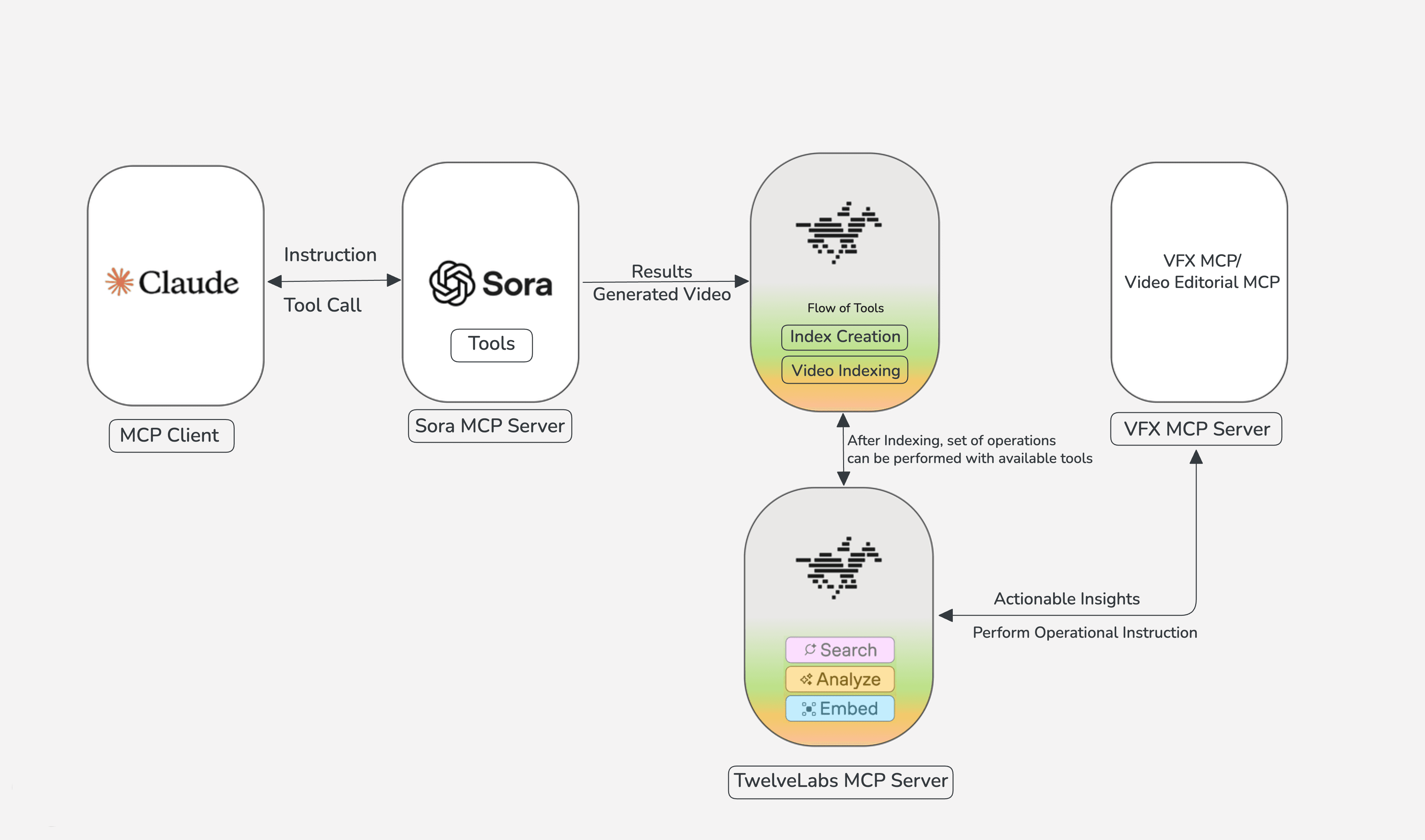
To truly unlock effective usage and leverage video intelligence as contextual data for your AI Agents, integrate other MCPs. Connect the File Handling MCP, the VFX MCP, or utilize the native capabilities of Claude Desktop to execute ffmpeg commands. This allows you to programmatically perform actions like trimming, merging, quality enhancement, applying transitions, or overlaying elements, all guided by the insights from your video analysis.
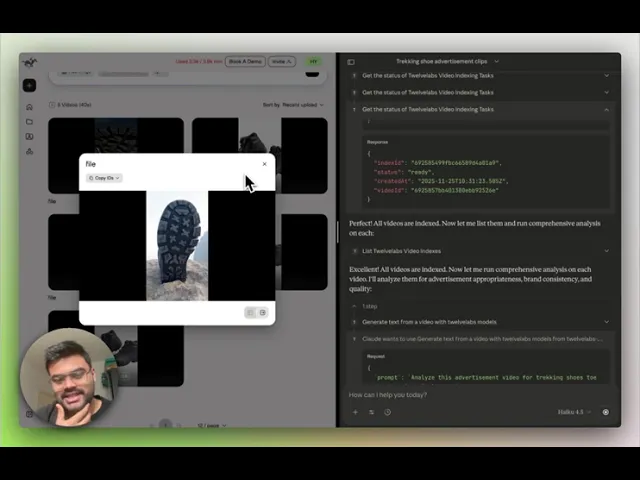
Below is a detailed walkthrough demonstrating how to generate personalized advertisements given any object as input. It showcases how powerful video understanding utilities are applied to extract actionable insights about in-video actions, directly informing targeted editing decisions for specific audiences. The walkthrough also covers essential operations using the VFX MCP.
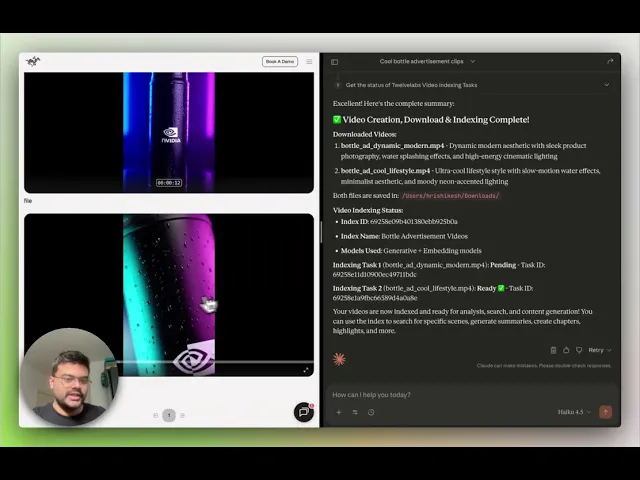
The Convergence of Video Intelligence and Content Creation
The application of content understanding to generated video assets facilitates and enables diverse avenues for optimization and workflow automation. The combined utilization of the TwelveLabs MCP and the Sora 2 Video Generation MCP ensures that every output is contextually coherent, and that assets acquire capabilities for personalization insights (e.g., tailored advertisements for specific demographics) and operational context for autonomous tools to execute automated actions on the video content. The extensive range of possibilities is detailed below:
A. Enhanced Content Moderation and Brand Compliance
The various video generation outputs have raised IP and likeness concerns, the TwelveLabs MCP can detect the copyrighted characters, logos, or any unsafe asset so that it can be flag, or provide the warning for the assets having the problem.
The quality control and brand checks, can be done in the iteration loop, which could refine the prompt to match the expectation of the user from the output, by getting the feedback by analyzing the generated video content assets especially for the personalized ads, and further it can be extended for further actionable insights from the TwelveLabs MCP analyze.
B. Comprehensive Metadata Generation
The TwelveLabs MCP is capable of automatically extracting granular metadata from generated videos, including topics, objects, actions, concise descriptions, and tags. Given that metadata assignment is a labor-intensive manual process, its automation not only conserves time but also improves recommendation systems and enhances content discoverability, searchability, and contextual relevance, especially when managing a substantial volume of generated video assets.
C. Contextualization for AI Agents
The application of Video Intelligence to generated video assets contributes to the contextualization necessary for AI Agents within the workflow, thereby extending their capability from interpretive analysis to active execution.
This enriched contextual layer allows the AI Agent or connected MCPs to perform actions on the video content. Agents can execute various operational actions, such as automated editorial decision-making, storyline validation, continuity checks, brand tone alignment, goal-driven content restructuring, and more. Agents can infer the significance of the content, its relation to specific scenes, and what subsequent actions or transformations should be initiated, which increases efficacy and can be characterized as "Vibe Editing" for video content.
D. Multilingual Support for Global Accessibility
The multilingual functionality within the TwelveLabs analysis utility improves video generation workflows by enabling accessibility features, such as translated subtitles, captions, and time-aligned transcripts across multiple languages. This enhanced linguistic utility ensures that every generated video asset is globally deployable or suitable for the target audience and is precisely timestamped for subsequent autonomous tasks.
AI Agents can then leverage this multilingual output for automated dubbing, region-specific editorial modifications, and the application of system-generated captions, resulting in a pipeline that is more adaptive and context-aware.
Next-Level Experimentation Beyond the Tutorial
You can push the boundaries of video creation by exploring how powerful video generation and deep video understanding can forge truly actionable, end-to-end workflows is key to unlocking next-generation applications. Here are advanced experimental directions you can immediately tackle with Sora 2 MCP and TwelveLabs MCP:
🎨 Automated Scene Expansion & Regeneration Loops
Leverage TwelveLabs' scene intelligence to pinpoint cinematic flaws, inconsistencies, or prime opportunities within a generated clip. Use those precise insights to instruct Sora 2 MCP to surgically regenerate or seamlessly extend specific scenes.
✂️ Auto Highlights, Cutdowns & Multi-Platform Reformatting
Instantly transform a single, raw Sora-generated video into a complete suite of platform-optimized assets: ultra-short clips, high-impact teasers, full trailers, compelling thumbnails, and polished vertical edits—all ready for deployment.
🤖 Agent-Ready Knowledge Bundles
Don't just generate video—generate data. Structure the content into powerful bundles of transcripts, detailed descriptions, accurate character timelines, and critical key moments. This is the structured data AI agents need to execute complex, utility-focused video editing tasks autonomously.
📡 Actionable Feedback Loops for Model Iteration
Identify and flag critical model issues—visual artifacts, physics violations, off-model characters, or unwanted scene elements—and automatically channel that structured feedback directly back into a Sora regeneration pipeline for immediate, precise correction.
Conclusion
The synergy between Sora 2's state-of-the-art generative video capabilities and TwelveLabs' deep video intelligence isn't just about creating media; it's about transforming it into an actionable, trustworthy, and highly functional asset. This combined MCP workflow gives developers the power to engineer rich workflows, automate critical content decisions, and structure media with meaningful, execution-ready context. The detailed guide demonstrates how generated video content can directly fuel personalized advertisement creation, using insights to dynamically trigger modifications, custom branding, or targeted messaging. Together, the TwelveLabs MCP tools empower developers, marketers, and researchers to engage with and build upon video in truly meaningful, programmatic ways.
Additional Resources on MCP
Install the MCP Server
Get started now. Use our Installation Guide to integrate the TwelveLabs MCP Server into your client.
Dive into the API Documentation
Explore the complete power of the protocol. Check out our Model Context Protocol documentation for detailed usage and seamless integration guides.
Build Your Own MCP Server
Interested in owning the stack? If you're a developer eager to create your own specialized MCP server, you can easily launch and host it on Alpic (free beta).
Migration notice: The TwelveLabs MCP server documented on this page has moved to mcp-alpic.twelvelabs.io/try. Update your MCP client configuration to use the new URL. The previous URL, mcp.twelvelabs.io/try, will be retired on July 15, 2026.
Introduction
This guide cuts straight to the core: leveraging the power of TwelveLabs MCP to supercharge your AI video generation workflows. Forget compatibility headaches; integrating MCP ensures seamless, system-wide collaboration, enabling effortlessly complex, chained pipelines across various compliant tools and servers.
Specifically, you will discover how to forge an impactful, production-ready workflow for social media and beyond by combining TwelveLabs MCP with cutting-edge video generation tools like the Sora 2 MCP server. Injecting video intelligence into every step of the pipeline unlocks richer, smarter, and truly dynamic content. We cover essential strategies and practical applications, from cinematic filmmaking and content creation to precision-targeted advertising.
Ready to build? Start now with the installation and configuration steps in the installation guide, or skip the reading and jump straight into the detailed tutorial video for a complete hands-on setup and prompting masterclass.
Integrating the TwelveLabs MCP on Claude Desktop
Step 1: Access the Setup Guide
Follow the official installation guide: https://mcp-install-instructions.alpic.cloud/servers/twelvelabs-mcp
This resource provides the definitive, step-by-step procedure for adding the TwelveLabs MCP server to your chosen MCP client.
Step 2: Obtain Your TwelveLabs API Key
Log in to your TwelveLabs account and retrieve your API key. This key is non-negotiable for setup, enabling the MCP server to securely and seamlessly access TwelveLabs APIs on your behalf.
Step 3: Select Your Preferred MCP Client
The setup guide contains specific instructions tailored for major clients, including Claude Desktop, Cursor, Goose, VS Code, and Claude Code. Choose your environment.
Step 4: Connect and Validate
After installation, confirm the TwelveLabs MCP server is correctly registered within your client's toolset. A successful connection verifies that your client is ready to execute TwelveLabs tools with zero friction.
Content Creation Workflow using TwelveLabs and Sora 2 MCP
Setup of Sora2 MCP
Clone the repository: https://github.com/Hrishikesh332/sora2-mcp
Make sure to install the required npm packages, set your OpenAI API key in the
.envfile, and configure it properly in the MCP server settings inside Claude Desktop. Also, ensure to read the README thoroughly to know more about the available tools.MCP Server Config for the Sora 2
{
  "mcpServers": {
    "sora-server": {
      "command": "node",
      "args": ["/ABSOLUTE/PATH/TO/sora-mcp/dist/stdio-server.js"],
      "env": {
        "OPENAI_API_KEY": "your-openai-api-key-here",
        "DOWNLOAD_DIR": "/Users/yourname/Downloads/sora"
      }
    }
  }
}
Steps for Effective Usage
Get started by configuring your environment with the TwelveLabs MCP and the Sora 2 Video Generation MCP within your preferred MCP client server. The workflow kicks off with your prompt—the scene definition, narration, or detailed video specifications. For Sora 2 MCP, if you're aiming for a personalized, input-driven video, make sure to provide the reference input path.
Upon initiation, Sora 2 MCP delivers multiple scene-aligned video variations based on your script. The critical next step is indexing these generated videos using the TwelveLabs MCP. Once indexing and monitoring are complete, you can run deep analysis on all indexed videos. This is where you extract the value: generating editor instructions for maximum engagement, producing accurate transcripts, verifying brand consistency, or determining the optimal scene alignment and sequence.
To truly unlock effective usage and leverage video intelligence as contextual data for your AI Agents, integrate other MCPs. Connect the File Handling MCP, the VFX MCP, or utilize the native capabilities of Claude Desktop to execute ffmpeg commands. This allows you to programmatically perform actions like trimming, merging, quality enhancement, applying transitions, or overlaying elements, all guided by the insights from your video analysis.
Below is a detailed walkthrough demonstrating how to generate personalized advertisements given any object as input. It showcases how powerful video understanding utilities are applied to extract actionable insights about in-video actions, directly informing targeted editing decisions for specific audiences. The walkthrough also covers essential operations using the VFX MCP.
The Convergence of Video Intelligence and Content Creation
The application of content understanding to generated video assets facilitates and enables diverse avenues for optimization and workflow automation. The combined utilization of the TwelveLabs MCP and the Sora 2 Video Generation MCP ensures that every output is contextually coherent, and that assets acquire capabilities for personalization insights (e.g., tailored advertisements for specific demographics) and operational context for autonomous tools to execute automated actions on the video content. The extensive range of possibilities is detailed below:
A. Enhanced Content Moderation and Brand Compliance
The various video generation outputs have raised IP and likeness concerns, the TwelveLabs MCP can detect the copyrighted characters, logos, or any unsafe asset so that it can be flag, or provide the warning for the assets having the problem.
The quality control and brand checks, can be done in the iteration loop, which could refine the prompt to match the expectation of the user from the output, by getting the feedback by analyzing the generated video content assets especially for the personalized ads, and further it can be extended for further actionable insights from the TwelveLabs MCP analyze.
B. Comprehensive Metadata Generation
The TwelveLabs MCP is capable of automatically extracting granular metadata from generated videos, including topics, objects, actions, concise descriptions, and tags. Given that metadata assignment is a labor-intensive manual process, its automation not only conserves time but also improves recommendation systems and enhances content discoverability, searchability, and contextual relevance, especially when managing a substantial volume of generated video assets.
C. Contextualization for AI Agents
The application of Video Intelligence to generated video assets contributes to the contextualization necessary for AI Agents within the workflow, thereby extending their capability from interpretive analysis to active execution.
This enriched contextual layer allows the AI Agent or connected MCPs to perform actions on the video content. Agents can execute various operational actions, such as automated editorial decision-making, storyline validation, continuity checks, brand tone alignment, goal-driven content restructuring, and more. Agents can infer the significance of the content, its relation to specific scenes, and what subsequent actions or transformations should be initiated, which increases efficacy and can be characterized as "Vibe Editing" for video content.
D. Multilingual Support for Global Accessibility
The multilingual functionality within the TwelveLabs analysis utility improves video generation workflows by enabling accessibility features, such as translated subtitles, captions, and time-aligned transcripts across multiple languages. This enhanced linguistic utility ensures that every generated video asset is globally deployable or suitable for the target audience and is precisely timestamped for subsequent autonomous tasks.
AI Agents can then leverage this multilingual output for automated dubbing, region-specific editorial modifications, and the application of system-generated captions, resulting in a pipeline that is more adaptive and context-aware.
Next-Level Experimentation Beyond the Tutorial
You can push the boundaries of video creation by exploring how powerful video generation and deep video understanding can forge truly actionable, end-to-end workflows is key to unlocking next-generation applications. Here are advanced experimental directions you can immediately tackle with Sora 2 MCP and TwelveLabs MCP:
🎨 Automated Scene Expansion & Regeneration Loops
Leverage TwelveLabs' scene intelligence to pinpoint cinematic flaws, inconsistencies, or prime opportunities within a generated clip. Use those precise insights to instruct Sora 2 MCP to surgically regenerate or seamlessly extend specific scenes.
✂️ Auto Highlights, Cutdowns & Multi-Platform Reformatting
Instantly transform a single, raw Sora-generated video into a complete suite of platform-optimized assets: ultra-short clips, high-impact teasers, full trailers, compelling thumbnails, and polished vertical edits—all ready for deployment.
🤖 Agent-Ready Knowledge Bundles
Don't just generate video—generate data. Structure the content into powerful bundles of transcripts, detailed descriptions, accurate character timelines, and critical key moments. This is the structured data AI agents need to execute complex, utility-focused video editing tasks autonomously.
📡 Actionable Feedback Loops for Model Iteration
Identify and flag critical model issues—visual artifacts, physics violations, off-model characters, or unwanted scene elements—and automatically channel that structured feedback directly back into a Sora regeneration pipeline for immediate, precise correction.
Conclusion
The synergy between Sora 2's state-of-the-art generative video capabilities and TwelveLabs' deep video intelligence isn't just about creating media; it's about transforming it into an actionable, trustworthy, and highly functional asset. This combined MCP workflow gives developers the power to engineer rich workflows, automate critical content decisions, and structure media with meaningful, execution-ready context. The detailed guide demonstrates how generated video content can directly fuel personalized advertisement creation, using insights to dynamically trigger modifications, custom branding, or targeted messaging. Together, the TwelveLabs MCP tools empower developers, marketers, and researchers to engage with and build upon video in truly meaningful, programmatic ways.
Additional Resources on MCP
Install the MCP Server
Get started now. Use our Installation Guide to integrate the TwelveLabs MCP Server into your client.
Dive into the API Documentation
Explore the complete power of the protocol. Check out our Model Context Protocol documentation for detailed usage and seamless integration guides.
Build Your Own MCP Server
Interested in owning the stack? If you're a developer eager to create your own specialized MCP server, you can easily launch and host it on Alpic (free beta).
In this article
No headings found on page
Search, analyze, and explore your videos with AI.
Join our newsletter
Receive the latest advancements, tutorials, and industry insights in video understanding



©
2026년
주식회사 트웰브랩스. All Rights Reserved

©
2026년
주식회사 트웰브랩스. All Rights Reserved

©
2026년
주식회사 트웰브랩스. All Rights Reserved