" height="1.90314px" id="wtDTm6bEW" transform="translate(26.225 0)" width="2.4723000000000006px"/><path d="M 0.557 0 L 1.438 0 C 1.746 0 1.995 0.25 1.995 0.559 L 1.995 1.344 C 1.995 1.653 1.746 1.903 1.438 1.903 L 0.557 1.903 C 0.25 1.903 0 1.653 0 1.344 L 0 0.559 C 0 0.25 0.25 0 0.557 0 Z" fill="rgb(29, 28, 27)" height="1.9031500000000001px" id="GnmDnNra_" transform="translate(36.408 2.728)" width="1.9953000000000003px"/><path d="M 6.224 0 L 0.558 0 C 0.25 0 0 0.25 0 0.559 L 0 1.344 C 0 1.653 0.25 1.903 0.558 1.903 L 6.224 1.903 C 6.531 1.903 6.781 1.653 6.781 1.344 L 6.781 0.559 C 6.781 0.25 6.531 0 6.224 0 Z" fill="rgb(29, 28, 27)" height="1.9031500000000001px" id="hKTQ3dbw4" transform="translate(34.261 5.456)" width="6.781100000000002px"/><path d="M 6.955 0 L 0.558 0 C 0.25 0 0 0.25 0 0.559 L 0 1.344 C 0 1.653 0.25 1.903 0.558 1.903 L 6.955 1.903 C 7.263 1.903 7.513 1.653 7.513 1.344 L 7.513 0.559 C 7.513 0.25 7.263 0 6.955 0 Z" fill="rgb(29, 28, 27)" height="1.9031500000000001px" id="G1Zzk9CUU" transform="translate(28.298 8.243)" width="7.513100000000001px"/><path d="M 7.123 0 L 0.558 0 C 0.25 0 0 0.25 0 0.559 L 0 1.344 C 0 1.653 0.25 1.903 0.558 1.903 L 7.123 1.903 C 7.431 1.903 7.681 1.653 7.681 1.344 L 7.681 0.559 C 7.681 0.25 7.431 0 7.123 0 Z" fill="rgb(29, 28, 27)" height="1.9030999999999985px" id="fm7cHxIfJ" transform="translate(0 10.972)" width="7.68067px"/><path d="M 13.447 0 L 0.558 0 C 0.25 0 0 0.25 0 0.559 L 0 1.344 C 0 1.653 0.25 1.903 0.558 1.903 L 13.447 1.903 C 13.755 1.903 14.004 1.653 14.004 1.344 L 14.004 0.559 C 14.004 0.25 13.755 0 13.447 0 Z" fill="rgb(29, 28, 27)" height="1.9030999999999985px" id="LowSwDrtg" transform="translate(9.552 10.972)" width="14.0044px"/><path d="M 0.558 0 L 8.212 0 C 8.52 0 8.77 0.25 8.77 0.559 L 8.77 1.344 C 8.77 1.653 8.52 1.903 8.212 1.903 L 0.558 1.903 C 0.25 1.903 0 1.653 0 1.344 L 0 0.559 C 0 0.25 0.25 0 0.558 0 Z" fill="rgb(29, 28, 27)" height="1.9030999999999985px" id="xRiKc2od7" transform="translate(27.041 10.972)" width="8.769900000000003px"/><path d="M 0.557 0 L 5.4 0 C 5.708 0 5.958 0.25 5.958 0.559 L 5.958 1.344 C 5.958 1.653 5.708 1.903 5.4 1.903 L 0.557 1.903 C 0.25 1.903 0 1.653 0 1.344 L 0 0.559 C 0 0.25 0.25 0 0.557 0 Z" fill="rgb(29, 28, 27)" height="1.9031500000000001px" id="JWdNVicde" transform="translate(36.796 8.243)" width="5.957599999999999px"/><path d="M 1.438 0 L 0.558 0 C 0.25 0 0 0.25 0 0.559 L 0 1.344 C 0 1.653 0.25 1.903 0.558 1.903 L 1.438 1.903 C 1.746 1.903 1.995 1.653 1.995 1.344 L 1.995 0.559 C 1.995 0.25 1.746 0 1.438 0 Z" fill="rgb(29, 28, 27)" height="1.9031500000000001px" id="RfFYVCT_T" transform="translate(28.717 5.456)" width="1.9953000000000003px"/><path d="M 0.558 0 L 2.895 0 C 3.203 0 3.453 0.25 3.453 0.559 L 3.453 1.406 C 3.453 1.714 3.203 1.964 2.895 1.964 L 0.558 1.964 C 0.25 1.964 0 1.714 0 1.406 L 0 0.559 C 0 0.25 0.25 0 0.558 0 Z" fill="rgb(29, 28, 27)" height="1.964299999999998px" id="dngJ6MU2p" transform="translate(16.183 24.582)" width="3.4525000000000006px"/><path d="M 1.706 0 L 0.558 0 C 0.25 0 0 0.25 0 0.559 L 0 1.406 C 0 1.714 0.25 1.964 0.558 1.964 L 1.706 1.964 C 2.014 1.964 2.263 1.714 2.263 1.406 L 2.263 0.559 C 2.263 0.25 2.014 0 1.706 0 Z" fill="rgb(29, 28, 27)" height="1.964299999999998px" id="N_fstvKmR" transform="translate(22.18 24.582)" width="2.2631999999999977px"/><path d="M 0.558 0 L 5.544 0 C 5.852 0 6.101 0.25 6.101 0.559 L 6.101 1.406 C 6.101 1.714 5.852 1.964 5.544 1.964 L 0.558 1.964 C 0.25 1.964 0 1.714 0 1.406 L 0 0.559 C 0 0.25 0.25 0 0.558 0 Z" fill="rgb(29, 28, 27)" height="1.964299999999998px" id="t55XLYcgb" transform="translate(25.486 24.582)" width="6.101399999999998px"/><path d="M 1.976 0 L 0.558 0 C 0.25 0 0 0.25 0 0.559 L 0 1.406 C 0 1.714 0.25 1.964 0.558 1.964 L 1.976 1.964 C 2.284 1.964 2.533 1.714 2.533 1.406 L 2.533 0.559 C 2.533 0.25 2.284 0 1.976 0 Z" fill="rgb(29, 28, 27)" height="1.964299999999998px" id="ZrEKTVTAe" transform="translate(28.542 21.854)" width="2.5334000000000003px"/><path d="M 0.557 0 L 1.438 0 C 1.746 0 1.995 0.25 1.995 0.559 L 1.995 1.406 C 1.995 1.714 1.746 1.964 1.438 1.964 L 0.557 1.964 C 0.25 1.964 0 1.714 0 1.406 L 0 0.559 C 0 0.25 0.25 0 0.557 0 Z" fill="rgb(29, 28, 27)" height="1.964299999999998px" id="Z0fPTp9aR" transform="translate(11.425 24.582)" width="1.9953000000000003px"/><path d="M 0 0.559 C 0 0.251 0.251 0 0.558 0 L 1.438 0 C 1.745 0 1.995 0.251 1.995 0.559 L 1.995 1.405 C 1.995 1.713 1.745 1.964 1.438 1.964 L 0.558 1.964 C 0.251 1.964 0 1.713 0 1.405 Z" fill="rgb(29, 28, 27)" height="1.964299999999998px" id="Tj_PDHFDh" transform="translate(20.635 27.308)" width="1.9954px"/><path d="M 0.557 0 L 1.342 0 C 1.65 0 1.899 0.25 1.899 0.559 L 1.899 1.406 C 1.899 1.714 1.65 1.964 1.342 1.964 L 0.557 1.964 C 0.25 1.964 0 1.714 0 1.406 L 0 0.559 C 0 0.25 0.25 0 0.557 0 Z" fill="rgb(29, 28, 27)" height="1.9643000000000015px" id="AYq9dXkKz" transform="translate(18.686 30.036)" width="1.8994px"/><path d="M 0.558 0 L 5.768 0 C 6.076 0 6.326 0.25 6.326 0.559 L 6.326 1.344 C 6.326 1.653 6.076 1.903 5.768 1.903 L 0.558 1.903 C 0.25 1.903 0 1.653 0 1.344 L 0 0.559 C 0 0.25 0.25 0 0.558 0 Z" fill="rgb(29, 28, 27)" height="1.9031500000000001px" id="rspevfJcx" transform="translate(12.157 8.243)" width="6.325900000000001px"/><path d="M 3.285 0 L 0.558 0 C 0.25 0 0 0.25 0 0.559 L 0 1.344 C 0 1.653 0.25 1.903 0.558 1.903 L 3.285 1.903 C 3.593 1.903 3.842 1.653 3.842 1.344 L 3.842 0.559 C 3.842 0.25 3.593 0 3.285 0 Z" fill="rgb(29, 28, 27)" height="1.9031500000000001px" id="XRUAhGnph" transform="translate(23.887 2.728)" width="3.8424000000000014px"/><path d="M 0.558 0 L 5.644 0 C 5.952 0 6.202 0.25 6.202 0.559 L 6.202 1.344 C 6.202 1.653 5.952 1.903 5.644 1.903 L 0.558 1.903 C 0.25 1.903 0 1.653 0 1.344 L 0 0.559 C 0 0.25 0.25 0 0.558 0 Z" fill="rgb(29, 28, 27)" height="1.9031500000000001px" id="VsaVVIfke" transform="translate(21.528 5.456)" width="6.201600000000003px"/><path d="M 3.06 0 L 0.558 0 C 0.25 0 0 0.25 0 0.559 L 0 1.344 C 0 1.653 0.25 1.903 0.558 1.903 L 3.06 1.903 C 3.369 1.903 3.618 1.653 3.618 1.344 L 3.618 0.559 C 3.618 0.25 3.369 0 3.06 0 Z" fill="rgb(29, 28, 27)" height="1.9030999999999985px" id="wiAKEgyId" transform="translate(40.819 10.972)" width="3.6182000000000016px"/><path d="M 0.558 0 L 17.318 0 C 17.626 0 17.875 0.25 17.875 0.559 L 17.875 1.345 C 17.875 1.653 17.626 1.903 17.318 1.903 L 0.558 1.903 C 0.25 1.903 0 1.653 0 1.345 L 0 0.559 C 0 0.25 0.25 0 0.558 0 Z" fill="rgb(29, 28, 27)" height="1.9032px" id="FIE0ufK9m" transform="translate(6.666 13.7)" width="17.87506px"/><path d="M 6.426 0 L 0.558 0 C 0.25 0 0 0.25 0 0.559 L 0 1.345 C 0 1.653 0.25 1.903 0.558 1.903 L 6.426 1.903 C 6.734 1.903 6.984 1.653 6.984 1.345 L 6.984 0.559 C 6.984 0.25 6.734 0 6.426 0 Z" fill="rgb(29, 28, 27)" height="1.9032000000000018px" id="ut9UWny3L" transform="translate(22.892 19.156)" width="6.983599999999999px"/><path d="M 0.558 0 L 22.151 0 C 22.459 0 22.709 0.25 22.709 0.559 L 22.709 1.344 C 22.709 1.653 22.459 1.903 22.151 1.903 L 0.558 1.903 C 0.25 1.903 0 1.653 0 1.344 L 0 0.559 C 0 0.25 0.25 0 0.558 0 Z" fill="rgb(29, 28, 27)" height="1.9030999999999985px" id="VULnffgbk" transform="translate(9.552 16.428)" width="22.7089px"/><path d="M 7.886 0 L 0.558 0 C 0.25 0 0 0.25 0 0.559 L 0 1.345 C 0 1.653 0.25 1.903 0.558 1.903 L 7.886 1.903 C 8.194 1.903 8.443 1.653 8.443 1.345 L 8.443 0.559 C 8.443 0.25 8.194 0 7.886 0 Z" fill="rgb(29, 28, 27)" height="1.9032000000000018px" id="adZTYr4MR" transform="translate(6.078 19.156)" width="8.44303px"/><path d="M 0.558 0 L 2.211 0 C 2.519 0 2.769 0.25 2.769 0.559 L 2.769 1.406 C 2.769 1.714 2.519 1.964 2.211 1.964 L 0.558 1.964 C 0.25 1.964 0 1.714 0 1.406 L 0 0.559 C 0 0.25 0.25 0 0.558 0 Z" fill="rgb(29, 28, 27)" height="1.964299999999998px" id="bwdUdEmCH" transform="translate(13.784 21.854)" width="2.768600000000001px"/><path d="M 2.424 0 L 0.558 0 C 0.25 0 0 0.25 0 0.559 L 0 1.406 C 0 1.714 0.25 1.964 0.558 1.964 L 2.424 1.964 C 2.732 1.964 2.982 1.714 2.982 1.406 L 2.982 0.559 C 2.982 0.25 2.732 0 2.424 0 Z" fill="rgb(29, 28, 27)" height="1.964299999999998px" id="PUvesMJEj" transform="translate(23.556 21.854)" width="2.982199999999999px"/><path d="M 0.558 0 L 2.241 0 C 2.55 0 2.799 0.25 2.799 0.559 L 2.799 1.406 C 2.799 1.714 2.55 1.964 2.241 1.964 L 0.558 1.964 C 0.25 1.964 0 1.714 0 1.406 L 0 0.559 C 0 0.25 0.25 0 0.558 0 Z" fill="rgb(29, 28, 27)" height="1.964299999999998px" id="Wo2W7J3Zj" transform="translate(8.672 21.854)" width="2.799050000000001px"/><path d="M 6.661 0 L 0.558 0 C 0.25 0 0 0.25 0 0.559 L 0 1.345 C 0 1.653 0.25 1.903 0.558 1.903 L 6.661 1.903 C 6.969 1.903 7.219 1.653 7.219 1.345 L 7.219 0.559 C 7.219 0.25 6.969 0 6.661 0 Z" fill="rgb(29, 28, 27)" height="1.9032px" id="PpPVZXp9j" transform="translate(27.041 13.7)" width="7.218900000000001px"/><path d="M 0.621 1.905 C 0.218 1.905 0 1.687 0 1.283 L 0 0.622 C 0 0.218 0.218 0 0.621 0 L 11.225 0 C 11.628 0 11.846 0.218 11.846 0.622 L 11.846 1.283 C 11.846 1.687 11.628 1.905 11.225 1.905 L 6.934 1.905 L 6.934 14.926 C 6.934 15.33 6.716 15.548 6.313 15.548 L 5.537 15.548 C 5.134 15.548 4.916 15.33 4.916 14.926 L 4.916 1.905 Z" fill="rgb(29, 28, 27)" height="15.54825px" id="xr32fxeO6" transform="translate(52.177 8.243)" width="11.845599999999997px"/><path d="M 0.621 0 C 0.218 0 0 0.218 0 0.622 L 0 14.924 C 0 15.328 0.218 15.546 0.621 15.546 L 1.357 15.546 C 1.76 15.546 1.978 15.328 1.978 14.924 L 1.978 0.622 C 1.978 0.218 1.76 0 1.357 0 Z" fill="rgb(29, 28, 27)" height="15.546050000000001px" id="oSsO_UPVN" transform="translate(90.476 8.243)" width="1.9779000000000053px"/><path d="M 0.62 15.546 C 0.217 15.546 0 15.328 0 14.924 L 0 0.622 C 0 0.218 0.217 0 0.62 0 L 1.396 0 C 1.799 0 2.017 0.218 2.017 0.622 L 2.017 13.632 L 8.981 13.632 C 9.384 13.632 9.602 13.85 9.602 14.254 L 9.602 14.924 C 9.602 15.328 9.384 15.546 8.981 15.546 Z" fill="rgb(29, 28, 27)" height="15.546050000000001px" id="Sgj4z5osO" transform="translate(116.749 8.243)" width="9.602000000000004px"/><path d="M 1.974 14.924 C 1.974 15.328 1.756 15.546 1.353 15.546 L 0.621 15.546 C 0.218 15.546 0 15.328 0 14.924 L 0 0.622 C 0 0.218 0.218 0 0.621 0 L 1.357 0 C 1.76 0 1.978 0.218 1.978 0.622 L 1.978 5.747 C 2.634 4.721 3.806 4.079 5.309 4.079 C 8.18 4.079 10.356 6.358 10.356 9.948 C 10.356 13.538 8.18 15.817 5.309 15.817 C 3.801 15.817 2.627 15.175 1.971 14.145 L 1.971 14.922 Z M 8.36 9.95 C 8.36 7.362 6.881 5.928 5.121 5.928 C 3.361 5.928 1.863 7.362 1.863 9.95 C 1.863 12.539 3.361 13.972 5.121 13.972 C 6.881 13.972 8.36 12.539 8.36 9.95 Z" fill="rgb(29, 28, 27)" height="15.81665px" id="q13jjj7xd" transform="translate(138.401 8.243)" width="10.355999999999995px"/><path d="M 4.457 11.738 C 0.961 11.738 -0.019 9.872 0 8.318 C 0.005 7.929 0.253 7.735 0.645 7.735 L 1.344 7.735 C 1.748 7.735 1.922 7.949 1.961 8.352 C 2.063 9.315 2.693 9.907 4.433 9.907 C 6.174 9.907 7.012 9.269 7.012 8.289 C 7.012 7.425 6.522 7.108 5.305 6.899 L 3.209 6.539 C 1.453 6.238 0.29 5.247 0.29 3.468 C 0.29 1.467 1.774 0 4.518 0 C 7.263 0 8.838 1.491 8.814 3.23 C 8.81 3.614 8.553 3.808 8.165 3.808 L 7.457 3.808 C 7.054 3.808 6.908 3.595 6.851 3.202 C 6.749 2.477 6.159 1.818 4.518 1.818 C 2.878 1.818 2.249 2.508 2.249 3.403 C 2.249 4.175 2.695 4.516 3.81 4.714 L 5.906 5.083 C 7.72 5.404 8.98 6.292 8.98 8.198 C 8.98 9.976 7.908 11.74 4.455 11.74 Z" fill="rgb(29, 28, 27)" height="11.739799999999999px" id="tJ8syeWTW" transform="translate(150.024 12.325)" width="8.980269730401375px"/><path d="M 9.146 7.997 C 9.146 8.813 9.175 9.983 9.282 10.799 C 9.334 11.223 9.155 11.465 8.728 11.465 L 8.068 11.465 C 7.685 11.465 7.467 11.319 7.428 11.022 L 7.317 10.181 C 6.724 11.157 5.565 11.659 4.145 11.659 C 1.579 11.659 0 10.142 0 8.078 C 0 6.27 1.27 5.157 3.433 5.002 L 6.589 4.78 C 7.162 4.741 7.186 4.688 7.186 4.153 L 7.186 3.682 C 7.186 2.438 6.434 1.807 4.79 1.807 C 3.145 1.807 2.472 2.425 2.405 3.289 C 2.376 3.697 2.235 3.916 1.823 3.916 L 1.067 3.916 C 0.675 3.916 0.427 3.717 0.422 3.328 C 0.407 1.51 1.74 0 4.792 0 C 7.798 0 9.162 1.427 9.155 3.736 Z M 7.188 7.298 L 7.188 6.244 C 6.955 6.327 6.678 6.386 6.363 6.415 L 3.598 6.676 C 2.59 6.775 1.997 7.163 1.997 8.099 L 1.999 8.099 C 1.999 9.188 2.886 9.97 4.4 9.97 C 6.169 9.97 7.188 8.9 7.188 7.298 Z" fill="rgb(29, 28, 27)" height="11.658999999999999px" id="QPESIZvku" transform="translate(126.854 12.325)" width="9.290755130109668px"/><path d="M 5.224 0 C 8.313 0 10.295 2.255 10.295 5.456 L 10.295 5.694 C 10.295 6.098 10.077 6.316 9.674 6.316 L 1.998 6.316 C 2.168 8.547 3.447 9.898 5.407 9.898 C 6.768 9.898 7.598 9.363 7.934 8.431 C 8.06 8.078 8.243 7.892 8.618 7.892 L 9.33 7.892 C 9.746 7.892 9.994 8.125 9.923 8.538 C 9.598 10.433 7.834 11.74 5.409 11.74 L 5.407 11.738 C 2.168 11.738 0 9.424 0 5.797 C 0 2.169 2.135 0 5.224 0 Z M 5.222 1.74 C 3.494 1.74 2.405 2.818 2.074 4.64 L 8.282 4.64 C 8.054 2.842 6.949 1.74 5.222 1.74 Z" fill="rgb(29, 28, 27)" height="11.739799999999999px" id="PKmyQkwJE" transform="translate(104.541 12.325)" width="10.295000000000002px"/><path d="M 4.459 11.194 C 4.099 11.194 3.877 11.039 3.746 10.703 L 0.091 1.021 C -0.024 0.72 -0.031 0.511 0.076 0.297 C 0.178 0.094 0.381 0 0.732 0 L 1.274 0 C 1.633 0 1.86 0.155 1.986 0.495 L 4.958 8.503 L 5.123 9.018 L 5.289 8.503 L 8.262 0.495 C 8.388 0.155 8.615 0 8.974 0 L 9.517 0 C 9.865 0 10.07 0.092 10.172 0.297 C 10.279 0.511 10.275 0.72 10.157 1.021 L 6.502 10.703 C 6.371 11.039 6.149 11.194 5.79 11.194 Z" fill="rgb(29, 28, 27)" height="11.1941px" id="uUQr5Yl4B" transform="translate(93.807 12.595)" width="10.248961642504256px"/><path d="M 5.407 11.738 C 2.167 11.738 0 9.424 0 5.797 C 0 2.169 2.133 0 5.221 0 C 8.31 0 10.292 2.255 10.292 5.456 L 10.292 5.694 C 10.292 6.098 10.075 6.316 9.672 6.316 L 1.995 6.316 C 2.165 8.547 3.446 9.898 5.404 9.898 C 6.768 9.898 7.596 9.363 7.931 8.431 C 8.058 8.078 8.241 7.892 8.615 7.892 L 9.328 7.892 C 9.744 7.892 9.992 8.125 9.918 8.538 C 9.593 10.433 7.829 11.74 5.404 11.74 Z M 8.282 4.64 C 8.053 2.842 6.949 1.74 5.221 1.74 C 3.494 1.74 2.405 2.818 2.074 4.64 Z" fill="rgb(29, 28, 27)" height="11.739799999999999px" id="zo1nSBuSF" transform="translate(78.397 12.325)" width="10.29249999999999px"/><path d="M 3.057 10.677 C 3.163 11.026 3.392 11.192 3.756 11.192 L 3.749 11.194 L 4.987 11.194 C 5.35 11.194 5.579 11.028 5.69 10.679 L 8.173 2.654 L 8.237 2.401 L 8.3 2.654 L 10.787 10.679 C 10.894 11.028 11.123 11.194 11.487 11.194 L 12.733 11.194 C 13.096 11.194 13.325 11.028 13.432 10.679 L 16.418 1.006 C 16.516 0.7 16.512 0.498 16.41 0.288 C 16.307 0.089 16.109 0.002 15.76 0.002 L 15.218 0.002 C 14.848 0.002 14.626 0.168 14.519 0.522 L 12.094 8.547 L 12.046 8.761 L 11.999 8.542 L 9.506 0.517 C 9.4 0.168 9.171 0.002 8.807 0.002 L 7.683 0.002 C 7.319 0.002 7.091 0.168 6.984 0.517 L 4.492 8.542 L 4.449 8.745 L 4.405 8.551 L 1.98 0.519 C 1.874 0.166 1.649 0 1.281 0 L 0.728 0 C 0.38 0 0.181 0.087 0.079 0.286 C -0.021 0.493 -0.028 0.698 0.07 1.004 Z" fill="rgb(29, 28, 27)" height="11.194099999999999px" id="uboloLX99" transform="translate(61.282 12.598)" width="16.489163442184434px"/></svg>)
Tutorials
From Long-Form Episodes to Personalized Vertical Feeds: Building a Superfan Feed Engine with TwelveLabs
Transform full reality TV episodes into a personalized, TikTok-style vertical feed that serves profile-ranked clips in under 2 seconds. This tutorial builds the pipeline on TwelveLabs Pegasus 1.5 for per-clip structured metadata, Marengo 3.0 for semantic search, and Jockey 1.0 for cross-episode reasoning.
Nathan Che
Tutorials
From Long-Form Episodes to Personalized Vertical Feeds: Building a Superfan Feed Engine with TwelveLabs
Transform full reality TV episodes into a personalized, TikTok-style vertical feed that serves profile-ranked clips in under 2 seconds. This tutorial builds the pipeline on TwelveLabs Pegasus 1.5 for per-clip structured metadata, Marengo 3.0 for semantic search, and Jockey 1.0 for cross-episode reasoning.
Nathan Che

2026. 7. 23.
18 Minutes
링크 복사하기
TLDR
Most streaming platforms have spent years building content libraries and almost no time building tools to navigate them. The result is massive episode catalogs that younger audiences scroll past in favor of TikTok and Reels.
This leads to a predicament as the bottleneck is not content volume, but rather intelligent systems as legacy manual tagging cannot scale to identify every tension-filled glance or designer outfit across thousands of episodes. Basic metadata can also not distinguish a playful argument from a relationship-ending fight, which are the moments younger audience members prioritize in their short-form content.
This tutorial walks through a complete solution built on TwelveLabs Pegasus 1.5, Marengo 3.0, and Jockey 1.0. The output is a personalized, TikTok-style vertical feed that serves profile-ranked clips in under 2 seconds, runs semantic search across indexed episodes, and surfaces cross-season story arcs through natural language queries.
What you will build: A pipeline that transforms full reality TV episodes into queryable, bite-sized moments. The system matches scenes to user personas based on emotional intensity, tracks cast entities across entire seasons, and generates dynamic feeds with transparent AI reasoning behind every clip selection.
Introduction
Three structural problems prevent streaming platforms from building the kind of experience that actually retains superfans and the younger generation.
Scale. Identifying every meaningful moment in a 40+ minute episode, across a library of hundreds of episodes, requires armies of human loggers. Beyond the direct cost, those loggers need full-show context to avoid surfacing spoilers or irrelevant clips out of sequence, which poses IP and platform reputation risks if mistakes are made at pivotal moments in the show.
Depth. Traditional metadata are often surface-level tags. A tag like "argument" tells a recommendation engine nothing about whether the scene is playful shade between friends or a relationship-ending confrontation. The distinction determines whether a clip belongs in a Drama Addict's feed or a Romance Fan's. Without that depth, recommendations feel random.
Continuity. Single-video analysis, even good single-video analysis, has no memory. It can tag a fight scene but cannot recognize that the same two cast members have been building toward this moment for three episodes. This context is what can differentiate scenes as normal versus one that engages the superfan more with the TV series.
This tutorial builds a hybrid architecture that solves all three at once. The system combines three TwelveLabs models, each solving a distinct layer of the problem:
Layer | API | Model | Use Case |
Scene Tagging | Analyze (async) | Single video analysis in 10–30s windows for taxonomy and emotional intensity | |
Semantic Search | Search | Embedding search for natural language queries and content discovery | |
Cross-episode | Responses | Cross-Episode video reasoning to identify season arcs, cast tracking, and ranking of clips for superfans. |
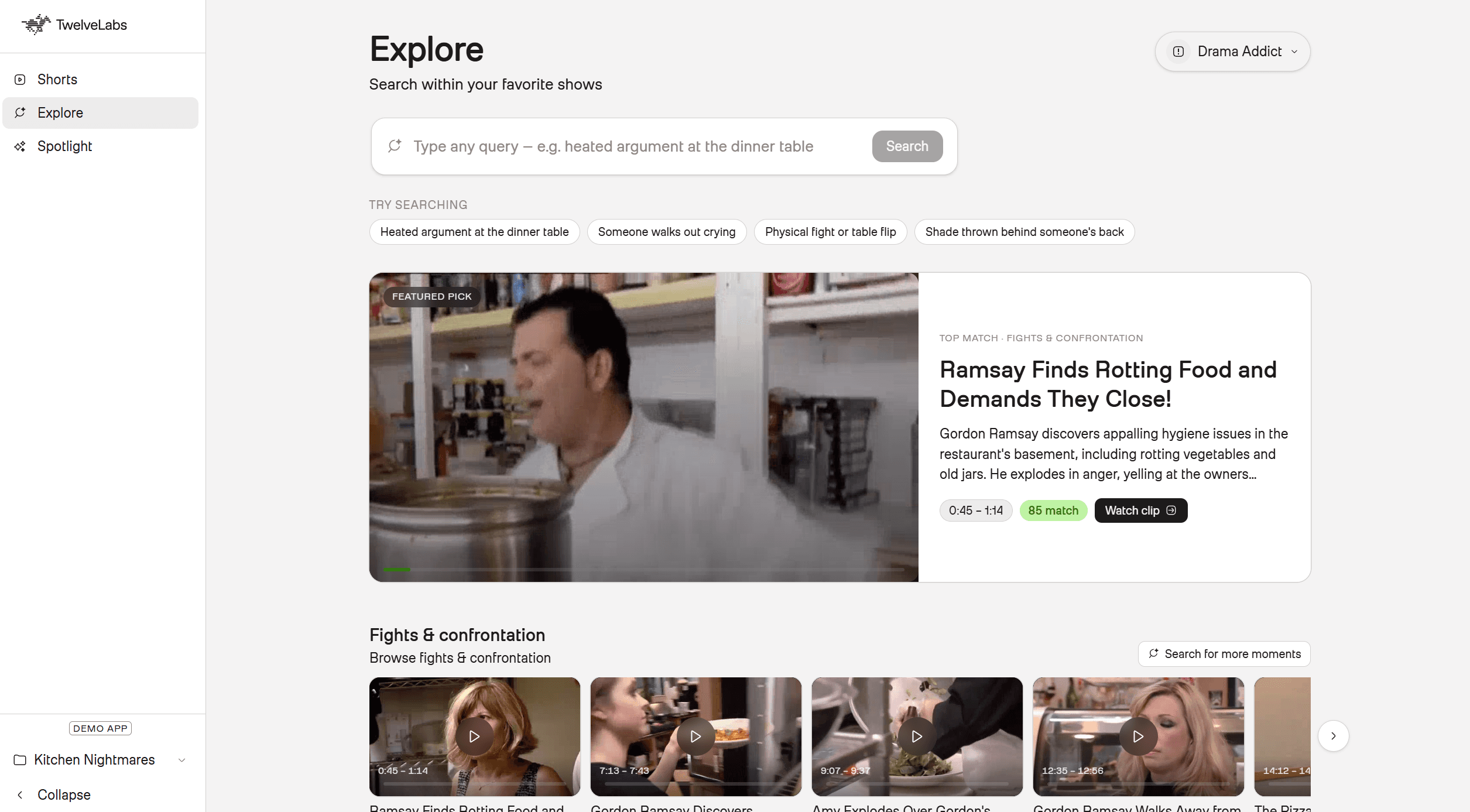
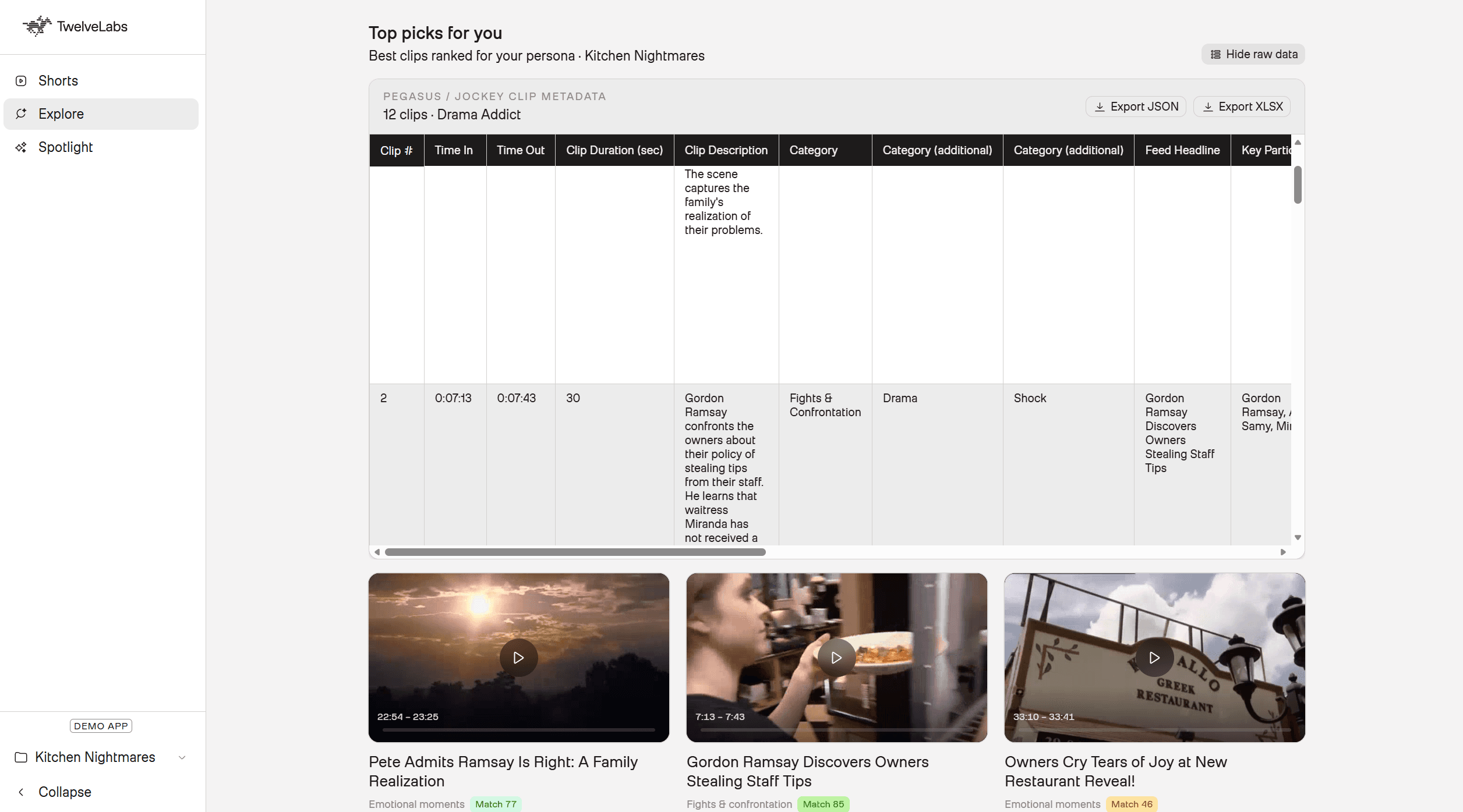
Figure 1: Explore Tab displaying Personalized Shorts for “Drama Addict”
This architecture and release of new unified foundational multimodal models like Jockey proves that it is now possible to build the editorial intelligence of a full logging team into an API pipeline, and extend it with corpus-level reasoning that no human logger could produce in real time.
Here is a walkthrough of the application in action!
You can also visit the live demo site here: Superfan Vertical Feed
Prerequisites
Before building along, confirm you have the following:
Runtime (Vercel / Next.js)
Node.js 20+
TwelveLabs API key with:
TL_INDEX_ID: Marengo index for search and HLS playbackTL_KS_ID: Jockey Knowledge Store for cross-episode reasoning
Pre-processing (local Python pipeline)
Python 3.10+
pip install -r requirements.txt(twelvelabs, requests, python-dotenv)Episodes uploaded as TwelveLabs assets (24-char hex IDs, HLS enabled). Assets can be created in the TwelveLabs Playground under "Assets."
Clone and run:
git clone https://github.com/nathanchess/fox-superfan-feed.git
cd fox-superfan-feed/app
npm install
cp .env.example .env.local
npm
git clone https://github.com/nathanchess/fox-superfan-feed.git
cd fox-superfan-feed/app
npm install
cp .env.example .env.local
npm
Architecture Overview
The platform splits into two distinct phases: offline pre-processing (run once per season or whenever new episodes are added) and runtime serving (real-time API calls to TwelveLabs video models on Vercel).
💡 System Design Note: This is the same pattern enterprise search engines use. To keep feed generation fast for personalized or profile-based requests, computationally expensive work happens offline. Pegasus segments every episode, Jockey enriches the corpus, and the resulting manifest gets committed to the repo. At request time, the app reads pre-built JSON and runs in-memory scoring. No model is re-invoked on the fly for standard feeds unless needed.
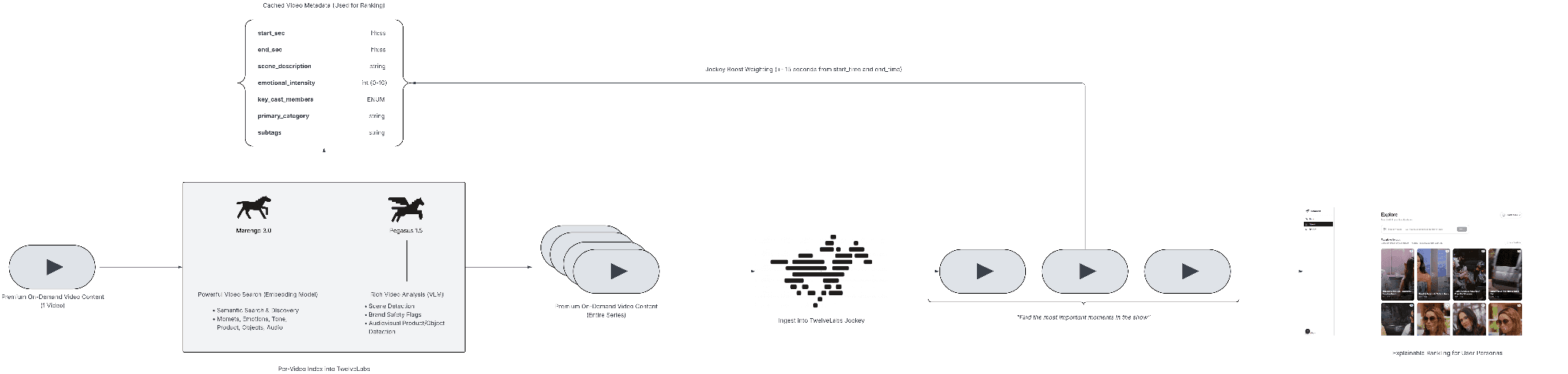
Figure 2: Superfan Vertical Feed Engine Architecture (Link)
Each model in the pipeline serves a specific purpose:
Pegasus 1.5 is the primary source of per-clip metadata. The time-based metadata feature lets you extract structured JSON from each 15-30 second segment, including scene description, emotional intensity, primary category, subtags, and key cast members. These fields directly power the ranking algorithm: a clip gets boosted if a favorite cast member appears, if its emotional intensity matches a persona's preference, and if its category aligns with the persona's interests.
Jockey 1.0 solves the one thing Pegasus cannot: relative importance. Two clips might have identical categories, intensities, and cast members. What distinguishes them is how much weight the broader season gives to each moment. A recurring feud between the two leads is more significant than a one-off confrontation, and only corpus-level reasoning can surface that distinction. Jockey runs across the full Knowledge Store, identifies season-defining moments, and applies a jockey_boost flag to the segments within 10-15 seconds of those moments.
Marengo 3.0 handles ad-hoc semantic search. When a user types "awkward dinner party" or "someone storms out" in the Explore tab, Marengo queries the full indexed library across visual, audio, and transcription modalities and returns timestamped hits grounded in actual content, not keyword overlap on a title field.
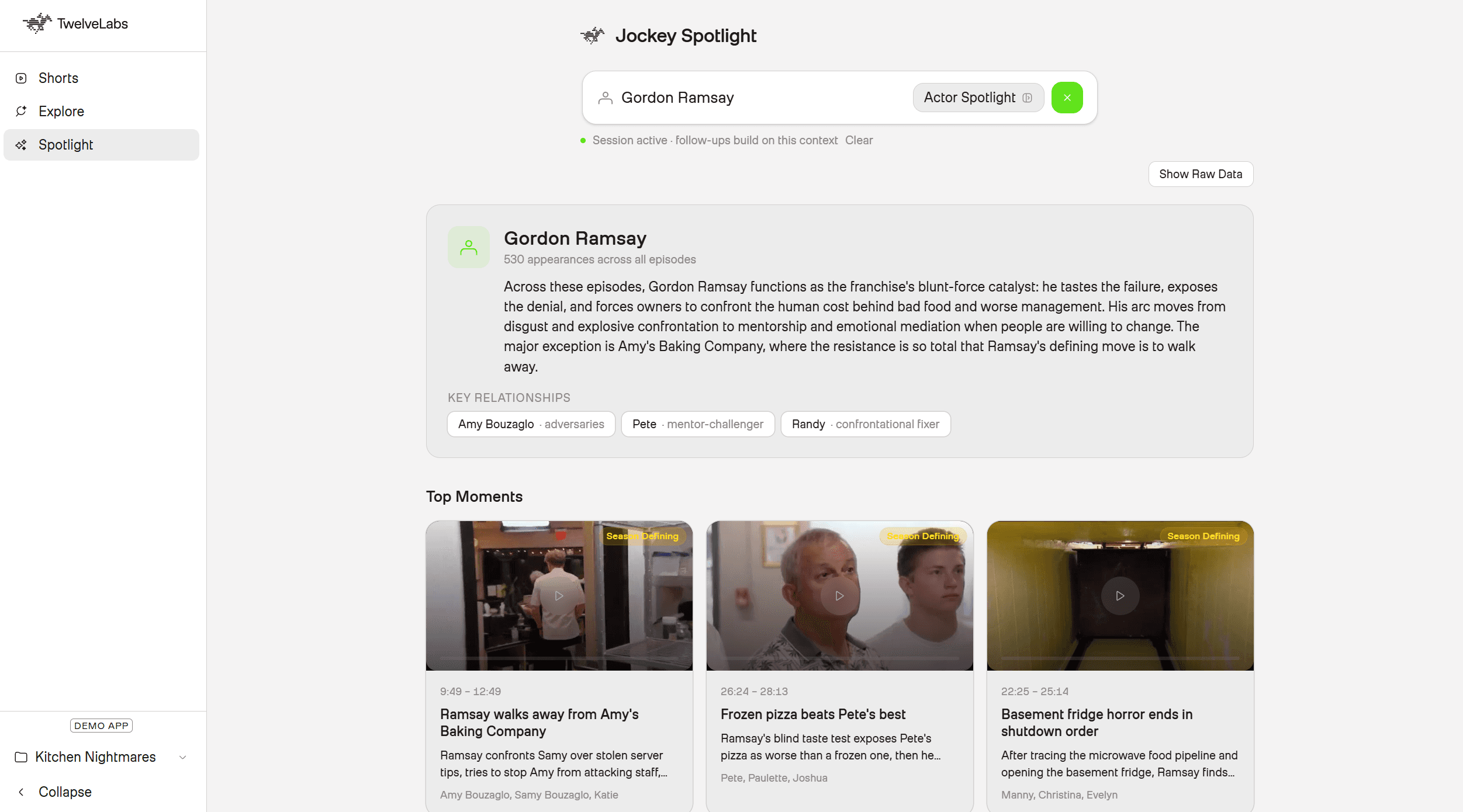
With this architecture in mind, let’s get started building 🏗️!
Phase 1: Pre-processing Pipeline (Offline)
The /pre-processing folder in the repository handles everything in this phase. The output is a manifest file: data/feed_manifest.json. The Next.js app reads this file at request time. No Python runs on Vercel.
Step 0: Uploading Assets & Creating Jockey Knowledge Store
TwelveLabs uses two distinct storage models, and this pipeline requires both:
Indexes: Support Pegasus 1.5 and Marengo 3.0. Used for per-video analysis and semantic search.
Knowledge Stores: Support Jockey 1.0. Organized at the corpus level, enabling cross-episode reasoning.
The helper functions for both operations live in pre-processing/knowledge_store.py. The one configuration worth customizing is the Knowledge Store's enrichment schema:
response = requests.post(
    f"{BASE_URL}/knowledge-stores",
    headers=HEADERS,
    json={
        "name": "show-name",
        "ingestion_config": {
            "enrichment_config": {
                "type": "json_schema",
                "json_schema": SUPERFAN_CTV_ENRICHMENT_JSON_SCHEMA,
            }
        },
    },
)
response = requests.post(
    f"{BASE_URL}/knowledge-stores",
    headers=HEADERS,
    json={
        "name": "show-name",
        "ingestion_config": {
            "enrichment_config": {
                "type": "json_schema",
                "json_schema": SUPERFAN_CTV_ENRICHMENT_JSON_SCHEMA,
            }
        },
    },
)
💡Tip: The enrichment configuration is a Jockey-specific feature that acts as a pre-indexing prompt. Rather than loading your full taxonomy into each query (where token budgets are tighter), you define what the model should focus on once, at ingestion time.
Here is the schema used for this project:
SUPERFAN_CTV_ENRICHMENT_JSON_SCHEMA = {
    "type": "json_schema",
    "json_schema": {
        "type": "object",
        "properties": {
            "primary_scene_category": {
                "type": "string",
                "description": "Dominant moment type for specific scene for vertical-feed taxonomy and profile matching",
            },
            "subtags": {
                "type": "array",
                "description": (
                    "Concrete visual/audio signals of scene for what is happening and can be heard in the scene"
                ),
                "items": {"type": "string"},
                "maxItems": 5,
            },
            "description": {
                "type": "string",
                "description": (
                    "Precise moment summary: who, what happened, tone, body language, "
                    "and dialogue subtext for long-form episodic TV. Should pinpoint exact names and map to people."
                ),
            },
            "emotional_intensity": {
                "type": "string",
                "description": "Salience for feed ranking and profile intensity preference",
                "enum": ["low", "medium", "high", "explosive"],
            },
            "key_figures": {
                "type": "array",
                "description": "On-screen people or named participants; pairs or groups in conflict/alliance when clear. Get specific names and map to people.",
                "items": {"type": "string"},
            },
            "feed_headline": {
                "type": "string",
                "description": "One short headline suitable for a vertical clip card",
            },
            "scene_setting": {
                "type": "string",
                "description": (
                    "Setting type: interview, ensemble_conversation, event, travel, "
                    "home, workplace, competition_stage, other"
                ),
            },
            "cross_episode_significance": {
                "type": "string",
                "description": (
                    "If inferable: recurring storyline, callback, finale/reunion relevance, "
                    "or franchise-defining beat; empty string if none"
                ),
            },
        },
        "required": [
            "primary_scene_category",
            "subtags",
            "description",
            "emotional_intensity",
            "key_figures",
            "feed_headline",
        ]
    }
}
SUPERFAN_CTV_ENRICHMENT_JSON_SCHEMA = {
    "type": "json_schema",
    "json_schema": {
        "type": "object",
        "properties": {
            "primary_scene_category": {
                "type": "string",
                "description": "Dominant moment type for specific scene for vertical-feed taxonomy and profile matching",
            },
            "subtags": {
                "type": "array",
                "description": (
                    "Concrete visual/audio signals of scene for what is happening and can be heard in the scene"
                ),
                "items": {"type": "string"},
                "maxItems": 5,
            },
            "description": {
                "type": "string",
                "description": (
                    "Precise moment summary: who, what happened, tone, body language, "
                    "and dialogue subtext for long-form episodic TV. Should pinpoint exact names and map to people."
                ),
            },
            "emotional_intensity": {
                "type": "string",
                "description": "Salience for feed ranking and profile intensity preference",
                "enum": ["low", "medium", "high", "explosive"],
            },
            "key_figures": {
                "type": "array",
                "description": "On-screen people or named participants; pairs or groups in conflict/alliance when clear. Get specific names and map to people.",
                "items": {"type": "string"},
            },
            "feed_headline": {
                "type": "string",
                "description": "One short headline suitable for a vertical clip card",
            },
            "scene_setting": {
                "type": "string",
                "description": (
                    "Setting type: interview, ensemble_conversation, event, travel, "
                    "home, workplace, competition_stage, other"
                ),
            },
            "cross_episode_significance": {
                "type": "string",
                "description": (
                    "If inferable: recurring storyline, callback, finale/reunion relevance, "
                    "or franchise-defining beat; empty string if none"
                ),
            },
        },
        "required": [
            "primary_scene_category",
            "subtags",
            "description",
            "emotional_intensity",
            "key_figures",
            "feed_headline",
        ]
    }
}
For more on customizing the enrichment configuration, see the official TwelveLabs documentation.
Step 1: Segmentation with Pegasus 1.5 Time-Based Metadata
With content uploaded to both the Jockey Knowledge Store and the TwelveLabs indexes, the next step is to run Pegasus 1.5 against each episode. Most of the implementation lives in ranking.py. The key call uses time_based_metadata mode, which instructs Pegasus to partition the video into 15-30 second windows and emit structured JSON for each:
create_response = client.analyze_async.tasks.create(
    model_name="pegasus1.5",
    video=VideoContext_AssetId(asset_id=asset_id),
    analysis_mode="time_based_metadata",
    temperature=0.2,
    max_tokens=PEGASUS_15_SEGMENTATION_MAX_TOKENS,
    min_segment_duration=SEGMENT_MIN_DURATION_SEC,
    max_segment_duration=SEGMENT_MAX_DURATION_SEC,
    custom_id=custom_id,
    response_format=AsyncResponseFormat(
        type="segment_definitions",
        segment_definitions=[feed_moment_segment_definition()],
    ),
)
create_response = client.analyze_async.tasks.create(
    model_name="pegasus1.5",
    video=VideoContext_AssetId(asset_id=asset_id),
    analysis_mode="time_based_metadata",
    temperature=0.2,
    max_tokens=PEGASUS_15_SEGMENTATION_MAX_TOKENS,
    min_segment_duration=SEGMENT_MIN_DURATION_SEC,
    max_segment_duration=SEGMENT_MAX_DURATION_SEC,
    custom_id=custom_id,
    response_format=AsyncResponseFormat(
        type="segment_definitions",
        segment_definitions=[feed_moment_segment_definition()],
    ),
)
A typical output segment looks like this:
"6a14ddbaddce351fa0ae8952": {
      "asset_id": "6a14ddbaddce351fa0ae8952",
      "task_id": "6a17154aa35bbfb00c5cea12",
      "status": "ready",
      "segments": [
        {
          "segment_id": "6a14ddba_seg_0000",
          "asset_id": "6a14ddbaddce351fa0ae8952",
          "start_sec": 195,
          "end_sec": 225,
          "duration_sec": 30,
          "description": "The housewives arrive at the ultra-pink Trixie Motel in Palm Springs. Drag queen Trixie Mattel greets them in a fluffy mint-green outfit, and the group marvels at the drag-themed decor.",
          "emotional_intensity": 7,
          "explanation": "This segment highlights the glamorous arrival at the Trixie Motel and the housewives' first encounter with Trixie Mattel, which is why it makes for a great clip for fashion and parties fans watching The Real Housewives of Salt Lake City.",
          "feed_headline": "Trixie Mattel Welcomes Housewives to Pink Paradise",
          "key_participants": [
            "Trixie Mattel",
            "Lisa Barlow",
            "Heather Gay",
            "Meredith Marks",
            "Whitney Rose",
            "Angie Smibert"
          ],
          "primary_category": "luxury_fashion",
          "show_name": "The Real Housewives of Salt Lake City",
          "subtags": [
            "fashion_beat",
            "parties_nightlife"
          ]
        },
    }
}
"6a14ddbaddce351fa0ae8952": {
      "asset_id": "6a14ddbaddce351fa0ae8952",
      "task_id": "6a17154aa35bbfb00c5cea12",
      "status": "ready",
      "segments": [
        {
          "segment_id": "6a14ddba_seg_0000",
          "asset_id": "6a14ddbaddce351fa0ae8952",
          "start_sec": 195,
          "end_sec": 225,
          "duration_sec": 30,
          "description": "The housewives arrive at the ultra-pink Trixie Motel in Palm Springs. Drag queen Trixie Mattel greets them in a fluffy mint-green outfit, and the group marvels at the drag-themed decor.",
          "emotional_intensity": 7,
          "explanation": "This segment highlights the glamorous arrival at the Trixie Motel and the housewives' first encounter with Trixie Mattel, which is why it makes for a great clip for fashion and parties fans watching The Real Housewives of Salt Lake City.",
          "feed_headline": "Trixie Mattel Welcomes Housewives to Pink Paradise",
          "key_participants": [
            "Trixie Mattel",
            "Lisa Barlow",
            "Heather Gay",
            "Meredith Marks",
            "Whitney Rose",
            "Angie Smibert"
          ],
          "primary_category": "luxury_fashion",
          "show_name": "The Real Housewives of Salt Lake City",
          "subtags": [
            "fashion_beat",
            "parties_nightlife"
          ]
        },
    }
}
Pegasus returns six fields per segment that feed directly into the ranking algorithm:
Primary Category: One of a fixed set of enums (Fights, Fashion, Romance, etc.) for profile matching
Subtags: Granular signals within each category (Screaming, Table Flip, Designer Clothes)
Emotional Intensity: An integer from 0-10 used for per-persona intensity preference matching
Feed Headline: The vertical card title shown in the UI
Feed Description: A concise scene summary
Key Participants: Cast members visible in the clip, later used by Jockey to build character arcs
This is equivalent to what a human logger produces, but generated in a fraction of the time and at scale. Pegasus reads tone, body language, dialogue, and how all of these attributes shift over the course of a segment. It can distinguish playful shade from a relationship-ending confrontation. Compared against average logging labor costs and Pegasus 1.5 API pricing, the cost reduction per episode is approximately 80%.
If you would like to learn more about Time-Based Metadata API calls I highly recommend you read the documentation and research: Building Pegasus 1.5: From Clip-Based QA to Time-Based Metadata.
Step 2: Enrich with Jockey Cross-Episode Top Moments
Per-clip metadata from Pegasus is sufficient for basic persona matching. The harder problem is distinguishing clips that have identical categories, intensities, and cast members. What separates a fight between incidental co-stars from a feud between the show's central characters is context that no single-video analysis can surface.
Jockey solves this through corpus-level reasoning. Given a full Knowledge Store of indexed episodes, it tracks character relationships, plot progression, and emotional arcs across the entire season. The developer interface for this is a single natural language prompt and a structured JSON output schema:
"""
Cross-episode top moments via Jockey POST /responses (jockey + knowledge store).

Taxonomy enums match Pegasus (PRIMARY_CATEGORIES, SUBTAG_ENUM, intensity 0-10).
"""
body = {
    "model": "jockey1.0",
    "knowledge_store_id": os.environ["TL_KS_ID"],
    "instructions": JOCKEY_INSTRUCTIONS,
    "input": [
        {
            "type": "message",
            "role": "user",
            "content": JOCKEY_USER_PROMPT_TEMPLATE.format(top_n=top_n),
        }
    ],
    "text": {
        "format": {
            "type": "json_schema",
            "name": "superfan_feed",
            "schema": JOCKEY_FEED_SCHEMA,
        }
    },
    "stream": False,
}

response = requests.post(
    f"{BASE_URL}/responses",
    headers={
        "x-api-key": os.environ["TL_API_KEY"],
        "Content-Type": "application/json",
    },
    json=body,
    timeout=600,
)
"""
Cross-episode top moments via Jockey POST /responses (jockey + knowledge store).

Taxonomy enums match Pegasus (PRIMARY_CATEGORIES, SUBTAG_ENUM, intensity 0-10).
"""
body = {
    "model": "jockey1.0",
    "knowledge_store_id": os.environ["TL_KS_ID"],
    "instructions": JOCKEY_INSTRUCTIONS,
    "input": [
        {
            "type": "message",
            "role": "user",
            "content": JOCKEY_USER_PROMPT_TEMPLATE.format(top_n=top_n),
        }
    ],
    "text": {
        "format": {
            "type": "json_schema",
            "name": "superfan_feed",
            "schema": JOCKEY_FEED_SCHEMA,
        }
    },
    "stream": False,
}

response = requests.post(
    f"{BASE_URL}/responses",
    headers={
        "x-api-key": os.environ["TL_API_KEY"],
        "Content-Type": "application/json",
    },
    json=body,
    timeout=600,
)
Run it with:
Jockey returns precise start and end timestamps for season-defining moments, paired with a cross_episode_significance field explaining why each moment matters in the context of the full run:
{
    "asset_id": "...",
    "cross_episode_significance": "Meredith's escalating rage is central to The Real Housewives of Salt Lake City because her controlled persona makes every blowup feel seismic. This shout-heavy sequence matters across episodes because it cements Meredith as someone whose calm can snap into legendary confrontation mode, a rhythm the show keeps returning to.",
    "emotional_intensity": 10,
    "end_sec": 2258,
    "start_sec": 2248
}
{
    "asset_id": "...",
    "cross_episode_significance": "Meredith's escalating rage is central to The Real Housewives of Salt Lake City because her controlled persona makes every blowup feel seismic. This shout-heavy sequence matters across episodes because it cements Meredith as someone whose calm can snap into legendary confrontation mode, a rhythm the show keeps returning to.",
    "emotional_intensity": 10,
    "end_sec": 2258,
    "start_sec": 2248
}
In the next step, the merge script applies a jockey_boost flag to any Pegasus segment whose timestamp window overlaps with these Jockey-identified moments. That boolean becomes a +1.0 weight in the ranking algorithm at query time.
Step 3: Sync the Manifest to the Next.js App
With Pegasus segmentation and Jockey enrichment complete, run:
This script reads data/feed_manifest.json, applies the Jockey boost merges, slims the payload to segments and metadata only, and writes the result to app/data/feed_manifest.json. That file is what the Next.js app reads at request time.
QA Before Proceeding: Before moving to Phase 2, validate the manifest. The following command prints the diversified scroll order for each persona to stdout, letting you inspect categories, intensities, Jockey reasoning, and match scores before the UI is involved:
This is where prompt engineering has the most leverage. If the output does not match your editorial expectations, iterate on the segment definitions in feed_moment_segment_definition() or the enrichment configuration in SUPERFAN_CTV_ENRICHMENT_JSON_SCHEMA before committing the manifest.
Phase 2: Runtime Ranking Engine & Personalization
With app/data/feed_manifest.json synced, the computationally expensive work is done. Phase 2 is entirely within the Next.js application deployed on Vercel.
The app reads the pre-built manifest directly into memory at request time. It calls TwelveLabs APIs live only where dynamic retrieval adds genuine value: ad-hoc Explore searches via Marengo, on-demand Spotlight queries via Jockey, and HLS URL resolution for playback. All ranking decisions are exposed transparently in the UI.
💡 The System Design "Why": Nothing in this phase re-runs Pegasus segmentation or batch Jockey reasoning. Profile feeds target a strict sub-2-second latency. Pre-index offline, rank instantly on query. This is the same pattern enterprise search engines have used for decades, now applied to video.
The Core Feed Scoring & Persona Logic
Before wiring up the Next.js API routes, the ranking math needs a definition. Every clip in the offline manifest is scored against one of three superfan personas:
Profile | Categories | Intensity Preference | Subtag Boosts |
Drama Addict | Fights, shade, emotional | High (8–10) | Screaming, walkout, betrayal |
Fashion Obsessed | Luxury_fashion, parties | Any | Designer_clothes, jewelry_moment, brand_callout |
Romance Fan | Romance, emotional | Medium (6–8) | Kiss, heartfelt_confession, reconciliation |
The score is additive. Category match is the initial gate; every other signal applies a weighted boost:
matchScore = base + Σ(subtagBoosts) + intensityBonus + jockeyBoost
Signal | Weight | Meaning |
base | +1.0 | The primary category matches the persona. |
subtag_* | +0.25 | Matching subtag from the persona's boost list. |
intensity | +0.5 | Emotional intensity fits the persona's preference. |
jockey | +1.0 | Offline Jockey flagged this as cross-episode significant. |
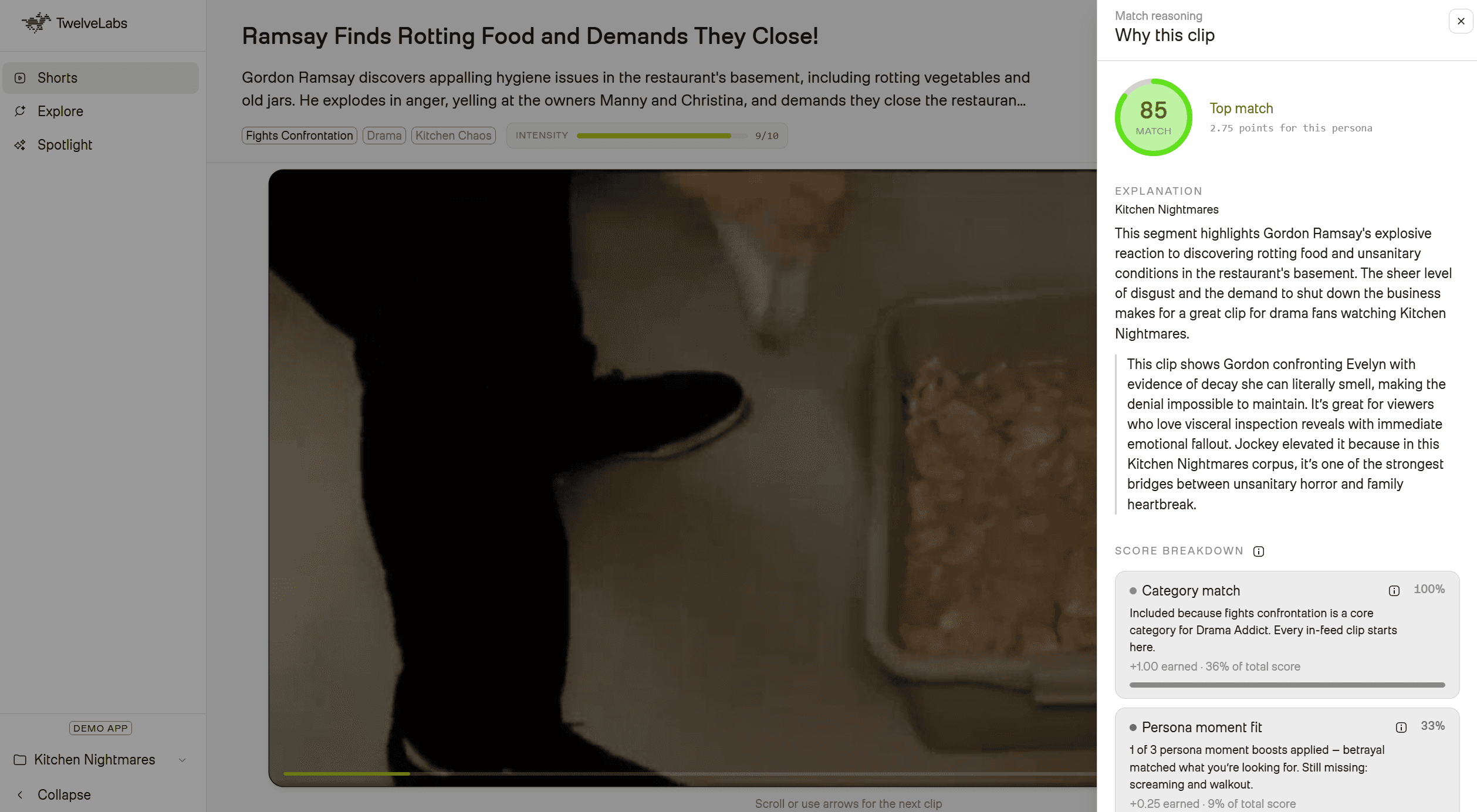
Implementation in app/lib/scoring.ts:
export const SCORE_BASE = 1.0;
export const SCORE_SUBTAG = 0.25;
export const SCORE_INTENSITY = 0.5;
export const SCORE_JOCKEY = 1.0;

export function scoreSegment(segment: Segment, profile: PreferenceProfile): ScoredSegment | null {
  // Gate: If the category doesn't match, drop the clip
  if (!profile.categories.includes(segment.primary_category)) return null;

  let score = SCORE_BASE;
  const breakdown: Record<string, number> = { base: SCORE_BASE };

  // Subtag Boosts
  for (const rawTag of segment.subtags ?? []) {
    const tag = normalizeSubtag(rawTag);
    if (profile.subtag_boosts.includes(tag) && SUBTAG_ENUM.has(tag)) {
      score += SCORE_SUBTAG;
      breakdown[`subtag_${tag}`] = SCORE_SUBTAG;
    }
  }

  // Intensity Bonus
  if (intensityMatchesPreference(segment.emotional_intensity, profile.intensity_preference)) {
    score += SCORE_INTENSITY;
    breakdown.intensity = SCORE_INTENSITY;
  }

  // Cross-Episode Jockey Boost
  if (segment.jockey_boost) {
    score += SCORE_JOCKEY;
    breakdown.jockey = SCORE_JOCKEY;
  }

  return { ...segment, match_score: score, score_breakdown: breakdown };
}
export const SCORE_BASE = 1.0;
export const SCORE_SUBTAG = 0.25;
export const SCORE_INTENSITY = 0.5;
export const SCORE_JOCKEY = 1.0;

export function scoreSegment(segment: Segment, profile: PreferenceProfile): ScoredSegment | null {
  // Gate: If the category doesn't match, drop the clip
  if (!profile.categories.includes(segment.primary_category)) return null;

  let score = SCORE_BASE;
  const breakdown: Record<string, number> = { base: SCORE_BASE };

  // Subtag Boosts
  for (const rawTag of segment.subtags ?? []) {
    const tag = normalizeSubtag(rawTag);
    if (profile.subtag_boosts.includes(tag) && SUBTAG_ENUM.has(tag)) {
      score += SCORE_SUBTAG;
      breakdown[`subtag_${tag}`] = SCORE_SUBTAG;
    }
  }

  // Intensity Bonus
  if (intensityMatchesPreference(segment.emotional_intensity, profile.intensity_preference)) {
    score += SCORE_INTENSITY;
    breakdown.intensity = SCORE_INTENSITY;
  }

  // Cross-Episode Jockey Boost
  if (segment.jockey_boost) {
    score += SCORE_JOCKEY;
    breakdown.jockey = SCORE_JOCKEY;
  }

  return { ...segment, match_score: score, score_breakdown: breakdown };
}
Why additive rather than a black-box ML model? For ranking algorithms, explainability matters more than marginal ranking accuracy. Product and data teams need to answer "Why did this clip surface?" at a glance. The additive breakdown maps directly to what Pegasus tagged and what Jockey boosted in Phase 1, which is what makes the Reasoning Panel (Step 7) possible. It also allows for fine-tuning of the weights down the line if the needs of your customers change.
Step 4: Enable Semantic Discovery with Marengo 3.0
Profile feeds on the home screen read directly from the bundled manifest with no live API calls. The Explore tab is different. When a superfan types "awkward dinner party" or "someone storms out," the system needs real-time retrieval across the entire indexed library.
The /api/search route posts a multimodal query to Marengo via the TwelveLabs Search API:
const form = new FormData();
form.append("index_id", indexId);
form.append("query_text", query.trim());
form.append("search_options", "visual");
form.append("search_options", "audio");
form.append("search_options", "transcription");
form.append("group_by", "clip");
form.append("operator", "or");
form.append("page_limit", "30");

const res = await fetch(`${config.baseUrl}/search`, {
  method: "POST",
  headers: { "x-api-key": config.apiKey },
  body: form,
});
const form = new FormData();
form.append("index_id", indexId);
form.append("query_text", query.trim());
form.append("search_options", "visual");
form.append("search_options", "audio");
form.append("search_options", "transcription");
form.append("group_by", "clip");
form.append("operator", "or");
form.append("page_limit", "30");

const res = await fetch(`${config.baseUrl}/search`, {
  method: "POST",
  headers: { "x-api-key": config.apiKey },
  body: form,
});
Marengo returns timestamped hits grounded in visual, audio, and transcription content, not keyword overlap on a title field.
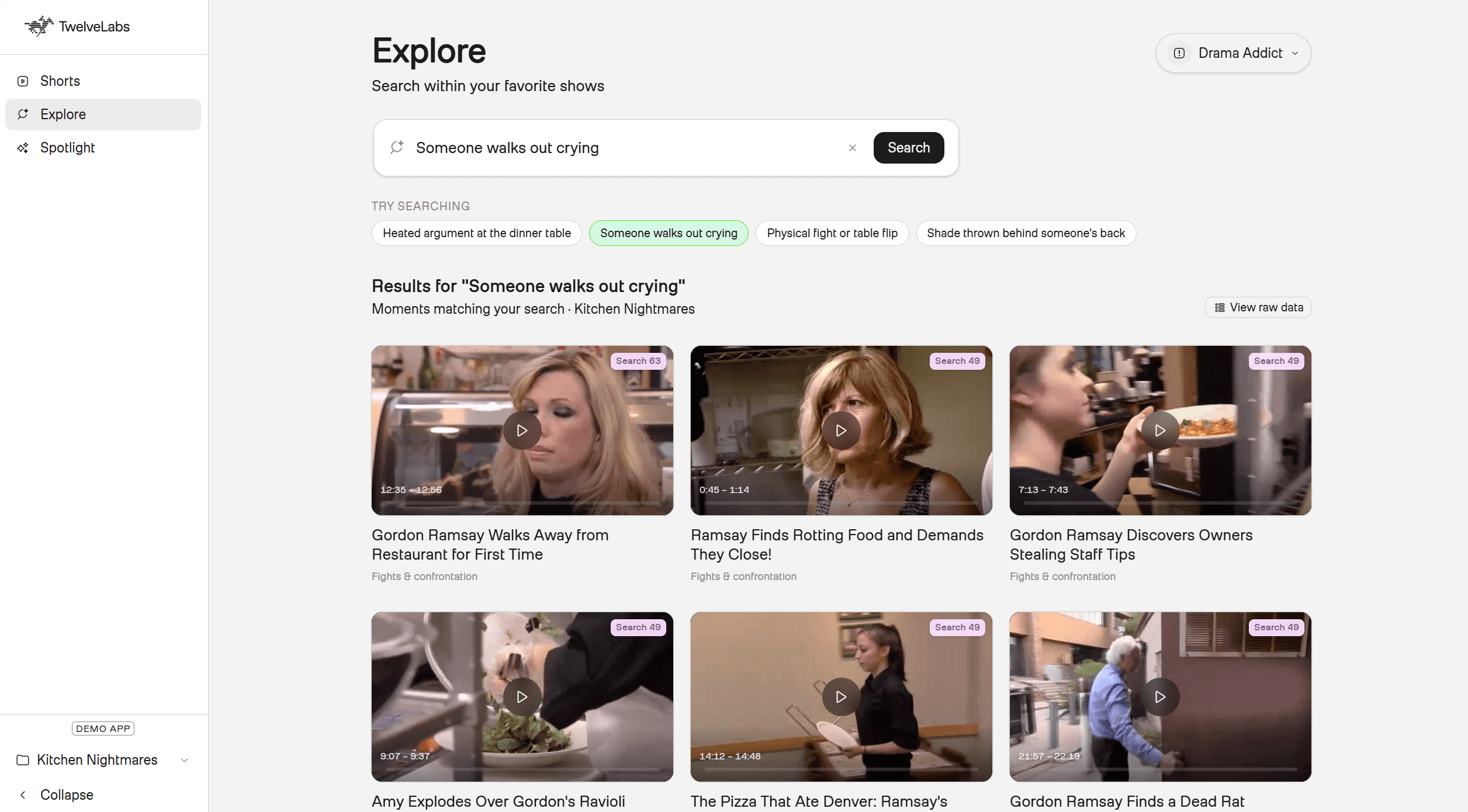
Joining search results to the manifest. After Marengo returns hits, the app joins them back to the offline Pegasus manifest using asset_id and timestamp overlap:
const segment = findManifestSegment(
  manifest.segments,
  hit.asset_id,
  hit.start_sec,
  hit.end_sec,
);
const scored = segment ? scoreSegment(segment, preference) : null;
const segment = findManifestSegment(
  manifest.segments,
  hit.asset_id,
  hit.start_sec,
  hit.end_sec,
);
const scored = segment ? scoreSegment(segment, preference) : null;
Results sorted by Marengo's search_rank first, with match_score as a tiebreaker.
This hybrid approach handles two different failure modes. Marengo alone can find "vibes" that Pegasus never explicitly tagged. Pegasus alone provides deterministic metadata (headlines, exact intensity scores) but cannot answer zero-shot queries like "Lisa side-eye at reunion." Together they power an Explore tab that behaves like a genuine superfan search engine rather than a rigid category browser.
Step 5: Rank Feeds with Persona Logic + Diversity Constraints
The home feed (/api/feed) is the core product loop. It loads the manifest once, scores every segment for the active persona, and returns a paginated clip list.
A raw sort by match_score creates a different problem: a Drama Addict's top ten clips by pure score might all be fights_confrontation. To keep the feed bingeable, the app implements diversified round-robin ordering:
Bucket segments by
primary_categorySort within each bucket by
match_scoredescendingInterleave one clip per category per round (Fights → Shade → Emotional → Fights...)
Paginate with
offset + limitfor infinite scroll
Because this route performs only JSON reads and in-memory sorting, latency is in the tens of milliseconds with no live TwelveLabs API call required.
Step 6: Interactive Spotlight with Runtime Jockey
Phase 1 and Phase 2 use Jockey differently, and it is worth being explicit about the distinction:
Feature | Phase 1 (Pre-processing) | Phase 2 (Runtime Spotlight) |
When it runs | Offline, once per season | On demand, per user query |
Output | jockey_boost boolean on manifest | Full clip list + narrative JSON |
Latency | Minutes (async batch) | ~5–10 seconds (live) |
Use Case | Boost season-defining beats in the feed | Answer "How did the feud unfold?" |
The Spotlight page (/api/spotlight) is where Jockey answers complex, ad-hoc narrative questions the manifest was never designed to pre-compute. Two modes:
Actor Spotlight: "Find all clips featuring Meredith Marks" returns top 8 defining moments, relationship summaries, and narrative arcs
Moment Discovery: "How did the Lisa and Meredith friendship fall apart?" returns chronologically ordered story scenes mapped to structural roles (origin, buildup, turning point, aftermath)
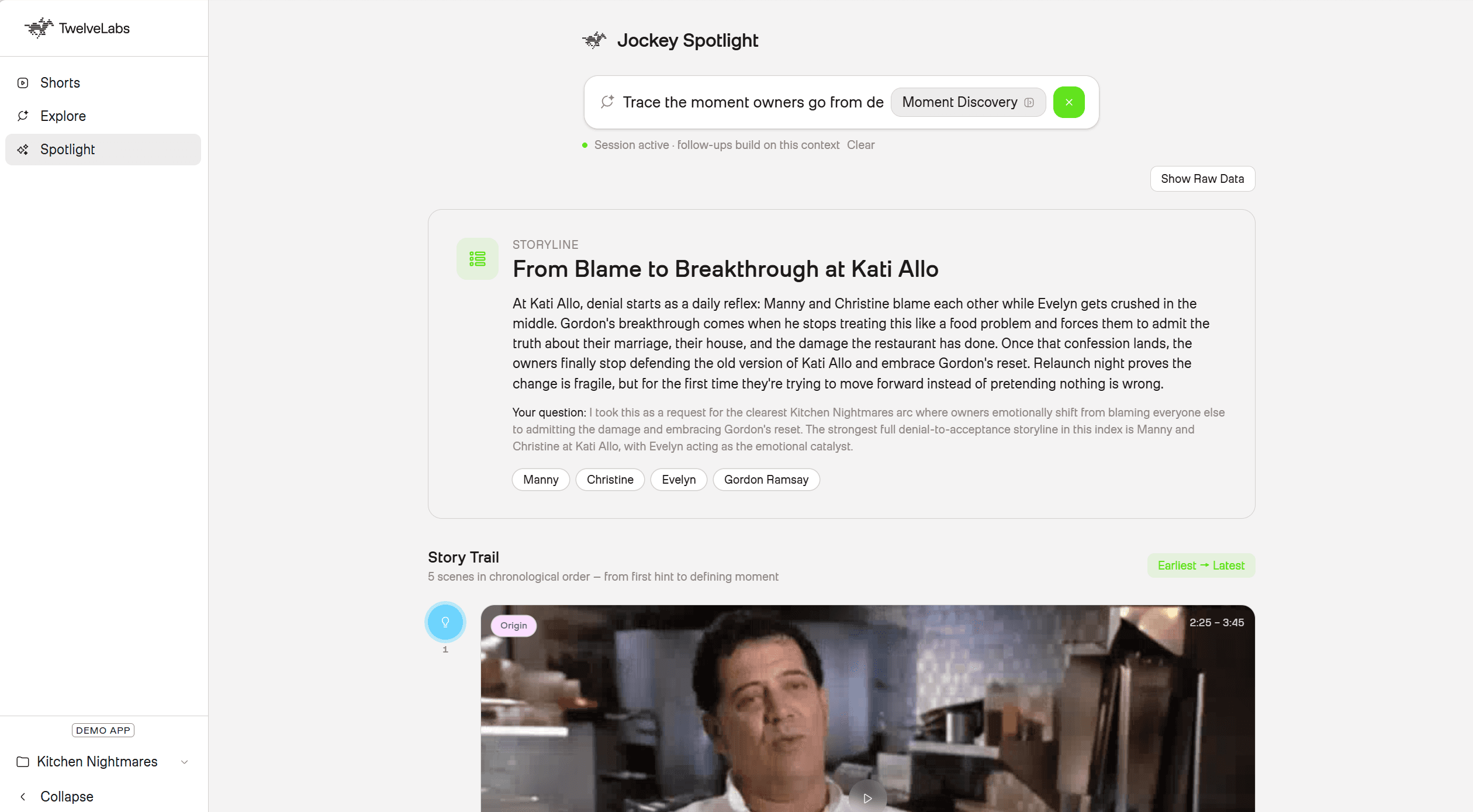
Strict JSON schemas ensure the UI can immediately map Jockey's response to the video player:
const jockeyBody = {
  model: "jockey1.0",
  instructions: isActor ? ACTOR_SPOTLIGHT_INSTRUCTIONS : MOMENT_DISCOVERY_INSTRUCTIONS,
  input: [{ type: "message", role: "user", content: userContent }],
  knowledge_store_id: ksId,
  text: {
    format: {
      type: "json_schema",
      name: isActor ? "actor_spotlight" : "moment_discovery",
      schema: isActor ? ACTOR_SPOTLIGHT_SCHEMA : MOMENT_DISCOVERY_SCHEMA,
    },
  },
};
const jockeyBody = {
  model: "jockey1.0",
  instructions: isActor ? ACTOR_SPOTLIGHT_INSTRUCTIONS : MOMENT_DISCOVERY_INSTRUCTIONS,
  input: [{ type: "message", role: "user", content: userContent }],
  knowledge_store_id: ksId,
  text: {
    format: {
      type: "json_schema",
      name: isActor ? "actor_spotlight" : "moment_discovery",
      schema: isActor ? ACTOR_SPOTLIGHT_SCHEMA : MOMENT_DISCOVERY_SCHEMA,
    },
  },
};
Passing a session_id on follow-up requests enables multi-turn refinement. A user can ask "Now show me only moments from the Atlanta trip" and Jockey narrows the response without re-ingesting the corpus.
Step 7: Deliver with Transparent Reasoning in the Feed UI
The final deliverable is not just a video player. It is an explainable ranking surface. Every clip selection exposes its exact rationale through a slide-out Reasoning Panel:
Why This Clip?
Pegasus: "This segment highlights a screaming confrontation at the reunion dinner... making it a perfect match for your High-Intensity Drama preference."
Jockey: "Across the full run of the show, this moment mirrors the Season 3 reunion fight between the same cast members and is referenced in two later episodes."
For technical evaluators, a Raw Data view toggles the full Pegasus and Jockey JSON payloads. The Explore tab includes an export function that writes clip metadata to Excel, giving QA and editorial teams an auditable sheet of categories, intensities, match scores, and Jockey reasoning.
Deploy to Vercel
The /app directory is now Vercel-ready! Congratulations on building and following along with this tutorial. In order to push your own version to the web, you must:
Push to GitHub. Fork the repository to your own account.
Import the project in Vercel. Set the Root Directory to app.
Add environment variables:
TL_API_KEY(Required)TL_INDEX_ID(Required for Marengo Search and HLS playback)TL_KS_ID(Recommended for Jockey Spotlight)
Deploy.
npm run buildruns automatically.
What runs where after deploy:
Feature | Compute | Live API Calls |
Persona Feed | Vercel (reads manifest) | None |
Explore Search | Vercel | Marengo Search API |
Spotlight | Vercel | Jockey Responses API |
HLS Playback | Vercel proxy | TwelveLabs Assets API (keeps API key server-side) |
When new episodes are added, re-run Phase 1 locally, commit the updated manifest to Git, and redeploy. The episode video files never enter the Git repo or Vercel; they stay in TwelveLabs.
Why This Architecture Matters
This pipeline turns static, expensive episode catalogs into highly queryable, explainable moment inventories. That is the core value proposition for any streaming or broadcasting platform evaluating TwelveLabs: not just faster tagging, but a fundamentally different kind of content intelligence.
Pegasus 1.5 produces per-clip metadata at scale that would require full-time logging staff to generate manually, at roughly 20% of the cost. Marengo 3.0 makes that metadata searchable with natural language queries that no keyword index could match. Jockey 1.0 adds the layer that neither model can provide alone: an understanding of how individual moments fit into the larger story of a season, which is exactly what superfans care about.
The result is a feed engine that does not just recommend content. It surfaces the right moment, in the right context, with a transparent explanation of why.
If you’d like to see more technical blogs like visit our Blogs or if you want custom enterprise video solutions for your company please talk to Sales!
Additional Resources:
Sign up for Jockey: https://www.twelvelabs.io/jockey
Source Code: github.com/nathanchess/jockey-superfan-vertical-feed
Live Demo: jockey-superfan-vertical-feed.vercel.app
TwelveLabs Playground: playground.twelvelabs.io
API Reference: https://docs.twelvelabs.io/v1.3/agents/get-started/quickstart
Architecture Diagram: LucidChart Diagram
TLDR
Most streaming platforms have spent years building content libraries and almost no time building tools to navigate them. The result is massive episode catalogs that younger audiences scroll past in favor of TikTok and Reels.
This leads to a predicament as the bottleneck is not content volume, but rather intelligent systems as legacy manual tagging cannot scale to identify every tension-filled glance or designer outfit across thousands of episodes. Basic metadata can also not distinguish a playful argument from a relationship-ending fight, which are the moments younger audience members prioritize in their short-form content.
This tutorial walks through a complete solution built on TwelveLabs Pegasus 1.5, Marengo 3.0, and Jockey 1.0. The output is a personalized, TikTok-style vertical feed that serves profile-ranked clips in under 2 seconds, runs semantic search across indexed episodes, and surfaces cross-season story arcs through natural language queries.
What you will build: A pipeline that transforms full reality TV episodes into queryable, bite-sized moments. The system matches scenes to user personas based on emotional intensity, tracks cast entities across entire seasons, and generates dynamic feeds with transparent AI reasoning behind every clip selection.
Introduction
Three structural problems prevent streaming platforms from building the kind of experience that actually retains superfans and the younger generation.
Scale. Identifying every meaningful moment in a 40+ minute episode, across a library of hundreds of episodes, requires armies of human loggers. Beyond the direct cost, those loggers need full-show context to avoid surfacing spoilers or irrelevant clips out of sequence, which poses IP and platform reputation risks if mistakes are made at pivotal moments in the show.
Depth. Traditional metadata are often surface-level tags. A tag like "argument" tells a recommendation engine nothing about whether the scene is playful shade between friends or a relationship-ending confrontation. The distinction determines whether a clip belongs in a Drama Addict's feed or a Romance Fan's. Without that depth, recommendations feel random.
Continuity. Single-video analysis, even good single-video analysis, has no memory. It can tag a fight scene but cannot recognize that the same two cast members have been building toward this moment for three episodes. This context is what can differentiate scenes as normal versus one that engages the superfan more with the TV series.
This tutorial builds a hybrid architecture that solves all three at once. The system combines three TwelveLabs models, each solving a distinct layer of the problem:
Layer | API | Model | Use Case |
Scene Tagging | Analyze (async) | Single video analysis in 10–30s windows for taxonomy and emotional intensity | |
Semantic Search | Search | Embedding search for natural language queries and content discovery | |
Cross-episode | Responses | Cross-Episode video reasoning to identify season arcs, cast tracking, and ranking of clips for superfans. |
Figure 1: Explore Tab displaying Personalized Shorts for “Drama Addict”
This architecture and release of new unified foundational multimodal models like Jockey proves that it is now possible to build the editorial intelligence of a full logging team into an API pipeline, and extend it with corpus-level reasoning that no human logger could produce in real time.
Here is a walkthrough of the application in action!
You can also visit the live demo site here: Superfan Vertical Feed
Prerequisites
Before building along, confirm you have the following:
Runtime (Vercel / Next.js)
Node.js 20+
TwelveLabs API key with:
TL_INDEX_ID: Marengo index for search and HLS playbackTL_KS_ID: Jockey Knowledge Store for cross-episode reasoning
Pre-processing (local Python pipeline)
Python 3.10+
pip install -r requirements.txt(twelvelabs, requests, python-dotenv)Episodes uploaded as TwelveLabs assets (24-char hex IDs, HLS enabled). Assets can be created in the TwelveLabs Playground under "Assets."
Clone and run:
git clone https://github.com/nathanchess/fox-superfan-feed.git
cd fox-superfan-feed/app
npm install
cp .env.example .env.local
npm
Architecture Overview
The platform splits into two distinct phases: offline pre-processing (run once per season or whenever new episodes are added) and runtime serving (real-time API calls to TwelveLabs video models on Vercel).
💡 System Design Note: This is the same pattern enterprise search engines use. To keep feed generation fast for personalized or profile-based requests, computationally expensive work happens offline. Pegasus segments every episode, Jockey enriches the corpus, and the resulting manifest gets committed to the repo. At request time, the app reads pre-built JSON and runs in-memory scoring. No model is re-invoked on the fly for standard feeds unless needed.
Figure 2: Superfan Vertical Feed Engine Architecture (Link)
Each model in the pipeline serves a specific purpose:
Pegasus 1.5 is the primary source of per-clip metadata. The time-based metadata feature lets you extract structured JSON from each 15-30 second segment, including scene description, emotional intensity, primary category, subtags, and key cast members. These fields directly power the ranking algorithm: a clip gets boosted if a favorite cast member appears, if its emotional intensity matches a persona's preference, and if its category aligns with the persona's interests.
Jockey 1.0 solves the one thing Pegasus cannot: relative importance. Two clips might have identical categories, intensities, and cast members. What distinguishes them is how much weight the broader season gives to each moment. A recurring feud between the two leads is more significant than a one-off confrontation, and only corpus-level reasoning can surface that distinction. Jockey runs across the full Knowledge Store, identifies season-defining moments, and applies a jockey_boost flag to the segments within 10-15 seconds of those moments.
Marengo 3.0 handles ad-hoc semantic search. When a user types "awkward dinner party" or "someone storms out" in the Explore tab, Marengo queries the full indexed library across visual, audio, and transcription modalities and returns timestamped hits grounded in actual content, not keyword overlap on a title field.
With this architecture in mind, let’s get started building 🏗️!
Phase 1: Pre-processing Pipeline (Offline)
The /pre-processing folder in the repository handles everything in this phase. The output is a manifest file: data/feed_manifest.json. The Next.js app reads this file at request time. No Python runs on Vercel.
Step 0: Uploading Assets & Creating Jockey Knowledge Store
TwelveLabs uses two distinct storage models, and this pipeline requires both:
Indexes: Support Pegasus 1.5 and Marengo 3.0. Used for per-video analysis and semantic search.
Knowledge Stores: Support Jockey 1.0. Organized at the corpus level, enabling cross-episode reasoning.
The helper functions for both operations live in pre-processing/knowledge_store.py. The one configuration worth customizing is the Knowledge Store's enrichment schema:
response = requests.post(
    f"{BASE_URL}/knowledge-stores",
    headers=HEADERS,
    json={
        "name": "show-name",
        "ingestion_config": {
            "enrichment_config": {
                "type": "json_schema",
                "json_schema": SUPERFAN_CTV_ENRICHMENT_JSON_SCHEMA,
            }
        },
    },
)
💡Tip: The enrichment configuration is a Jockey-specific feature that acts as a pre-indexing prompt. Rather than loading your full taxonomy into each query (where token budgets are tighter), you define what the model should focus on once, at ingestion time.
Here is the schema used for this project:
SUPERFAN_CTV_ENRICHMENT_JSON_SCHEMA = {
    "type": "json_schema",
    "json_schema": {
        "type": "object",
        "properties": {
            "primary_scene_category": {
                "type": "string",
                "description": "Dominant moment type for specific scene for vertical-feed taxonomy and profile matching",
            },
            "subtags": {
                "type": "array",
                "description": (
                    "Concrete visual/audio signals of scene for what is happening and can be heard in the scene"
                ),
                "items": {"type": "string"},
                "maxItems": 5,
            },
            "description": {
                "type": "string",
                "description": (
                    "Precise moment summary: who, what happened, tone, body language, "
                    "and dialogue subtext for long-form episodic TV. Should pinpoint exact names and map to people."
                ),
            },
            "emotional_intensity": {
                "type": "string",
                "description": "Salience for feed ranking and profile intensity preference",
                "enum": ["low", "medium", "high", "explosive"],
            },
            "key_figures": {
                "type": "array",
                "description": "On-screen people or named participants; pairs or groups in conflict/alliance when clear. Get specific names and map to people.",
                "items": {"type": "string"},
            },
            "feed_headline": {
                "type": "string",
                "description": "One short headline suitable for a vertical clip card",
            },
            "scene_setting": {
                "type": "string",
                "description": (
                    "Setting type: interview, ensemble_conversation, event, travel, "
                    "home, workplace, competition_stage, other"
                ),
            },
            "cross_episode_significance": {
                "type": "string",
                "description": (
                    "If inferable: recurring storyline, callback, finale/reunion relevance, "
                    "or franchise-defining beat; empty string if none"
                ),
            },
        },
        "required": [
            "primary_scene_category",
            "subtags",
            "description",
            "emotional_intensity",
            "key_figures",
            "feed_headline",
        ]
    }
}
For more on customizing the enrichment configuration, see the official TwelveLabs documentation.
Step 1: Segmentation with Pegasus 1.5 Time-Based Metadata
With content uploaded to both the Jockey Knowledge Store and the TwelveLabs indexes, the next step is to run Pegasus 1.5 against each episode. Most of the implementation lives in ranking.py. The key call uses time_based_metadata mode, which instructs Pegasus to partition the video into 15-30 second windows and emit structured JSON for each:
create_response = client.analyze_async.tasks.create(
    model_name="pegasus1.5",
    video=VideoContext_AssetId(asset_id=asset_id),
    analysis_mode="time_based_metadata",
    temperature=0.2,
    max_tokens=PEGASUS_15_SEGMENTATION_MAX_TOKENS,
    min_segment_duration=SEGMENT_MIN_DURATION_SEC,
    max_segment_duration=SEGMENT_MAX_DURATION_SEC,
    custom_id=custom_id,
    response_format=AsyncResponseFormat(
        type="segment_definitions",
        segment_definitions=[feed_moment_segment_definition()],
    ),
)
A typical output segment looks like this:
"6a14ddbaddce351fa0ae8952": {
      "asset_id": "6a14ddbaddce351fa0ae8952",
      "task_id": "6a17154aa35bbfb00c5cea12",
      "status": "ready",
      "segments": [
        {
          "segment_id": "6a14ddba_seg_0000",
          "asset_id": "6a14ddbaddce351fa0ae8952",
          "start_sec": 195,
          "end_sec": 225,
          "duration_sec": 30,
          "description": "The housewives arrive at the ultra-pink Trixie Motel in Palm Springs. Drag queen Trixie Mattel greets them in a fluffy mint-green outfit, and the group marvels at the drag-themed decor.",
          "emotional_intensity": 7,
          "explanation": "This segment highlights the glamorous arrival at the Trixie Motel and the housewives' first encounter with Trixie Mattel, which is why it makes for a great clip for fashion and parties fans watching The Real Housewives of Salt Lake City.",
          "feed_headline": "Trixie Mattel Welcomes Housewives to Pink Paradise",
          "key_participants": [
            "Trixie Mattel",
            "Lisa Barlow",
            "Heather Gay",
            "Meredith Marks",
            "Whitney Rose",
            "Angie Smibert"
          ],
          "primary_category": "luxury_fashion",
          "show_name": "The Real Housewives of Salt Lake City",
          "subtags": [
            "fashion_beat",
            "parties_nightlife"
          ]
        },
    }
}
Pegasus returns six fields per segment that feed directly into the ranking algorithm:
Primary Category: One of a fixed set of enums (Fights, Fashion, Romance, etc.) for profile matching
Subtags: Granular signals within each category (Screaming, Table Flip, Designer Clothes)
Emotional Intensity: An integer from 0-10 used for per-persona intensity preference matching
Feed Headline: The vertical card title shown in the UI
Feed Description: A concise scene summary
Key Participants: Cast members visible in the clip, later used by Jockey to build character arcs
This is equivalent to what a human logger produces, but generated in a fraction of the time and at scale. Pegasus reads tone, body language, dialogue, and how all of these attributes shift over the course of a segment. It can distinguish playful shade from a relationship-ending confrontation. Compared against average logging labor costs and Pegasus 1.5 API pricing, the cost reduction per episode is approximately 80%.
If you would like to learn more about Time-Based Metadata API calls I highly recommend you read the documentation and research: Building Pegasus 1.5: From Clip-Based QA to Time-Based Metadata.
Step 2: Enrich with Jockey Cross-Episode Top Moments
Per-clip metadata from Pegasus is sufficient for basic persona matching. The harder problem is distinguishing clips that have identical categories, intensities, and cast members. What separates a fight between incidental co-stars from a feud between the show's central characters is context that no single-video analysis can surface.
Jockey solves this through corpus-level reasoning. Given a full Knowledge Store of indexed episodes, it tracks character relationships, plot progression, and emotional arcs across the entire season. The developer interface for this is a single natural language prompt and a structured JSON output schema:
"""
Cross-episode top moments via Jockey POST /responses (jockey + knowledge store).

Taxonomy enums match Pegasus (PRIMARY_CATEGORIES, SUBTAG_ENUM, intensity 0-10).
"""
body = {
    "model": "jockey1.0",
    "knowledge_store_id": os.environ["TL_KS_ID"],
    "instructions": JOCKEY_INSTRUCTIONS,
    "input": [
        {
            "type": "message",
            "role": "user",
            "content": JOCKEY_USER_PROMPT_TEMPLATE.format(top_n=top_n),
        }
    ],
    "text": {
        "format": {
            "type": "json_schema",
            "name": "superfan_feed",
            "schema": JOCKEY_FEED_SCHEMA,
        }
    },
    "stream": False,
}

response = requests.post(
    f"{BASE_URL}/responses",
    headers={
        "x-api-key": os.environ["TL_API_KEY"],
        "Content-Type": "application/json",
    },
    json=body,
    timeout=600,
)
Run it with:
Jockey returns precise start and end timestamps for season-defining moments, paired with a cross_episode_significance field explaining why each moment matters in the context of the full run:
{
    "asset_id": "...",
    "cross_episode_significance": "Meredith's escalating rage is central to The Real Housewives of Salt Lake City because her controlled persona makes every blowup feel seismic. This shout-heavy sequence matters across episodes because it cements Meredith as someone whose calm can snap into legendary confrontation mode, a rhythm the show keeps returning to.",
    "emotional_intensity": 10,
    "end_sec": 2258,
    "start_sec": 2248
}
In the next step, the merge script applies a jockey_boost flag to any Pegasus segment whose timestamp window overlaps with these Jockey-identified moments. That boolean becomes a +1.0 weight in the ranking algorithm at query time.
Step 3: Sync the Manifest to the Next.js App
With Pegasus segmentation and Jockey enrichment complete, run:
This script reads data/feed_manifest.json, applies the Jockey boost merges, slims the payload to segments and metadata only, and writes the result to app/data/feed_manifest.json. That file is what the Next.js app reads at request time.
QA Before Proceeding: Before moving to Phase 2, validate the manifest. The following command prints the diversified scroll order for each persona to stdout, letting you inspect categories, intensities, Jockey reasoning, and match scores before the UI is involved:
This is where prompt engineering has the most leverage. If the output does not match your editorial expectations, iterate on the segment definitions in feed_moment_segment_definition() or the enrichment configuration in SUPERFAN_CTV_ENRICHMENT_JSON_SCHEMA before committing the manifest.
Phase 2: Runtime Ranking Engine & Personalization
With app/data/feed_manifest.json synced, the computationally expensive work is done. Phase 2 is entirely within the Next.js application deployed on Vercel.
The app reads the pre-built manifest directly into memory at request time. It calls TwelveLabs APIs live only where dynamic retrieval adds genuine value: ad-hoc Explore searches via Marengo, on-demand Spotlight queries via Jockey, and HLS URL resolution for playback. All ranking decisions are exposed transparently in the UI.
💡 The System Design "Why": Nothing in this phase re-runs Pegasus segmentation or batch Jockey reasoning. Profile feeds target a strict sub-2-second latency. Pre-index offline, rank instantly on query. This is the same pattern enterprise search engines have used for decades, now applied to video.
The Core Feed Scoring & Persona Logic
Before wiring up the Next.js API routes, the ranking math needs a definition. Every clip in the offline manifest is scored against one of three superfan personas:
Profile | Categories | Intensity Preference | Subtag Boosts |
Drama Addict | Fights, shade, emotional | High (8–10) | Screaming, walkout, betrayal |
Fashion Obsessed | Luxury_fashion, parties | Any | Designer_clothes, jewelry_moment, brand_callout |
Romance Fan | Romance, emotional | Medium (6–8) | Kiss, heartfelt_confession, reconciliation |
The score is additive. Category match is the initial gate; every other signal applies a weighted boost:
matchScore = base + Σ(subtagBoosts) + intensityBonus + jockeyBoost
Signal | Weight | Meaning |
base | +1.0 | The primary category matches the persona. |
subtag_* | +0.25 | Matching subtag from the persona's boost list. |
intensity | +0.5 | Emotional intensity fits the persona's preference. |
jockey | +1.0 | Offline Jockey flagged this as cross-episode significant. |
Implementation in app/lib/scoring.ts:
export const SCORE_BASE = 1.0;
export const SCORE_SUBTAG = 0.25;
export const SCORE_INTENSITY = 0.5;
export const SCORE_JOCKEY = 1.0;

export function scoreSegment(segment: Segment, profile: PreferenceProfile): ScoredSegment | null {
  // Gate: If the category doesn't match, drop the clip
  if (!profile.categories.includes(segment.primary_category)) return null;

  let score = SCORE_BASE;
  const breakdown: Record<string, number> = { base: SCORE_BASE };

  // Subtag Boosts
  for (const rawTag of segment.subtags ?? []) {
    const tag = normalizeSubtag(rawTag);
    if (profile.subtag_boosts.includes(tag) && SUBTAG_ENUM.has(tag)) {
      score += SCORE_SUBTAG;
      breakdown[`subtag_${tag}`] = SCORE_SUBTAG;
    }
  }

  // Intensity Bonus
  if (intensityMatchesPreference(segment.emotional_intensity, profile.intensity_preference)) {
    score += SCORE_INTENSITY;
    breakdown.intensity = SCORE_INTENSITY;
  }

  // Cross-Episode Jockey Boost
  if (segment.jockey_boost) {
    score += SCORE_JOCKEY;
    breakdown.jockey = SCORE_JOCKEY;
  }

  return { ...segment, match_score: score, score_breakdown: breakdown };
}
Why additive rather than a black-box ML model? For ranking algorithms, explainability matters more than marginal ranking accuracy. Product and data teams need to answer "Why did this clip surface?" at a glance. The additive breakdown maps directly to what Pegasus tagged and what Jockey boosted in Phase 1, which is what makes the Reasoning Panel (Step 7) possible. It also allows for fine-tuning of the weights down the line if the needs of your customers change.
Step 4: Enable Semantic Discovery with Marengo 3.0
Profile feeds on the home screen read directly from the bundled manifest with no live API calls. The Explore tab is different. When a superfan types "awkward dinner party" or "someone storms out," the system needs real-time retrieval across the entire indexed library.
The /api/search route posts a multimodal query to Marengo via the TwelveLabs Search API:
const form = new FormData();
form.append("index_id", indexId);
form.append("query_text", query.trim());
form.append("search_options", "visual");
form.append("search_options", "audio");
form.append("search_options", "transcription");
form.append("group_by", "clip");
form.append("operator", "or");
form.append("page_limit", "30");

const res = await fetch(`${config.baseUrl}/search`, {
  method: "POST",
  headers: { "x-api-key": config.apiKey },
  body: form,
});
Marengo returns timestamped hits grounded in visual, audio, and transcription content, not keyword overlap on a title field.
Joining search results to the manifest. After Marengo returns hits, the app joins them back to the offline Pegasus manifest using asset_id and timestamp overlap:
const segment = findManifestSegment(
  manifest.segments,
  hit.asset_id,
  hit.start_sec,
  hit.end_sec,
);
const scored = segment ? scoreSegment(segment, preference) : null;
Results sorted by Marengo's search_rank first, with match_score as a tiebreaker.
This hybrid approach handles two different failure modes. Marengo alone can find "vibes" that Pegasus never explicitly tagged. Pegasus alone provides deterministic metadata (headlines, exact intensity scores) but cannot answer zero-shot queries like "Lisa side-eye at reunion." Together they power an Explore tab that behaves like a genuine superfan search engine rather than a rigid category browser.
Step 5: Rank Feeds with Persona Logic + Diversity Constraints
The home feed (/api/feed) is the core product loop. It loads the manifest once, scores every segment for the active persona, and returns a paginated clip list.
A raw sort by match_score creates a different problem: a Drama Addict's top ten clips by pure score might all be fights_confrontation. To keep the feed bingeable, the app implements diversified round-robin ordering:
Bucket segments by
primary_categorySort within each bucket by
match_scoredescendingInterleave one clip per category per round (Fights → Shade → Emotional → Fights...)
Paginate with
offset + limitfor infinite scroll
Because this route performs only JSON reads and in-memory sorting, latency is in the tens of milliseconds with no live TwelveLabs API call required.
Step 6: Interactive Spotlight with Runtime Jockey
Phase 1 and Phase 2 use Jockey differently, and it is worth being explicit about the distinction:
Feature | Phase 1 (Pre-processing) | Phase 2 (Runtime Spotlight) |
When it runs | Offline, once per season | On demand, per user query |
Output | jockey_boost boolean on manifest | Full clip list + narrative JSON |
Latency | Minutes (async batch) | ~5–10 seconds (live) |
Use Case | Boost season-defining beats in the feed | Answer "How did the feud unfold?" |
The Spotlight page (/api/spotlight) is where Jockey answers complex, ad-hoc narrative questions the manifest was never designed to pre-compute. Two modes:
Actor Spotlight: "Find all clips featuring Meredith Marks" returns top 8 defining moments, relationship summaries, and narrative arcs
Moment Discovery: "How did the Lisa and Meredith friendship fall apart?" returns chronologically ordered story scenes mapped to structural roles (origin, buildup, turning point, aftermath)
Strict JSON schemas ensure the UI can immediately map Jockey's response to the video player:
const jockeyBody = {
  model: "jockey1.0",
  instructions: isActor ? ACTOR_SPOTLIGHT_INSTRUCTIONS : MOMENT_DISCOVERY_INSTRUCTIONS,
  input: [{ type: "message", role: "user", content: userContent }],
  knowledge_store_id: ksId,
  text: {
    format: {
      type: "json_schema",
      name: isActor ? "actor_spotlight" : "moment_discovery",
      schema: isActor ? ACTOR_SPOTLIGHT_SCHEMA : MOMENT_DISCOVERY_SCHEMA,
    },
  },
};
Passing a session_id on follow-up requests enables multi-turn refinement. A user can ask "Now show me only moments from the Atlanta trip" and Jockey narrows the response without re-ingesting the corpus.
Step 7: Deliver with Transparent Reasoning in the Feed UI
The final deliverable is not just a video player. It is an explainable ranking surface. Every clip selection exposes its exact rationale through a slide-out Reasoning Panel:
Why This Clip?
Pegasus: "This segment highlights a screaming confrontation at the reunion dinner... making it a perfect match for your High-Intensity Drama preference."
Jockey: "Across the full run of the show, this moment mirrors the Season 3 reunion fight between the same cast members and is referenced in two later episodes."
For technical evaluators, a Raw Data view toggles the full Pegasus and Jockey JSON payloads. The Explore tab includes an export function that writes clip metadata to Excel, giving QA and editorial teams an auditable sheet of categories, intensities, match scores, and Jockey reasoning.
Deploy to Vercel
The /app directory is now Vercel-ready! Congratulations on building and following along with this tutorial. In order to push your own version to the web, you must:
Push to GitHub. Fork the repository to your own account.
Import the project in Vercel. Set the Root Directory to app.
Add environment variables:
TL_API_KEY(Required)TL_INDEX_ID(Required for Marengo Search and HLS playback)TL_KS_ID(Recommended for Jockey Spotlight)
Deploy.
npm run buildruns automatically.
What runs where after deploy:
Feature | Compute | Live API Calls |
Persona Feed | Vercel (reads manifest) | None |
Explore Search | Vercel | Marengo Search API |
Spotlight | Vercel | Jockey Responses API |
HLS Playback | Vercel proxy | TwelveLabs Assets API (keeps API key server-side) |
When new episodes are added, re-run Phase 1 locally, commit the updated manifest to Git, and redeploy. The episode video files never enter the Git repo or Vercel; they stay in TwelveLabs.
Why This Architecture Matters
This pipeline turns static, expensive episode catalogs into highly queryable, explainable moment inventories. That is the core value proposition for any streaming or broadcasting platform evaluating TwelveLabs: not just faster tagging, but a fundamentally different kind of content intelligence.
Pegasus 1.5 produces per-clip metadata at scale that would require full-time logging staff to generate manually, at roughly 20% of the cost. Marengo 3.0 makes that metadata searchable with natural language queries that no keyword index could match. Jockey 1.0 adds the layer that neither model can provide alone: an understanding of how individual moments fit into the larger story of a season, which is exactly what superfans care about.
The result is a feed engine that does not just recommend content. It surfaces the right moment, in the right context, with a transparent explanation of why.
If you’d like to see more technical blogs like visit our Blogs or if you want custom enterprise video solutions for your company please talk to Sales!
Additional Resources:
Sign up for Jockey: https://www.twelvelabs.io/jockey
Source Code: github.com/nathanchess/jockey-superfan-vertical-feed
Live Demo: jockey-superfan-vertical-feed.vercel.app
TwelveLabs Playground: playground.twelvelabs.io
API Reference: https://docs.twelvelabs.io/v1.3/agents/get-started/quickstart
Architecture Diagram: LucidChart Diagram
In this article
No headings found on page
Search, analyze, and explore your videos with AI.
Join our newsletter
Receive the latest advancements, tutorials, and industry insights in video understanding




©
2026년
주식회사 트웰브랩스. All Rights Reserved

©
2026년
주식회사 트웰브랩스. All Rights Reserved

©
2026년
주식회사 트웰브랩스. All Rights Reserved