" height="1.90314px" id="wtDTm6bEW" transform="translate(26.225 0)" width="2.4723000000000006px"/><path d="M 0.557 0 L 1.438 0 C 1.746 0 1.995 0.25 1.995 0.559 L 1.995 1.344 C 1.995 1.653 1.746 1.903 1.438 1.903 L 0.557 1.903 C 0.25 1.903 0 1.653 0 1.344 L 0 0.559 C 0 0.25 0.25 0 0.557 0 Z" fill="rgb(29, 28, 27)" height="1.9031500000000001px" id="GnmDnNra_" transform="translate(36.408 2.728)" width="1.9953000000000003px"/><path d="M 6.224 0 L 0.558 0 C 0.25 0 0 0.25 0 0.559 L 0 1.344 C 0 1.653 0.25 1.903 0.558 1.903 L 6.224 1.903 C 6.531 1.903 6.781 1.653 6.781 1.344 L 6.781 0.559 C 6.781 0.25 6.531 0 6.224 0 Z" fill="rgb(29, 28, 27)" height="1.9031500000000001px" id="hKTQ3dbw4" transform="translate(34.261 5.456)" width="6.781100000000002px"/><path d="M 6.955 0 L 0.558 0 C 0.25 0 0 0.25 0 0.559 L 0 1.344 C 0 1.653 0.25 1.903 0.558 1.903 L 6.955 1.903 C 7.263 1.903 7.513 1.653 7.513 1.344 L 7.513 0.559 C 7.513 0.25 7.263 0 6.955 0 Z" fill="rgb(29, 28, 27)" height="1.9031500000000001px" id="G1Zzk9CUU" transform="translate(28.298 8.243)" width="7.513100000000001px"/><path d="M 7.123 0 L 0.558 0 C 0.25 0 0 0.25 0 0.559 L 0 1.344 C 0 1.653 0.25 1.903 0.558 1.903 L 7.123 1.903 C 7.431 1.903 7.681 1.653 7.681 1.344 L 7.681 0.559 C 7.681 0.25 7.431 0 7.123 0 Z" fill="rgb(29, 28, 27)" height="1.9030999999999985px" id="fm7cHxIfJ" transform="translate(0 10.972)" width="7.68067px"/><path d="M 13.447 0 L 0.558 0 C 0.25 0 0 0.25 0 0.559 L 0 1.344 C 0 1.653 0.25 1.903 0.558 1.903 L 13.447 1.903 C 13.755 1.903 14.004 1.653 14.004 1.344 L 14.004 0.559 C 14.004 0.25 13.755 0 13.447 0 Z" fill="rgb(29, 28, 27)" height="1.9030999999999985px" id="LowSwDrtg" transform="translate(9.552 10.972)" width="14.0044px"/><path d="M 0.558 0 L 8.212 0 C 8.52 0 8.77 0.25 8.77 0.559 L 8.77 1.344 C 8.77 1.653 8.52 1.903 8.212 1.903 L 0.558 1.903 C 0.25 1.903 0 1.653 0 1.344 L 0 0.559 C 0 0.25 0.25 0 0.558 0 Z" fill="rgb(29, 28, 27)" height="1.9030999999999985px" id="xRiKc2od7" transform="translate(27.041 10.972)" width="8.769900000000003px"/><path d="M 0.557 0 L 5.4 0 C 5.708 0 5.958 0.25 5.958 0.559 L 5.958 1.344 C 5.958 1.653 5.708 1.903 5.4 1.903 L 0.557 1.903 C 0.25 1.903 0 1.653 0 1.344 L 0 0.559 C 0 0.25 0.25 0 0.557 0 Z" fill="rgb(29, 28, 27)" height="1.9031500000000001px" id="JWdNVicde" transform="translate(36.796 8.243)" width="5.957599999999999px"/><path d="M 1.438 0 L 0.558 0 C 0.25 0 0 0.25 0 0.559 L 0 1.344 C 0 1.653 0.25 1.903 0.558 1.903 L 1.438 1.903 C 1.746 1.903 1.995 1.653 1.995 1.344 L 1.995 0.559 C 1.995 0.25 1.746 0 1.438 0 Z" fill="rgb(29, 28, 27)" height="1.9031500000000001px" id="RfFYVCT_T" transform="translate(28.717 5.456)" width="1.9953000000000003px"/><path d="M 0.558 0 L 2.895 0 C 3.203 0 3.453 0.25 3.453 0.559 L 3.453 1.406 C 3.453 1.714 3.203 1.964 2.895 1.964 L 0.558 1.964 C 0.25 1.964 0 1.714 0 1.406 L 0 0.559 C 0 0.25 0.25 0 0.558 0 Z" fill="rgb(29, 28, 27)" height="1.964299999999998px" id="dngJ6MU2p" transform="translate(16.183 24.582)" width="3.4525000000000006px"/><path d="M 1.706 0 L 0.558 0 C 0.25 0 0 0.25 0 0.559 L 0 1.406 C 0 1.714 0.25 1.964 0.558 1.964 L 1.706 1.964 C 2.014 1.964 2.263 1.714 2.263 1.406 L 2.263 0.559 C 2.263 0.25 2.014 0 1.706 0 Z" fill="rgb(29, 28, 27)" height="1.964299999999998px" id="N_fstvKmR" transform="translate(22.18 24.582)" width="2.2631999999999977px"/><path d="M 0.558 0 L 5.544 0 C 5.852 0 6.101 0.25 6.101 0.559 L 6.101 1.406 C 6.101 1.714 5.852 1.964 5.544 1.964 L 0.558 1.964 C 0.25 1.964 0 1.714 0 1.406 L 0 0.559 C 0 0.25 0.25 0 0.558 0 Z" fill="rgb(29, 28, 27)" height="1.964299999999998px" id="t55XLYcgb" transform="translate(25.486 24.582)" width="6.101399999999998px"/><path d="M 1.976 0 L 0.558 0 C 0.25 0 0 0.25 0 0.559 L 0 1.406 C 0 1.714 0.25 1.964 0.558 1.964 L 1.976 1.964 C 2.284 1.964 2.533 1.714 2.533 1.406 L 2.533 0.559 C 2.533 0.25 2.284 0 1.976 0 Z" fill="rgb(29, 28, 27)" height="1.964299999999998px" id="ZrEKTVTAe" transform="translate(28.542 21.854)" width="2.5334000000000003px"/><path d="M 0.557 0 L 1.438 0 C 1.746 0 1.995 0.25 1.995 0.559 L 1.995 1.406 C 1.995 1.714 1.746 1.964 1.438 1.964 L 0.557 1.964 C 0.25 1.964 0 1.714 0 1.406 L 0 0.559 C 0 0.25 0.25 0 0.557 0 Z" fill="rgb(29, 28, 27)" height="1.964299999999998px" id="Z0fPTp9aR" transform="translate(11.425 24.582)" width="1.9953000000000003px"/><path d="M 0 0.559 C 0 0.251 0.251 0 0.558 0 L 1.438 0 C 1.745 0 1.995 0.251 1.995 0.559 L 1.995 1.405 C 1.995 1.713 1.745 1.964 1.438 1.964 L 0.558 1.964 C 0.251 1.964 0 1.713 0 1.405 Z" fill="rgb(29, 28, 27)" height="1.964299999999998px" id="Tj_PDHFDh" transform="translate(20.635 27.308)" width="1.9954px"/><path d="M 0.557 0 L 1.342 0 C 1.65 0 1.899 0.25 1.899 0.559 L 1.899 1.406 C 1.899 1.714 1.65 1.964 1.342 1.964 L 0.557 1.964 C 0.25 1.964 0 1.714 0 1.406 L 0 0.559 C 0 0.25 0.25 0 0.557 0 Z" fill="rgb(29, 28, 27)" height="1.9643000000000015px" id="AYq9dXkKz" transform="translate(18.686 30.036)" width="1.8994px"/><path d="M 0.558 0 L 5.768 0 C 6.076 0 6.326 0.25 6.326 0.559 L 6.326 1.344 C 6.326 1.653 6.076 1.903 5.768 1.903 L 0.558 1.903 C 0.25 1.903 0 1.653 0 1.344 L 0 0.559 C 0 0.25 0.25 0 0.558 0 Z" fill="rgb(29, 28, 27)" height="1.9031500000000001px" id="rspevfJcx" transform="translate(12.157 8.243)" width="6.325900000000001px"/><path d="M 3.285 0 L 0.558 0 C 0.25 0 0 0.25 0 0.559 L 0 1.344 C 0 1.653 0.25 1.903 0.558 1.903 L 3.285 1.903 C 3.593 1.903 3.842 1.653 3.842 1.344 L 3.842 0.559 C 3.842 0.25 3.593 0 3.285 0 Z" fill="rgb(29, 28, 27)" height="1.9031500000000001px" id="XRUAhGnph" transform="translate(23.887 2.728)" width="3.8424000000000014px"/><path d="M 0.558 0 L 5.644 0 C 5.952 0 6.202 0.25 6.202 0.559 L 6.202 1.344 C 6.202 1.653 5.952 1.903 5.644 1.903 L 0.558 1.903 C 0.25 1.903 0 1.653 0 1.344 L 0 0.559 C 0 0.25 0.25 0 0.558 0 Z" fill="rgb(29, 28, 27)" height="1.9031500000000001px" id="VsaVVIfke" transform="translate(21.528 5.456)" width="6.201600000000003px"/><path d="M 3.06 0 L 0.558 0 C 0.25 0 0 0.25 0 0.559 L 0 1.344 C 0 1.653 0.25 1.903 0.558 1.903 L 3.06 1.903 C 3.369 1.903 3.618 1.653 3.618 1.344 L 3.618 0.559 C 3.618 0.25 3.369 0 3.06 0 Z" fill="rgb(29, 28, 27)" height="1.9030999999999985px" id="wiAKEgyId" transform="translate(40.819 10.972)" width="3.6182000000000016px"/><path d="M 0.558 0 L 17.318 0 C 17.626 0 17.875 0.25 17.875 0.559 L 17.875 1.345 C 17.875 1.653 17.626 1.903 17.318 1.903 L 0.558 1.903 C 0.25 1.903 0 1.653 0 1.345 L 0 0.559 C 0 0.25 0.25 0 0.558 0 Z" fill="rgb(29, 28, 27)" height="1.9032px" id="FIE0ufK9m" transform="translate(6.666 13.7)" width="17.87506px"/><path d="M 6.426 0 L 0.558 0 C 0.25 0 0 0.25 0 0.559 L 0 1.345 C 0 1.653 0.25 1.903 0.558 1.903 L 6.426 1.903 C 6.734 1.903 6.984 1.653 6.984 1.345 L 6.984 0.559 C 6.984 0.25 6.734 0 6.426 0 Z" fill="rgb(29, 28, 27)" height="1.9032000000000018px" id="ut9UWny3L" transform="translate(22.892 19.156)" width="6.983599999999999px"/><path d="M 0.558 0 L 22.151 0 C 22.459 0 22.709 0.25 22.709 0.559 L 22.709 1.344 C 22.709 1.653 22.459 1.903 22.151 1.903 L 0.558 1.903 C 0.25 1.903 0 1.653 0 1.344 L 0 0.559 C 0 0.25 0.25 0 0.558 0 Z" fill="rgb(29, 28, 27)" height="1.9030999999999985px" id="VULnffgbk" transform="translate(9.552 16.428)" width="22.7089px"/><path d="M 7.886 0 L 0.558 0 C 0.25 0 0 0.25 0 0.559 L 0 1.345 C 0 1.653 0.25 1.903 0.558 1.903 L 7.886 1.903 C 8.194 1.903 8.443 1.653 8.443 1.345 L 8.443 0.559 C 8.443 0.25 8.194 0 7.886 0 Z" fill="rgb(29, 28, 27)" height="1.9032000000000018px" id="adZTYr4MR" transform="translate(6.078 19.156)" width="8.44303px"/><path d="M 0.558 0 L 2.211 0 C 2.519 0 2.769 0.25 2.769 0.559 L 2.769 1.406 C 2.769 1.714 2.519 1.964 2.211 1.964 L 0.558 1.964 C 0.25 1.964 0 1.714 0 1.406 L 0 0.559 C 0 0.25 0.25 0 0.558 0 Z" fill="rgb(29, 28, 27)" height="1.964299999999998px" id="bwdUdEmCH" transform="translate(13.784 21.854)" width="2.768600000000001px"/><path d="M 2.424 0 L 0.558 0 C 0.25 0 0 0.25 0 0.559 L 0 1.406 C 0 1.714 0.25 1.964 0.558 1.964 L 2.424 1.964 C 2.732 1.964 2.982 1.714 2.982 1.406 L 2.982 0.559 C 2.982 0.25 2.732 0 2.424 0 Z" fill="rgb(29, 28, 27)" height="1.964299999999998px" id="PUvesMJEj" transform="translate(23.556 21.854)" width="2.982199999999999px"/><path d="M 0.558 0 L 2.241 0 C 2.55 0 2.799 0.25 2.799 0.559 L 2.799 1.406 C 2.799 1.714 2.55 1.964 2.241 1.964 L 0.558 1.964 C 0.25 1.964 0 1.714 0 1.406 L 0 0.559 C 0 0.25 0.25 0 0.558 0 Z" fill="rgb(29, 28, 27)" height="1.964299999999998px" id="Wo2W7J3Zj" transform="translate(8.672 21.854)" width="2.799050000000001px"/><path d="M 6.661 0 L 0.558 0 C 0.25 0 0 0.25 0 0.559 L 0 1.345 C 0 1.653 0.25 1.903 0.558 1.903 L 6.661 1.903 C 6.969 1.903 7.219 1.653 7.219 1.345 L 7.219 0.559 C 7.219 0.25 6.969 0 6.661 0 Z" fill="rgb(29, 28, 27)" height="1.9032px" id="PpPVZXp9j" transform="translate(27.041 13.7)" width="7.218900000000001px"/><path d="M 0.621 1.905 C 0.218 1.905 0 1.687 0 1.283 L 0 0.622 C 0 0.218 0.218 0 0.621 0 L 11.225 0 C 11.628 0 11.846 0.218 11.846 0.622 L 11.846 1.283 C 11.846 1.687 11.628 1.905 11.225 1.905 L 6.934 1.905 L 6.934 14.926 C 6.934 15.33 6.716 15.548 6.313 15.548 L 5.537 15.548 C 5.134 15.548 4.916 15.33 4.916 14.926 L 4.916 1.905 Z" fill="rgb(29, 28, 27)" height="15.54825px" id="xr32fxeO6" transform="translate(52.177 8.243)" width="11.845599999999997px"/><path d="M 0.621 0 C 0.218 0 0 0.218 0 0.622 L 0 14.924 C 0 15.328 0.218 15.546 0.621 15.546 L 1.357 15.546 C 1.76 15.546 1.978 15.328 1.978 14.924 L 1.978 0.622 C 1.978 0.218 1.76 0 1.357 0 Z" fill="rgb(29, 28, 27)" height="15.546050000000001px" id="oSsO_UPVN" transform="translate(90.476 8.243)" width="1.9779000000000053px"/><path d="M 0.62 15.546 C 0.217 15.546 0 15.328 0 14.924 L 0 0.622 C 0 0.218 0.217 0 0.62 0 L 1.396 0 C 1.799 0 2.017 0.218 2.017 0.622 L 2.017 13.632 L 8.981 13.632 C 9.384 13.632 9.602 13.85 9.602 14.254 L 9.602 14.924 C 9.602 15.328 9.384 15.546 8.981 15.546 Z" fill="rgb(29, 28, 27)" height="15.546050000000001px" id="Sgj4z5osO" transform="translate(116.749 8.243)" width="9.602000000000004px"/><path d="M 1.974 14.924 C 1.974 15.328 1.756 15.546 1.353 15.546 L 0.621 15.546 C 0.218 15.546 0 15.328 0 14.924 L 0 0.622 C 0 0.218 0.218 0 0.621 0 L 1.357 0 C 1.76 0 1.978 0.218 1.978 0.622 L 1.978 5.747 C 2.634 4.721 3.806 4.079 5.309 4.079 C 8.18 4.079 10.356 6.358 10.356 9.948 C 10.356 13.538 8.18 15.817 5.309 15.817 C 3.801 15.817 2.627 15.175 1.971 14.145 L 1.971 14.922 Z M 8.36 9.95 C 8.36 7.362 6.881 5.928 5.121 5.928 C 3.361 5.928 1.863 7.362 1.863 9.95 C 1.863 12.539 3.361 13.972 5.121 13.972 C 6.881 13.972 8.36 12.539 8.36 9.95 Z" fill="rgb(29, 28, 27)" height="15.81665px" id="q13jjj7xd" transform="translate(138.401 8.243)" width="10.355999999999995px"/><path d="M 4.457 11.738 C 0.961 11.738 -0.019 9.872 0 8.318 C 0.005 7.929 0.253 7.735 0.645 7.735 L 1.344 7.735 C 1.748 7.735 1.922 7.949 1.961 8.352 C 2.063 9.315 2.693 9.907 4.433 9.907 C 6.174 9.907 7.012 9.269 7.012 8.289 C 7.012 7.425 6.522 7.108 5.305 6.899 L 3.209 6.539 C 1.453 6.238 0.29 5.247 0.29 3.468 C 0.29 1.467 1.774 0 4.518 0 C 7.263 0 8.838 1.491 8.814 3.23 C 8.81 3.614 8.553 3.808 8.165 3.808 L 7.457 3.808 C 7.054 3.808 6.908 3.595 6.851 3.202 C 6.749 2.477 6.159 1.818 4.518 1.818 C 2.878 1.818 2.249 2.508 2.249 3.403 C 2.249 4.175 2.695 4.516 3.81 4.714 L 5.906 5.083 C 7.72 5.404 8.98 6.292 8.98 8.198 C 8.98 9.976 7.908 11.74 4.455 11.74 Z" fill="rgb(29, 28, 27)" height="11.739799999999999px" id="tJ8syeWTW" transform="translate(150.024 12.325)" width="8.980269730401375px"/><path d="M 9.146 7.997 C 9.146 8.813 9.175 9.983 9.282 10.799 C 9.334 11.223 9.155 11.465 8.728 11.465 L 8.068 11.465 C 7.685 11.465 7.467 11.319 7.428 11.022 L 7.317 10.181 C 6.724 11.157 5.565 11.659 4.145 11.659 C 1.579 11.659 0 10.142 0 8.078 C 0 6.27 1.27 5.157 3.433 5.002 L 6.589 4.78 C 7.162 4.741 7.186 4.688 7.186 4.153 L 7.186 3.682 C 7.186 2.438 6.434 1.807 4.79 1.807 C 3.145 1.807 2.472 2.425 2.405 3.289 C 2.376 3.697 2.235 3.916 1.823 3.916 L 1.067 3.916 C 0.675 3.916 0.427 3.717 0.422 3.328 C 0.407 1.51 1.74 0 4.792 0 C 7.798 0 9.162 1.427 9.155 3.736 Z M 7.188 7.298 L 7.188 6.244 C 6.955 6.327 6.678 6.386 6.363 6.415 L 3.598 6.676 C 2.59 6.775 1.997 7.163 1.997 8.099 L 1.999 8.099 C 1.999 9.188 2.886 9.97 4.4 9.97 C 6.169 9.97 7.188 8.9 7.188 7.298 Z" fill="rgb(29, 28, 27)" height="11.658999999999999px" id="QPESIZvku" transform="translate(126.854 12.325)" width="9.290755130109668px"/><path d="M 5.224 0 C 8.313 0 10.295 2.255 10.295 5.456 L 10.295 5.694 C 10.295 6.098 10.077 6.316 9.674 6.316 L 1.998 6.316 C 2.168 8.547 3.447 9.898 5.407 9.898 C 6.768 9.898 7.598 9.363 7.934 8.431 C 8.06 8.078 8.243 7.892 8.618 7.892 L 9.33 7.892 C 9.746 7.892 9.994 8.125 9.923 8.538 C 9.598 10.433 7.834 11.74 5.409 11.74 L 5.407 11.738 C 2.168 11.738 0 9.424 0 5.797 C 0 2.169 2.135 0 5.224 0 Z M 5.222 1.74 C 3.494 1.74 2.405 2.818 2.074 4.64 L 8.282 4.64 C 8.054 2.842 6.949 1.74 5.222 1.74 Z" fill="rgb(29, 28, 27)" height="11.739799999999999px" id="PKmyQkwJE" transform="translate(104.541 12.325)" width="10.295000000000002px"/><path d="M 4.459 11.194 C 4.099 11.194 3.877 11.039 3.746 10.703 L 0.091 1.021 C -0.024 0.72 -0.031 0.511 0.076 0.297 C 0.178 0.094 0.381 0 0.732 0 L 1.274 0 C 1.633 0 1.86 0.155 1.986 0.495 L 4.958 8.503 L 5.123 9.018 L 5.289 8.503 L 8.262 0.495 C 8.388 0.155 8.615 0 8.974 0 L 9.517 0 C 9.865 0 10.07 0.092 10.172 0.297 C 10.279 0.511 10.275 0.72 10.157 1.021 L 6.502 10.703 C 6.371 11.039 6.149 11.194 5.79 11.194 Z" fill="rgb(29, 28, 27)" height="11.1941px" id="uUQr5Yl4B" transform="translate(93.807 12.595)" width="10.248961642504256px"/><path d="M 5.407 11.738 C 2.167 11.738 0 9.424 0 5.797 C 0 2.169 2.133 0 5.221 0 C 8.31 0 10.292 2.255 10.292 5.456 L 10.292 5.694 C 10.292 6.098 10.075 6.316 9.672 6.316 L 1.995 6.316 C 2.165 8.547 3.446 9.898 5.404 9.898 C 6.768 9.898 7.596 9.363 7.931 8.431 C 8.058 8.078 8.241 7.892 8.615 7.892 L 9.328 7.892 C 9.744 7.892 9.992 8.125 9.918 8.538 C 9.593 10.433 7.829 11.74 5.404 11.74 Z M 8.282 4.64 C 8.053 2.842 6.949 1.74 5.221 1.74 C 3.494 1.74 2.405 2.818 2.074 4.64 Z" fill="rgb(29, 28, 27)" height="11.739799999999999px" id="zo1nSBuSF" transform="translate(78.397 12.325)" width="10.29249999999999px"/><path d="M 3.057 10.677 C 3.163 11.026 3.392 11.192 3.756 11.192 L 3.749 11.194 L 4.987 11.194 C 5.35 11.194 5.579 11.028 5.69 10.679 L 8.173 2.654 L 8.237 2.401 L 8.3 2.654 L 10.787 10.679 C 10.894 11.028 11.123 11.194 11.487 11.194 L 12.733 11.194 C 13.096 11.194 13.325 11.028 13.432 10.679 L 16.418 1.006 C 16.516 0.7 16.512 0.498 16.41 0.288 C 16.307 0.089 16.109 0.002 15.76 0.002 L 15.218 0.002 C 14.848 0.002 14.626 0.168 14.519 0.522 L 12.094 8.547 L 12.046 8.761 L 11.999 8.542 L 9.506 0.517 C 9.4 0.168 9.171 0.002 8.807 0.002 L 7.683 0.002 C 7.319 0.002 7.091 0.168 6.984 0.517 L 4.492 8.542 L 4.449 8.745 L 4.405 8.551 L 1.98 0.519 C 1.874 0.166 1.649 0 1.281 0 L 0.728 0 C 0.38 0 0.181 0.087 0.079 0.286 C -0.021 0.493 -0.028 0.698 0.07 1.004 Z" fill="rgb(29, 28, 27)" height="11.194099999999999px" id="uboloLX99" transform="translate(61.282 12.598)" width="16.489163442184434px"/></svg>)
Tutorials
From Manual Review to Automated Intelligence: Building a Surgical Video Analysis Platform with YOLO and Twelve Labs

Meeran Kim
This tutorial walks through building Surgical Video Intelligence, a platform that pairs YOLOv8 tool detection with Twelve Labs Marengo and Pegasus to automatically generate SOAP operative notes, segment surgeries into phases, enable semantic search across video libraries, and power Dr. Sage, a conversational clinical Q&A assistant.
This tutorial walks through building Surgical Video Intelligence, a platform that pairs YOLOv8 tool detection with Twelve Labs Marengo and Pegasus to automatically generate SOAP operative notes, segment surgeries into phases, enable semantic search across video libraries, and power Dr. Sage, a conversational clinical Q&A assistant.
Feb 20, 2026
9 Minutes
Copy link to article
Surgeons and residents routinely spend 3–5 hours per procedure reviewing laparoscopic footage frame-by-frame — logging instruments, identifying surgical phases, and writing operative reports by hand. Across a teaching hospital processing hundreds of procedures monthly, that manual review adds up to thousands of hours of clinical time diverted from patient care.
In this tutorial, we build Surgical Video Intelligence, a platform that treats surgical video as a rich, queryable dataset. The core architectural insight: pair YOLO (You Only Look Once) for precise object detection with Twelve Labs' multimodal video understanding API to create a system that can both see which tools are on screen and understand the surgical context around them.
⭐️ What We're Building: A Next.js application that automatically:
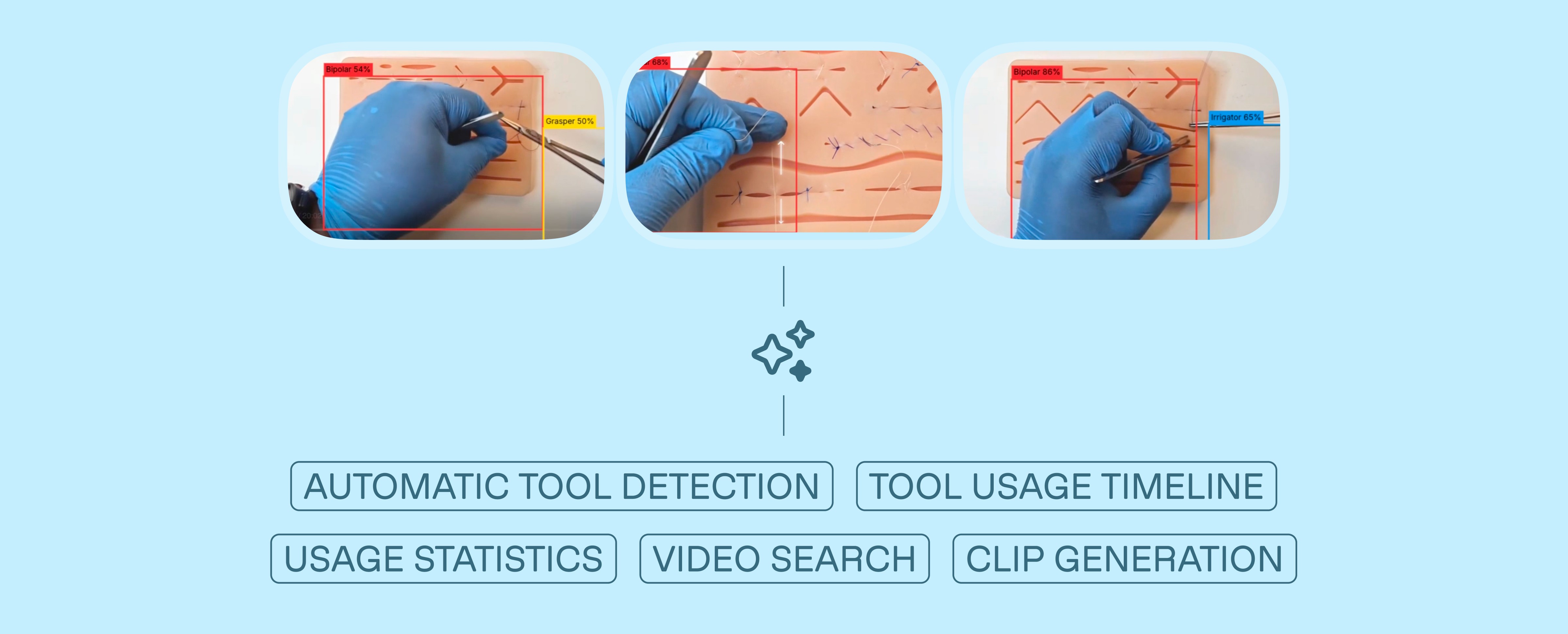
Detects surgical tools in real-time with bounding boxes and timestamps
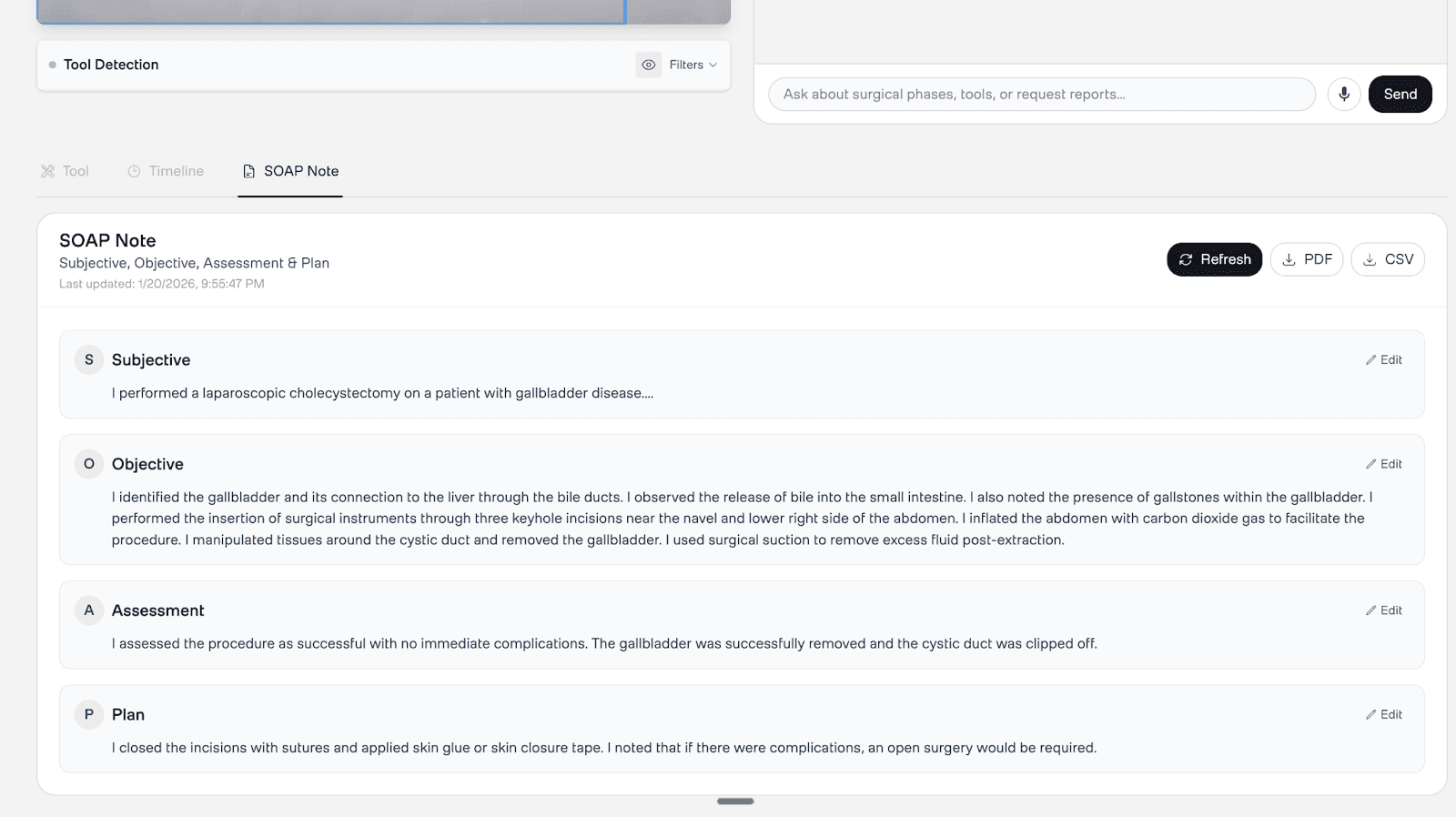
Generates SOAP operative notes (Subjective, Objective, Assessment, Plan) from video evidence
Segments surgeries into chapters (e.g., "Dissection," "Closure")
Enables semantic search across video libraries (e.g., "find all cauterization moments")
Provides Dr. Sage, a conversational AI assistant for follow-up clinical Q&A
📌 Try the live demo | View the GitHub repository
System Architecture
Surgical video analysis requires two fundamentally different capabilities: pixel-precise instrument identification and contextual understanding of what those instruments are doing within a procedure. No single model handles both well.
Our architecture separates these concerns into two parallel pipelines that converge at inference time.
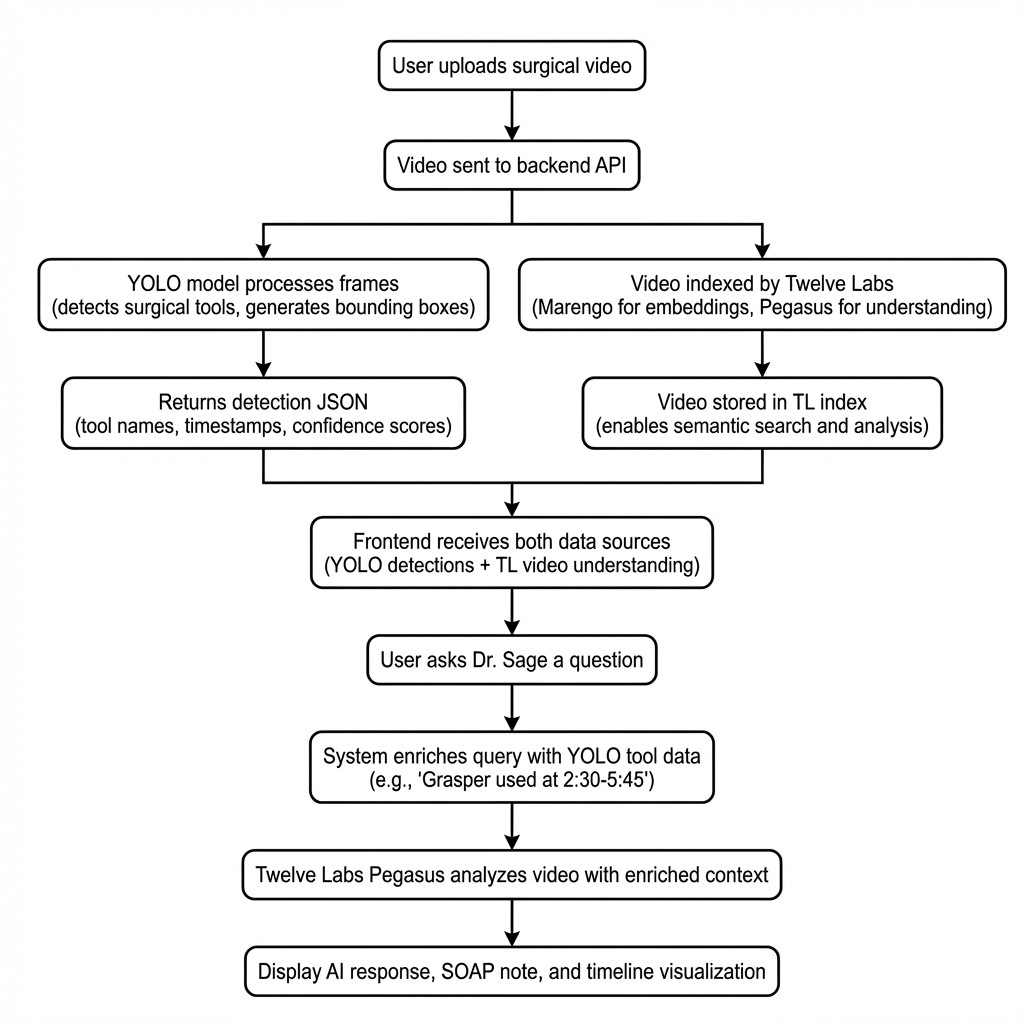
Video Ingestion: The user uploads a laparoscopic surgery video.
Tool Detection: A YOLOv8 model (fine-tuned on 7 distinct surgical instrument classes) scans the video and outputs a structured JSON file of detections with timestamps and bounding boxes.
Video Indexing: The video is indexed by Twelve Labs to enable semantic search (Marengo embeddings) and contextual analysis (Pegasus reasoning).
Context Fusion: When the system generates notes or answers questions, YOLO's detection data is injected into the prompt alongside Twelve Labs' video understanding — grounding the AI's reasoning in verified visual evidence.
This hybrid approach matters because each technology compensates for the other's blind spots. YOLO can identify a grasper with 95% confidence at frame 120, but it cannot tell you whether that grasper is being used for retraction or dissection. Twelve Labs can reason about surgical technique and phase progression, but benefits from hard detection data to prevent hallucinating instrument usage that never occurred.
Application Demo
1. Real-Time Tool Detection
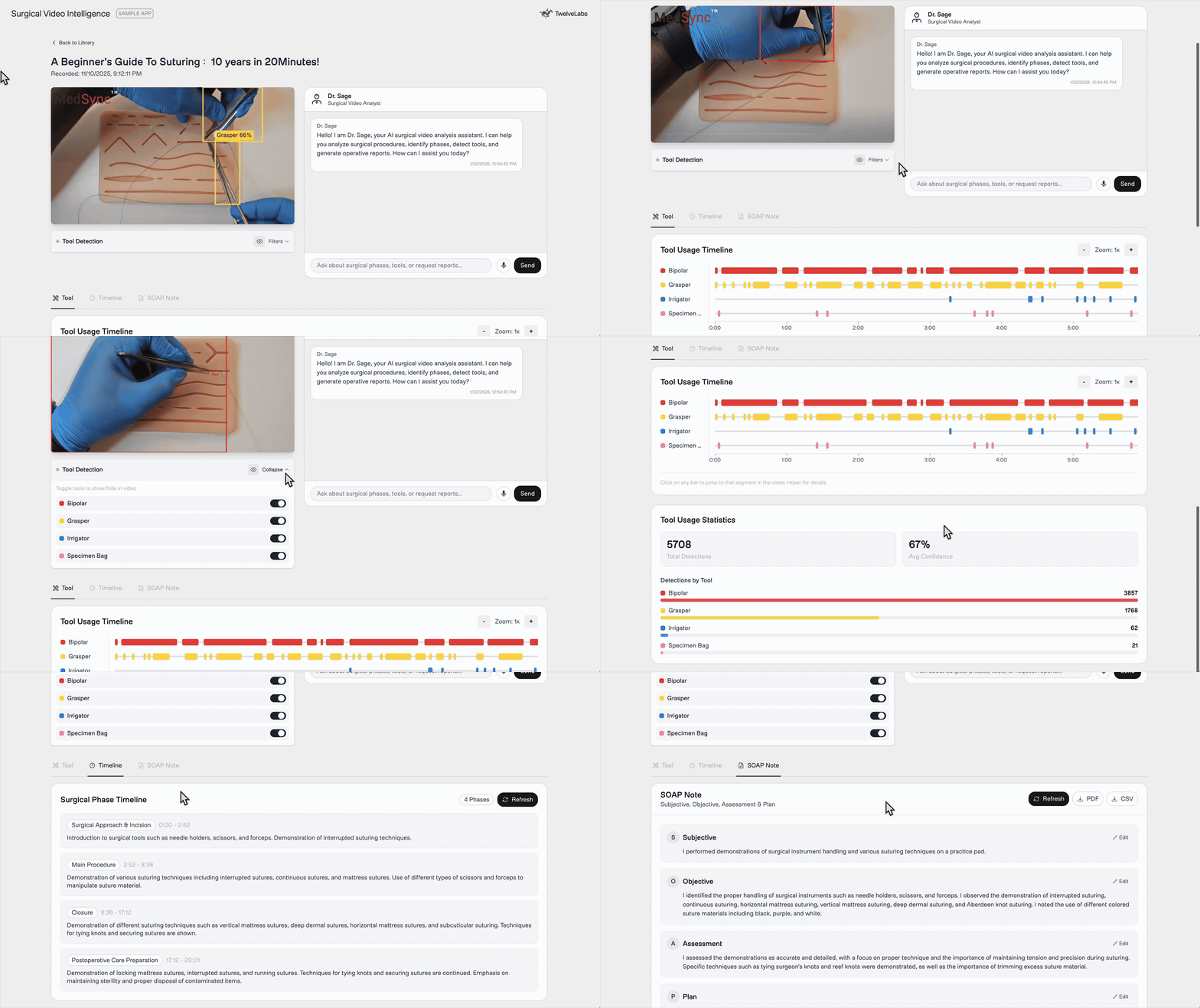
The main analysis view provides a synchronized experience. On the left, the video player overlays real-time tool bounding boxes detected by YOLO. Below, a "swimlane" timeline visualizes exactly when each instrument appears — giving educators an instant, scannable map of instrument usage across the entire procedure.
2. Automatic SOAP Note Generation
Upon video upload and indexing, the system generates a first-person operative note using the Twelve Labs Analyze API, enriched with YOLO tool detection data. No manual input required. The resulting SOAP note includes accurate instrument references anchored to specific timestamps, reducing documentation time from hours to minutes.
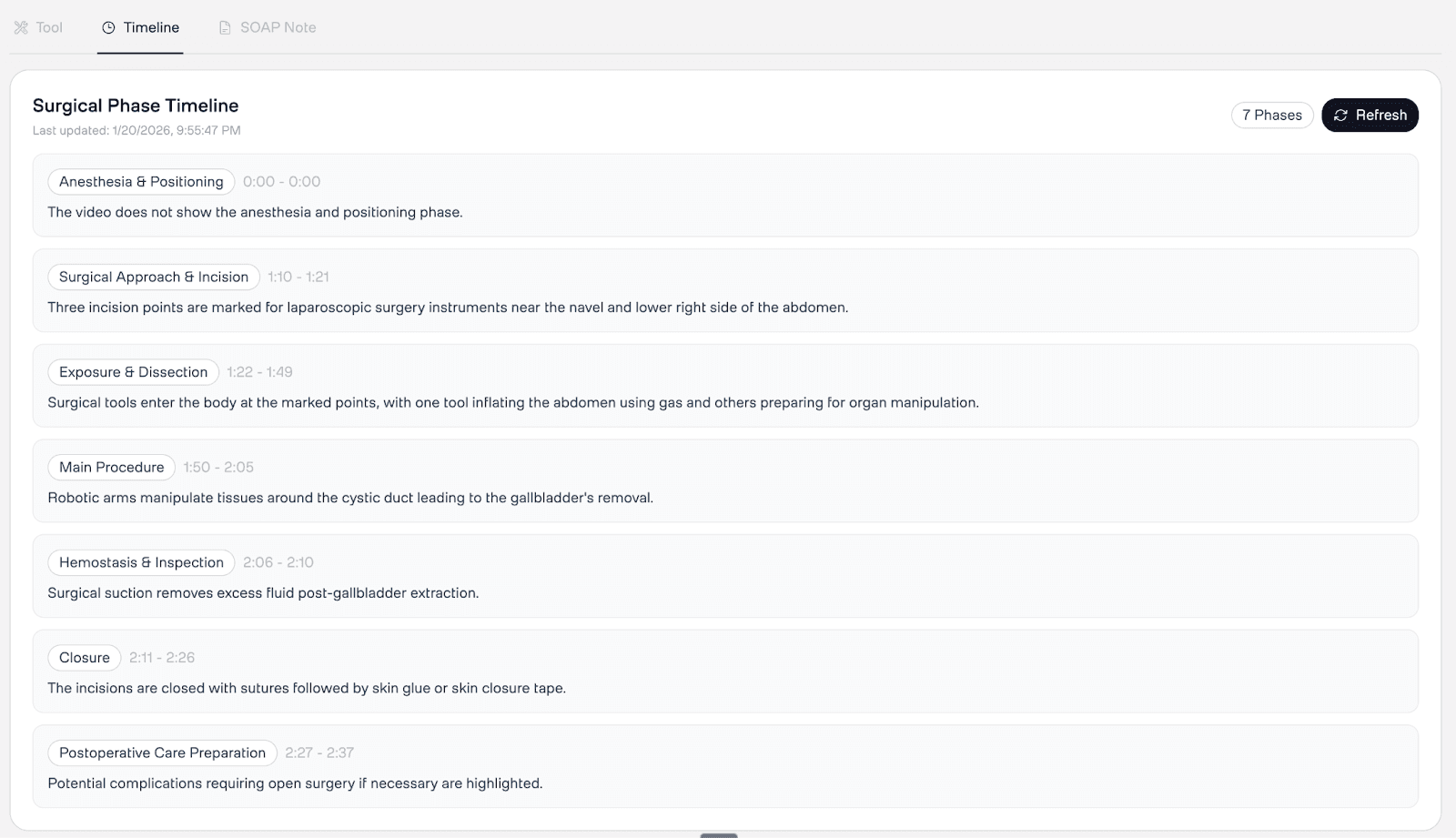
3. Surgical Phase Segmentation
The Twelve Labs Analyze API automatically breaks the surgery into distinct phases — "Preparation," "Dissection," "Closure" — using structured JSON output. These chapters appear on an interactive timeline, enabling quick navigation to specific surgical stages. For training programs, this transforms a 90-minute recording into a navigable curriculum.
4. Semantic Search
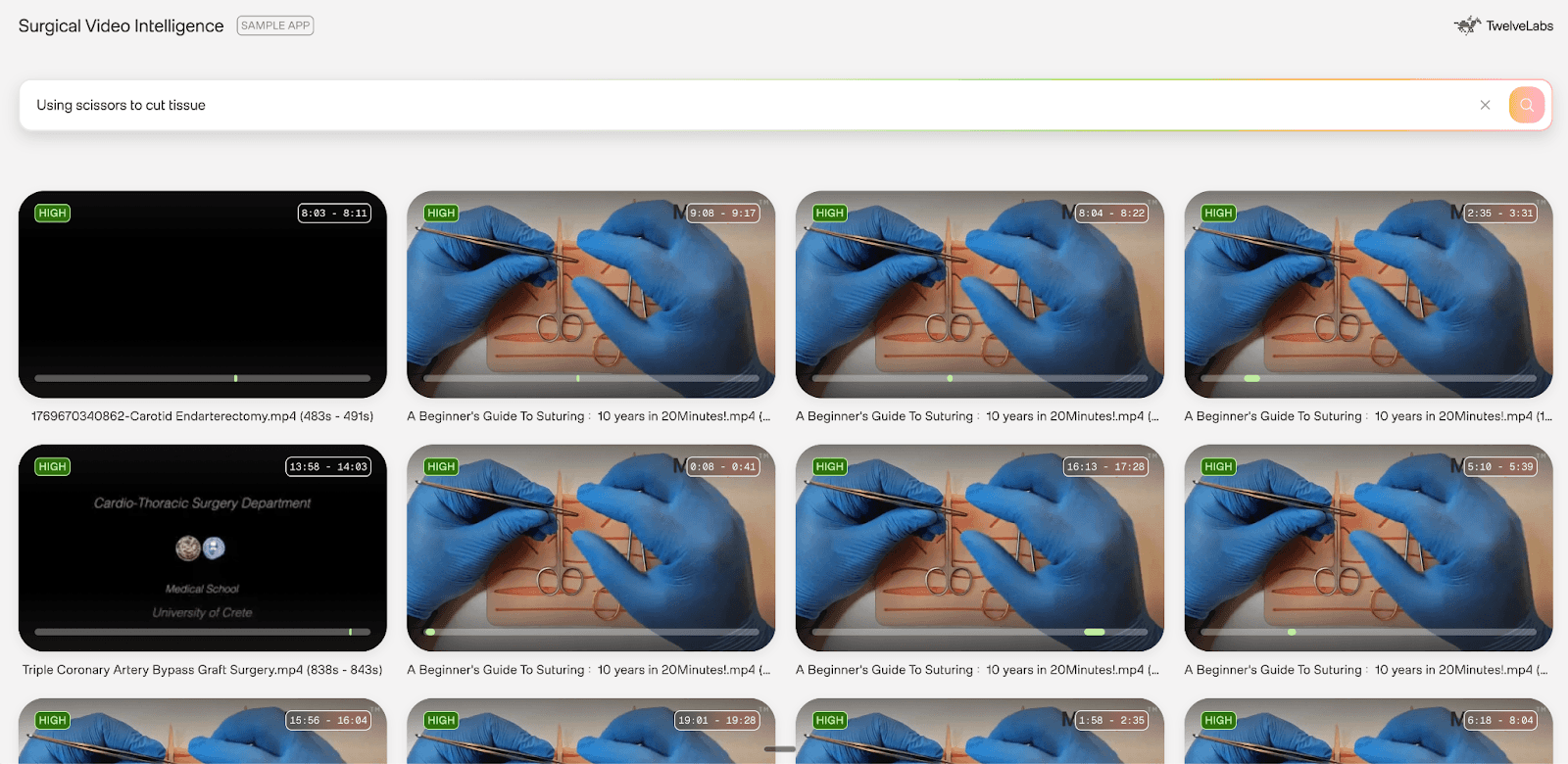
Natural language search across surgical video libraries, powered by Twelve Labs Marengo's multimodal embeddings. Unlike keyword matching, this understands surgical context semantically.
Example query: "Show me when the surgeon used electrocautery" Result: Clips at 2:34–2:58 and 5:12–5:45 with 0.92 confidence
For a surgical educator searching "use of monopolar coagulation" across 50+ training videos, Marengo returns all instances with timestamps — enabling rapid compilation of technique montages without watching a single full recording.
5. Dr. Sage: Conversational Clinical Q&A
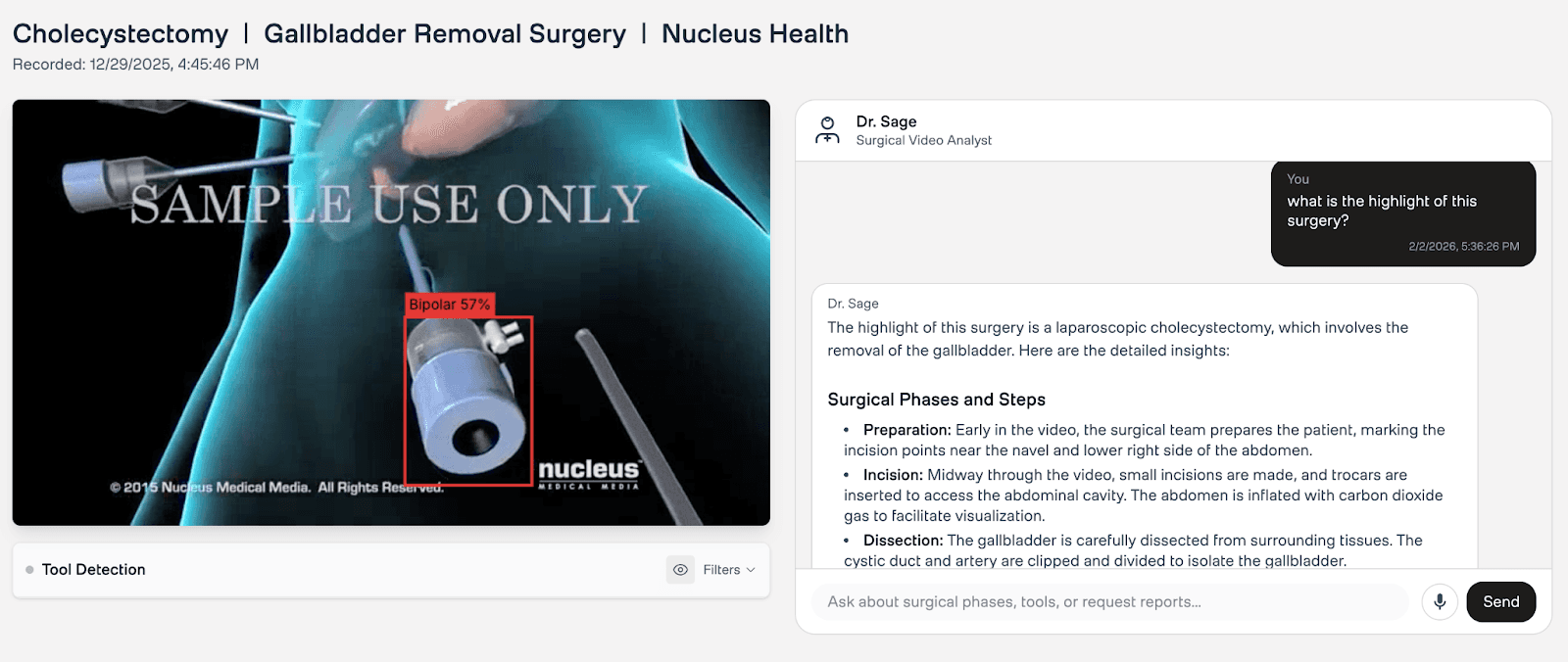
After automated analysis completes, Dr. Sage provides a conversational interface for follow-up questions. It has access to both YOLO detections and Twelve Labs video understanding, enabling queries like "What tools were used during dissection?" or "Explain the technique used at 3:45." This bridges the gap between automated reports and the ad-hoc questions that arise during surgical review and training sessions.
Deployment Architecture
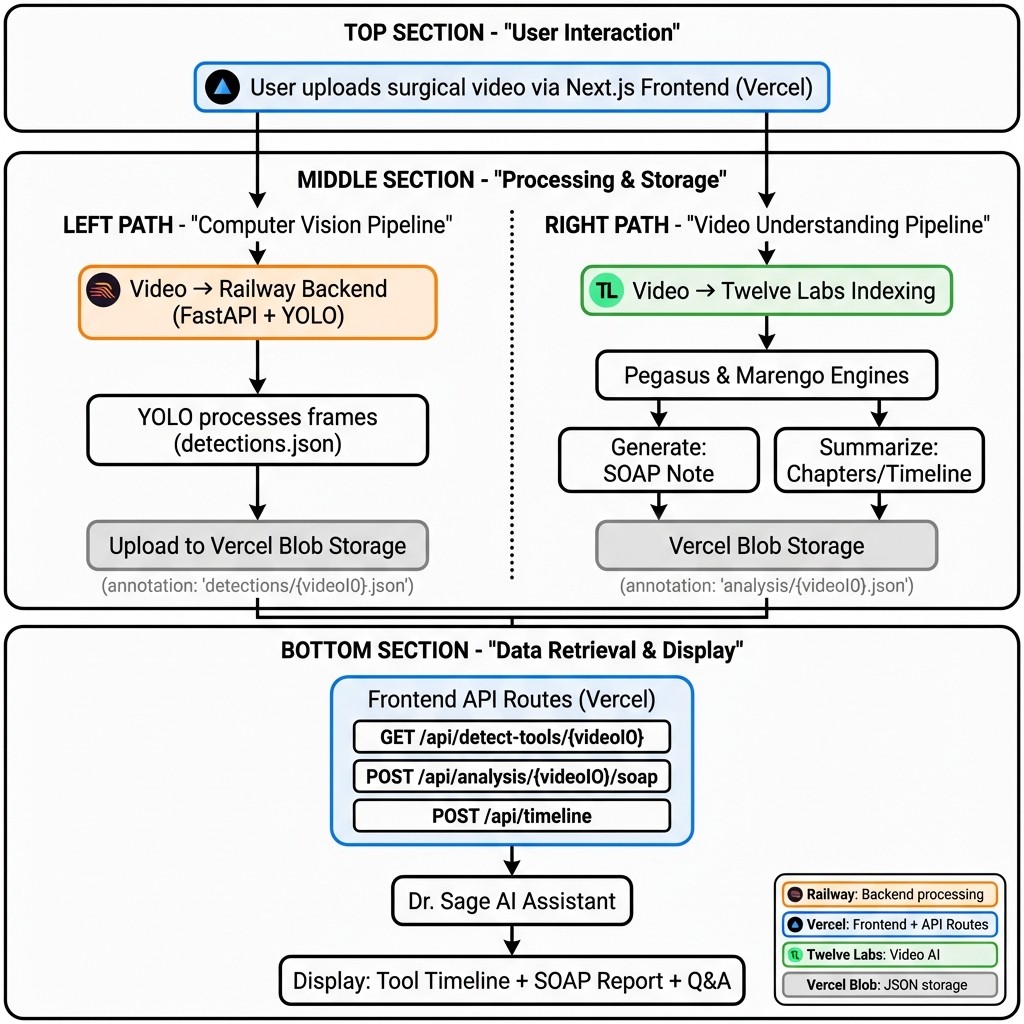
The application is designed as a distributed system with clear separation between compute-intensive inference and user-facing operations.
Infrastructure Overview
Frontend (Vercel): Next.js application serving the UI and API routes
Backend (Railway): FastAPI server running YOLO inference
Storage (Vercel Blob): Centralized JSON storage for all analysis results
AI Processing (Twelve Labs): Cloud-based video understanding
Data Flow
When a user uploads a surgical video, two parallel pipelines activate:
Computer Vision Pipeline (Railway)
User uploads video → Frontend sends to Railway backend
YOLO processes the video frame-by-frame (every 120th frame for efficiency)
Backend generates
detections.json:
{
  "detections": [
    {
      "frame": 120,
      "timestamp": 5.0,
      "tools": [
        {"class_name": "Grasper", "confidence": 0.95, "bbox": {...}}
      ]
    }
  ]
}
{
  "detections": [
    {
      "frame": 120,
      "timestamp": 5.0,
      "tools": [
        {"class_name": "Grasper", "confidence": 0.95, "bbox": {...}}
      ]
    }
  ]
}
Results upload to Vercel Blob at path:
detections/{videoId}.json
Video Intelligence Pipeline (Twelve Labs + Vercel)
Video is indexed by Twelve Labs (Marengo for embeddings, Pegasus for understanding)
Frontend API routes trigger AI generation:
SOAP Note:
POST /api/analysis/{videoId}/soapChapters/Timeline:
POST /api/timeline
Results are saved to Vercel Blob at:
analysis/{videoId}.json
Vercel Blob: Centralized State
Both pipelines converge at Vercel Blob, a key-value store for JSON files. This eliminates database complexity while maintaining fast lookups.
Storage schema:
How Twelve Labs Powers Intelligence
YOLO gives us the what and when — specific tools, exact timestamps. Twelve Labs gives us the why and how — phase recognition, technique analysis, contextual reasoning. Here is how we use three primary API capabilities: Analyze (for SOAP generation and chapter segmentation) and Search (for semantic retrieval).
1. Analyze API: SOAP Note Generation
The Analyze API is Twelve Labs' multimodal generation endpoint. We use it to create first-person operative notes grounded in YOLO detection data.
Source: frontend/src/app/api/analysis/[videoId]/soap/route.js
// 1. Fetch YOLO detection data from Vercel Blob
const toolData = await fetchToolDetection(videoId);

// 2. Format detections as readable text for the prompt
const toolContext = formatToolDetectionForPrompt(toolData);
// Example output: "DETECTED TOOLS: Grasper at 0:45, 1:20, 2:30..."

// 3. Enrich the SOAP generation prompt with hard detection data
const enrichedPrompt = `${soapPrompt}

## REFERENCE DATA
${toolContext}
Use this tool detection data to provide accurate tool names and usage times.`;

// 4. Call Twelve Labs Analyze API
const response = await getTwelveLabsClient().analyze({
    videoId: videoId,
    prompt: enrichedPrompt,
    temperature: 0.2 // Low temperature for factual, not creative, output
});

// 5. Parse JSON response and save to Vercel Blob
const parsedData = JSON.parse(response.data);
await saveToBlob(videoId, { operative_note: parsedData.operative_note });
// 1. Fetch YOLO detection data from Vercel Blob
const toolData = await fetchToolDetection(videoId);

// 2. Format detections as readable text for the prompt
const toolContext = formatToolDetectionForPrompt(toolData);
// Example output: "DETECTED TOOLS: Grasper at 0:45, 1:20, 2:30..."

// 3. Enrich the SOAP generation prompt with hard detection data
const enrichedPrompt = `${soapPrompt}

## REFERENCE DATA
${toolContext}
Use this tool detection data to provide accurate tool names and usage times.`;

// 4. Call Twelve Labs Analyze API
const response = await getTwelveLabsClient().analyze({
    videoId: videoId,
    prompt: enrichedPrompt,
    temperature: 0.2 // Low temperature for factual, not creative, output
});

// 5. Parse JSON response and save to Vercel Blob
const parsedData = JSON.parse(response.data);
await saveToBlob(videoId, { operative_note: parsedData.operative_note });
Why this works: By injecting YOLO detections into the prompt, we ground the model's reasoning in verified visual evidence. The AI cannot claim "I used a clipper at 5:30" if YOLO never detected one. This is the key architectural pattern — using computer vision outputs as factual constraints on multimodal generation.
2. Analyze API: Timeline Generation (Structured Output)
We also use the Analyze API for chapter generation by leveraging the responseFormat parameter to request structured JSON output. This provides schema-validated responses, eliminating fragile string parsing.
Source: frontend/src/app/api/timeline/route.js
const response = await getTwelveLabsClient().analyze({
    videoId: videoId,
    prompt: "Divide this surgery into distinct phases with medical terminology. For each phase, provide a title, summary, start time, and end time.",
    responseFormat: {
        type: "json_schema",
        jsonSchema: {
            type: "object",
            properties: {
                chapters: {
                    type: "array",
                    items: {
                        type: "object",
                        properties: {
                            chapterNumber: { type: "number" },
                            chapterTitle: { type: "string" },
                            chapterSummary: { type: "string" },
                            startSec: { type: "number" },
                            endSec: { type: "number" }
                        },
                        required: ["chapterNumber", "chapterTitle", "startSec", "endSec"]
                    }
                }
            }
        }
    }
});

// Parse the structured JSON response
const parsedData = JSON.parse(response.data);
// parsedData.chapters contains the chapter array
const response = await getTwelveLabsClient().analyze({
    videoId: videoId,
    prompt: "Divide this surgery into distinct phases with medical terminology. For each phase, provide a title, summary, start time, and end time.",
    responseFormat: {
        type: "json_schema",
        jsonSchema: {
            type: "object",
            properties: {
                chapters: {
                    type: "array",
                    items: {
                        type: "object",
                        properties: {
                            chapterNumber: { type: "number" },
                            chapterTitle: { type: "string" },
                            chapterSummary: { type: "string" },
                            startSec: { type: "number" },
                            endSec: { type: "number" }
                        },
                        required: ["chapterNumber", "chapterTitle", "startSec", "endSec"]
                    }
                }
            }
        }
    }
});

// Parse the structured JSON response
const parsedData = JSON.parse(response.data);
// parsedData.chapters contains the chapter array
Example output:
{
  "chapters": [
    {
      "chapterNumber": 1,
      "chapterTitle": "Preoperative Setup and Positioning",
      "chapterSummary": "Patient positioned and prepped for procedure",
      "startSec": 0,
      "endSec": 163
    },
    {
      "chapterNumber": 2,
      "chapterTitle": "Dissection and Control of Carotid Arteries",
      "startSec": 163,
      "endSec": 326
    }
  ]
}
{
  "chapters": [
    {
      "chapterNumber": 1,
      "chapterTitle": "Preoperative Setup and Positioning",
      "chapterSummary": "Patient positioned and prepped for procedure",
      "startSec": 0,
      "endSec": 163
    },
    {
      "chapterNumber": 2,
      "chapterTitle": "Dissection and Control of Carotid Arteries",
      "startSec": 163,
      "endSec": 326
    }
  ]
}
Why this works: The responseFormat parameter ensures the model returns valid, parseable JSON matching an exact schema. No regex, no post-processing heuristics — the structured output is ready for direct use in the timeline UI.
3. Search API: Semantic Retrieval with Marengo
The Search API uses Marengo's multimodal embeddings to find specific moments in video based on natural language queries.
Source: frontend/src/app/api/search/route.js
const response = await getTwelveLabsClient().search.query({
    indexId: process.env.NEXT_PUBLIC_TWELVELABS_MARENGO_INDEX_ID,
    searchOptions: ['visual', 'audio'], // Search both modalities
    queryText: query, // e.g., "clipping of cystic artery"
    groupBy: "clip",
    threshold: "low" // Balance precision vs. recall
});

// Iterate through results
for await (const clip of response) {
    console.log(`Found at ${clip.start}s - ${clip.end}s (confidence: ${clip.confidence})`);
    console.log(`Thumbnail: ${clip.thumbnailUrl}`);
}
const response = await getTwelveLabsClient().search.query({
    indexId: process.env.NEXT_PUBLIC_TWELVELABS_MARENGO_INDEX_ID,
    searchOptions: ['visual', 'audio'], // Search both modalities
    queryText: query, // e.g., "clipping of cystic artery"
    groupBy: "clip",
    threshold: "low" // Balance precision vs. recall
});

// Iterate through results
for await (const clip of response) {
    console.log(`Found at ${clip.start}s - ${clip.end}s (confidence: ${clip.confidence})`);
    console.log(`Thumbnail: ${clip.thumbnailUrl}`);
}
Why this works: Unlike keyword matching, Marengo understands surgical context. A search for "clipping of cystic artery" returns results even when no one says those exact words — the model recognizes the visual and procedural pattern. This enables building searchable surgical video archives without manual tagging.
Step-by-Step Implementation
Prerequisites
Node.js 18+ and Python 3.10+
Twelve Labs API Key: Get one from the Playground
Computer Vision Model: We use a YOLOv8 model fine-tuned on the Cholec80 dataset, which contains 80 cholecystectomy surgeries annotated with 7 instrument classes
Step 1: Setting Up the Backend (Railway)
The YOLO detection backend is a FastAPI server that accepts video uploads and returns JSON detections.
# backend/main.py
@app.post("/detect/upload")
async def detect_tools_upload(video_id: str, video: UploadFile):
    # Process video with YOLO
    results_data = run_inference(temp_video_path, video_id)

    # Upload results to Vercel Blob via Frontend API
    await upload_results_to_blob(video_id, results_data, blob_token)

    return {"status": "completed", "data": results_data}
# backend/main.py
@app.post("/detect/upload")
async def detect_tools_upload(video_id: str, video: UploadFile):
    # Process video with YOLO
    results_data = run_inference(temp_video_path, video_id)

    # Upload results to Vercel Blob via Frontend API
    await upload_results_to_blob(video_id, results_data, blob_token)

    return {"status": "completed", "data": results_data}
The backend processes every 120th frame (~1 frame per 5 seconds at 24fps), balancing detection accuracy against processing speed. For a 30-minute surgical video, this produces approximately 360 analyzed frames — enough to build a comprehensive instrument usage timeline without the cost of full frame-by-frame inference.
Step 2: Frontend API Routes (Vercel)
The Next.js API routes orchestrate the intelligence layer. Three key endpoints:
GET /api/detect-tools/{videoId}: Retrieves YOLO detections from Vercel BlobPOST /api/analysis/{videoId}/soap: Generates SOAP notes using Twelve Labs Analyze APIPOST /api/timeline: Creates chapter segmentation using Twelve Labs Analyze API
Each route follows a consistent three-step pattern: fetch YOLO data from Blob (if available), call the Twelve Labs API with enriched prompts, and save results back to Blob for caching.
Step 3: Dr. Sage Chat Integration
The conversational interface enriches user queries with visual evidence before sending them to Twelve Labs.
Source: frontend/src/app/api/analysis/route.js
import { TwelveLabs } from 'twelvelabs-js';

// Helper: Convert raw JSON detections to a chat-friendly summary
function formatToolDetectionForChat(toolData) {
    // ... logic to aggregate frames into time ranges ...
    // Output example:
    // "- Grasper: 450 detections (0:05 - 12:30)"
    // "- Hook: 120 detections (4:15 - 8:00)"
    return summary;
}

export async function POST(request) {
    const { userQuery, videoId } = await request.json();

    // 1. Fetch the JSON data produced by our YOLO backend
    const toolData = await fetchToolDetection(videoId);

    // 2. Format it into natural language context
    // This turns thousands of data points into a readable summary for the AI
    const toolContext = formatToolDetectionForChat(toolData);

    // 3. Enrich the user's query
    // We tag this as system-injected data so the model treats it as ground truth
    const enrichedQuery = toolContext
        ? `${userQuery}\n\n[SYSTEM INJECTED DATA - DO NOT IGNORE]\n${toolContext}`
        : userQuery;

    // 4. Call Twelve Labs Pegasus
    const client = new TwelveLabs({ apiKey: process.env.TWELVELABS_API_KEY });
    const response = await client.analyze({
        videoId: videoId,
        prompt: enrichedQuery,
        temperature: 0.2 // Low temperature for factual accuracy
    });

    return new Response(JSON.stringify(response));
}
import { TwelveLabs } from 'twelvelabs-js';

// Helper: Convert raw JSON detections to a chat-friendly summary
function formatToolDetectionForChat(toolData) {
    // ... logic to aggregate frames into time ranges ...
    // Output example:
    // "- Grasper: 450 detections (0:05 - 12:30)"
    // "- Hook: 120 detections (4:15 - 8:00)"
    return summary;
}

export async function POST(request) {
    const { userQuery, videoId } = await request.json();

    // 1. Fetch the JSON data produced by our YOLO backend
    const toolData = await fetchToolDetection(videoId);

    // 2. Format it into natural language context
    // This turns thousands of data points into a readable summary for the AI
    const toolContext = formatToolDetectionForChat(toolData);

    // 3. Enrich the user's query
    // We tag this as system-injected data so the model treats it as ground truth
    const enrichedQuery = toolContext
        ? `${userQuery}\n\n[SYSTEM INJECTED DATA - DO NOT IGNORE]\n${toolContext}`
        : userQuery;

    // 4. Call Twelve Labs Pegasus
    const client = new TwelveLabs({ apiKey: process.env.TWELVELABS_API_KEY });
    const response = await client.analyze({
        videoId: videoId,
        prompt: enrichedQuery,
        temperature: 0.2 // Low temperature for factual accuracy
    });

    return new Response(JSON.stringify(response));
}
Step 4: Visualizing the Timeline
Raw detection data is useful for the AI, but clinicians need visuals. We map detection timestamps to a React timeline component where each "swimlane" represents a surgical instrument class:
Red: Bipolar (Cautery)
Green: Hook (Dissection)
Yellow: Grasper (Manipulation)
A surgical educator reviewing a trainee's cholecystectomy can instantly spot patterns — prolonged cautery before adequate dissection, or unusual instrument sequencing — and click any moment to verify in the video. The frontend maps the JSON detections array to CSS-positioned elements on the timeline bar.
Conclusion
By pairing precise computer vision with contextual multimodal reasoning, this platform converts surgical video from passive recordings into structured, searchable clinical data.
YOLO delivers the who and when: specific instruments identified with pixel-level confidence at exact timestamps.
Twelve Labs delivers the what and why: phase recognition, technique analysis, and operative note generation grounded in full-procedure context.
The critical design pattern — injecting verified CV detections as factual constraints on multimodal generation — is applicable well beyond surgery. Any domain where you need both precise object identification and contextual reasoning (manufacturing QA, sports analytics, security review) can benefit from this hybrid architecture.
Next steps to explore:
Multi-procedure analytics across a department's full surgical library
Real-time intraoperative assistance with streaming YOLO detection
Automated training curriculum generation from annotated case libraries
Get started:
Surgeons and residents routinely spend 3–5 hours per procedure reviewing laparoscopic footage frame-by-frame — logging instruments, identifying surgical phases, and writing operative reports by hand. Across a teaching hospital processing hundreds of procedures monthly, that manual review adds up to thousands of hours of clinical time diverted from patient care.
In this tutorial, we build Surgical Video Intelligence, a platform that treats surgical video as a rich, queryable dataset. The core architectural insight: pair YOLO (You Only Look Once) for precise object detection with Twelve Labs' multimodal video understanding API to create a system that can both see which tools are on screen and understand the surgical context around them.
⭐️ What We're Building: A Next.js application that automatically:
Detects surgical tools in real-time with bounding boxes and timestamps
Generates SOAP operative notes (Subjective, Objective, Assessment, Plan) from video evidence
Segments surgeries into chapters (e.g., "Dissection," "Closure")
Enables semantic search across video libraries (e.g., "find all cauterization moments")
Provides Dr. Sage, a conversational AI assistant for follow-up clinical Q&A
📌 Try the live demo | View the GitHub repository
System Architecture
Surgical video analysis requires two fundamentally different capabilities: pixel-precise instrument identification and contextual understanding of what those instruments are doing within a procedure. No single model handles both well.
Our architecture separates these concerns into two parallel pipelines that converge at inference time.
Video Ingestion: The user uploads a laparoscopic surgery video.
Tool Detection: A YOLOv8 model (fine-tuned on 7 distinct surgical instrument classes) scans the video and outputs a structured JSON file of detections with timestamps and bounding boxes.
Video Indexing: The video is indexed by Twelve Labs to enable semantic search (Marengo embeddings) and contextual analysis (Pegasus reasoning).
Context Fusion: When the system generates notes or answers questions, YOLO's detection data is injected into the prompt alongside Twelve Labs' video understanding — grounding the AI's reasoning in verified visual evidence.
This hybrid approach matters because each technology compensates for the other's blind spots. YOLO can identify a grasper with 95% confidence at frame 120, but it cannot tell you whether that grasper is being used for retraction or dissection. Twelve Labs can reason about surgical technique and phase progression, but benefits from hard detection data to prevent hallucinating instrument usage that never occurred.
Application Demo
1. Real-Time Tool Detection
The main analysis view provides a synchronized experience. On the left, the video player overlays real-time tool bounding boxes detected by YOLO. Below, a "swimlane" timeline visualizes exactly when each instrument appears — giving educators an instant, scannable map of instrument usage across the entire procedure.
2. Automatic SOAP Note Generation
Upon video upload and indexing, the system generates a first-person operative note using the Twelve Labs Analyze API, enriched with YOLO tool detection data. No manual input required. The resulting SOAP note includes accurate instrument references anchored to specific timestamps, reducing documentation time from hours to minutes.
3. Surgical Phase Segmentation
The Twelve Labs Analyze API automatically breaks the surgery into distinct phases — "Preparation," "Dissection," "Closure" — using structured JSON output. These chapters appear on an interactive timeline, enabling quick navigation to specific surgical stages. For training programs, this transforms a 90-minute recording into a navigable curriculum.
4. Semantic Search
Natural language search across surgical video libraries, powered by Twelve Labs Marengo's multimodal embeddings. Unlike keyword matching, this understands surgical context semantically.
Example query: "Show me when the surgeon used electrocautery" Result: Clips at 2:34–2:58 and 5:12–5:45 with 0.92 confidence
For a surgical educator searching "use of monopolar coagulation" across 50+ training videos, Marengo returns all instances with timestamps — enabling rapid compilation of technique montages without watching a single full recording.
5. Dr. Sage: Conversational Clinical Q&A
After automated analysis completes, Dr. Sage provides a conversational interface for follow-up questions. It has access to both YOLO detections and Twelve Labs video understanding, enabling queries like "What tools were used during dissection?" or "Explain the technique used at 3:45." This bridges the gap between automated reports and the ad-hoc questions that arise during surgical review and training sessions.
Deployment Architecture
The application is designed as a distributed system with clear separation between compute-intensive inference and user-facing operations.
Infrastructure Overview
Frontend (Vercel): Next.js application serving the UI and API routes
Backend (Railway): FastAPI server running YOLO inference
Storage (Vercel Blob): Centralized JSON storage for all analysis results
AI Processing (Twelve Labs): Cloud-based video understanding
Data Flow
When a user uploads a surgical video, two parallel pipelines activate:
Computer Vision Pipeline (Railway)
User uploads video → Frontend sends to Railway backend
YOLO processes the video frame-by-frame (every 120th frame for efficiency)
Backend generates
detections.json:
{
  "detections": [
    {
      "frame": 120,
      "timestamp": 5.0,
      "tools": [
        {"class_name": "Grasper", "confidence": 0.95, "bbox": {...}}
      ]
    }
  ]
}
Results upload to Vercel Blob at path:
detections/{videoId}.json
Video Intelligence Pipeline (Twelve Labs + Vercel)
Video is indexed by Twelve Labs (Marengo for embeddings, Pegasus for understanding)
Frontend API routes trigger AI generation:
SOAP Note:
POST /api/analysis/{videoId}/soapChapters/Timeline:
POST /api/timeline
Results are saved to Vercel Blob at:
analysis/{videoId}.json
Vercel Blob: Centralized State
Both pipelines converge at Vercel Blob, a key-value store for JSON files. This eliminates database complexity while maintaining fast lookups.
Storage schema:
How Twelve Labs Powers Intelligence
YOLO gives us the what and when — specific tools, exact timestamps. Twelve Labs gives us the why and how — phase recognition, technique analysis, contextual reasoning. Here is how we use three primary API capabilities: Analyze (for SOAP generation and chapter segmentation) and Search (for semantic retrieval).
1. Analyze API: SOAP Note Generation
The Analyze API is Twelve Labs' multimodal generation endpoint. We use it to create first-person operative notes grounded in YOLO detection data.
Source: frontend/src/app/api/analysis/[videoId]/soap/route.js
// 1. Fetch YOLO detection data from Vercel Blob
const toolData = await fetchToolDetection(videoId);

// 2. Format detections as readable text for the prompt
const toolContext = formatToolDetectionForPrompt(toolData);
// Example output: "DETECTED TOOLS: Grasper at 0:45, 1:20, 2:30..."

// 3. Enrich the SOAP generation prompt with hard detection data
const enrichedPrompt = `${soapPrompt}

## REFERENCE DATA
${toolContext}
Use this tool detection data to provide accurate tool names and usage times.`;

// 4. Call Twelve Labs Analyze API
const response = await getTwelveLabsClient().analyze({
    videoId: videoId,
    prompt: enrichedPrompt,
    temperature: 0.2 // Low temperature for factual, not creative, output
});

// 5. Parse JSON response and save to Vercel Blob
const parsedData = JSON.parse(response.data);
await saveToBlob(videoId, { operative_note: parsedData.operative_note });
Why this works: By injecting YOLO detections into the prompt, we ground the model's reasoning in verified visual evidence. The AI cannot claim "I used a clipper at 5:30" if YOLO never detected one. This is the key architectural pattern — using computer vision outputs as factual constraints on multimodal generation.
2. Analyze API: Timeline Generation (Structured Output)
We also use the Analyze API for chapter generation by leveraging the responseFormat parameter to request structured JSON output. This provides schema-validated responses, eliminating fragile string parsing.
Source: frontend/src/app/api/timeline/route.js
const response = await getTwelveLabsClient().analyze({
    videoId: videoId,
    prompt: "Divide this surgery into distinct phases with medical terminology. For each phase, provide a title, summary, start time, and end time.",
    responseFormat: {
        type: "json_schema",
        jsonSchema: {
            type: "object",
            properties: {
                chapters: {
                    type: "array",
                    items: {
                        type: "object",
                        properties: {
                            chapterNumber: { type: "number" },
                            chapterTitle: { type: "string" },
                            chapterSummary: { type: "string" },
                            startSec: { type: "number" },
                            endSec: { type: "number" }
                        },
                        required: ["chapterNumber", "chapterTitle", "startSec", "endSec"]
                    }
                }
            }
        }
    }
});

// Parse the structured JSON response
const parsedData = JSON.parse(response.data);
// parsedData.chapters contains the chapter array
Example output:
{
  "chapters": [
    {
      "chapterNumber": 1,
      "chapterTitle": "Preoperative Setup and Positioning",
      "chapterSummary": "Patient positioned and prepped for procedure",
      "startSec": 0,
      "endSec": 163
    },
    {
      "chapterNumber": 2,
      "chapterTitle": "Dissection and Control of Carotid Arteries",
      "startSec": 163,
      "endSec": 326
    }
  ]
}
Why this works: The responseFormat parameter ensures the model returns valid, parseable JSON matching an exact schema. No regex, no post-processing heuristics — the structured output is ready for direct use in the timeline UI.
3. Search API: Semantic Retrieval with Marengo
The Search API uses Marengo's multimodal embeddings to find specific moments in video based on natural language queries.
Source: frontend/src/app/api/search/route.js
const response = await getTwelveLabsClient().search.query({
    indexId: process.env.NEXT_PUBLIC_TWELVELABS_MARENGO_INDEX_ID,
    searchOptions: ['visual', 'audio'], // Search both modalities
    queryText: query, // e.g., "clipping of cystic artery"
    groupBy: "clip",
    threshold: "low" // Balance precision vs. recall
});

// Iterate through results
for await (const clip of response) {
    console.log(`Found at ${clip.start}s - ${clip.end}s (confidence: ${clip.confidence})`);
    console.log(`Thumbnail: ${clip.thumbnailUrl}`);
}
Why this works: Unlike keyword matching, Marengo understands surgical context. A search for "clipping of cystic artery" returns results even when no one says those exact words — the model recognizes the visual and procedural pattern. This enables building searchable surgical video archives without manual tagging.
Step-by-Step Implementation
Prerequisites
Node.js 18+ and Python 3.10+
Twelve Labs API Key: Get one from the Playground
Computer Vision Model: We use a YOLOv8 model fine-tuned on the Cholec80 dataset, which contains 80 cholecystectomy surgeries annotated with 7 instrument classes
Step 1: Setting Up the Backend (Railway)
The YOLO detection backend is a FastAPI server that accepts video uploads and returns JSON detections.
# backend/main.py
@app.post("/detect/upload")
async def detect_tools_upload(video_id: str, video: UploadFile):
    # Process video with YOLO
    results_data = run_inference(temp_video_path, video_id)

    # Upload results to Vercel Blob via Frontend API
    await upload_results_to_blob(video_id, results_data, blob_token)

    return {"status": "completed", "data": results_data}
The backend processes every 120th frame (~1 frame per 5 seconds at 24fps), balancing detection accuracy against processing speed. For a 30-minute surgical video, this produces approximately 360 analyzed frames — enough to build a comprehensive instrument usage timeline without the cost of full frame-by-frame inference.
Step 2: Frontend API Routes (Vercel)
The Next.js API routes orchestrate the intelligence layer. Three key endpoints:
GET /api/detect-tools/{videoId}: Retrieves YOLO detections from Vercel BlobPOST /api/analysis/{videoId}/soap: Generates SOAP notes using Twelve Labs Analyze APIPOST /api/timeline: Creates chapter segmentation using Twelve Labs Analyze API
Each route follows a consistent three-step pattern: fetch YOLO data from Blob (if available), call the Twelve Labs API with enriched prompts, and save results back to Blob for caching.
Step 3: Dr. Sage Chat Integration
The conversational interface enriches user queries with visual evidence before sending them to Twelve Labs.
Source: frontend/src/app/api/analysis/route.js
import { TwelveLabs } from 'twelvelabs-js';

// Helper: Convert raw JSON detections to a chat-friendly summary
function formatToolDetectionForChat(toolData) {
    // ... logic to aggregate frames into time ranges ...
    // Output example:
    // "- Grasper: 450 detections (0:05 - 12:30)"
    // "- Hook: 120 detections (4:15 - 8:00)"
    return summary;
}

export async function POST(request) {
    const { userQuery, videoId } = await request.json();

    // 1. Fetch the JSON data produced by our YOLO backend
    const toolData = await fetchToolDetection(videoId);

    // 2. Format it into natural language context
    // This turns thousands of data points into a readable summary for the AI
    const toolContext = formatToolDetectionForChat(toolData);

    // 3. Enrich the user's query
    // We tag this as system-injected data so the model treats it as ground truth
    const enrichedQuery = toolContext
        ? `${userQuery}\n\n[SYSTEM INJECTED DATA - DO NOT IGNORE]\n${toolContext}`
        : userQuery;

    // 4. Call Twelve Labs Pegasus
    const client = new TwelveLabs({ apiKey: process.env.TWELVELABS_API_KEY });
    const response = await client.analyze({
        videoId: videoId,
        prompt: enrichedQuery,
        temperature: 0.2 // Low temperature for factual accuracy
    });

    return new Response(JSON.stringify(response));
}
Step 4: Visualizing the Timeline
Raw detection data is useful for the AI, but clinicians need visuals. We map detection timestamps to a React timeline component where each "swimlane" represents a surgical instrument class:
Red: Bipolar (Cautery)
Green: Hook (Dissection)
Yellow: Grasper (Manipulation)
A surgical educator reviewing a trainee's cholecystectomy can instantly spot patterns — prolonged cautery before adequate dissection, or unusual instrument sequencing — and click any moment to verify in the video. The frontend maps the JSON detections array to CSS-positioned elements on the timeline bar.
Conclusion
By pairing precise computer vision with contextual multimodal reasoning, this platform converts surgical video from passive recordings into structured, searchable clinical data.
YOLO delivers the who and when: specific instruments identified with pixel-level confidence at exact timestamps.
Twelve Labs delivers the what and why: phase recognition, technique analysis, and operative note generation grounded in full-procedure context.
The critical design pattern — injecting verified CV detections as factual constraints on multimodal generation — is applicable well beyond surgery. Any domain where you need both precise object identification and contextual reasoning (manufacturing QA, sports analytics, security review) can benefit from this hybrid architecture.
Next steps to explore:
Multi-procedure analytics across a department's full surgical library
Real-time intraoperative assistance with streaming YOLO detection
Automated training curriculum generation from annotated case libraries
Get started:



Platform
Enterprise
©
2026
TwelveLabs, Inc. All Rights Reserved

Platform
Enterprise
©
2026
TwelveLabs, Inc. All Rights Reserved

Platform
Enterprise
©
2026
TwelveLabs, Inc. All Rights Reserved