" height="1.90314px" id="wtDTm6bEW" transform="translate(26.225 0)" width="2.4723000000000006px"/><path d="M 0.557 0 L 1.438 0 C 1.746 0 1.995 0.25 1.995 0.559 L 1.995 1.344 C 1.995 1.653 1.746 1.903 1.438 1.903 L 0.557 1.903 C 0.25 1.903 0 1.653 0 1.344 L 0 0.559 C 0 0.25 0.25 0 0.557 0 Z" fill="rgb(29, 28, 27)" height="1.9031500000000001px" id="GnmDnNra_" transform="translate(36.408 2.728)" width="1.9953000000000003px"/><path d="M 6.224 0 L 0.558 0 C 0.25 0 0 0.25 0 0.559 L 0 1.344 C 0 1.653 0.25 1.903 0.558 1.903 L 6.224 1.903 C 6.531 1.903 6.781 1.653 6.781 1.344 L 6.781 0.559 C 6.781 0.25 6.531 0 6.224 0 Z" fill="rgb(29, 28, 27)" height="1.9031500000000001px" id="hKTQ3dbw4" transform="translate(34.261 5.456)" width="6.781100000000002px"/><path d="M 6.955 0 L 0.558 0 C 0.25 0 0 0.25 0 0.559 L 0 1.344 C 0 1.653 0.25 1.903 0.558 1.903 L 6.955 1.903 C 7.263 1.903 7.513 1.653 7.513 1.344 L 7.513 0.559 C 7.513 0.25 7.263 0 6.955 0 Z" fill="rgb(29, 28, 27)" height="1.9031500000000001px" id="G1Zzk9CUU" transform="translate(28.298 8.243)" width="7.513100000000001px"/><path d="M 7.123 0 L 0.558 0 C 0.25 0 0 0.25 0 0.559 L 0 1.344 C 0 1.653 0.25 1.903 0.558 1.903 L 7.123 1.903 C 7.431 1.903 7.681 1.653 7.681 1.344 L 7.681 0.559 C 7.681 0.25 7.431 0 7.123 0 Z" fill="rgb(29, 28, 27)" height="1.9030999999999985px" id="fm7cHxIfJ" transform="translate(0 10.972)" width="7.68067px"/><path d="M 13.447 0 L 0.558 0 C 0.25 0 0 0.25 0 0.559 L 0 1.344 C 0 1.653 0.25 1.903 0.558 1.903 L 13.447 1.903 C 13.755 1.903 14.004 1.653 14.004 1.344 L 14.004 0.559 C 14.004 0.25 13.755 0 13.447 0 Z" fill="rgb(29, 28, 27)" height="1.9030999999999985px" id="LowSwDrtg" transform="translate(9.552 10.972)" width="14.0044px"/><path d="M 0.558 0 L 8.212 0 C 8.52 0 8.77 0.25 8.77 0.559 L 8.77 1.344 C 8.77 1.653 8.52 1.903 8.212 1.903 L 0.558 1.903 C 0.25 1.903 0 1.653 0 1.344 L 0 0.559 C 0 0.25 0.25 0 0.558 0 Z" fill="rgb(29, 28, 27)" height="1.9030999999999985px" id="xRiKc2od7" transform="translate(27.041 10.972)" width="8.769900000000003px"/><path d="M 0.557 0 L 5.4 0 C 5.708 0 5.958 0.25 5.958 0.559 L 5.958 1.344 C 5.958 1.653 5.708 1.903 5.4 1.903 L 0.557 1.903 C 0.25 1.903 0 1.653 0 1.344 L 0 0.559 C 0 0.25 0.25 0 0.557 0 Z" fill="rgb(29, 28, 27)" height="1.9031500000000001px" id="JWdNVicde" transform="translate(36.796 8.243)" width="5.957599999999999px"/><path d="M 1.438 0 L 0.558 0 C 0.25 0 0 0.25 0 0.559 L 0 1.344 C 0 1.653 0.25 1.903 0.558 1.903 L 1.438 1.903 C 1.746 1.903 1.995 1.653 1.995 1.344 L 1.995 0.559 C 1.995 0.25 1.746 0 1.438 0 Z" fill="rgb(29, 28, 27)" height="1.9031500000000001px" id="RfFYVCT_T" transform="translate(28.717 5.456)" width="1.9953000000000003px"/><path d="M 0.558 0 L 2.895 0 C 3.203 0 3.453 0.25 3.453 0.559 L 3.453 1.406 C 3.453 1.714 3.203 1.964 2.895 1.964 L 0.558 1.964 C 0.25 1.964 0 1.714 0 1.406 L 0 0.559 C 0 0.25 0.25 0 0.558 0 Z" fill="rgb(29, 28, 27)" height="1.964299999999998px" id="dngJ6MU2p" transform="translate(16.183 24.582)" width="3.4525000000000006px"/><path d="M 1.706 0 L 0.558 0 C 0.25 0 0 0.25 0 0.559 L 0 1.406 C 0 1.714 0.25 1.964 0.558 1.964 L 1.706 1.964 C 2.014 1.964 2.263 1.714 2.263 1.406 L 2.263 0.559 C 2.263 0.25 2.014 0 1.706 0 Z" fill="rgb(29, 28, 27)" height="1.964299999999998px" id="N_fstvKmR" transform="translate(22.18 24.582)" width="2.2631999999999977px"/><path d="M 0.558 0 L 5.544 0 C 5.852 0 6.101 0.25 6.101 0.559 L 6.101 1.406 C 6.101 1.714 5.852 1.964 5.544 1.964 L 0.558 1.964 C 0.25 1.964 0 1.714 0 1.406 L 0 0.559 C 0 0.25 0.25 0 0.558 0 Z" fill="rgb(29, 28, 27)" height="1.964299999999998px" id="t55XLYcgb" transform="translate(25.486 24.582)" width="6.101399999999998px"/><path d="M 1.976 0 L 0.558 0 C 0.25 0 0 0.25 0 0.559 L 0 1.406 C 0 1.714 0.25 1.964 0.558 1.964 L 1.976 1.964 C 2.284 1.964 2.533 1.714 2.533 1.406 L 2.533 0.559 C 2.533 0.25 2.284 0 1.976 0 Z" fill="rgb(29, 28, 27)" height="1.964299999999998px" id="ZrEKTVTAe" transform="translate(28.542 21.854)" width="2.5334000000000003px"/><path d="M 0.557 0 L 1.438 0 C 1.746 0 1.995 0.25 1.995 0.559 L 1.995 1.406 C 1.995 1.714 1.746 1.964 1.438 1.964 L 0.557 1.964 C 0.25 1.964 0 1.714 0 1.406 L 0 0.559 C 0 0.25 0.25 0 0.557 0 Z" fill="rgb(29, 28, 27)" height="1.964299999999998px" id="Z0fPTp9aR" transform="translate(11.425 24.582)" width="1.9953000000000003px"/><path d="M 0 0.559 C 0 0.251 0.251 0 0.558 0 L 1.438 0 C 1.745 0 1.995 0.251 1.995 0.559 L 1.995 1.405 C 1.995 1.713 1.745 1.964 1.438 1.964 L 0.558 1.964 C 0.251 1.964 0 1.713 0 1.405 Z" fill="rgb(29, 28, 27)" height="1.964299999999998px" id="Tj_PDHFDh" transform="translate(20.635 27.308)" width="1.9954px"/><path d="M 0.557 0 L 1.342 0 C 1.65 0 1.899 0.25 1.899 0.559 L 1.899 1.406 C 1.899 1.714 1.65 1.964 1.342 1.964 L 0.557 1.964 C 0.25 1.964 0 1.714 0 1.406 L 0 0.559 C 0 0.25 0.25 0 0.557 0 Z" fill="rgb(29, 28, 27)" height="1.9643000000000015px" id="AYq9dXkKz" transform="translate(18.686 30.036)" width="1.8994px"/><path d="M 0.558 0 L 5.768 0 C 6.076 0 6.326 0.25 6.326 0.559 L 6.326 1.344 C 6.326 1.653 6.076 1.903 5.768 1.903 L 0.558 1.903 C 0.25 1.903 0 1.653 0 1.344 L 0 0.559 C 0 0.25 0.25 0 0.558 0 Z" fill="rgb(29, 28, 27)" height="1.9031500000000001px" id="rspevfJcx" transform="translate(12.157 8.243)" width="6.325900000000001px"/><path d="M 3.285 0 L 0.558 0 C 0.25 0 0 0.25 0 0.559 L 0 1.344 C 0 1.653 0.25 1.903 0.558 1.903 L 3.285 1.903 C 3.593 1.903 3.842 1.653 3.842 1.344 L 3.842 0.559 C 3.842 0.25 3.593 0 3.285 0 Z" fill="rgb(29, 28, 27)" height="1.9031500000000001px" id="XRUAhGnph" transform="translate(23.887 2.728)" width="3.8424000000000014px"/><path d="M 0.558 0 L 5.644 0 C 5.952 0 6.202 0.25 6.202 0.559 L 6.202 1.344 C 6.202 1.653 5.952 1.903 5.644 1.903 L 0.558 1.903 C 0.25 1.903 0 1.653 0 1.344 L 0 0.559 C 0 0.25 0.25 0 0.558 0 Z" fill="rgb(29, 28, 27)" height="1.9031500000000001px" id="VsaVVIfke" transform="translate(21.528 5.456)" width="6.201600000000003px"/><path d="M 3.06 0 L 0.558 0 C 0.25 0 0 0.25 0 0.559 L 0 1.344 C 0 1.653 0.25 1.903 0.558 1.903 L 3.06 1.903 C 3.369 1.903 3.618 1.653 3.618 1.344 L 3.618 0.559 C 3.618 0.25 3.369 0 3.06 0 Z" fill="rgb(29, 28, 27)" height="1.9030999999999985px" id="wiAKEgyId" transform="translate(40.819 10.972)" width="3.6182000000000016px"/><path d="M 0.558 0 L 17.318 0 C 17.626 0 17.875 0.25 17.875 0.559 L 17.875 1.345 C 17.875 1.653 17.626 1.903 17.318 1.903 L 0.558 1.903 C 0.25 1.903 0 1.653 0 1.345 L 0 0.559 C 0 0.25 0.25 0 0.558 0 Z" fill="rgb(29, 28, 27)" height="1.9032px" id="FIE0ufK9m" transform="translate(6.666 13.7)" width="17.87506px"/><path d="M 6.426 0 L 0.558 0 C 0.25 0 0 0.25 0 0.559 L 0 1.345 C 0 1.653 0.25 1.903 0.558 1.903 L 6.426 1.903 C 6.734 1.903 6.984 1.653 6.984 1.345 L 6.984 0.559 C 6.984 0.25 6.734 0 6.426 0 Z" fill="rgb(29, 28, 27)" height="1.9032000000000018px" id="ut9UWny3L" transform="translate(22.892 19.156)" width="6.983599999999999px"/><path d="M 0.558 0 L 22.151 0 C 22.459 0 22.709 0.25 22.709 0.559 L 22.709 1.344 C 22.709 1.653 22.459 1.903 22.151 1.903 L 0.558 1.903 C 0.25 1.903 0 1.653 0 1.344 L 0 0.559 C 0 0.25 0.25 0 0.558 0 Z" fill="rgb(29, 28, 27)" height="1.9030999999999985px" id="VULnffgbk" transform="translate(9.552 16.428)" width="22.7089px"/><path d="M 7.886 0 L 0.558 0 C 0.25 0 0 0.25 0 0.559 L 0 1.345 C 0 1.653 0.25 1.903 0.558 1.903 L 7.886 1.903 C 8.194 1.903 8.443 1.653 8.443 1.345 L 8.443 0.559 C 8.443 0.25 8.194 0 7.886 0 Z" fill="rgb(29, 28, 27)" height="1.9032000000000018px" id="adZTYr4MR" transform="translate(6.078 19.156)" width="8.44303px"/><path d="M 0.558 0 L 2.211 0 C 2.519 0 2.769 0.25 2.769 0.559 L 2.769 1.406 C 2.769 1.714 2.519 1.964 2.211 1.964 L 0.558 1.964 C 0.25 1.964 0 1.714 0 1.406 L 0 0.559 C 0 0.25 0.25 0 0.558 0 Z" fill="rgb(29, 28, 27)" height="1.964299999999998px" id="bwdUdEmCH" transform="translate(13.784 21.854)" width="2.768600000000001px"/><path d="M 2.424 0 L 0.558 0 C 0.25 0 0 0.25 0 0.559 L 0 1.406 C 0 1.714 0.25 1.964 0.558 1.964 L 2.424 1.964 C 2.732 1.964 2.982 1.714 2.982 1.406 L 2.982 0.559 C 2.982 0.25 2.732 0 2.424 0 Z" fill="rgb(29, 28, 27)" height="1.964299999999998px" id="PUvesMJEj" transform="translate(23.556 21.854)" width="2.982199999999999px"/><path d="M 0.558 0 L 2.241 0 C 2.55 0 2.799 0.25 2.799 0.559 L 2.799 1.406 C 2.799 1.714 2.55 1.964 2.241 1.964 L 0.558 1.964 C 0.25 1.964 0 1.714 0 1.406 L 0 0.559 C 0 0.25 0.25 0 0.558 0 Z" fill="rgb(29, 28, 27)" height="1.964299999999998px" id="Wo2W7J3Zj" transform="translate(8.672 21.854)" width="2.799050000000001px"/><path d="M 6.661 0 L 0.558 0 C 0.25 0 0 0.25 0 0.559 L 0 1.345 C 0 1.653 0.25 1.903 0.558 1.903 L 6.661 1.903 C 6.969 1.903 7.219 1.653 7.219 1.345 L 7.219 0.559 C 7.219 0.25 6.969 0 6.661 0 Z" fill="rgb(29, 28, 27)" height="1.9032px" id="PpPVZXp9j" transform="translate(27.041 13.7)" width="7.218900000000001px"/><path d="M 0.621 1.905 C 0.218 1.905 0 1.687 0 1.283 L 0 0.622 C 0 0.218 0.218 0 0.621 0 L 11.225 0 C 11.628 0 11.846 0.218 11.846 0.622 L 11.846 1.283 C 11.846 1.687 11.628 1.905 11.225 1.905 L 6.934 1.905 L 6.934 14.926 C 6.934 15.33 6.716 15.548 6.313 15.548 L 5.537 15.548 C 5.134 15.548 4.916 15.33 4.916 14.926 L 4.916 1.905 Z" fill="rgb(29, 28, 27)" height="15.54825px" id="xr32fxeO6" transform="translate(52.177 8.243)" width="11.845599999999997px"/><path d="M 0.621 0 C 0.218 0 0 0.218 0 0.622 L 0 14.924 C 0 15.328 0.218 15.546 0.621 15.546 L 1.357 15.546 C 1.76 15.546 1.978 15.328 1.978 14.924 L 1.978 0.622 C 1.978 0.218 1.76 0 1.357 0 Z" fill="rgb(29, 28, 27)" height="15.546050000000001px" id="oSsO_UPVN" transform="translate(90.476 8.243)" width="1.9779000000000053px"/><path d="M 0.62 15.546 C 0.217 15.546 0 15.328 0 14.924 L 0 0.622 C 0 0.218 0.217 0 0.62 0 L 1.396 0 C 1.799 0 2.017 0.218 2.017 0.622 L 2.017 13.632 L 8.981 13.632 C 9.384 13.632 9.602 13.85 9.602 14.254 L 9.602 14.924 C 9.602 15.328 9.384 15.546 8.981 15.546 Z" fill="rgb(29, 28, 27)" height="15.546050000000001px" id="Sgj4z5osO" transform="translate(116.749 8.243)" width="9.602000000000004px"/><path d="M 1.974 14.924 C 1.974 15.328 1.756 15.546 1.353 15.546 L 0.621 15.546 C 0.218 15.546 0 15.328 0 14.924 L 0 0.622 C 0 0.218 0.218 0 0.621 0 L 1.357 0 C 1.76 0 1.978 0.218 1.978 0.622 L 1.978 5.747 C 2.634 4.721 3.806 4.079 5.309 4.079 C 8.18 4.079 10.356 6.358 10.356 9.948 C 10.356 13.538 8.18 15.817 5.309 15.817 C 3.801 15.817 2.627 15.175 1.971 14.145 L 1.971 14.922 Z M 8.36 9.95 C 8.36 7.362 6.881 5.928 5.121 5.928 C 3.361 5.928 1.863 7.362 1.863 9.95 C 1.863 12.539 3.361 13.972 5.121 13.972 C 6.881 13.972 8.36 12.539 8.36 9.95 Z" fill="rgb(29, 28, 27)" height="15.81665px" id="q13jjj7xd" transform="translate(138.401 8.243)" width="10.355999999999995px"/><path d="M 4.457 11.738 C 0.961 11.738 -0.019 9.872 0 8.318 C 0.005 7.929 0.253 7.735 0.645 7.735 L 1.344 7.735 C 1.748 7.735 1.922 7.949 1.961 8.352 C 2.063 9.315 2.693 9.907 4.433 9.907 C 6.174 9.907 7.012 9.269 7.012 8.289 C 7.012 7.425 6.522 7.108 5.305 6.899 L 3.209 6.539 C 1.453 6.238 0.29 5.247 0.29 3.468 C 0.29 1.467 1.774 0 4.518 0 C 7.263 0 8.838 1.491 8.814 3.23 C 8.81 3.614 8.553 3.808 8.165 3.808 L 7.457 3.808 C 7.054 3.808 6.908 3.595 6.851 3.202 C 6.749 2.477 6.159 1.818 4.518 1.818 C 2.878 1.818 2.249 2.508 2.249 3.403 C 2.249 4.175 2.695 4.516 3.81 4.714 L 5.906 5.083 C 7.72 5.404 8.98 6.292 8.98 8.198 C 8.98 9.976 7.908 11.74 4.455 11.74 Z" fill="rgb(29, 28, 27)" height="11.739799999999999px" id="tJ8syeWTW" transform="translate(150.024 12.325)" width="8.980269730401375px"/><path d="M 9.146 7.997 C 9.146 8.813 9.175 9.983 9.282 10.799 C 9.334 11.223 9.155 11.465 8.728 11.465 L 8.068 11.465 C 7.685 11.465 7.467 11.319 7.428 11.022 L 7.317 10.181 C 6.724 11.157 5.565 11.659 4.145 11.659 C 1.579 11.659 0 10.142 0 8.078 C 0 6.27 1.27 5.157 3.433 5.002 L 6.589 4.78 C 7.162 4.741 7.186 4.688 7.186 4.153 L 7.186 3.682 C 7.186 2.438 6.434 1.807 4.79 1.807 C 3.145 1.807 2.472 2.425 2.405 3.289 C 2.376 3.697 2.235 3.916 1.823 3.916 L 1.067 3.916 C 0.675 3.916 0.427 3.717 0.422 3.328 C 0.407 1.51 1.74 0 4.792 0 C 7.798 0 9.162 1.427 9.155 3.736 Z M 7.188 7.298 L 7.188 6.244 C 6.955 6.327 6.678 6.386 6.363 6.415 L 3.598 6.676 C 2.59 6.775 1.997 7.163 1.997 8.099 L 1.999 8.099 C 1.999 9.188 2.886 9.97 4.4 9.97 C 6.169 9.97 7.188 8.9 7.188 7.298 Z" fill="rgb(29, 28, 27)" height="11.658999999999999px" id="QPESIZvku" transform="translate(126.854 12.325)" width="9.290755130109668px"/><path d="M 5.224 0 C 8.313 0 10.295 2.255 10.295 5.456 L 10.295 5.694 C 10.295 6.098 10.077 6.316 9.674 6.316 L 1.998 6.316 C 2.168 8.547 3.447 9.898 5.407 9.898 C 6.768 9.898 7.598 9.363 7.934 8.431 C 8.06 8.078 8.243 7.892 8.618 7.892 L 9.33 7.892 C 9.746 7.892 9.994 8.125 9.923 8.538 C 9.598 10.433 7.834 11.74 5.409 11.74 L 5.407 11.738 C 2.168 11.738 0 9.424 0 5.797 C 0 2.169 2.135 0 5.224 0 Z M 5.222 1.74 C 3.494 1.74 2.405 2.818 2.074 4.64 L 8.282 4.64 C 8.054 2.842 6.949 1.74 5.222 1.74 Z" fill="rgb(29, 28, 27)" height="11.739799999999999px" id="PKmyQkwJE" transform="translate(104.541 12.325)" width="10.295000000000002px"/><path d="M 4.459 11.194 C 4.099 11.194 3.877 11.039 3.746 10.703 L 0.091 1.021 C -0.024 0.72 -0.031 0.511 0.076 0.297 C 0.178 0.094 0.381 0 0.732 0 L 1.274 0 C 1.633 0 1.86 0.155 1.986 0.495 L 4.958 8.503 L 5.123 9.018 L 5.289 8.503 L 8.262 0.495 C 8.388 0.155 8.615 0 8.974 0 L 9.517 0 C 9.865 0 10.07 0.092 10.172 0.297 C 10.279 0.511 10.275 0.72 10.157 1.021 L 6.502 10.703 C 6.371 11.039 6.149 11.194 5.79 11.194 Z" fill="rgb(29, 28, 27)" height="11.1941px" id="uUQr5Yl4B" transform="translate(93.807 12.595)" width="10.248961642504256px"/><path d="M 5.407 11.738 C 2.167 11.738 0 9.424 0 5.797 C 0 2.169 2.133 0 5.221 0 C 8.31 0 10.292 2.255 10.292 5.456 L 10.292 5.694 C 10.292 6.098 10.075 6.316 9.672 6.316 L 1.995 6.316 C 2.165 8.547 3.446 9.898 5.404 9.898 C 6.768 9.898 7.596 9.363 7.931 8.431 C 8.058 8.078 8.241 7.892 8.615 7.892 L 9.328 7.892 C 9.744 7.892 9.992 8.125 9.918 8.538 C 9.593 10.433 7.829 11.74 5.404 11.74 Z M 8.282 4.64 C 8.053 2.842 6.949 1.74 5.221 1.74 C 3.494 1.74 2.405 2.818 2.074 4.64 Z" fill="rgb(29, 28, 27)" height="11.739799999999999px" id="zo1nSBuSF" transform="translate(78.397 12.325)" width="10.29249999999999px"/><path d="M 3.057 10.677 C 3.163 11.026 3.392 11.192 3.756 11.192 L 3.749 11.194 L 4.987 11.194 C 5.35 11.194 5.579 11.028 5.69 10.679 L 8.173 2.654 L 8.237 2.401 L 8.3 2.654 L 10.787 10.679 C 10.894 11.028 11.123 11.194 11.487 11.194 L 12.733 11.194 C 13.096 11.194 13.325 11.028 13.432 10.679 L 16.418 1.006 C 16.516 0.7 16.512 0.498 16.41 0.288 C 16.307 0.089 16.109 0.002 15.76 0.002 L 15.218 0.002 C 14.848 0.002 14.626 0.168 14.519 0.522 L 12.094 8.547 L 12.046 8.761 L 11.999 8.542 L 9.506 0.517 C 9.4 0.168 9.171 0.002 8.807 0.002 L 7.683 0.002 C 7.319 0.002 7.091 0.168 6.984 0.517 L 4.492 8.542 L 4.449 8.745 L 4.405 8.551 L 1.98 0.519 C 1.874 0.166 1.649 0 1.281 0 L 0.728 0 C 0.38 0 0.181 0.087 0.079 0.286 C -0.021 0.493 -0.028 0.698 0.07 1.004 Z" fill="rgb(29, 28, 27)" height="11.194099999999999px" id="uboloLX99" transform="translate(61.282 12.598)" width="16.489163442184434px"/></svg>)
Tutorials
Building SAGE: Semantic Video Comparison with TwelveLabs Embeddings

Aahil Shaikh
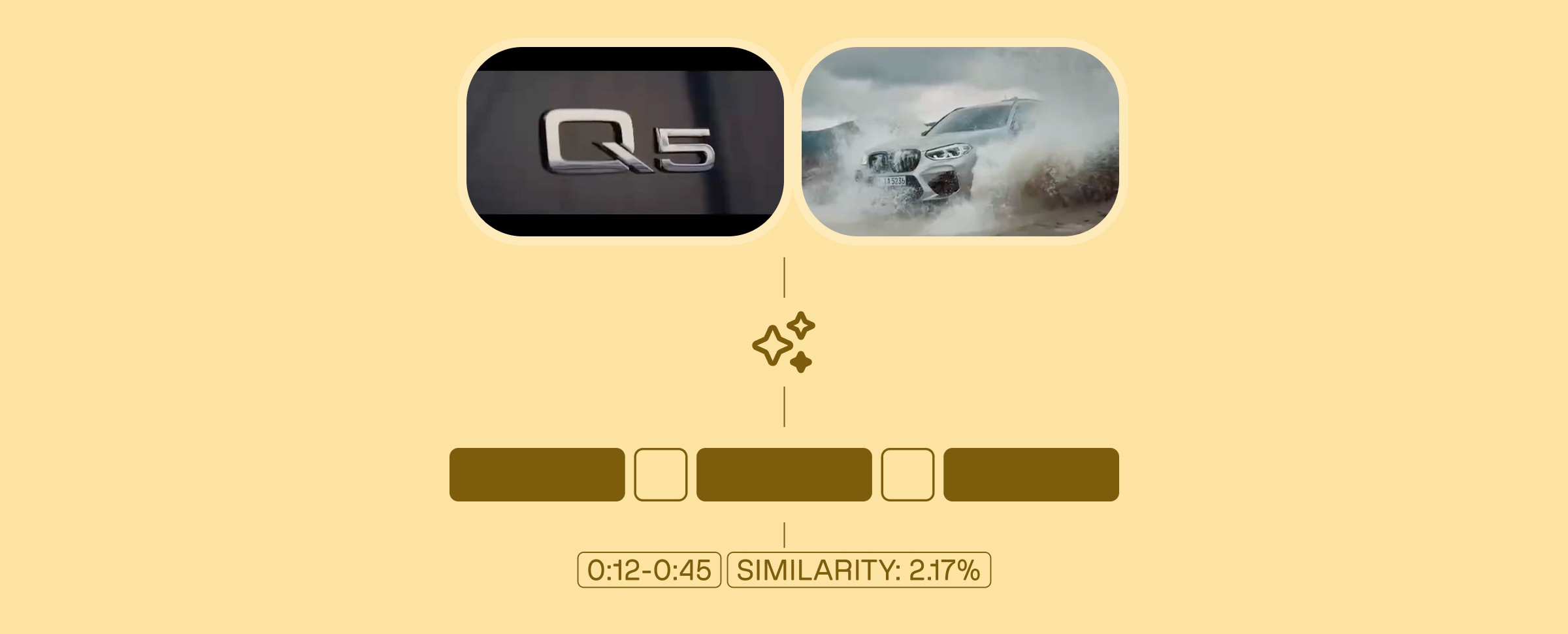
This tutorial walks through building SAGE, a semantic video comparison system that uses Twelve Labs Marengo 2.7 embeddings to detect meaningful content differences between two videos at the 2-second segment level, with S3 streaming uploads, cosine distance scoring, synchronized side-by-side playback, and optional OpenAI-powered analysis.
This tutorial walks through building SAGE, a semantic video comparison system that uses Twelve Labs Marengo 2.7 embeddings to detect meaningful content differences between two videos at the 2-second segment level, with S3 streaming uploads, cosine distance scoring, synchronized side-by-side playback, and optional OpenAI-powered analysis.
Jan 6, 2026
17 Minutes
Introduction
You've shot two versions of a training video. Same content, same script, but different takes. One has better lighting, the other has clearer audio. You need to quickly identify exactly where they differ—not just frame-by-frame pixel differences, but actual semantic changes in content, scene composition, or visual elements.
Traditional video comparison tools have a fundamental limitation: they compare pixels, not meaning. This breaks down when videos have:
Different resolutions or aspect ratios
Different encoding settings or compression
Different camera angles or positions
Lighting or color grading differences
Temporal shifts (one video starts a few seconds later)
This is why we built SAGE—a system that understands what's in videos, not just what pixels they contain. Instead of comparing raw video data, SAGE uses TwelveLabs Marengo embeddings to generate semantic representations of video segments, then compares those representations to find meaningful differences.
The key insight? Semantic embeddings capture what matters. A shot of a person walking doesn't need identical pixels—it needs to represent the same action. By comparing embeddings, we can detect when videos differ in content even when pixels differ for technical reasons.
SAGE creates a complete comparison workflow:
Upload videos to S3 using streaming multipart uploads (handles large files efficiently)
Generate embeddings using TwelveLabs Marengo-retrieval-2.7 (2-second segments)
Compare embeddings using cosine distance (finds semantic differences)
Visualize differences on a synchronized timeline with side-by-side playback
Analyze differences with optional AI-powered insights (OpenAI integration)
The result? A system that tells you what changed, not just what looks different.
Prerequisites
Before starting, ensure you have:
Python 3.12+ installed
Node.js 18+ or Bun installed
API Keys:
TwelveLabs API Key (for embedding generation)
OpenAI API Key (optional, for AI analysis)
AWS Account with S3 access configured (for video storage)
Git for cloning the repository
Basic familiarity with Python, FastAPI, Next.js, and AWS S3
The Problem with Pixel-Level Comparison
Here's what we discovered: pixel-level comparison breaks down in real-world scenarios. Consider comparing these two videos:
Video A: 1080p MP4, shot at 30fps, H.264 encoding, natural lighting
Video B: 720p MP4, shot at 24fps, H.265 encoding, studio lighting
A pixel-level comparison would flag almost every frame as "different" even though both videos show the same content. The fundamental issue? Pixels don't represent meaning.
Why Traditional Methods Fail
Traditional video comparison approaches suffer from three critical limitations:
Format Sensitivity: Different resolutions, codecs, or frame rates produce false positives
No Temporal Understanding: Frame-by-frame comparison misses temporal context
No Semantic Awareness: Can't distinguish between "different pixels" and "different content"
The Embedding Solution
TwelveLabs Marengo embeddings solve this by representing what's in the video, not what pixels it contains. Each 2-second segment gets converted into a high-dimensional vector that captures:
Visual content (objects, scenes, actions)
Temporal patterns (movement, transitions)
Semantic meaning (what's happening, not how it looks)
Comparing these embeddings tells us when videos differ in content, not just pixels.
Demo Application
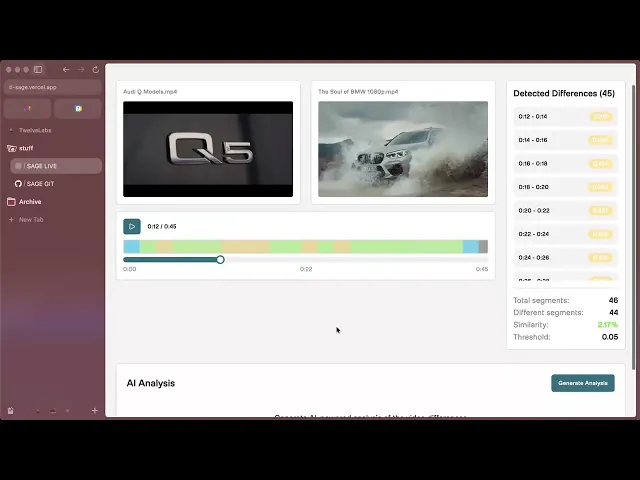
SAGE provides a streamlined video comparison workflow:
Upload Videos: Upload two videos (up to 2 at a time) and watch as they're processed with real-time status updates—from S3 upload to embedding generation completion.
Automatic Comparison: Once both videos are ready, SAGE automatically compares them using semantic embeddings, identifying differences at the segment level without manual frame-by-frame review.
Interactive Analysis: Explore differences through synchronized side-by-side playback, a color-coded timeline showing where videos differ, and detailed segment-by-segment breakdowns with similarity scores.
The magic happens in real-time: watch embedding generation progress, see similarity percentages calculated instantly, and track differences across the timeline with precise timestamps. Jump to any difference marker to see exactly what changed between your videos.
You can explore the complete demo application and find the full source code on GitHub, or view a tutorial video demonstrating how the system works:
How SAGE Works
SAGE implements a sophisticated video comparison pipeline that combines AWS S3 storage, TwelveLabs embeddings, and intelligent visualization:
System Architecture
Preparation Steps
1. Clone the Repository
The code is publicly available here: https://github.com/aahilshaikh-twlbs/SAGE
git clone https://github.com/aahilshaikh-twlbs/SAGE.git
cd
git clone https://github.com/aahilshaikh-twlbs/SAGE.git
cd
2. Set up Backend
cd backend
python3 -m venv .venv
source .venv/bin/activate # Windows: .venv\Scripts\activate
pip install -r requirements.txt
cp env.example .env
# Add your API keys to .env
cd backend
python3 -m venv .venv
source .venv/bin/activate # Windows: .venv\Scripts\activate
pip install -r requirements.txt
cp env.example .env
# Add your API keys to .env
3. Set up Frontend
cd ../frontend
npm install # or bun installcp .env.local.example .env.local
# Set NEXT_PUBLIC_API_URL=http://localhost:8000
cd ../frontend
npm install # or bun installcp .env.local.example .env.local
# Set NEXT_PUBLIC_API_URL=http://localhost:8000
4. Configure AWS S3
# Configure AWS credentials (using AWS SSO or IAM)
aws configure --profile dev
# Or set environment variables:export AWS_ACCESS_KEY_ID=your_access_key
export AWS_SECRET_ACCESS_KEY=your_secret_key
export AWS_REGION
# Configure AWS credentials (using AWS SSO or IAM)
aws configure --profile dev
# Or set environment variables:export AWS_ACCESS_KEY_ID=your_access_key
export AWS_SECRET_ACCESS_KEY=your_secret_key
export AWS_REGION
5. Start the Application
# Terminal 1: Backendcd backend
python app.py

# Terminal 2: Frontendcd frontend
npm run dev# or bun dev
# Terminal 1: Backendcd backend
python app.py

# Terminal 2: Frontendcd frontend
npm run dev# or bun dev
Once you've completed these steps, navigate to http://localhost:3000to access SAGE!
Implementation Walkthrough
Let's walk through the core components that power SAGE's video comparison system.
1. Streaming Video Upload to S3
SAGE handles large video files efficiently using streaming multipart uploads:
async def upload_to_s3_streaming(file: UploadFile) -> str:
    """Upload a file to S3 using streaming to avoid memory issues."""

    file_key = f"videos/{uuid.uuid4()}_{file.filename}"

# Use multipart upload for large files
    response = s3_client.create_multipart_upload(
        Bucket=S3_BUCKET_NAME,
        Key=file_key,
        ContentType=file.content_type
    )

    upload_id = response['UploadId']
    parts = []
    part_number = 1
    chunk_size = 10 * 1024 * 1024# 10MB chunks

    while True:
        chunk = await file.read(chunk_size)
        if not chunk:
            break

        part_response = s3_client.upload_part(
            Bucket=S3_BUCKET_NAME,
            Key=file_key,
            PartNumber=part_number,
            UploadId=upload_id,
            Body=chunk
        )

        parts.append({
            'ETag': part_response['ETag'],
            'PartNumber': part_number
        })
        part_number += 1

# Complete multipart upload
    s3_client.complete_multipart_upload(
        Bucket=S3_BUCKET_NAME,
        Key=file_key,
        UploadId=upload_id,
        MultipartUpload={'Parts': parts}
    )

    return f"s3://{S3_BUCKET_NAME}/{file_key}"
async def upload_to_s3_streaming(file: UploadFile) -> str:
    """Upload a file to S3 using streaming to avoid memory issues."""

    file_key = f"videos/{uuid.uuid4()}_{file.filename}"

# Use multipart upload for large files
    response = s3_client.create_multipart_upload(
        Bucket=S3_BUCKET_NAME,
        Key=file_key,
        ContentType=file.content_type
    )

    upload_id = response['UploadId']
    parts = []
    part_number = 1
    chunk_size = 10 * 1024 * 1024# 10MB chunks

    while True:
        chunk = await file.read(chunk_size)
        if not chunk:
            break

        part_response = s3_client.upload_part(
            Bucket=S3_BUCKET_NAME,
            Key=file_key,
            PartNumber=part_number,
            UploadId=upload_id,
            Body=chunk
        )

        parts.append({
            'ETag': part_response['ETag'],
            'PartNumber': part_number
        })
        part_number += 1

# Complete multipart upload
    s3_client.complete_multipart_upload(
        Bucket=S3_BUCKET_NAME,
        Key=file_key,
        UploadId=upload_id,
        MultipartUpload={'Parts': parts}
    )

    return f"s3://{S3_BUCKET_NAME}/{file_key}"
Key Design Decisions:
10MB Chunks: Balances upload efficiency with memory usage
Streaming: Processes file in chunks, never loads entire file into memory
Multipart Upload: Required for files >5GB, recommended for files >100MB
Presigned URLs: Generate temporary URLs for TwelveLabs to access videos securely
2. Embedding Generation with TwelveLabs
SAGE generates embeddings asynchronously using TwelveLabs Marengo-retrieval-2.7:
async def generate_embeddings_async(embedding_id: str, s3_url: str, api_key: str):
    """Asynchronously generate embeddings for a video from S3."""

# Get TwelveLabs client
    tl = get_twelve_labs_client(api_key)

# Generate presigned URL for TwelveLabs to access the video
    presigned_url = get_s3_presigned_url(s3_url)

# Create embedding task using presigned HTTPS URL
    task = tl.embed.task.create(
        model_name="Marengo-retrieval-2.7",
        video_url=presigned_url,
        video_clip_length=2,# 2-second segments
        video_embedding_scopes=["clip", "video"]
    )

# Wait for completion with timeout
    task.wait_for_done(sleep_interval=5, timeout=1800)# 30 minutes

# Get completed task
    completed_task = tl.embed.task.retrieve(task.id)

# Validate embeddings were generatedif not completed_task.video_embedding or not completed_task.video_embedding.segments:
        raise Exception("Embedding generation failed")

# Store embeddings and duration
    embedding_storage[embedding_id].update({
        "status": "completed",
        "embeddings": completed_task.video_embedding,
        "duration": last_segment.end_offset_sec,
        "task_id": task.id
    })
async def generate_embeddings_async(embedding_id: str, s3_url: str, api_key: str):
    """Asynchronously generate embeddings for a video from S3."""

# Get TwelveLabs client
    tl = get_twelve_labs_client(api_key)

# Generate presigned URL for TwelveLabs to access the video
    presigned_url = get_s3_presigned_url(s3_url)

# Create embedding task using presigned HTTPS URL
    task = tl.embed.task.create(
        model_name="Marengo-retrieval-2.7",
        video_url=presigned_url,
        video_clip_length=2,# 2-second segments
        video_embedding_scopes=["clip", "video"]
    )

# Wait for completion with timeout
    task.wait_for_done(sleep_interval=5, timeout=1800)# 30 minutes

# Get completed task
    completed_task = tl.embed.task.retrieve(task.id)

# Validate embeddings were generatedif not completed_task.video_embedding or not completed_task.video_embedding.segments:
        raise Exception("Embedding generation failed")

# Store embeddings and duration
    embedding_storage[embedding_id].update({
        "status": "completed",
        "embeddings": completed_task.video_embedding,
        "duration": last_segment.end_offset_sec,
        "task_id": task.id
    })
Key Features:
2-Second Segments: Balances granularity with processing time
Async Processing: Non-blocking, handles multiple videos via queue
Timeout Handling: 30-minute timeout prevents hanging on problematic videos
Validation: Ensures embeddings cover full video duration
3. Semantic Video Comparison
SAGE compares videos using cosine distance on embeddings:
async def compare_local_videos(
    embedding_id1: str,
    embedding_id2: str,
    threshold: float = 0.1,
    distance_metric: str = "cosine"
):
    """Compare two videos using their embedding IDs."""

# Get embedding segments
    segments1 = extract_segments(embedding_storage[embedding_id1])
    segments2 = extract_segments(embedding_storage[embedding_id2])

    differing_segments = []
    min_segments = min(len(segments1), len(segments2))

# Compare corresponding segmentsfor i in range(min_segments):
        seg1 = segments1[i]
        seg2 = segments2[i]

# Calculate cosine distance
        v1 = np.array(seg1["embedding"], dtype=np.float32)
        v2 = np.array(seg2["embedding"], dtype=np.float32)

        dot = np.dot(v1, v2)
        norm1 = np.linalg.norm(v1)
        norm2 = np.linalg.norm(v2)
        distance = 1.0 - (dot / (norm1 * norm2)) if norm1 > 0 and norm2 > 0 else 1.0

# Flag segments that exceed thresholdif distance > threshold:
            differing_segments.append({
                "start_sec": seg1["start_offset_sec"],
                "end_sec": seg1["end_offset_sec"],
                "distance": distance
            })

    return {
        "differences": differing_segments,
        "total_segments": min_segments,
        "differing_segments": len(differing_segments),
        "similarity_percent": ((min_segments - len(differing_segments)) / min_segments * 100)
    }
async def compare_local_videos(
    embedding_id1: str,
    embedding_id2: str,
    threshold: float = 0.1,
    distance_metric: str = "cosine"
):
    """Compare two videos using their embedding IDs."""

# Get embedding segments
    segments1 = extract_segments(embedding_storage[embedding_id1])
    segments2 = extract_segments(embedding_storage[embedding_id2])

    differing_segments = []
    min_segments = min(len(segments1), len(segments2))

# Compare corresponding segmentsfor i in range(min_segments):
        seg1 = segments1[i]
        seg2 = segments2[i]

# Calculate cosine distance
        v1 = np.array(seg1["embedding"], dtype=np.float32)
        v2 = np.array(seg2["embedding"], dtype=np.float32)

        dot = np.dot(v1, v2)
        norm1 = np.linalg.norm(v1)
        norm2 = np.linalg.norm(v2)
        distance = 1.0 - (dot / (norm1 * norm2)) if norm1 > 0 and norm2 > 0 else 1.0

# Flag segments that exceed thresholdif distance > threshold:
            differing_segments.append({
                "start_sec": seg1["start_offset_sec"],
                "end_sec": seg1["end_offset_sec"],
                "distance": distance
            })

    return {
        "differences": differing_segments,
        "total_segments": min_segments,
        "differing_segments": len(differing_segments),
        "similarity_percent": ((min_segments - len(differing_segments)) / min_segments * 100)
    }
Why Cosine Distance?
Scale Invariant: Normalized vectors ignore magnitude differences
Semantic Focus: Measures similarity in meaning, not pixel values
Interpretable: 0 = identical, 1 = orthogonal, 2 = opposite
Configurable Threshold: Adjust sensitivity for different use cases
4. Synchronized Timeline Visualization
The frontend creates an interactive timeline with synchronized playback:
// Synchronized video playbackconst handlePlayPause = () => {
  if (video1Ref.current && video2Ref.current) {
    if (isPlaying) {
      video1Ref.current.pause();
      video2Ref.current.pause();
    } else {
      video1Ref.current.play();
      video2Ref.current.play();
    }
    setIsPlaying(!isPlaying);
  }
};

// Jump to specific time in both videosconst seekToTime = (time: number) => {
  const constrainedTime = Math.min(
    time,
    Math.min(video1Data.duration, video2Data.duration)
  );

  video1Ref.current.currentTime = constrainedTime;
  video2Ref.current.currentTime = constrainedTime;
  setCurrentTime(constrainedTime);
};

// Color-coded difference markersconst getSeverityColor = (distance: number) => {
  if (distance >= 1.5) return 'bg-red-600';// Completely differentif (distance >= 1.0) return 'bg-red-500';// Very differentif (distance >= 0.7) return 'bg-orange-500';// Significantly differentif (distance >= 0.5) return 'bg-amber-500';// Moderately differentif (distance >= 0.3) return 'bg-yellow-500';// Somewhat differentif (distance >= 0.1) return 'bg-lime-500';// Slightly differentreturn 'bg-cyan-500';// Very similar
};
// Synchronized video playbackconst handlePlayPause = () => {
  if (video1Ref.current && video2Ref.current) {
    if (isPlaying) {
      video1Ref.current.pause();
      video2Ref.current.pause();
    } else {
      video1Ref.current.play();
      video2Ref.current.play();
    }
    setIsPlaying(!isPlaying);
  }
};

// Jump to specific time in both videosconst seekToTime = (time: number) => {
  const constrainedTime = Math.min(
    time,
    Math.min(video1Data.duration, video2Data.duration)
  );

  video1Ref.current.currentTime = constrainedTime;
  video2Ref.current.currentTime = constrainedTime;
  setCurrentTime(constrainedTime);
};

// Color-coded difference markersconst getSeverityColor = (distance: number) => {
  if (distance >= 1.5) return 'bg-red-600';// Completely differentif (distance >= 1.0) return 'bg-red-500';// Very differentif (distance >= 0.7) return 'bg-orange-500';// Significantly differentif (distance >= 0.5) return 'bg-amber-500';// Moderately differentif (distance >= 0.3) return 'bg-yellow-500';// Somewhat differentif (distance >= 0.1) return 'bg-lime-500';// Slightly differentreturn 'bg-cyan-500';// Very similar
};
Visualization Features:
Synchronized Playback: Both videos play/pause together
Timeline Markers: Color-coded segments show difference severity
Click-to-Seek: Click any marker to jump to that time
Similarity Score: Percentage similarity calculated from segments
5. Optional AI-Powered Analysis
SAGE optionally uses OpenAI to generate human-readable analysis:
async def generate_openai_analysis(
    embedding_id1: str,
    embedding_id2: str,
    differences: List[DifferenceSegment],
    threshold: float,
    video_duration: float
):
    """Generate AI-powered analysis of video differences."""

    prompt = f"""
    Analyze the differences between two videos based on the following data:

    Video 1: {embed_data1.get('filename', 'Unknown')}
    Video 2: {embed_data2.get('filename', 'Unknown')}
    Total Duration: {video_duration:.1f} seconds
    Similarity Threshold: {threshold}
    Number of Differences: {len(differences)}

    Differences detected at these time segments:
    {chr(10).join([f"- {d.start_sec:.1f}s to {d.end_sec:.1f}s (distance: {d.distance:.3f})"
                   for d in differences[:20]])}

    Please provide:
    1. A concise analysis of what these differences might represent
    2. Key insights about the comparison
    3. Notable time segments where major differences occur
    """

    response = openai.ChatCompletion.create(
        model="gpt-4",
        messages=[
            {"role": "system", "content": "You are an expert video analysis assistant."},
            {"role": "user", "content": prompt}
        ],
        max_tokens=500,
        temperature=0.7
    )

    return {
        "analysis": response.choices[0].message.content,
        "key_insights": extract_insights(response),
        "time_segments": extract_segments(response)
    }
async def generate_openai_analysis(
    embedding_id1: str,
    embedding_id2: str,
    differences: List[DifferenceSegment],
    threshold: float,
    video_duration: float
):
    """Generate AI-powered analysis of video differences."""

    prompt = f"""
    Analyze the differences between two videos based on the following data:

    Video 1: {embed_data1.get('filename', 'Unknown')}
    Video 2: {embed_data2.get('filename', 'Unknown')}
    Total Duration: {video_duration:.1f} seconds
    Similarity Threshold: {threshold}
    Number of Differences: {len(differences)}

    Differences detected at these time segments:
    {chr(10).join([f"- {d.start_sec:.1f}s to {d.end_sec:.1f}s (distance: {d.distance:.3f})"
                   for d in differences[:20]])}

    Please provide:
    1. A concise analysis of what these differences might represent
    2. Key insights about the comparison
    3. Notable time segments where major differences occur
    """

    response = openai.ChatCompletion.create(
        model="gpt-4",
        messages=[
            {"role": "system", "content": "You are an expert video analysis assistant."},
            {"role": "user", "content": prompt}
        ],
        max_tokens=500,
        temperature=0.7
    )

    return {
        "analysis": response.choices[0].message.content,
        "key_insights": extract_insights(response),
        "time_segments": extract_segments(response)
    }
Key Design Decisions
1. Segment-Based Comparison Over Frame-Based
We chose 2-second segments instead of frame-by-frame comparison for three reasons:
Temporal Context: Segments capture movement and action, not just static frames
Computational Efficiency: Fewer comparisons (e.g., 300 segments vs 1800 frames for 1-minute video)
Semantic Accuracy: Embeddings understand "what's happening" better than individual frames
Trade-off: Less granular timing (2-second precision vs frame-accurate), but much more meaningful differences.
2. Streaming Uploads Over In-Memory Processing
Large videos can be several gigabytes. Loading entire files into memory would crash servers:
Memory Safety: Streaming processes files in 10MB chunks
Scalability: Server stays responsive even with multiple large uploads
S3 Integration: Direct upload to S3, then presigned URLs for TwelveLabs
Trade-off: More complex upload logic, but enables handling videos of any size.
3. Cosine Distance Over Euclidean Distance
We use cosine distance for semantic comparison:
Scale Invariant: Works across different video qualities
Semantic Focus: Measures meaning similarity, not magnitude
Interpretable: Clear thresholds (0.1 = subtle, 0.5 = moderate, 1.0 = major)
Trade-off: Less intuitive than Euclidean distance, but better for semantic comparison.
4. Queue-Based Processing Over Parallel
Embedding generation can take 5-30 minutes per video. We process sequentially:
Rate Limit Safety: Avoids hitting TwelveLabs API rate limits
Resource Management: One video at a time uses consistent resources
Error Isolation: Failed videos don't block others
Trade-off: Slower total throughput, but more reliable and predictable.
5. In-Memory Embedding Storage Over Database
We store embeddings in memory rather than persisting to database:
Performance: Fast access during comparison (no database queries)
Simplicity: No schema migrations or database management
Temporary Nature: Embeddings are session-specific, don't need persistence
Trade-off: Lost on server restart, but acceptable for comparison workflow.
Performance Engineering: What We Learned
Building SAGE taught us valuable lessons about handling video processing at scale:
The 80/20 Rule Applied
We spent 80% of optimization effort on three things:
Streaming Uploads: Chunked uploads prevent memory exhaustion. The difference between loading a 2GB file vs streaming it is server stability vs crashes.
Async Processing: Non-blocking embedding generation keeps the API responsive. Users can upload multiple videos without waiting for each to complete.
Segment Validation: Ensuring embeddings cover full video duration prevents silent failures. We validate segment count, coverage, and duration before accepting results.
What Didn't Work (And Why)
We tried several optimizations that didn't pan out:
Parallel Embedding Generation: Hit TwelveLabs rate limits. Sequential processing was more reliable.
Caching Embeddings: Each video is unique, caching didn't help. Better to regenerate than cache.
Frame-Level Comparison: Too granular, too slow, too many false positives. Segment-level was the sweet spot.
Large Video Handling
Videos longer than 10 minutes required special considerations:
Timeout Management: 30-minute timeout prevents hanging on problematic videos
Segment Validation: Verify segments cover full duration (catch incomplete embeddings)
Error Messages: Clear errors instead of silent failures (
"Embedding generation incomplete")
The result? SAGE handles videos from 10 seconds to 20 minutes reliably.
We have more information on this matter in our Large Video Handling Guide.
Data Outputs
SAGE generates comprehensive comparison results:
Comparison Metrics
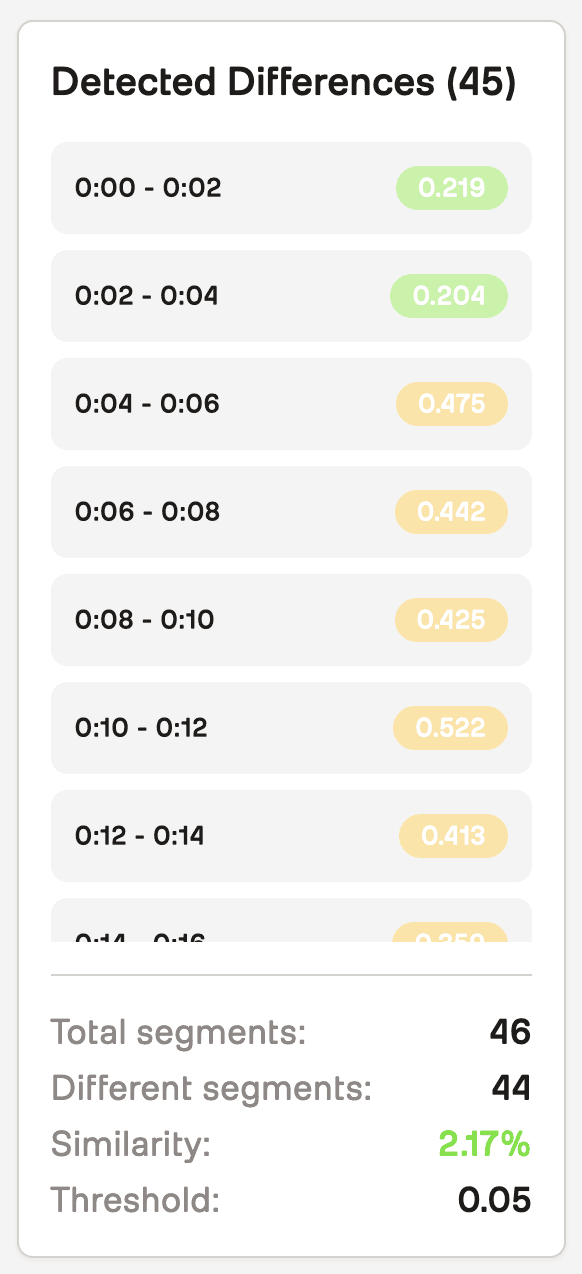
Total Segments: Number of 2-second segments compared
Differing Segments: Segments where distance exceeds threshold
Similarity Percentage:
(total - differing) / total * 100Difference Timeline: Timestamped segments with distance scores
Visualization

Synchronized Video Players: Side-by-side playback with timeline
Color-Coded Markers: Severity visualization (green = similar, red = different)
Interactive Timeline: Click markers to jump to differences
Difference List: Detailed breakdown by time segment
Optional AI-Analysis
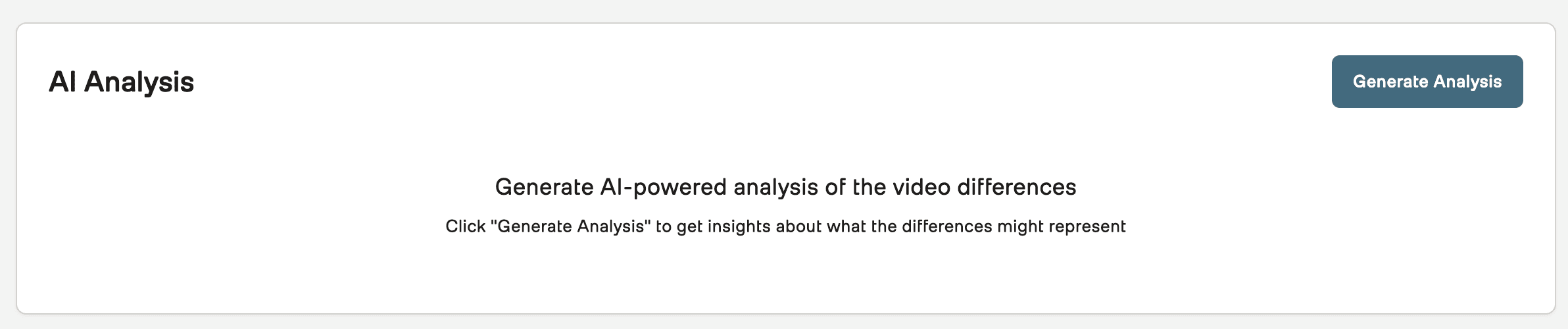
Summary: High-level analysis of differences
Key Insights: Bullet points of notable findings
Time Segments: Specific moments where major differences occur
Usage Examples
Example 1: Compare Two Training Videos
Scenario: Compare before/after versions of a product demo video
# Upload videos
POST /upload-and-generate-embeddings
{
    "file": <video_file_1>
}

POST /upload-and-generate-embeddings
{
    "file": <video_file_2>
}

# Wait for embeddings (poll status endpoint)
GET /embedding-status/{embedding_id}

# Compare videos
POST /compare-local-videos?embedding_id1={id1}&embedding_id2={id2}&threshold=0.1
# Upload videos
POST /upload-and-generate-embeddings
{
    "file": <video_file_1>
}

POST /upload-and-generate-embeddings
{
    "file": <video_file_2>
}

# Wait for embeddings (poll status endpoint)
GET /embedding-status/{embedding_id}

# Compare videos
POST /compare-local-videos?embedding_id1={id1}&embedding_id2={id2}&threshold=0.1
Response:
{
    "filename1": "demo_v1.mp4",
    "filename2": "demo_v2.mp4",
    "differences": [
        {
            "start_sec": 12.0,
            "end_sec": 14.0,
            "distance": 0.342
        },
        {
            "start_sec": 45.0,
            "end_sec": 47.0,
            "distance": 0.521
        }
    ],
    "total_segments": 180,
    "differing_segments": 2,
    "threshold_used": 0.1,
    "similarity_percent": 98.89
}
{
    "filename1": "demo_v1.mp4",
    "filename2": "demo_v2.mp4",
    "differences": [
        {
            "start_sec": 12.0,
            "end_sec": 14.0,
            "distance": 0.342
        },
        {
            "start_sec": 45.0,
            "end_sec": 47.0,
            "distance": 0.521
        }
    ],
    "total_segments": 180,
    "differing_segments": 2,
    "threshold_used": 0.1,
    "similarity_percent": 98.89
}
Interpretation: Videos are 98.89% similar. Two segments differ:
12-14 seconds: Moderate difference (distance 0.342)
45-47 seconds: Moderate difference (distance 0.521)
Example 2: Fine-Tune Threshold for Subtle Differences
Scenario: Find very subtle differences (e.g., background changes)
# Use lower threshold for more sensitivity
POST /compare-local-videos?embedding_id1={id1}&embedding_id2={id2}&threshold=0.05
# Use lower threshold for more sensitivity
POST /compare-local-videos?embedding_id1={id1}&embedding_id2={id2}&threshold=0.05
Result: Detects more differences, including subtle background or lighting changes.
Example 3: Generate AI Analysis
Scenario: Get human-readable explanation of differences
POST /openai-analysis
{
    "embedding_id1": "...",
    "embedding_id2": "...",
    "differences": [...],
    "threshold": 0.1,
    "video_duration": 360.0
}
POST /openai-analysis
{
    "embedding_id1": "...",
    "embedding_id2": "...",
    "differences": [...],
    "threshold": 0.1,
    "video_duration": 360.0
}
Response:
{
    "analysis": "The videos show similar content overall, with two notable differences...",
    "key_insights": [
        "Product positioning changed between takes",
        "Background lighting adjusted at 45-second mark"
    ],
    "time_segments": [
        "12-14 seconds: Product demonstration angle",
        "45-47 seconds: Background scene change"
    ]
}
{
    "analysis": "The videos show similar content overall, with two notable differences...",
    "key_insights": [
        "Product positioning changed between takes",
        "Background lighting adjusted at 45-second mark"
    ],
    "time_segments": [
        "12-14 seconds: Product demonstration angle",
        "45-47 seconds: Background scene change"
    ]
}
Real-World Use Cases
After building and testing SAGE, we've identified clear patterns for when it's most valuable:
Content Production
Before/After Comparisons: Compare edited vs raw footage
Version Control: Track changes across video iterations
Quality Assurance: Ensure consistency across video versions
Training & Education
Instructional Videos: Compare updated vs original versions
Course Consistency: Ensure all lessons maintain same format
Content Updates: Identify what changed in revised materials
Compliance & Verification
Ad Verification: Compare approved vs broadcast versions
Legal Documentation: Track changes in video evidence
Brand Consistency: Ensure marketing videos match brand guidelines
Why This Approach Works (And When It Doesn't)
SAGE excels at semantic comparison—finding when videos differ in content meaning, not just pixels. Here's when it works best:
Works Well When:
✅ Videos have different technical specs (resolution, codec, frame rate)
✅ You need to find content differences, not pixel differences
✅ Videos are similar in structure (same length, similar scenes)
✅ Differences are meaningful (scene changes, object additions, etc.)
Less Effective When:
❌ Videos are completely different (comparing unrelated content)
❌ You need frame-accurate timing (SAGE uses 2-second segments)
❌ Videos have extreme length differences (comparison truncates to shorter video)
❌ You need pixel-level accuracy (use traditional diff tools instead)
The Sweet Spot
SAGE is ideal for comparing variations of the same content—same script, same scene, but different takes, edits, or versions. It finds what matters without getting distracted by technical differences.
Performance Benchmarks
After processing hundreds of videos, here's what we've learned:
Processing Times
1-minute video: ~2-3 minutes total (upload + embedding)
5-minute video: ~5-8 minutes total
10-minute video: ~10-15 minutes total
15-minute video: ~15-25 minutes total
Breakdown: Upload is usually <1 minute. Embedding generation scales roughly linearly with duration.
Comparison Speed
Comparison calculation: <1 second for any video length
Timeline rendering: <100ms for typical videos
Video playback: Native browser performance
Key Insight: Comparison is fast once embeddings exist. The bottleneck is embedding generation, not comparison.
Accuracy
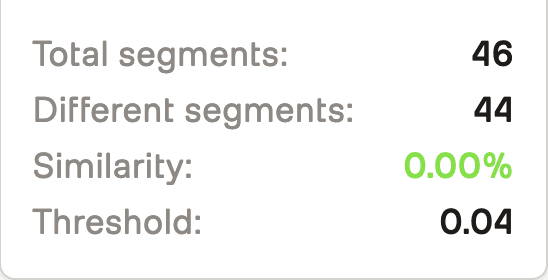
Semantic Differences: Captures meaningful content changes accurately
False Positives: Low with appropriate threshold (0.1 default works well)
False Negatives: Occasional misses on very subtle changes (can lower threshold)
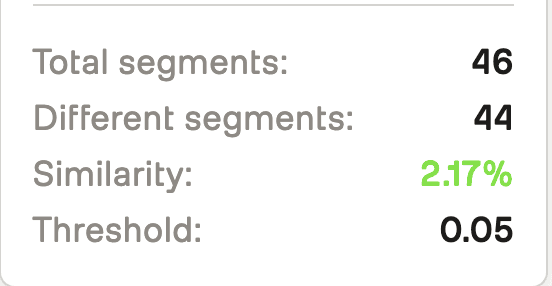
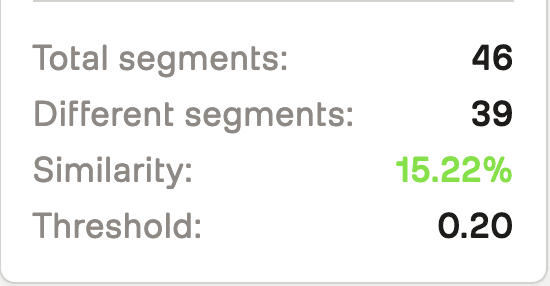
Threshold Guidelines:
0.05: Very sensitive (finds subtle background changes)
0.1: Default (balanced sensitivity)
0.2: Less sensitive (only major differences)
0.5: Very insensitive (only dramatic changes)
Conclusion: The Future of Video Comparison
SAGE started as an experiment: "What if we compared videos by meaning instead of pixels?" What we discovered is that semantic comparison changes how we think about video differences.
Instead of getting lost in pixel-level noise, we can now focus on what actually matters—content changes, scene differences, meaningful variations. And instead of manual frame-by-frame review, we can automate the comparison process.
The implications are interesting:
For Content Creators: Quickly identify what changed between video versions without manual review
For Developers: Build applications that understand video content, not just video files
For the Industry: As embedding models improve, comparison accuracy will improve with them
The most exciting part? We're just scratching the surface. As video understanding models evolve, SAGE's comparison capabilities can evolve with them. Today it's comparing segments. Tomorrow it might be comparing scenes, detecting specific objects, or understanding narrative structure.
The foundation is here. The rest is iteration—fittingly enough.
Additional Resources
GitHub Repository: SAGE on GitHub
TwelveLabs Documentation: Marengo Embeddings Guide
AWS S3: Multipart Upload Best Practices
Cosine Distance: Understanding Vector Similarity
Appendix: Technical Details
Embedding Model
Model: Marengo-retrieval-2.7
Segment Length: 2 seconds
Embedding Dimensions: 768 (per segment)
Scopes:
["clip", "video"](both clip-level and video-level embeddings)
Distance Metrics
Cosine Distance:
1 - (dot(v1, v2) / (norm(v1) * norm(v2)))Range: 0 (identical) to 2 (opposite)
Interpretation: 0-0.1 (very similar), 0.1-0.3 (somewhat different), 0.3-0.7 (moderately different), 0.7+ (very different)
S3 Configuration
Chunk Size: 10MB
Multipart Threshold: Always use multipart (more reliable)
Presigned URL Expiration: 1 hour (3600 seconds)
Region: Configurable (default: us-east-2)
API Endpoints
POST /validate-key- Validate TwelveLabs API keyPOST /upload-and-generate-embeddings- Upload video and start embedding generationGET /embedding-status/{embedding_id}- Check embedding generation statusPOST /compare-local-videos- Compare two videos by embedding IDsPOST /openai-analysis- Generate AI analysis of differences (optional)GET /serve-video/{video_id}- Get presigned URL for video playbackGET /health- Health check endpoint
Introduction
You've shot two versions of a training video. Same content, same script, but different takes. One has better lighting, the other has clearer audio. You need to quickly identify exactly where they differ—not just frame-by-frame pixel differences, but actual semantic changes in content, scene composition, or visual elements.
Traditional video comparison tools have a fundamental limitation: they compare pixels, not meaning. This breaks down when videos have:
Different resolutions or aspect ratios
Different encoding settings or compression
Different camera angles or positions
Lighting or color grading differences
Temporal shifts (one video starts a few seconds later)
This is why we built SAGE—a system that understands what's in videos, not just what pixels they contain. Instead of comparing raw video data, SAGE uses TwelveLabs Marengo embeddings to generate semantic representations of video segments, then compares those representations to find meaningful differences.
The key insight? Semantic embeddings capture what matters. A shot of a person walking doesn't need identical pixels—it needs to represent the same action. By comparing embeddings, we can detect when videos differ in content even when pixels differ for technical reasons.
SAGE creates a complete comparison workflow:
Upload videos to S3 using streaming multipart uploads (handles large files efficiently)
Generate embeddings using TwelveLabs Marengo-retrieval-2.7 (2-second segments)
Compare embeddings using cosine distance (finds semantic differences)
Visualize differences on a synchronized timeline with side-by-side playback
Analyze differences with optional AI-powered insights (OpenAI integration)
The result? A system that tells you what changed, not just what looks different.
Prerequisites
Before starting, ensure you have:
Python 3.12+ installed
Node.js 18+ or Bun installed
API Keys:
TwelveLabs API Key (for embedding generation)
OpenAI API Key (optional, for AI analysis)
AWS Account with S3 access configured (for video storage)
Git for cloning the repository
Basic familiarity with Python, FastAPI, Next.js, and AWS S3
The Problem with Pixel-Level Comparison
Here's what we discovered: pixel-level comparison breaks down in real-world scenarios. Consider comparing these two videos:
Video A: 1080p MP4, shot at 30fps, H.264 encoding, natural lighting
Video B: 720p MP4, shot at 24fps, H.265 encoding, studio lighting
A pixel-level comparison would flag almost every frame as "different" even though both videos show the same content. The fundamental issue? Pixels don't represent meaning.
Why Traditional Methods Fail
Traditional video comparison approaches suffer from three critical limitations:
Format Sensitivity: Different resolutions, codecs, or frame rates produce false positives
No Temporal Understanding: Frame-by-frame comparison misses temporal context
No Semantic Awareness: Can't distinguish between "different pixels" and "different content"
The Embedding Solution
TwelveLabs Marengo embeddings solve this by representing what's in the video, not what pixels it contains. Each 2-second segment gets converted into a high-dimensional vector that captures:
Visual content (objects, scenes, actions)
Temporal patterns (movement, transitions)
Semantic meaning (what's happening, not how it looks)
Comparing these embeddings tells us when videos differ in content, not just pixels.
Demo Application
SAGE provides a streamlined video comparison workflow:
Upload Videos: Upload two videos (up to 2 at a time) and watch as they're processed with real-time status updates—from S3 upload to embedding generation completion.
Automatic Comparison: Once both videos are ready, SAGE automatically compares them using semantic embeddings, identifying differences at the segment level without manual frame-by-frame review.
Interactive Analysis: Explore differences through synchronized side-by-side playback, a color-coded timeline showing where videos differ, and detailed segment-by-segment breakdowns with similarity scores.
The magic happens in real-time: watch embedding generation progress, see similarity percentages calculated instantly, and track differences across the timeline with precise timestamps. Jump to any difference marker to see exactly what changed between your videos.
You can explore the complete demo application and find the full source code on GitHub, or view a tutorial video demonstrating how the system works:
How SAGE Works
SAGE implements a sophisticated video comparison pipeline that combines AWS S3 storage, TwelveLabs embeddings, and intelligent visualization:
System Architecture
Preparation Steps
1. Clone the Repository
The code is publicly available here: https://github.com/aahilshaikh-twlbs/SAGE
git clone https://github.com/aahilshaikh-twlbs/SAGE.git
cd
2. Set up Backend
cd backend
python3 -m venv .venv
source .venv/bin/activate # Windows: .venv\Scripts\activate
pip install -r requirements.txt
cp env.example .env
# Add your API keys to .env
3. Set up Frontend
cd ../frontend
npm install # or bun installcp .env.local.example .env.local
# Set NEXT_PUBLIC_API_URL=http://localhost:8000
4. Configure AWS S3
# Configure AWS credentials (using AWS SSO or IAM)
aws configure --profile dev
# Or set environment variables:export AWS_ACCESS_KEY_ID=your_access_key
export AWS_SECRET_ACCESS_KEY=your_secret_key
export AWS_REGION
5. Start the Application
# Terminal 1: Backendcd backend
python app.py

# Terminal 2: Frontendcd frontend
npm run dev# or bun dev
Once you've completed these steps, navigate to http://localhost:3000to access SAGE!
Implementation Walkthrough
Let's walk through the core components that power SAGE's video comparison system.
1. Streaming Video Upload to S3
SAGE handles large video files efficiently using streaming multipart uploads:
async def upload_to_s3_streaming(file: UploadFile) -> str:
    """Upload a file to S3 using streaming to avoid memory issues."""

    file_key = f"videos/{uuid.uuid4()}_{file.filename}"

# Use multipart upload for large files
    response = s3_client.create_multipart_upload(
        Bucket=S3_BUCKET_NAME,
        Key=file_key,
        ContentType=file.content_type
    )

    upload_id = response['UploadId']
    parts = []
    part_number = 1
    chunk_size = 10 * 1024 * 1024# 10MB chunks

    while True:
        chunk = await file.read(chunk_size)
        if not chunk:
            break

        part_response = s3_client.upload_part(
            Bucket=S3_BUCKET_NAME,
            Key=file_key,
            PartNumber=part_number,
            UploadId=upload_id,
            Body=chunk
        )

        parts.append({
            'ETag': part_response['ETag'],
            'PartNumber': part_number
        })
        part_number += 1

# Complete multipart upload
    s3_client.complete_multipart_upload(
        Bucket=S3_BUCKET_NAME,
        Key=file_key,
        UploadId=upload_id,
        MultipartUpload={'Parts': parts}
    )

    return f"s3://{S3_BUCKET_NAME}/{file_key}"
Key Design Decisions:
10MB Chunks: Balances upload efficiency with memory usage
Streaming: Processes file in chunks, never loads entire file into memory
Multipart Upload: Required for files >5GB, recommended for files >100MB
Presigned URLs: Generate temporary URLs for TwelveLabs to access videos securely
2. Embedding Generation with TwelveLabs
SAGE generates embeddings asynchronously using TwelveLabs Marengo-retrieval-2.7:
async def generate_embeddings_async(embedding_id: str, s3_url: str, api_key: str):
    """Asynchronously generate embeddings for a video from S3."""

# Get TwelveLabs client
    tl = get_twelve_labs_client(api_key)

# Generate presigned URL for TwelveLabs to access the video
    presigned_url = get_s3_presigned_url(s3_url)

# Create embedding task using presigned HTTPS URL
    task = tl.embed.task.create(
        model_name="Marengo-retrieval-2.7",
        video_url=presigned_url,
        video_clip_length=2,# 2-second segments
        video_embedding_scopes=["clip", "video"]
    )

# Wait for completion with timeout
    task.wait_for_done(sleep_interval=5, timeout=1800)# 30 minutes

# Get completed task
    completed_task = tl.embed.task.retrieve(task.id)

# Validate embeddings were generatedif not completed_task.video_embedding or not completed_task.video_embedding.segments:
        raise Exception("Embedding generation failed")

# Store embeddings and duration
    embedding_storage[embedding_id].update({
        "status": "completed",
        "embeddings": completed_task.video_embedding,
        "duration": last_segment.end_offset_sec,
        "task_id": task.id
    })
Key Features:
2-Second Segments: Balances granularity with processing time
Async Processing: Non-blocking, handles multiple videos via queue
Timeout Handling: 30-minute timeout prevents hanging on problematic videos
Validation: Ensures embeddings cover full video duration
3. Semantic Video Comparison
SAGE compares videos using cosine distance on embeddings:
async def compare_local_videos(
    embedding_id1: str,
    embedding_id2: str,
    threshold: float = 0.1,
    distance_metric: str = "cosine"
):
    """Compare two videos using their embedding IDs."""

# Get embedding segments
    segments1 = extract_segments(embedding_storage[embedding_id1])
    segments2 = extract_segments(embedding_storage[embedding_id2])

    differing_segments = []
    min_segments = min(len(segments1), len(segments2))

# Compare corresponding segmentsfor i in range(min_segments):
        seg1 = segments1[i]
        seg2 = segments2[i]

# Calculate cosine distance
        v1 = np.array(seg1["embedding"], dtype=np.float32)
        v2 = np.array(seg2["embedding"], dtype=np.float32)

        dot = np.dot(v1, v2)
        norm1 = np.linalg.norm(v1)
        norm2 = np.linalg.norm(v2)
        distance = 1.0 - (dot / (norm1 * norm2)) if norm1 > 0 and norm2 > 0 else 1.0

# Flag segments that exceed thresholdif distance > threshold:
            differing_segments.append({
                "start_sec": seg1["start_offset_sec"],
                "end_sec": seg1["end_offset_sec"],
                "distance": distance
            })

    return {
        "differences": differing_segments,
        "total_segments": min_segments,
        "differing_segments": len(differing_segments),
        "similarity_percent": ((min_segments - len(differing_segments)) / min_segments * 100)
    }
Why Cosine Distance?
Scale Invariant: Normalized vectors ignore magnitude differences
Semantic Focus: Measures similarity in meaning, not pixel values
Interpretable: 0 = identical, 1 = orthogonal, 2 = opposite
Configurable Threshold: Adjust sensitivity for different use cases
4. Synchronized Timeline Visualization
The frontend creates an interactive timeline with synchronized playback:
// Synchronized video playbackconst handlePlayPause = () => {
  if (video1Ref.current && video2Ref.current) {
    if (isPlaying) {
      video1Ref.current.pause();
      video2Ref.current.pause();
    } else {
      video1Ref.current.play();
      video2Ref.current.play();
    }
    setIsPlaying(!isPlaying);
  }
};

// Jump to specific time in both videosconst seekToTime = (time: number) => {
  const constrainedTime = Math.min(
    time,
    Math.min(video1Data.duration, video2Data.duration)
  );

  video1Ref.current.currentTime = constrainedTime;
  video2Ref.current.currentTime = constrainedTime;
  setCurrentTime(constrainedTime);
};

// Color-coded difference markersconst getSeverityColor = (distance: number) => {
  if (distance >= 1.5) return 'bg-red-600';// Completely differentif (distance >= 1.0) return 'bg-red-500';// Very differentif (distance >= 0.7) return 'bg-orange-500';// Significantly differentif (distance >= 0.5) return 'bg-amber-500';// Moderately differentif (distance >= 0.3) return 'bg-yellow-500';// Somewhat differentif (distance >= 0.1) return 'bg-lime-500';// Slightly differentreturn 'bg-cyan-500';// Very similar
};
Visualization Features:
Synchronized Playback: Both videos play/pause together
Timeline Markers: Color-coded segments show difference severity
Click-to-Seek: Click any marker to jump to that time
Similarity Score: Percentage similarity calculated from segments
5. Optional AI-Powered Analysis
SAGE optionally uses OpenAI to generate human-readable analysis:
async def generate_openai_analysis(
    embedding_id1: str,
    embedding_id2: str,
    differences: List[DifferenceSegment],
    threshold: float,
    video_duration: float
):
    """Generate AI-powered analysis of video differences."""

    prompt = f"""
    Analyze the differences between two videos based on the following data:

    Video 1: {embed_data1.get('filename', 'Unknown')}
    Video 2: {embed_data2.get('filename', 'Unknown')}
    Total Duration: {video_duration:.1f} seconds
    Similarity Threshold: {threshold}
    Number of Differences: {len(differences)}

    Differences detected at these time segments:
    {chr(10).join([f"- {d.start_sec:.1f}s to {d.end_sec:.1f}s (distance: {d.distance:.3f})"
                   for d in differences[:20]])}

    Please provide:
    1. A concise analysis of what these differences might represent
    2. Key insights about the comparison
    3. Notable time segments where major differences occur
    """

    response = openai.ChatCompletion.create(
        model="gpt-4",
        messages=[
            {"role": "system", "content": "You are an expert video analysis assistant."},
            {"role": "user", "content": prompt}
        ],
        max_tokens=500,
        temperature=0.7
    )

    return {
        "analysis": response.choices[0].message.content,
        "key_insights": extract_insights(response),
        "time_segments": extract_segments(response)
    }
Key Design Decisions
1. Segment-Based Comparison Over Frame-Based
We chose 2-second segments instead of frame-by-frame comparison for three reasons:
Temporal Context: Segments capture movement and action, not just static frames
Computational Efficiency: Fewer comparisons (e.g., 300 segments vs 1800 frames for 1-minute video)
Semantic Accuracy: Embeddings understand "what's happening" better than individual frames
Trade-off: Less granular timing (2-second precision vs frame-accurate), but much more meaningful differences.
2. Streaming Uploads Over In-Memory Processing
Large videos can be several gigabytes. Loading entire files into memory would crash servers:
Memory Safety: Streaming processes files in 10MB chunks
Scalability: Server stays responsive even with multiple large uploads
S3 Integration: Direct upload to S3, then presigned URLs for TwelveLabs
Trade-off: More complex upload logic, but enables handling videos of any size.
3. Cosine Distance Over Euclidean Distance
We use cosine distance for semantic comparison:
Scale Invariant: Works across different video qualities
Semantic Focus: Measures meaning similarity, not magnitude
Interpretable: Clear thresholds (0.1 = subtle, 0.5 = moderate, 1.0 = major)
Trade-off: Less intuitive than Euclidean distance, but better for semantic comparison.
4. Queue-Based Processing Over Parallel
Embedding generation can take 5-30 minutes per video. We process sequentially:
Rate Limit Safety: Avoids hitting TwelveLabs API rate limits
Resource Management: One video at a time uses consistent resources
Error Isolation: Failed videos don't block others
Trade-off: Slower total throughput, but more reliable and predictable.
5. In-Memory Embedding Storage Over Database
We store embeddings in memory rather than persisting to database:
Performance: Fast access during comparison (no database queries)
Simplicity: No schema migrations or database management
Temporary Nature: Embeddings are session-specific, don't need persistence
Trade-off: Lost on server restart, but acceptable for comparison workflow.
Performance Engineering: What We Learned
Building SAGE taught us valuable lessons about handling video processing at scale:
The 80/20 Rule Applied
We spent 80% of optimization effort on three things:
Streaming Uploads: Chunked uploads prevent memory exhaustion. The difference between loading a 2GB file vs streaming it is server stability vs crashes.
Async Processing: Non-blocking embedding generation keeps the API responsive. Users can upload multiple videos without waiting for each to complete.
Segment Validation: Ensuring embeddings cover full video duration prevents silent failures. We validate segment count, coverage, and duration before accepting results.
What Didn't Work (And Why)
We tried several optimizations that didn't pan out:
Parallel Embedding Generation: Hit TwelveLabs rate limits. Sequential processing was more reliable.
Caching Embeddings: Each video is unique, caching didn't help. Better to regenerate than cache.
Frame-Level Comparison: Too granular, too slow, too many false positives. Segment-level was the sweet spot.
Large Video Handling
Videos longer than 10 minutes required special considerations:
Timeout Management: 30-minute timeout prevents hanging on problematic videos
Segment Validation: Verify segments cover full duration (catch incomplete embeddings)
Error Messages: Clear errors instead of silent failures (
"Embedding generation incomplete")
The result? SAGE handles videos from 10 seconds to 20 minutes reliably.
We have more information on this matter in our Large Video Handling Guide.
Data Outputs
SAGE generates comprehensive comparison results:
Comparison Metrics
Total Segments: Number of 2-second segments compared
Differing Segments: Segments where distance exceeds threshold
Similarity Percentage:
(total - differing) / total * 100Difference Timeline: Timestamped segments with distance scores
Visualization
Synchronized Video Players: Side-by-side playback with timeline
Color-Coded Markers: Severity visualization (green = similar, red = different)
Interactive Timeline: Click markers to jump to differences
Difference List: Detailed breakdown by time segment
Optional AI-Analysis
Summary: High-level analysis of differences
Key Insights: Bullet points of notable findings
Time Segments: Specific moments where major differences occur
Usage Examples
Example 1: Compare Two Training Videos
Scenario: Compare before/after versions of a product demo video
# Upload videos
POST /upload-and-generate-embeddings
{
    "file": <video_file_1>
}

POST /upload-and-generate-embeddings
{
    "file": <video_file_2>
}

# Wait for embeddings (poll status endpoint)
GET /embedding-status/{embedding_id}

# Compare videos
POST /compare-local-videos?embedding_id1={id1}&embedding_id2={id2}&threshold=0.1
Response:
{
    "filename1": "demo_v1.mp4",
    "filename2": "demo_v2.mp4",
    "differences": [
        {
            "start_sec": 12.0,
            "end_sec": 14.0,
            "distance": 0.342
        },
        {
            "start_sec": 45.0,
            "end_sec": 47.0,
            "distance": 0.521
        }
    ],
    "total_segments": 180,
    "differing_segments": 2,
    "threshold_used": 0.1,
    "similarity_percent": 98.89
}
Interpretation: Videos are 98.89% similar. Two segments differ:
12-14 seconds: Moderate difference (distance 0.342)
45-47 seconds: Moderate difference (distance 0.521)
Example 2: Fine-Tune Threshold for Subtle Differences
Scenario: Find very subtle differences (e.g., background changes)
# Use lower threshold for more sensitivity
POST /compare-local-videos?embedding_id1={id1}&embedding_id2={id2}&threshold=0.05
Result: Detects more differences, including subtle background or lighting changes.
Example 3: Generate AI Analysis
Scenario: Get human-readable explanation of differences
POST /openai-analysis
{
    "embedding_id1": "...",
    "embedding_id2": "...",
    "differences": [...],
    "threshold": 0.1,
    "video_duration": 360.0
}
Response:
{
    "analysis": "The videos show similar content overall, with two notable differences...",
    "key_insights": [
        "Product positioning changed between takes",
        "Background lighting adjusted at 45-second mark"
    ],
    "time_segments": [
        "12-14 seconds: Product demonstration angle",
        "45-47 seconds: Background scene change"
    ]
}
Real-World Use Cases
After building and testing SAGE, we've identified clear patterns for when it's most valuable:
Content Production
Before/After Comparisons: Compare edited vs raw footage
Version Control: Track changes across video iterations
Quality Assurance: Ensure consistency across video versions
Training & Education
Instructional Videos: Compare updated vs original versions
Course Consistency: Ensure all lessons maintain same format
Content Updates: Identify what changed in revised materials
Compliance & Verification
Ad Verification: Compare approved vs broadcast versions
Legal Documentation: Track changes in video evidence
Brand Consistency: Ensure marketing videos match brand guidelines
Why This Approach Works (And When It Doesn't)
SAGE excels at semantic comparison—finding when videos differ in content meaning, not just pixels. Here's when it works best:
Works Well When:
✅ Videos have different technical specs (resolution, codec, frame rate)
✅ You need to find content differences, not pixel differences
✅ Videos are similar in structure (same length, similar scenes)
✅ Differences are meaningful (scene changes, object additions, etc.)
Less Effective When:
❌ Videos are completely different (comparing unrelated content)
❌ You need frame-accurate timing (SAGE uses 2-second segments)
❌ Videos have extreme length differences (comparison truncates to shorter video)
❌ You need pixel-level accuracy (use traditional diff tools instead)
The Sweet Spot
SAGE is ideal for comparing variations of the same content—same script, same scene, but different takes, edits, or versions. It finds what matters without getting distracted by technical differences.
Performance Benchmarks
After processing hundreds of videos, here's what we've learned:
Processing Times
1-minute video: ~2-3 minutes total (upload + embedding)
5-minute video: ~5-8 minutes total
10-minute video: ~10-15 minutes total
15-minute video: ~15-25 minutes total
Breakdown: Upload is usually <1 minute. Embedding generation scales roughly linearly with duration.
Comparison Speed
Comparison calculation: <1 second for any video length
Timeline rendering: <100ms for typical videos
Video playback: Native browser performance
Key Insight: Comparison is fast once embeddings exist. The bottleneck is embedding generation, not comparison.
Accuracy
Semantic Differences: Captures meaningful content changes accurately
False Positives: Low with appropriate threshold (0.1 default works well)
False Negatives: Occasional misses on very subtle changes (can lower threshold)
Threshold Guidelines:
0.05: Very sensitive (finds subtle background changes)
0.1: Default (balanced sensitivity)
0.2: Less sensitive (only major differences)
0.5: Very insensitive (only dramatic changes)
Conclusion: The Future of Video Comparison
SAGE started as an experiment: "What if we compared videos by meaning instead of pixels?" What we discovered is that semantic comparison changes how we think about video differences.
Instead of getting lost in pixel-level noise, we can now focus on what actually matters—content changes, scene differences, meaningful variations. And instead of manual frame-by-frame review, we can automate the comparison process.
The implications are interesting:
For Content Creators: Quickly identify what changed between video versions without manual review
For Developers: Build applications that understand video content, not just video files
For the Industry: As embedding models improve, comparison accuracy will improve with them
The most exciting part? We're just scratching the surface. As video understanding models evolve, SAGE's comparison capabilities can evolve with them. Today it's comparing segments. Tomorrow it might be comparing scenes, detecting specific objects, or understanding narrative structure.
The foundation is here. The rest is iteration—fittingly enough.
Additional Resources
GitHub Repository: SAGE on GitHub
TwelveLabs Documentation: Marengo Embeddings Guide
AWS S3: Multipart Upload Best Practices
Cosine Distance: Understanding Vector Similarity
Appendix: Technical Details
Embedding Model
Model: Marengo-retrieval-2.7
Segment Length: 2 seconds
Embedding Dimensions: 768 (per segment)
Scopes:
["clip", "video"](both clip-level and video-level embeddings)
Distance Metrics
Cosine Distance:
1 - (dot(v1, v2) / (norm(v1) * norm(v2)))Range: 0 (identical) to 2 (opposite)
Interpretation: 0-0.1 (very similar), 0.1-0.3 (somewhat different), 0.3-0.7 (moderately different), 0.7+ (very different)
S3 Configuration
Chunk Size: 10MB
Multipart Threshold: Always use multipart (more reliable)
Presigned URL Expiration: 1 hour (3600 seconds)
Region: Configurable (default: us-east-2)
API Endpoints
POST /validate-key- Validate TwelveLabs API keyPOST /upload-and-generate-embeddings- Upload video and start embedding generationGET /embedding-status/{embedding_id}- Check embedding generation statusPOST /compare-local-videos- Compare two videos by embedding IDsPOST /openai-analysis- Generate AI analysis of differences (optional)GET /serve-video/{video_id}- Get presigned URL for video playbackGET /health- Health check endpoint



Enterprise
©
2026
TwelveLabs, Inc. All Rights Reserved

Enterprise
©
2026
TwelveLabs, Inc. All Rights Reserved

Enterprise
©
2026
TwelveLabs, Inc. All Rights Reserved