" height="1.90314px" id="wtDTm6bEW" transform="translate(26.225 0)" width="2.4723000000000006px"/><path d="M 0.557 0 L 1.438 0 C 1.746 0 1.995 0.25 1.995 0.559 L 1.995 1.344 C 1.995 1.653 1.746 1.903 1.438 1.903 L 0.557 1.903 C 0.25 1.903 0 1.653 0 1.344 L 0 0.559 C 0 0.25 0.25 0 0.557 0 Z" fill="rgb(29, 28, 27)" height="1.9031500000000001px" id="GnmDnNra_" transform="translate(36.408 2.728)" width="1.9953000000000003px"/><path d="M 6.224 0 L 0.558 0 C 0.25 0 0 0.25 0 0.559 L 0 1.344 C 0 1.653 0.25 1.903 0.558 1.903 L 6.224 1.903 C 6.531 1.903 6.781 1.653 6.781 1.344 L 6.781 0.559 C 6.781 0.25 6.531 0 6.224 0 Z" fill="rgb(29, 28, 27)" height="1.9031500000000001px" id="hKTQ3dbw4" transform="translate(34.261 5.456)" width="6.781100000000002px"/><path d="M 6.955 0 L 0.558 0 C 0.25 0 0 0.25 0 0.559 L 0 1.344 C 0 1.653 0.25 1.903 0.558 1.903 L 6.955 1.903 C 7.263 1.903 7.513 1.653 7.513 1.344 L 7.513 0.559 C 7.513 0.25 7.263 0 6.955 0 Z" fill="rgb(29, 28, 27)" height="1.9031500000000001px" id="G1Zzk9CUU" transform="translate(28.298 8.243)" width="7.513100000000001px"/><path d="M 7.123 0 L 0.558 0 C 0.25 0 0 0.25 0 0.559 L 0 1.344 C 0 1.653 0.25 1.903 0.558 1.903 L 7.123 1.903 C 7.431 1.903 7.681 1.653 7.681 1.344 L 7.681 0.559 C 7.681 0.25 7.431 0 7.123 0 Z" fill="rgb(29, 28, 27)" height="1.9030999999999985px" id="fm7cHxIfJ" transform="translate(0 10.972)" width="7.68067px"/><path d="M 13.447 0 L 0.558 0 C 0.25 0 0 0.25 0 0.559 L 0 1.344 C 0 1.653 0.25 1.903 0.558 1.903 L 13.447 1.903 C 13.755 1.903 14.004 1.653 14.004 1.344 L 14.004 0.559 C 14.004 0.25 13.755 0 13.447 0 Z" fill="rgb(29, 28, 27)" height="1.9030999999999985px" id="LowSwDrtg" transform="translate(9.552 10.972)" width="14.0044px"/><path d="M 0.558 0 L 8.212 0 C 8.52 0 8.77 0.25 8.77 0.559 L 8.77 1.344 C 8.77 1.653 8.52 1.903 8.212 1.903 L 0.558 1.903 C 0.25 1.903 0 1.653 0 1.344 L 0 0.559 C 0 0.25 0.25 0 0.558 0 Z" fill="rgb(29, 28, 27)" height="1.9030999999999985px" id="xRiKc2od7" transform="translate(27.041 10.972)" width="8.769900000000003px"/><path d="M 0.557 0 L 5.4 0 C 5.708 0 5.958 0.25 5.958 0.559 L 5.958 1.344 C 5.958 1.653 5.708 1.903 5.4 1.903 L 0.557 1.903 C 0.25 1.903 0 1.653 0 1.344 L 0 0.559 C 0 0.25 0.25 0 0.557 0 Z" fill="rgb(29, 28, 27)" height="1.9031500000000001px" id="JWdNVicde" transform="translate(36.796 8.243)" width="5.957599999999999px"/><path d="M 1.438 0 L 0.558 0 C 0.25 0 0 0.25 0 0.559 L 0 1.344 C 0 1.653 0.25 1.903 0.558 1.903 L 1.438 1.903 C 1.746 1.903 1.995 1.653 1.995 1.344 L 1.995 0.559 C 1.995 0.25 1.746 0 1.438 0 Z" fill="rgb(29, 28, 27)" height="1.9031500000000001px" id="RfFYVCT_T" transform="translate(28.717 5.456)" width="1.9953000000000003px"/><path d="M 0.558 0 L 2.895 0 C 3.203 0 3.453 0.25 3.453 0.559 L 3.453 1.406 C 3.453 1.714 3.203 1.964 2.895 1.964 L 0.558 1.964 C 0.25 1.964 0 1.714 0 1.406 L 0 0.559 C 0 0.25 0.25 0 0.558 0 Z" fill="rgb(29, 28, 27)" height="1.964299999999998px" id="dngJ6MU2p" transform="translate(16.183 24.582)" width="3.4525000000000006px"/><path d="M 1.706 0 L 0.558 0 C 0.25 0 0 0.25 0 0.559 L 0 1.406 C 0 1.714 0.25 1.964 0.558 1.964 L 1.706 1.964 C 2.014 1.964 2.263 1.714 2.263 1.406 L 2.263 0.559 C 2.263 0.25 2.014 0 1.706 0 Z" fill="rgb(29, 28, 27)" height="1.964299999999998px" id="N_fstvKmR" transform="translate(22.18 24.582)" width="2.2631999999999977px"/><path d="M 0.558 0 L 5.544 0 C 5.852 0 6.101 0.25 6.101 0.559 L 6.101 1.406 C 6.101 1.714 5.852 1.964 5.544 1.964 L 0.558 1.964 C 0.25 1.964 0 1.714 0 1.406 L 0 0.559 C 0 0.25 0.25 0 0.558 0 Z" fill="rgb(29, 28, 27)" height="1.964299999999998px" id="t55XLYcgb" transform="translate(25.486 24.582)" width="6.101399999999998px"/><path d="M 1.976 0 L 0.558 0 C 0.25 0 0 0.25 0 0.559 L 0 1.406 C 0 1.714 0.25 1.964 0.558 1.964 L 1.976 1.964 C 2.284 1.964 2.533 1.714 2.533 1.406 L 2.533 0.559 C 2.533 0.25 2.284 0 1.976 0 Z" fill="rgb(29, 28, 27)" height="1.964299999999998px" id="ZrEKTVTAe" transform="translate(28.542 21.854)" width="2.5334000000000003px"/><path d="M 0.557 0 L 1.438 0 C 1.746 0 1.995 0.25 1.995 0.559 L 1.995 1.406 C 1.995 1.714 1.746 1.964 1.438 1.964 L 0.557 1.964 C 0.25 1.964 0 1.714 0 1.406 L 0 0.559 C 0 0.25 0.25 0 0.557 0 Z" fill="rgb(29, 28, 27)" height="1.964299999999998px" id="Z0fPTp9aR" transform="translate(11.425 24.582)" width="1.9953000000000003px"/><path d="M 0 0.559 C 0 0.251 0.251 0 0.558 0 L 1.438 0 C 1.745 0 1.995 0.251 1.995 0.559 L 1.995 1.405 C 1.995 1.713 1.745 1.964 1.438 1.964 L 0.558 1.964 C 0.251 1.964 0 1.713 0 1.405 Z" fill="rgb(29, 28, 27)" height="1.964299999999998px" id="Tj_PDHFDh" transform="translate(20.635 27.308)" width="1.9954px"/><path d="M 0.557 0 L 1.342 0 C 1.65 0 1.899 0.25 1.899 0.559 L 1.899 1.406 C 1.899 1.714 1.65 1.964 1.342 1.964 L 0.557 1.964 C 0.25 1.964 0 1.714 0 1.406 L 0 0.559 C 0 0.25 0.25 0 0.557 0 Z" fill="rgb(29, 28, 27)" height="1.9643000000000015px" id="AYq9dXkKz" transform="translate(18.686 30.036)" width="1.8994px"/><path d="M 0.558 0 L 5.768 0 C 6.076 0 6.326 0.25 6.326 0.559 L 6.326 1.344 C 6.326 1.653 6.076 1.903 5.768 1.903 L 0.558 1.903 C 0.25 1.903 0 1.653 0 1.344 L 0 0.559 C 0 0.25 0.25 0 0.558 0 Z" fill="rgb(29, 28, 27)" height="1.9031500000000001px" id="rspevfJcx" transform="translate(12.157 8.243)" width="6.325900000000001px"/><path d="M 3.285 0 L 0.558 0 C 0.25 0 0 0.25 0 0.559 L 0 1.344 C 0 1.653 0.25 1.903 0.558 1.903 L 3.285 1.903 C 3.593 1.903 3.842 1.653 3.842 1.344 L 3.842 0.559 C 3.842 0.25 3.593 0 3.285 0 Z" fill="rgb(29, 28, 27)" height="1.9031500000000001px" id="XRUAhGnph" transform="translate(23.887 2.728)" width="3.8424000000000014px"/><path d="M 0.558 0 L 5.644 0 C 5.952 0 6.202 0.25 6.202 0.559 L 6.202 1.344 C 6.202 1.653 5.952 1.903 5.644 1.903 L 0.558 1.903 C 0.25 1.903 0 1.653 0 1.344 L 0 0.559 C 0 0.25 0.25 0 0.558 0 Z" fill="rgb(29, 28, 27)" height="1.9031500000000001px" id="VsaVVIfke" transform="translate(21.528 5.456)" width="6.201600000000003px"/><path d="M 3.06 0 L 0.558 0 C 0.25 0 0 0.25 0 0.559 L 0 1.344 C 0 1.653 0.25 1.903 0.558 1.903 L 3.06 1.903 C 3.369 1.903 3.618 1.653 3.618 1.344 L 3.618 0.559 C 3.618 0.25 3.369 0 3.06 0 Z" fill="rgb(29, 28, 27)" height="1.9030999999999985px" id="wiAKEgyId" transform="translate(40.819 10.972)" width="3.6182000000000016px"/><path d="M 0.558 0 L 17.318 0 C 17.626 0 17.875 0.25 17.875 0.559 L 17.875 1.345 C 17.875 1.653 17.626 1.903 17.318 1.903 L 0.558 1.903 C 0.25 1.903 0 1.653 0 1.345 L 0 0.559 C 0 0.25 0.25 0 0.558 0 Z" fill="rgb(29, 28, 27)" height="1.9032px" id="FIE0ufK9m" transform="translate(6.666 13.7)" width="17.87506px"/><path d="M 6.426 0 L 0.558 0 C 0.25 0 0 0.25 0 0.559 L 0 1.345 C 0 1.653 0.25 1.903 0.558 1.903 L 6.426 1.903 C 6.734 1.903 6.984 1.653 6.984 1.345 L 6.984 0.559 C 6.984 0.25 6.734 0 6.426 0 Z" fill="rgb(29, 28, 27)" height="1.9032000000000018px" id="ut9UWny3L" transform="translate(22.892 19.156)" width="6.983599999999999px"/><path d="M 0.558 0 L 22.151 0 C 22.459 0 22.709 0.25 22.709 0.559 L 22.709 1.344 C 22.709 1.653 22.459 1.903 22.151 1.903 L 0.558 1.903 C 0.25 1.903 0 1.653 0 1.344 L 0 0.559 C 0 0.25 0.25 0 0.558 0 Z" fill="rgb(29, 28, 27)" height="1.9030999999999985px" id="VULnffgbk" transform="translate(9.552 16.428)" width="22.7089px"/><path d="M 7.886 0 L 0.558 0 C 0.25 0 0 0.25 0 0.559 L 0 1.345 C 0 1.653 0.25 1.903 0.558 1.903 L 7.886 1.903 C 8.194 1.903 8.443 1.653 8.443 1.345 L 8.443 0.559 C 8.443 0.25 8.194 0 7.886 0 Z" fill="rgb(29, 28, 27)" height="1.9032000000000018px" id="adZTYr4MR" transform="translate(6.078 19.156)" width="8.44303px"/><path d="M 0.558 0 L 2.211 0 C 2.519 0 2.769 0.25 2.769 0.559 L 2.769 1.406 C 2.769 1.714 2.519 1.964 2.211 1.964 L 0.558 1.964 C 0.25 1.964 0 1.714 0 1.406 L 0 0.559 C 0 0.25 0.25 0 0.558 0 Z" fill="rgb(29, 28, 27)" height="1.964299999999998px" id="bwdUdEmCH" transform="translate(13.784 21.854)" width="2.768600000000001px"/><path d="M 2.424 0 L 0.558 0 C 0.25 0 0 0.25 0 0.559 L 0 1.406 C 0 1.714 0.25 1.964 0.558 1.964 L 2.424 1.964 C 2.732 1.964 2.982 1.714 2.982 1.406 L 2.982 0.559 C 2.982 0.25 2.732 0 2.424 0 Z" fill="rgb(29, 28, 27)" height="1.964299999999998px" id="PUvesMJEj" transform="translate(23.556 21.854)" width="2.982199999999999px"/><path d="M 0.558 0 L 2.241 0 C 2.55 0 2.799 0.25 2.799 0.559 L 2.799 1.406 C 2.799 1.714 2.55 1.964 2.241 1.964 L 0.558 1.964 C 0.25 1.964 0 1.714 0 1.406 L 0 0.559 C 0 0.25 0.25 0 0.558 0 Z" fill="rgb(29, 28, 27)" height="1.964299999999998px" id="Wo2W7J3Zj" transform="translate(8.672 21.854)" width="2.799050000000001px"/><path d="M 6.661 0 L 0.558 0 C 0.25 0 0 0.25 0 0.559 L 0 1.345 C 0 1.653 0.25 1.903 0.558 1.903 L 6.661 1.903 C 6.969 1.903 7.219 1.653 7.219 1.345 L 7.219 0.559 C 7.219 0.25 6.969 0 6.661 0 Z" fill="rgb(29, 28, 27)" height="1.9032px" id="PpPVZXp9j" transform="translate(27.041 13.7)" width="7.218900000000001px"/><path d="M 0.621 1.905 C 0.218 1.905 0 1.687 0 1.283 L 0 0.622 C 0 0.218 0.218 0 0.621 0 L 11.225 0 C 11.628 0 11.846 0.218 11.846 0.622 L 11.846 1.283 C 11.846 1.687 11.628 1.905 11.225 1.905 L 6.934 1.905 L 6.934 14.926 C 6.934 15.33 6.716 15.548 6.313 15.548 L 5.537 15.548 C 5.134 15.548 4.916 15.33 4.916 14.926 L 4.916 1.905 Z" fill="rgb(29, 28, 27)" height="15.54825px" id="xr32fxeO6" transform="translate(52.177 8.243)" width="11.845599999999997px"/><path d="M 0.621 0 C 0.218 0 0 0.218 0 0.622 L 0 14.924 C 0 15.328 0.218 15.546 0.621 15.546 L 1.357 15.546 C 1.76 15.546 1.978 15.328 1.978 14.924 L 1.978 0.622 C 1.978 0.218 1.76 0 1.357 0 Z" fill="rgb(29, 28, 27)" height="15.546050000000001px" id="oSsO_UPVN" transform="translate(90.476 8.243)" width="1.9779000000000053px"/><path d="M 0.62 15.546 C 0.217 15.546 0 15.328 0 14.924 L 0 0.622 C 0 0.218 0.217 0 0.62 0 L 1.396 0 C 1.799 0 2.017 0.218 2.017 0.622 L 2.017 13.632 L 8.981 13.632 C 9.384 13.632 9.602 13.85 9.602 14.254 L 9.602 14.924 C 9.602 15.328 9.384 15.546 8.981 15.546 Z" fill="rgb(29, 28, 27)" height="15.546050000000001px" id="Sgj4z5osO" transform="translate(116.749 8.243)" width="9.602000000000004px"/><path d="M 1.974 14.924 C 1.974 15.328 1.756 15.546 1.353 15.546 L 0.621 15.546 C 0.218 15.546 0 15.328 0 14.924 L 0 0.622 C 0 0.218 0.218 0 0.621 0 L 1.357 0 C 1.76 0 1.978 0.218 1.978 0.622 L 1.978 5.747 C 2.634 4.721 3.806 4.079 5.309 4.079 C 8.18 4.079 10.356 6.358 10.356 9.948 C 10.356 13.538 8.18 15.817 5.309 15.817 C 3.801 15.817 2.627 15.175 1.971 14.145 L 1.971 14.922 Z M 8.36 9.95 C 8.36 7.362 6.881 5.928 5.121 5.928 C 3.361 5.928 1.863 7.362 1.863 9.95 C 1.863 12.539 3.361 13.972 5.121 13.972 C 6.881 13.972 8.36 12.539 8.36 9.95 Z" fill="rgb(29, 28, 27)" height="15.81665px" id="q13jjj7xd" transform="translate(138.401 8.243)" width="10.355999999999995px"/><path d="M 4.457 11.738 C 0.961 11.738 -0.019 9.872 0 8.318 C 0.005 7.929 0.253 7.735 0.645 7.735 L 1.344 7.735 C 1.748 7.735 1.922 7.949 1.961 8.352 C 2.063 9.315 2.693 9.907 4.433 9.907 C 6.174 9.907 7.012 9.269 7.012 8.289 C 7.012 7.425 6.522 7.108 5.305 6.899 L 3.209 6.539 C 1.453 6.238 0.29 5.247 0.29 3.468 C 0.29 1.467 1.774 0 4.518 0 C 7.263 0 8.838 1.491 8.814 3.23 C 8.81 3.614 8.553 3.808 8.165 3.808 L 7.457 3.808 C 7.054 3.808 6.908 3.595 6.851 3.202 C 6.749 2.477 6.159 1.818 4.518 1.818 C 2.878 1.818 2.249 2.508 2.249 3.403 C 2.249 4.175 2.695 4.516 3.81 4.714 L 5.906 5.083 C 7.72 5.404 8.98 6.292 8.98 8.198 C 8.98 9.976 7.908 11.74 4.455 11.74 Z" fill="rgb(29, 28, 27)" height="11.739799999999999px" id="tJ8syeWTW" transform="translate(150.024 12.325)" width="8.980269730401375px"/><path d="M 9.146 7.997 C 9.146 8.813 9.175 9.983 9.282 10.799 C 9.334 11.223 9.155 11.465 8.728 11.465 L 8.068 11.465 C 7.685 11.465 7.467 11.319 7.428 11.022 L 7.317 10.181 C 6.724 11.157 5.565 11.659 4.145 11.659 C 1.579 11.659 0 10.142 0 8.078 C 0 6.27 1.27 5.157 3.433 5.002 L 6.589 4.78 C 7.162 4.741 7.186 4.688 7.186 4.153 L 7.186 3.682 C 7.186 2.438 6.434 1.807 4.79 1.807 C 3.145 1.807 2.472 2.425 2.405 3.289 C 2.376 3.697 2.235 3.916 1.823 3.916 L 1.067 3.916 C 0.675 3.916 0.427 3.717 0.422 3.328 C 0.407 1.51 1.74 0 4.792 0 C 7.798 0 9.162 1.427 9.155 3.736 Z M 7.188 7.298 L 7.188 6.244 C 6.955 6.327 6.678 6.386 6.363 6.415 L 3.598 6.676 C 2.59 6.775 1.997 7.163 1.997 8.099 L 1.999 8.099 C 1.999 9.188 2.886 9.97 4.4 9.97 C 6.169 9.97 7.188 8.9 7.188 7.298 Z" fill="rgb(29, 28, 27)" height="11.658999999999999px" id="QPESIZvku" transform="translate(126.854 12.325)" width="9.290755130109668px"/><path d="M 5.224 0 C 8.313 0 10.295 2.255 10.295 5.456 L 10.295 5.694 C 10.295 6.098 10.077 6.316 9.674 6.316 L 1.998 6.316 C 2.168 8.547 3.447 9.898 5.407 9.898 C 6.768 9.898 7.598 9.363 7.934 8.431 C 8.06 8.078 8.243 7.892 8.618 7.892 L 9.33 7.892 C 9.746 7.892 9.994 8.125 9.923 8.538 C 9.598 10.433 7.834 11.74 5.409 11.74 L 5.407 11.738 C 2.168 11.738 0 9.424 0 5.797 C 0 2.169 2.135 0 5.224 0 Z M 5.222 1.74 C 3.494 1.74 2.405 2.818 2.074 4.64 L 8.282 4.64 C 8.054 2.842 6.949 1.74 5.222 1.74 Z" fill="rgb(29, 28, 27)" height="11.739799999999999px" id="PKmyQkwJE" transform="translate(104.541 12.325)" width="10.295000000000002px"/><path d="M 4.459 11.194 C 4.099 11.194 3.877 11.039 3.746 10.703 L 0.091 1.021 C -0.024 0.72 -0.031 0.511 0.076 0.297 C 0.178 0.094 0.381 0 0.732 0 L 1.274 0 C 1.633 0 1.86 0.155 1.986 0.495 L 4.958 8.503 L 5.123 9.018 L 5.289 8.503 L 8.262 0.495 C 8.388 0.155 8.615 0 8.974 0 L 9.517 0 C 9.865 0 10.07 0.092 10.172 0.297 C 10.279 0.511 10.275 0.72 10.157 1.021 L 6.502 10.703 C 6.371 11.039 6.149 11.194 5.79 11.194 Z" fill="rgb(29, 28, 27)" height="11.1941px" id="uUQr5Yl4B" transform="translate(93.807 12.595)" width="10.248961642504256px"/><path d="M 5.407 11.738 C 2.167 11.738 0 9.424 0 5.797 C 0 2.169 2.133 0 5.221 0 C 8.31 0 10.292 2.255 10.292 5.456 L 10.292 5.694 C 10.292 6.098 10.075 6.316 9.672 6.316 L 1.995 6.316 C 2.165 8.547 3.446 9.898 5.404 9.898 C 6.768 9.898 7.596 9.363 7.931 8.431 C 8.058 8.078 8.241 7.892 8.615 7.892 L 9.328 7.892 C 9.744 7.892 9.992 8.125 9.918 8.538 C 9.593 10.433 7.829 11.74 5.404 11.74 Z M 8.282 4.64 C 8.053 2.842 6.949 1.74 5.221 1.74 C 3.494 1.74 2.405 2.818 2.074 4.64 Z" fill="rgb(29, 28, 27)" height="11.739799999999999px" id="zo1nSBuSF" transform="translate(78.397 12.325)" width="10.29249999999999px"/><path d="M 3.057 10.677 C 3.163 11.026 3.392 11.192 3.756 11.192 L 3.749 11.194 L 4.987 11.194 C 5.35 11.194 5.579 11.028 5.69 10.679 L 8.173 2.654 L 8.237 2.401 L 8.3 2.654 L 10.787 10.679 C 10.894 11.028 11.123 11.194 11.487 11.194 L 12.733 11.194 C 13.096 11.194 13.325 11.028 13.432 10.679 L 16.418 1.006 C 16.516 0.7 16.512 0.498 16.41 0.288 C 16.307 0.089 16.109 0.002 15.76 0.002 L 15.218 0.002 C 14.848 0.002 14.626 0.168 14.519 0.522 L 12.094 8.547 L 12.046 8.761 L 11.999 8.542 L 9.506 0.517 C 9.4 0.168 9.171 0.002 8.807 0.002 L 7.683 0.002 C 7.319 0.002 7.091 0.168 6.984 0.517 L 4.492 8.542 L 4.449 8.745 L 4.405 8.551 L 1.98 0.519 C 1.874 0.166 1.649 0 1.281 0 L 0.728 0 C 0.38 0 0.181 0.087 0.079 0.286 C -0.021 0.493 -0.028 0.698 0.07 1.004 Z" fill="rgb(29, 28, 27)" height="11.194099999999999px" id="uboloLX99" transform="translate(61.282 12.598)" width="16.489163442184434px"/></svg>)
Tutorials
Building Recurser: Iterative AI Video Enhancement with TwelveLabs and Google Veo

Aahil Shaikh
This tutorial walks through building Recurser, an iterative AI video enhancement system that uses Twelve Labs Marengo to detect artifacts across 250 checks in 15 categories, Pegasus to describe video content, and Google Gemini to automatically improve generation prompts until videos reach a 100% photorealism quality score through repeated Veo 2 regeneration.
This tutorial walks through building Recurser, an iterative AI video enhancement system that uses Twelve Labs Marengo to detect artifacts across 250 checks in 15 categories, Pegasus to describe video content, and Google Gemini to automatically improve generation prompts until videos reach a 100% photorealism quality score through repeated Veo 2 regeneration.
Jan 13, 2026
18 Minutes
Introduction
You've just generated a video with Google Gemini’s Veo2. It looks decent at first glance—the prompt was good, the composition is solid. But something feels off. On closer inspection, you notice the cat's fur moves unnaturally, shadows don't quite align with the lighting, and there's a subtle "uncanny valley" effect that makes it feel synthetic.
The problem? Most AI video generation is a one-shot process. You generate once, maybe tweak the prompt slightly, generate again. But how do you know what's actually wrong? And more importantly, how do you fix it without spending hours manually reviewing every frame?
This is why we built Recurser—an automated system that doesn't just detect AI problems, but actively fixes them through smart iteration. Instead of guessing what's wrong, Recurser uses AI video understanding to find specific issues, then automatically improves prompts to regenerate better versions until the video looks real.
The key insight? Fixing the prompt is more powerful than fixing the video. Traditional post-processing can only address what's already generated, but improving prompts addresses the root cause—ensuring the next generation is fundamentally better.
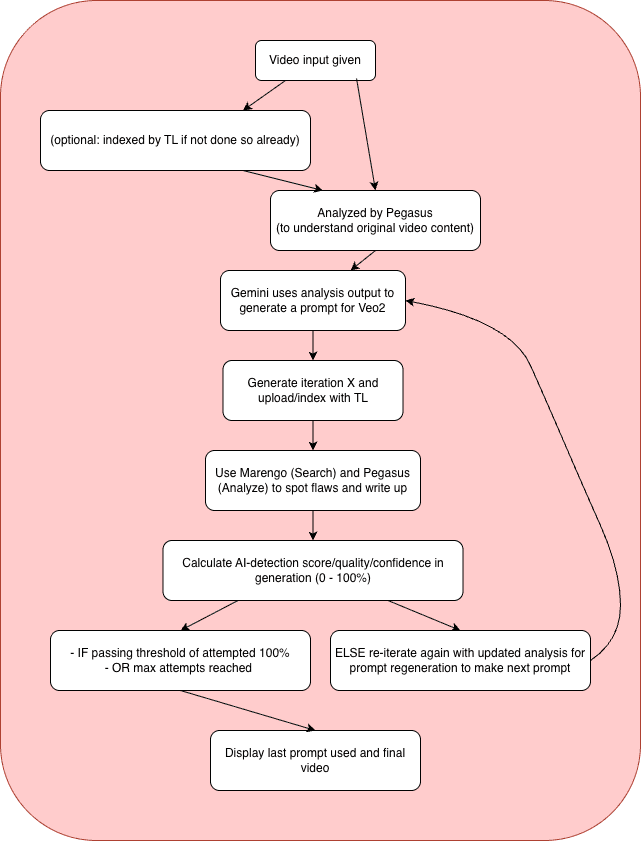
Recurser creates a feedback loop:
Detect problems using TwelveLabs Marengo (checks 250+ different issues)
Understand what's in the video with TwelveLabs Pegasus (converts video to text description)
Improve the prompt using Google Gemini (makes the prompt better)
Regenerate with Veo2 (creates a new video with the improved prompt)
Repeat until quality reaches 100% or max iterations
The result? Videos that start at 60% quality and systematically improve to 100% over 1-3 iterations, without you doing anything.
Prerequisites
Before starting, ensure you have:
Python 3.12+ installed
Node.js 18+ installed
API Keys:
TwelveLabs API Key (for Pegasus and Marengo)
Google Gemini API Key (for prompt enhancement)
Google Veo 2.0 access (for video generation)
Git for cloning the repository
Basic familiarity with Python, FastAPI, and Next.js
The Problem with One-Shot Generation
Here's what we discovered: AI video generation models don't always produce the same result. Run the same prompt twice and you get different videos. But more importantly, models often produce flaws that look okay at first glance but become obvious on closer inspection.
Consider this scenario: You generate a video of "a cat drinking tea in a garden." The first generation might have:
Unnatural fur movement (motion artifacts)
Inconsistent lighting between frames (temporal artifacts)
Slightly robotic cat behavior (behavioral artifacts)
Traditional approaches would either:
Accept the flaws (if they're subtle enough)
Manually regenerate with slightly different prompts (trial and error)
Apply post-processing filters (only fixes certain issues)
Recurser takes a different approach: find every problem, then automatically improve the prompt to fix them all at once. Each iteration learns from the previous one, so the improvements build on each other.
Demo Application
Recurser provides three entry points:
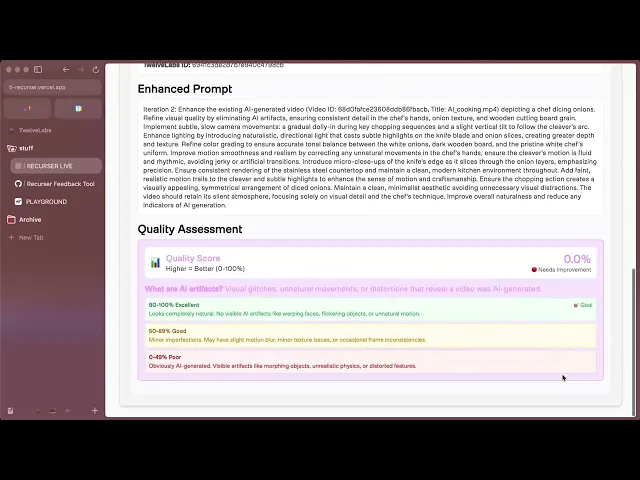
Generate from Prompt: Start fresh—provide a text description and watch Recurser automatically refine it through multiple iterations
Upload Existing Video: Have a video that's "almost there"? Upload it and let Recurser polish it to perfection
Select from Playground: Browse pre-indexed videos and enhance them instantly
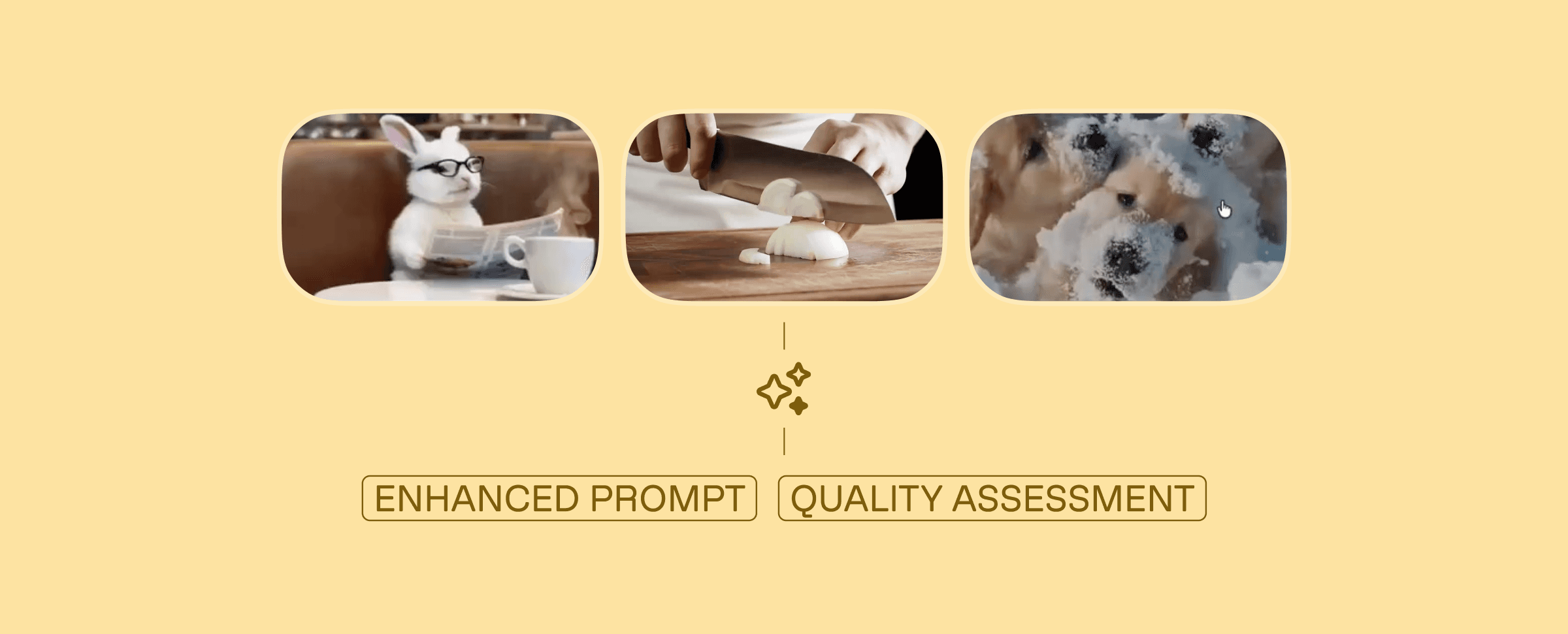
The magic happens in real-time: watch quality scores improve iteration by iteration, see detailed logs of what artifacts were found and how prompts were enhanced, and track the journey from "obviously AI" to "indistinguishable from real."
You can explore the complete demo application and find the full source code on GitHub, or view a tutorial as to the workings of the code -
How Recurser Works
Recurser implements a sophisticated iterative enhancement pipeline that combines multiple AI services:
System Architecture
Preparation Steps
1 - Clone the Repository
git clone https://github.com/aahilshaikh-twlbs/Recurser.git
cd
git clone https://github.com/aahilshaikh-twlbs/Recurser.git
cd
2 - Set up Backend
cd backend
pip3 install -r requirements.txt --break-system-packages
cp .env.example .env
# Add your API keys to .env
cd backend
pip3 install -r requirements.txt --break-system-packages
cp .env.example .env
# Add your API keys to .env
3 - Set up Frontend
cd ../frontend
npm install
cp .env.local.example .env.local
# Set BACKEND_URL=http://localhost:8000
cd ../frontend
npm install
cp .env.local.example .env.local
# Set BACKEND_URL=http://localhost:8000
4 - Configure API Keys
Get your TwelveLabs API key from the Playground
Get your Google Gemini API key from AI Studio
Create a TwelveLabs index with both Marengo and Pegasus engines enabled
Note your index ID for use in the application
5 - Start the Application
# Terminal 1: Backend
cd backend
uvicorn app:app --host 0.0.0.0 --port 8000 --reload

# Terminal 2: Frontend
cd frontend
npm
# Terminal 1: Backend
cd backend
uvicorn app:app --host 0.0.0.0 --port 8000 --reload

# Terminal 2: Frontend
cd frontend
npm
Once you've completed these steps, you're ready to start developing!
Implementation Walkthrough
Let's walk through the core components that power Recurser's iterative enhancement system.
1. Iterative Video Generation Loop
The heart of Recurser is the generate_iterative_video method, which orchestrates the entire enhancement process:
This loop continues until either:
async def generate_iterative_video(prompt: str, video_id: int, max_iterations: int = 3):
    """Main loop: generate → analyze → improve → repeat"""

    current_prompt = prompt
    current_iteration = 1

    while current_iteration <= max_iterations:
# Step 1: Generate video with current promptawait generate_video(current_prompt, video_id, current_iteration)

# Step 2: Wait for video to be indexed (30 seconds)await asyncio.sleep(30)

# Step 3: Analyze the video for AI artifacts
        ai_analysis = await detect_ai_generation(video_id)
        quality_score = ai_analysis.get('quality_score', 0.0)

# Step 4: Check if we're done (100% = perfect)if quality_score >= 100.0:
            break# Success! Video looks real

# Step 5: Improve the prompt for next iterationif current_iteration < max_iterations:
            current_prompt = await enhance_prompt(current_prompt, ai_analysis)

        current_iteration += 1

    return current_prompt# Return final improved prompt
async def generate_iterative_video(prompt: str, video_id: int, max_iterations: int = 3):
    """Main loop: generate → analyze → improve → repeat"""

    current_prompt = prompt
    current_iteration = 1

    while current_iteration <= max_iterations:
# Step 1: Generate video with current promptawait generate_video(current_prompt, video_id, current_iteration)

# Step 2: Wait for video to be indexed (30 seconds)await asyncio.sleep(30)

# Step 3: Analyze the video for AI artifacts
        ai_analysis = await detect_ai_generation(video_id)
        quality_score = ai_analysis.get('quality_score', 0.0)

# Step 4: Check if we're done (100% = perfect)if quality_score >= 100.0:
            break# Success! Video looks real

# Step 5: Improve the prompt for next iterationif current_iteration < max_iterations:
            current_prompt = await enhance_prompt(current_prompt, ai_analysis)

        current_iteration += 1

    return current_prompt# Return final improved prompt
The quality score reaches 100% (video passes as photorealistic)
Maximum iterations are reached
An error occurs
2. AI artifact detection with Marengo
Marengo Search checks for 250+ different AI problems across 15 categories (facial issues, motion problems, lighting glitches, etc.). We group related checks together to be more efficient:
async def _search_for_ai_indicators(search_client, index_id: str, video_id: str):
    """Search for AI indicators using Marengo - grouped into 15 categories"""

# We check 15 categories of artifacts (facial, motion, lighting, etc.)
    ai_detection_categories = {
        "facial_artifacts": "unnatural facial symmetry, robotic expressions",
        "motion_artifacts": "jerky movements, mechanical tracking",
        "lighting_artifacts": "inconsistent lighting, artificial shadows",
# ... 12 more categories
    }

    all_results = []

# We check all 15 categories for comprehensive detectionfor category, query_text in ai_detection_categories.items():

# Search for this category of artifacts
        results = search_client.query(
            index_id=index_id,
            search_options=["visual", "audio"],
            query_text=query_text,
            filter=json.dumps({"id": [video_id]})
        )

        if results and results.data:
            all_results.extend(results.data)

    return all_results# Returns list of detected artifacts
async def _search_for_ai_indicators(search_client, index_id: str, video_id: str):
    """Search for AI indicators using Marengo - grouped into 15 categories"""

# We check 15 categories of artifacts (facial, motion, lighting, etc.)
    ai_detection_categories = {
        "facial_artifacts": "unnatural facial symmetry, robotic expressions",
        "motion_artifacts": "jerky movements, mechanical tracking",
        "lighting_artifacts": "inconsistent lighting, artificial shadows",
# ... 12 more categories
    }

    all_results = []

# We check all 15 categories for comprehensive detectionfor category, query_text in ai_detection_categories.items():

# Search for this category of artifacts
        results = search_client.query(
            index_id=index_id,
            search_options=["visual", "audio"],
            query_text=query_text,
            filter=json.dumps({"id": [video_id]})
        )

        if results and results.data:
            all_results.extend(results.data)

    return all_results# Returns list of detected artifacts
Key Optimizations:
Comprehensive Detection: We check all 15 categories to ensure thorough detection. We previously had an early-exit heuristic that stopped after 8 searches (more than half) if zero problems were found, but we removed it to guarantee we catch every possible issue. While this means perfect videos make 15 API calls instead of 8, it ensures we never miss subtle artifacts that might only appear in the later categories.
Batched Queries: Groups related search terms into categories for efficiency
Periodic Completion Checks: Verifies if video already completed every 5 searches (a separate check that can stop the loop entirely if another process already marked it complete)
3. Video Content Analysis with Pegasus
Pegasus converts video to text—it watches the video and describes what it sees. This helps us understand what needs improvement:
async def _analyze_with_pegasus_content(analyze_client, video_id: str):
    """Pegasus watches the video and describes what it sees"""

# We ask Pegasus two questions:
    prompts = [
        "Describe everything in this video: objects, movement, lighting, mood",
        "What technical issues does this video have? (quality, consistency, etc.)"
    ]

    analysis_results = []
    for prompt in prompts:
        response = analyze_client.analyze(
            video_id=video_id,
            prompt=prompt,
            temperature=0.2# Lower = more consistent responses
        )
        analysis_results.append({
            'content_description': response.data
        })

    return analysis_results# Returns text descriptions of the video
async def _analyze_with_pegasus_content(analyze_client, video_id: str):
    """Pegasus watches the video and describes what it sees"""

# We ask Pegasus two questions:
    prompts = [
        "Describe everything in this video: objects, movement, lighting, mood",
        "What technical issues does this video have? (quality, consistency, etc.)"
    ]

    analysis_results = []
    for prompt in prompts:
        response = analyze_client.analyze(
            video_id=video_id,
            prompt=prompt,
            temperature=0.2# Lower = more consistent responses
        )
        analysis_results.append({
            'content_description': response.data
        })

    return analysis_results# Returns text descriptions of the video
Smart Optimization: The detection service skips Pegasus analysis entirely when Marengo finds 0 indicators, since the video already passes quality checks:
# Early exit: If we have 0 indicators from searches, quality is 100% - skip Pegasus
if len(search_results) == 0 and preliminary_quality_score >= 100.0:
    logger.info(f"✅ Early exit: 0 search results = 100% quality, skipping Pegasus analysis for faster response")
    log_detailed(video_id, f"✅ Quality Score: 100.0% (Early exit - 0 AI indicators found)", "SUCCESS")

    # Create minimal detailed logs without Pegasus
    detailed_logs = AIDetectionService._create_detailed_logs(
        search_results, [], 100.0
    )

    return {
        "search_results": search_results,
        "analysis_results": [],
        "quality_score": 100.0,
        "detailed_logs": detailed_logs
    }
# Early exit: If we have 0 indicators from searches, quality is 100% - skip Pegasus
if len(search_results) == 0 and preliminary_quality_score >= 100.0:
    logger.info(f"✅ Early exit: 0 search results = 100% quality, skipping Pegasus analysis for faster response")
    log_detailed(video_id, f"✅ Quality Score: 100.0% (Early exit - 0 AI indicators found)", "SUCCESS")

    # Create minimal detailed logs without Pegasus
    detailed_logs = AIDetectionService._create_detailed_logs(
        search_results, [], 100.0
    )

    return {
        "search_results": search_results,
        "analysis_results": [],
        "quality_score": 100.0,
        "detailed_logs": detailed_logs
    }
4. Quality Scoring System
The system calculates a single consolidated quality score (0-100%) based on detected indicators. The scoring logic ensures that videos with no detected artifacts receive a perfect score:
def _calculate_quality_score(search_results, analysis_results):
    """Start at 100%, subtract points for each problem found"""

# No problems found = perfect scoreif not search_results and not analysis_results:
        return 100.0

# Each artifact found reduces score by 3% (max 50% penalty)
    search_penalty = min(len(search_results) * 3, 50)

# Check Pegasus analysis for quality issues mentioned
    analysis_penalty = 0
    if analysis_results:
# Look for words like "artificial", "blurry", "inconsistent" in the analysis
        quality_keywords = ['artificial', 'synthetic', 'blurry', 'inconsistent', 'robotic']
        issues_found = sum(1 for result in analysis_results
                          if any(keyword in str(result).lower() for keyword in quality_keywords))
        analysis_penalty = min(issues_found * 8, 50)

# Final score: 100 minus all penalties (can't go below 0)
    quality_score = max(100 - search_penalty - analysis_penalty, 0)
    return quality_score
def _calculate_quality_score(search_results, analysis_results):
    """Start at 100%, subtract points for each problem found"""

# No problems found = perfect scoreif not search_results and not analysis_results:
        return 100.0

# Each artifact found reduces score by 3% (max 50% penalty)
    search_penalty = min(len(search_results) * 3, 50)

# Check Pegasus analysis for quality issues mentioned
    analysis_penalty = 0
    if analysis_results:
# Look for words like "artificial", "blurry", "inconsistent" in the analysis
        quality_keywords = ['artificial', 'synthetic', 'blurry', 'inconsistent', 'robotic']
        issues_found = sum(1 for result in analysis_results
                          if any(keyword in str(result).lower() for keyword in quality_keywords))
        analysis_penalty = min(issues_found * 8, 50)

# Final score: 100 minus all penalties (can't go below 0)
    quality_score = max(100 - search_penalty - analysis_penalty, 0)
    return quality_score
Scoring Logic:
0 AI Indicators Found: 100% quality score (perfect - video passes as real)
Each Search Indicator: Reduces score by 3% (max 50% penalty)
Analysis Quality Issues: Additional penalties up to 50%
Final Score: Cannot go below 0%
5. Prompt Enhancement with Gemini
When quality is below target, Gemini generates an improved prompt based on detected issues:
async def _generate_enhanced_prompt(original_prompt: str, analysis_results: dict):
    """Use Gemini to improve the prompt based on what we found wrong"""

    client = Client(api_key=GEMINI_API_KEY)

# Tell Gemini: "Here's the original prompt and what was wrong. Fix it."
    enhancement_request = f"""
    Original prompt: {original_prompt}

    Problems found: {json.dumps(analysis_results, indent=2)}

    Create a better prompt that fixes these issues. Make it more natural and realistic.
    Return only the new prompt, nothing else.
    """

    response = client.models.generate_content(
        model='gemini-2.5-flash',
        contents=enhancement_request
    )

    return response.text.strip() if response.text else original_prompt
async def _generate_enhanced_prompt(original_prompt: str, analysis_results: dict):
    """Use Gemini to improve the prompt based on what we found wrong"""

    client = Client(api_key=GEMINI_API_KEY)

# Tell Gemini: "Here's the original prompt and what was wrong. Fix it."
    enhancement_request = f"""
    Original prompt: {original_prompt}

    Problems found: {json.dumps(analysis_results, indent=2)}

    Create a better prompt that fixes these issues. Make it more natural and realistic.
    Return only the new prompt, nothing else.
    """

    response = client.models.generate_content(
        model='gemini-2.5-flash',
        contents=enhancement_request
    )

    return response.text.strip() if response.text else original_prompt
Why This Approach Works (And When It Doesn't)
After building and testing Recurser extensively, we discovered something interesting: not all videos need iteration. Some prompts produce near-perfect results on the first try, while others require 3-5 iterations to reach acceptable quality.
The Iteration Sweet Spot
Our testing revealed clear patterns:
Simple scenes (single subject, static background): Often 100% on first try
Complex scenes (multiple subjects, dynamic lighting): Typically need 2-3 iterations
Unusual prompts (creative/impossible scenarios): May need 4-5 iterations or hit diminishing returns
The key insight? Early detection matters. By stopping as soon as we hit 100% quality (using "early exit" shortcuts), we avoid wasting time and money on videos that are already perfect.
Why Prompt Enhancement Beats Post-Processing
We initially tried fixing videos after they were generated—applying filters, smoothing out glitches, fixing frames. But we quickly realized:
Post-processing can't fix fundamental problems—if the model misunderstood what you wanted, filters won't help
Improving prompts fixes the root cause—each new generation starts from a better understanding
Improvements build on each other—iteration 2 learns from iteration 1, iteration 3 learns from both
However, Recurser isn't a magic bullet. It works best when:
✅ You have a clear creative vision (even if initial execution is flawed)
✅ You're willing to wait for iterative improvement (2-5 minutes per iteration)
✅ Quality threshold is well-defined (we target 100% but you can customize)
It's less effective when:
❌ The original prompt is fundamentally wrong (no amount of iteration fixes a broken concept)
❌ You need instant results (real-time generation isn't possible with iteration)
❌ Cost is prohibitive (each iteration costs generation + analysis API calls)
Key Design Decisions
1. Separation of Detection and Generation
We deliberately kept AI detection (TwelveLabs) separate from video generation (Veo2). This wasn't just a technical choice—it was strategic:
Works with any generator: Switch from Veo2 to Veo3 (or any future model) without changing how we detect problems
Cost control: Detection is cheaper than generation, so we can afford to check thoroughly
Independent scaling: Scale detection and generation separately based on what's slow
2. Comprehensive Detection Over Speed
We prioritize thorough detection over speed optimizations. Here's our approach:
Marengo Comprehensive Check: We check all 15 categories to ensure thorough detection. We previously had an early exit heuristic that stopped after 8 searches (more than half) if zero problems were found, but we removed it to guarantee we never miss subtle artifacts that might only appear in later categories. While this means perfect videos make 15 API calls instead of 8, the trade-off is worth it for accuracy.
Pegasus Skip: If Marengo finds nothing across all 15 categories, skip expensive Pegasus analysis entirely. This is still our biggest optimization—skipping analysis when no problems are found.
Completion Checks: Every 5 searches, verify if video already completed (parallel processing can mark videos complete early)
This means videos that start at 100% quality complete faster than videos with issues, since we skip Pegasus analysis when no indicators are found, but we still check all 15 categories to be certain.
3. Real-time Feedback Without WebSockets
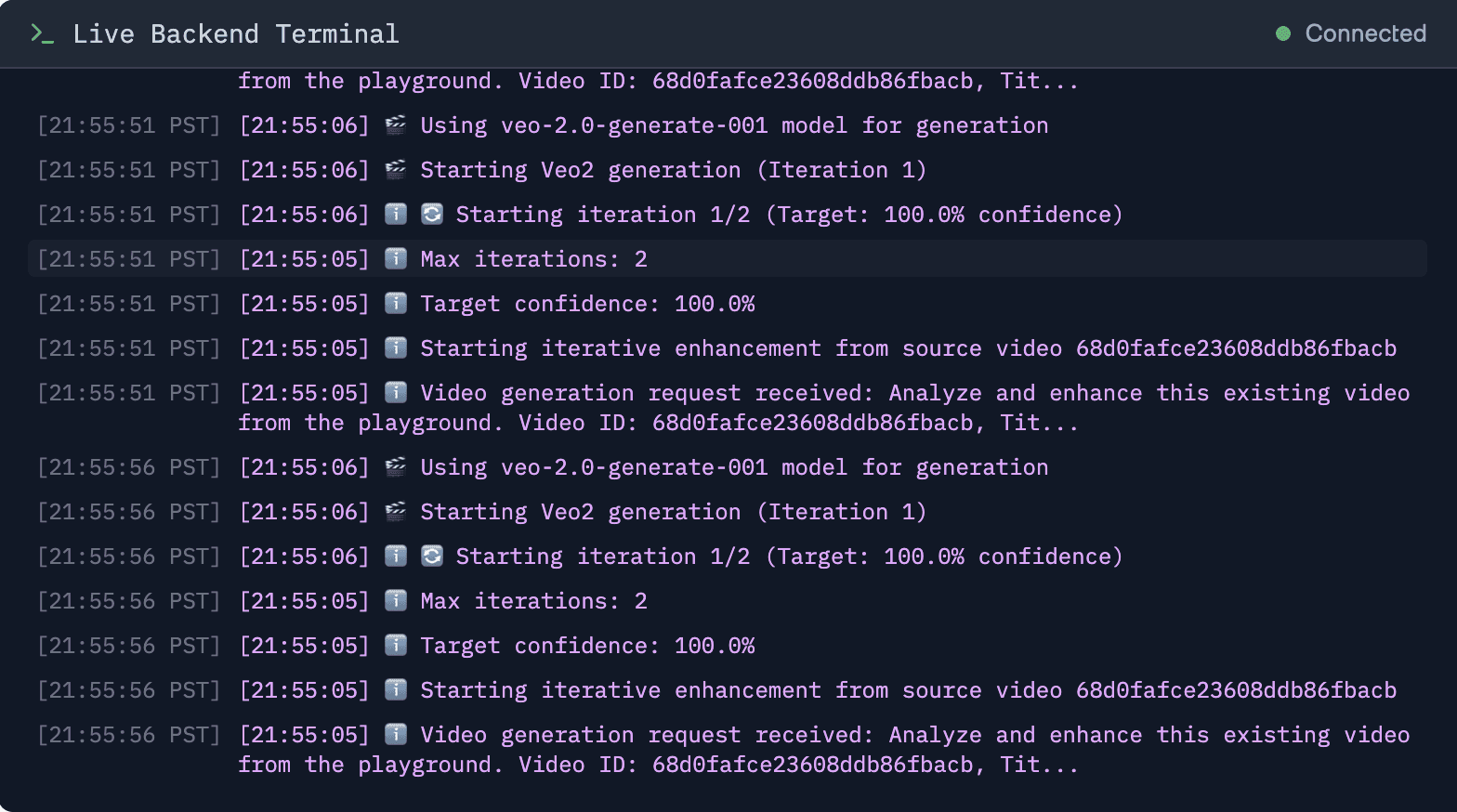
We couldn't use WebSockets (Vercel doesn't support them), so we built a polling system that checks for updates frequently—it feels real-time:
Global Log Buffer: 200-entry rolling buffer captures all backend activity
Smart Polling: 1-second intervals with connection management and buffer delays
Noise Filtering: Remove repetitive API calls from logs, highlight important events
The result? Users see updates within 1-2 seconds, even without true streaming.
4. Graceful Degradation Over Perfect Reliability
We prioritized "keep going even if something breaks" over "never break." Why? Because AI services sometimes fail—rate limits, timeouts, temporary outages. But users shouldn't lose their progress:
Pegasus Failures: Continue with backup analysis, log the failure, finish anyway
API Rate Limits: Clear error messages, wait and retry, pick up where we left off
Partial Failures: If 14 out of 15 searches succeed, use those results and continue
The philosophy: A partial result is better than no result.
Performance Engineering: What We Learned
Building Recurser taught us a lot about making AI systems faster. Here's what actually made a difference:
The 80/20 Rule Applied to AI Pipelines
We spent 80% of our optimization effort on three things:
Conditional Pegasus: Skipping Pegasus analysis when Marengo finds 0 indicators saves ~$0.05 per video and 30+ seconds. This is our biggest optimization—if no problems are found in the search phase, we skip the expensive analysis phase entirely.
Smart Search Batching: Checking completion status every 5 searches instead of every search reduced database queries by 15x. But more importantly, it let us update completion status in the background without slowing down searches.
Comprehensive Detection: We check all 15 categories instead of using an early exit heuristic. While this means perfect videos make 15 API calls instead of 8, it ensures we never miss subtle artifacts. The trade-off is worth it for accuracy.
What Didn't Work (And Why)
We tried several optimizations that didn't pan out:
Parallel Search Queries: We tried running all 15 search categories at the same time, but hit rate limits. Doing them sequentially was more reliable.
Caching Analysis Results: We tried saving Pegasus analysis results for similar videos, but each video was too different to reuse results.
Frame Sampling: We tested analyzing only some frames to save time, but missed problems that only show up over time. Full analysis was worth it.
Frontend: A Hidden Performance Bottleneck
The frontend isn't just a UI—it's a real-time monitoring system. Our optimizations:
Rolling Logs: Fixed memory leaks from unbounded log arrays (we hit 10,000+ entries in testing)
Single Video Player: Reduced from 3 components to 1 unified player—smaller bundle, faster renders
Noise Filtering: Removed 80% of log entries that weren't user-actionable (internal API calls, etc.)
The result? Frontend stays responsive even during long-running iterations.
Data Outputs
Recurser generates comprehensive outputs for each video:
Video Metadata
Final Video: Best iteration (highest quality score)
All Iterations: Complete history of enhancement attempts
Quality Scores: Per-iteration confidence tracking

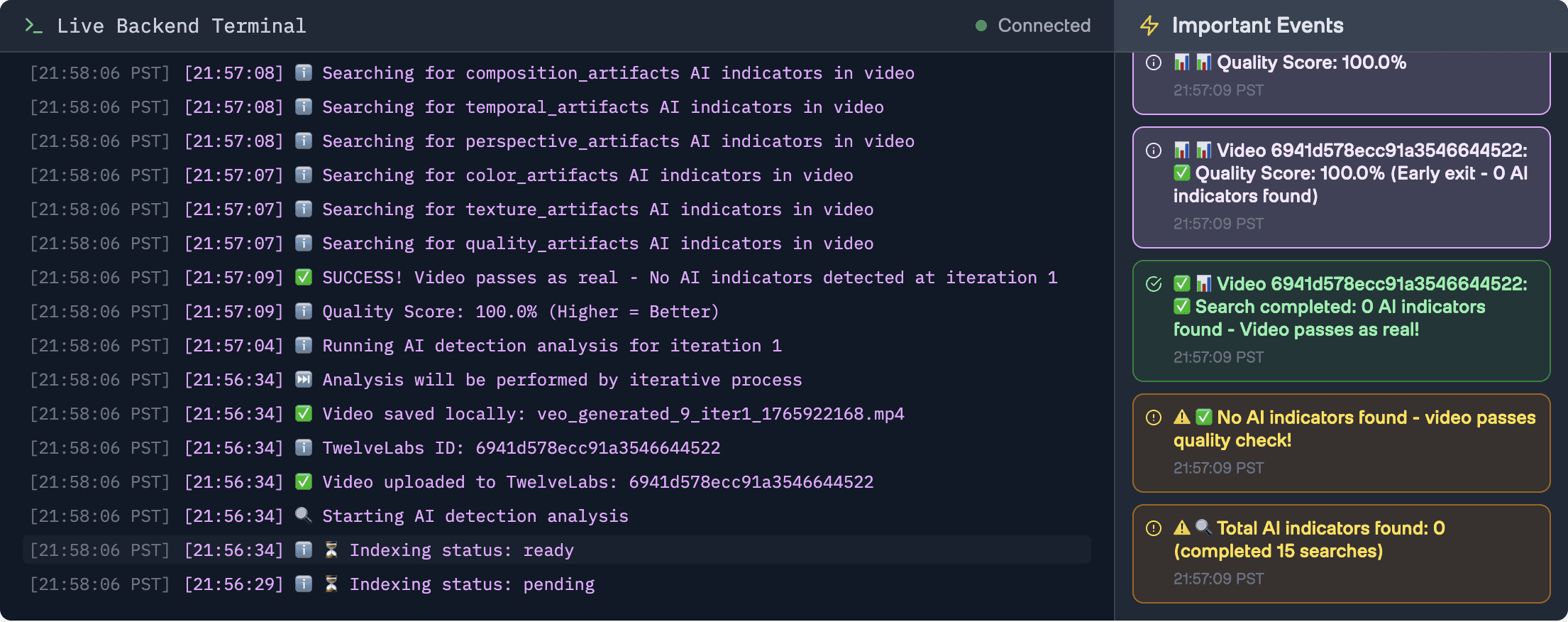
Analysis Results
Search Results: Detailed list of detected AI indicators by category
Analysis Results: Pegasus content analysis and quality insights
Detailed Logs: Complete processing history with timestamps
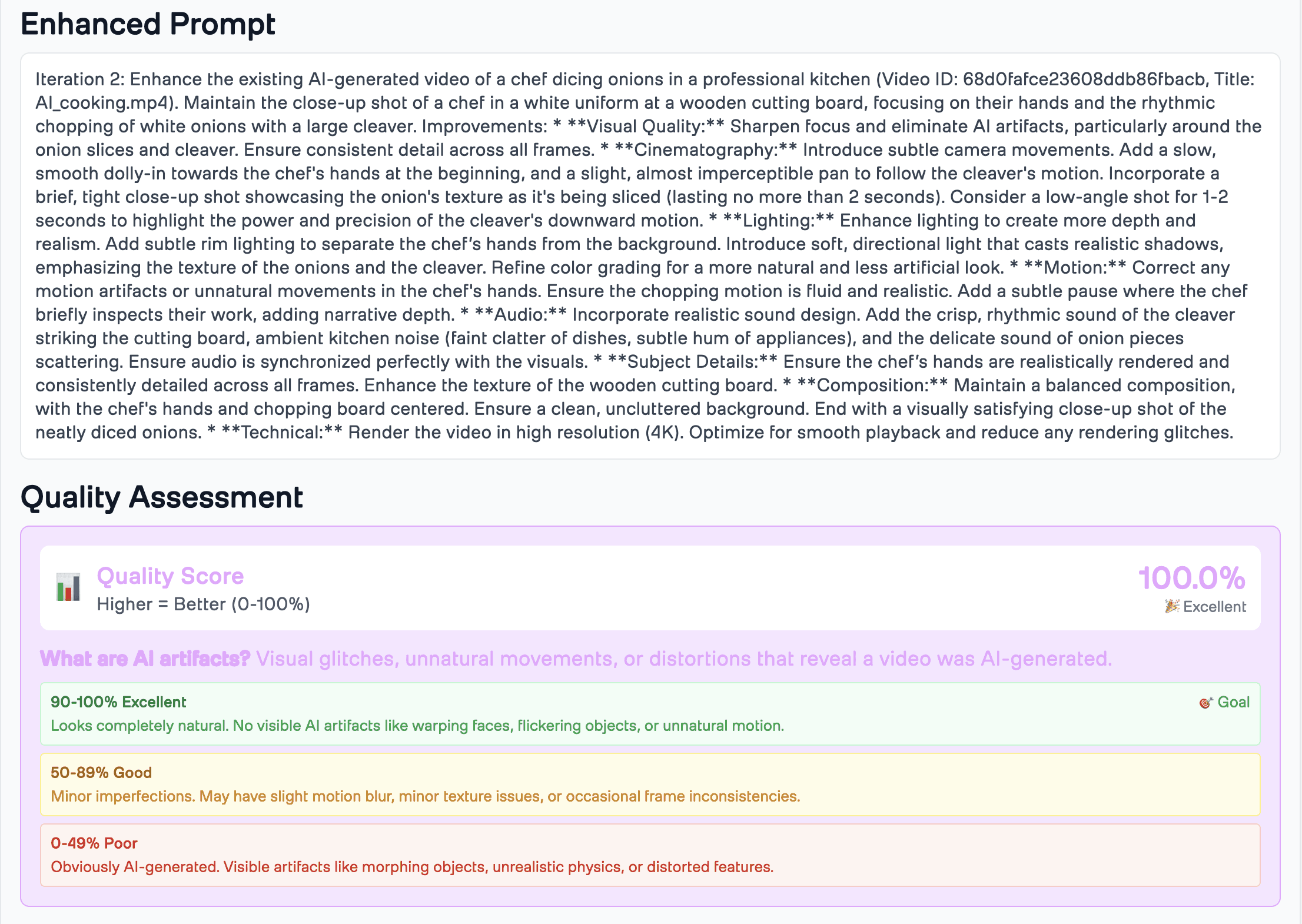
Enhancement Insights
Original Prompt: Initial video generation prompt
Enhanced Prompts: Each iteration's improved prompt
Improvement Trajectory: Quality score progression over iterations
Usage Examples
Example 1: Generate from Prompt
POST /api/videos/generate
{
    "prompt": "A cat drinking tea in a garden",
    "max_iterations": 5,
    "target_confidence": 100.0,
    "index_id": "your_index_id",
    "twelvelabs_api_key": "your_api_key"
}
POST /api/videos/generate
{
    "prompt": "A cat drinking tea in a garden",
    "max_iterations": 5,
    "target_confidence": 100.0,
    "index_id": "your_index_id",
    "twelvelabs_api_key": "your_api_key"
}
Response:
{
    "success": true,
    "video_id": 123,
    "status": "processing",
    "message": "Video generation started"
}
{
    "success": true,
    "video_id": 123,
    "status": "processing",
    "message": "Video generation started"
}
Example 2: Upload Existing Video
POST /api/videos/upload
{
    "file": <video_file>,
    "prompt": "Original prompt used",
    "max_iterations": 3,
    "index_id": "your_index_id",
    "twelvelabs_api_key": "your_api_key"
}
POST /api/videos/upload
{
    "file": <video_file>,
    "prompt": "Original prompt used",
    "max_iterations": 3,
    "index_id": "your_index_id",
    "twelvelabs_api_key": "your_api_key"
}
Example 3: Check Status
GET /api/videos/123/status
GET /api/videos/123/status
Response:
{
    "success": true,
    "data": {
        "video_id": 123,
        "status": "completed",
        "current_confidence": 100.0,
        "iteration_count": 2,
        "final_confidence": 100.0,
        "video_url": "https://..."
    }
}
{
    "success": true,
    "data": {
        "video_id": 123,
        "status": "completed",
        "current_confidence": 100.0,
        "iteration_count": 2,
        "final_confidence": 100.0,
        "video_url": "https://..."
    }
}
Interpreting Quality Scores
Quality scores aren't random—they're based on actually finding problems:
100%: Zero problems found across 250+ checks. Video looks real to professionals.
80-99%: 1-6 small problems found. Usually fixable in 1-2 iterations.
50-79%: 7-15 problems found. Multiple types of issues. Needs 3-5 iterations.
<50%: 16+ problems found. Serious generation issues. May need to rewrite the prompt entirely.
When to Stop Iterating
Recurser automatically stops at 100%, but you might want to stop earlier if:
Cost constraints: Each iteration costs generation + analysis (~$0.10-0.50 depending on video length)
Time constraints: Iterations take 2-5 minutes each
"Good enough" threshold: For internal use, 85%+ might be acceptable
Diminishing returns: If quality plateaus for 2+ iterations, the prompt might need fundamental changes
Beyond Basic Enhancement: Advanced Use Cases
Recurser's iterative approach opens up possibilities beyond simple quality improvement:
A/B Testing Prompt Variations
Instead of guessing which prompt works best, generate multiple versions and let Recurser figure out which one reaches 100% quality fastest. The iteration count tells you which prompt is better.
Domain-Specific Artifact Detection
We've already seen users adapt Recurser for:
Product videos: Adding "commercial photography artifacts" to detection categories
Character animation: Focusing on "unnatural character movement" and "uncanny valley" detection
Nature scenes: Emphasizing "environmental consistency" and "physics violations"
The beauty? The same core system works—just adjust the detection categories.
Prompt Engineering as a Service
Recurser essentially automates prompt writing. Give it a rough idea, and it systematically improves the prompt until the output is perfect. This suggests a future where prompt writing becomes a service—input an idea, get back an optimized prompt and perfect video.
The Learning Opportunity
Here's an interesting possibility: What if Recurser learned from successful iterations? If iteration 2 consistently fixes "motion problems" for a certain type of prompt, could we skip iteration 1 and go straight to the improved prompt? This would require building a database of prompt patterns and what fixes them—essentially creating a "prompt improvement model."
When Not to Use Recurser
Recurser isn't always the right tool:
Real-time generation: Can't wait 2-5 minutes per iteration? Use direct generation.
Cost-sensitive: At scale, iterations add up. Consider one-shot generation with better initial prompts.
Creative exploration: Sometimes you want to see many variations quickly, not perfect one variation slowly.
Technical videos: If your video needs specific technical accuracy (product dimensions, exact colors), post-processing might be more reliable.
The key is understanding your constraints: quality, speed, or cost—pick two.
Conclusion: The Future of AI Video Quality
Recurser started as an experiment: "What if we treated AI video generation like software—with automated testing and iterative improvement?" What we discovered is that this approach changes how we think about AI video quality.
Instead of accepting whatever the model generates, we can now demand perfection. And instead of manually tweaking prompts through trial and error, we can automate the refinement process.
The implications are interesting:
For creators: Generate once, refine automatically, get professional-quality results without needing to be an expert at writing prompts or video production.
For developers: Build applications that guarantee video quality without manual review. Process hundreds of videos knowing each will meet your quality standard.
For the industry: As models improve, the iteration count should decrease. But even perfect models benefit from Recurser's quality checking—you'll know immediately if a video looks real.
The most exciting part? We're just scratching the surface. As video generation models evolve, Recurser's detection and enhancement capabilities can evolve with them. Today it's fixing artifacts. Tomorrow it might be optimizing for specific creative goals, adapting to different artistic styles, or learning from successful iterations to predict optimal prompts.
The foundation is here. The rest is iteration—fittingly enough.
Additional Resources
Live Application: Recurser
GitHub Repository: Recurser on GitHub
TwelveLabs Documentation: Pegasus and Marengo guides
Google Gemini API: Prompt engineering best practices
Video Generation: Google Veo 2.0 documentation
Introduction
You've just generated a video with Google Gemini’s Veo2. It looks decent at first glance—the prompt was good, the composition is solid. But something feels off. On closer inspection, you notice the cat's fur moves unnaturally, shadows don't quite align with the lighting, and there's a subtle "uncanny valley" effect that makes it feel synthetic.
The problem? Most AI video generation is a one-shot process. You generate once, maybe tweak the prompt slightly, generate again. But how do you know what's actually wrong? And more importantly, how do you fix it without spending hours manually reviewing every frame?
This is why we built Recurser—an automated system that doesn't just detect AI problems, but actively fixes them through smart iteration. Instead of guessing what's wrong, Recurser uses AI video understanding to find specific issues, then automatically improves prompts to regenerate better versions until the video looks real.
The key insight? Fixing the prompt is more powerful than fixing the video. Traditional post-processing can only address what's already generated, but improving prompts addresses the root cause—ensuring the next generation is fundamentally better.
Recurser creates a feedback loop:
Detect problems using TwelveLabs Marengo (checks 250+ different issues)
Understand what's in the video with TwelveLabs Pegasus (converts video to text description)
Improve the prompt using Google Gemini (makes the prompt better)
Regenerate with Veo2 (creates a new video with the improved prompt)
Repeat until quality reaches 100% or max iterations
The result? Videos that start at 60% quality and systematically improve to 100% over 1-3 iterations, without you doing anything.
Prerequisites
Before starting, ensure you have:
Python 3.12+ installed
Node.js 18+ installed
API Keys:
TwelveLabs API Key (for Pegasus and Marengo)
Google Gemini API Key (for prompt enhancement)
Google Veo 2.0 access (for video generation)
Git for cloning the repository
Basic familiarity with Python, FastAPI, and Next.js
The Problem with One-Shot Generation
Here's what we discovered: AI video generation models don't always produce the same result. Run the same prompt twice and you get different videos. But more importantly, models often produce flaws that look okay at first glance but become obvious on closer inspection.
Consider this scenario: You generate a video of "a cat drinking tea in a garden." The first generation might have:
Unnatural fur movement (motion artifacts)
Inconsistent lighting between frames (temporal artifacts)
Slightly robotic cat behavior (behavioral artifacts)
Traditional approaches would either:
Accept the flaws (if they're subtle enough)
Manually regenerate with slightly different prompts (trial and error)
Apply post-processing filters (only fixes certain issues)
Recurser takes a different approach: find every problem, then automatically improve the prompt to fix them all at once. Each iteration learns from the previous one, so the improvements build on each other.
Demo Application
Recurser provides three entry points:
Generate from Prompt: Start fresh—provide a text description and watch Recurser automatically refine it through multiple iterations
Upload Existing Video: Have a video that's "almost there"? Upload it and let Recurser polish it to perfection
Select from Playground: Browse pre-indexed videos and enhance them instantly
The magic happens in real-time: watch quality scores improve iteration by iteration, see detailed logs of what artifacts were found and how prompts were enhanced, and track the journey from "obviously AI" to "indistinguishable from real."
You can explore the complete demo application and find the full source code on GitHub, or view a tutorial as to the workings of the code -
How Recurser Works
Recurser implements a sophisticated iterative enhancement pipeline that combines multiple AI services:
System Architecture
Preparation Steps
1 - Clone the Repository
git clone https://github.com/aahilshaikh-twlbs/Recurser.git
cd
2 - Set up Backend
cd backend
pip3 install -r requirements.txt --break-system-packages
cp .env.example .env
# Add your API keys to .env
3 - Set up Frontend
cd ../frontend
npm install
cp .env.local.example .env.local
# Set BACKEND_URL=http://localhost:8000
4 - Configure API Keys
Get your TwelveLabs API key from the Playground
Get your Google Gemini API key from AI Studio
Create a TwelveLabs index with both Marengo and Pegasus engines enabled
Note your index ID for use in the application
5 - Start the Application
# Terminal 1: Backend
cd backend
uvicorn app:app --host 0.0.0.0 --port 8000 --reload

# Terminal 2: Frontend
cd frontend
npm
Once you've completed these steps, you're ready to start developing!
Implementation Walkthrough
Let's walk through the core components that power Recurser's iterative enhancement system.
1. Iterative Video Generation Loop
The heart of Recurser is the generate_iterative_video method, which orchestrates the entire enhancement process:
This loop continues until either:
async def generate_iterative_video(prompt: str, video_id: int, max_iterations: int = 3):
    """Main loop: generate → analyze → improve → repeat"""

    current_prompt = prompt
    current_iteration = 1

    while current_iteration <= max_iterations:
# Step 1: Generate video with current promptawait generate_video(current_prompt, video_id, current_iteration)

# Step 2: Wait for video to be indexed (30 seconds)await asyncio.sleep(30)

# Step 3: Analyze the video for AI artifacts
        ai_analysis = await detect_ai_generation(video_id)
        quality_score = ai_analysis.get('quality_score', 0.0)

# Step 4: Check if we're done (100% = perfect)if quality_score >= 100.0:
            break# Success! Video looks real

# Step 5: Improve the prompt for next iterationif current_iteration < max_iterations:
            current_prompt = await enhance_prompt(current_prompt, ai_analysis)

        current_iteration += 1

    return current_prompt# Return final improved prompt
The quality score reaches 100% (video passes as photorealistic)
Maximum iterations are reached
An error occurs
2. AI artifact detection with Marengo
Marengo Search checks for 250+ different AI problems across 15 categories (facial issues, motion problems, lighting glitches, etc.). We group related checks together to be more efficient:
async def _search_for_ai_indicators(search_client, index_id: str, video_id: str):
    """Search for AI indicators using Marengo - grouped into 15 categories"""

# We check 15 categories of artifacts (facial, motion, lighting, etc.)
    ai_detection_categories = {
        "facial_artifacts": "unnatural facial symmetry, robotic expressions",
        "motion_artifacts": "jerky movements, mechanical tracking",
        "lighting_artifacts": "inconsistent lighting, artificial shadows",
# ... 12 more categories
    }

    all_results = []

# We check all 15 categories for comprehensive detectionfor category, query_text in ai_detection_categories.items():

# Search for this category of artifacts
        results = search_client.query(
            index_id=index_id,
            search_options=["visual", "audio"],
            query_text=query_text,
            filter=json.dumps({"id": [video_id]})
        )

        if results and results.data:
            all_results.extend(results.data)

    return all_results# Returns list of detected artifacts
Key Optimizations:
Comprehensive Detection: We check all 15 categories to ensure thorough detection. We previously had an early-exit heuristic that stopped after 8 searches (more than half) if zero problems were found, but we removed it to guarantee we catch every possible issue. While this means perfect videos make 15 API calls instead of 8, it ensures we never miss subtle artifacts that might only appear in the later categories.
Batched Queries: Groups related search terms into categories for efficiency
Periodic Completion Checks: Verifies if video already completed every 5 searches (a separate check that can stop the loop entirely if another process already marked it complete)
3. Video Content Analysis with Pegasus
Pegasus converts video to text—it watches the video and describes what it sees. This helps us understand what needs improvement:
async def _analyze_with_pegasus_content(analyze_client, video_id: str):
    """Pegasus watches the video and describes what it sees"""

# We ask Pegasus two questions:
    prompts = [
        "Describe everything in this video: objects, movement, lighting, mood",
        "What technical issues does this video have? (quality, consistency, etc.)"
    ]

    analysis_results = []
    for prompt in prompts:
        response = analyze_client.analyze(
            video_id=video_id,
            prompt=prompt,
            temperature=0.2# Lower = more consistent responses
        )
        analysis_results.append({
            'content_description': response.data
        })

    return analysis_results# Returns text descriptions of the video
Smart Optimization: The detection service skips Pegasus analysis entirely when Marengo finds 0 indicators, since the video already passes quality checks:
# Early exit: If we have 0 indicators from searches, quality is 100% - skip Pegasus
if len(search_results) == 0 and preliminary_quality_score >= 100.0:
    logger.info(f"✅ Early exit: 0 search results = 100% quality, skipping Pegasus analysis for faster response")
    log_detailed(video_id, f"✅ Quality Score: 100.0% (Early exit - 0 AI indicators found)", "SUCCESS")

    # Create minimal detailed logs without Pegasus
    detailed_logs = AIDetectionService._create_detailed_logs(
        search_results, [], 100.0
    )

    return {
        "search_results": search_results,
        "analysis_results": [],
        "quality_score": 100.0,
        "detailed_logs": detailed_logs
    }
4. Quality Scoring System
The system calculates a single consolidated quality score (0-100%) based on detected indicators. The scoring logic ensures that videos with no detected artifacts receive a perfect score:
def _calculate_quality_score(search_results, analysis_results):
    """Start at 100%, subtract points for each problem found"""

# No problems found = perfect scoreif not search_results and not analysis_results:
        return 100.0

# Each artifact found reduces score by 3% (max 50% penalty)
    search_penalty = min(len(search_results) * 3, 50)

# Check Pegasus analysis for quality issues mentioned
    analysis_penalty = 0
    if analysis_results:
# Look for words like "artificial", "blurry", "inconsistent" in the analysis
        quality_keywords = ['artificial', 'synthetic', 'blurry', 'inconsistent', 'robotic']
        issues_found = sum(1 for result in analysis_results
                          if any(keyword in str(result).lower() for keyword in quality_keywords))
        analysis_penalty = min(issues_found * 8, 50)

# Final score: 100 minus all penalties (can't go below 0)
    quality_score = max(100 - search_penalty - analysis_penalty, 0)
    return quality_score
Scoring Logic:
0 AI Indicators Found: 100% quality score (perfect - video passes as real)
Each Search Indicator: Reduces score by 3% (max 50% penalty)
Analysis Quality Issues: Additional penalties up to 50%
Final Score: Cannot go below 0%
5. Prompt Enhancement with Gemini
When quality is below target, Gemini generates an improved prompt based on detected issues:
async def _generate_enhanced_prompt(original_prompt: str, analysis_results: dict):
    """Use Gemini to improve the prompt based on what we found wrong"""

    client = Client(api_key=GEMINI_API_KEY)

# Tell Gemini: "Here's the original prompt and what was wrong. Fix it."
    enhancement_request = f"""
    Original prompt: {original_prompt}

    Problems found: {json.dumps(analysis_results, indent=2)}

    Create a better prompt that fixes these issues. Make it more natural and realistic.
    Return only the new prompt, nothing else.
    """

    response = client.models.generate_content(
        model='gemini-2.5-flash',
        contents=enhancement_request
    )

    return response.text.strip() if response.text else original_prompt
Why This Approach Works (And When It Doesn't)
After building and testing Recurser extensively, we discovered something interesting: not all videos need iteration. Some prompts produce near-perfect results on the first try, while others require 3-5 iterations to reach acceptable quality.
The Iteration Sweet Spot
Our testing revealed clear patterns:
Simple scenes (single subject, static background): Often 100% on first try
Complex scenes (multiple subjects, dynamic lighting): Typically need 2-3 iterations
Unusual prompts (creative/impossible scenarios): May need 4-5 iterations or hit diminishing returns
The key insight? Early detection matters. By stopping as soon as we hit 100% quality (using "early exit" shortcuts), we avoid wasting time and money on videos that are already perfect.
Why Prompt Enhancement Beats Post-Processing
We initially tried fixing videos after they were generated—applying filters, smoothing out glitches, fixing frames. But we quickly realized:
Post-processing can't fix fundamental problems—if the model misunderstood what you wanted, filters won't help
Improving prompts fixes the root cause—each new generation starts from a better understanding
Improvements build on each other—iteration 2 learns from iteration 1, iteration 3 learns from both
However, Recurser isn't a magic bullet. It works best when:
✅ You have a clear creative vision (even if initial execution is flawed)
✅ You're willing to wait for iterative improvement (2-5 minutes per iteration)
✅ Quality threshold is well-defined (we target 100% but you can customize)
It's less effective when:
❌ The original prompt is fundamentally wrong (no amount of iteration fixes a broken concept)
❌ You need instant results (real-time generation isn't possible with iteration)
❌ Cost is prohibitive (each iteration costs generation + analysis API calls)
Key Design Decisions
1. Separation of Detection and Generation
We deliberately kept AI detection (TwelveLabs) separate from video generation (Veo2). This wasn't just a technical choice—it was strategic:
Works with any generator: Switch from Veo2 to Veo3 (or any future model) without changing how we detect problems
Cost control: Detection is cheaper than generation, so we can afford to check thoroughly
Independent scaling: Scale detection and generation separately based on what's slow
2. Comprehensive Detection Over Speed
We prioritize thorough detection over speed optimizations. Here's our approach:
Marengo Comprehensive Check: We check all 15 categories to ensure thorough detection. We previously had an early exit heuristic that stopped after 8 searches (more than half) if zero problems were found, but we removed it to guarantee we never miss subtle artifacts that might only appear in later categories. While this means perfect videos make 15 API calls instead of 8, the trade-off is worth it for accuracy.
Pegasus Skip: If Marengo finds nothing across all 15 categories, skip expensive Pegasus analysis entirely. This is still our biggest optimization—skipping analysis when no problems are found.
Completion Checks: Every 5 searches, verify if video already completed (parallel processing can mark videos complete early)
This means videos that start at 100% quality complete faster than videos with issues, since we skip Pegasus analysis when no indicators are found, but we still check all 15 categories to be certain.
3. Real-time Feedback Without WebSockets
We couldn't use WebSockets (Vercel doesn't support them), so we built a polling system that checks for updates frequently—it feels real-time:
Global Log Buffer: 200-entry rolling buffer captures all backend activity
Smart Polling: 1-second intervals with connection management and buffer delays
Noise Filtering: Remove repetitive API calls from logs, highlight important events
The result? Users see updates within 1-2 seconds, even without true streaming.
4. Graceful Degradation Over Perfect Reliability
We prioritized "keep going even if something breaks" over "never break." Why? Because AI services sometimes fail—rate limits, timeouts, temporary outages. But users shouldn't lose their progress:
Pegasus Failures: Continue with backup analysis, log the failure, finish anyway
API Rate Limits: Clear error messages, wait and retry, pick up where we left off
Partial Failures: If 14 out of 15 searches succeed, use those results and continue
The philosophy: A partial result is better than no result.
Performance Engineering: What We Learned
Building Recurser taught us a lot about making AI systems faster. Here's what actually made a difference:
The 80/20 Rule Applied to AI Pipelines
We spent 80% of our optimization effort on three things:
Conditional Pegasus: Skipping Pegasus analysis when Marengo finds 0 indicators saves ~$0.05 per video and 30+ seconds. This is our biggest optimization—if no problems are found in the search phase, we skip the expensive analysis phase entirely.
Smart Search Batching: Checking completion status every 5 searches instead of every search reduced database queries by 15x. But more importantly, it let us update completion status in the background without slowing down searches.
Comprehensive Detection: We check all 15 categories instead of using an early exit heuristic. While this means perfect videos make 15 API calls instead of 8, it ensures we never miss subtle artifacts. The trade-off is worth it for accuracy.
What Didn't Work (And Why)
We tried several optimizations that didn't pan out:
Parallel Search Queries: We tried running all 15 search categories at the same time, but hit rate limits. Doing them sequentially was more reliable.
Caching Analysis Results: We tried saving Pegasus analysis results for similar videos, but each video was too different to reuse results.
Frame Sampling: We tested analyzing only some frames to save time, but missed problems that only show up over time. Full analysis was worth it.
Frontend: A Hidden Performance Bottleneck
The frontend isn't just a UI—it's a real-time monitoring system. Our optimizations:
Rolling Logs: Fixed memory leaks from unbounded log arrays (we hit 10,000+ entries in testing)
Single Video Player: Reduced from 3 components to 1 unified player—smaller bundle, faster renders
Noise Filtering: Removed 80% of log entries that weren't user-actionable (internal API calls, etc.)
The result? Frontend stays responsive even during long-running iterations.
Data Outputs
Recurser generates comprehensive outputs for each video:
Video Metadata
Final Video: Best iteration (highest quality score)
All Iterations: Complete history of enhancement attempts
Quality Scores: Per-iteration confidence tracking
Analysis Results
Search Results: Detailed list of detected AI indicators by category
Analysis Results: Pegasus content analysis and quality insights
Detailed Logs: Complete processing history with timestamps
Enhancement Insights
Original Prompt: Initial video generation prompt
Enhanced Prompts: Each iteration's improved prompt
Improvement Trajectory: Quality score progression over iterations
Usage Examples
Example 1: Generate from Prompt
POST /api/videos/generate
{
    "prompt": "A cat drinking tea in a garden",
    "max_iterations": 5,
    "target_confidence": 100.0,
    "index_id": "your_index_id",
    "twelvelabs_api_key": "your_api_key"
}
Response:
{
    "success": true,
    "video_id": 123,
    "status": "processing",
    "message": "Video generation started"
}
Example 2: Upload Existing Video
POST /api/videos/upload
{
    "file": <video_file>,
    "prompt": "Original prompt used",
    "max_iterations": 3,
    "index_id": "your_index_id",
    "twelvelabs_api_key": "your_api_key"
}
Example 3: Check Status
GET /api/videos/123/status
Response:
{
    "success": true,
    "data": {
        "video_id": 123,
        "status": "completed",
        "current_confidence": 100.0,
        "iteration_count": 2,
        "final_confidence": 100.0,
        "video_url": "https://..."
    }
}
Interpreting Quality Scores
Quality scores aren't random—they're based on actually finding problems:
100%: Zero problems found across 250+ checks. Video looks real to professionals.
80-99%: 1-6 small problems found. Usually fixable in 1-2 iterations.
50-79%: 7-15 problems found. Multiple types of issues. Needs 3-5 iterations.
<50%: 16+ problems found. Serious generation issues. May need to rewrite the prompt entirely.
When to Stop Iterating
Recurser automatically stops at 100%, but you might want to stop earlier if:
Cost constraints: Each iteration costs generation + analysis (~$0.10-0.50 depending on video length)
Time constraints: Iterations take 2-5 minutes each
"Good enough" threshold: For internal use, 85%+ might be acceptable
Diminishing returns: If quality plateaus for 2+ iterations, the prompt might need fundamental changes
Beyond Basic Enhancement: Advanced Use Cases
Recurser's iterative approach opens up possibilities beyond simple quality improvement:
A/B Testing Prompt Variations
Instead of guessing which prompt works best, generate multiple versions and let Recurser figure out which one reaches 100% quality fastest. The iteration count tells you which prompt is better.
Domain-Specific Artifact Detection
We've already seen users adapt Recurser for:
Product videos: Adding "commercial photography artifacts" to detection categories
Character animation: Focusing on "unnatural character movement" and "uncanny valley" detection
Nature scenes: Emphasizing "environmental consistency" and "physics violations"
The beauty? The same core system works—just adjust the detection categories.
Prompt Engineering as a Service
Recurser essentially automates prompt writing. Give it a rough idea, and it systematically improves the prompt until the output is perfect. This suggests a future where prompt writing becomes a service—input an idea, get back an optimized prompt and perfect video.
The Learning Opportunity
Here's an interesting possibility: What if Recurser learned from successful iterations? If iteration 2 consistently fixes "motion problems" for a certain type of prompt, could we skip iteration 1 and go straight to the improved prompt? This would require building a database of prompt patterns and what fixes them—essentially creating a "prompt improvement model."
When Not to Use Recurser
Recurser isn't always the right tool:
Real-time generation: Can't wait 2-5 minutes per iteration? Use direct generation.
Cost-sensitive: At scale, iterations add up. Consider one-shot generation with better initial prompts.
Creative exploration: Sometimes you want to see many variations quickly, not perfect one variation slowly.
Technical videos: If your video needs specific technical accuracy (product dimensions, exact colors), post-processing might be more reliable.
The key is understanding your constraints: quality, speed, or cost—pick two.
Conclusion: The Future of AI Video Quality
Recurser started as an experiment: "What if we treated AI video generation like software—with automated testing and iterative improvement?" What we discovered is that this approach changes how we think about AI video quality.
Instead of accepting whatever the model generates, we can now demand perfection. And instead of manually tweaking prompts through trial and error, we can automate the refinement process.
The implications are interesting:
For creators: Generate once, refine automatically, get professional-quality results without needing to be an expert at writing prompts or video production.
For developers: Build applications that guarantee video quality without manual review. Process hundreds of videos knowing each will meet your quality standard.
For the industry: As models improve, the iteration count should decrease. But even perfect models benefit from Recurser's quality checking—you'll know immediately if a video looks real.
The most exciting part? We're just scratching the surface. As video generation models evolve, Recurser's detection and enhancement capabilities can evolve with them. Today it's fixing artifacts. Tomorrow it might be optimizing for specific creative goals, adapting to different artistic styles, or learning from successful iterations to predict optimal prompts.
The foundation is here. The rest is iteration—fittingly enough.
Additional Resources
Live Application: Recurser
GitHub Repository: Recurser on GitHub
TwelveLabs Documentation: Pegasus and Marengo guides
Google Gemini API: Prompt engineering best practices
Video Generation: Google Veo 2.0 documentation



Enterprise
©
2026
TwelveLabs, Inc. All Rights Reserved

Enterprise
©
2026
TwelveLabs, Inc. All Rights Reserved

Enterprise
©
2026
TwelveLabs, Inc. All Rights Reserved