" height="1.90314px" id="wtDTm6bEW" transform="translate(26.225 0)" width="2.4723000000000006px"/><path d="M 0.557 0 L 1.438 0 C 1.746 0 1.995 0.25 1.995 0.559 L 1.995 1.344 C 1.995 1.653 1.746 1.903 1.438 1.903 L 0.557 1.903 C 0.25 1.903 0 1.653 0 1.344 L 0 0.559 C 0 0.25 0.25 0 0.557 0 Z" fill="rgb(29, 28, 27)" height="1.9031500000000001px" id="GnmDnNra_" transform="translate(36.408 2.728)" width="1.9953000000000003px"/><path d="M 6.224 0 L 0.558 0 C 0.25 0 0 0.25 0 0.559 L 0 1.344 C 0 1.653 0.25 1.903 0.558 1.903 L 6.224 1.903 C 6.531 1.903 6.781 1.653 6.781 1.344 L 6.781 0.559 C 6.781 0.25 6.531 0 6.224 0 Z" fill="rgb(29, 28, 27)" height="1.9031500000000001px" id="hKTQ3dbw4" transform="translate(34.261 5.456)" width="6.781100000000002px"/><path d="M 6.955 0 L 0.558 0 C 0.25 0 0 0.25 0 0.559 L 0 1.344 C 0 1.653 0.25 1.903 0.558 1.903 L 6.955 1.903 C 7.263 1.903 7.513 1.653 7.513 1.344 L 7.513 0.559 C 7.513 0.25 7.263 0 6.955 0 Z" fill="rgb(29, 28, 27)" height="1.9031500000000001px" id="G1Zzk9CUU" transform="translate(28.298 8.243)" width="7.513100000000001px"/><path d="M 7.123 0 L 0.558 0 C 0.25 0 0 0.25 0 0.559 L 0 1.344 C 0 1.653 0.25 1.903 0.558 1.903 L 7.123 1.903 C 7.431 1.903 7.681 1.653 7.681 1.344 L 7.681 0.559 C 7.681 0.25 7.431 0 7.123 0 Z" fill="rgb(29, 28, 27)" height="1.9030999999999985px" id="fm7cHxIfJ" transform="translate(0 10.972)" width="7.68067px"/><path d="M 13.447 0 L 0.558 0 C 0.25 0 0 0.25 0 0.559 L 0 1.344 C 0 1.653 0.25 1.903 0.558 1.903 L 13.447 1.903 C 13.755 1.903 14.004 1.653 14.004 1.344 L 14.004 0.559 C 14.004 0.25 13.755 0 13.447 0 Z" fill="rgb(29, 28, 27)" height="1.9030999999999985px" id="LowSwDrtg" transform="translate(9.552 10.972)" width="14.0044px"/><path d="M 0.558 0 L 8.212 0 C 8.52 0 8.77 0.25 8.77 0.559 L 8.77 1.344 C 8.77 1.653 8.52 1.903 8.212 1.903 L 0.558 1.903 C 0.25 1.903 0 1.653 0 1.344 L 0 0.559 C 0 0.25 0.25 0 0.558 0 Z" fill="rgb(29, 28, 27)" height="1.9030999999999985px" id="xRiKc2od7" transform="translate(27.041 10.972)" width="8.769900000000003px"/><path d="M 0.557 0 L 5.4 0 C 5.708 0 5.958 0.25 5.958 0.559 L 5.958 1.344 C 5.958 1.653 5.708 1.903 5.4 1.903 L 0.557 1.903 C 0.25 1.903 0 1.653 0 1.344 L 0 0.559 C 0 0.25 0.25 0 0.557 0 Z" fill="rgb(29, 28, 27)" height="1.9031500000000001px" id="JWdNVicde" transform="translate(36.796 8.243)" width="5.957599999999999px"/><path d="M 1.438 0 L 0.558 0 C 0.25 0 0 0.25 0 0.559 L 0 1.344 C 0 1.653 0.25 1.903 0.558 1.903 L 1.438 1.903 C 1.746 1.903 1.995 1.653 1.995 1.344 L 1.995 0.559 C 1.995 0.25 1.746 0 1.438 0 Z" fill="rgb(29, 28, 27)" height="1.9031500000000001px" id="RfFYVCT_T" transform="translate(28.717 5.456)" width="1.9953000000000003px"/><path d="M 0.558 0 L 2.895 0 C 3.203 0 3.453 0.25 3.453 0.559 L 3.453 1.406 C 3.453 1.714 3.203 1.964 2.895 1.964 L 0.558 1.964 C 0.25 1.964 0 1.714 0 1.406 L 0 0.559 C 0 0.25 0.25 0 0.558 0 Z" fill="rgb(29, 28, 27)" height="1.964299999999998px" id="dngJ6MU2p" transform="translate(16.183 24.582)" width="3.4525000000000006px"/><path d="M 1.706 0 L 0.558 0 C 0.25 0 0 0.25 0 0.559 L 0 1.406 C 0 1.714 0.25 1.964 0.558 1.964 L 1.706 1.964 C 2.014 1.964 2.263 1.714 2.263 1.406 L 2.263 0.559 C 2.263 0.25 2.014 0 1.706 0 Z" fill="rgb(29, 28, 27)" height="1.964299999999998px" id="N_fstvKmR" transform="translate(22.18 24.582)" width="2.2631999999999977px"/><path d="M 0.558 0 L 5.544 0 C 5.852 0 6.101 0.25 6.101 0.559 L 6.101 1.406 C 6.101 1.714 5.852 1.964 5.544 1.964 L 0.558 1.964 C 0.25 1.964 0 1.714 0 1.406 L 0 0.559 C 0 0.25 0.25 0 0.558 0 Z" fill="rgb(29, 28, 27)" height="1.964299999999998px" id="t55XLYcgb" transform="translate(25.486 24.582)" width="6.101399999999998px"/><path d="M 1.976 0 L 0.558 0 C 0.25 0 0 0.25 0 0.559 L 0 1.406 C 0 1.714 0.25 1.964 0.558 1.964 L 1.976 1.964 C 2.284 1.964 2.533 1.714 2.533 1.406 L 2.533 0.559 C 2.533 0.25 2.284 0 1.976 0 Z" fill="rgb(29, 28, 27)" height="1.964299999999998px" id="ZrEKTVTAe" transform="translate(28.542 21.854)" width="2.5334000000000003px"/><path d="M 0.557 0 L 1.438 0 C 1.746 0 1.995 0.25 1.995 0.559 L 1.995 1.406 C 1.995 1.714 1.746 1.964 1.438 1.964 L 0.557 1.964 C 0.25 1.964 0 1.714 0 1.406 L 0 0.559 C 0 0.25 0.25 0 0.557 0 Z" fill="rgb(29, 28, 27)" height="1.964299999999998px" id="Z0fPTp9aR" transform="translate(11.425 24.582)" width="1.9953000000000003px"/><path d="M 0 0.559 C 0 0.251 0.251 0 0.558 0 L 1.438 0 C 1.745 0 1.995 0.251 1.995 0.559 L 1.995 1.405 C 1.995 1.713 1.745 1.964 1.438 1.964 L 0.558 1.964 C 0.251 1.964 0 1.713 0 1.405 Z" fill="rgb(29, 28, 27)" height="1.964299999999998px" id="Tj_PDHFDh" transform="translate(20.635 27.308)" width="1.9954px"/><path d="M 0.557 0 L 1.342 0 C 1.65 0 1.899 0.25 1.899 0.559 L 1.899 1.406 C 1.899 1.714 1.65 1.964 1.342 1.964 L 0.557 1.964 C 0.25 1.964 0 1.714 0 1.406 L 0 0.559 C 0 0.25 0.25 0 0.557 0 Z" fill="rgb(29, 28, 27)" height="1.9643000000000015px" id="AYq9dXkKz" transform="translate(18.686 30.036)" width="1.8994px"/><path d="M 0.558 0 L 5.768 0 C 6.076 0 6.326 0.25 6.326 0.559 L 6.326 1.344 C 6.326 1.653 6.076 1.903 5.768 1.903 L 0.558 1.903 C 0.25 1.903 0 1.653 0 1.344 L 0 0.559 C 0 0.25 0.25 0 0.558 0 Z" fill="rgb(29, 28, 27)" height="1.9031500000000001px" id="rspevfJcx" transform="translate(12.157 8.243)" width="6.325900000000001px"/><path d="M 3.285 0 L 0.558 0 C 0.25 0 0 0.25 0 0.559 L 0 1.344 C 0 1.653 0.25 1.903 0.558 1.903 L 3.285 1.903 C 3.593 1.903 3.842 1.653 3.842 1.344 L 3.842 0.559 C 3.842 0.25 3.593 0 3.285 0 Z" fill="rgb(29, 28, 27)" height="1.9031500000000001px" id="XRUAhGnph" transform="translate(23.887 2.728)" width="3.8424000000000014px"/><path d="M 0.558 0 L 5.644 0 C 5.952 0 6.202 0.25 6.202 0.559 L 6.202 1.344 C 6.202 1.653 5.952 1.903 5.644 1.903 L 0.558 1.903 C 0.25 1.903 0 1.653 0 1.344 L 0 0.559 C 0 0.25 0.25 0 0.558 0 Z" fill="rgb(29, 28, 27)" height="1.9031500000000001px" id="VsaVVIfke" transform="translate(21.528 5.456)" width="6.201600000000003px"/><path d="M 3.06 0 L 0.558 0 C 0.25 0 0 0.25 0 0.559 L 0 1.344 C 0 1.653 0.25 1.903 0.558 1.903 L 3.06 1.903 C 3.369 1.903 3.618 1.653 3.618 1.344 L 3.618 0.559 C 3.618 0.25 3.369 0 3.06 0 Z" fill="rgb(29, 28, 27)" height="1.9030999999999985px" id="wiAKEgyId" transform="translate(40.819 10.972)" width="3.6182000000000016px"/><path d="M 0.558 0 L 17.318 0 C 17.626 0 17.875 0.25 17.875 0.559 L 17.875 1.345 C 17.875 1.653 17.626 1.903 17.318 1.903 L 0.558 1.903 C 0.25 1.903 0 1.653 0 1.345 L 0 0.559 C 0 0.25 0.25 0 0.558 0 Z" fill="rgb(29, 28, 27)" height="1.9032px" id="FIE0ufK9m" transform="translate(6.666 13.7)" width="17.87506px"/><path d="M 6.426 0 L 0.558 0 C 0.25 0 0 0.25 0 0.559 L 0 1.345 C 0 1.653 0.25 1.903 0.558 1.903 L 6.426 1.903 C 6.734 1.903 6.984 1.653 6.984 1.345 L 6.984 0.559 C 6.984 0.25 6.734 0 6.426 0 Z" fill="rgb(29, 28, 27)" height="1.9032000000000018px" id="ut9UWny3L" transform="translate(22.892 19.156)" width="6.983599999999999px"/><path d="M 0.558 0 L 22.151 0 C 22.459 0 22.709 0.25 22.709 0.559 L 22.709 1.344 C 22.709 1.653 22.459 1.903 22.151 1.903 L 0.558 1.903 C 0.25 1.903 0 1.653 0 1.344 L 0 0.559 C 0 0.25 0.25 0 0.558 0 Z" fill="rgb(29, 28, 27)" height="1.9030999999999985px" id="VULnffgbk" transform="translate(9.552 16.428)" width="22.7089px"/><path d="M 7.886 0 L 0.558 0 C 0.25 0 0 0.25 0 0.559 L 0 1.345 C 0 1.653 0.25 1.903 0.558 1.903 L 7.886 1.903 C 8.194 1.903 8.443 1.653 8.443 1.345 L 8.443 0.559 C 8.443 0.25 8.194 0 7.886 0 Z" fill="rgb(29, 28, 27)" height="1.9032000000000018px" id="adZTYr4MR" transform="translate(6.078 19.156)" width="8.44303px"/><path d="M 0.558 0 L 2.211 0 C 2.519 0 2.769 0.25 2.769 0.559 L 2.769 1.406 C 2.769 1.714 2.519 1.964 2.211 1.964 L 0.558 1.964 C 0.25 1.964 0 1.714 0 1.406 L 0 0.559 C 0 0.25 0.25 0 0.558 0 Z" fill="rgb(29, 28, 27)" height="1.964299999999998px" id="bwdUdEmCH" transform="translate(13.784 21.854)" width="2.768600000000001px"/><path d="M 2.424 0 L 0.558 0 C 0.25 0 0 0.25 0 0.559 L 0 1.406 C 0 1.714 0.25 1.964 0.558 1.964 L 2.424 1.964 C 2.732 1.964 2.982 1.714 2.982 1.406 L 2.982 0.559 C 2.982 0.25 2.732 0 2.424 0 Z" fill="rgb(29, 28, 27)" height="1.964299999999998px" id="PUvesMJEj" transform="translate(23.556 21.854)" width="2.982199999999999px"/><path d="M 0.558 0 L 2.241 0 C 2.55 0 2.799 0.25 2.799 0.559 L 2.799 1.406 C 2.799 1.714 2.55 1.964 2.241 1.964 L 0.558 1.964 C 0.25 1.964 0 1.714 0 1.406 L 0 0.559 C 0 0.25 0.25 0 0.558 0 Z" fill="rgb(29, 28, 27)" height="1.964299999999998px" id="Wo2W7J3Zj" transform="translate(8.672 21.854)" width="2.799050000000001px"/><path d="M 6.661 0 L 0.558 0 C 0.25 0 0 0.25 0 0.559 L 0 1.345 C 0 1.653 0.25 1.903 0.558 1.903 L 6.661 1.903 C 6.969 1.903 7.219 1.653 7.219 1.345 L 7.219 0.559 C 7.219 0.25 6.969 0 6.661 0 Z" fill="rgb(29, 28, 27)" height="1.9032px" id="PpPVZXp9j" transform="translate(27.041 13.7)" width="7.218900000000001px"/><path d="M 0.621 1.905 C 0.218 1.905 0 1.687 0 1.283 L 0 0.622 C 0 0.218 0.218 0 0.621 0 L 11.225 0 C 11.628 0 11.846 0.218 11.846 0.622 L 11.846 1.283 C 11.846 1.687 11.628 1.905 11.225 1.905 L 6.934 1.905 L 6.934 14.926 C 6.934 15.33 6.716 15.548 6.313 15.548 L 5.537 15.548 C 5.134 15.548 4.916 15.33 4.916 14.926 L 4.916 1.905 Z" fill="rgb(29, 28, 27)" height="15.54825px" id="xr32fxeO6" transform="translate(52.177 8.243)" width="11.845599999999997px"/><path d="M 0.621 0 C 0.218 0 0 0.218 0 0.622 L 0 14.924 C 0 15.328 0.218 15.546 0.621 15.546 L 1.357 15.546 C 1.76 15.546 1.978 15.328 1.978 14.924 L 1.978 0.622 C 1.978 0.218 1.76 0 1.357 0 Z" fill="rgb(29, 28, 27)" height="15.546050000000001px" id="oSsO_UPVN" transform="translate(90.476 8.243)" width="1.9779000000000053px"/><path d="M 0.62 15.546 C 0.217 15.546 0 15.328 0 14.924 L 0 0.622 C 0 0.218 0.217 0 0.62 0 L 1.396 0 C 1.799 0 2.017 0.218 2.017 0.622 L 2.017 13.632 L 8.981 13.632 C 9.384 13.632 9.602 13.85 9.602 14.254 L 9.602 14.924 C 9.602 15.328 9.384 15.546 8.981 15.546 Z" fill="rgb(29, 28, 27)" height="15.546050000000001px" id="Sgj4z5osO" transform="translate(116.749 8.243)" width="9.602000000000004px"/><path d="M 1.974 14.924 C 1.974 15.328 1.756 15.546 1.353 15.546 L 0.621 15.546 C 0.218 15.546 0 15.328 0 14.924 L 0 0.622 C 0 0.218 0.218 0 0.621 0 L 1.357 0 C 1.76 0 1.978 0.218 1.978 0.622 L 1.978 5.747 C 2.634 4.721 3.806 4.079 5.309 4.079 C 8.18 4.079 10.356 6.358 10.356 9.948 C 10.356 13.538 8.18 15.817 5.309 15.817 C 3.801 15.817 2.627 15.175 1.971 14.145 L 1.971 14.922 Z M 8.36 9.95 C 8.36 7.362 6.881 5.928 5.121 5.928 C 3.361 5.928 1.863 7.362 1.863 9.95 C 1.863 12.539 3.361 13.972 5.121 13.972 C 6.881 13.972 8.36 12.539 8.36 9.95 Z" fill="rgb(29, 28, 27)" height="15.81665px" id="q13jjj7xd" transform="translate(138.401 8.243)" width="10.355999999999995px"/><path d="M 4.457 11.738 C 0.961 11.738 -0.019 9.872 0 8.318 C 0.005 7.929 0.253 7.735 0.645 7.735 L 1.344 7.735 C 1.748 7.735 1.922 7.949 1.961 8.352 C 2.063 9.315 2.693 9.907 4.433 9.907 C 6.174 9.907 7.012 9.269 7.012 8.289 C 7.012 7.425 6.522 7.108 5.305 6.899 L 3.209 6.539 C 1.453 6.238 0.29 5.247 0.29 3.468 C 0.29 1.467 1.774 0 4.518 0 C 7.263 0 8.838 1.491 8.814 3.23 C 8.81 3.614 8.553 3.808 8.165 3.808 L 7.457 3.808 C 7.054 3.808 6.908 3.595 6.851 3.202 C 6.749 2.477 6.159 1.818 4.518 1.818 C 2.878 1.818 2.249 2.508 2.249 3.403 C 2.249 4.175 2.695 4.516 3.81 4.714 L 5.906 5.083 C 7.72 5.404 8.98 6.292 8.98 8.198 C 8.98 9.976 7.908 11.74 4.455 11.74 Z" fill="rgb(29, 28, 27)" height="11.739799999999999px" id="tJ8syeWTW" transform="translate(150.024 12.325)" width="8.980269730401375px"/><path d="M 9.146 7.997 C 9.146 8.813 9.175 9.983 9.282 10.799 C 9.334 11.223 9.155 11.465 8.728 11.465 L 8.068 11.465 C 7.685 11.465 7.467 11.319 7.428 11.022 L 7.317 10.181 C 6.724 11.157 5.565 11.659 4.145 11.659 C 1.579 11.659 0 10.142 0 8.078 C 0 6.27 1.27 5.157 3.433 5.002 L 6.589 4.78 C 7.162 4.741 7.186 4.688 7.186 4.153 L 7.186 3.682 C 7.186 2.438 6.434 1.807 4.79 1.807 C 3.145 1.807 2.472 2.425 2.405 3.289 C 2.376 3.697 2.235 3.916 1.823 3.916 L 1.067 3.916 C 0.675 3.916 0.427 3.717 0.422 3.328 C 0.407 1.51 1.74 0 4.792 0 C 7.798 0 9.162 1.427 9.155 3.736 Z M 7.188 7.298 L 7.188 6.244 C 6.955 6.327 6.678 6.386 6.363 6.415 L 3.598 6.676 C 2.59 6.775 1.997 7.163 1.997 8.099 L 1.999 8.099 C 1.999 9.188 2.886 9.97 4.4 9.97 C 6.169 9.97 7.188 8.9 7.188 7.298 Z" fill="rgb(29, 28, 27)" height="11.658999999999999px" id="QPESIZvku" transform="translate(126.854 12.325)" width="9.290755130109668px"/><path d="M 5.224 0 C 8.313 0 10.295 2.255 10.295 5.456 L 10.295 5.694 C 10.295 6.098 10.077 6.316 9.674 6.316 L 1.998 6.316 C 2.168 8.547 3.447 9.898 5.407 9.898 C 6.768 9.898 7.598 9.363 7.934 8.431 C 8.06 8.078 8.243 7.892 8.618 7.892 L 9.33 7.892 C 9.746 7.892 9.994 8.125 9.923 8.538 C 9.598 10.433 7.834 11.74 5.409 11.74 L 5.407 11.738 C 2.168 11.738 0 9.424 0 5.797 C 0 2.169 2.135 0 5.224 0 Z M 5.222 1.74 C 3.494 1.74 2.405 2.818 2.074 4.64 L 8.282 4.64 C 8.054 2.842 6.949 1.74 5.222 1.74 Z" fill="rgb(29, 28, 27)" height="11.739799999999999px" id="PKmyQkwJE" transform="translate(104.541 12.325)" width="10.295000000000002px"/><path d="M 4.459 11.194 C 4.099 11.194 3.877 11.039 3.746 10.703 L 0.091 1.021 C -0.024 0.72 -0.031 0.511 0.076 0.297 C 0.178 0.094 0.381 0 0.732 0 L 1.274 0 C 1.633 0 1.86 0.155 1.986 0.495 L 4.958 8.503 L 5.123 9.018 L 5.289 8.503 L 8.262 0.495 C 8.388 0.155 8.615 0 8.974 0 L 9.517 0 C 9.865 0 10.07 0.092 10.172 0.297 C 10.279 0.511 10.275 0.72 10.157 1.021 L 6.502 10.703 C 6.371 11.039 6.149 11.194 5.79 11.194 Z" fill="rgb(29, 28, 27)" height="11.1941px" id="uUQr5Yl4B" transform="translate(93.807 12.595)" width="10.248961642504256px"/><path d="M 5.407 11.738 C 2.167 11.738 0 9.424 0 5.797 C 0 2.169 2.133 0 5.221 0 C 8.31 0 10.292 2.255 10.292 5.456 L 10.292 5.694 C 10.292 6.098 10.075 6.316 9.672 6.316 L 1.995 6.316 C 2.165 8.547 3.446 9.898 5.404 9.898 C 6.768 9.898 7.596 9.363 7.931 8.431 C 8.058 8.078 8.241 7.892 8.615 7.892 L 9.328 7.892 C 9.744 7.892 9.992 8.125 9.918 8.538 C 9.593 10.433 7.829 11.74 5.404 11.74 Z M 8.282 4.64 C 8.053 2.842 6.949 1.74 5.221 1.74 C 3.494 1.74 2.405 2.818 2.074 4.64 Z" fill="rgb(29, 28, 27)" height="11.739799999999999px" id="zo1nSBuSF" transform="translate(78.397 12.325)" width="10.29249999999999px"/><path d="M 3.057 10.677 C 3.163 11.026 3.392 11.192 3.756 11.192 L 3.749 11.194 L 4.987 11.194 C 5.35 11.194 5.579 11.028 5.69 10.679 L 8.173 2.654 L 8.237 2.401 L 8.3 2.654 L 10.787 10.679 C 10.894 11.028 11.123 11.194 11.487 11.194 L 12.733 11.194 C 13.096 11.194 13.325 11.028 13.432 10.679 L 16.418 1.006 C 16.516 0.7 16.512 0.498 16.41 0.288 C 16.307 0.089 16.109 0.002 15.76 0.002 L 15.218 0.002 C 14.848 0.002 14.626 0.168 14.519 0.522 L 12.094 8.547 L 12.046 8.761 L 11.999 8.542 L 9.506 0.517 C 9.4 0.168 9.171 0.002 8.807 0.002 L 7.683 0.002 C 7.319 0.002 7.091 0.168 6.984 0.517 L 4.492 8.542 L 4.449 8.745 L 4.405 8.551 L 1.98 0.519 C 1.874 0.166 1.649 0 1.281 0 L 0.728 0 C 0.38 0 0.181 0.087 0.079 0.286 C -0.021 0.493 -0.028 0.698 0.07 1.004 Z" fill="rgb(29, 28, 27)" height="11.194099999999999px" id="uboloLX99" transform="translate(61.282 12.598)" width="16.489163442184434px"/></svg>)
Tutorials
From Raw Surveillance to Training-Ready Datasets in Minutes: Building an Automated Video Curator with TwelveLabs and FiftyOne
Nathan Che
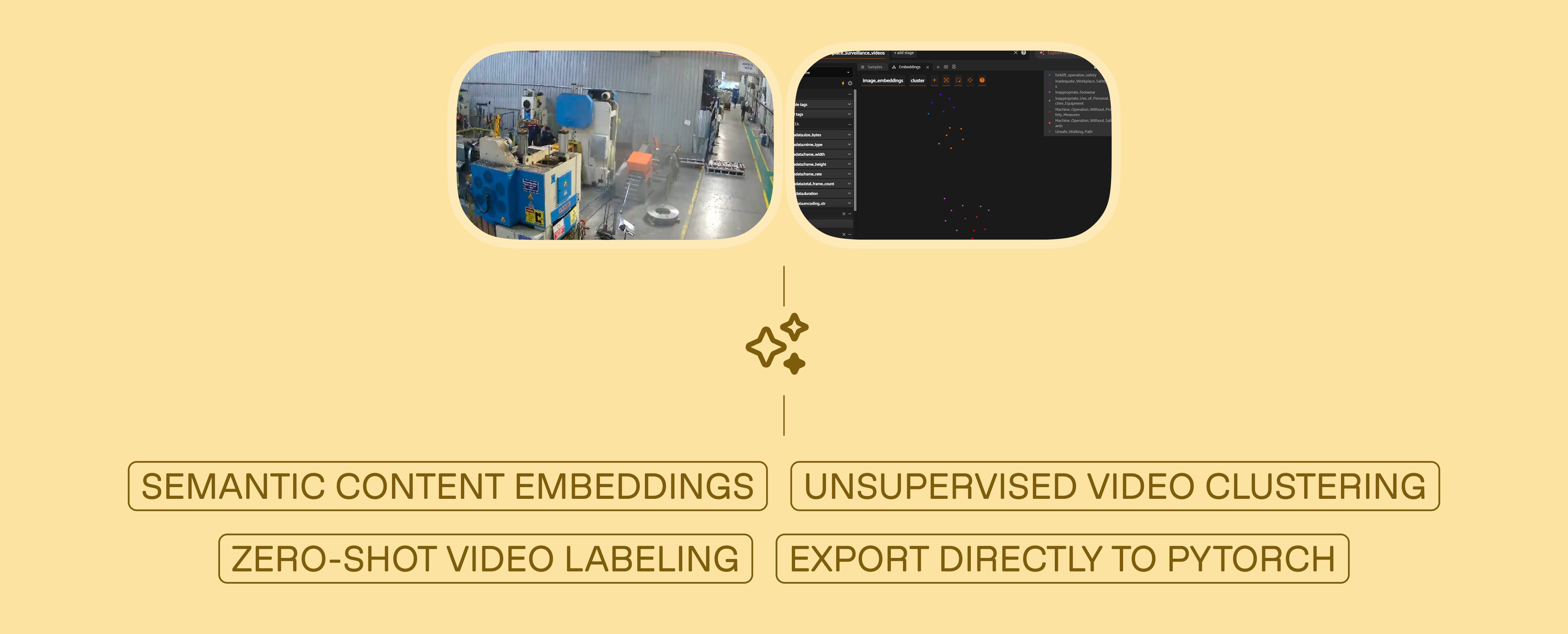
Developers can build an automated video curation pipeline using Twelve Labs Marengo 3.0 embeddings and Pegasus 1.2 to semantically cluster raw surveillance footage, auto-generate safety classification labels without predefined categories, visualize results in FiftyOne, and export a training-ready PyTorch DataLoader without manually reviewing a single frame.
Developers can build an automated video curation pipeline using Twelve Labs Marengo 3.0 embeddings and Pegasus 1.2 to semantically cluster raw surveillance footage, auto-generate safety classification labels without predefined categories, visualize results in FiftyOne, and export a training-ready PyTorch DataLoader without manually reviewing a single frame.
Feb 24, 2026
11 Minutes
Copy link to article
Introduction
Thousands of terabytes of surveillance footage flow through factory IP cameras every year. Somewhere in that data is the forklift violation that caused a near-miss last Tuesday, the PPE non-compliance pattern on the night shift, and the blocked fire exit that nobody noticed for six weeks. The footage exists. The labels do not.
This gap between raw video volume and usable training data is the single largest bottleneck in deploying computer vision for worker safety. Traditional solutions — AWS SageMaker Ground Truth, Scale AI, dedicated annotation teams — attack the problem by throwing human reviewers at it. That approach works, but it costs $25–50 per hour of video reviewed and scales linearly. Double your camera count, double your annotation budget.

What if you could invert that workflow entirely? Instead of scrubbing through footage to find incidents, what if the video could organize itself — grouping similar events by meaning, then describing what it found?
That is what we are building in this tutorial. By combining TwelveLabs' video understanding models with FiftyOne's dataset management platform, we will construct a pipeline that:
Ingests and indexes raw surveillance footage using the TwelveLabs API
Extracts multimodal embeddings (Marengo 3.0) that represent video content as dense vectors — capturing visual, audio, and contextual signals simultaneously
Clusters videos semantically using KMeans, grouping similar safety incidents without any predefined categories
Auto-labels each cluster using generative video reasoning (Pegasus 1.2), converting abstract cluster IDs into human-readable safety classifications
Visualizes the results in FiftyOne for quality auditing, then exports a training-ready PyTorch dataset
The key insight: TwelveLabs doesn't process video frame-by-frame. Marengo encodes video as a compressed multimodal representation — what the team calls "video as volume" — where audio, text, motion, and visual context are unified into a single embedding space. This is why semantic clustering works. Videos that look different but mean the same thing (a forklift cutting off a pedestrian from two different camera angles) end up near each other in embedding space.
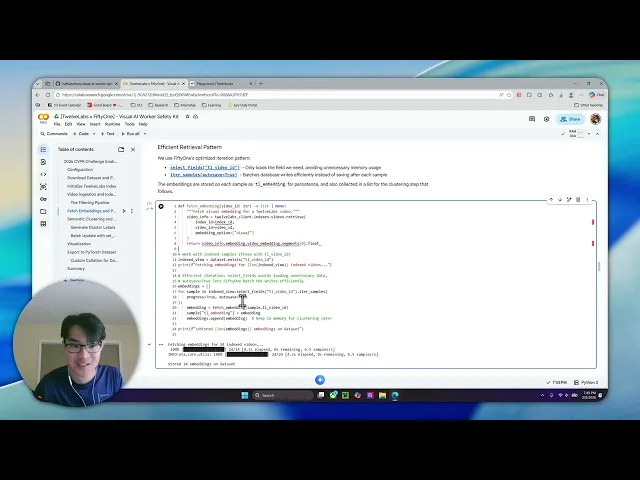
Watch the walkthrough below for a quick demo of the finished application:
Prerequisites
This project requires three things:
Python 3.8+: Download Python
TwelveLabs API Key: Authentication docs (free tier available)
HuggingFace Account (optional): Only needed if you want to use the same surveillance dataset we use — Voxel51/Safe_and_Unsafe_Behaviours
Clone the repository and install dependencies:
>> git clone https://github.com/nathanchess/visual-ai-worker-safety-kit
>> cd
>> git clone https://github.com/nathanchess/visual-ai-worker-safety-kit
>> cd
Architecture Overview
Before writing any code, it helps to see the full pipeline. At a high level, this project has two halves: TwelveLabs provides the intelligence (embeddings and labels), and FiftyOne provides the infrastructure (visualization, filtering, and export).
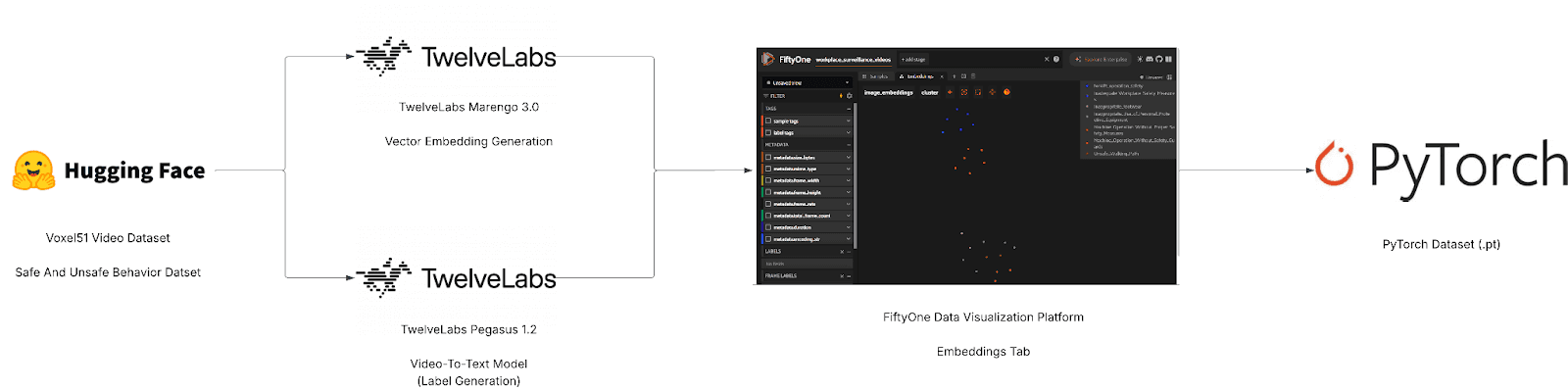
Full-Screen View (Lucid App): [Voxel51 x TwelveLabs] - Semantic Dataset Curator Tool
Marengo 3.0 is TwelveLabs' encoder model — it compresses video into rich multimodal embeddings that capture what is seen, heard, and contextually implied. Pegasus 1.2 is the reasoning model — it traverses that compressed representation to identify events, classify behaviors, and generate natural-language descriptions. FiftyOne sits downstream, ingesting the embeddings and labels to provide interactive visualization, similarity browsing, and direct export to PyTorch.
The complete source code is available in the GitHub repository. The walkthrough below follows the structure of main.py.
Step 1: Intelligent Video Ingestion
We start by loading the surveillance dataset from Hugging Face. FiftyOne's ViewField (imported as F) lets us build declarative filters without modifying the underlying data. Three filters matter here: restrict to the training split, drop clips shorter than 4 seconds (too brief for meaningful embedding), and skip any videos we have already indexed.
from fiftyone import ViewField as F
from fiftyone.utils.huggingface import load_from_hub

def load_or_create_dataset(dataset_name):
    # Load directly from Hugging Face Hub
    return load_from_hub("Voxel51/Safe_and_Unsafe_Behaviours", name=dataset_name)

def ingest_videos(client, index_id, dataset, min_duration=4.0):
    # Create a view: Train split ONLY, Duration >= 4s, NOT yet indexed
    base_view = (
        dataset
        .match_tags("train")
        .match(F("metadata.duration") >= min_duration)
        .match(~F("tl_video_id").exists())  # Idempotency check
    )

    # ... iteration logic ...
from fiftyone import ViewField as F
from fiftyone.utils.huggingface import load_from_hub

def load_or_create_dataset(dataset_name):
    # Load directly from Hugging Face Hub
    return load_from_hub("Voxel51/Safe_and_Unsafe_Behaviours", name=dataset_name)

def ingest_videos(client, index_id, dataset, min_duration=4.0):
    # Create a view: Train split ONLY, Duration >= 4s, NOT yet indexed
    base_view = (
        dataset
        .match_tags("train")
        .match(F("metadata.duration") >= min_duration)
        .match(~F("tl_video_id").exists())  # Idempotency check
    )

    # ... iteration logic ...
The ~F("tl_video_id").exists() filter is worth pausing on. In a production environment, you might run this pipeline daily as new footage arrives. This filter ensures you never pay to index the same video twice — if a sample already has a TwelveLabs video ID stored on it, the view silently skips it. Idempotency at the data layer, with no bookkeeping code required.
Step 2: Extracting Embeddings and Populating FiftyOne
With the filtered view constructed, we iterate through samples and upload each video to TwelveLabs for indexing. FiftyOne's iter_samples(autosave=True) batches database writes automatically, which matters when you are processing thousands of clips — it avoids a round-trip to the database on every single sample.
# Iterate through the filtered view
    for sample in label_view.iter_samples(autosave=True, progress=True):
        try:
            # Upload to TwelveLabs and save the returned Video ID to the sample
            sample["tl_video_id"] = index_video_to_twelvelabs(
                client, index_id, sample
            )
            print(f"  ✓ {sample.filename}")
        except Exception as e:
            print(f"  ✗ {sample.filename}: {e}")
# Iterate through the filtered view
    for sample in label_view.iter_samples(autosave=True, progress=True):
        try:
            # Upload to TwelveLabs and save the returned Video ID to the sample
            sample["tl_video_id"] = index_video_to_twelvelabs(
                client, index_id, sample
            )
            print(f"  ✓ {sample.filename}")
        except Exception as e:
            print(f"  ✗ {sample.filename}: {e}")
Once indexing completes, we fetch the Marengo 3.0 embeddings for each video. These are dense vectors that encode the full multimodal content of each clip — what is happening visually, what is audible, and the contextual relationship between the two. Unlike embeddings from image-only models (which would treat each frame independently), Marengo's embeddings capture temporal continuity. A "worker removing safety goggles" and a "worker putting on safety goggles" produce meaningfully different vectors, even though any single frame might look identical.
Step 3: Unsupervised Semantic Clustering
This is the core of the pipeline. We have no predefined categories. We do not know how many types of safety violations exist in this footage, or what they look like. Instead, we apply KMeans clustering on the embedding space and let the data self-organize.
def cluster_and_label(client, dataset, embeddings, num_clusters=8):
    print(f"Clustering {len(embeddings)} videos into {num_clusters} clusters...")

    # 1. Cluster embeddings
    kmeans = KMeans(n_clusters=num_clusters, random_state=0)
    cluster_labels = kmeans.fit_predict(embeddings)

    # 2. Map clusters to semantic labels using Pegasus (Generative AI)
    cluster_label_map = {}
    for cluster_idx in np.unique(cluster_labels):
         # We pick a representative video from the cluster and ask Pegasus to label it
         representative_video_id = get_video_id_for_cluster(cluster_idx)
         cluster_label_map[cluster_idx] = generate_label(client, representative_video_id)

    # 3. Batch update FiftyOne samples
    indexed_view = dataset.exists("tl_video_id")
    classifications = [Classification(label=cluster_label_map[c]) for c in cluster_labels]
    indexed_view.set_values("pred_cluster", classifications)
def cluster_and_label(client, dataset, embeddings, num_clusters=8):
    print(f"Clustering {len(embeddings)} videos into {num_clusters} clusters...")

    # 1. Cluster embeddings
    kmeans = KMeans(n_clusters=num_clusters, random_state=0)
    cluster_labels = kmeans.fit_predict(embeddings)

    # 2. Map clusters to semantic labels using Pegasus (Generative AI)
    cluster_label_map = {}
    for cluster_idx in np.unique(cluster_labels):
         # We pick a representative video from the cluster and ask Pegasus to label it
         representative_video_id = get_video_id_for_cluster(cluster_idx)
         cluster_label_map[cluster_idx] = generate_label(client, representative_video_id)

    # 3. Batch update FiftyOne samples
    indexed_view = dataset.exists("tl_video_id")
    classifications = [Classification(label=cluster_label_map[c]) for c in cluster_labels]
    indexed_view.set_values("pred_cluster", classifications)
A technical note on set_values(): this updates the entire dataset in a single bulk operation. The naive alternative — iterating sample by sample and calling sample.save() — would be orders of magnitude slower at scale. When you are working with thousands of videos, this distinction matters.
Why does semantic clustering produce meaningful groups here? Because Marengo's embeddings encode video as a compressed multimodal representation, not as a bag of per-frame features. Two clips of a forklift blocking a walkway — shot from different angles, at different times of day, with different ambient noise — will land near each other in embedding space because they share semantic meaning. Traditional approaches based on visual similarity alone would scatter them.
Step 4: Zero-Shot Auto-Labeling with Pegasus
A cluster ID like "Cluster 3" is mathematically useful but operationally meaningless. We need "Forklift Right-of-Way Violation." This is where Pegasus 1.2 comes in.
For each cluster, we select a representative video and send it to Pegasus with a structured prompt. Pegasus reasons over the full video — not a single frame, not a transcript — and returns a safety classification. No fine-tuning required. This is zero-shot generative reasoning: Pegasus has never seen this specific surveillance footage before, yet it produces labels that align with established safety protocols.
CLUSTER_LABEL_PROMPT = """
Analyze this workplace safety video and classify it as exactly ONE of the following labels.
UNSAFE BEHAVIORS:
- Safe Walkway Violation
- Unauthorized Intervention
- Opened Panel Cover
...
Return ONLY the exact label name.
"""
CLUSTER_LABEL_PROMPT = """
Analyze this workplace safety video and classify it as exactly ONE of the following labels.
UNSAFE BEHAVIORS:
- Safe Walkway Violation
- Unauthorized Intervention
- Opened Panel Cover
...
Return ONLY the exact label name.
"""
The prompt constrains Pegasus to a predefined taxonomy of safety categories. This is a deliberate design choice: in a production deployment, safety managers need labels that map to their existing incident classification systems, not free-form descriptions. You can adapt this taxonomy to match your organization's specific safety protocols by editing the prompt — no retraining, no new model, just a different set of label strings.
Step 5: Interactive Embedding Visualization with UMAP
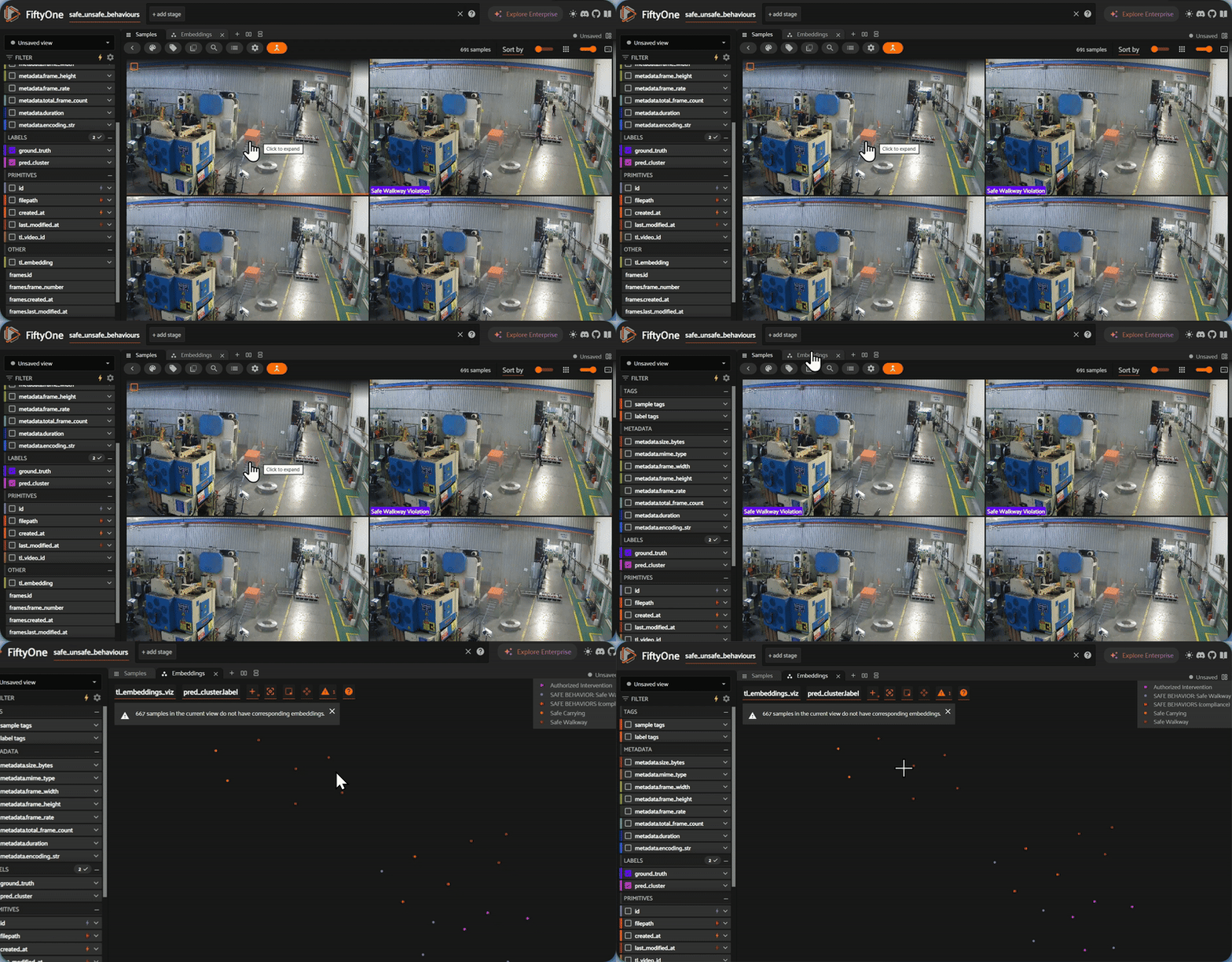
Numbers and labels are necessary, but for computer vision work, you need to see the data. FiftyOne's Brain module computes a 2D UMAP projection of the high-dimensional embeddings, producing an interactive scatterplot where each point is a video and colors correspond to auto-generated labels.
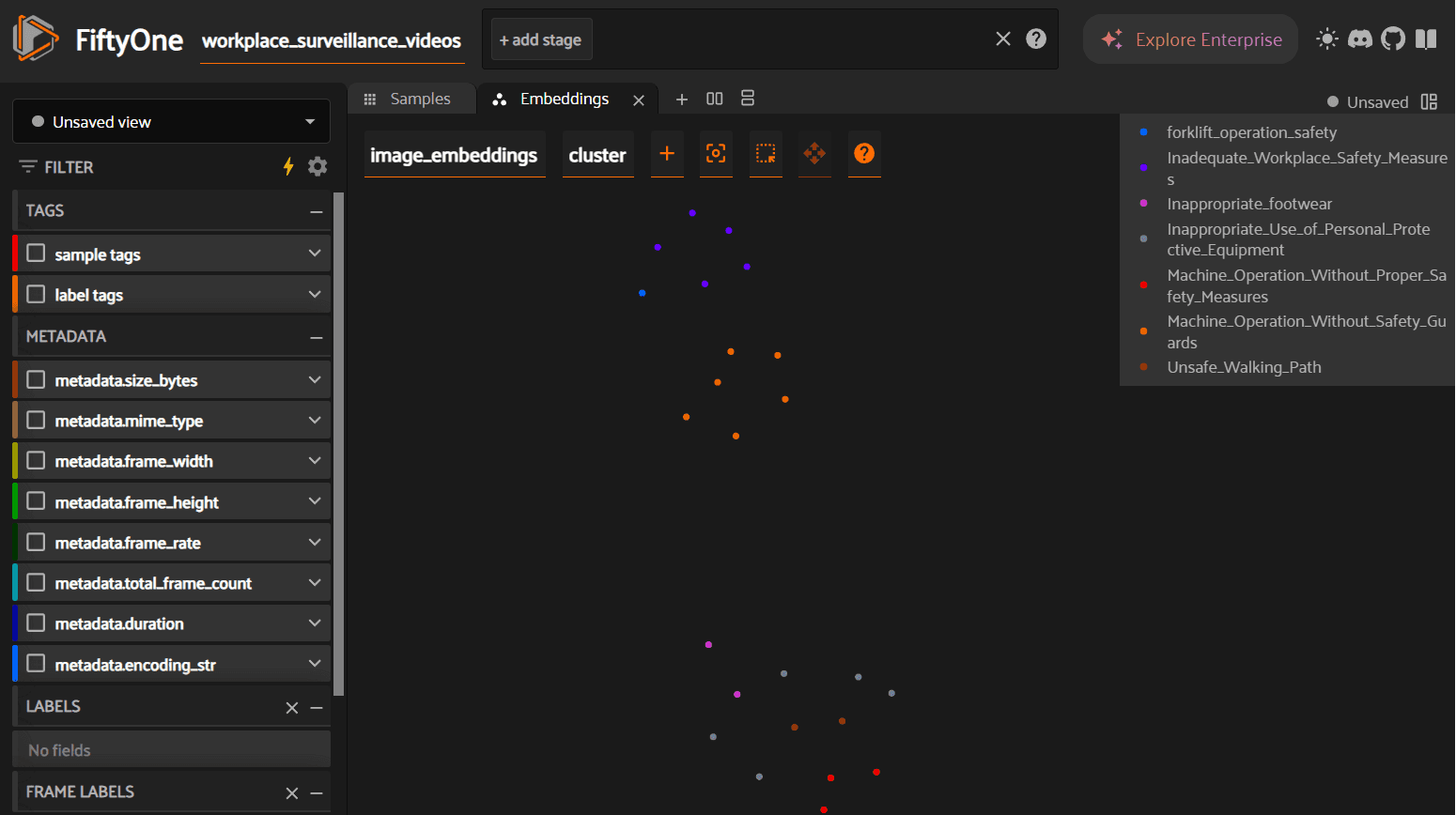
What to look for in this visualization: tight, well-separated clusters indicate that the embeddings are producing clean semantic groupings — the model is confidently distinguishing between, say, "blocked fire exit" and "PPE violation." Overlapping clusters suggest categories that may need refinement (perhaps "improper lifting" and "ergonomic violation" are too similar to separate cleanly). Outliers — points sitting far from any cluster center — are worth investigating manually, as they may represent rare incidents or mislabeled data.
This step is not cosmetic. Visualizing embeddings before export catches data quality issues that would otherwise propagate silently into your training pipeline. A five-minute review here can prevent hours of debugging downstream.
Step 6: Exporting for PyTorch
A curated dataset is only valuable if it can train a model. We use FiftyOne's to_torch() method with a custom GetItem class that maps string labels to tensors and retrieves pre-computed embeddings on the fly.
from fiftyone.utils.torch import GetItem
import torch

class WorkerSafetyGetItem(GetItem):
    def __call__(self, d):
        return {
            "embedding": torch.tensor(d.get("tl_embedding"), dtype=torch.float32),
            "label_idx": torch.tensor(
                self.label_to_idx.get(d.get("ground_truth").label, -1),
                dtype=torch.long
            ),
        }

def create_dataloader(dataset, batch_size=4):
    indexed_view = dataset.exists("tl_video_id")

    # Create a PyTorch dataset directly from the FiftyOne view
    torch_dataset = indexed_view.to_torch(WorkerSafetyGetItem(LABEL_TO_IDX))

    return DataLoader(torch_dataset, batch_size=batch_size, shuffle=True)
from fiftyone.utils.torch import GetItem
import torch

class WorkerSafetyGetItem(GetItem):
    def __call__(self, d):
        return {
            "embedding": torch.tensor(d.get("tl_embedding"), dtype=torch.float32),
            "label_idx": torch.tensor(
                self.label_to_idx.get(d.get("ground_truth").label, -1),
                dtype=torch.long
            ),
        }

def create_dataloader(dataset, batch_size=4):
    indexed_view = dataset.exists("tl_video_id")

    # Create a PyTorch dataset directly from the FiftyOne view
    torch_dataset = indexed_view.to_torch(WorkerSafetyGetItem(LABEL_TO_IDX))

    return DataLoader(torch_dataset, batch_size=batch_size, shuffle=True)
The resulting DataLoader yields batches of pre-computed embeddings paired with integer labels. Because the embeddings were already extracted by Marengo during the indexing step, the training loop skips the most expensive part of the typical CV pipeline — feature extraction. You can train a lightweight classifier (an MLP or linear probe) on top of these embeddings in seconds rather than hours, and the labels are semantically consistent because they were generated by Pegasus reasoning over actual video content, not inferred from filenames or folder structures.
An example dataset is available in the GitHub repository.
Why This Matters: From Curated Data to Operational Intelligence
With the technical pipeline complete, it is worth stepping back to consider what this workflow enables at an organizational level.
Accelerating model development. The conventional path from raw footage to trained model involves weeks of annotation, multiple review cycles, and significant cost. This pipeline compresses that into a single script execution. The exported dataset contains pre-computed embeddings and semantically consistent labels — a training loop can begin immediately. For teams iterating on safety classification models, this removes the annotation bottleneck entirely.
Surfacing systemic patterns. For a safety manager, the clustering visualization is not just a data quality tool — it is an operational dashboard. If KMeans produces a disproportionately large cluster for "blocked fire exit," that is not a one-off incident. It is a systemic failure pattern that demands a process-level response, not just a written warning. Running this pipeline on a recurring schedule (daily, weekly) transforms surveillance footage from a passive liability into an active intelligence source. You can track whether specific violation categories are trending upward or downward over time, measure the impact of safety interventions, and identify which shifts or zones have the highest incident density.
Reducing annotation costs. Manual video annotation for safety-critical datasets typically costs $25–50 per reviewed hour of footage. This pipeline replaces that cost with API compute time. For organizations operating hundreds of cameras, the difference compounds quickly. More importantly, the labels are reproducible — run the same pipeline on new footage and you get consistent classifications, without the inter-annotator variability that plagues manual labeling at scale.
Conclusion
This tutorial walked through a complete pipeline: raw surveillance footage in, labeled PyTorch DataLoader out. TwelveLabs' Marengo 3.0 handled the hard part — encoding video into multimodal embeddings that capture semantic meaning across visual, audio, and contextual dimensions. Pegasus 1.2 converted those abstract clusters into human-readable safety classifications. FiftyOne provided the visualization and export infrastructure to make the results auditable and training-ready.
The full source code is available on GitHub. Clone it, point it at your own footage, and adapt the Pegasus labeling prompt to match your safety taxonomy.
To explore what else you can build with TwelveLabs' video understanding APIs — from content search to compliance monitoring to highlight generation — visit the TwelveLabs documentation or contact the team to discuss your use case.
Resources
Introduction
Thousands of terabytes of surveillance footage flow through factory IP cameras every year. Somewhere in that data is the forklift violation that caused a near-miss last Tuesday, the PPE non-compliance pattern on the night shift, and the blocked fire exit that nobody noticed for six weeks. The footage exists. The labels do not.
This gap between raw video volume and usable training data is the single largest bottleneck in deploying computer vision for worker safety. Traditional solutions — AWS SageMaker Ground Truth, Scale AI, dedicated annotation teams — attack the problem by throwing human reviewers at it. That approach works, but it costs $25–50 per hour of video reviewed and scales linearly. Double your camera count, double your annotation budget.
What if you could invert that workflow entirely? Instead of scrubbing through footage to find incidents, what if the video could organize itself — grouping similar events by meaning, then describing what it found?
That is what we are building in this tutorial. By combining TwelveLabs' video understanding models with FiftyOne's dataset management platform, we will construct a pipeline that:
Ingests and indexes raw surveillance footage using the TwelveLabs API
Extracts multimodal embeddings (Marengo 3.0) that represent video content as dense vectors — capturing visual, audio, and contextual signals simultaneously
Clusters videos semantically using KMeans, grouping similar safety incidents without any predefined categories
Auto-labels each cluster using generative video reasoning (Pegasus 1.2), converting abstract cluster IDs into human-readable safety classifications
Visualizes the results in FiftyOne for quality auditing, then exports a training-ready PyTorch dataset
The key insight: TwelveLabs doesn't process video frame-by-frame. Marengo encodes video as a compressed multimodal representation — what the team calls "video as volume" — where audio, text, motion, and visual context are unified into a single embedding space. This is why semantic clustering works. Videos that look different but mean the same thing (a forklift cutting off a pedestrian from two different camera angles) end up near each other in embedding space.
Watch the walkthrough below for a quick demo of the finished application:
Prerequisites
This project requires three things:
Python 3.8+: Download Python
TwelveLabs API Key: Authentication docs (free tier available)
HuggingFace Account (optional): Only needed if you want to use the same surveillance dataset we use — Voxel51/Safe_and_Unsafe_Behaviours
Clone the repository and install dependencies:
>> git clone https://github.com/nathanchess/visual-ai-worker-safety-kit
>> cd
Architecture Overview
Before writing any code, it helps to see the full pipeline. At a high level, this project has two halves: TwelveLabs provides the intelligence (embeddings and labels), and FiftyOne provides the infrastructure (visualization, filtering, and export).
Full-Screen View (Lucid App): [Voxel51 x TwelveLabs] - Semantic Dataset Curator Tool
Marengo 3.0 is TwelveLabs' encoder model — it compresses video into rich multimodal embeddings that capture what is seen, heard, and contextually implied. Pegasus 1.2 is the reasoning model — it traverses that compressed representation to identify events, classify behaviors, and generate natural-language descriptions. FiftyOne sits downstream, ingesting the embeddings and labels to provide interactive visualization, similarity browsing, and direct export to PyTorch.
The complete source code is available in the GitHub repository. The walkthrough below follows the structure of main.py.
Step 1: Intelligent Video Ingestion
We start by loading the surveillance dataset from Hugging Face. FiftyOne's ViewField (imported as F) lets us build declarative filters without modifying the underlying data. Three filters matter here: restrict to the training split, drop clips shorter than 4 seconds (too brief for meaningful embedding), and skip any videos we have already indexed.
from fiftyone import ViewField as F
from fiftyone.utils.huggingface import load_from_hub

def load_or_create_dataset(dataset_name):
    # Load directly from Hugging Face Hub
    return load_from_hub("Voxel51/Safe_and_Unsafe_Behaviours", name=dataset_name)

def ingest_videos(client, index_id, dataset, min_duration=4.0):
    # Create a view: Train split ONLY, Duration >= 4s, NOT yet indexed
    base_view = (
        dataset
        .match_tags("train")
        .match(F("metadata.duration") >= min_duration)
        .match(~F("tl_video_id").exists())  # Idempotency check
    )

    # ... iteration logic ...
The ~F("tl_video_id").exists() filter is worth pausing on. In a production environment, you might run this pipeline daily as new footage arrives. This filter ensures you never pay to index the same video twice — if a sample already has a TwelveLabs video ID stored on it, the view silently skips it. Idempotency at the data layer, with no bookkeeping code required.
Step 2: Extracting Embeddings and Populating FiftyOne
With the filtered view constructed, we iterate through samples and upload each video to TwelveLabs for indexing. FiftyOne's iter_samples(autosave=True) batches database writes automatically, which matters when you are processing thousands of clips — it avoids a round-trip to the database on every single sample.
# Iterate through the filtered view
    for sample in label_view.iter_samples(autosave=True, progress=True):
        try:
            # Upload to TwelveLabs and save the returned Video ID to the sample
            sample["tl_video_id"] = index_video_to_twelvelabs(
                client, index_id, sample
            )
            print(f"  ✓ {sample.filename}")
        except Exception as e:
            print(f"  ✗ {sample.filename}: {e}")
Once indexing completes, we fetch the Marengo 3.0 embeddings for each video. These are dense vectors that encode the full multimodal content of each clip — what is happening visually, what is audible, and the contextual relationship between the two. Unlike embeddings from image-only models (which would treat each frame independently), Marengo's embeddings capture temporal continuity. A "worker removing safety goggles" and a "worker putting on safety goggles" produce meaningfully different vectors, even though any single frame might look identical.
Step 3: Unsupervised Semantic Clustering
This is the core of the pipeline. We have no predefined categories. We do not know how many types of safety violations exist in this footage, or what they look like. Instead, we apply KMeans clustering on the embedding space and let the data self-organize.
def cluster_and_label(client, dataset, embeddings, num_clusters=8):
    print(f"Clustering {len(embeddings)} videos into {num_clusters} clusters...")

    # 1. Cluster embeddings
    kmeans = KMeans(n_clusters=num_clusters, random_state=0)
    cluster_labels = kmeans.fit_predict(embeddings)

    # 2. Map clusters to semantic labels using Pegasus (Generative AI)
    cluster_label_map = {}
    for cluster_idx in np.unique(cluster_labels):
         # We pick a representative video from the cluster and ask Pegasus to label it
         representative_video_id = get_video_id_for_cluster(cluster_idx)
         cluster_label_map[cluster_idx] = generate_label(client, representative_video_id)

    # 3. Batch update FiftyOne samples
    indexed_view = dataset.exists("tl_video_id")
    classifications = [Classification(label=cluster_label_map[c]) for c in cluster_labels]
    indexed_view.set_values("pred_cluster", classifications)
A technical note on set_values(): this updates the entire dataset in a single bulk operation. The naive alternative — iterating sample by sample and calling sample.save() — would be orders of magnitude slower at scale. When you are working with thousands of videos, this distinction matters.
Why does semantic clustering produce meaningful groups here? Because Marengo's embeddings encode video as a compressed multimodal representation, not as a bag of per-frame features. Two clips of a forklift blocking a walkway — shot from different angles, at different times of day, with different ambient noise — will land near each other in embedding space because they share semantic meaning. Traditional approaches based on visual similarity alone would scatter them.
Step 4: Zero-Shot Auto-Labeling with Pegasus
A cluster ID like "Cluster 3" is mathematically useful but operationally meaningless. We need "Forklift Right-of-Way Violation." This is where Pegasus 1.2 comes in.
For each cluster, we select a representative video and send it to Pegasus with a structured prompt. Pegasus reasons over the full video — not a single frame, not a transcript — and returns a safety classification. No fine-tuning required. This is zero-shot generative reasoning: Pegasus has never seen this specific surveillance footage before, yet it produces labels that align with established safety protocols.
CLUSTER_LABEL_PROMPT = """
Analyze this workplace safety video and classify it as exactly ONE of the following labels.
UNSAFE BEHAVIORS:
- Safe Walkway Violation
- Unauthorized Intervention
- Opened Panel Cover
...
Return ONLY the exact label name.
"""
The prompt constrains Pegasus to a predefined taxonomy of safety categories. This is a deliberate design choice: in a production deployment, safety managers need labels that map to their existing incident classification systems, not free-form descriptions. You can adapt this taxonomy to match your organization's specific safety protocols by editing the prompt — no retraining, no new model, just a different set of label strings.
Step 5: Interactive Embedding Visualization with UMAP
Numbers and labels are necessary, but for computer vision work, you need to see the data. FiftyOne's Brain module computes a 2D UMAP projection of the high-dimensional embeddings, producing an interactive scatterplot where each point is a video and colors correspond to auto-generated labels.
What to look for in this visualization: tight, well-separated clusters indicate that the embeddings are producing clean semantic groupings — the model is confidently distinguishing between, say, "blocked fire exit" and "PPE violation." Overlapping clusters suggest categories that may need refinement (perhaps "improper lifting" and "ergonomic violation" are too similar to separate cleanly). Outliers — points sitting far from any cluster center — are worth investigating manually, as they may represent rare incidents or mislabeled data.
This step is not cosmetic. Visualizing embeddings before export catches data quality issues that would otherwise propagate silently into your training pipeline. A five-minute review here can prevent hours of debugging downstream.
Step 6: Exporting for PyTorch
A curated dataset is only valuable if it can train a model. We use FiftyOne's to_torch() method with a custom GetItem class that maps string labels to tensors and retrieves pre-computed embeddings on the fly.
from fiftyone.utils.torch import GetItem
import torch

class WorkerSafetyGetItem(GetItem):
    def __call__(self, d):
        return {
            "embedding": torch.tensor(d.get("tl_embedding"), dtype=torch.float32),
            "label_idx": torch.tensor(
                self.label_to_idx.get(d.get("ground_truth").label, -1),
                dtype=torch.long
            ),
        }

def create_dataloader(dataset, batch_size=4):
    indexed_view = dataset.exists("tl_video_id")

    # Create a PyTorch dataset directly from the FiftyOne view
    torch_dataset = indexed_view.to_torch(WorkerSafetyGetItem(LABEL_TO_IDX))

    return DataLoader(torch_dataset, batch_size=batch_size, shuffle=True)
The resulting DataLoader yields batches of pre-computed embeddings paired with integer labels. Because the embeddings were already extracted by Marengo during the indexing step, the training loop skips the most expensive part of the typical CV pipeline — feature extraction. You can train a lightweight classifier (an MLP or linear probe) on top of these embeddings in seconds rather than hours, and the labels are semantically consistent because they were generated by Pegasus reasoning over actual video content, not inferred from filenames or folder structures.
An example dataset is available in the GitHub repository.
Why This Matters: From Curated Data to Operational Intelligence
With the technical pipeline complete, it is worth stepping back to consider what this workflow enables at an organizational level.
Accelerating model development. The conventional path from raw footage to trained model involves weeks of annotation, multiple review cycles, and significant cost. This pipeline compresses that into a single script execution. The exported dataset contains pre-computed embeddings and semantically consistent labels — a training loop can begin immediately. For teams iterating on safety classification models, this removes the annotation bottleneck entirely.
Surfacing systemic patterns. For a safety manager, the clustering visualization is not just a data quality tool — it is an operational dashboard. If KMeans produces a disproportionately large cluster for "blocked fire exit," that is not a one-off incident. It is a systemic failure pattern that demands a process-level response, not just a written warning. Running this pipeline on a recurring schedule (daily, weekly) transforms surveillance footage from a passive liability into an active intelligence source. You can track whether specific violation categories are trending upward or downward over time, measure the impact of safety interventions, and identify which shifts or zones have the highest incident density.
Reducing annotation costs. Manual video annotation for safety-critical datasets typically costs $25–50 per reviewed hour of footage. This pipeline replaces that cost with API compute time. For organizations operating hundreds of cameras, the difference compounds quickly. More importantly, the labels are reproducible — run the same pipeline on new footage and you get consistent classifications, without the inter-annotator variability that plagues manual labeling at scale.
Conclusion
This tutorial walked through a complete pipeline: raw surveillance footage in, labeled PyTorch DataLoader out. TwelveLabs' Marengo 3.0 handled the hard part — encoding video into multimodal embeddings that capture semantic meaning across visual, audio, and contextual dimensions. Pegasus 1.2 converted those abstract clusters into human-readable safety classifications. FiftyOne provided the visualization and export infrastructure to make the results auditable and training-ready.
The full source code is available on GitHub. Clone it, point it at your own footage, and adapt the Pegasus labeling prompt to match your safety taxonomy.
To explore what else you can build with TwelveLabs' video understanding APIs — from content search to compliance monitoring to highlight generation — visit the TwelveLabs documentation or contact the team to discuss your use case.
Resources




Platform
Enterprise
©
2026
TwelveLabs, Inc. All Rights Reserved

Platform
Enterprise
©
2026
TwelveLabs, Inc. All Rights Reserved

Platform
Enterprise
©
2026
TwelveLabs, Inc. All Rights Reserved