" height="1.90314px" id="wtDTm6bEW" transform="translate(26.225 0)" width="2.4723000000000006px"/><path d="M 0.557 0 L 1.438 0 C 1.746 0 1.995 0.25 1.995 0.559 L 1.995 1.344 C 1.995 1.653 1.746 1.903 1.438 1.903 L 0.557 1.903 C 0.25 1.903 0 1.653 0 1.344 L 0 0.559 C 0 0.25 0.25 0 0.557 0 Z" fill="rgb(29, 28, 27)" height="1.9031500000000001px" id="GnmDnNra_" transform="translate(36.408 2.728)" width="1.9953000000000003px"/><path d="M 6.224 0 L 0.558 0 C 0.25 0 0 0.25 0 0.559 L 0 1.344 C 0 1.653 0.25 1.903 0.558 1.903 L 6.224 1.903 C 6.531 1.903 6.781 1.653 6.781 1.344 L 6.781 0.559 C 6.781 0.25 6.531 0 6.224 0 Z" fill="rgb(29, 28, 27)" height="1.9031500000000001px" id="hKTQ3dbw4" transform="translate(34.261 5.456)" width="6.781100000000002px"/><path d="M 6.955 0 L 0.558 0 C 0.25 0 0 0.25 0 0.559 L 0 1.344 C 0 1.653 0.25 1.903 0.558 1.903 L 6.955 1.903 C 7.263 1.903 7.513 1.653 7.513 1.344 L 7.513 0.559 C 7.513 0.25 7.263 0 6.955 0 Z" fill="rgb(29, 28, 27)" height="1.9031500000000001px" id="G1Zzk9CUU" transform="translate(28.298 8.243)" width="7.513100000000001px"/><path d="M 7.123 0 L 0.558 0 C 0.25 0 0 0.25 0 0.559 L 0 1.344 C 0 1.653 0.25 1.903 0.558 1.903 L 7.123 1.903 C 7.431 1.903 7.681 1.653 7.681 1.344 L 7.681 0.559 C 7.681 0.25 7.431 0 7.123 0 Z" fill="rgb(29, 28, 27)" height="1.9030999999999985px" id="fm7cHxIfJ" transform="translate(0 10.972)" width="7.68067px"/><path d="M 13.447 0 L 0.558 0 C 0.25 0 0 0.25 0 0.559 L 0 1.344 C 0 1.653 0.25 1.903 0.558 1.903 L 13.447 1.903 C 13.755 1.903 14.004 1.653 14.004 1.344 L 14.004 0.559 C 14.004 0.25 13.755 0 13.447 0 Z" fill="rgb(29, 28, 27)" height="1.9030999999999985px" id="LowSwDrtg" transform="translate(9.552 10.972)" width="14.0044px"/><path d="M 0.558 0 L 8.212 0 C 8.52 0 8.77 0.25 8.77 0.559 L 8.77 1.344 C 8.77 1.653 8.52 1.903 8.212 1.903 L 0.558 1.903 C 0.25 1.903 0 1.653 0 1.344 L 0 0.559 C 0 0.25 0.25 0 0.558 0 Z" fill="rgb(29, 28, 27)" height="1.9030999999999985px" id="xRiKc2od7" transform="translate(27.041 10.972)" width="8.769900000000003px"/><path d="M 0.557 0 L 5.4 0 C 5.708 0 5.958 0.25 5.958 0.559 L 5.958 1.344 C 5.958 1.653 5.708 1.903 5.4 1.903 L 0.557 1.903 C 0.25 1.903 0 1.653 0 1.344 L 0 0.559 C 0 0.25 0.25 0 0.557 0 Z" fill="rgb(29, 28, 27)" height="1.9031500000000001px" id="JWdNVicde" transform="translate(36.796 8.243)" width="5.957599999999999px"/><path d="M 1.438 0 L 0.558 0 C 0.25 0 0 0.25 0 0.559 L 0 1.344 C 0 1.653 0.25 1.903 0.558 1.903 L 1.438 1.903 C 1.746 1.903 1.995 1.653 1.995 1.344 L 1.995 0.559 C 1.995 0.25 1.746 0 1.438 0 Z" fill="rgb(29, 28, 27)" height="1.9031500000000001px" id="RfFYVCT_T" transform="translate(28.717 5.456)" width="1.9953000000000003px"/><path d="M 0.558 0 L 2.895 0 C 3.203 0 3.453 0.25 3.453 0.559 L 3.453 1.406 C 3.453 1.714 3.203 1.964 2.895 1.964 L 0.558 1.964 C 0.25 1.964 0 1.714 0 1.406 L 0 0.559 C 0 0.25 0.25 0 0.558 0 Z" fill="rgb(29, 28, 27)" height="1.964299999999998px" id="dngJ6MU2p" transform="translate(16.183 24.582)" width="3.4525000000000006px"/><path d="M 1.706 0 L 0.558 0 C 0.25 0 0 0.25 0 0.559 L 0 1.406 C 0 1.714 0.25 1.964 0.558 1.964 L 1.706 1.964 C 2.014 1.964 2.263 1.714 2.263 1.406 L 2.263 0.559 C 2.263 0.25 2.014 0 1.706 0 Z" fill="rgb(29, 28, 27)" height="1.964299999999998px" id="N_fstvKmR" transform="translate(22.18 24.582)" width="2.2631999999999977px"/><path d="M 0.558 0 L 5.544 0 C 5.852 0 6.101 0.25 6.101 0.559 L 6.101 1.406 C 6.101 1.714 5.852 1.964 5.544 1.964 L 0.558 1.964 C 0.25 1.964 0 1.714 0 1.406 L 0 0.559 C 0 0.25 0.25 0 0.558 0 Z" fill="rgb(29, 28, 27)" height="1.964299999999998px" id="t55XLYcgb" transform="translate(25.486 24.582)" width="6.101399999999998px"/><path d="M 1.976 0 L 0.558 0 C 0.25 0 0 0.25 0 0.559 L 0 1.406 C 0 1.714 0.25 1.964 0.558 1.964 L 1.976 1.964 C 2.284 1.964 2.533 1.714 2.533 1.406 L 2.533 0.559 C 2.533 0.25 2.284 0 1.976 0 Z" fill="rgb(29, 28, 27)" height="1.964299999999998px" id="ZrEKTVTAe" transform="translate(28.542 21.854)" width="2.5334000000000003px"/><path d="M 0.557 0 L 1.438 0 C 1.746 0 1.995 0.25 1.995 0.559 L 1.995 1.406 C 1.995 1.714 1.746 1.964 1.438 1.964 L 0.557 1.964 C 0.25 1.964 0 1.714 0 1.406 L 0 0.559 C 0 0.25 0.25 0 0.557 0 Z" fill="rgb(29, 28, 27)" height="1.964299999999998px" id="Z0fPTp9aR" transform="translate(11.425 24.582)" width="1.9953000000000003px"/><path d="M 0 0.559 C 0 0.251 0.251 0 0.558 0 L 1.438 0 C 1.745 0 1.995 0.251 1.995 0.559 L 1.995 1.405 C 1.995 1.713 1.745 1.964 1.438 1.964 L 0.558 1.964 C 0.251 1.964 0 1.713 0 1.405 Z" fill="rgb(29, 28, 27)" height="1.964299999999998px" id="Tj_PDHFDh" transform="translate(20.635 27.308)" width="1.9954px"/><path d="M 0.557 0 L 1.342 0 C 1.65 0 1.899 0.25 1.899 0.559 L 1.899 1.406 C 1.899 1.714 1.65 1.964 1.342 1.964 L 0.557 1.964 C 0.25 1.964 0 1.714 0 1.406 L 0 0.559 C 0 0.25 0.25 0 0.557 0 Z" fill="rgb(29, 28, 27)" height="1.9643000000000015px" id="AYq9dXkKz" transform="translate(18.686 30.036)" width="1.8994px"/><path d="M 0.558 0 L 5.768 0 C 6.076 0 6.326 0.25 6.326 0.559 L 6.326 1.344 C 6.326 1.653 6.076 1.903 5.768 1.903 L 0.558 1.903 C 0.25 1.903 0 1.653 0 1.344 L 0 0.559 C 0 0.25 0.25 0 0.558 0 Z" fill="rgb(29, 28, 27)" height="1.9031500000000001px" id="rspevfJcx" transform="translate(12.157 8.243)" width="6.325900000000001px"/><path d="M 3.285 0 L 0.558 0 C 0.25 0 0 0.25 0 0.559 L 0 1.344 C 0 1.653 0.25 1.903 0.558 1.903 L 3.285 1.903 C 3.593 1.903 3.842 1.653 3.842 1.344 L 3.842 0.559 C 3.842 0.25 3.593 0 3.285 0 Z" fill="rgb(29, 28, 27)" height="1.9031500000000001px" id="XRUAhGnph" transform="translate(23.887 2.728)" width="3.8424000000000014px"/><path d="M 0.558 0 L 5.644 0 C 5.952 0 6.202 0.25 6.202 0.559 L 6.202 1.344 C 6.202 1.653 5.952 1.903 5.644 1.903 L 0.558 1.903 C 0.25 1.903 0 1.653 0 1.344 L 0 0.559 C 0 0.25 0.25 0 0.558 0 Z" fill="rgb(29, 28, 27)" height="1.9031500000000001px" id="VsaVVIfke" transform="translate(21.528 5.456)" width="6.201600000000003px"/><path d="M 3.06 0 L 0.558 0 C 0.25 0 0 0.25 0 0.559 L 0 1.344 C 0 1.653 0.25 1.903 0.558 1.903 L 3.06 1.903 C 3.369 1.903 3.618 1.653 3.618 1.344 L 3.618 0.559 C 3.618 0.25 3.369 0 3.06 0 Z" fill="rgb(29, 28, 27)" height="1.9030999999999985px" id="wiAKEgyId" transform="translate(40.819 10.972)" width="3.6182000000000016px"/><path d="M 0.558 0 L 17.318 0 C 17.626 0 17.875 0.25 17.875 0.559 L 17.875 1.345 C 17.875 1.653 17.626 1.903 17.318 1.903 L 0.558 1.903 C 0.25 1.903 0 1.653 0 1.345 L 0 0.559 C 0 0.25 0.25 0 0.558 0 Z" fill="rgb(29, 28, 27)" height="1.9032px" id="FIE0ufK9m" transform="translate(6.666 13.7)" width="17.87506px"/><path d="M 6.426 0 L 0.558 0 C 0.25 0 0 0.25 0 0.559 L 0 1.345 C 0 1.653 0.25 1.903 0.558 1.903 L 6.426 1.903 C 6.734 1.903 6.984 1.653 6.984 1.345 L 6.984 0.559 C 6.984 0.25 6.734 0 6.426 0 Z" fill="rgb(29, 28, 27)" height="1.9032000000000018px" id="ut9UWny3L" transform="translate(22.892 19.156)" width="6.983599999999999px"/><path d="M 0.558 0 L 22.151 0 C 22.459 0 22.709 0.25 22.709 0.559 L 22.709 1.344 C 22.709 1.653 22.459 1.903 22.151 1.903 L 0.558 1.903 C 0.25 1.903 0 1.653 0 1.344 L 0 0.559 C 0 0.25 0.25 0 0.558 0 Z" fill="rgb(29, 28, 27)" height="1.9030999999999985px" id="VULnffgbk" transform="translate(9.552 16.428)" width="22.7089px"/><path d="M 7.886 0 L 0.558 0 C 0.25 0 0 0.25 0 0.559 L 0 1.345 C 0 1.653 0.25 1.903 0.558 1.903 L 7.886 1.903 C 8.194 1.903 8.443 1.653 8.443 1.345 L 8.443 0.559 C 8.443 0.25 8.194 0 7.886 0 Z" fill="rgb(29, 28, 27)" height="1.9032000000000018px" id="adZTYr4MR" transform="translate(6.078 19.156)" width="8.44303px"/><path d="M 0.558 0 L 2.211 0 C 2.519 0 2.769 0.25 2.769 0.559 L 2.769 1.406 C 2.769 1.714 2.519 1.964 2.211 1.964 L 0.558 1.964 C 0.25 1.964 0 1.714 0 1.406 L 0 0.559 C 0 0.25 0.25 0 0.558 0 Z" fill="rgb(29, 28, 27)" height="1.964299999999998px" id="bwdUdEmCH" transform="translate(13.784 21.854)" width="2.768600000000001px"/><path d="M 2.424 0 L 0.558 0 C 0.25 0 0 0.25 0 0.559 L 0 1.406 C 0 1.714 0.25 1.964 0.558 1.964 L 2.424 1.964 C 2.732 1.964 2.982 1.714 2.982 1.406 L 2.982 0.559 C 2.982 0.25 2.732 0 2.424 0 Z" fill="rgb(29, 28, 27)" height="1.964299999999998px" id="PUvesMJEj" transform="translate(23.556 21.854)" width="2.982199999999999px"/><path d="M 0.558 0 L 2.241 0 C 2.55 0 2.799 0.25 2.799 0.559 L 2.799 1.406 C 2.799 1.714 2.55 1.964 2.241 1.964 L 0.558 1.964 C 0.25 1.964 0 1.714 0 1.406 L 0 0.559 C 0 0.25 0.25 0 0.558 0 Z" fill="rgb(29, 28, 27)" height="1.964299999999998px" id="Wo2W7J3Zj" transform="translate(8.672 21.854)" width="2.799050000000001px"/><path d="M 6.661 0 L 0.558 0 C 0.25 0 0 0.25 0 0.559 L 0 1.345 C 0 1.653 0.25 1.903 0.558 1.903 L 6.661 1.903 C 6.969 1.903 7.219 1.653 7.219 1.345 L 7.219 0.559 C 7.219 0.25 6.969 0 6.661 0 Z" fill="rgb(29, 28, 27)" height="1.9032px" id="PpPVZXp9j" transform="translate(27.041 13.7)" width="7.218900000000001px"/><path d="M 0.621 1.905 C 0.218 1.905 0 1.687 0 1.283 L 0 0.622 C 0 0.218 0.218 0 0.621 0 L 11.225 0 C 11.628 0 11.846 0.218 11.846 0.622 L 11.846 1.283 C 11.846 1.687 11.628 1.905 11.225 1.905 L 6.934 1.905 L 6.934 14.926 C 6.934 15.33 6.716 15.548 6.313 15.548 L 5.537 15.548 C 5.134 15.548 4.916 15.33 4.916 14.926 L 4.916 1.905 Z" fill="rgb(29, 28, 27)" height="15.54825px" id="xr32fxeO6" transform="translate(52.177 8.243)" width="11.845599999999997px"/><path d="M 0.621 0 C 0.218 0 0 0.218 0 0.622 L 0 14.924 C 0 15.328 0.218 15.546 0.621 15.546 L 1.357 15.546 C 1.76 15.546 1.978 15.328 1.978 14.924 L 1.978 0.622 C 1.978 0.218 1.76 0 1.357 0 Z" fill="rgb(29, 28, 27)" height="15.546050000000001px" id="oSsO_UPVN" transform="translate(90.476 8.243)" width="1.9779000000000053px"/><path d="M 0.62 15.546 C 0.217 15.546 0 15.328 0 14.924 L 0 0.622 C 0 0.218 0.217 0 0.62 0 L 1.396 0 C 1.799 0 2.017 0.218 2.017 0.622 L 2.017 13.632 L 8.981 13.632 C 9.384 13.632 9.602 13.85 9.602 14.254 L 9.602 14.924 C 9.602 15.328 9.384 15.546 8.981 15.546 Z" fill="rgb(29, 28, 27)" height="15.546050000000001px" id="Sgj4z5osO" transform="translate(116.749 8.243)" width="9.602000000000004px"/><path d="M 1.974 14.924 C 1.974 15.328 1.756 15.546 1.353 15.546 L 0.621 15.546 C 0.218 15.546 0 15.328 0 14.924 L 0 0.622 C 0 0.218 0.218 0 0.621 0 L 1.357 0 C 1.76 0 1.978 0.218 1.978 0.622 L 1.978 5.747 C 2.634 4.721 3.806 4.079 5.309 4.079 C 8.18 4.079 10.356 6.358 10.356 9.948 C 10.356 13.538 8.18 15.817 5.309 15.817 C 3.801 15.817 2.627 15.175 1.971 14.145 L 1.971 14.922 Z M 8.36 9.95 C 8.36 7.362 6.881 5.928 5.121 5.928 C 3.361 5.928 1.863 7.362 1.863 9.95 C 1.863 12.539 3.361 13.972 5.121 13.972 C 6.881 13.972 8.36 12.539 8.36 9.95 Z" fill="rgb(29, 28, 27)" height="15.81665px" id="q13jjj7xd" transform="translate(138.401 8.243)" width="10.355999999999995px"/><path d="M 4.457 11.738 C 0.961 11.738 -0.019 9.872 0 8.318 C 0.005 7.929 0.253 7.735 0.645 7.735 L 1.344 7.735 C 1.748 7.735 1.922 7.949 1.961 8.352 C 2.063 9.315 2.693 9.907 4.433 9.907 C 6.174 9.907 7.012 9.269 7.012 8.289 C 7.012 7.425 6.522 7.108 5.305 6.899 L 3.209 6.539 C 1.453 6.238 0.29 5.247 0.29 3.468 C 0.29 1.467 1.774 0 4.518 0 C 7.263 0 8.838 1.491 8.814 3.23 C 8.81 3.614 8.553 3.808 8.165 3.808 L 7.457 3.808 C 7.054 3.808 6.908 3.595 6.851 3.202 C 6.749 2.477 6.159 1.818 4.518 1.818 C 2.878 1.818 2.249 2.508 2.249 3.403 C 2.249 4.175 2.695 4.516 3.81 4.714 L 5.906 5.083 C 7.72 5.404 8.98 6.292 8.98 8.198 C 8.98 9.976 7.908 11.74 4.455 11.74 Z" fill="rgb(29, 28, 27)" height="11.739799999999999px" id="tJ8syeWTW" transform="translate(150.024 12.325)" width="8.980269730401375px"/><path d="M 9.146 7.997 C 9.146 8.813 9.175 9.983 9.282 10.799 C 9.334 11.223 9.155 11.465 8.728 11.465 L 8.068 11.465 C 7.685 11.465 7.467 11.319 7.428 11.022 L 7.317 10.181 C 6.724 11.157 5.565 11.659 4.145 11.659 C 1.579 11.659 0 10.142 0 8.078 C 0 6.27 1.27 5.157 3.433 5.002 L 6.589 4.78 C 7.162 4.741 7.186 4.688 7.186 4.153 L 7.186 3.682 C 7.186 2.438 6.434 1.807 4.79 1.807 C 3.145 1.807 2.472 2.425 2.405 3.289 C 2.376 3.697 2.235 3.916 1.823 3.916 L 1.067 3.916 C 0.675 3.916 0.427 3.717 0.422 3.328 C 0.407 1.51 1.74 0 4.792 0 C 7.798 0 9.162 1.427 9.155 3.736 Z M 7.188 7.298 L 7.188 6.244 C 6.955 6.327 6.678 6.386 6.363 6.415 L 3.598 6.676 C 2.59 6.775 1.997 7.163 1.997 8.099 L 1.999 8.099 C 1.999 9.188 2.886 9.97 4.4 9.97 C 6.169 9.97 7.188 8.9 7.188 7.298 Z" fill="rgb(29, 28, 27)" height="11.658999999999999px" id="QPESIZvku" transform="translate(126.854 12.325)" width="9.290755130109668px"/><path d="M 5.224 0 C 8.313 0 10.295 2.255 10.295 5.456 L 10.295 5.694 C 10.295 6.098 10.077 6.316 9.674 6.316 L 1.998 6.316 C 2.168 8.547 3.447 9.898 5.407 9.898 C 6.768 9.898 7.598 9.363 7.934 8.431 C 8.06 8.078 8.243 7.892 8.618 7.892 L 9.33 7.892 C 9.746 7.892 9.994 8.125 9.923 8.538 C 9.598 10.433 7.834 11.74 5.409 11.74 L 5.407 11.738 C 2.168 11.738 0 9.424 0 5.797 C 0 2.169 2.135 0 5.224 0 Z M 5.222 1.74 C 3.494 1.74 2.405 2.818 2.074 4.64 L 8.282 4.64 C 8.054 2.842 6.949 1.74 5.222 1.74 Z" fill="rgb(29, 28, 27)" height="11.739799999999999px" id="PKmyQkwJE" transform="translate(104.541 12.325)" width="10.295000000000002px"/><path d="M 4.459 11.194 C 4.099 11.194 3.877 11.039 3.746 10.703 L 0.091 1.021 C -0.024 0.72 -0.031 0.511 0.076 0.297 C 0.178 0.094 0.381 0 0.732 0 L 1.274 0 C 1.633 0 1.86 0.155 1.986 0.495 L 4.958 8.503 L 5.123 9.018 L 5.289 8.503 L 8.262 0.495 C 8.388 0.155 8.615 0 8.974 0 L 9.517 0 C 9.865 0 10.07 0.092 10.172 0.297 C 10.279 0.511 10.275 0.72 10.157 1.021 L 6.502 10.703 C 6.371 11.039 6.149 11.194 5.79 11.194 Z" fill="rgb(29, 28, 27)" height="11.1941px" id="uUQr5Yl4B" transform="translate(93.807 12.595)" width="10.248961642504256px"/><path d="M 5.407 11.738 C 2.167 11.738 0 9.424 0 5.797 C 0 2.169 2.133 0 5.221 0 C 8.31 0 10.292 2.255 10.292 5.456 L 10.292 5.694 C 10.292 6.098 10.075 6.316 9.672 6.316 L 1.995 6.316 C 2.165 8.547 3.446 9.898 5.404 9.898 C 6.768 9.898 7.596 9.363 7.931 8.431 C 8.058 8.078 8.241 7.892 8.615 7.892 L 9.328 7.892 C 9.744 7.892 9.992 8.125 9.918 8.538 C 9.593 10.433 7.829 11.74 5.404 11.74 Z M 8.282 4.64 C 8.053 2.842 6.949 1.74 5.221 1.74 C 3.494 1.74 2.405 2.818 2.074 4.64 Z" fill="rgb(29, 28, 27)" height="11.739799999999999px" id="zo1nSBuSF" transform="translate(78.397 12.325)" width="10.29249999999999px"/><path d="M 3.057 10.677 C 3.163 11.026 3.392 11.192 3.756 11.192 L 3.749 11.194 L 4.987 11.194 C 5.35 11.194 5.579 11.028 5.69 10.679 L 8.173 2.654 L 8.237 2.401 L 8.3 2.654 L 10.787 10.679 C 10.894 11.028 11.123 11.194 11.487 11.194 L 12.733 11.194 C 13.096 11.194 13.325 11.028 13.432 10.679 L 16.418 1.006 C 16.516 0.7 16.512 0.498 16.41 0.288 C 16.307 0.089 16.109 0.002 15.76 0.002 L 15.218 0.002 C 14.848 0.002 14.626 0.168 14.519 0.522 L 12.094 8.547 L 12.046 8.761 L 11.999 8.542 L 9.506 0.517 C 9.4 0.168 9.171 0.002 8.807 0.002 L 7.683 0.002 C 7.319 0.002 7.091 0.168 6.984 0.517 L 4.492 8.542 L 4.449 8.745 L 4.405 8.551 L 1.98 0.519 C 1.874 0.166 1.649 0 1.281 0 L 0.728 0 C 0.38 0 0.181 0.087 0.079 0.286 C -0.021 0.493 -0.028 0.698 0.07 1.004 Z" fill="rgb(29, 28, 27)" height="11.194099999999999px" id="uboloLX99" transform="translate(61.282 12.598)" width="16.489163442184434px"/></svg>)
Tutorials
How TwelveLabs Saves Hours of Manual Video Annotation with a Few API Calls
Nathan Che
Developers can build an automated video annotation pipeline using Twelve Labs Marengo embeddings and Pegasus structured JSON output to generate timestamped training labels against a custom taxonomy, visualized in 2D embedding space and exported as JSON, CSV, or COCO for direct ingestion into PyTorch.
Developers can build an automated video annotation pipeline using Twelve Labs Marengo embeddings and Pegasus structured JSON output to generate timestamped training labels against a custom taxonomy, visualized in 2D embedding space and exported as JSON, CSV, or COCO for direct ingestion into PyTorch.
Mar 9, 2026
6 Minutes
Copy link to article
Introduction
Labeling video data is one of the most expensive bottlenecks in machine learning. A single hour of footage requires 4 hours of human annotation time, and at $100 per hour for domain specialists (radiologists, safety auditors, sports analysts) the math stops working long before you reach your back catalog.
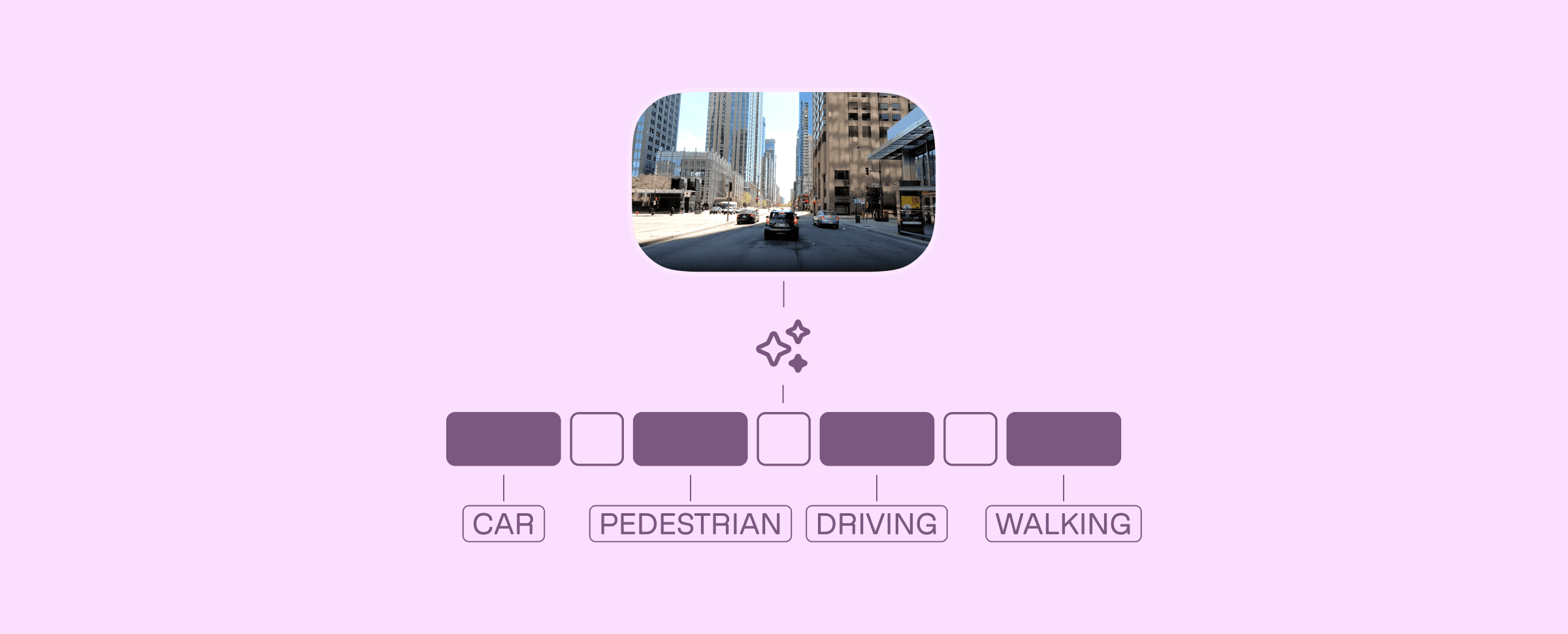
The footage exists. Dashcams, retail cameras, warehouse feeds, surgical recordings, sports broadcasts: enterprises sit on thousands of hours of video containing precisely the training signals their models need. But the path from raw footage to structured labels still runs through a labeling platform where human reviewers scrub frame by frame.
This tutorial builds a different pipeline. Instead of sending video to annotators, we send it to TwelveLabs' multimodal foundation models. Marengo encodes each video into dense, temporal embeddings that capture visual, audio, and contextual information in 512 dimensions. Pegasus then reasons over those embeddings and returns structured, timestamped annotations (complete with scene classifications, object detections, and confidence scores) all enforced by a strict JSON schema.
By the end of this walkthrough, you will have a working Next.js application that indexes video, auto-generates training labels against a custom taxonomy, visualizes your dataset in 2D embedding space, and exports to COCO, JSON, or CSV for direct ingestion into PyTorch or any standard ML pipeline.
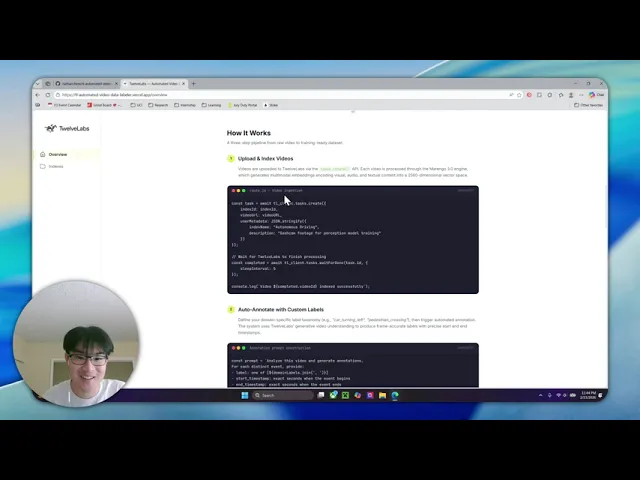
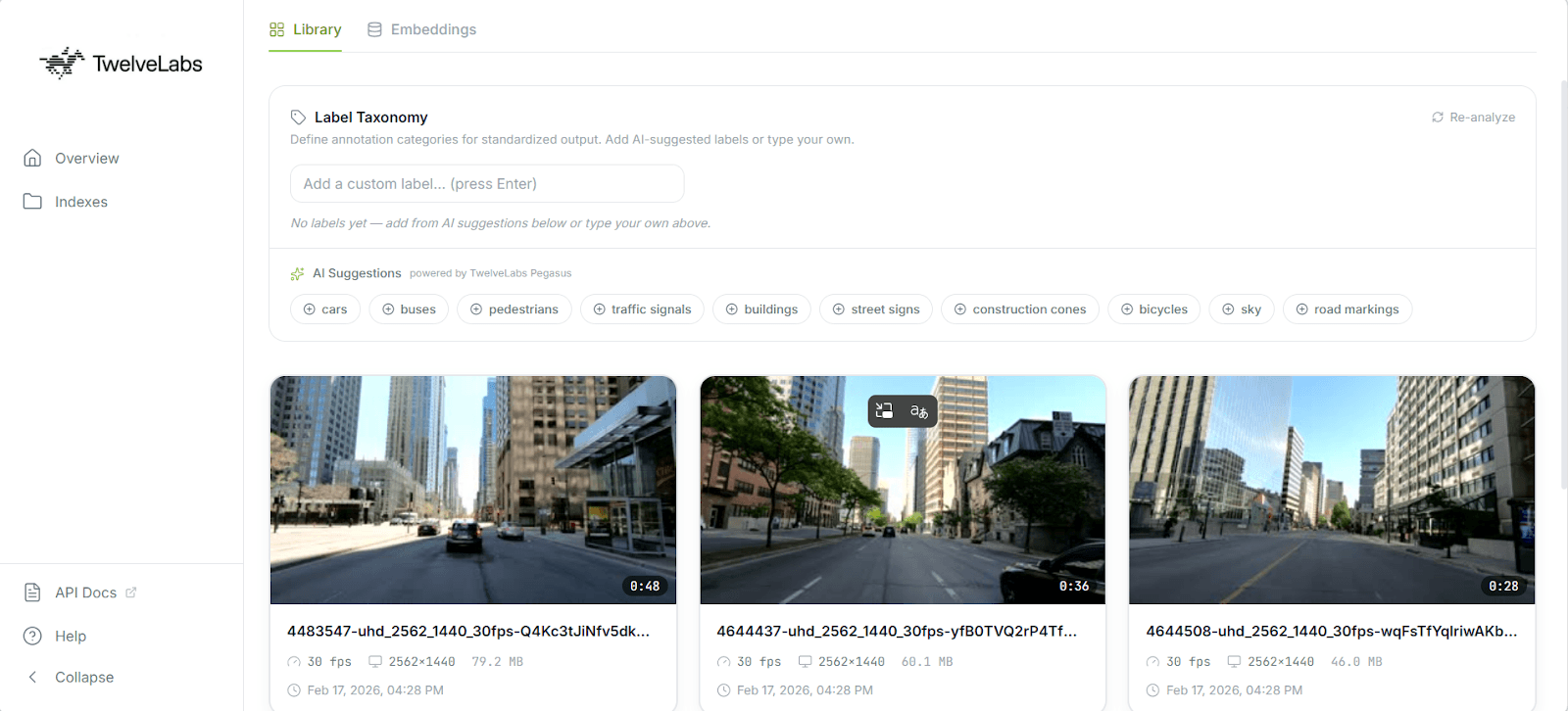
Here is the finished application in action:
Architecture Overview
Before writing any code, here is the full pipeline. Each layer was chosen to solve a specific constraint of production video annotation.
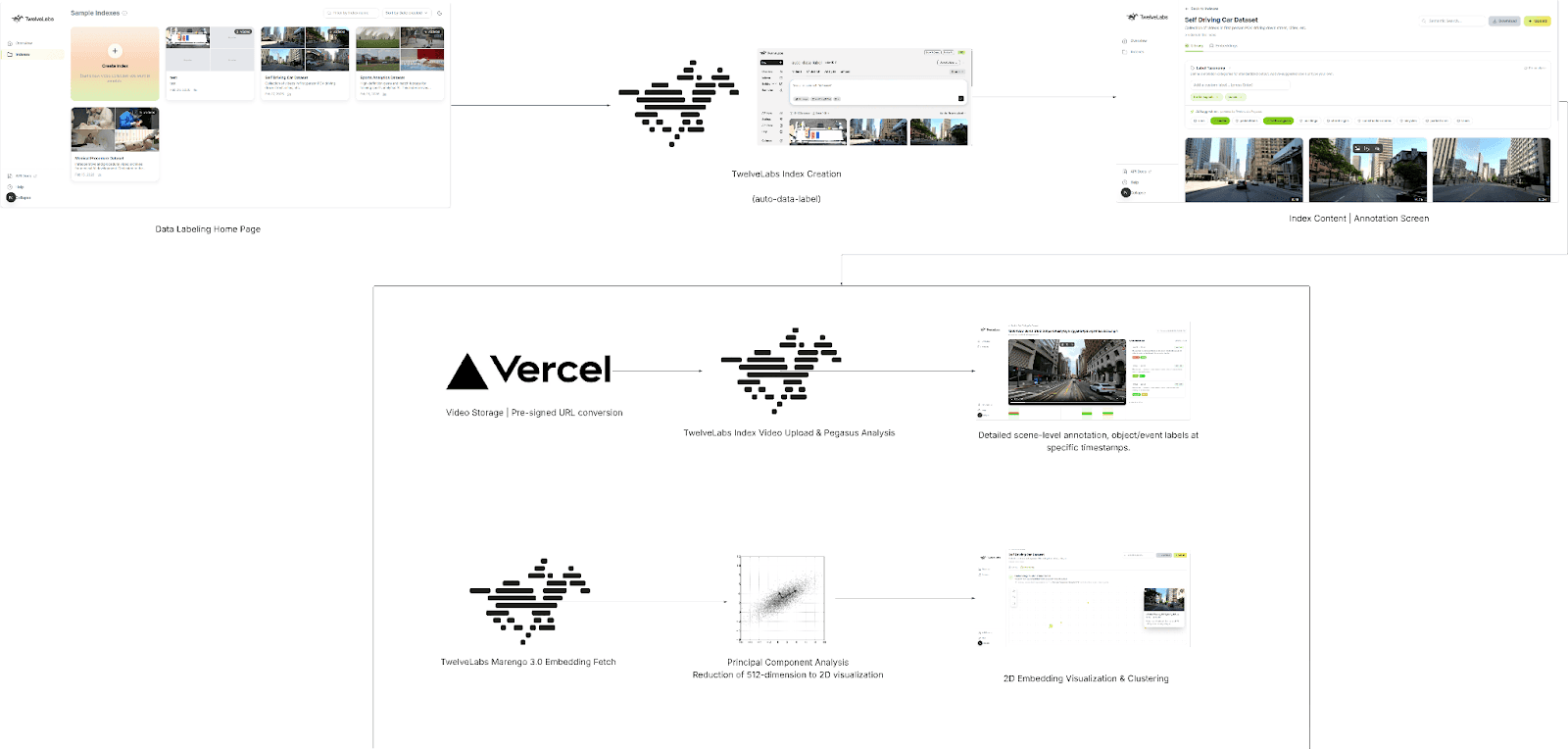
Next.js 16 + React 19 handles both the frontend dashboard and the backend API routes. Serverless functions let us orchestrate the entire annotation pipeline without running a persistent server, which matters when you want ISV partners or internal teams to deploy this with a single vercel deploy.
Vercel Blob provides temporary video storage. Serverless environments impose strict payload limits (4.5 MB on Vercel), so the client uploads video files directly to Blob storage and passes only the resulting public URL to our API routes. This decouples upload size from function constraints.
TwelveLabs Marengo extracts 512-dimensional vector embeddings from each video. These are not frame-level features: Marengo processes video as a continuous multimodal signal across visual, audio, and temporal dimensions, producing a sequence of segment-level embeddings that capture semantic meaning rather than pixel data. This is what makes downstream clustering and visualization possible without any manual feature engineering.
TwelveLabs Pegasus (Analyze API) acts as the reasoning engine. Given the embeddings and a user-defined label taxonomy, Pegasus generates structured, machine-readable annotations with timestamps, scene classifications, and detected objects; all returned as JSON that maps directly to ML training formats.
For a deeper look at the data flow, the full architecture diagram is available on LucidChart: [TwelveLabs] - Automated Video Data Labeling Solution
Step 1: Prerequisite & Setup
You will need three things to run this project locally:
Node.js 18+ (20+ recommended)
TwelveLabs API Key from the TwelveLabs Dashboard
Vercel Blob Token for handling temporary video uploads
Clone the repository and install dependencies:
>> git clone https://github.com/nathanchess/tl-automated-video-data-labeler.git
>> cd tl-automated-video-data-labeler
>> npm
>> git clone https://github.com/nathanchess/tl-automated-video-data-labeler.git
>> cd tl-automated-video-data-labeler
>> npm
Set up your .env.local file:
TL_API_KEY=your_twelvelabs_api_key_here
TL_INDEX_NAME=your_default_index_name_here
BLOB_READ_WRITE_TOKEN
TL_API_KEY=your_twelvelabs_api_key_here
TL_INDEX_NAME=your_default_index_name_here
BLOB_READ_WRITE_TOKEN
Start the development server with npm run dev. The dashboard will be available at http://localhost:3000/indexes.
Step 2: Video Ingestion and Indexing
The ingestion flow begins when a user drops video files into the dashboard UI. The client uploads each file to Vercel Blob, then sends the resulting public URLs to a Next.js API route that triggers TwelveLabs indexing.
Here is the server-side logic in src/app/api/videos/route.js:
import { TwelveLabs } from 'twelvelabs-js';
import { NextResponse } from 'next/server';

const tl_client = new TwelveLabs({ apiKey: process.env.TL_API_KEY });

export async function POST(request) {
  const { videoURLs, metadata } = await request.json();

  // 1. Locate the target index
  const indexPager = await tl_client.indexes.list();
  let indexId = null;
  for await (const index of indexPager) {
    if (index.indexName === process.env.TL_INDEX_NAME) indexId = index.id;
  }

  if (!indexId) return NextResponse.json({ error: 'Index not found' }, { status: 404 });

  // 2. Create tasks and wait for completion
  for (const videoURL of videoURLs) {
    const task = await tl_client.tasks.create({
      indexId,
      videoUrl: videoURL,
      userMetadata: JSON.stringify(metadata),
    });

    const completedTask = await tl_client.tasks.waitForDone(task.id, {
      sleepInterval: 5,
    });

    if (completedTask.status !== 'ready') {
      throw new Error(`Task ${completedTask.id} failed`);
    }
  }

  return new Response('ok');
}
import { TwelveLabs } from 'twelvelabs-js';
import { NextResponse } from 'next/server';

const tl_client = new TwelveLabs({ apiKey: process.env.TL_API_KEY });

export async function POST(request) {
  const { videoURLs, metadata } = await request.json();

  // 1. Locate the target index
  const indexPager = await tl_client.indexes.list();
  let indexId = null;
  for await (const index of indexPager) {
    if (index.indexName === process.env.TL_INDEX_NAME) indexId = index.id;
  }

  if (!indexId) return NextResponse.json({ error: 'Index not found' }, { status: 404 });

  // 2. Create tasks and wait for completion
  for (const videoURL of videoURLs) {
    const task = await tl_client.tasks.create({
      indexId,
      videoUrl: videoURL,
      userMetadata: JSON.stringify(metadata),
    });

    const completedTask = await tl_client.tasks.waitForDone(task.id, {
      sleepInterval: 5,
    });

    if (completedTask.status !== 'ready') {
      throw new Error(`Task ${completedTask.id} failed`);
    }
  }

  return new Response('ok');
}
Production note: Video processing is fundamentally asynchronous. The waitForDone call here blocks the HTTP request until indexing completes, which works for a reference application processing a handful of clips. For production pipelines handling hours of footage, offload indexing to a background queue (Inngest, Upstash, or similar) and use TwelveLabs webhooks to notify your application when processing is complete. The SDK fully supports this pattern.
Step 3: Extracting and Pooling Embeddings
Once videos are indexed, we retrieve them along with their Marengo embeddings. These vectors are what power semantic grouping and the 2D visualization we build later.
const videoPager = await tl_client.indexes.videos.list(indexId);
  const videos = [];

  for await (const video of videoPager) {
    let embeddings = [];
    try {
      const videoData = await tl_client.indexes.videos.retrieve(indexId, video.id, {
        embeddingOption: ['visual'],
      });

      const segments = videoData.embedding?.videoEmbedding?.segments || [];
      if (segments.length > 0) {
        const dim = segments[0].float?.length;
        if (dim) {
          const sum = new Array(dim).fill(0);
          let count = 0;

          // Average the embeddings across all temporal segments
          for (const seg of segments) {
            if (seg.float && seg.float.length === dim) {
              for (let i = 0; i < dim; i++) sum[i] += seg.float[i];
              count++;
            }
          }
          if (count > 0) embeddings = sum.map((val) => val / count);
        }
      }
    } catch (embErr) {
      console.warn(`Failed to get embeddings for ${video.id}`);
    }
    videos.push({ ...video, embeddings });
  }
const videoPager = await tl_client.indexes.videos.list(indexId);
  const videos = [];

  for await (const video of videoPager) {
    let embeddings = [];
    try {
      const videoData = await tl_client.indexes.videos.retrieve(indexId, video.id, {
        embeddingOption: ['visual'],
      });

      const segments = videoData.embedding?.videoEmbedding?.segments || [];
      if (segments.length > 0) {
        const dim = segments[0].float?.length;
        if (dim) {
          const sum = new Array(dim).fill(0);
          let count = 0;

          // Average the embeddings across all temporal segments
          for (const seg of segments) {
            if (seg.float && seg.float.length === dim) {
              for (let i = 0; i < dim; i++) sum[i] += seg.float[i];
              count++;
            }
          }
          if (count > 0) embeddings = sum.map((val) => val / count);
        }
      }
    } catch (embErr) {
      console.warn(`Failed to get embeddings for ${video.id}`);
    }
    videos.push({ ...video, embeddings });
  }
Why mean pooling? Marengo outputs a sequence of embeddings mapped to temporal segments; an embedding for seconds 0–5, another for 5–10, and so on. That temporal granularity is valuable for search (finding the exact moment a forklift enters a restricted zone), but to visualize an entire video as a single point in a 2D scatterplot, we need a single vector per video.
Mean pooling (averaging the float values across all segments) produces a composite vector that represents the overall semantic content of the video. If the footage is primarily a forklift operating in a warehouse, the averaged vector will land in the "forklift operation" region of embedding space, regardless of which specific 5-second segment you examine.
Step 4: Zero-Shot Auto-Labeling with Pegasus
The core problem with using general-purpose LLMs for annotation is output structure. Language models return free-form text, which means developers end up writing fragile regular expressions to extract timestamps, labels, and confidence scores from prose paragraphs. One unexpected formatting change and the parser breaks.
The TwelveLabs Analyze API eliminates this by enforcing a strict JSON schema on Pegasus's output. You define exactly the structure your ML pipeline expects, inject the user's custom label taxonomy (e.g., shoplifting, forklift_violation, surgical_clamp) directly into the prompt, and receive machine-parseable annotations with zero post-processing.
const response_format = {
    type: 'json_schema',
    json_schema: {
      type: 'object',
      properties: {
        annotations: {
          type: 'array',
          items: {
            type: 'object',
            properties: {
              start_timestamp: { type: 'string' },
              end_timestamp: { type: 'string' },
              description: { type: 'string' },
              scene_classification: { type: 'string' },
              detected_objects: {
                type: 'array',
                items: {
                  type: 'object',
                  properties: {
                    label: { type: 'string' },
                    confidence_score: { type: 'number' },
                    start_timestamp: { type: 'string' },
                    end_timestamp: { type: 'string' },
                  },
                },
              },
            },
            required: ['start_timestamp', 'end_timestamp', 'description', 'scene_classification', 'detected_objects'],
          },
        },
      },
    },
  };
const response_format = {
    type: 'json_schema',
    json_schema: {
      type: 'object',
      properties: {
        annotations: {
          type: 'array',
          items: {
            type: 'object',
            properties: {
              start_timestamp: { type: 'string' },
              end_timestamp: { type: 'string' },
              description: { type: 'string' },
              scene_classification: { type: 'string' },
              detected_objects: {
                type: 'array',
                items: {
                  type: 'object',
                  properties: {
                    label: { type: 'string' },
                    confidence_score: { type: 'number' },
                    start_timestamp: { type: 'string' },
                    end_timestamp: { type: 'string' },
                  },
                },
              },
            },
            required: ['start_timestamp', 'end_timestamp', 'description', 'scene_classification', 'detected_objects'],
          },
        },
      },
    },
  };
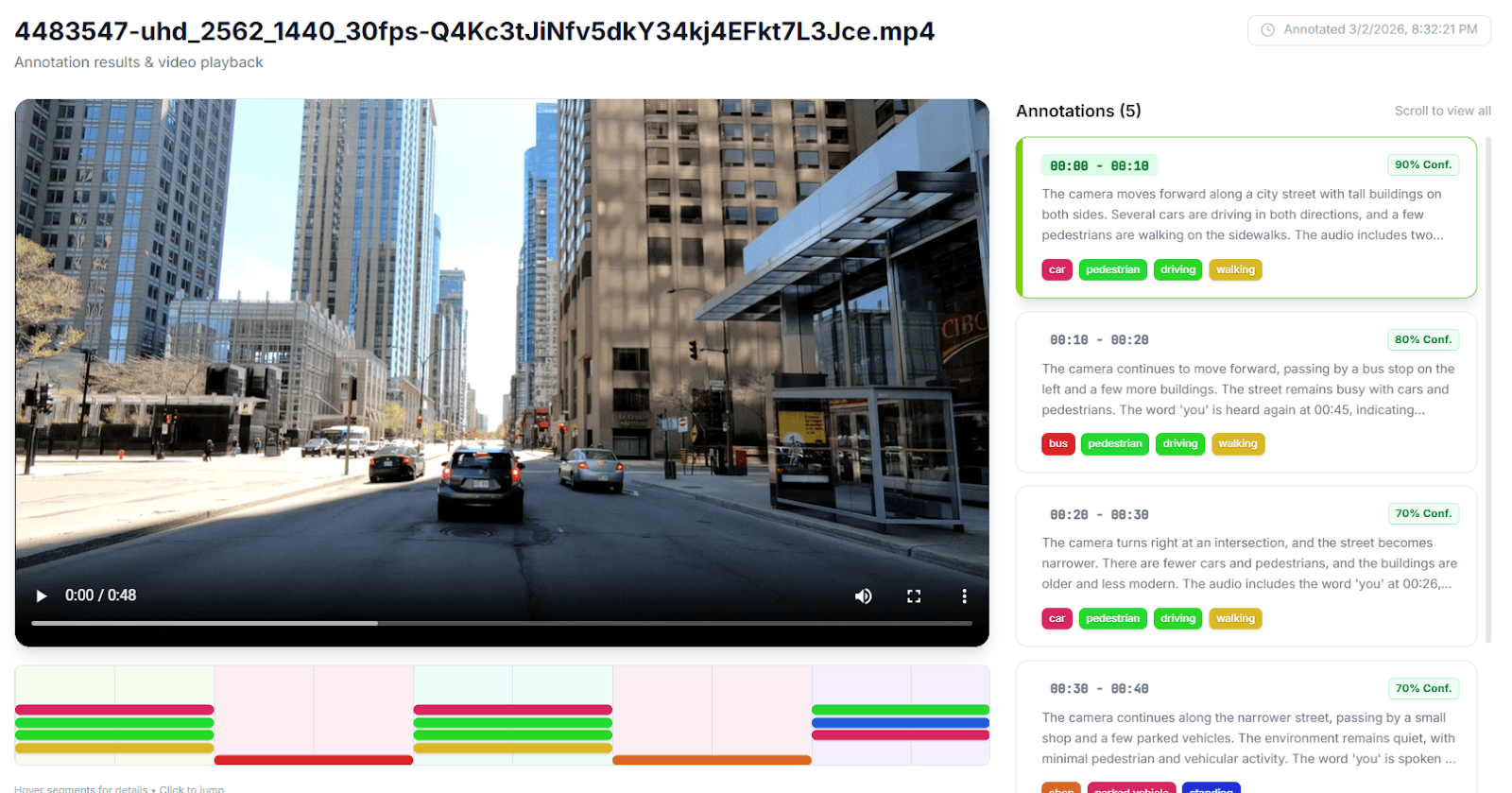
This schema guarantees that every annotation includes start and end timestamps, a natural-language description, a scene classification label, and an array of detected objects (each with its own confidence score and temporal bounds). Because Pegasus is a zero-shot generative model, no fine-tuning is required. You define the taxonomy, pass the schema, and receive structured training data in seconds.
Step 5: Interactive Embedding Visualization with PCA
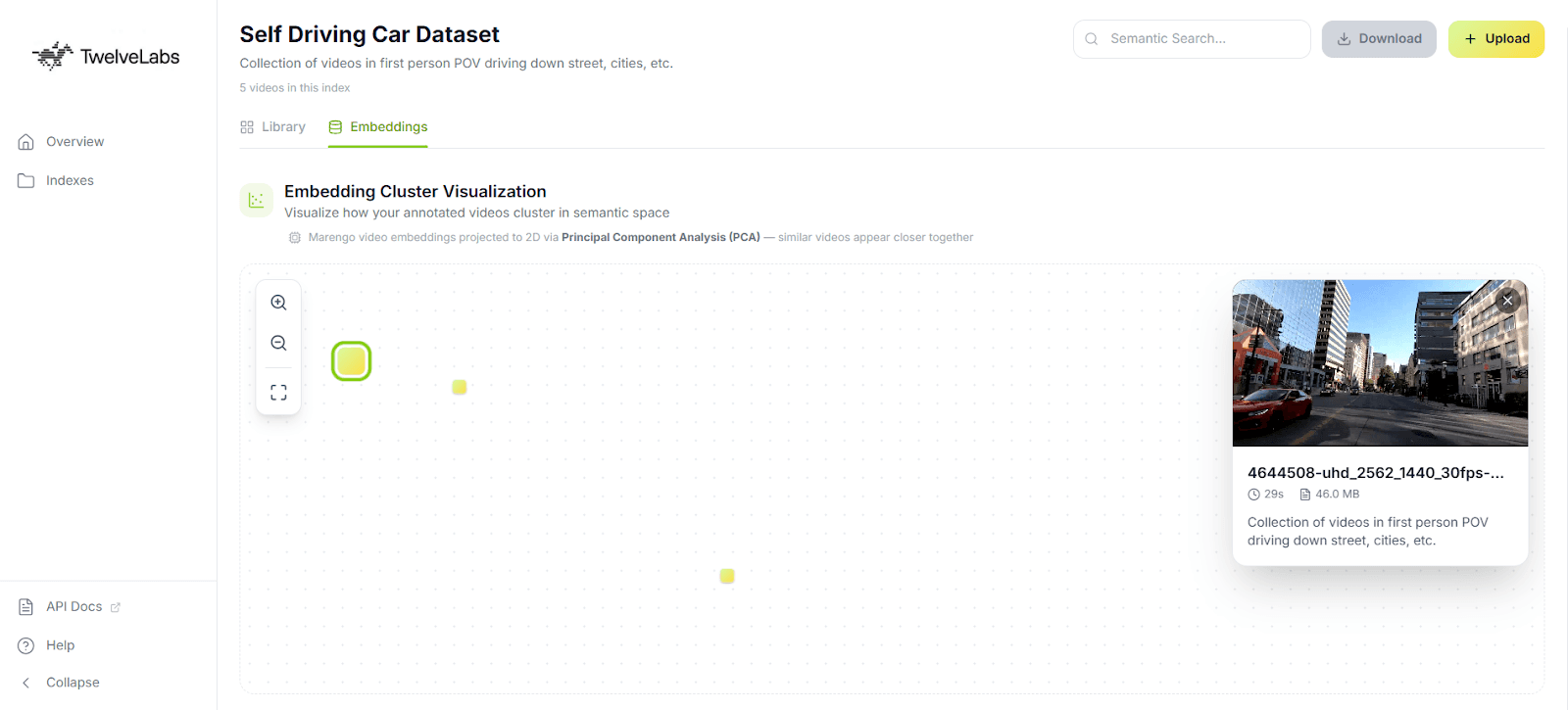
Numbers and labels are necessary for ML pipelines, but for data curation work, you need to see your dataset. The application includes an in-browser 2D scatter plot that projects Marengo's 512-dimensional embeddings into two dimensions using Principal Component Analysis (PCA).
Optimizing PCA for Browser-Based Visualization
Computing PCA on high-dimensional data is expensive. The standard approach (constructing a 512 × 512 covariance matrix and finding its eigenvalues via singular value decomposition) will freeze a browser tab. When the user is curating a dataset of 50 videos, they need immediate visual feedback, not a loading spinner.
The solution is a Gram matrix approach. Instead of computing the full D × D covariance matrix (where D = 512), we compute an N × N matrix of inner products between videos (where N = the number of videos in the dataset). For a 50-video dataset, finding the eigenvectors of a 50 × 50 matrix is orders of magnitude faster than operating on 512 dimensions; reducing complexity from O(D³) to O(N³) and keeping the visualization fluid in the main browser thread.
What the visualization reveals for annotation quality: Tight, well-separated clusters indicate that your labeled categories correspond to genuinely distinct semantic content. Outliers (points that sit far from any cluster) flag either rare events worth separate annotation attention (a safety incident in routine warehouse footage) or noisy data that may be misclassified. This gives data PMs and annotators immediate, actionable feedback on dataset health before they commit to expensive model training.
Step 6: Exporting for ML Pipelines
A curated dataset is only as valuable as its compatibility with downstream training tools. The application natively supports three export formats:
JSON provides the raw structured output for programmatic parsing in custom data loaders. Every field from the Pegasus annotation schema is preserved, including nested detected objects with confidence scores.
CSV flattens the annotations into spreadsheet-friendly rows with timestamps, labels, and descriptions; useful for quick manual audits or feeding into pandas-based preprocessing scripts.
COCO (Common Objects in Context) structures annotations into the
videos,annotations, andcategoriesarrays expected by major training frameworks. This is the format PyTorch DataLoaders consume natively, and it imports directly into workforce platforms like Label Studio and CVAT for a final human-in-the-loop review.
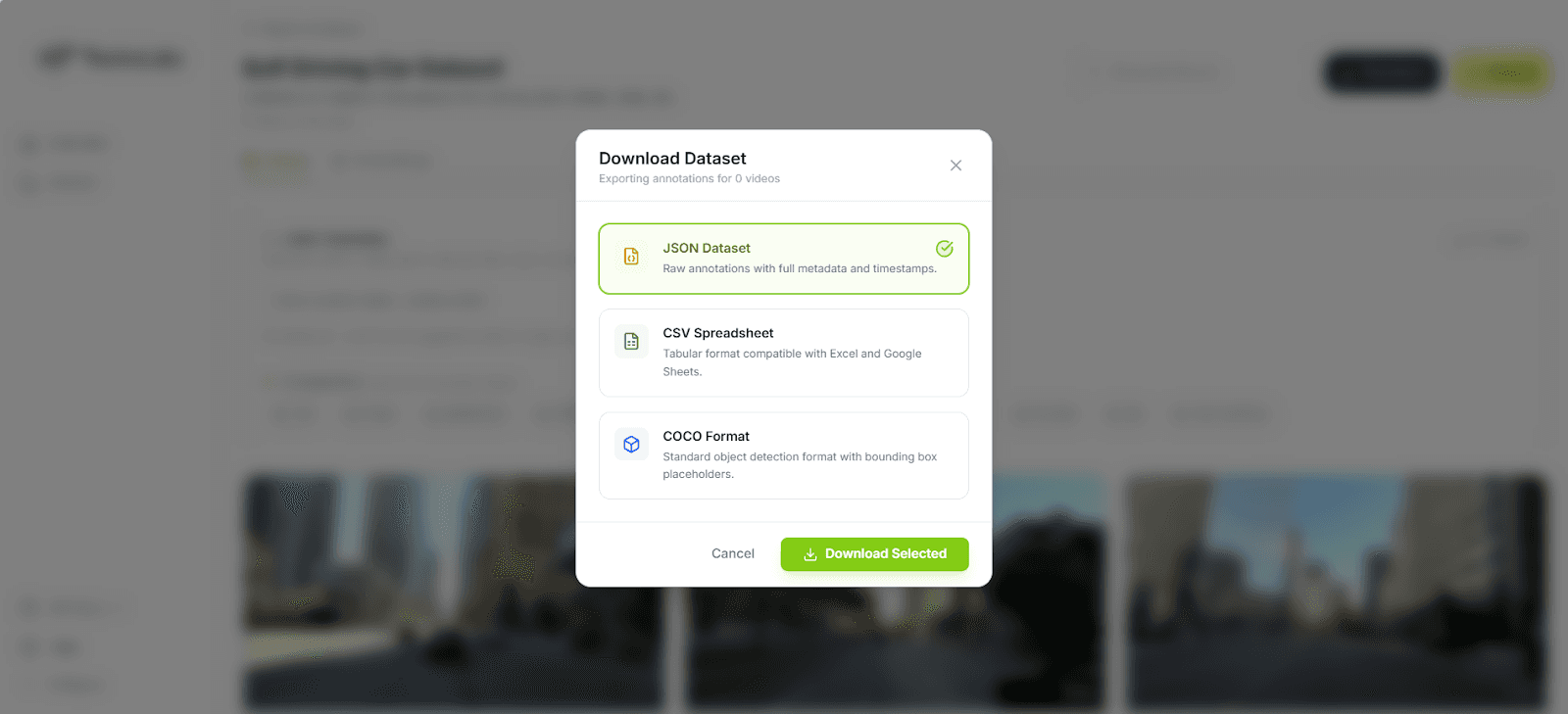
The COCO export is particularly important because it eliminates the reformatting step that typically sits between annotation and training. You go from raw video to indexed embeddings to structured labels to training-ready dataset (all within a single pipeline).
Business Impact: What This Changes
For ML and Computer Vision Teams
The economics of this pipeline shift the annotation bottleneck from human labor to compute:
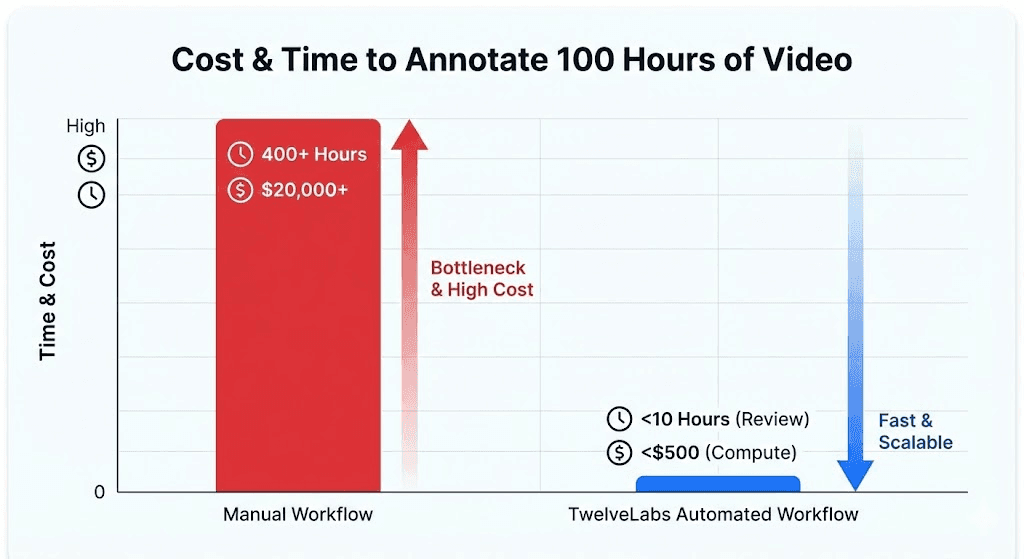
Traditional manual workflow: 2–4 hours of human effort per 1 hour of video, at $50–100/hour for domain expertise. A 500-hour back catalog requires 1,000–2,000 hours of annotation labor; roughly 6–12 months of full-time work.
TwelveLabs automated workflow: Approximately 1 minute of compute per video for indexing and structured annotation, plus targeted human review of the auto-generated labels. The same 500-hour back catalog processes in days, not months.
Humans stay in the loop for quality assurance, but the expensive first pass (finding the 4 seconds of relevant action in a 2-hour video) is handled by the models. This makes it economically feasible to label historical footage that was previously too costly to touch.
For Data Labeling Platform ISVs
This application is a product blueprint. Integrating AI-first video annotation into your platform reduces per-project annotation effort by 80–90% based on the time savings demonstrated in this pipeline (minutes of compute replacing hours of manual review). That shifts your business model from selling raw human hours to selling high-margin, scalable intelligence; a differentiation that matters as annotation becomes increasingly commoditized.
Conclusion
This reference application demonstrates a complete pipeline for converting raw video into structured, training-ready datasets using TwelveLabs' video understanding APIs. Marengo encodes footage into dense temporal embeddings. Pegasus converts those embeddings into timestamped, schema-enforced training labels. The browser-based dashboard handles ingestion, visualization, and export (all without a persistent backend).
What you have after running this tutorial: a working application that you can point at your own footage, define your own label taxonomy, and generate ML-ready annotations in the time it takes to index the video.
The full source code is available on GitHub. Clone it, configure your TwelveLabs index, and start building.
To explore what else you can build with TwelveLabs' video understanding APIs, visit the documentation or reach out to our team.
Resources
Introduction
Labeling video data is one of the most expensive bottlenecks in machine learning. A single hour of footage requires 4 hours of human annotation time, and at $100 per hour for domain specialists (radiologists, safety auditors, sports analysts) the math stops working long before you reach your back catalog.
The footage exists. Dashcams, retail cameras, warehouse feeds, surgical recordings, sports broadcasts: enterprises sit on thousands of hours of video containing precisely the training signals their models need. But the path from raw footage to structured labels still runs through a labeling platform where human reviewers scrub frame by frame.
This tutorial builds a different pipeline. Instead of sending video to annotators, we send it to TwelveLabs' multimodal foundation models. Marengo encodes each video into dense, temporal embeddings that capture visual, audio, and contextual information in 512 dimensions. Pegasus then reasons over those embeddings and returns structured, timestamped annotations (complete with scene classifications, object detections, and confidence scores) all enforced by a strict JSON schema.
By the end of this walkthrough, you will have a working Next.js application that indexes video, auto-generates training labels against a custom taxonomy, visualizes your dataset in 2D embedding space, and exports to COCO, JSON, or CSV for direct ingestion into PyTorch or any standard ML pipeline.
Here is the finished application in action:
Architecture Overview
Before writing any code, here is the full pipeline. Each layer was chosen to solve a specific constraint of production video annotation.
Next.js 16 + React 19 handles both the frontend dashboard and the backend API routes. Serverless functions let us orchestrate the entire annotation pipeline without running a persistent server, which matters when you want ISV partners or internal teams to deploy this with a single vercel deploy.
Vercel Blob provides temporary video storage. Serverless environments impose strict payload limits (4.5 MB on Vercel), so the client uploads video files directly to Blob storage and passes only the resulting public URL to our API routes. This decouples upload size from function constraints.
TwelveLabs Marengo extracts 512-dimensional vector embeddings from each video. These are not frame-level features: Marengo processes video as a continuous multimodal signal across visual, audio, and temporal dimensions, producing a sequence of segment-level embeddings that capture semantic meaning rather than pixel data. This is what makes downstream clustering and visualization possible without any manual feature engineering.
TwelveLabs Pegasus (Analyze API) acts as the reasoning engine. Given the embeddings and a user-defined label taxonomy, Pegasus generates structured, machine-readable annotations with timestamps, scene classifications, and detected objects; all returned as JSON that maps directly to ML training formats.
For a deeper look at the data flow, the full architecture diagram is available on LucidChart: [TwelveLabs] - Automated Video Data Labeling Solution
Step 1: Prerequisite & Setup
You will need three things to run this project locally:
Node.js 18+ (20+ recommended)
TwelveLabs API Key from the TwelveLabs Dashboard
Vercel Blob Token for handling temporary video uploads
Clone the repository and install dependencies:
>> git clone https://github.com/nathanchess/tl-automated-video-data-labeler.git
>> cd tl-automated-video-data-labeler
>> npm
Set up your .env.local file:
TL_API_KEY=your_twelvelabs_api_key_here
TL_INDEX_NAME=your_default_index_name_here
BLOB_READ_WRITE_TOKEN
Start the development server with npm run dev. The dashboard will be available at http://localhost:3000/indexes.
Step 2: Video Ingestion and Indexing
The ingestion flow begins when a user drops video files into the dashboard UI. The client uploads each file to Vercel Blob, then sends the resulting public URLs to a Next.js API route that triggers TwelveLabs indexing.
Here is the server-side logic in src/app/api/videos/route.js:
import { TwelveLabs } from 'twelvelabs-js';
import { NextResponse } from 'next/server';

const tl_client = new TwelveLabs({ apiKey: process.env.TL_API_KEY });

export async function POST(request) {
  const { videoURLs, metadata } = await request.json();

  // 1. Locate the target index
  const indexPager = await tl_client.indexes.list();
  let indexId = null;
  for await (const index of indexPager) {
    if (index.indexName === process.env.TL_INDEX_NAME) indexId = index.id;
  }

  if (!indexId) return NextResponse.json({ error: 'Index not found' }, { status: 404 });

  // 2. Create tasks and wait for completion
  for (const videoURL of videoURLs) {
    const task = await tl_client.tasks.create({
      indexId,
      videoUrl: videoURL,
      userMetadata: JSON.stringify(metadata),
    });

    const completedTask = await tl_client.tasks.waitForDone(task.id, {
      sleepInterval: 5,
    });

    if (completedTask.status !== 'ready') {
      throw new Error(`Task ${completedTask.id} failed`);
    }
  }

  return new Response('ok');
}
Production note: Video processing is fundamentally asynchronous. The waitForDone call here blocks the HTTP request until indexing completes, which works for a reference application processing a handful of clips. For production pipelines handling hours of footage, offload indexing to a background queue (Inngest, Upstash, or similar) and use TwelveLabs webhooks to notify your application when processing is complete. The SDK fully supports this pattern.
Step 3: Extracting and Pooling Embeddings
Once videos are indexed, we retrieve them along with their Marengo embeddings. These vectors are what power semantic grouping and the 2D visualization we build later.
const videoPager = await tl_client.indexes.videos.list(indexId);
  const videos = [];

  for await (const video of videoPager) {
    let embeddings = [];
    try {
      const videoData = await tl_client.indexes.videos.retrieve(indexId, video.id, {
        embeddingOption: ['visual'],
      });

      const segments = videoData.embedding?.videoEmbedding?.segments || [];
      if (segments.length > 0) {
        const dim = segments[0].float?.length;
        if (dim) {
          const sum = new Array(dim).fill(0);
          let count = 0;

          // Average the embeddings across all temporal segments
          for (const seg of segments) {
            if (seg.float && seg.float.length === dim) {
              for (let i = 0; i < dim; i++) sum[i] += seg.float[i];
              count++;
            }
          }
          if (count > 0) embeddings = sum.map((val) => val / count);
        }
      }
    } catch (embErr) {
      console.warn(`Failed to get embeddings for ${video.id}`);
    }
    videos.push({ ...video, embeddings });
  }
Why mean pooling? Marengo outputs a sequence of embeddings mapped to temporal segments; an embedding for seconds 0–5, another for 5–10, and so on. That temporal granularity is valuable for search (finding the exact moment a forklift enters a restricted zone), but to visualize an entire video as a single point in a 2D scatterplot, we need a single vector per video.
Mean pooling (averaging the float values across all segments) produces a composite vector that represents the overall semantic content of the video. If the footage is primarily a forklift operating in a warehouse, the averaged vector will land in the "forklift operation" region of embedding space, regardless of which specific 5-second segment you examine.
Step 4: Zero-Shot Auto-Labeling with Pegasus
The core problem with using general-purpose LLMs for annotation is output structure. Language models return free-form text, which means developers end up writing fragile regular expressions to extract timestamps, labels, and confidence scores from prose paragraphs. One unexpected formatting change and the parser breaks.
The TwelveLabs Analyze API eliminates this by enforcing a strict JSON schema on Pegasus's output. You define exactly the structure your ML pipeline expects, inject the user's custom label taxonomy (e.g., shoplifting, forklift_violation, surgical_clamp) directly into the prompt, and receive machine-parseable annotations with zero post-processing.
const response_format = {
    type: 'json_schema',
    json_schema: {
      type: 'object',
      properties: {
        annotations: {
          type: 'array',
          items: {
            type: 'object',
            properties: {
              start_timestamp: { type: 'string' },
              end_timestamp: { type: 'string' },
              description: { type: 'string' },
              scene_classification: { type: 'string' },
              detected_objects: {
                type: 'array',
                items: {
                  type: 'object',
                  properties: {
                    label: { type: 'string' },
                    confidence_score: { type: 'number' },
                    start_timestamp: { type: 'string' },
                    end_timestamp: { type: 'string' },
                  },
                },
              },
            },
            required: ['start_timestamp', 'end_timestamp', 'description', 'scene_classification', 'detected_objects'],
          },
        },
      },
    },
  };
This schema guarantees that every annotation includes start and end timestamps, a natural-language description, a scene classification label, and an array of detected objects (each with its own confidence score and temporal bounds). Because Pegasus is a zero-shot generative model, no fine-tuning is required. You define the taxonomy, pass the schema, and receive structured training data in seconds.
Step 5: Interactive Embedding Visualization with PCA
Numbers and labels are necessary for ML pipelines, but for data curation work, you need to see your dataset. The application includes an in-browser 2D scatter plot that projects Marengo's 512-dimensional embeddings into two dimensions using Principal Component Analysis (PCA).
Optimizing PCA for Browser-Based Visualization
Computing PCA on high-dimensional data is expensive. The standard approach (constructing a 512 × 512 covariance matrix and finding its eigenvalues via singular value decomposition) will freeze a browser tab. When the user is curating a dataset of 50 videos, they need immediate visual feedback, not a loading spinner.
The solution is a Gram matrix approach. Instead of computing the full D × D covariance matrix (where D = 512), we compute an N × N matrix of inner products between videos (where N = the number of videos in the dataset). For a 50-video dataset, finding the eigenvectors of a 50 × 50 matrix is orders of magnitude faster than operating on 512 dimensions; reducing complexity from O(D³) to O(N³) and keeping the visualization fluid in the main browser thread.
What the visualization reveals for annotation quality: Tight, well-separated clusters indicate that your labeled categories correspond to genuinely distinct semantic content. Outliers (points that sit far from any cluster) flag either rare events worth separate annotation attention (a safety incident in routine warehouse footage) or noisy data that may be misclassified. This gives data PMs and annotators immediate, actionable feedback on dataset health before they commit to expensive model training.
Step 6: Exporting for ML Pipelines
A curated dataset is only as valuable as its compatibility with downstream training tools. The application natively supports three export formats:
JSON provides the raw structured output for programmatic parsing in custom data loaders. Every field from the Pegasus annotation schema is preserved, including nested detected objects with confidence scores.
CSV flattens the annotations into spreadsheet-friendly rows with timestamps, labels, and descriptions; useful for quick manual audits or feeding into pandas-based preprocessing scripts.
COCO (Common Objects in Context) structures annotations into the
videos,annotations, andcategoriesarrays expected by major training frameworks. This is the format PyTorch DataLoaders consume natively, and it imports directly into workforce platforms like Label Studio and CVAT for a final human-in-the-loop review.
The COCO export is particularly important because it eliminates the reformatting step that typically sits between annotation and training. You go from raw video to indexed embeddings to structured labels to training-ready dataset (all within a single pipeline).
Business Impact: What This Changes
For ML and Computer Vision Teams
The economics of this pipeline shift the annotation bottleneck from human labor to compute:
Traditional manual workflow: 2–4 hours of human effort per 1 hour of video, at $50–100/hour for domain expertise. A 500-hour back catalog requires 1,000–2,000 hours of annotation labor; roughly 6–12 months of full-time work.
TwelveLabs automated workflow: Approximately 1 minute of compute per video for indexing and structured annotation, plus targeted human review of the auto-generated labels. The same 500-hour back catalog processes in days, not months.
Humans stay in the loop for quality assurance, but the expensive first pass (finding the 4 seconds of relevant action in a 2-hour video) is handled by the models. This makes it economically feasible to label historical footage that was previously too costly to touch.
For Data Labeling Platform ISVs
This application is a product blueprint. Integrating AI-first video annotation into your platform reduces per-project annotation effort by 80–90% based on the time savings demonstrated in this pipeline (minutes of compute replacing hours of manual review). That shifts your business model from selling raw human hours to selling high-margin, scalable intelligence; a differentiation that matters as annotation becomes increasingly commoditized.
Conclusion
This reference application demonstrates a complete pipeline for converting raw video into structured, training-ready datasets using TwelveLabs' video understanding APIs. Marengo encodes footage into dense temporal embeddings. Pegasus converts those embeddings into timestamped, schema-enforced training labels. The browser-based dashboard handles ingestion, visualization, and export (all without a persistent backend).
What you have after running this tutorial: a working application that you can point at your own footage, define your own label taxonomy, and generate ML-ready annotations in the time it takes to index the video.
The full source code is available on GitHub. Clone it, configure your TwelveLabs index, and start building.
To explore what else you can build with TwelveLabs' video understanding APIs, visit the documentation or reach out to our team.
Resources




Platform
Enterprise
©
2026
TwelveLabs, Inc. All Rights Reserved

Platform
Enterprise
©
2026
TwelveLabs, Inc. All Rights Reserved

Platform
Enterprise
©
2026
TwelveLabs, Inc. All Rights Reserved