" height="1.90314px" id="wtDTm6bEW" transform="translate(26.225 0)" width="2.4723000000000006px"/><path d="M 0.557 0 L 1.438 0 C 1.746 0 1.995 0.25 1.995 0.559 L 1.995 1.344 C 1.995 1.653 1.746 1.903 1.438 1.903 L 0.557 1.903 C 0.25 1.903 0 1.653 0 1.344 L 0 0.559 C 0 0.25 0.25 0 0.557 0 Z" fill="rgb(29, 28, 27)" height="1.9031500000000001px" id="GnmDnNra_" transform="translate(36.408 2.728)" width="1.9953000000000003px"/><path d="M 6.224 0 L 0.558 0 C 0.25 0 0 0.25 0 0.559 L 0 1.344 C 0 1.653 0.25 1.903 0.558 1.903 L 6.224 1.903 C 6.531 1.903 6.781 1.653 6.781 1.344 L 6.781 0.559 C 6.781 0.25 6.531 0 6.224 0 Z" fill="rgb(29, 28, 27)" height="1.9031500000000001px" id="hKTQ3dbw4" transform="translate(34.261 5.456)" width="6.781100000000002px"/><path d="M 6.955 0 L 0.558 0 C 0.25 0 0 0.25 0 0.559 L 0 1.344 C 0 1.653 0.25 1.903 0.558 1.903 L 6.955 1.903 C 7.263 1.903 7.513 1.653 7.513 1.344 L 7.513 0.559 C 7.513 0.25 7.263 0 6.955 0 Z" fill="rgb(29, 28, 27)" height="1.9031500000000001px" id="G1Zzk9CUU" transform="translate(28.298 8.243)" width="7.513100000000001px"/><path d="M 7.123 0 L 0.558 0 C 0.25 0 0 0.25 0 0.559 L 0 1.344 C 0 1.653 0.25 1.903 0.558 1.903 L 7.123 1.903 C 7.431 1.903 7.681 1.653 7.681 1.344 L 7.681 0.559 C 7.681 0.25 7.431 0 7.123 0 Z" fill="rgb(29, 28, 27)" height="1.9030999999999985px" id="fm7cHxIfJ" transform="translate(0 10.972)" width="7.68067px"/><path d="M 13.447 0 L 0.558 0 C 0.25 0 0 0.25 0 0.559 L 0 1.344 C 0 1.653 0.25 1.903 0.558 1.903 L 13.447 1.903 C 13.755 1.903 14.004 1.653 14.004 1.344 L 14.004 0.559 C 14.004 0.25 13.755 0 13.447 0 Z" fill="rgb(29, 28, 27)" height="1.9030999999999985px" id="LowSwDrtg" transform="translate(9.552 10.972)" width="14.0044px"/><path d="M 0.558 0 L 8.212 0 C 8.52 0 8.77 0.25 8.77 0.559 L 8.77 1.344 C 8.77 1.653 8.52 1.903 8.212 1.903 L 0.558 1.903 C 0.25 1.903 0 1.653 0 1.344 L 0 0.559 C 0 0.25 0.25 0 0.558 0 Z" fill="rgb(29, 28, 27)" height="1.9030999999999985px" id="xRiKc2od7" transform="translate(27.041 10.972)" width="8.769900000000003px"/><path d="M 0.557 0 L 5.4 0 C 5.708 0 5.958 0.25 5.958 0.559 L 5.958 1.344 C 5.958 1.653 5.708 1.903 5.4 1.903 L 0.557 1.903 C 0.25 1.903 0 1.653 0 1.344 L 0 0.559 C 0 0.25 0.25 0 0.557 0 Z" fill="rgb(29, 28, 27)" height="1.9031500000000001px" id="JWdNVicde" transform="translate(36.796 8.243)" width="5.957599999999999px"/><path d="M 1.438 0 L 0.558 0 C 0.25 0 0 0.25 0 0.559 L 0 1.344 C 0 1.653 0.25 1.903 0.558 1.903 L 1.438 1.903 C 1.746 1.903 1.995 1.653 1.995 1.344 L 1.995 0.559 C 1.995 0.25 1.746 0 1.438 0 Z" fill="rgb(29, 28, 27)" height="1.9031500000000001px" id="RfFYVCT_T" transform="translate(28.717 5.456)" width="1.9953000000000003px"/><path d="M 0.558 0 L 2.895 0 C 3.203 0 3.453 0.25 3.453 0.559 L 3.453 1.406 C 3.453 1.714 3.203 1.964 2.895 1.964 L 0.558 1.964 C 0.25 1.964 0 1.714 0 1.406 L 0 0.559 C 0 0.25 0.25 0 0.558 0 Z" fill="rgb(29, 28, 27)" height="1.964299999999998px" id="dngJ6MU2p" transform="translate(16.183 24.582)" width="3.4525000000000006px"/><path d="M 1.706 0 L 0.558 0 C 0.25 0 0 0.25 0 0.559 L 0 1.406 C 0 1.714 0.25 1.964 0.558 1.964 L 1.706 1.964 C 2.014 1.964 2.263 1.714 2.263 1.406 L 2.263 0.559 C 2.263 0.25 2.014 0 1.706 0 Z" fill="rgb(29, 28, 27)" height="1.964299999999998px" id="N_fstvKmR" transform="translate(22.18 24.582)" width="2.2631999999999977px"/><path d="M 0.558 0 L 5.544 0 C 5.852 0 6.101 0.25 6.101 0.559 L 6.101 1.406 C 6.101 1.714 5.852 1.964 5.544 1.964 L 0.558 1.964 C 0.25 1.964 0 1.714 0 1.406 L 0 0.559 C 0 0.25 0.25 0 0.558 0 Z" fill="rgb(29, 28, 27)" height="1.964299999999998px" id="t55XLYcgb" transform="translate(25.486 24.582)" width="6.101399999999998px"/><path d="M 1.976 0 L 0.558 0 C 0.25 0 0 0.25 0 0.559 L 0 1.406 C 0 1.714 0.25 1.964 0.558 1.964 L 1.976 1.964 C 2.284 1.964 2.533 1.714 2.533 1.406 L 2.533 0.559 C 2.533 0.25 2.284 0 1.976 0 Z" fill="rgb(29, 28, 27)" height="1.964299999999998px" id="ZrEKTVTAe" transform="translate(28.542 21.854)" width="2.5334000000000003px"/><path d="M 0.557 0 L 1.438 0 C 1.746 0 1.995 0.25 1.995 0.559 L 1.995 1.406 C 1.995 1.714 1.746 1.964 1.438 1.964 L 0.557 1.964 C 0.25 1.964 0 1.714 0 1.406 L 0 0.559 C 0 0.25 0.25 0 0.557 0 Z" fill="rgb(29, 28, 27)" height="1.964299999999998px" id="Z0fPTp9aR" transform="translate(11.425 24.582)" width="1.9953000000000003px"/><path d="M 0 0.559 C 0 0.251 0.251 0 0.558 0 L 1.438 0 C 1.745 0 1.995 0.251 1.995 0.559 L 1.995 1.405 C 1.995 1.713 1.745 1.964 1.438 1.964 L 0.558 1.964 C 0.251 1.964 0 1.713 0 1.405 Z" fill="rgb(29, 28, 27)" height="1.964299999999998px" id="Tj_PDHFDh" transform="translate(20.635 27.308)" width="1.9954px"/><path d="M 0.557 0 L 1.342 0 C 1.65 0 1.899 0.25 1.899 0.559 L 1.899 1.406 C 1.899 1.714 1.65 1.964 1.342 1.964 L 0.557 1.964 C 0.25 1.964 0 1.714 0 1.406 L 0 0.559 C 0 0.25 0.25 0 0.557 0 Z" fill="rgb(29, 28, 27)" height="1.9643000000000015px" id="AYq9dXkKz" transform="translate(18.686 30.036)" width="1.8994px"/><path d="M 0.558 0 L 5.768 0 C 6.076 0 6.326 0.25 6.326 0.559 L 6.326 1.344 C 6.326 1.653 6.076 1.903 5.768 1.903 L 0.558 1.903 C 0.25 1.903 0 1.653 0 1.344 L 0 0.559 C 0 0.25 0.25 0 0.558 0 Z" fill="rgb(29, 28, 27)" height="1.9031500000000001px" id="rspevfJcx" transform="translate(12.157 8.243)" width="6.325900000000001px"/><path d="M 3.285 0 L 0.558 0 C 0.25 0 0 0.25 0 0.559 L 0 1.344 C 0 1.653 0.25 1.903 0.558 1.903 L 3.285 1.903 C 3.593 1.903 3.842 1.653 3.842 1.344 L 3.842 0.559 C 3.842 0.25 3.593 0 3.285 0 Z" fill="rgb(29, 28, 27)" height="1.9031500000000001px" id="XRUAhGnph" transform="translate(23.887 2.728)" width="3.8424000000000014px"/><path d="M 0.558 0 L 5.644 0 C 5.952 0 6.202 0.25 6.202 0.559 L 6.202 1.344 C 6.202 1.653 5.952 1.903 5.644 1.903 L 0.558 1.903 C 0.25 1.903 0 1.653 0 1.344 L 0 0.559 C 0 0.25 0.25 0 0.558 0 Z" fill="rgb(29, 28, 27)" height="1.9031500000000001px" id="VsaVVIfke" transform="translate(21.528 5.456)" width="6.201600000000003px"/><path d="M 3.06 0 L 0.558 0 C 0.25 0 0 0.25 0 0.559 L 0 1.344 C 0 1.653 0.25 1.903 0.558 1.903 L 3.06 1.903 C 3.369 1.903 3.618 1.653 3.618 1.344 L 3.618 0.559 C 3.618 0.25 3.369 0 3.06 0 Z" fill="rgb(29, 28, 27)" height="1.9030999999999985px" id="wiAKEgyId" transform="translate(40.819 10.972)" width="3.6182000000000016px"/><path d="M 0.558 0 L 17.318 0 C 17.626 0 17.875 0.25 17.875 0.559 L 17.875 1.345 C 17.875 1.653 17.626 1.903 17.318 1.903 L 0.558 1.903 C 0.25 1.903 0 1.653 0 1.345 L 0 0.559 C 0 0.25 0.25 0 0.558 0 Z" fill="rgb(29, 28, 27)" height="1.9032px" id="FIE0ufK9m" transform="translate(6.666 13.7)" width="17.87506px"/><path d="M 6.426 0 L 0.558 0 C 0.25 0 0 0.25 0 0.559 L 0 1.345 C 0 1.653 0.25 1.903 0.558 1.903 L 6.426 1.903 C 6.734 1.903 6.984 1.653 6.984 1.345 L 6.984 0.559 C 6.984 0.25 6.734 0 6.426 0 Z" fill="rgb(29, 28, 27)" height="1.9032000000000018px" id="ut9UWny3L" transform="translate(22.892 19.156)" width="6.983599999999999px"/><path d="M 0.558 0 L 22.151 0 C 22.459 0 22.709 0.25 22.709 0.559 L 22.709 1.344 C 22.709 1.653 22.459 1.903 22.151 1.903 L 0.558 1.903 C 0.25 1.903 0 1.653 0 1.344 L 0 0.559 C 0 0.25 0.25 0 0.558 0 Z" fill="rgb(29, 28, 27)" height="1.9030999999999985px" id="VULnffgbk" transform="translate(9.552 16.428)" width="22.7089px"/><path d="M 7.886 0 L 0.558 0 C 0.25 0 0 0.25 0 0.559 L 0 1.345 C 0 1.653 0.25 1.903 0.558 1.903 L 7.886 1.903 C 8.194 1.903 8.443 1.653 8.443 1.345 L 8.443 0.559 C 8.443 0.25 8.194 0 7.886 0 Z" fill="rgb(29, 28, 27)" height="1.9032000000000018px" id="adZTYr4MR" transform="translate(6.078 19.156)" width="8.44303px"/><path d="M 0.558 0 L 2.211 0 C 2.519 0 2.769 0.25 2.769 0.559 L 2.769 1.406 C 2.769 1.714 2.519 1.964 2.211 1.964 L 0.558 1.964 C 0.25 1.964 0 1.714 0 1.406 L 0 0.559 C 0 0.25 0.25 0 0.558 0 Z" fill="rgb(29, 28, 27)" height="1.964299999999998px" id="bwdUdEmCH" transform="translate(13.784 21.854)" width="2.768600000000001px"/><path d="M 2.424 0 L 0.558 0 C 0.25 0 0 0.25 0 0.559 L 0 1.406 C 0 1.714 0.25 1.964 0.558 1.964 L 2.424 1.964 C 2.732 1.964 2.982 1.714 2.982 1.406 L 2.982 0.559 C 2.982 0.25 2.732 0 2.424 0 Z" fill="rgb(29, 28, 27)" height="1.964299999999998px" id="PUvesMJEj" transform="translate(23.556 21.854)" width="2.982199999999999px"/><path d="M 0.558 0 L 2.241 0 C 2.55 0 2.799 0.25 2.799 0.559 L 2.799 1.406 C 2.799 1.714 2.55 1.964 2.241 1.964 L 0.558 1.964 C 0.25 1.964 0 1.714 0 1.406 L 0 0.559 C 0 0.25 0.25 0 0.558 0 Z" fill="rgb(29, 28, 27)" height="1.964299999999998px" id="Wo2W7J3Zj" transform="translate(8.672 21.854)" width="2.799050000000001px"/><path d="M 6.661 0 L 0.558 0 C 0.25 0 0 0.25 0 0.559 L 0 1.345 C 0 1.653 0.25 1.903 0.558 1.903 L 6.661 1.903 C 6.969 1.903 7.219 1.653 7.219 1.345 L 7.219 0.559 C 7.219 0.25 6.969 0 6.661 0 Z" fill="rgb(29, 28, 27)" height="1.9032px" id="PpPVZXp9j" transform="translate(27.041 13.7)" width="7.218900000000001px"/><path d="M 0.621 1.905 C 0.218 1.905 0 1.687 0 1.283 L 0 0.622 C 0 0.218 0.218 0 0.621 0 L 11.225 0 C 11.628 0 11.846 0.218 11.846 0.622 L 11.846 1.283 C 11.846 1.687 11.628 1.905 11.225 1.905 L 6.934 1.905 L 6.934 14.926 C 6.934 15.33 6.716 15.548 6.313 15.548 L 5.537 15.548 C 5.134 15.548 4.916 15.33 4.916 14.926 L 4.916 1.905 Z" fill="rgb(29, 28, 27)" height="15.54825px" id="xr32fxeO6" transform="translate(52.177 8.243)" width="11.845599999999997px"/><path d="M 0.621 0 C 0.218 0 0 0.218 0 0.622 L 0 14.924 C 0 15.328 0.218 15.546 0.621 15.546 L 1.357 15.546 C 1.76 15.546 1.978 15.328 1.978 14.924 L 1.978 0.622 C 1.978 0.218 1.76 0 1.357 0 Z" fill="rgb(29, 28, 27)" height="15.546050000000001px" id="oSsO_UPVN" transform="translate(90.476 8.243)" width="1.9779000000000053px"/><path d="M 0.62 15.546 C 0.217 15.546 0 15.328 0 14.924 L 0 0.622 C 0 0.218 0.217 0 0.62 0 L 1.396 0 C 1.799 0 2.017 0.218 2.017 0.622 L 2.017 13.632 L 8.981 13.632 C 9.384 13.632 9.602 13.85 9.602 14.254 L 9.602 14.924 C 9.602 15.328 9.384 15.546 8.981 15.546 Z" fill="rgb(29, 28, 27)" height="15.546050000000001px" id="Sgj4z5osO" transform="translate(116.749 8.243)" width="9.602000000000004px"/><path d="M 1.974 14.924 C 1.974 15.328 1.756 15.546 1.353 15.546 L 0.621 15.546 C 0.218 15.546 0 15.328 0 14.924 L 0 0.622 C 0 0.218 0.218 0 0.621 0 L 1.357 0 C 1.76 0 1.978 0.218 1.978 0.622 L 1.978 5.747 C 2.634 4.721 3.806 4.079 5.309 4.079 C 8.18 4.079 10.356 6.358 10.356 9.948 C 10.356 13.538 8.18 15.817 5.309 15.817 C 3.801 15.817 2.627 15.175 1.971 14.145 L 1.971 14.922 Z M 8.36 9.95 C 8.36 7.362 6.881 5.928 5.121 5.928 C 3.361 5.928 1.863 7.362 1.863 9.95 C 1.863 12.539 3.361 13.972 5.121 13.972 C 6.881 13.972 8.36 12.539 8.36 9.95 Z" fill="rgb(29, 28, 27)" height="15.81665px" id="q13jjj7xd" transform="translate(138.401 8.243)" width="10.355999999999995px"/><path d="M 4.457 11.738 C 0.961 11.738 -0.019 9.872 0 8.318 C 0.005 7.929 0.253 7.735 0.645 7.735 L 1.344 7.735 C 1.748 7.735 1.922 7.949 1.961 8.352 C 2.063 9.315 2.693 9.907 4.433 9.907 C 6.174 9.907 7.012 9.269 7.012 8.289 C 7.012 7.425 6.522 7.108 5.305 6.899 L 3.209 6.539 C 1.453 6.238 0.29 5.247 0.29 3.468 C 0.29 1.467 1.774 0 4.518 0 C 7.263 0 8.838 1.491 8.814 3.23 C 8.81 3.614 8.553 3.808 8.165 3.808 L 7.457 3.808 C 7.054 3.808 6.908 3.595 6.851 3.202 C 6.749 2.477 6.159 1.818 4.518 1.818 C 2.878 1.818 2.249 2.508 2.249 3.403 C 2.249 4.175 2.695 4.516 3.81 4.714 L 5.906 5.083 C 7.72 5.404 8.98 6.292 8.98 8.198 C 8.98 9.976 7.908 11.74 4.455 11.74 Z" fill="rgb(29, 28, 27)" height="11.739799999999999px" id="tJ8syeWTW" transform="translate(150.024 12.325)" width="8.980269730401375px"/><path d="M 9.146 7.997 C 9.146 8.813 9.175 9.983 9.282 10.799 C 9.334 11.223 9.155 11.465 8.728 11.465 L 8.068 11.465 C 7.685 11.465 7.467 11.319 7.428 11.022 L 7.317 10.181 C 6.724 11.157 5.565 11.659 4.145 11.659 C 1.579 11.659 0 10.142 0 8.078 C 0 6.27 1.27 5.157 3.433 5.002 L 6.589 4.78 C 7.162 4.741 7.186 4.688 7.186 4.153 L 7.186 3.682 C 7.186 2.438 6.434 1.807 4.79 1.807 C 3.145 1.807 2.472 2.425 2.405 3.289 C 2.376 3.697 2.235 3.916 1.823 3.916 L 1.067 3.916 C 0.675 3.916 0.427 3.717 0.422 3.328 C 0.407 1.51 1.74 0 4.792 0 C 7.798 0 9.162 1.427 9.155 3.736 Z M 7.188 7.298 L 7.188 6.244 C 6.955 6.327 6.678 6.386 6.363 6.415 L 3.598 6.676 C 2.59 6.775 1.997 7.163 1.997 8.099 L 1.999 8.099 C 1.999 9.188 2.886 9.97 4.4 9.97 C 6.169 9.97 7.188 8.9 7.188 7.298 Z" fill="rgb(29, 28, 27)" height="11.658999999999999px" id="QPESIZvku" transform="translate(126.854 12.325)" width="9.290755130109668px"/><path d="M 5.224 0 C 8.313 0 10.295 2.255 10.295 5.456 L 10.295 5.694 C 10.295 6.098 10.077 6.316 9.674 6.316 L 1.998 6.316 C 2.168 8.547 3.447 9.898 5.407 9.898 C 6.768 9.898 7.598 9.363 7.934 8.431 C 8.06 8.078 8.243 7.892 8.618 7.892 L 9.33 7.892 C 9.746 7.892 9.994 8.125 9.923 8.538 C 9.598 10.433 7.834 11.74 5.409 11.74 L 5.407 11.738 C 2.168 11.738 0 9.424 0 5.797 C 0 2.169 2.135 0 5.224 0 Z M 5.222 1.74 C 3.494 1.74 2.405 2.818 2.074 4.64 L 8.282 4.64 C 8.054 2.842 6.949 1.74 5.222 1.74 Z" fill="rgb(29, 28, 27)" height="11.739799999999999px" id="PKmyQkwJE" transform="translate(104.541 12.325)" width="10.295000000000002px"/><path d="M 4.459 11.194 C 4.099 11.194 3.877 11.039 3.746 10.703 L 0.091 1.021 C -0.024 0.72 -0.031 0.511 0.076 0.297 C 0.178 0.094 0.381 0 0.732 0 L 1.274 0 C 1.633 0 1.86 0.155 1.986 0.495 L 4.958 8.503 L 5.123 9.018 L 5.289 8.503 L 8.262 0.495 C 8.388 0.155 8.615 0 8.974 0 L 9.517 0 C 9.865 0 10.07 0.092 10.172 0.297 C 10.279 0.511 10.275 0.72 10.157 1.021 L 6.502 10.703 C 6.371 11.039 6.149 11.194 5.79 11.194 Z" fill="rgb(29, 28, 27)" height="11.1941px" id="uUQr5Yl4B" transform="translate(93.807 12.595)" width="10.248961642504256px"/><path d="M 5.407 11.738 C 2.167 11.738 0 9.424 0 5.797 C 0 2.169 2.133 0 5.221 0 C 8.31 0 10.292 2.255 10.292 5.456 L 10.292 5.694 C 10.292 6.098 10.075 6.316 9.672 6.316 L 1.995 6.316 C 2.165 8.547 3.446 9.898 5.404 9.898 C 6.768 9.898 7.596 9.363 7.931 8.431 C 8.058 8.078 8.241 7.892 8.615 7.892 L 9.328 7.892 C 9.744 7.892 9.992 8.125 9.918 8.538 C 9.593 10.433 7.829 11.74 5.404 11.74 Z M 8.282 4.64 C 8.053 2.842 6.949 1.74 5.221 1.74 C 3.494 1.74 2.405 2.818 2.074 4.64 Z" fill="rgb(29, 28, 27)" height="11.739799999999999px" id="zo1nSBuSF" transform="translate(78.397 12.325)" width="10.29249999999999px"/><path d="M 3.057 10.677 C 3.163 11.026 3.392 11.192 3.756 11.192 L 3.749 11.194 L 4.987 11.194 C 5.35 11.194 5.579 11.028 5.69 10.679 L 8.173 2.654 L 8.237 2.401 L 8.3 2.654 L 10.787 10.679 C 10.894 11.028 11.123 11.194 11.487 11.194 L 12.733 11.194 C 13.096 11.194 13.325 11.028 13.432 10.679 L 16.418 1.006 C 16.516 0.7 16.512 0.498 16.41 0.288 C 16.307 0.089 16.109 0.002 15.76 0.002 L 15.218 0.002 C 14.848 0.002 14.626 0.168 14.519 0.522 L 12.094 8.547 L 12.046 8.761 L 11.999 8.542 L 9.506 0.517 C 9.4 0.168 9.171 0.002 8.807 0.002 L 7.683 0.002 C 7.319 0.002 7.091 0.168 6.984 0.517 L 4.492 8.542 L 4.449 8.745 L 4.405 8.551 L 1.98 0.519 C 1.874 0.166 1.649 0 1.281 0 L 0.728 0 C 0.38 0 0.181 0.087 0.079 0.286 C -0.021 0.493 -0.028 0.698 0.07 1.004 Z" fill="rgb(29, 28, 27)" height="11.194099999999999px" id="uboloLX99" transform="translate(61.282 12.598)" width="16.489163442184434px"/></svg>)
파트너십
Solving Compliance Video Intelligence: A Hands-On Guide with Mux and TwelveLabs MCP Servers
Hrishikesh Yadav
Developers can build a scalable video compliance workflow by combining the Mux MCP server for video infrastructure with the Twelve Labs MCP server and Pegasus model to automatically analyze content against brand safety, cultural moderation, UGC, and child safety policies, flagging violations with precise timestamps and contextual reasoning without writing custom code.
Developers can build a scalable video compliance workflow by combining the Mux MCP server for video infrastructure with the Twelve Labs MCP server and Pegasus model to automatically analyze content against brand safety, cultural moderation, UGC, and child safety policies, flagging violations with precise timestamps and contextual reasoning without writing custom code.
In this article
Join our newsletter
Receive the latest advancements, tutorials, and industry insights in video understanding
Search, analyze, and explore your videos with AI.
2026. 2. 6.
9 Minutes
링크 복사하기
Introduction
Video content has become dominant across advertising, branding, entertainment, and community-driven platforms. However, this scale introduces significant risk. Brands and studios must ensure that video content shared across social media and the web adheres to brand compliance policies and ad-safety standards. This involves guaranteeing cultural sensitivity and proper governance of vast amounts of video marketing content.
Manually reviewing such large volumes of video for compliance is costly, time-consuming, and ultimately inefficient. This makes video intelligence an essential tool for streamlining the workflow, enabling faster, more effective content review at scale.
The TwelveLabs Pegasus model directly addresses this challenge. It achieves large-scale compliance and moderation by understanding video through visuals, actions, objects, audio, and, crucially, contextual meaning over time.
Mux provides the critical video infrastructure layer for this compliance workflow. As the "video for AI tools," the Mux MCP Server directly connects Mux’s Video and Data platform with AI clients. It facilitates video uploads, performance analysis, video management, and straightforward access to Mux’s core infrastructure.
This tutorial explores various compliance use cases, eliminating the need to write custom code for dynamic policy checks. By leveraging the Mux MCP and TwelveLabs MCP, compliance can be managed effortlessly using any preferred MCP client, such as Claude Desktop.
Installing the TwelveLabs MCP
Step 1: Access the Setup Guide
Follow the official installation guide: https://mcp-install-instructions.alpic.cloud/servers/twelvelabs-mcp
This resource provides the definitive, step-by-step procedure for adding the TwelveLabs MCP server to your chosen MCP client.
Step 2: Obtain Your TwelveLabs API Key
Log in to your TwelveLabs account and retrieve your API key. This key is non-negotiable for setup, enabling the MCP server to securely and seamlessly access TwelveLabs APIs on your behalf.
Step 3: Select Your Preferred MCP Client
The setup guide contains specific instructions tailored for major clients, including Claude Desktop, Cursor, Goose, VS Code, and Claude Code. Choose your environment.
Step 4: Connect and Validate
After installation, confirm the TwelveLabs MCP server is correctly registered within your client's toolset. A successful connection verifies that your client is ready to execute TwelveLabs tools with zero friction.
Setting up Mux MCP on Claude Desktop
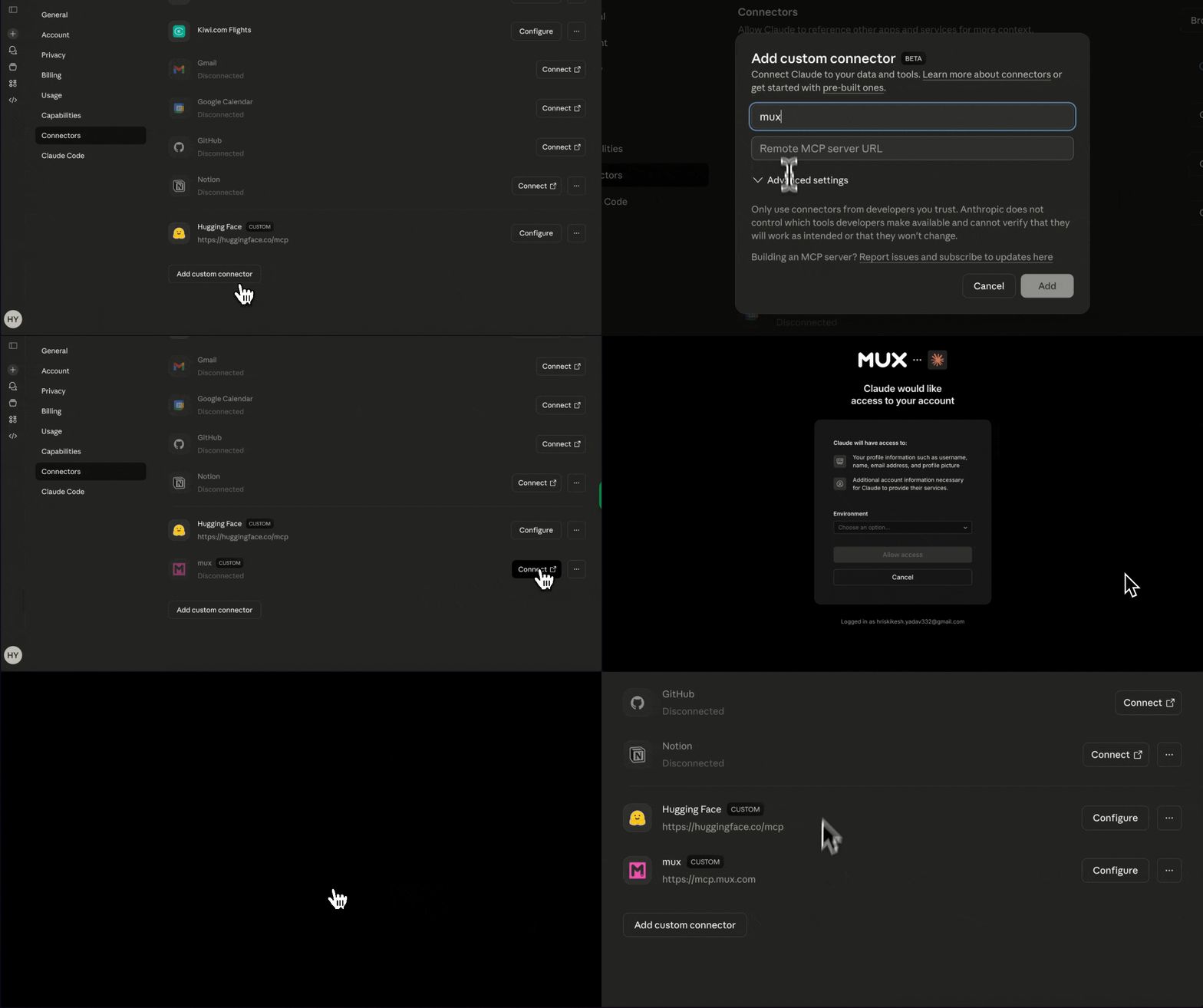
This section focuses on setting up the Mux MCP on Claude Desktop. We will configure the remote Mux MCP server using custom connectors, allowing for automatic authentication without the need to manually retrieve access tokens from the Mux dashboard. Alternatively, you can refer to the documentation for instructions on connecting the Mux MCP locally.
Step 1: Sign Up or Log In to Mux MCP
Ensure you are logged in at https://dashboard.mux.com.
Step 2: Connect the Mux MCP
To integrate the Mux MCP with Claude Desktop, navigate to Settings > Connectors > Add Custom Connectors, and enter the URL https://mcp.mux.com
Step 3: Configure Environment in Dashboard
Select the environment to authorize the connection.
Operationalizing Compliance Video Intelligence Workflow
Once both MCPs are set up, the workflow for content moderation and compliance is streamlined. Mux provides the video management infrastructure, allowing all videos to be uploaded directly into Mux. This can be done via the dashboard or using Claude Desktop, which utilizes the Create Video Asset tool for uploading content to the Mux account.
If video assets are uploaded in bulk through the Mux dashboard, they can later be accessed and listed directly from Claude Desktop. From there, specific videos or all videos can be sent to TwelveLabs for indexing and the application of video intelligence.
Next, the TwelveLabs tool can be invoked to either create a new index or perform indexing within an existing one. Once indexing is complete, the video status is marked as "ready." At this point, the Search and Analyze functionalities can be used. By supplying compliance policies or analysis instructions, along with details about different types of flags, the TwelveLabs analyze tool runs these instructions across all videos, processing each one individually.
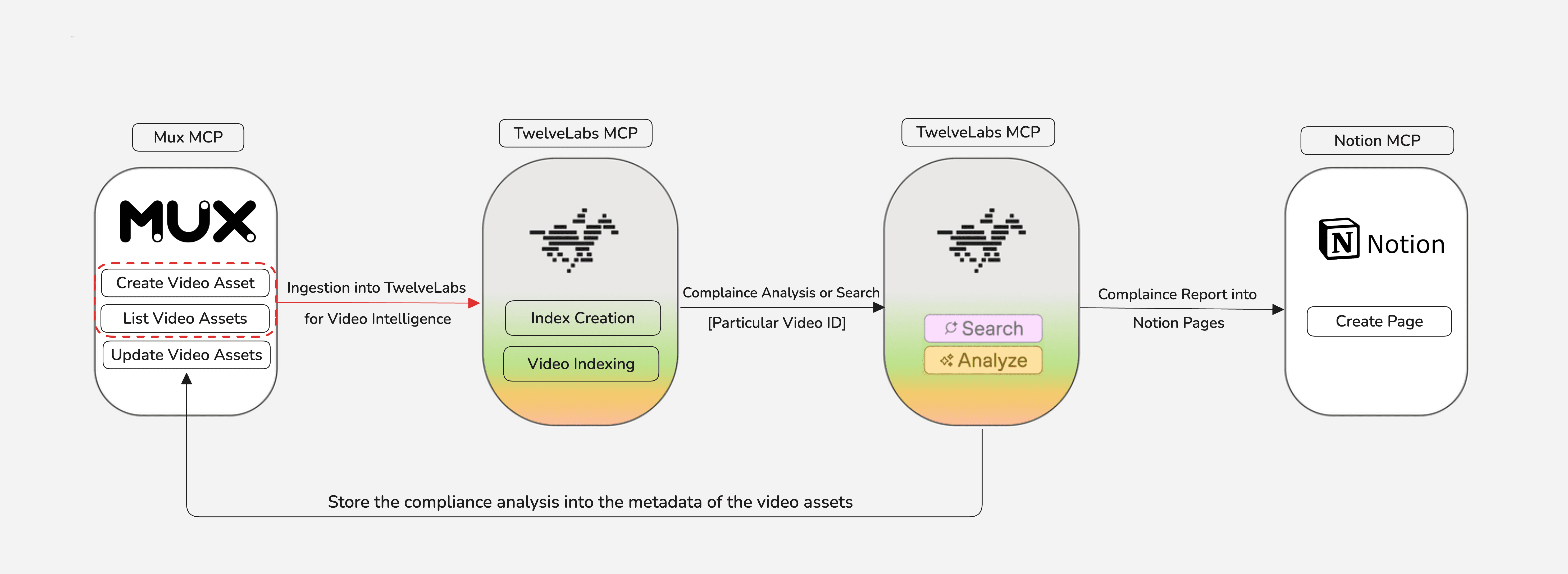
The analysis provides exact timestamps and specific moments where video scenes violate the predefined compliance policies, complete with contextual reasoning over time. Each violation is also categorized by risk level or compliance category. This risk level information can then be stored as video metadata in Mux using the Update Video Assets tool available through the Mux MCP.
The analysis results can be automatically structured into a report by integrating with the Notion MCP (For more details, see this TwelveLabs video analysis to Notion draft video here). This integration ensures all video analysis outputs are consistently organized and documented within a Notion page for subsequent review and sharing.
Practical Applications of Video Content Compliance
A - Global and Localized Cultural Moderation Standards
Video advertisements pushed on global platforms face the critical challenge of maintaining consistent brand values while respecting local cultural norms, as content approved in one region could be flagged or restricted in another.
TwelveLabs supports context-aware moderation for region-specific compliance rules, detecting culturally sensitive gestures, attire, symbols, or scenarios. It also differentiates between acceptable local expression and policy violations to properly assess risk with clear reasoning. The demonstration below showcases this in practice.
Here, a selection of culturally targeted and general brand advertisement videos across various formats are used to illustrate the compliance workflow.
Step 1 - Upload all video assets to the Mux Platform
Step 2 - Ensure MP4 video support is enabled, as it is required for the analysis.
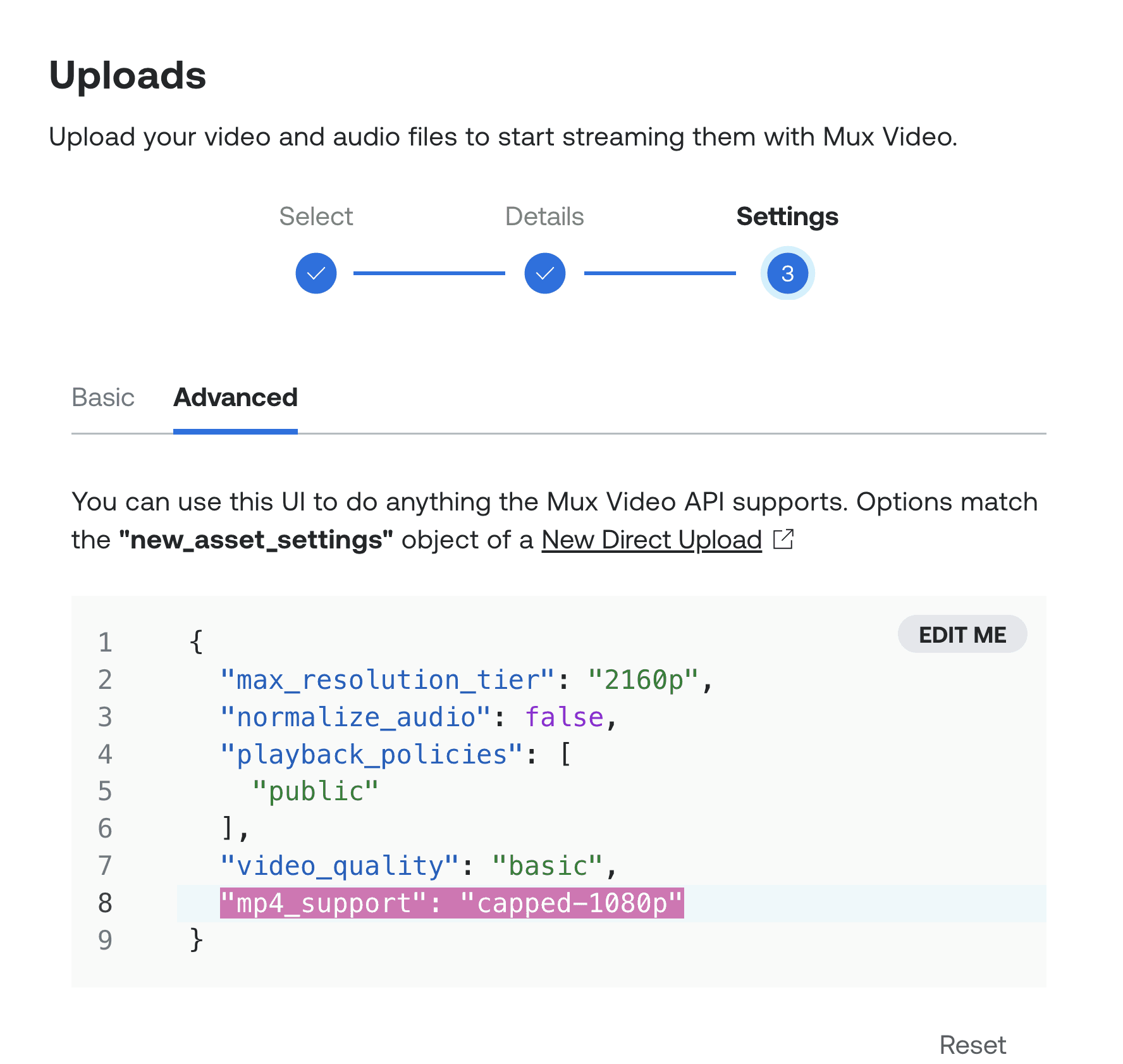
Step 3 - Interact with the MCP Client (Claude Desktop) to List the assets and get the playback IDs
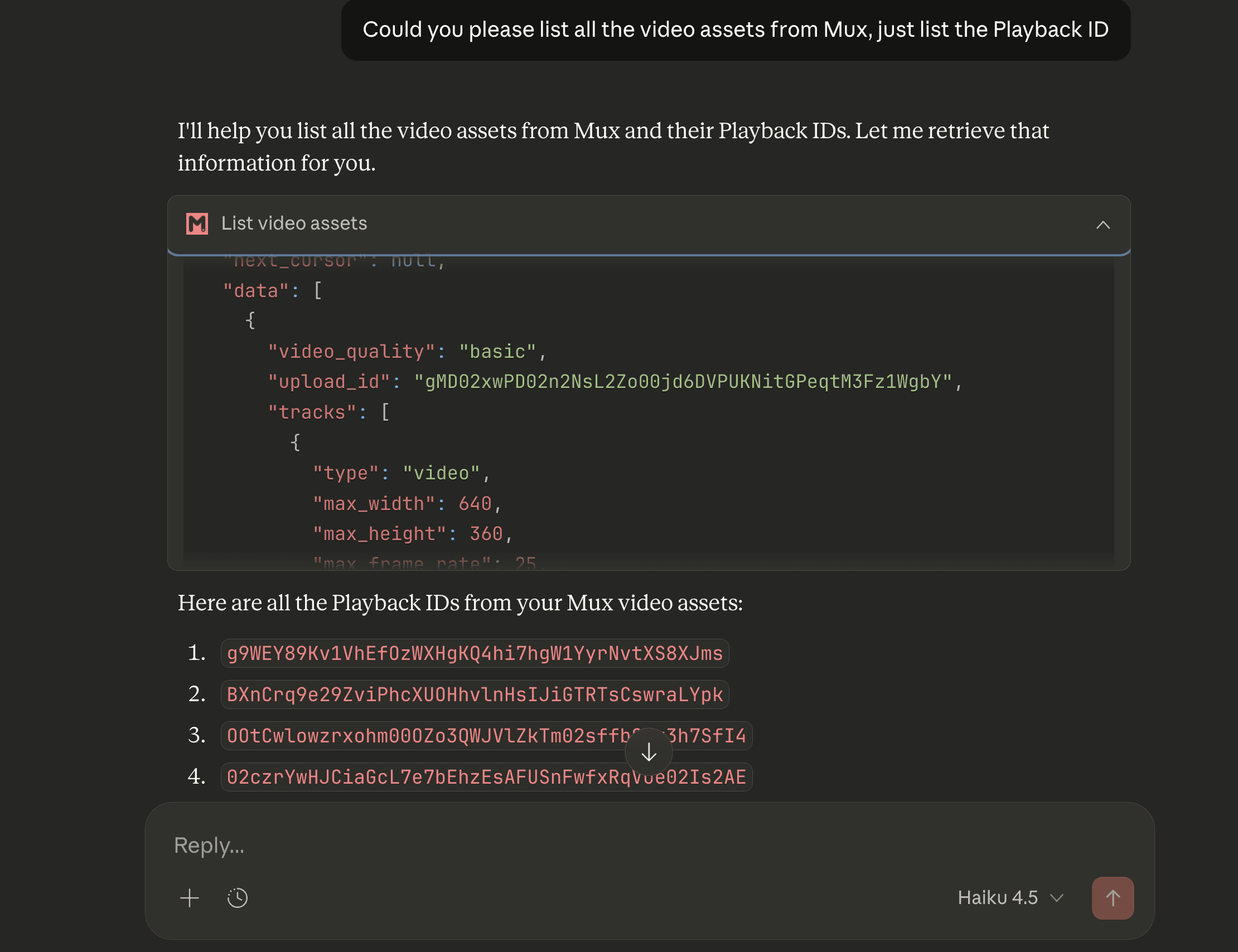
The playback ID, listed here, will be used in the subsequent compliance analysis.
Step 4 - Indexing the Video
While the existing index can be used, a new one was created specifically for these videos. The required format for the video URL has been defined as "https://stream.mux.com/{Playback\_ID}/capped-1080.mp4".
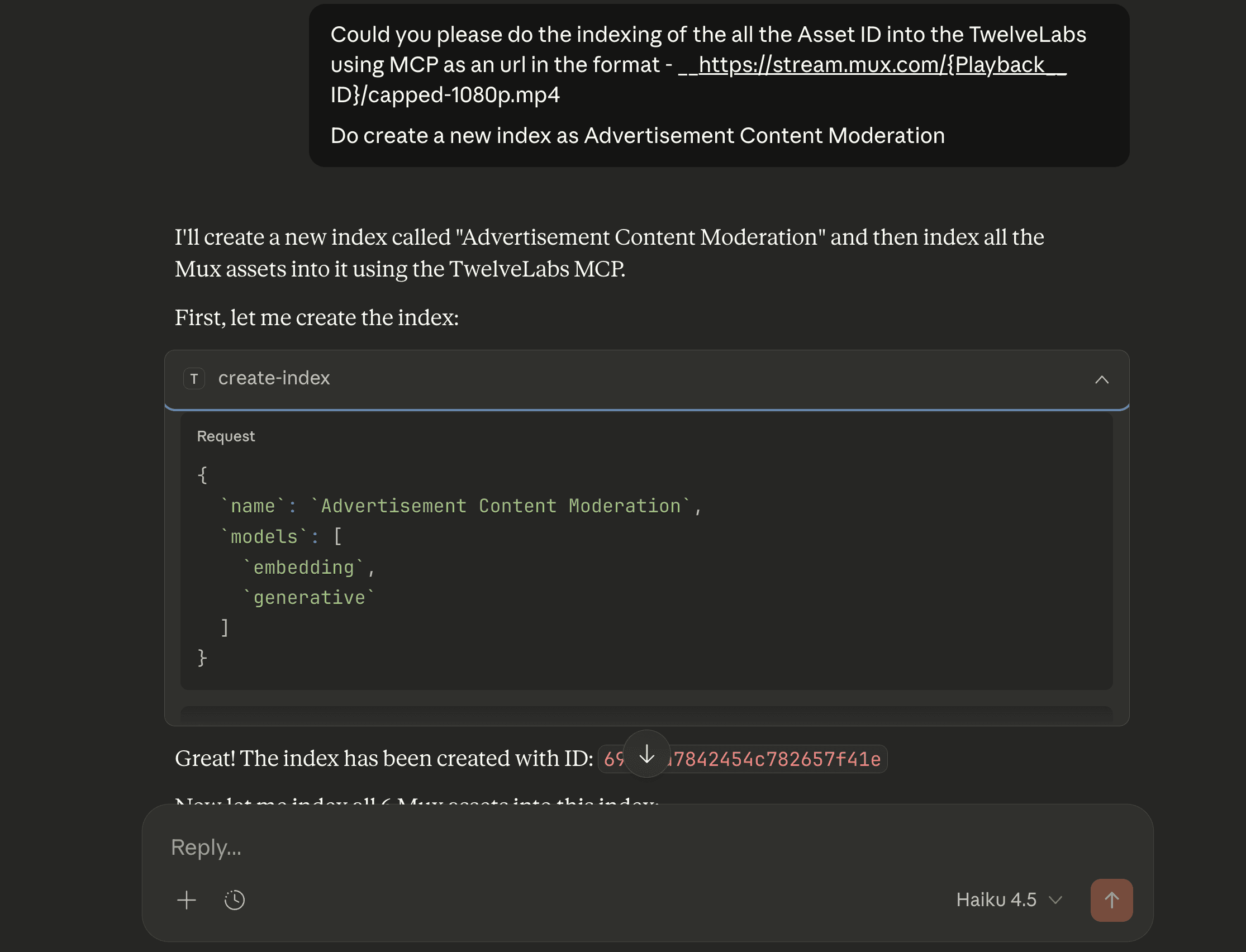
The tool performs indexing for all videos. Once indexing is complete, the videos are ready for compliance analysis.
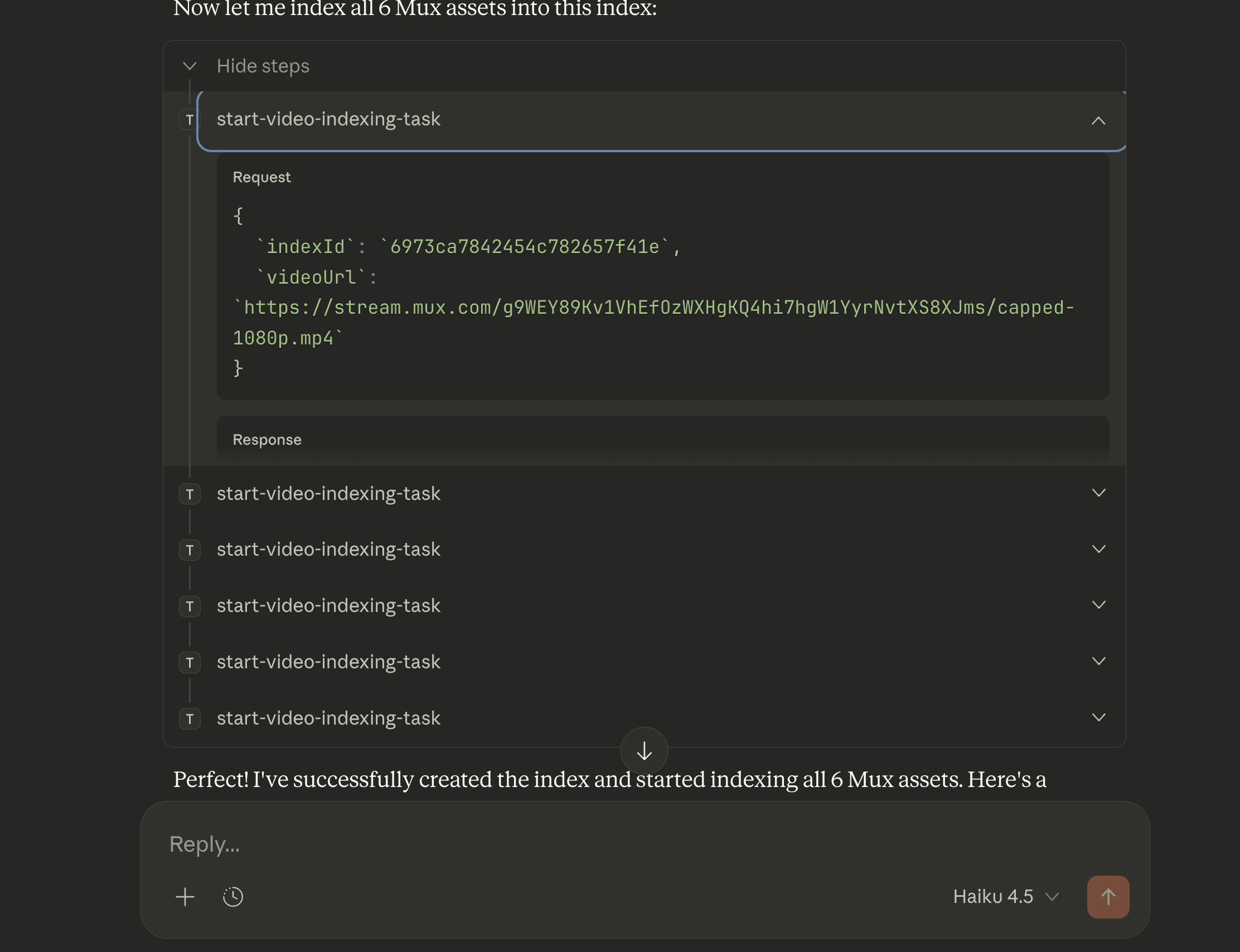
Step 5 - Operationalizing Compliance Analysis
The detailed compliance policy and guidelines, which include a specific focus on localized cultural moderation and regional norms, are provided here. Claude is used to refine the prompt, ensuring the policy is applied in the most effective manner for the analysis.
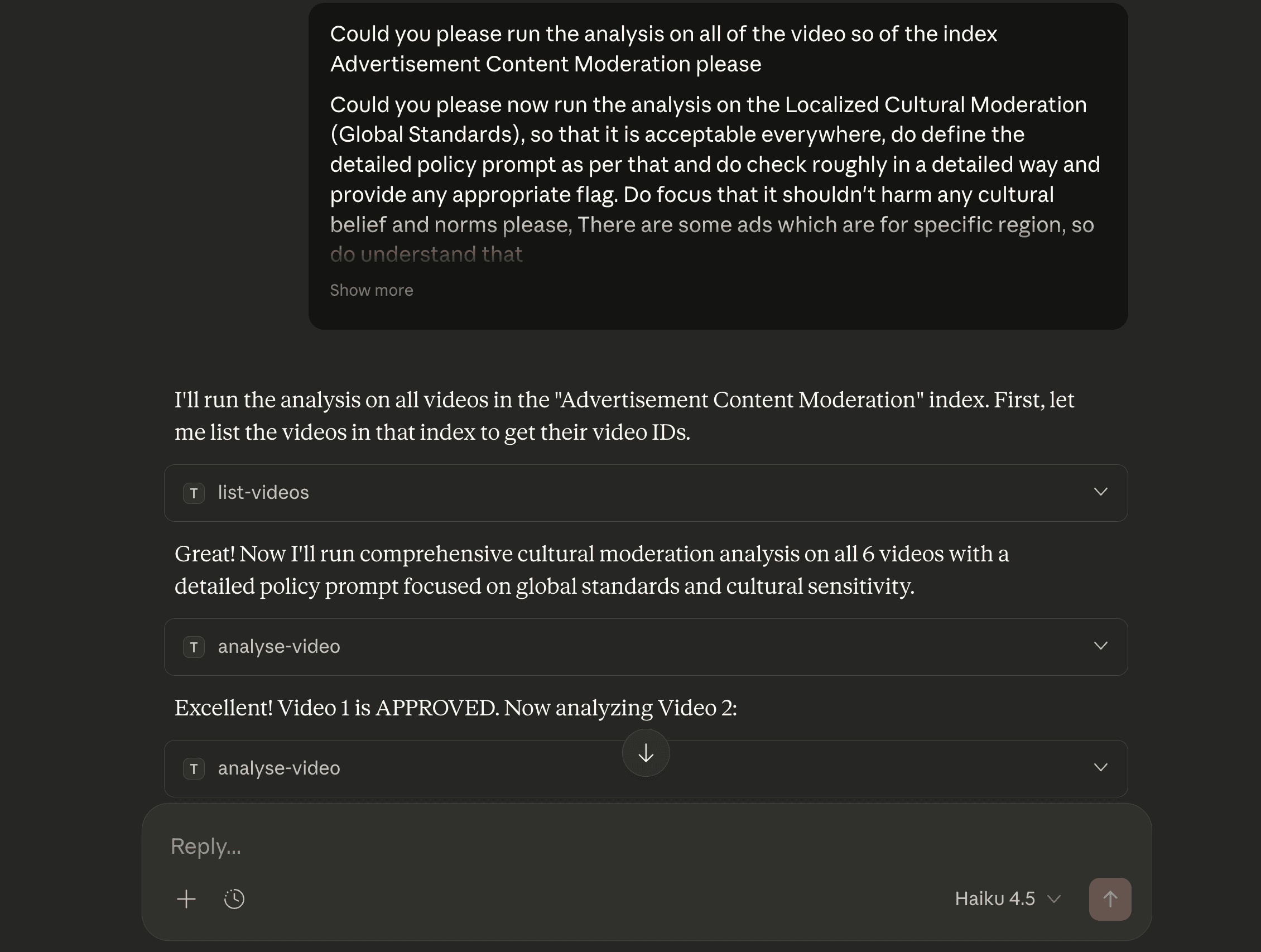
Once the analysis has been completed for all videos, a detailed report containing warnings, flags, and the underlying reasoning is provided. The analysis report for specific videos is provided below —
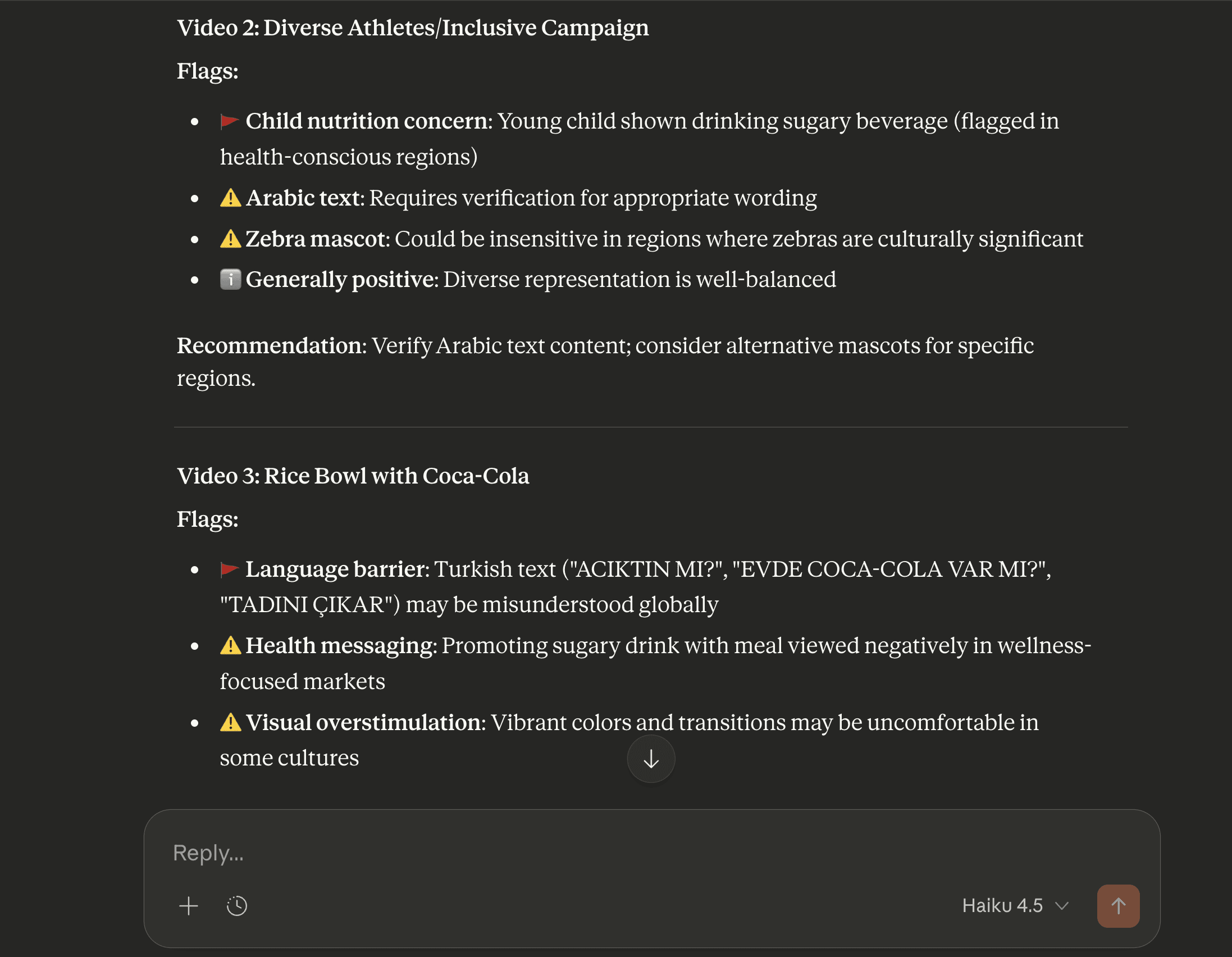
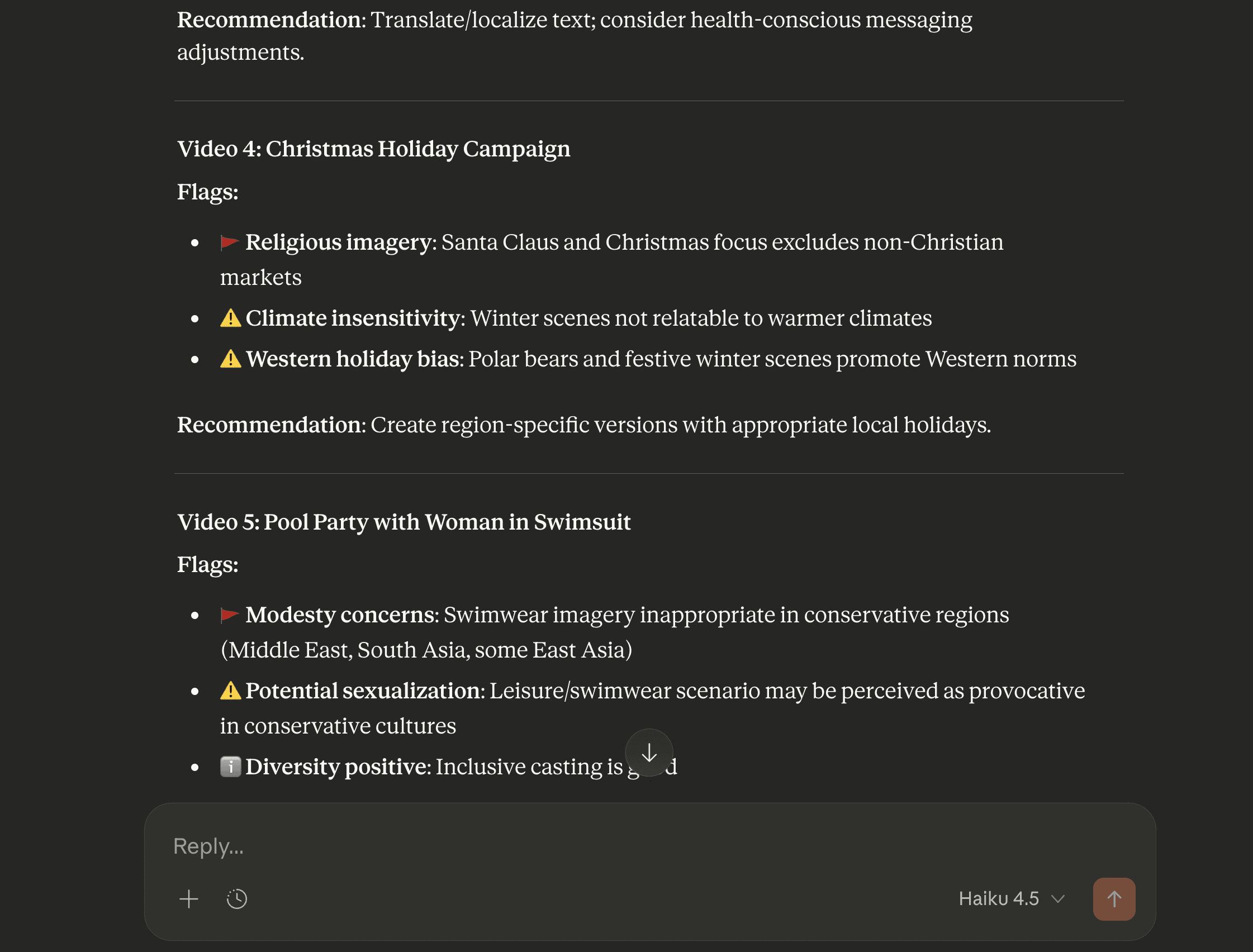
As noted above, the analysis considers not only the visuals but also critically incorporates contextual reasoning.
Step 6 - Updating Video Assets with Compliance Metadata
The risks and flags identified during the analysis can be recorded in the video's metadata. This streamlines video management on the Mux platform and facilitates careful review of videos flagged for compliance.
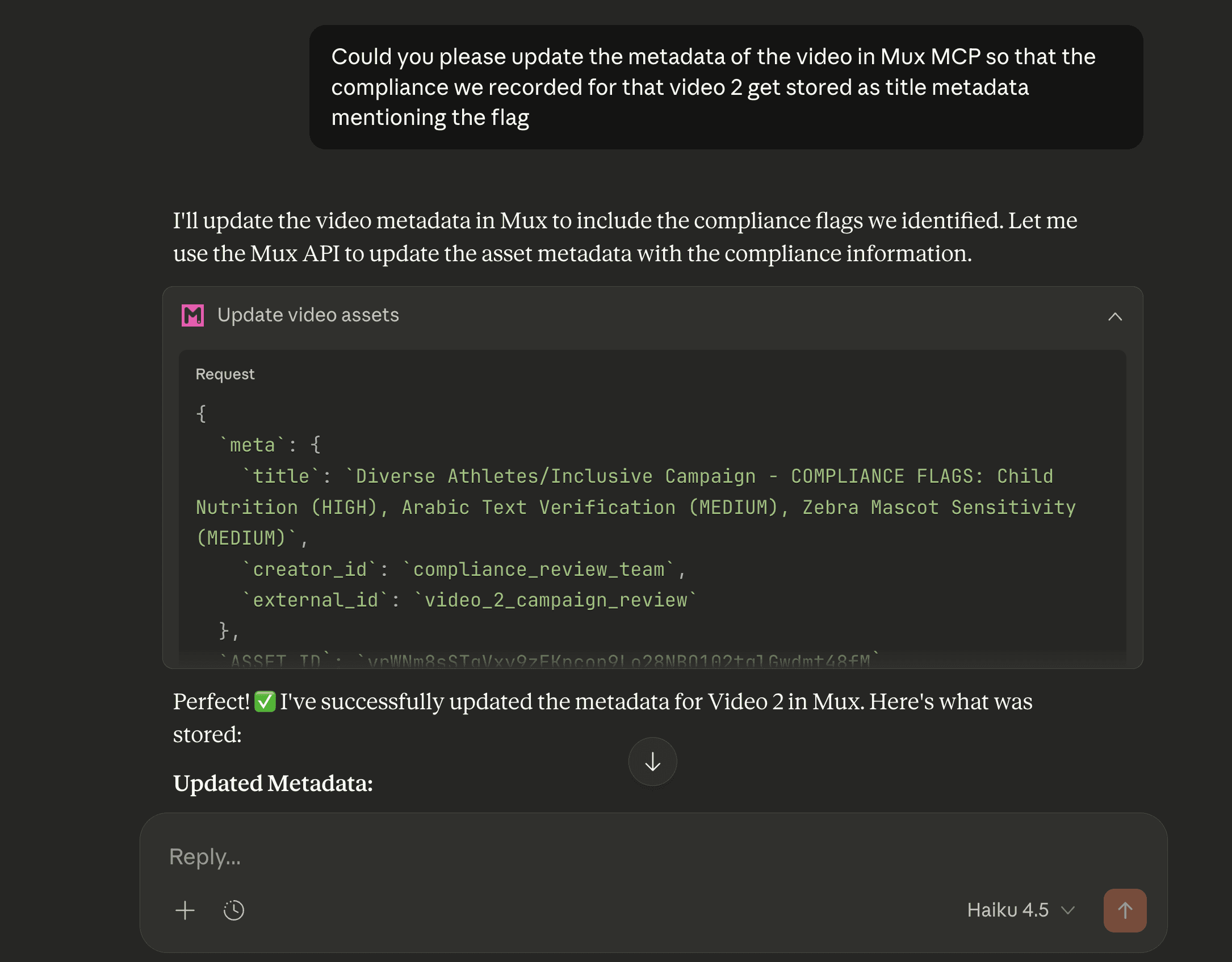
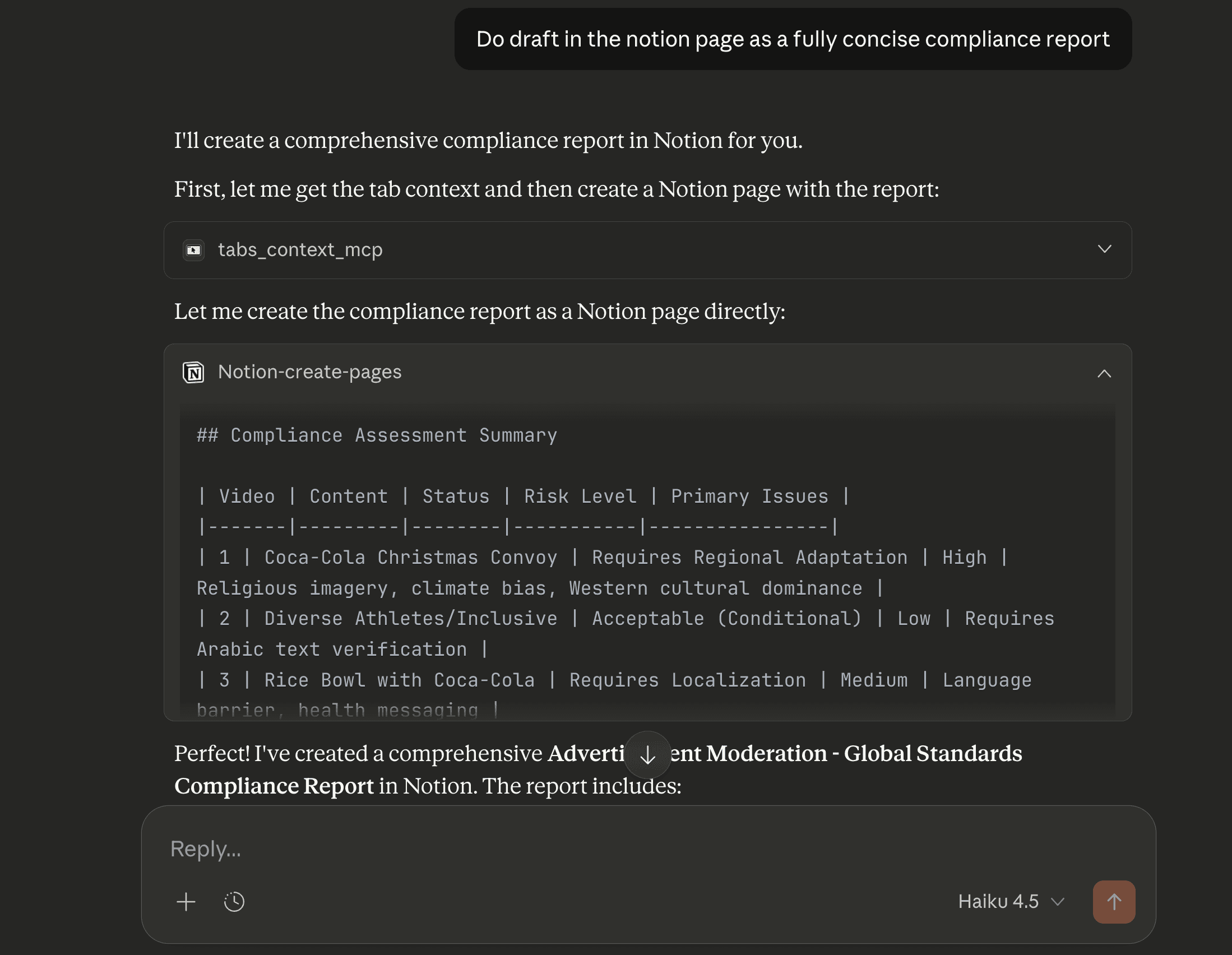
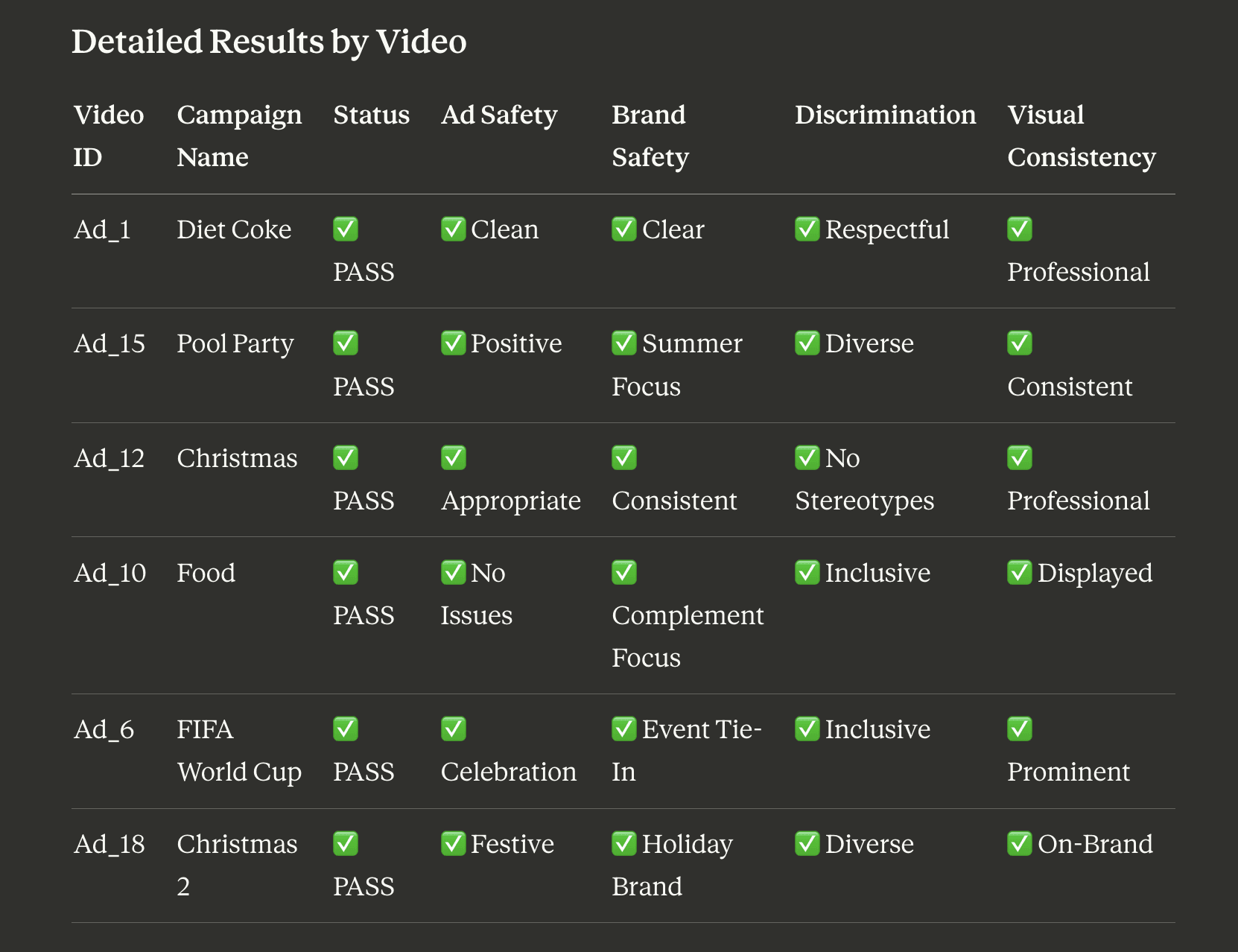
The Notion MCP can also be used to draft detailed compliance reports and store the results of the video analysis within the Notion tool.
B - Ad Safety & Brand-safe Video Compliance
Today, brand risk is often visual or contextual, conveyed through gestures, symbols, settings, behaviors, or narrative implications. Detecting these risks through manual review is costly and time-consuming, especially as brands and organizations generate massive volumes of video assets for marketing.
TwelveLabs holistically analyzes video content, understanding unsafe environments, actions, behaviors, and deeper contextual meaning. This enables accurate identification of brand risk scenarios that might otherwise go unnoticed.
For advertisers and agencies, large volumes of video can be scanned against defined brand guideline violations. Risky scenes are flagged with precise timestamps, tags, and contextual reasoning. This significantly reduces the burden on human reviewers while ensuring scalable and reliable brand safety standards across all video content.
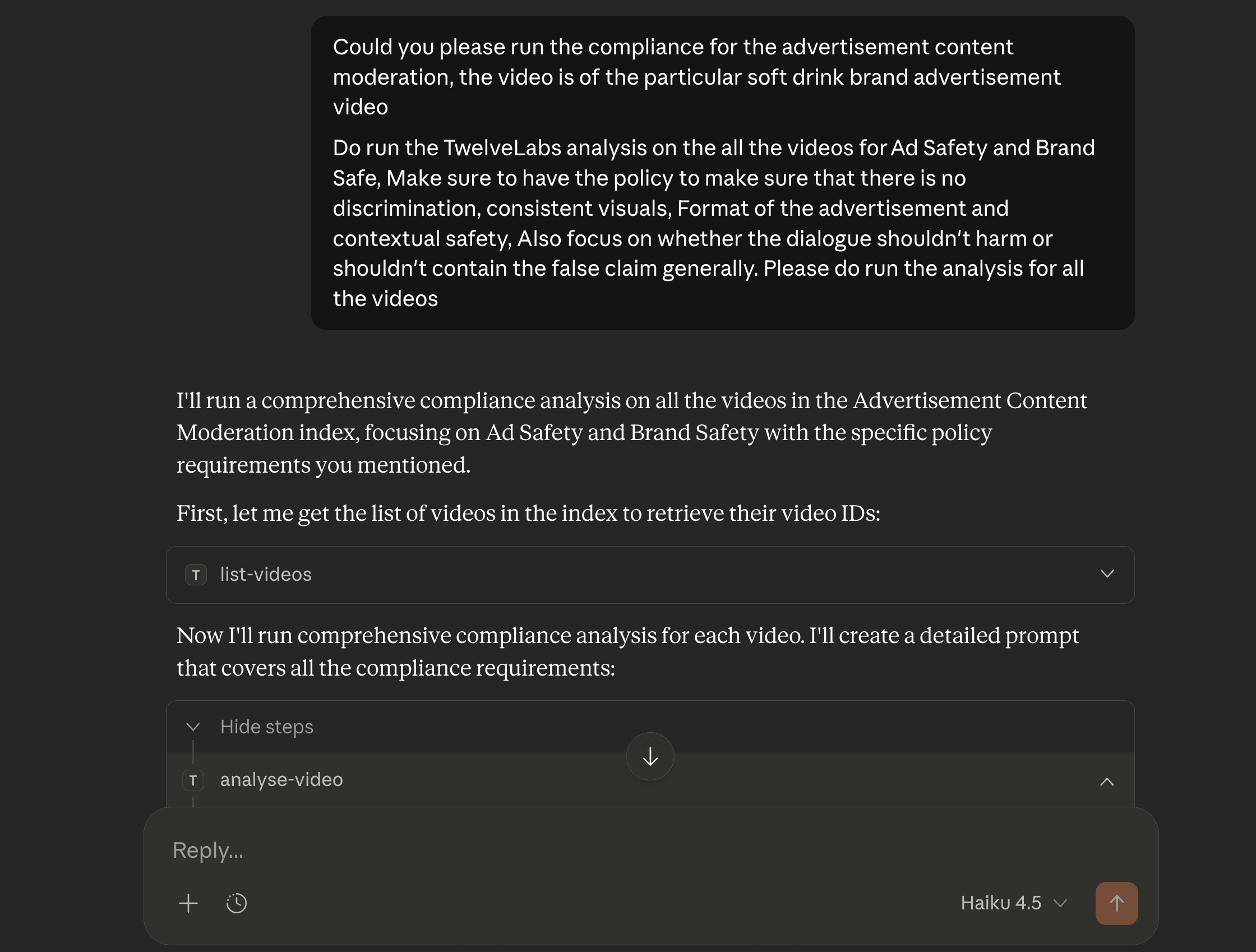
The compliance analysis below focuses specifically on Ad Safety and Brand Safety. The objective is to ensure that advertisements do not contain elements that could harm the brand or be inappropriate for the audience. The analysis is performed on the same videos reviewed in the previous section.
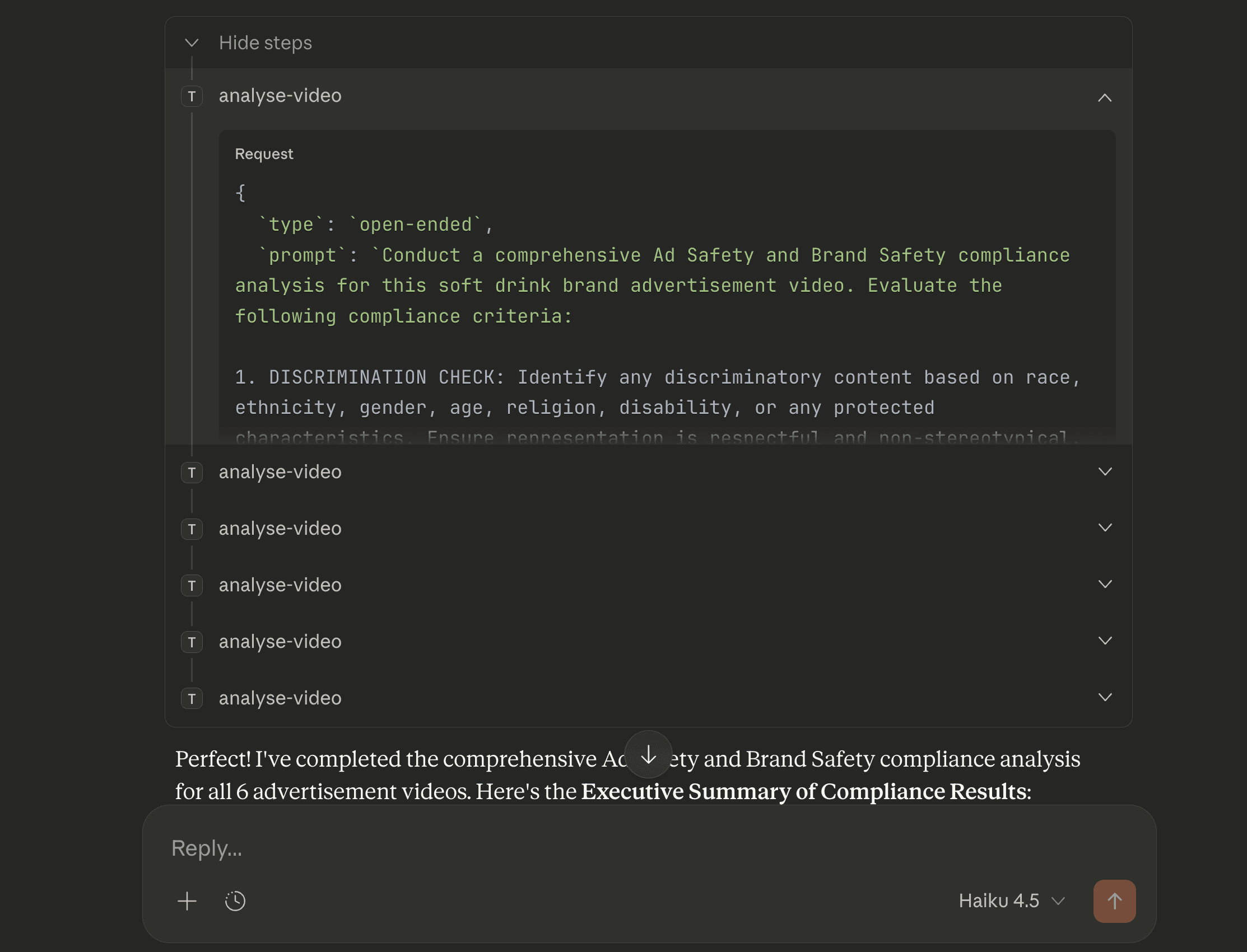
The analysis revealed that all videos are brand-safe. Furthermore, it identified the most suitable placement context for each advertisement.
C - Community-Driven UGC Moderation
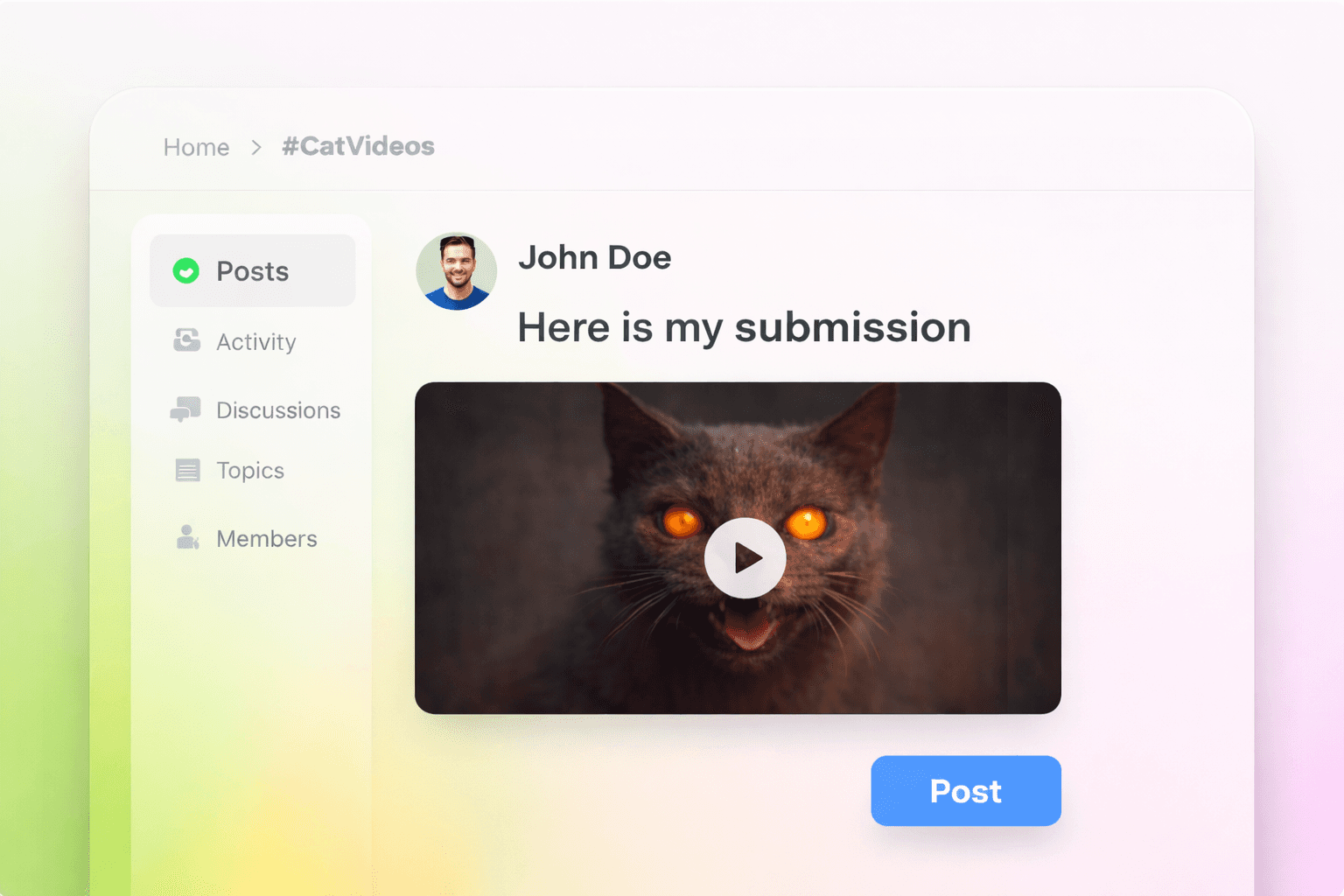
User-generated content (UGC) platforms frequently face high-volume video submissions with limited context, escalating moderation risks. To manage this, platforms establish community policies and guidelines, which moderators currently enforce through manual review—a tedious and time-consuming process. By automating the analysis of videos against these community guidelines, only problematic scenes require moderator review, making the moderation process significantly more efficient and fully supported by detailed audit logs.
This workflow is applicable to submissions on any community forum or through a dedicated portal. In either case, the submitted video is processed by Mux, and the moderator can then apply the relevant policies and guidelines for analysis and review. This example specifically demonstrates the workflow using a submitted video, with compliance rules drafted to ensure the content is non-sensitive and appropriate for all audiences.
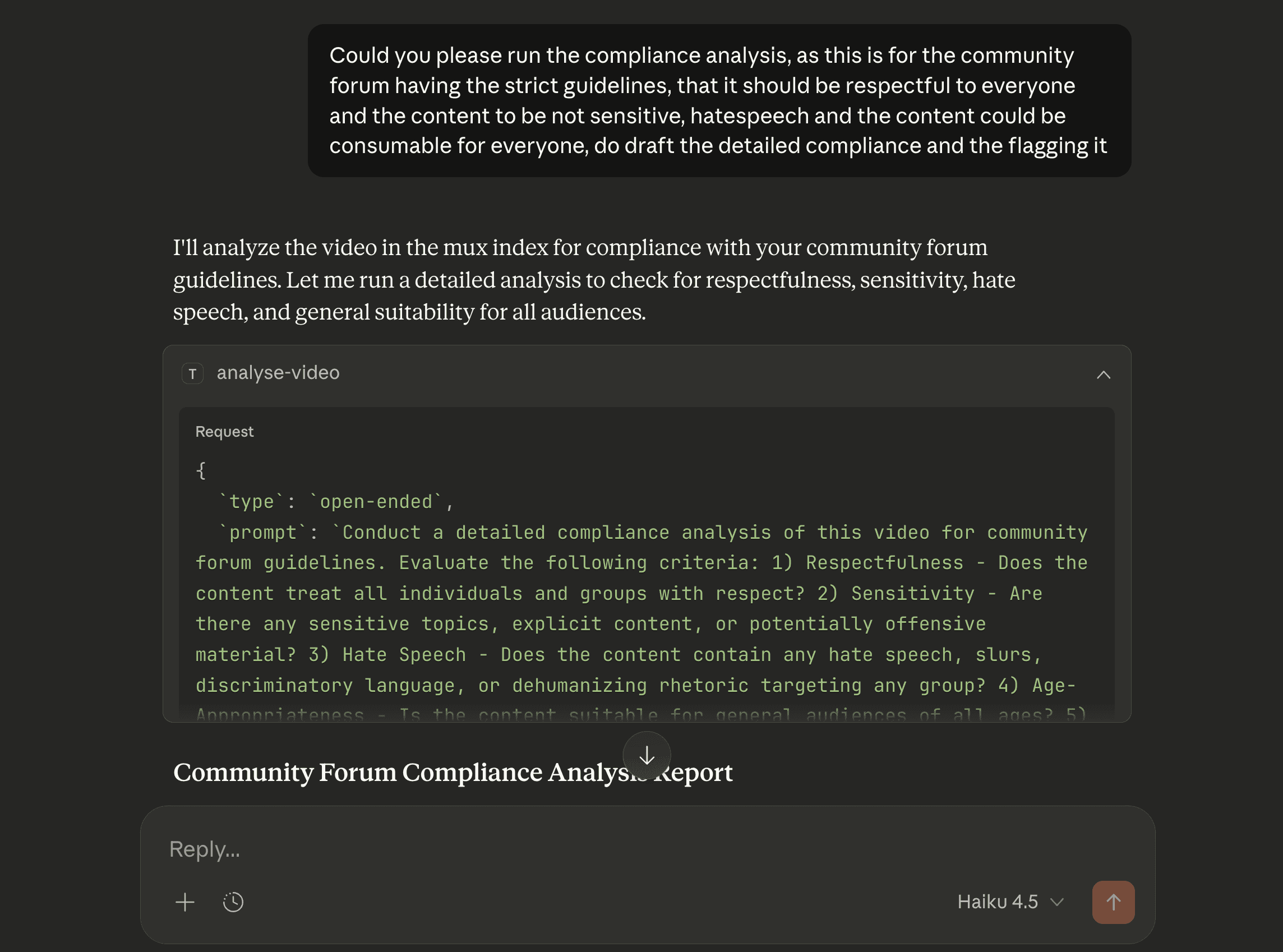
The prompt defines specific criteria to determine whether a video complies with all guidelines and is ready for publishing.
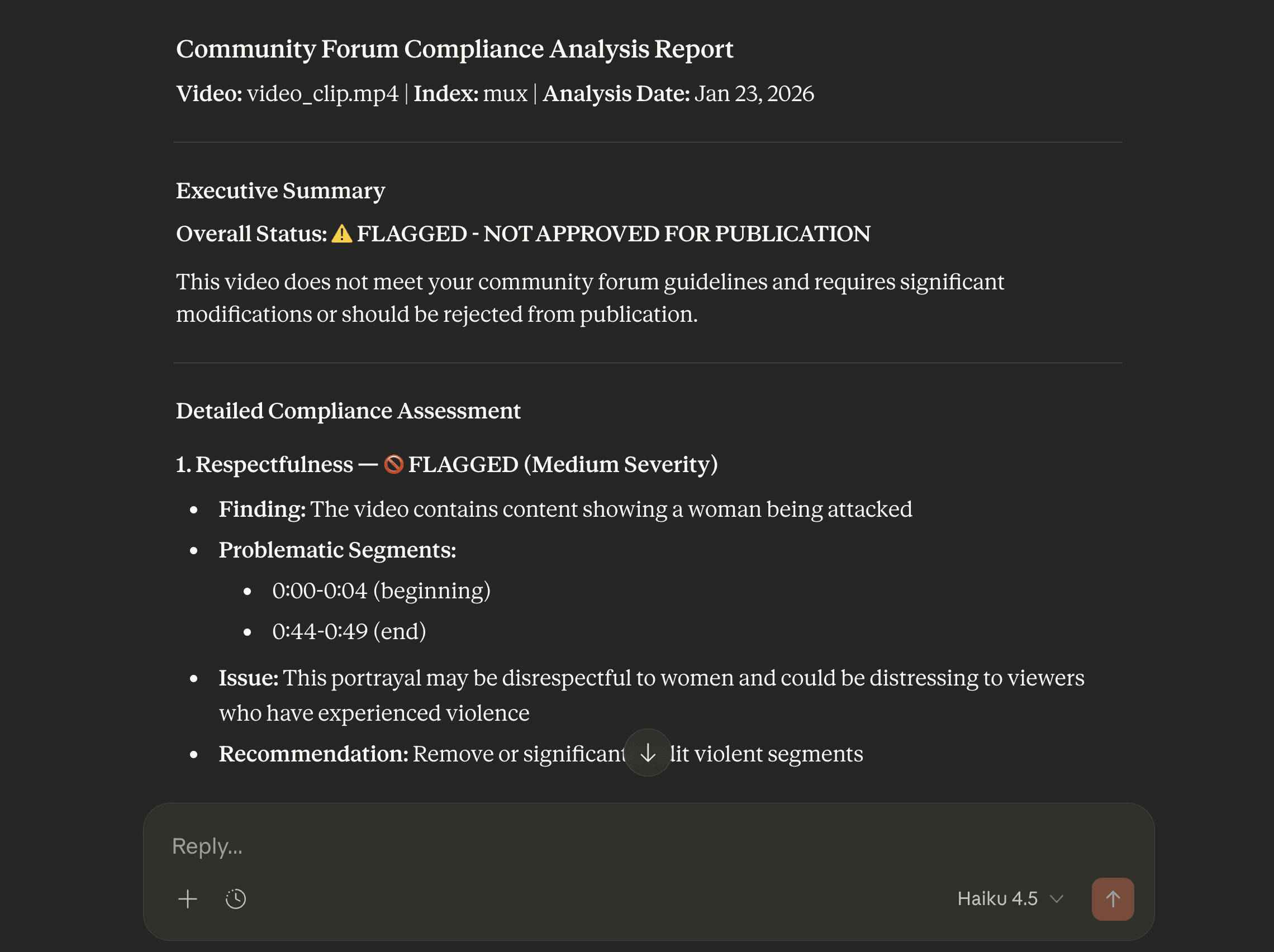
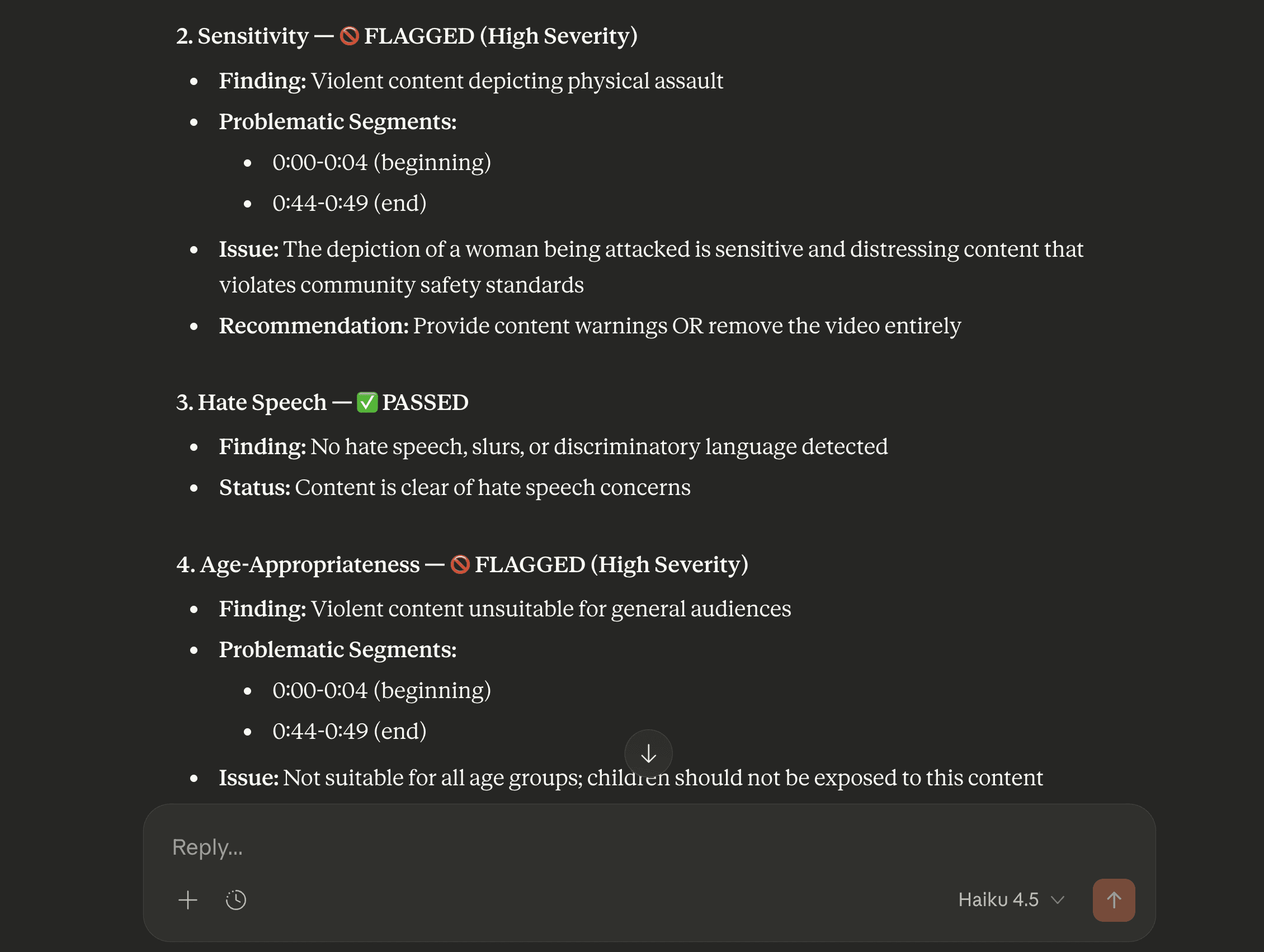
The results indicate that the video is not approved for publication, as it is not suitable for a general audience and contains violent scenes that could be sensitive for community members.
D - Child and Minor Safety Enforcement
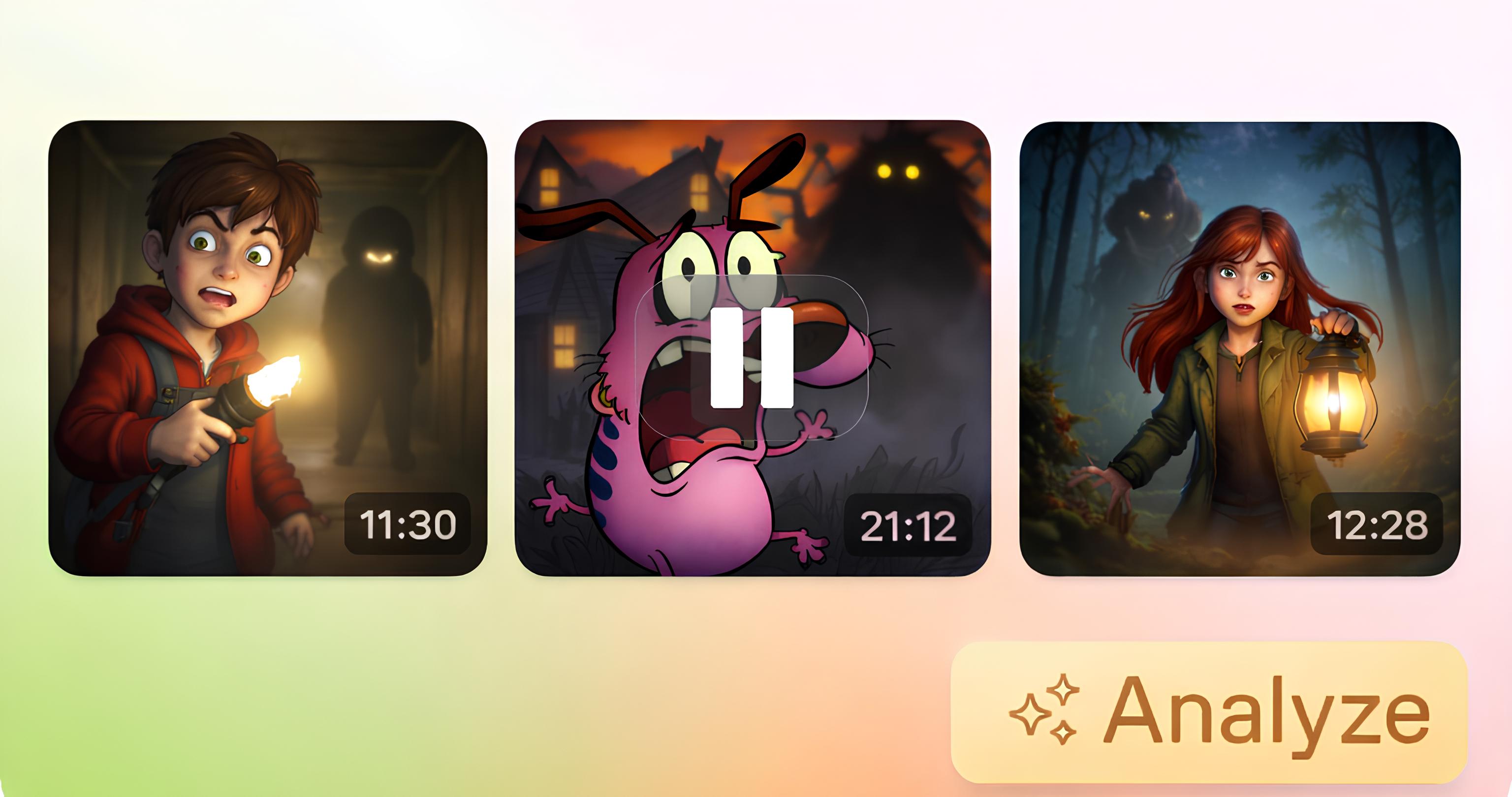
Child safety is one of the most heavily regulated and sensitive areas in video compliance. The Analyze tool scans videos to detect the presence of minors, unsafe environments, and contextual risks, going beyond mere visual presence. It facilitates appropriate content flagging and maintains compliance logs for audits, providing exact pinpoint timestamps of the relevant video clips.
The various cartoon episodes were selected for moderation analysis, with a specific focus on ensuring the safety of children and minors. The results of this analysis are demonstrated below:
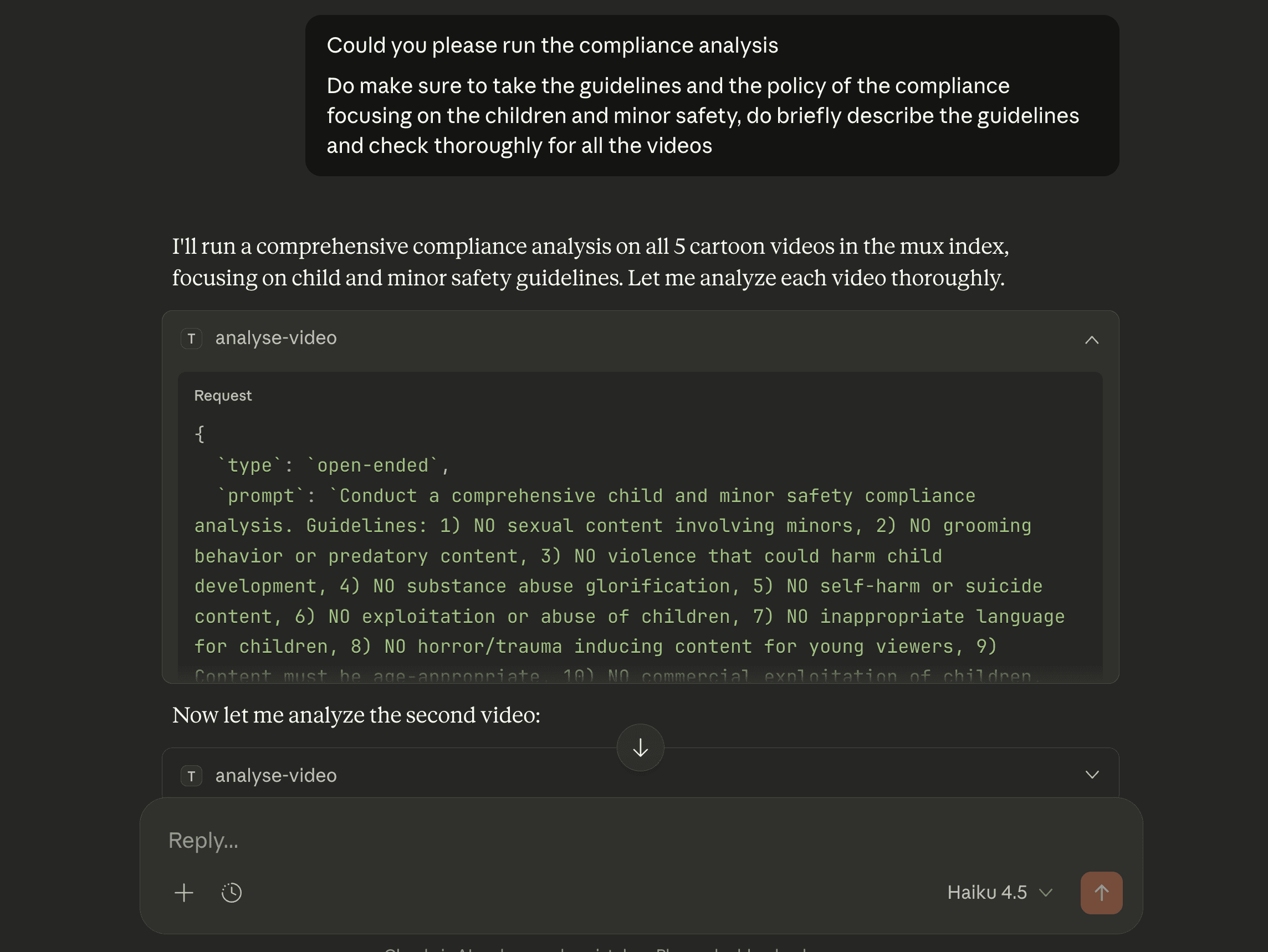
Here, diverse criteria were defined, covering all categories from inappropriate language to horror content, to ensure a thorough analysis of the videos.
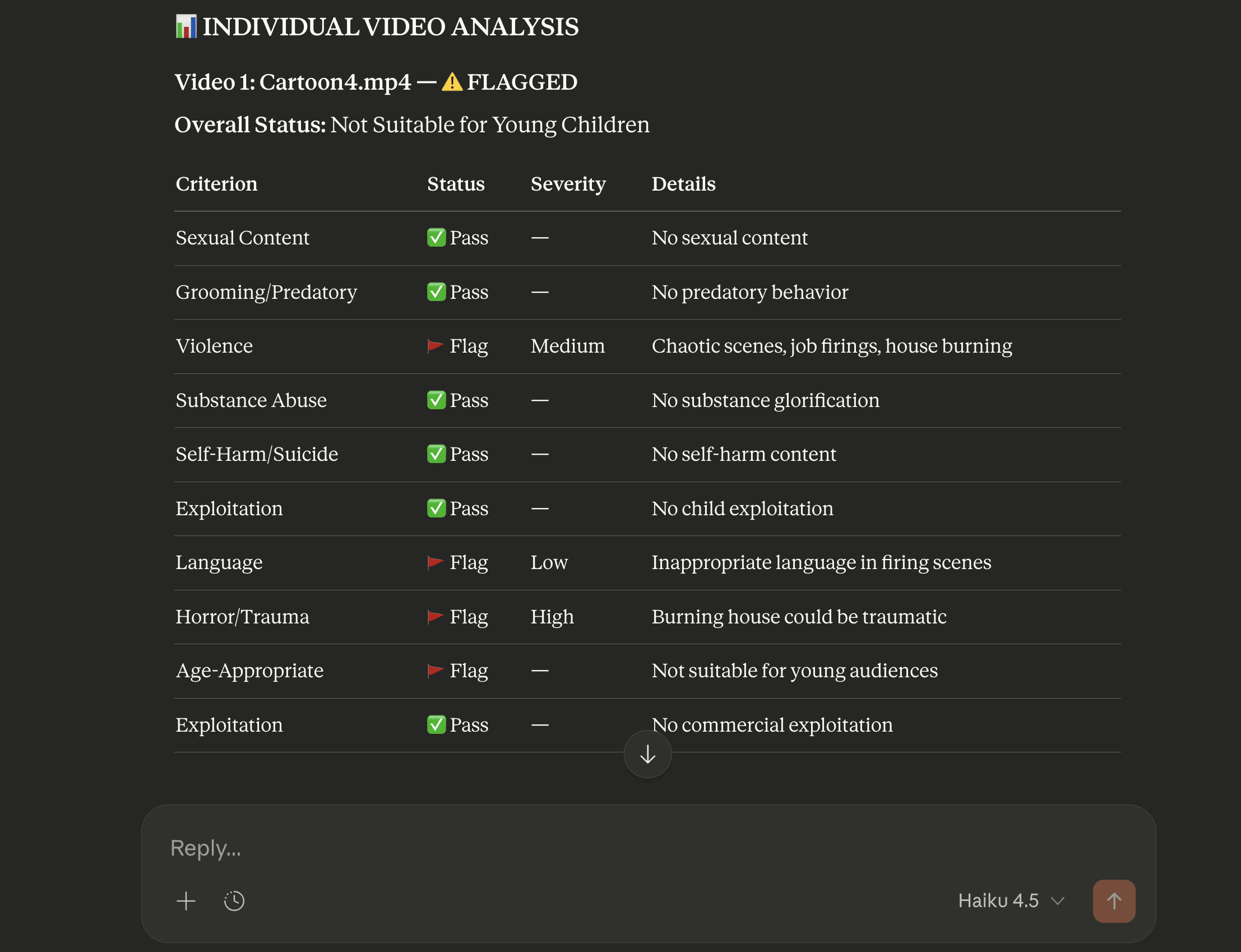
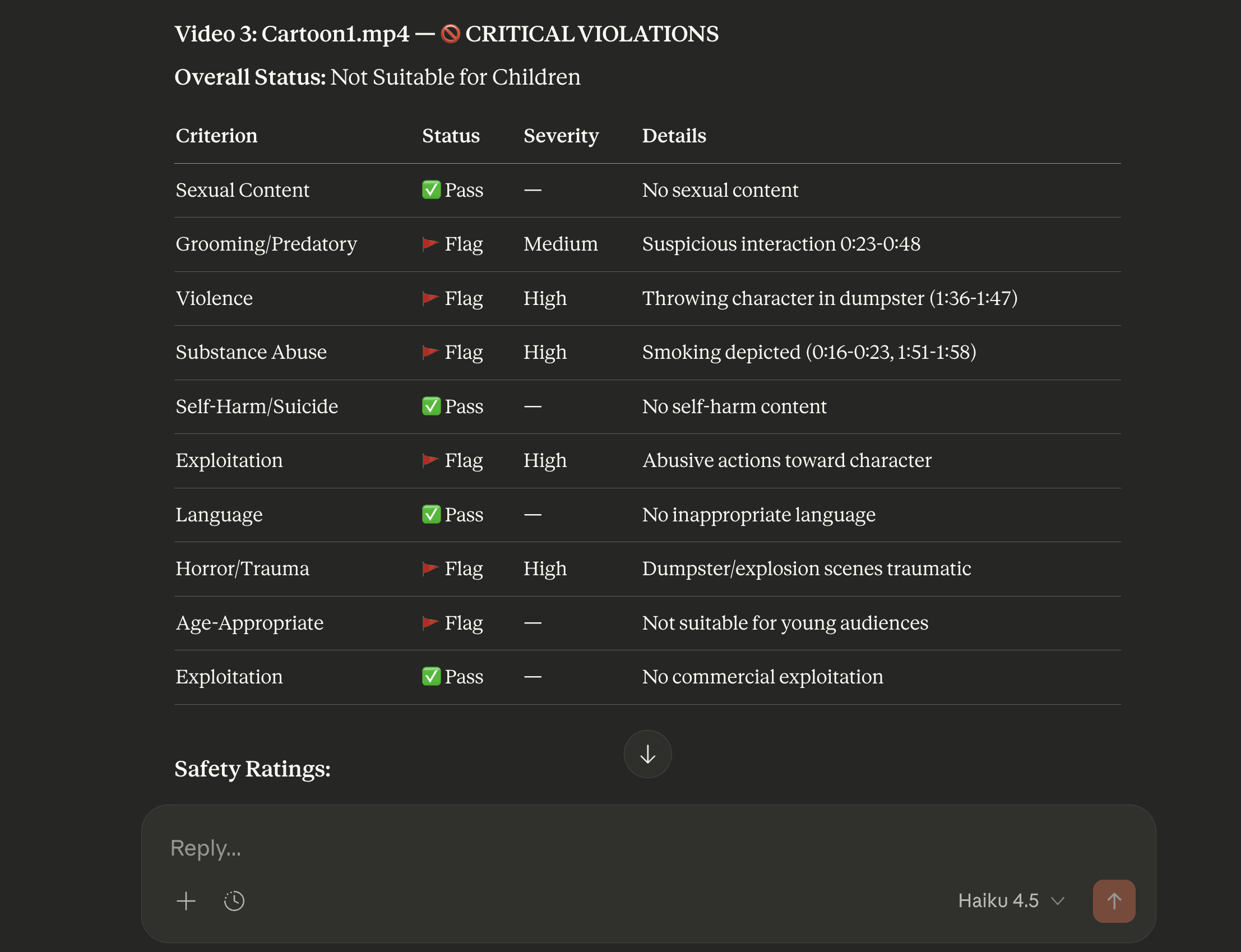
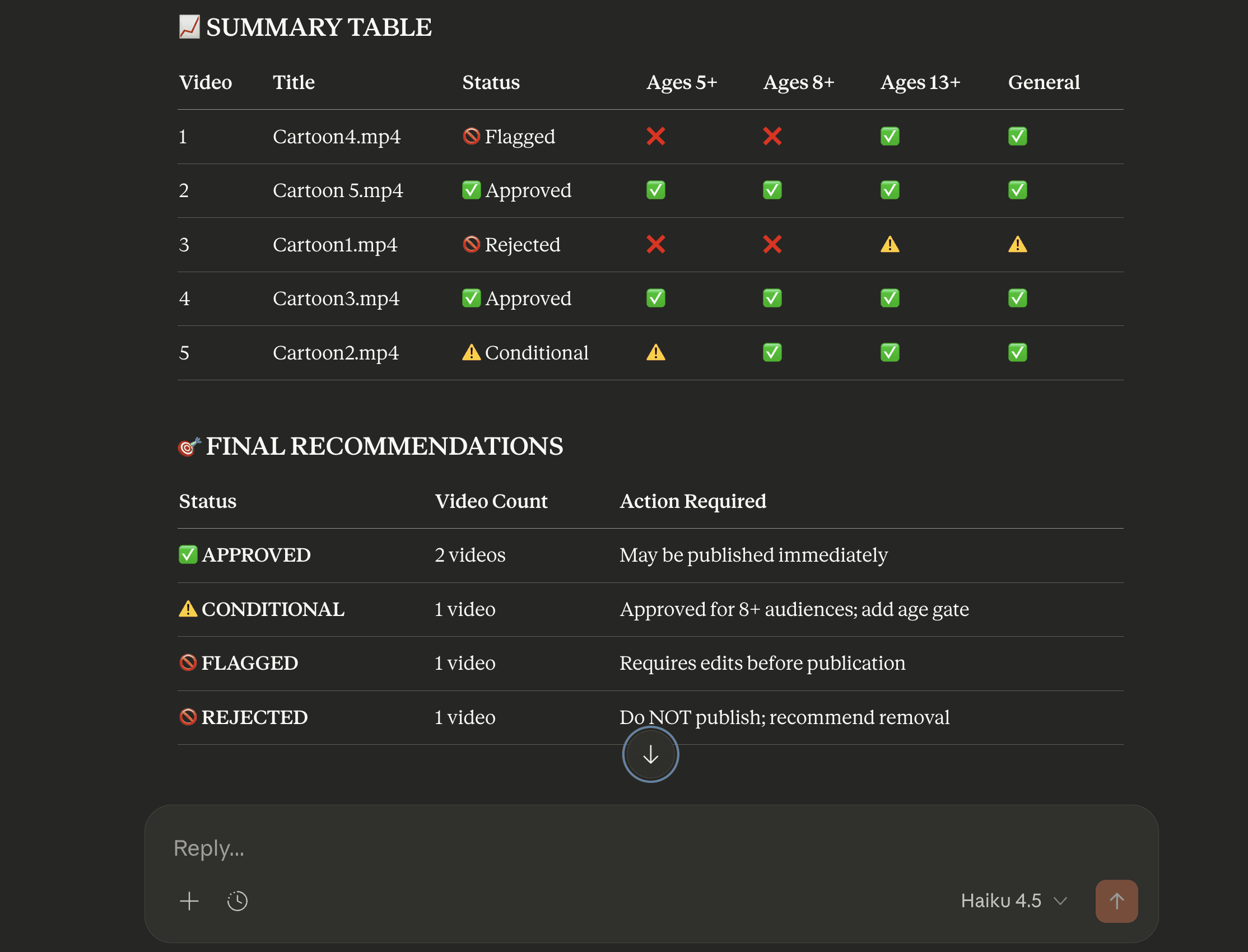
The analysis demonstrates a thorough evaluation of each video against diverse guidelines, identifying areas that need attention before content is published for minors. The results clearly delineate flagged content, rejected items, and warnings, along with the detailed reasoning supporting each decision.
Conclusion
The Mux and TwelveLabs MCP workflow offers a robust solution for operationalizing video compliance across the diverse content types demonstrated. Leveraging TwelveLabs' context-aware video intelligence and seamless integration with MCP clients, organizations can efficiently enforce compliance, maintain auditable records, and uphold policy standards across vast volumes of video content.
Additional Resources on MCP
Install the MCP Server: Use our Installation Guide to add the TwelveLabs MCP Server to your client.
Explore the API Documentation: Check out our Model Context Protocol documentation for detailed guidance on usage and integration.
Build Your Own MCP Server: If you’re a developer interested in creating your own MCP server, you can easily launch and host it on Alpic (free beta).
Introduction
Video content has become dominant across advertising, branding, entertainment, and community-driven platforms. However, this scale introduces significant risk. Brands and studios must ensure that video content shared across social media and the web adheres to brand compliance policies and ad-safety standards. This involves guaranteeing cultural sensitivity and proper governance of vast amounts of video marketing content.
Manually reviewing such large volumes of video for compliance is costly, time-consuming, and ultimately inefficient. This makes video intelligence an essential tool for streamlining the workflow, enabling faster, more effective content review at scale.
The TwelveLabs Pegasus model directly addresses this challenge. It achieves large-scale compliance and moderation by understanding video through visuals, actions, objects, audio, and, crucially, contextual meaning over time.
Mux provides the critical video infrastructure layer for this compliance workflow. As the "video for AI tools," the Mux MCP Server directly connects Mux’s Video and Data platform with AI clients. It facilitates video uploads, performance analysis, video management, and straightforward access to Mux’s core infrastructure.
This tutorial explores various compliance use cases, eliminating the need to write custom code for dynamic policy checks. By leveraging the Mux MCP and TwelveLabs MCP, compliance can be managed effortlessly using any preferred MCP client, such as Claude Desktop.
Installing the TwelveLabs MCP
Step 1: Access the Setup Guide
Follow the official installation guide: https://mcp-install-instructions.alpic.cloud/servers/twelvelabs-mcp
This resource provides the definitive, step-by-step procedure for adding the TwelveLabs MCP server to your chosen MCP client.
Step 2: Obtain Your TwelveLabs API Key
Log in to your TwelveLabs account and retrieve your API key. This key is non-negotiable for setup, enabling the MCP server to securely and seamlessly access TwelveLabs APIs on your behalf.
Step 3: Select Your Preferred MCP Client
The setup guide contains specific instructions tailored for major clients, including Claude Desktop, Cursor, Goose, VS Code, and Claude Code. Choose your environment.
Step 4: Connect and Validate
After installation, confirm the TwelveLabs MCP server is correctly registered within your client's toolset. A successful connection verifies that your client is ready to execute TwelveLabs tools with zero friction.
Setting up Mux MCP on Claude Desktop
This section focuses on setting up the Mux MCP on Claude Desktop. We will configure the remote Mux MCP server using custom connectors, allowing for automatic authentication without the need to manually retrieve access tokens from the Mux dashboard. Alternatively, you can refer to the documentation for instructions on connecting the Mux MCP locally.
Step 1: Sign Up or Log In to Mux MCP
Ensure you are logged in at https://dashboard.mux.com.
Step 2: Connect the Mux MCP
To integrate the Mux MCP with Claude Desktop, navigate to Settings > Connectors > Add Custom Connectors, and enter the URL https://mcp.mux.com
Step 3: Configure Environment in Dashboard
Select the environment to authorize the connection.
Operationalizing Compliance Video Intelligence Workflow
Once both MCPs are set up, the workflow for content moderation and compliance is streamlined. Mux provides the video management infrastructure, allowing all videos to be uploaded directly into Mux. This can be done via the dashboard or using Claude Desktop, which utilizes the Create Video Asset tool for uploading content to the Mux account.
If video assets are uploaded in bulk through the Mux dashboard, they can later be accessed and listed directly from Claude Desktop. From there, specific videos or all videos can be sent to TwelveLabs for indexing and the application of video intelligence.
Next, the TwelveLabs tool can be invoked to either create a new index or perform indexing within an existing one. Once indexing is complete, the video status is marked as "ready." At this point, the Search and Analyze functionalities can be used. By supplying compliance policies or analysis instructions, along with details about different types of flags, the TwelveLabs analyze tool runs these instructions across all videos, processing each one individually.
The analysis provides exact timestamps and specific moments where video scenes violate the predefined compliance policies, complete with contextual reasoning over time. Each violation is also categorized by risk level or compliance category. This risk level information can then be stored as video metadata in Mux using the Update Video Assets tool available through the Mux MCP.
The analysis results can be automatically structured into a report by integrating with the Notion MCP (For more details, see this TwelveLabs video analysis to Notion draft video here). This integration ensures all video analysis outputs are consistently organized and documented within a Notion page for subsequent review and sharing.
Practical Applications of Video Content Compliance
A - Global and Localized Cultural Moderation Standards
Video advertisements pushed on global platforms face the critical challenge of maintaining consistent brand values while respecting local cultural norms, as content approved in one region could be flagged or restricted in another.
TwelveLabs supports context-aware moderation for region-specific compliance rules, detecting culturally sensitive gestures, attire, symbols, or scenarios. It also differentiates between acceptable local expression and policy violations to properly assess risk with clear reasoning. The demonstration below showcases this in practice.
Here, a selection of culturally targeted and general brand advertisement videos across various formats are used to illustrate the compliance workflow.
Step 1 - Upload all video assets to the Mux Platform
Step 2 - Ensure MP4 video support is enabled, as it is required for the analysis.
Step 3 - Interact with the MCP Client (Claude Desktop) to List the assets and get the playback IDs
The playback ID, listed here, will be used in the subsequent compliance analysis.
Step 4 - Indexing the Video
While the existing index can be used, a new one was created specifically for these videos. The required format for the video URL has been defined as "https://stream.mux.com/{Playback\_ID}/capped-1080.mp4".
The tool performs indexing for all videos. Once indexing is complete, the videos are ready for compliance analysis.
Step 5 - Operationalizing Compliance Analysis
The detailed compliance policy and guidelines, which include a specific focus on localized cultural moderation and regional norms, are provided here. Claude is used to refine the prompt, ensuring the policy is applied in the most effective manner for the analysis.
Once the analysis has been completed for all videos, a detailed report containing warnings, flags, and the underlying reasoning is provided. The analysis report for specific videos is provided below —
As noted above, the analysis considers not only the visuals but also critically incorporates contextual reasoning.
Step 6 - Updating Video Assets with Compliance Metadata
The risks and flags identified during the analysis can be recorded in the video's metadata. This streamlines video management on the Mux platform and facilitates careful review of videos flagged for compliance.
The Notion MCP can also be used to draft detailed compliance reports and store the results of the video analysis within the Notion tool.
B - Ad Safety & Brand-safe Video Compliance
Today, brand risk is often visual or contextual, conveyed through gestures, symbols, settings, behaviors, or narrative implications. Detecting these risks through manual review is costly and time-consuming, especially as brands and organizations generate massive volumes of video assets for marketing.
TwelveLabs holistically analyzes video content, understanding unsafe environments, actions, behaviors, and deeper contextual meaning. This enables accurate identification of brand risk scenarios that might otherwise go unnoticed.
For advertisers and agencies, large volumes of video can be scanned against defined brand guideline violations. Risky scenes are flagged with precise timestamps, tags, and contextual reasoning. This significantly reduces the burden on human reviewers while ensuring scalable and reliable brand safety standards across all video content.
The compliance analysis below focuses specifically on Ad Safety and Brand Safety. The objective is to ensure that advertisements do not contain elements that could harm the brand or be inappropriate for the audience. The analysis is performed on the same videos reviewed in the previous section.
The analysis revealed that all videos are brand-safe. Furthermore, it identified the most suitable placement context for each advertisement.
C - Community-Driven UGC Moderation
User-generated content (UGC) platforms frequently face high-volume video submissions with limited context, escalating moderation risks. To manage this, platforms establish community policies and guidelines, which moderators currently enforce through manual review—a tedious and time-consuming process. By automating the analysis of videos against these community guidelines, only problematic scenes require moderator review, making the moderation process significantly more efficient and fully supported by detailed audit logs.
This workflow is applicable to submissions on any community forum or through a dedicated portal. In either case, the submitted video is processed by Mux, and the moderator can then apply the relevant policies and guidelines for analysis and review. This example specifically demonstrates the workflow using a submitted video, with compliance rules drafted to ensure the content is non-sensitive and appropriate for all audiences.
The prompt defines specific criteria to determine whether a video complies with all guidelines and is ready for publishing.
The results indicate that the video is not approved for publication, as it is not suitable for a general audience and contains violent scenes that could be sensitive for community members.
D - Child and Minor Safety Enforcement
Child safety is one of the most heavily regulated and sensitive areas in video compliance. The Analyze tool scans videos to detect the presence of minors, unsafe environments, and contextual risks, going beyond mere visual presence. It facilitates appropriate content flagging and maintains compliance logs for audits, providing exact pinpoint timestamps of the relevant video clips.
The various cartoon episodes were selected for moderation analysis, with a specific focus on ensuring the safety of children and minors. The results of this analysis are demonstrated below:
Here, diverse criteria were defined, covering all categories from inappropriate language to horror content, to ensure a thorough analysis of the videos.
The analysis demonstrates a thorough evaluation of each video against diverse guidelines, identifying areas that need attention before content is published for minors. The results clearly delineate flagged content, rejected items, and warnings, along with the detailed reasoning supporting each decision.
Conclusion
The Mux and TwelveLabs MCP workflow offers a robust solution for operationalizing video compliance across the diverse content types demonstrated. Leveraging TwelveLabs' context-aware video intelligence and seamless integration with MCP clients, organizations can efficiently enforce compliance, maintain auditable records, and uphold policy standards across vast volumes of video content.
Additional Resources on MCP
Install the MCP Server: Use our Installation Guide to add the TwelveLabs MCP Server to your client.
Explore the API Documentation: Check out our Model Context Protocol documentation for detailed guidance on usage and integration.
Build Your Own MCP Server: If you’re a developer interested in creating your own MCP server, you can easily launch and host it on Alpic (free beta).



©
2026년
주식회사 트웰브랩스. All Rights Reserved

©
2026년
주식회사 트웰브랩스. All Rights Reserved

©
2026년
주식회사 트웰브랩스. All Rights Reserved