" height="1.90314px" id="wtDTm6bEW" transform="translate(26.225 0)" width="2.4723000000000006px"/><path d="M 0.557 0 L 1.438 0 C 1.746 0 1.995 0.25 1.995 0.559 L 1.995 1.344 C 1.995 1.653 1.746 1.903 1.438 1.903 L 0.557 1.903 C 0.25 1.903 0 1.653 0 1.344 L 0 0.559 C 0 0.25 0.25 0 0.557 0 Z" fill="rgb(29, 28, 27)" height="1.9031500000000001px" id="GnmDnNra_" transform="translate(36.408 2.728)" width="1.9953000000000003px"/><path d="M 6.224 0 L 0.558 0 C 0.25 0 0 0.25 0 0.559 L 0 1.344 C 0 1.653 0.25 1.903 0.558 1.903 L 6.224 1.903 C 6.531 1.903 6.781 1.653 6.781 1.344 L 6.781 0.559 C 6.781 0.25 6.531 0 6.224 0 Z" fill="rgb(29, 28, 27)" height="1.9031500000000001px" id="hKTQ3dbw4" transform="translate(34.261 5.456)" width="6.781100000000002px"/><path d="M 6.955 0 L 0.558 0 C 0.25 0 0 0.25 0 0.559 L 0 1.344 C 0 1.653 0.25 1.903 0.558 1.903 L 6.955 1.903 C 7.263 1.903 7.513 1.653 7.513 1.344 L 7.513 0.559 C 7.513 0.25 7.263 0 6.955 0 Z" fill="rgb(29, 28, 27)" height="1.9031500000000001px" id="G1Zzk9CUU" transform="translate(28.298 8.243)" width="7.513100000000001px"/><path d="M 7.123 0 L 0.558 0 C 0.25 0 0 0.25 0 0.559 L 0 1.344 C 0 1.653 0.25 1.903 0.558 1.903 L 7.123 1.903 C 7.431 1.903 7.681 1.653 7.681 1.344 L 7.681 0.559 C 7.681 0.25 7.431 0 7.123 0 Z" fill="rgb(29, 28, 27)" height="1.9030999999999985px" id="fm7cHxIfJ" transform="translate(0 10.972)" width="7.68067px"/><path d="M 13.447 0 L 0.558 0 C 0.25 0 0 0.25 0 0.559 L 0 1.344 C 0 1.653 0.25 1.903 0.558 1.903 L 13.447 1.903 C 13.755 1.903 14.004 1.653 14.004 1.344 L 14.004 0.559 C 14.004 0.25 13.755 0 13.447 0 Z" fill="rgb(29, 28, 27)" height="1.9030999999999985px" id="LowSwDrtg" transform="translate(9.552 10.972)" width="14.0044px"/><path d="M 0.558 0 L 8.212 0 C 8.52 0 8.77 0.25 8.77 0.559 L 8.77 1.344 C 8.77 1.653 8.52 1.903 8.212 1.903 L 0.558 1.903 C 0.25 1.903 0 1.653 0 1.344 L 0 0.559 C 0 0.25 0.25 0 0.558 0 Z" fill="rgb(29, 28, 27)" height="1.9030999999999985px" id="xRiKc2od7" transform="translate(27.041 10.972)" width="8.769900000000003px"/><path d="M 0.557 0 L 5.4 0 C 5.708 0 5.958 0.25 5.958 0.559 L 5.958 1.344 C 5.958 1.653 5.708 1.903 5.4 1.903 L 0.557 1.903 C 0.25 1.903 0 1.653 0 1.344 L 0 0.559 C 0 0.25 0.25 0 0.557 0 Z" fill="rgb(29, 28, 27)" height="1.9031500000000001px" id="JWdNVicde" transform="translate(36.796 8.243)" width="5.957599999999999px"/><path d="M 1.438 0 L 0.558 0 C 0.25 0 0 0.25 0 0.559 L 0 1.344 C 0 1.653 0.25 1.903 0.558 1.903 L 1.438 1.903 C 1.746 1.903 1.995 1.653 1.995 1.344 L 1.995 0.559 C 1.995 0.25 1.746 0 1.438 0 Z" fill="rgb(29, 28, 27)" height="1.9031500000000001px" id="RfFYVCT_T" transform="translate(28.717 5.456)" width="1.9953000000000003px"/><path d="M 0.558 0 L 2.895 0 C 3.203 0 3.453 0.25 3.453 0.559 L 3.453 1.406 C 3.453 1.714 3.203 1.964 2.895 1.964 L 0.558 1.964 C 0.25 1.964 0 1.714 0 1.406 L 0 0.559 C 0 0.25 0.25 0 0.558 0 Z" fill="rgb(29, 28, 27)" height="1.964299999999998px" id="dngJ6MU2p" transform="translate(16.183 24.582)" width="3.4525000000000006px"/><path d="M 1.706 0 L 0.558 0 C 0.25 0 0 0.25 0 0.559 L 0 1.406 C 0 1.714 0.25 1.964 0.558 1.964 L 1.706 1.964 C 2.014 1.964 2.263 1.714 2.263 1.406 L 2.263 0.559 C 2.263 0.25 2.014 0 1.706 0 Z" fill="rgb(29, 28, 27)" height="1.964299999999998px" id="N_fstvKmR" transform="translate(22.18 24.582)" width="2.2631999999999977px"/><path d="M 0.558 0 L 5.544 0 C 5.852 0 6.101 0.25 6.101 0.559 L 6.101 1.406 C 6.101 1.714 5.852 1.964 5.544 1.964 L 0.558 1.964 C 0.25 1.964 0 1.714 0 1.406 L 0 0.559 C 0 0.25 0.25 0 0.558 0 Z" fill="rgb(29, 28, 27)" height="1.964299999999998px" id="t55XLYcgb" transform="translate(25.486 24.582)" width="6.101399999999998px"/><path d="M 1.976 0 L 0.558 0 C 0.25 0 0 0.25 0 0.559 L 0 1.406 C 0 1.714 0.25 1.964 0.558 1.964 L 1.976 1.964 C 2.284 1.964 2.533 1.714 2.533 1.406 L 2.533 0.559 C 2.533 0.25 2.284 0 1.976 0 Z" fill="rgb(29, 28, 27)" height="1.964299999999998px" id="ZrEKTVTAe" transform="translate(28.542 21.854)" width="2.5334000000000003px"/><path d="M 0.557 0 L 1.438 0 C 1.746 0 1.995 0.25 1.995 0.559 L 1.995 1.406 C 1.995 1.714 1.746 1.964 1.438 1.964 L 0.557 1.964 C 0.25 1.964 0 1.714 0 1.406 L 0 0.559 C 0 0.25 0.25 0 0.557 0 Z" fill="rgb(29, 28, 27)" height="1.964299999999998px" id="Z0fPTp9aR" transform="translate(11.425 24.582)" width="1.9953000000000003px"/><path d="M 0 0.559 C 0 0.251 0.251 0 0.558 0 L 1.438 0 C 1.745 0 1.995 0.251 1.995 0.559 L 1.995 1.405 C 1.995 1.713 1.745 1.964 1.438 1.964 L 0.558 1.964 C 0.251 1.964 0 1.713 0 1.405 Z" fill="rgb(29, 28, 27)" height="1.964299999999998px" id="Tj_PDHFDh" transform="translate(20.635 27.308)" width="1.9954px"/><path d="M 0.557 0 L 1.342 0 C 1.65 0 1.899 0.25 1.899 0.559 L 1.899 1.406 C 1.899 1.714 1.65 1.964 1.342 1.964 L 0.557 1.964 C 0.25 1.964 0 1.714 0 1.406 L 0 0.559 C 0 0.25 0.25 0 0.557 0 Z" fill="rgb(29, 28, 27)" height="1.9643000000000015px" id="AYq9dXkKz" transform="translate(18.686 30.036)" width="1.8994px"/><path d="M 0.558 0 L 5.768 0 C 6.076 0 6.326 0.25 6.326 0.559 L 6.326 1.344 C 6.326 1.653 6.076 1.903 5.768 1.903 L 0.558 1.903 C 0.25 1.903 0 1.653 0 1.344 L 0 0.559 C 0 0.25 0.25 0 0.558 0 Z" fill="rgb(29, 28, 27)" height="1.9031500000000001px" id="rspevfJcx" transform="translate(12.157 8.243)" width="6.325900000000001px"/><path d="M 3.285 0 L 0.558 0 C 0.25 0 0 0.25 0 0.559 L 0 1.344 C 0 1.653 0.25 1.903 0.558 1.903 L 3.285 1.903 C 3.593 1.903 3.842 1.653 3.842 1.344 L 3.842 0.559 C 3.842 0.25 3.593 0 3.285 0 Z" fill="rgb(29, 28, 27)" height="1.9031500000000001px" id="XRUAhGnph" transform="translate(23.887 2.728)" width="3.8424000000000014px"/><path d="M 0.558 0 L 5.644 0 C 5.952 0 6.202 0.25 6.202 0.559 L 6.202 1.344 C 6.202 1.653 5.952 1.903 5.644 1.903 L 0.558 1.903 C 0.25 1.903 0 1.653 0 1.344 L 0 0.559 C 0 0.25 0.25 0 0.558 0 Z" fill="rgb(29, 28, 27)" height="1.9031500000000001px" id="VsaVVIfke" transform="translate(21.528 5.456)" width="6.201600000000003px"/><path d="M 3.06 0 L 0.558 0 C 0.25 0 0 0.25 0 0.559 L 0 1.344 C 0 1.653 0.25 1.903 0.558 1.903 L 3.06 1.903 C 3.369 1.903 3.618 1.653 3.618 1.344 L 3.618 0.559 C 3.618 0.25 3.369 0 3.06 0 Z" fill="rgb(29, 28, 27)" height="1.9030999999999985px" id="wiAKEgyId" transform="translate(40.819 10.972)" width="3.6182000000000016px"/><path d="M 0.558 0 L 17.318 0 C 17.626 0 17.875 0.25 17.875 0.559 L 17.875 1.345 C 17.875 1.653 17.626 1.903 17.318 1.903 L 0.558 1.903 C 0.25 1.903 0 1.653 0 1.345 L 0 0.559 C 0 0.25 0.25 0 0.558 0 Z" fill="rgb(29, 28, 27)" height="1.9032px" id="FIE0ufK9m" transform="translate(6.666 13.7)" width="17.87506px"/><path d="M 6.426 0 L 0.558 0 C 0.25 0 0 0.25 0 0.559 L 0 1.345 C 0 1.653 0.25 1.903 0.558 1.903 L 6.426 1.903 C 6.734 1.903 6.984 1.653 6.984 1.345 L 6.984 0.559 C 6.984 0.25 6.734 0 6.426 0 Z" fill="rgb(29, 28, 27)" height="1.9032000000000018px" id="ut9UWny3L" transform="translate(22.892 19.156)" width="6.983599999999999px"/><path d="M 0.558 0 L 22.151 0 C 22.459 0 22.709 0.25 22.709 0.559 L 22.709 1.344 C 22.709 1.653 22.459 1.903 22.151 1.903 L 0.558 1.903 C 0.25 1.903 0 1.653 0 1.344 L 0 0.559 C 0 0.25 0.25 0 0.558 0 Z" fill="rgb(29, 28, 27)" height="1.9030999999999985px" id="VULnffgbk" transform="translate(9.552 16.428)" width="22.7089px"/><path d="M 7.886 0 L 0.558 0 C 0.25 0 0 0.25 0 0.559 L 0 1.345 C 0 1.653 0.25 1.903 0.558 1.903 L 7.886 1.903 C 8.194 1.903 8.443 1.653 8.443 1.345 L 8.443 0.559 C 8.443 0.25 8.194 0 7.886 0 Z" fill="rgb(29, 28, 27)" height="1.9032000000000018px" id="adZTYr4MR" transform="translate(6.078 19.156)" width="8.44303px"/><path d="M 0.558 0 L 2.211 0 C 2.519 0 2.769 0.25 2.769 0.559 L 2.769 1.406 C 2.769 1.714 2.519 1.964 2.211 1.964 L 0.558 1.964 C 0.25 1.964 0 1.714 0 1.406 L 0 0.559 C 0 0.25 0.25 0 0.558 0 Z" fill="rgb(29, 28, 27)" height="1.964299999999998px" id="bwdUdEmCH" transform="translate(13.784 21.854)" width="2.768600000000001px"/><path d="M 2.424 0 L 0.558 0 C 0.25 0 0 0.25 0 0.559 L 0 1.406 C 0 1.714 0.25 1.964 0.558 1.964 L 2.424 1.964 C 2.732 1.964 2.982 1.714 2.982 1.406 L 2.982 0.559 C 2.982 0.25 2.732 0 2.424 0 Z" fill="rgb(29, 28, 27)" height="1.964299999999998px" id="PUvesMJEj" transform="translate(23.556 21.854)" width="2.982199999999999px"/><path d="M 0.558 0 L 2.241 0 C 2.55 0 2.799 0.25 2.799 0.559 L 2.799 1.406 C 2.799 1.714 2.55 1.964 2.241 1.964 L 0.558 1.964 C 0.25 1.964 0 1.714 0 1.406 L 0 0.559 C 0 0.25 0.25 0 0.558 0 Z" fill="rgb(29, 28, 27)" height="1.964299999999998px" id="Wo2W7J3Zj" transform="translate(8.672 21.854)" width="2.799050000000001px"/><path d="M 6.661 0 L 0.558 0 C 0.25 0 0 0.25 0 0.559 L 0 1.345 C 0 1.653 0.25 1.903 0.558 1.903 L 6.661 1.903 C 6.969 1.903 7.219 1.653 7.219 1.345 L 7.219 0.559 C 7.219 0.25 6.969 0 6.661 0 Z" fill="rgb(29, 28, 27)" height="1.9032px" id="PpPVZXp9j" transform="translate(27.041 13.7)" width="7.218900000000001px"/><path d="M 0.621 1.905 C 0.218 1.905 0 1.687 0 1.283 L 0 0.622 C 0 0.218 0.218 0 0.621 0 L 11.225 0 C 11.628 0 11.846 0.218 11.846 0.622 L 11.846 1.283 C 11.846 1.687 11.628 1.905 11.225 1.905 L 6.934 1.905 L 6.934 14.926 C 6.934 15.33 6.716 15.548 6.313 15.548 L 5.537 15.548 C 5.134 15.548 4.916 15.33 4.916 14.926 L 4.916 1.905 Z" fill="rgb(29, 28, 27)" height="15.54825px" id="xr32fxeO6" transform="translate(52.177 8.243)" width="11.845599999999997px"/><path d="M 0.621 0 C 0.218 0 0 0.218 0 0.622 L 0 14.924 C 0 15.328 0.218 15.546 0.621 15.546 L 1.357 15.546 C 1.76 15.546 1.978 15.328 1.978 14.924 L 1.978 0.622 C 1.978 0.218 1.76 0 1.357 0 Z" fill="rgb(29, 28, 27)" height="15.546050000000001px" id="oSsO_UPVN" transform="translate(90.476 8.243)" width="1.9779000000000053px"/><path d="M 0.62 15.546 C 0.217 15.546 0 15.328 0 14.924 L 0 0.622 C 0 0.218 0.217 0 0.62 0 L 1.396 0 C 1.799 0 2.017 0.218 2.017 0.622 L 2.017 13.632 L 8.981 13.632 C 9.384 13.632 9.602 13.85 9.602 14.254 L 9.602 14.924 C 9.602 15.328 9.384 15.546 8.981 15.546 Z" fill="rgb(29, 28, 27)" height="15.546050000000001px" id="Sgj4z5osO" transform="translate(116.749 8.243)" width="9.602000000000004px"/><path d="M 1.974 14.924 C 1.974 15.328 1.756 15.546 1.353 15.546 L 0.621 15.546 C 0.218 15.546 0 15.328 0 14.924 L 0 0.622 C 0 0.218 0.218 0 0.621 0 L 1.357 0 C 1.76 0 1.978 0.218 1.978 0.622 L 1.978 5.747 C 2.634 4.721 3.806 4.079 5.309 4.079 C 8.18 4.079 10.356 6.358 10.356 9.948 C 10.356 13.538 8.18 15.817 5.309 15.817 C 3.801 15.817 2.627 15.175 1.971 14.145 L 1.971 14.922 Z M 8.36 9.95 C 8.36 7.362 6.881 5.928 5.121 5.928 C 3.361 5.928 1.863 7.362 1.863 9.95 C 1.863 12.539 3.361 13.972 5.121 13.972 C 6.881 13.972 8.36 12.539 8.36 9.95 Z" fill="rgb(29, 28, 27)" height="15.81665px" id="q13jjj7xd" transform="translate(138.401 8.243)" width="10.355999999999995px"/><path d="M 4.457 11.738 C 0.961 11.738 -0.019 9.872 0 8.318 C 0.005 7.929 0.253 7.735 0.645 7.735 L 1.344 7.735 C 1.748 7.735 1.922 7.949 1.961 8.352 C 2.063 9.315 2.693 9.907 4.433 9.907 C 6.174 9.907 7.012 9.269 7.012 8.289 C 7.012 7.425 6.522 7.108 5.305 6.899 L 3.209 6.539 C 1.453 6.238 0.29 5.247 0.29 3.468 C 0.29 1.467 1.774 0 4.518 0 C 7.263 0 8.838 1.491 8.814 3.23 C 8.81 3.614 8.553 3.808 8.165 3.808 L 7.457 3.808 C 7.054 3.808 6.908 3.595 6.851 3.202 C 6.749 2.477 6.159 1.818 4.518 1.818 C 2.878 1.818 2.249 2.508 2.249 3.403 C 2.249 4.175 2.695 4.516 3.81 4.714 L 5.906 5.083 C 7.72 5.404 8.98 6.292 8.98 8.198 C 8.98 9.976 7.908 11.74 4.455 11.74 Z" fill="rgb(29, 28, 27)" height="11.739799999999999px" id="tJ8syeWTW" transform="translate(150.024 12.325)" width="8.980269730401375px"/><path d="M 9.146 7.997 C 9.146 8.813 9.175 9.983 9.282 10.799 C 9.334 11.223 9.155 11.465 8.728 11.465 L 8.068 11.465 C 7.685 11.465 7.467 11.319 7.428 11.022 L 7.317 10.181 C 6.724 11.157 5.565 11.659 4.145 11.659 C 1.579 11.659 0 10.142 0 8.078 C 0 6.27 1.27 5.157 3.433 5.002 L 6.589 4.78 C 7.162 4.741 7.186 4.688 7.186 4.153 L 7.186 3.682 C 7.186 2.438 6.434 1.807 4.79 1.807 C 3.145 1.807 2.472 2.425 2.405 3.289 C 2.376 3.697 2.235 3.916 1.823 3.916 L 1.067 3.916 C 0.675 3.916 0.427 3.717 0.422 3.328 C 0.407 1.51 1.74 0 4.792 0 C 7.798 0 9.162 1.427 9.155 3.736 Z M 7.188 7.298 L 7.188 6.244 C 6.955 6.327 6.678 6.386 6.363 6.415 L 3.598 6.676 C 2.59 6.775 1.997 7.163 1.997 8.099 L 1.999 8.099 C 1.999 9.188 2.886 9.97 4.4 9.97 C 6.169 9.97 7.188 8.9 7.188 7.298 Z" fill="rgb(29, 28, 27)" height="11.658999999999999px" id="QPESIZvku" transform="translate(126.854 12.325)" width="9.290755130109668px"/><path d="M 5.224 0 C 8.313 0 10.295 2.255 10.295 5.456 L 10.295 5.694 C 10.295 6.098 10.077 6.316 9.674 6.316 L 1.998 6.316 C 2.168 8.547 3.447 9.898 5.407 9.898 C 6.768 9.898 7.598 9.363 7.934 8.431 C 8.06 8.078 8.243 7.892 8.618 7.892 L 9.33 7.892 C 9.746 7.892 9.994 8.125 9.923 8.538 C 9.598 10.433 7.834 11.74 5.409 11.74 L 5.407 11.738 C 2.168 11.738 0 9.424 0 5.797 C 0 2.169 2.135 0 5.224 0 Z M 5.222 1.74 C 3.494 1.74 2.405 2.818 2.074 4.64 L 8.282 4.64 C 8.054 2.842 6.949 1.74 5.222 1.74 Z" fill="rgb(29, 28, 27)" height="11.739799999999999px" id="PKmyQkwJE" transform="translate(104.541 12.325)" width="10.295000000000002px"/><path d="M 4.459 11.194 C 4.099 11.194 3.877 11.039 3.746 10.703 L 0.091 1.021 C -0.024 0.72 -0.031 0.511 0.076 0.297 C 0.178 0.094 0.381 0 0.732 0 L 1.274 0 C 1.633 0 1.86 0.155 1.986 0.495 L 4.958 8.503 L 5.123 9.018 L 5.289 8.503 L 8.262 0.495 C 8.388 0.155 8.615 0 8.974 0 L 9.517 0 C 9.865 0 10.07 0.092 10.172 0.297 C 10.279 0.511 10.275 0.72 10.157 1.021 L 6.502 10.703 C 6.371 11.039 6.149 11.194 5.79 11.194 Z" fill="rgb(29, 28, 27)" height="11.1941px" id="uUQr5Yl4B" transform="translate(93.807 12.595)" width="10.248961642504256px"/><path d="M 5.407 11.738 C 2.167 11.738 0 9.424 0 5.797 C 0 2.169 2.133 0 5.221 0 C 8.31 0 10.292 2.255 10.292 5.456 L 10.292 5.694 C 10.292 6.098 10.075 6.316 9.672 6.316 L 1.995 6.316 C 2.165 8.547 3.446 9.898 5.404 9.898 C 6.768 9.898 7.596 9.363 7.931 8.431 C 8.058 8.078 8.241 7.892 8.615 7.892 L 9.328 7.892 C 9.744 7.892 9.992 8.125 9.918 8.538 C 9.593 10.433 7.829 11.74 5.404 11.74 Z M 8.282 4.64 C 8.053 2.842 6.949 1.74 5.221 1.74 C 3.494 1.74 2.405 2.818 2.074 4.64 Z" fill="rgb(29, 28, 27)" height="11.739799999999999px" id="zo1nSBuSF" transform="translate(78.397 12.325)" width="10.29249999999999px"/><path d="M 3.057 10.677 C 3.163 11.026 3.392 11.192 3.756 11.192 L 3.749 11.194 L 4.987 11.194 C 5.35 11.194 5.579 11.028 5.69 10.679 L 8.173 2.654 L 8.237 2.401 L 8.3 2.654 L 10.787 10.679 C 10.894 11.028 11.123 11.194 11.487 11.194 L 12.733 11.194 C 13.096 11.194 13.325 11.028 13.432 10.679 L 16.418 1.006 C 16.516 0.7 16.512 0.498 16.41 0.288 C 16.307 0.089 16.109 0.002 15.76 0.002 L 15.218 0.002 C 14.848 0.002 14.626 0.168 14.519 0.522 L 12.094 8.547 L 12.046 8.761 L 11.999 8.542 L 9.506 0.517 C 9.4 0.168 9.171 0.002 8.807 0.002 L 7.683 0.002 C 7.319 0.002 7.091 0.168 6.984 0.517 L 4.492 8.542 L 4.449 8.745 L 4.405 8.551 L 1.98 0.519 C 1.874 0.166 1.649 0 1.281 0 L 0.728 0 C 0.38 0 0.181 0.087 0.079 0.286 C -0.021 0.493 -0.028 0.698 0.07 1.004 Z" fill="rgb(29, 28, 27)" height="11.194099999999999px" id="uboloLX99" transform="translate(61.282 12.598)" width="16.489163442184434px"/></svg>)
제품
Announcing TwelveLabs Claude Code Plugin: Work With Videos Without Leaving Your Terminal
James Le, Will Brennan, Alex Owen
The TwelveLabs Claude Code Plugin brings video intelligence into your Claude Code workflow, so you can index, search, analyze, and embed videos without leaving the same CLI conversation you’re already using to write code.
The TwelveLabs Claude Code Plugin brings video intelligence into your Claude Code workflow, so you can index, search, analyze, and embed videos without leaving the same CLI conversation you’re already using to write code.
In this article
No headings found on page
Join our newsletter
Receive the latest advancements, tutorials, and industry insights in video understanding
Search, analyze, and explore your videos with AI.
2026. 3. 19.
7 Minutes
링크 복사하기
Migration notice: The TwelveLabs MCP server documented on this page has moved to mcp-alpic.twelvelabs.io/try. Update your MCP client configuration to use the new URL. The previous URL, mcp.twelvelabs.io/try, will be retired on July 15, 2026.
Video is everywhere in software work now: product demos recorded on Zoom, internal design reviews, customer calls, QA reproduction clips, onboarding walkthroughs, and hours of tutorials. But when video becomes part of your engineering “surface area,” it collides with a painful reality: most developer tools still treat video like a blob. You can’t grep it. You can’t diff it. You can’t ask it what happened.
Last year we shipped the TwelveLabs MCP Server to change that: by exposing video indexing, semantic search, analysis, and embeddings as standard tools any Model Context Protocol (MCP) client can call. In the MCP launch post, we described it as a bridge between our video understanding platform and AI assistants, built on the open MCP standard, so agents can “index videos, find relevant scenes, generate summaries, and more” without custom glue code.
Today we’re taking the next step for developers who live in the terminal: the TwelveLabs Claude Code Plugin.
What it is
The TwelveLabs Claude Code Plugin brings video intelligence into your Claude Code workflow, so you can index, search, analyze, and embed videos without leaving the same CLI conversation you’re already using to write code.
It installs through the Claude Code plugin marketplace and uses your TWELVELABS_API_KEY to authenticate. After install, it wires up the MCP server plus the UX layer developers actually want: slash commands, natural-language “skills,” and hooks that track async work and state automatically.
If you already liked the idea of MCP as a universal adapter, think of this plugin as the “batteries included” Claude Code experience: same MCP backbone, optimized for day-to-day terminal workflows.
What you can actually do
The plugin is intentionally small. It gives you a few verbs you can combine like building blocks: index, search, analyze, embed, and (optionally) entity search. The result is a workflow that feels like “grep, then explain”, but for video.
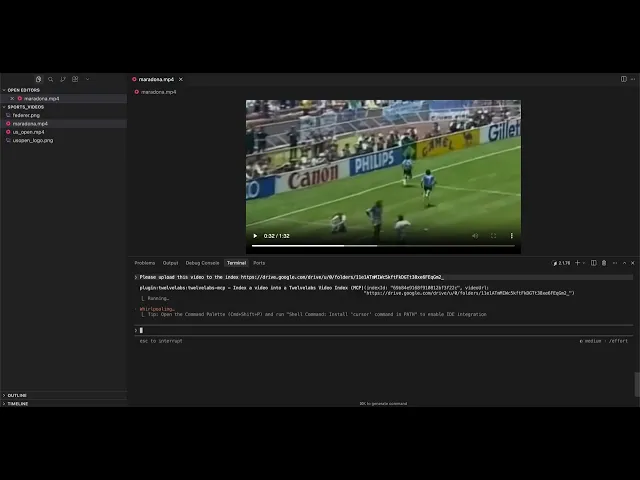
Index. Indexing accepts local paths, remote URLs, or Google Drive links. It’s also asynchronous: you can kick it off, go back to coding, and check status when you care.
Once indexing finishes, the video becomes searchable and analyzable from the same session.
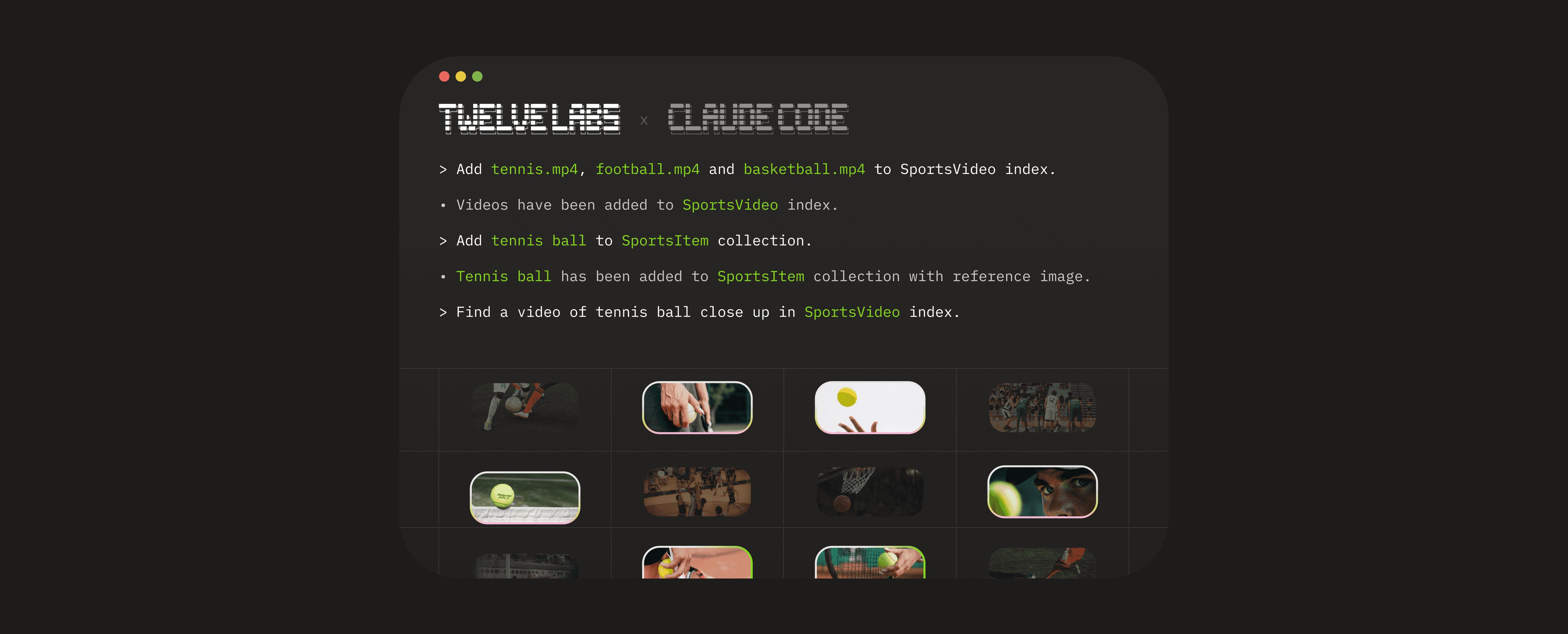
Search. Describe what you’re looking for (visual elements, actions, sounds, on-screen text) and Claude Code returns relevant moments. The plugin also supports image search, composed (image + text) search, and entity search.
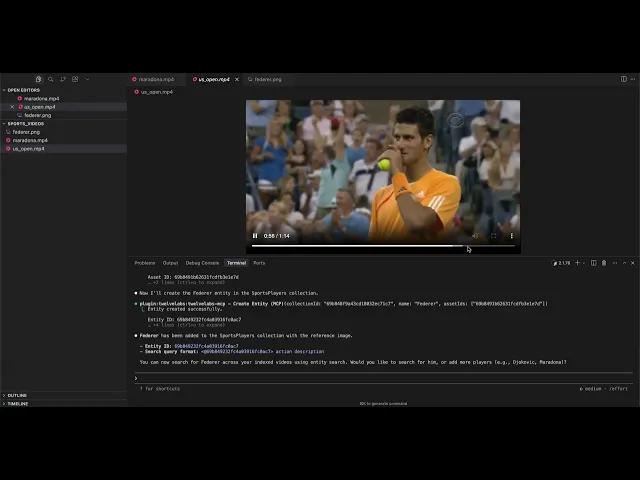
Entity search is how you make “find every time this person appears” practical. You create an entity collection, upload reference images, create an entity, then search by entity ID (or @entity_id).
Under the hood, search experiences like these are what TwelveLabs built Marengo for: Marengo focuses on “any-to-any” retrieval tasks that power cross-modal search across text, image, audio, and video.
Analyze. Search is about finding moments. Analysis is about extracting meaning. The plugin supports summaries, topics, Q&A, action items; whatever you can describe in a prompt.
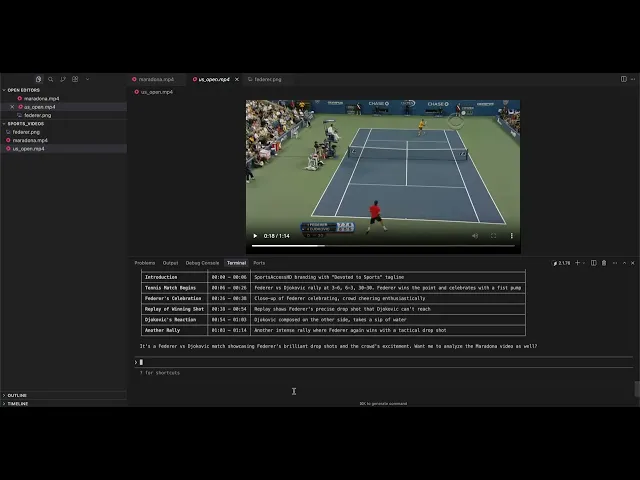
That “video-to-text” generation is the core strength of Pegasus: it integrates visual, audio, and speech information for text generation and reasoning over video.
Embed. If you’re building your own retrieval layer, clustering pipeline, or recommendation system, you can generate video embeddings directly.
How it works
From first principles, the design goal is: don’t make developers learn another tool; make video just another thing their agent can operate on.
Practically, that means a clean chain from Claude Code → MCP tools → TwelveLabs:
The plugin follows Claude Code’s plugin structure: a manifest for marketplace metadata, commands (slash commands under the twelvelabs: namespace), skills (natural-language triggers), and hooks (pre/post scripts around MCP calls).
The hook + state layer is what makes it feel “CLI-native” instead of “API wrapper.” Hooks wrap MCP calls with a predictable JSON contract (they read tool_name/tool_input and return continue/message), so they can validate inputs, cache results, and keep async tasks consistent.
The local .twelvelabs/config.json acts as a small runtime cache to track pending indexing tasks, completed videos, and recent results - managed through a helper that uses file locking (so you avoid state corruption when multiple steps happen quickly).
At the bottom of the stack is the MCP server itself. The plugin configures twelvelabs-mcp as an MCP server run via npx, and video operations flow through MCP tool calls with the mcp__twelvelabs-mcp__* prefix.
Conceptually, it’s the same MCP idea we introduced with the MCP Server launch: expose video understanding as discoverable “tools” so MCP-compatible clients can use them without bespoke integration code.
Why Claude Code
This isn’t a standalone app because developers don’t need another app.
Claude Code is already where people summarize diffs, refactor modules, trace incidents, and generate docs. The moment video enters that same workflow (demo recordings, customer interviews, user session replays), you want the same loop: ask a question, get a precise answer, ask a follow-up, ship the fix.
The plugin keeps that loop in one place. You can use explicit slash commands when you want deterministic behavior, or switch to natural language when you’re exploring.
And because the plugin configures the MCP server, commands, skills, and hooks automatically, setup stays close to “one environment variable and you’re done.”
Getting started
Install is three lines. (You may need to restart Claude Code after installing for the plugin and MCP server to take effect.)
export TWELVELABS_API_KEY
export TWELVELABS_API_KEY
If you’re new to TwelveLabs, you can start on the Free plan (the pricing page lists up to 10 hours of indexing with a 600-minute usage limit and 90 days of index access), and it explicitly states you don’t need a credit card to begin.
What’s next
This first release focuses on the essentials: indexing, multimodal search (text/image/entity), analysis, and embeddings - all inside the workflow developers already use every day.
From here, the most useful roadmap is the one guided by real workflows. If you try the plugin and hit friction (missing command, awkward output shape, a “this should be one step” moment), open an issue or PR in the repo. It’s MIT licensed and built to be extended.
Useful links
TwelveLabs Claude Code Plugin Repo: https://github.com/twelvelabs-io/twelve-labs-claude-code-plugin
TwelveLabs MCP Server Announcement: https://www.twelvelabs.io/blog/twelve-labs-mcp-server
TwelveLabs API Docs: https://docs.twelvelabs.io/docs/get-started/quickstart
TwelveLabs Playground: https://playground.twelvelabs.io/
TwelveLabs Video Foundation Models: https://www.twelvelabs.io/product/models-overview
TwelveLabs Pricing: https://www.twelvelabs.io/pricing
Migration notice: The TwelveLabs MCP server documented on this page has moved to mcp-alpic.twelvelabs.io/try. Update your MCP client configuration to use the new URL. The previous URL, mcp.twelvelabs.io/try, will be retired on July 15, 2026.
Video is everywhere in software work now: product demos recorded on Zoom, internal design reviews, customer calls, QA reproduction clips, onboarding walkthroughs, and hours of tutorials. But when video becomes part of your engineering “surface area,” it collides with a painful reality: most developer tools still treat video like a blob. You can’t grep it. You can’t diff it. You can’t ask it what happened.
Last year we shipped the TwelveLabs MCP Server to change that: by exposing video indexing, semantic search, analysis, and embeddings as standard tools any Model Context Protocol (MCP) client can call. In the MCP launch post, we described it as a bridge between our video understanding platform and AI assistants, built on the open MCP standard, so agents can “index videos, find relevant scenes, generate summaries, and more” without custom glue code.
Today we’re taking the next step for developers who live in the terminal: the TwelveLabs Claude Code Plugin.
What it is
The TwelveLabs Claude Code Plugin brings video intelligence into your Claude Code workflow, so you can index, search, analyze, and embed videos without leaving the same CLI conversation you’re already using to write code.
It installs through the Claude Code plugin marketplace and uses your TWELVELABS_API_KEY to authenticate. After install, it wires up the MCP server plus the UX layer developers actually want: slash commands, natural-language “skills,” and hooks that track async work and state automatically.
If you already liked the idea of MCP as a universal adapter, think of this plugin as the “batteries included” Claude Code experience: same MCP backbone, optimized for day-to-day terminal workflows.
What you can actually do
The plugin is intentionally small. It gives you a few verbs you can combine like building blocks: index, search, analyze, embed, and (optionally) entity search. The result is a workflow that feels like “grep, then explain”, but for video.
Index. Indexing accepts local paths, remote URLs, or Google Drive links. It’s also asynchronous: you can kick it off, go back to coding, and check status when you care.
Once indexing finishes, the video becomes searchable and analyzable from the same session.
Search. Describe what you’re looking for (visual elements, actions, sounds, on-screen text) and Claude Code returns relevant moments. The plugin also supports image search, composed (image + text) search, and entity search.
Entity search is how you make “find every time this person appears” practical. You create an entity collection, upload reference images, create an entity, then search by entity ID (or @entity_id).
Under the hood, search experiences like these are what TwelveLabs built Marengo for: Marengo focuses on “any-to-any” retrieval tasks that power cross-modal search across text, image, audio, and video.
Analyze. Search is about finding moments. Analysis is about extracting meaning. The plugin supports summaries, topics, Q&A, action items; whatever you can describe in a prompt.
That “video-to-text” generation is the core strength of Pegasus: it integrates visual, audio, and speech information for text generation and reasoning over video.
Embed. If you’re building your own retrieval layer, clustering pipeline, or recommendation system, you can generate video embeddings directly.
How it works
From first principles, the design goal is: don’t make developers learn another tool; make video just another thing their agent can operate on.
Practically, that means a clean chain from Claude Code → MCP tools → TwelveLabs:
The plugin follows Claude Code’s plugin structure: a manifest for marketplace metadata, commands (slash commands under the twelvelabs: namespace), skills (natural-language triggers), and hooks (pre/post scripts around MCP calls).
The hook + state layer is what makes it feel “CLI-native” instead of “API wrapper.” Hooks wrap MCP calls with a predictable JSON contract (they read tool_name/tool_input and return continue/message), so they can validate inputs, cache results, and keep async tasks consistent.
The local .twelvelabs/config.json acts as a small runtime cache to track pending indexing tasks, completed videos, and recent results - managed through a helper that uses file locking (so you avoid state corruption when multiple steps happen quickly).
At the bottom of the stack is the MCP server itself. The plugin configures twelvelabs-mcp as an MCP server run via npx, and video operations flow through MCP tool calls with the mcp__twelvelabs-mcp__* prefix.
Conceptually, it’s the same MCP idea we introduced with the MCP Server launch: expose video understanding as discoverable “tools” so MCP-compatible clients can use them without bespoke integration code.
Why Claude Code
This isn’t a standalone app because developers don’t need another app.
Claude Code is already where people summarize diffs, refactor modules, trace incidents, and generate docs. The moment video enters that same workflow (demo recordings, customer interviews, user session replays), you want the same loop: ask a question, get a precise answer, ask a follow-up, ship the fix.
The plugin keeps that loop in one place. You can use explicit slash commands when you want deterministic behavior, or switch to natural language when you’re exploring.
And because the plugin configures the MCP server, commands, skills, and hooks automatically, setup stays close to “one environment variable and you’re done.”
Getting started
Install is three lines. (You may need to restart Claude Code after installing for the plugin and MCP server to take effect.)
export TWELVELABS_API_KEY
If you’re new to TwelveLabs, you can start on the Free plan (the pricing page lists up to 10 hours of indexing with a 600-minute usage limit and 90 days of index access), and it explicitly states you don’t need a credit card to begin.
What’s next
This first release focuses on the essentials: indexing, multimodal search (text/image/entity), analysis, and embeddings - all inside the workflow developers already use every day.
From here, the most useful roadmap is the one guided by real workflows. If you try the plugin and hit friction (missing command, awkward output shape, a “this should be one step” moment), open an issue or PR in the repo. It’s MIT licensed and built to be extended.
Useful links
TwelveLabs Claude Code Plugin Repo: https://github.com/twelvelabs-io/twelve-labs-claude-code-plugin
TwelveLabs MCP Server Announcement: https://www.twelvelabs.io/blog/twelve-labs-mcp-server
TwelveLabs API Docs: https://docs.twelvelabs.io/docs/get-started/quickstart
TwelveLabs Playground: https://playground.twelvelabs.io/
TwelveLabs Video Foundation Models: https://www.twelvelabs.io/product/models-overview
TwelveLabs Pricing: https://www.twelvelabs.io/pricing