" height="1.90314px" id="wtDTm6bEW" transform="translate(26.225 0)" width="2.4723000000000006px"/><path d="M 0.557 0 L 1.438 0 C 1.746 0 1.995 0.25 1.995 0.559 L 1.995 1.344 C 1.995 1.653 1.746 1.903 1.438 1.903 L 0.557 1.903 C 0.25 1.903 0 1.653 0 1.344 L 0 0.559 C 0 0.25 0.25 0 0.557 0 Z" fill="rgb(29, 28, 27)" height="1.9031500000000001px" id="GnmDnNra_" transform="translate(36.408 2.728)" width="1.9953000000000003px"/><path d="M 6.224 0 L 0.558 0 C 0.25 0 0 0.25 0 0.559 L 0 1.344 C 0 1.653 0.25 1.903 0.558 1.903 L 6.224 1.903 C 6.531 1.903 6.781 1.653 6.781 1.344 L 6.781 0.559 C 6.781 0.25 6.531 0 6.224 0 Z" fill="rgb(29, 28, 27)" height="1.9031500000000001px" id="hKTQ3dbw4" transform="translate(34.261 5.456)" width="6.781100000000002px"/><path d="M 6.955 0 L 0.558 0 C 0.25 0 0 0.25 0 0.559 L 0 1.344 C 0 1.653 0.25 1.903 0.558 1.903 L 6.955 1.903 C 7.263 1.903 7.513 1.653 7.513 1.344 L 7.513 0.559 C 7.513 0.25 7.263 0 6.955 0 Z" fill="rgb(29, 28, 27)" height="1.9031500000000001px" id="G1Zzk9CUU" transform="translate(28.298 8.243)" width="7.513100000000001px"/><path d="M 7.123 0 L 0.558 0 C 0.25 0 0 0.25 0 0.559 L 0 1.344 C 0 1.653 0.25 1.903 0.558 1.903 L 7.123 1.903 C 7.431 1.903 7.681 1.653 7.681 1.344 L 7.681 0.559 C 7.681 0.25 7.431 0 7.123 0 Z" fill="rgb(29, 28, 27)" height="1.9030999999999985px" id="fm7cHxIfJ" transform="translate(0 10.972)" width="7.68067px"/><path d="M 13.447 0 L 0.558 0 C 0.25 0 0 0.25 0 0.559 L 0 1.344 C 0 1.653 0.25 1.903 0.558 1.903 L 13.447 1.903 C 13.755 1.903 14.004 1.653 14.004 1.344 L 14.004 0.559 C 14.004 0.25 13.755 0 13.447 0 Z" fill="rgb(29, 28, 27)" height="1.9030999999999985px" id="LowSwDrtg" transform="translate(9.552 10.972)" width="14.0044px"/><path d="M 0.558 0 L 8.212 0 C 8.52 0 8.77 0.25 8.77 0.559 L 8.77 1.344 C 8.77 1.653 8.52 1.903 8.212 1.903 L 0.558 1.903 C 0.25 1.903 0 1.653 0 1.344 L 0 0.559 C 0 0.25 0.25 0 0.558 0 Z" fill="rgb(29, 28, 27)" height="1.9030999999999985px" id="xRiKc2od7" transform="translate(27.041 10.972)" width="8.769900000000003px"/><path d="M 0.557 0 L 5.4 0 C 5.708 0 5.958 0.25 5.958 0.559 L 5.958 1.344 C 5.958 1.653 5.708 1.903 5.4 1.903 L 0.557 1.903 C 0.25 1.903 0 1.653 0 1.344 L 0 0.559 C 0 0.25 0.25 0 0.557 0 Z" fill="rgb(29, 28, 27)" height="1.9031500000000001px" id="JWdNVicde" transform="translate(36.796 8.243)" width="5.957599999999999px"/><path d="M 1.438 0 L 0.558 0 C 0.25 0 0 0.25 0 0.559 L 0 1.344 C 0 1.653 0.25 1.903 0.558 1.903 L 1.438 1.903 C 1.746 1.903 1.995 1.653 1.995 1.344 L 1.995 0.559 C 1.995 0.25 1.746 0 1.438 0 Z" fill="rgb(29, 28, 27)" height="1.9031500000000001px" id="RfFYVCT_T" transform="translate(28.717 5.456)" width="1.9953000000000003px"/><path d="M 0.558 0 L 2.895 0 C 3.203 0 3.453 0.25 3.453 0.559 L 3.453 1.406 C 3.453 1.714 3.203 1.964 2.895 1.964 L 0.558 1.964 C 0.25 1.964 0 1.714 0 1.406 L 0 0.559 C 0 0.25 0.25 0 0.558 0 Z" fill="rgb(29, 28, 27)" height="1.964299999999998px" id="dngJ6MU2p" transform="translate(16.183 24.582)" width="3.4525000000000006px"/><path d="M 1.706 0 L 0.558 0 C 0.25 0 0 0.25 0 0.559 L 0 1.406 C 0 1.714 0.25 1.964 0.558 1.964 L 1.706 1.964 C 2.014 1.964 2.263 1.714 2.263 1.406 L 2.263 0.559 C 2.263 0.25 2.014 0 1.706 0 Z" fill="rgb(29, 28, 27)" height="1.964299999999998px" id="N_fstvKmR" transform="translate(22.18 24.582)" width="2.2631999999999977px"/><path d="M 0.558 0 L 5.544 0 C 5.852 0 6.101 0.25 6.101 0.559 L 6.101 1.406 C 6.101 1.714 5.852 1.964 5.544 1.964 L 0.558 1.964 C 0.25 1.964 0 1.714 0 1.406 L 0 0.559 C 0 0.25 0.25 0 0.558 0 Z" fill="rgb(29, 28, 27)" height="1.964299999999998px" id="t55XLYcgb" transform="translate(25.486 24.582)" width="6.101399999999998px"/><path d="M 1.976 0 L 0.558 0 C 0.25 0 0 0.25 0 0.559 L 0 1.406 C 0 1.714 0.25 1.964 0.558 1.964 L 1.976 1.964 C 2.284 1.964 2.533 1.714 2.533 1.406 L 2.533 0.559 C 2.533 0.25 2.284 0 1.976 0 Z" fill="rgb(29, 28, 27)" height="1.964299999999998px" id="ZrEKTVTAe" transform="translate(28.542 21.854)" width="2.5334000000000003px"/><path d="M 0.557 0 L 1.438 0 C 1.746 0 1.995 0.25 1.995 0.559 L 1.995 1.406 C 1.995 1.714 1.746 1.964 1.438 1.964 L 0.557 1.964 C 0.25 1.964 0 1.714 0 1.406 L 0 0.559 C 0 0.25 0.25 0 0.557 0 Z" fill="rgb(29, 28, 27)" height="1.964299999999998px" id="Z0fPTp9aR" transform="translate(11.425 24.582)" width="1.9953000000000003px"/><path d="M 0 0.559 C 0 0.251 0.251 0 0.558 0 L 1.438 0 C 1.745 0 1.995 0.251 1.995 0.559 L 1.995 1.405 C 1.995 1.713 1.745 1.964 1.438 1.964 L 0.558 1.964 C 0.251 1.964 0 1.713 0 1.405 Z" fill="rgb(29, 28, 27)" height="1.964299999999998px" id="Tj_PDHFDh" transform="translate(20.635 27.308)" width="1.9954px"/><path d="M 0.557 0 L 1.342 0 C 1.65 0 1.899 0.25 1.899 0.559 L 1.899 1.406 C 1.899 1.714 1.65 1.964 1.342 1.964 L 0.557 1.964 C 0.25 1.964 0 1.714 0 1.406 L 0 0.559 C 0 0.25 0.25 0 0.557 0 Z" fill="rgb(29, 28, 27)" height="1.9643000000000015px" id="AYq9dXkKz" transform="translate(18.686 30.036)" width="1.8994px"/><path d="M 0.558 0 L 5.768 0 C 6.076 0 6.326 0.25 6.326 0.559 L 6.326 1.344 C 6.326 1.653 6.076 1.903 5.768 1.903 L 0.558 1.903 C 0.25 1.903 0 1.653 0 1.344 L 0 0.559 C 0 0.25 0.25 0 0.558 0 Z" fill="rgb(29, 28, 27)" height="1.9031500000000001px" id="rspevfJcx" transform="translate(12.157 8.243)" width="6.325900000000001px"/><path d="M 3.285 0 L 0.558 0 C 0.25 0 0 0.25 0 0.559 L 0 1.344 C 0 1.653 0.25 1.903 0.558 1.903 L 3.285 1.903 C 3.593 1.903 3.842 1.653 3.842 1.344 L 3.842 0.559 C 3.842 0.25 3.593 0 3.285 0 Z" fill="rgb(29, 28, 27)" height="1.9031500000000001px" id="XRUAhGnph" transform="translate(23.887 2.728)" width="3.8424000000000014px"/><path d="M 0.558 0 L 5.644 0 C 5.952 0 6.202 0.25 6.202 0.559 L 6.202 1.344 C 6.202 1.653 5.952 1.903 5.644 1.903 L 0.558 1.903 C 0.25 1.903 0 1.653 0 1.344 L 0 0.559 C 0 0.25 0.25 0 0.558 0 Z" fill="rgb(29, 28, 27)" height="1.9031500000000001px" id="VsaVVIfke" transform="translate(21.528 5.456)" width="6.201600000000003px"/><path d="M 3.06 0 L 0.558 0 C 0.25 0 0 0.25 0 0.559 L 0 1.344 C 0 1.653 0.25 1.903 0.558 1.903 L 3.06 1.903 C 3.369 1.903 3.618 1.653 3.618 1.344 L 3.618 0.559 C 3.618 0.25 3.369 0 3.06 0 Z" fill="rgb(29, 28, 27)" height="1.9030999999999985px" id="wiAKEgyId" transform="translate(40.819 10.972)" width="3.6182000000000016px"/><path d="M 0.558 0 L 17.318 0 C 17.626 0 17.875 0.25 17.875 0.559 L 17.875 1.345 C 17.875 1.653 17.626 1.903 17.318 1.903 L 0.558 1.903 C 0.25 1.903 0 1.653 0 1.345 L 0 0.559 C 0 0.25 0.25 0 0.558 0 Z" fill="rgb(29, 28, 27)" height="1.9032px" id="FIE0ufK9m" transform="translate(6.666 13.7)" width="17.87506px"/><path d="M 6.426 0 L 0.558 0 C 0.25 0 0 0.25 0 0.559 L 0 1.345 C 0 1.653 0.25 1.903 0.558 1.903 L 6.426 1.903 C 6.734 1.903 6.984 1.653 6.984 1.345 L 6.984 0.559 C 6.984 0.25 6.734 0 6.426 0 Z" fill="rgb(29, 28, 27)" height="1.9032000000000018px" id="ut9UWny3L" transform="translate(22.892 19.156)" width="6.983599999999999px"/><path d="M 0.558 0 L 22.151 0 C 22.459 0 22.709 0.25 22.709 0.559 L 22.709 1.344 C 22.709 1.653 22.459 1.903 22.151 1.903 L 0.558 1.903 C 0.25 1.903 0 1.653 0 1.344 L 0 0.559 C 0 0.25 0.25 0 0.558 0 Z" fill="rgb(29, 28, 27)" height="1.9030999999999985px" id="VULnffgbk" transform="translate(9.552 16.428)" width="22.7089px"/><path d="M 7.886 0 L 0.558 0 C 0.25 0 0 0.25 0 0.559 L 0 1.345 C 0 1.653 0.25 1.903 0.558 1.903 L 7.886 1.903 C 8.194 1.903 8.443 1.653 8.443 1.345 L 8.443 0.559 C 8.443 0.25 8.194 0 7.886 0 Z" fill="rgb(29, 28, 27)" height="1.9032000000000018px" id="adZTYr4MR" transform="translate(6.078 19.156)" width="8.44303px"/><path d="M 0.558 0 L 2.211 0 C 2.519 0 2.769 0.25 2.769 0.559 L 2.769 1.406 C 2.769 1.714 2.519 1.964 2.211 1.964 L 0.558 1.964 C 0.25 1.964 0 1.714 0 1.406 L 0 0.559 C 0 0.25 0.25 0 0.558 0 Z" fill="rgb(29, 28, 27)" height="1.964299999999998px" id="bwdUdEmCH" transform="translate(13.784 21.854)" width="2.768600000000001px"/><path d="M 2.424 0 L 0.558 0 C 0.25 0 0 0.25 0 0.559 L 0 1.406 C 0 1.714 0.25 1.964 0.558 1.964 L 2.424 1.964 C 2.732 1.964 2.982 1.714 2.982 1.406 L 2.982 0.559 C 2.982 0.25 2.732 0 2.424 0 Z" fill="rgb(29, 28, 27)" height="1.964299999999998px" id="PUvesMJEj" transform="translate(23.556 21.854)" width="2.982199999999999px"/><path d="M 0.558 0 L 2.241 0 C 2.55 0 2.799 0.25 2.799 0.559 L 2.799 1.406 C 2.799 1.714 2.55 1.964 2.241 1.964 L 0.558 1.964 C 0.25 1.964 0 1.714 0 1.406 L 0 0.559 C 0 0.25 0.25 0 0.558 0 Z" fill="rgb(29, 28, 27)" height="1.964299999999998px" id="Wo2W7J3Zj" transform="translate(8.672 21.854)" width="2.799050000000001px"/><path d="M 6.661 0 L 0.558 0 C 0.25 0 0 0.25 0 0.559 L 0 1.345 C 0 1.653 0.25 1.903 0.558 1.903 L 6.661 1.903 C 6.969 1.903 7.219 1.653 7.219 1.345 L 7.219 0.559 C 7.219 0.25 6.969 0 6.661 0 Z" fill="rgb(29, 28, 27)" height="1.9032px" id="PpPVZXp9j" transform="translate(27.041 13.7)" width="7.218900000000001px"/><path d="M 0.621 1.905 C 0.218 1.905 0 1.687 0 1.283 L 0 0.622 C 0 0.218 0.218 0 0.621 0 L 11.225 0 C 11.628 0 11.846 0.218 11.846 0.622 L 11.846 1.283 C 11.846 1.687 11.628 1.905 11.225 1.905 L 6.934 1.905 L 6.934 14.926 C 6.934 15.33 6.716 15.548 6.313 15.548 L 5.537 15.548 C 5.134 15.548 4.916 15.33 4.916 14.926 L 4.916 1.905 Z" fill="rgb(29, 28, 27)" height="15.54825px" id="xr32fxeO6" transform="translate(52.177 8.243)" width="11.845599999999997px"/><path d="M 0.621 0 C 0.218 0 0 0.218 0 0.622 L 0 14.924 C 0 15.328 0.218 15.546 0.621 15.546 L 1.357 15.546 C 1.76 15.546 1.978 15.328 1.978 14.924 L 1.978 0.622 C 1.978 0.218 1.76 0 1.357 0 Z" fill="rgb(29, 28, 27)" height="15.546050000000001px" id="oSsO_UPVN" transform="translate(90.476 8.243)" width="1.9779000000000053px"/><path d="M 0.62 15.546 C 0.217 15.546 0 15.328 0 14.924 L 0 0.622 C 0 0.218 0.217 0 0.62 0 L 1.396 0 C 1.799 0 2.017 0.218 2.017 0.622 L 2.017 13.632 L 8.981 13.632 C 9.384 13.632 9.602 13.85 9.602 14.254 L 9.602 14.924 C 9.602 15.328 9.384 15.546 8.981 15.546 Z" fill="rgb(29, 28, 27)" height="15.546050000000001px" id="Sgj4z5osO" transform="translate(116.749 8.243)" width="9.602000000000004px"/><path d="M 1.974 14.924 C 1.974 15.328 1.756 15.546 1.353 15.546 L 0.621 15.546 C 0.218 15.546 0 15.328 0 14.924 L 0 0.622 C 0 0.218 0.218 0 0.621 0 L 1.357 0 C 1.76 0 1.978 0.218 1.978 0.622 L 1.978 5.747 C 2.634 4.721 3.806 4.079 5.309 4.079 C 8.18 4.079 10.356 6.358 10.356 9.948 C 10.356 13.538 8.18 15.817 5.309 15.817 C 3.801 15.817 2.627 15.175 1.971 14.145 L 1.971 14.922 Z M 8.36 9.95 C 8.36 7.362 6.881 5.928 5.121 5.928 C 3.361 5.928 1.863 7.362 1.863 9.95 C 1.863 12.539 3.361 13.972 5.121 13.972 C 6.881 13.972 8.36 12.539 8.36 9.95 Z" fill="rgb(29, 28, 27)" height="15.81665px" id="q13jjj7xd" transform="translate(138.401 8.243)" width="10.355999999999995px"/><path d="M 4.457 11.738 C 0.961 11.738 -0.019 9.872 0 8.318 C 0.005 7.929 0.253 7.735 0.645 7.735 L 1.344 7.735 C 1.748 7.735 1.922 7.949 1.961 8.352 C 2.063 9.315 2.693 9.907 4.433 9.907 C 6.174 9.907 7.012 9.269 7.012 8.289 C 7.012 7.425 6.522 7.108 5.305 6.899 L 3.209 6.539 C 1.453 6.238 0.29 5.247 0.29 3.468 C 0.29 1.467 1.774 0 4.518 0 C 7.263 0 8.838 1.491 8.814 3.23 C 8.81 3.614 8.553 3.808 8.165 3.808 L 7.457 3.808 C 7.054 3.808 6.908 3.595 6.851 3.202 C 6.749 2.477 6.159 1.818 4.518 1.818 C 2.878 1.818 2.249 2.508 2.249 3.403 C 2.249 4.175 2.695 4.516 3.81 4.714 L 5.906 5.083 C 7.72 5.404 8.98 6.292 8.98 8.198 C 8.98 9.976 7.908 11.74 4.455 11.74 Z" fill="rgb(29, 28, 27)" height="11.739799999999999px" id="tJ8syeWTW" transform="translate(150.024 12.325)" width="8.980269730401375px"/><path d="M 9.146 7.997 C 9.146 8.813 9.175 9.983 9.282 10.799 C 9.334 11.223 9.155 11.465 8.728 11.465 L 8.068 11.465 C 7.685 11.465 7.467 11.319 7.428 11.022 L 7.317 10.181 C 6.724 11.157 5.565 11.659 4.145 11.659 C 1.579 11.659 0 10.142 0 8.078 C 0 6.27 1.27 5.157 3.433 5.002 L 6.589 4.78 C 7.162 4.741 7.186 4.688 7.186 4.153 L 7.186 3.682 C 7.186 2.438 6.434 1.807 4.79 1.807 C 3.145 1.807 2.472 2.425 2.405 3.289 C 2.376 3.697 2.235 3.916 1.823 3.916 L 1.067 3.916 C 0.675 3.916 0.427 3.717 0.422 3.328 C 0.407 1.51 1.74 0 4.792 0 C 7.798 0 9.162 1.427 9.155 3.736 Z M 7.188 7.298 L 7.188 6.244 C 6.955 6.327 6.678 6.386 6.363 6.415 L 3.598 6.676 C 2.59 6.775 1.997 7.163 1.997 8.099 L 1.999 8.099 C 1.999 9.188 2.886 9.97 4.4 9.97 C 6.169 9.97 7.188 8.9 7.188 7.298 Z" fill="rgb(29, 28, 27)" height="11.658999999999999px" id="QPESIZvku" transform="translate(126.854 12.325)" width="9.290755130109668px"/><path d="M 5.224 0 C 8.313 0 10.295 2.255 10.295 5.456 L 10.295 5.694 C 10.295 6.098 10.077 6.316 9.674 6.316 L 1.998 6.316 C 2.168 8.547 3.447 9.898 5.407 9.898 C 6.768 9.898 7.598 9.363 7.934 8.431 C 8.06 8.078 8.243 7.892 8.618 7.892 L 9.33 7.892 C 9.746 7.892 9.994 8.125 9.923 8.538 C 9.598 10.433 7.834 11.74 5.409 11.74 L 5.407 11.738 C 2.168 11.738 0 9.424 0 5.797 C 0 2.169 2.135 0 5.224 0 Z M 5.222 1.74 C 3.494 1.74 2.405 2.818 2.074 4.64 L 8.282 4.64 C 8.054 2.842 6.949 1.74 5.222 1.74 Z" fill="rgb(29, 28, 27)" height="11.739799999999999px" id="PKmyQkwJE" transform="translate(104.541 12.325)" width="10.295000000000002px"/><path d="M 4.459 11.194 C 4.099 11.194 3.877 11.039 3.746 10.703 L 0.091 1.021 C -0.024 0.72 -0.031 0.511 0.076 0.297 C 0.178 0.094 0.381 0 0.732 0 L 1.274 0 C 1.633 0 1.86 0.155 1.986 0.495 L 4.958 8.503 L 5.123 9.018 L 5.289 8.503 L 8.262 0.495 C 8.388 0.155 8.615 0 8.974 0 L 9.517 0 C 9.865 0 10.07 0.092 10.172 0.297 C 10.279 0.511 10.275 0.72 10.157 1.021 L 6.502 10.703 C 6.371 11.039 6.149 11.194 5.79 11.194 Z" fill="rgb(29, 28, 27)" height="11.1941px" id="uUQr5Yl4B" transform="translate(93.807 12.595)" width="10.248961642504256px"/><path d="M 5.407 11.738 C 2.167 11.738 0 9.424 0 5.797 C 0 2.169 2.133 0 5.221 0 C 8.31 0 10.292 2.255 10.292 5.456 L 10.292 5.694 C 10.292 6.098 10.075 6.316 9.672 6.316 L 1.995 6.316 C 2.165 8.547 3.446 9.898 5.404 9.898 C 6.768 9.898 7.596 9.363 7.931 8.431 C 8.058 8.078 8.241 7.892 8.615 7.892 L 9.328 7.892 C 9.744 7.892 9.992 8.125 9.918 8.538 C 9.593 10.433 7.829 11.74 5.404 11.74 Z M 8.282 4.64 C 8.053 2.842 6.949 1.74 5.221 1.74 C 3.494 1.74 2.405 2.818 2.074 4.64 Z" fill="rgb(29, 28, 27)" height="11.739799999999999px" id="zo1nSBuSF" transform="translate(78.397 12.325)" width="10.29249999999999px"/><path d="M 3.057 10.677 C 3.163 11.026 3.392 11.192 3.756 11.192 L 3.749 11.194 L 4.987 11.194 C 5.35 11.194 5.579 11.028 5.69 10.679 L 8.173 2.654 L 8.237 2.401 L 8.3 2.654 L 10.787 10.679 C 10.894 11.028 11.123 11.194 11.487 11.194 L 12.733 11.194 C 13.096 11.194 13.325 11.028 13.432 10.679 L 16.418 1.006 C 16.516 0.7 16.512 0.498 16.41 0.288 C 16.307 0.089 16.109 0.002 15.76 0.002 L 15.218 0.002 C 14.848 0.002 14.626 0.168 14.519 0.522 L 12.094 8.547 L 12.046 8.761 L 11.999 8.542 L 9.506 0.517 C 9.4 0.168 9.171 0.002 8.807 0.002 L 7.683 0.002 C 7.319 0.002 7.091 0.168 6.984 0.517 L 4.492 8.542 L 4.449 8.745 L 4.405 8.551 L 1.98 0.519 C 1.874 0.166 1.649 0 1.281 0 L 0.728 0 C 0.38 0 0.181 0.087 0.079 0.286 C -0.021 0.493 -0.028 0.698 0.07 1.004 Z" fill="rgb(29, 28, 27)" height="11.194099999999999px" id="uboloLX99" transform="translate(61.282 12.598)" width="16.489163442184434px"/></svg>)
Tutorials
Building a Sports Highlight Intelligence App with TwelveLabs Marengo, Pegasus, and Jockey
Turn a full game's raw footage into searchable moments, highlight lanes, and production-ready outputs. This tutorial builds Sports Jockey on TwelveLabs Marengo for semantic search, Pegasus 1.5 for clip-scoped editorial metadata, and Jockey as the agent layer reasoning over the Knowledge Store.
Hrishikesh Yadav
Tutorials
Building a Sports Highlight Intelligence App with TwelveLabs Marengo, Pegasus, and Jockey
Turn a full game's raw footage into searchable moments, highlight lanes, and production-ready outputs. This tutorial builds Sports Jockey on TwelveLabs Marengo for semantic search, Pegasus 1.5 for clip-scoped editorial metadata, and Jockey as the agent layer reasoning over the Knowledge Store.
Hrishikesh Yadav

Jul 22, 2026
16 Minutes
Copy link to article
Introduction
The moments that move sports audiences are not in the box score. A scoreboard change records that a point was scored. It does not capture the bench erupting, the crowd holding its breath, the broadcaster's voice cracking, or the player sinking to their knees. Those are the moments that get shared, replayed, and monetized.
The NBA generated more than 5 billion social media views during the 2025 Finals, up 215% from the previous year. That growth is driven by fast, moment-specific short-form content. But the production gap is real: hour-long games require human review to find what matters, and manual workflows cannot scale to meet the distribution pace.
Production-ready sports intelligence requires three things in sequence: semantic discovery across raw footage, structured understanding of selected moments, and an agentic layer that reasons over the game the way a producer would. Finding a goal is a starting point. Understanding the goal's crowd response, the emotional arc, the broadcast context, and which of four different formats it belongs in is what makes it publishable.
This tutorial walks through Sports Jockey, a production-grade sports video intelligence application built with TwelveLabs. The application uses Marengo for semantic search across game footage, Pegasus 1.5 for clip-scoped analysis of selected moments, and Jockey as the agent layer reasoning over the knowledge store. By the end, you will have a clear picture of how these three capabilities connect into a single workflow that turns raw footage into searchable moments, structured editorial context, highlight lanes, entity intelligence, and production-ready outputs.
What the Application Does
The application supports four connected workflows:
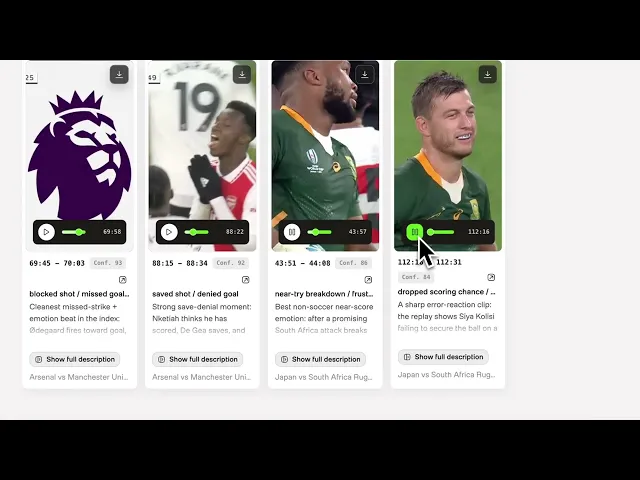
Semantic search finds plays, reactions, celebrations, logos, fan moments, and atmosphere directly from video using Marengo. This includes text queries, image-based search, and entity-based search for registered players, logos, or any visual reference.
Clip analysis with Pegasus 1.5 takes a selected moment and returns structured editorial metadata: description, emotional tone, key action, participants, score context, editorial use, and recommended formats. Pegasus does not re-analyze the full match. It focuses on exactly the segment the producer selected.
Highlight lane generation uses Jockey over the Knowledge Store to organize footage into production-ready categories: Best Plays, Emotional Moments, Fan Experience, and Behind the Scenes. Each lane includes timestamped clips with evidence, rationale, and editorial guidance.
Live chat with Jockey turns the Knowledge Store into an interactive production assistant. A producer can ask for a specific moment in natural language, refine a reel idea, or explore footage conversationally across multiple turns.
Intelligence Stack Behind Sports with Jockey Application
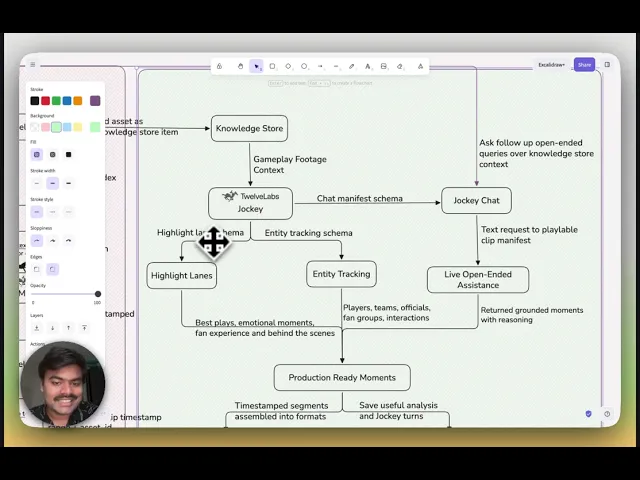
Three TwelveLabs capabilities power the workflow, each with a defined role and a defined hand-off point.
Before any search or reasoning can happen, source videos are uploaded to TwelveLabs as assets. Each uploaded asset becomes the canonical video object referenced across the full workflow. The backend stores the returned asset ID and maps it to the registered source video name.
After upload, each asset connects to two TwelveLabs layers: the search index and the Knowledge Store. The index makes footage available for Marengo-powered semantic search and indexed playback. The Knowledge Store gives Jockey a grounded context layer for reasoning over the game.
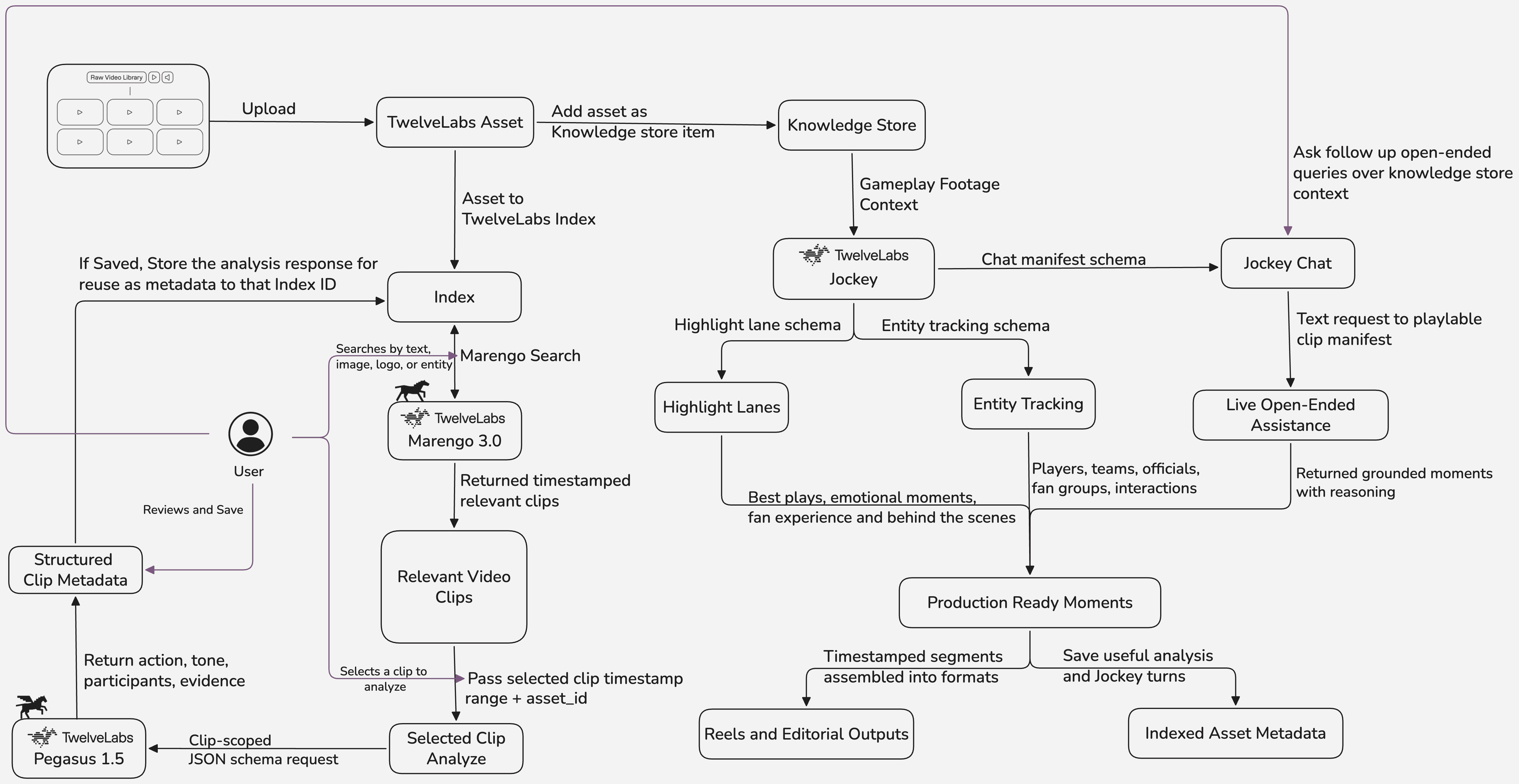
The sections below break down how each capability fits into the workflow, what it produces, and how its output flows into the next step.
Prerequisites
Build the foundation once and reuse it across every workflow. To set up the application, do clone the code repository.
Create a TwelveLabs account and generate an API key.
Create a TwelveLabs index with Marengo enabled for semantic video search and record the Index ID.
Create the Entity Collection and record the Entity Collection ID in
.env.Create a TwelveLabs Knowledge Store for Jockey and record it for
.env.Install FFmpeg to generate or export assembled highlight reels.
Create
backend/.envwith the following variables:TWELVELABS_API_KEY,INDEX_ID,ENTITY_COLLECTION_ID, andKNOWLEDGE_STORE_ID.
If you would like to explore the notebook workflow for using Jockey with sports footage, refer to this repository.
Section 1: Search the Game Like a Producer Thinks
The most valuable production moments are often absent from the official game log. A scoreboard change records that a point was scored. It does not capture the bench reaction, the crowd energy, the broadcast replay, or the emotional pause before the next play. Finding those moments requires understanding that spans visuals, audio, motion, atmosphere, and context together.
Marengo is the search layer that makes this possible. Instead of forcing production teams to scrub through footage manually or depend on pre-written tags, the application lets users search game footage the way they naturally think about it: "a late comeback," "a bench reaction," "a fan in the stands after the score."
1.1 - Marengo for Semantic Discovery
The workflow begins by indexing source footage with TwelveLabs. Once the video is available in the index, Marengo can search across the game using natural language.

Marengo returns timestamped results across all indexed footage. Each result includes the time range, video reference, relevance information, and source mapping needed to open the exact moment in the application.
This matters most for the moments that live between the data points. Sponsor boards, player gestures, crowd signs, and emotional reactions never appear in any stats feed, but they are frequently the most shareable content in the footage.
1.2 - Search by Images, Entity, or Logo
Some production moments cannot be put into words. A producer may want footage matching a visual reference: a specific player's face, a jersey number, a sponsor logo, a team badge, or a sideline figure who appears in multiple games.
The application extends search beyond text for these cases. A user uploads an image and the application sends it to TwelveLabs as visual search input, returning footage that matches the reference visually.
The workflow also supports entity-based search. Each entity is created with a name, description, and reference image, then stored inside the entity collection in TwelveLabs for reuse across games. Once registered, the entity is searchable across all indexed footage without recreating the context each time.
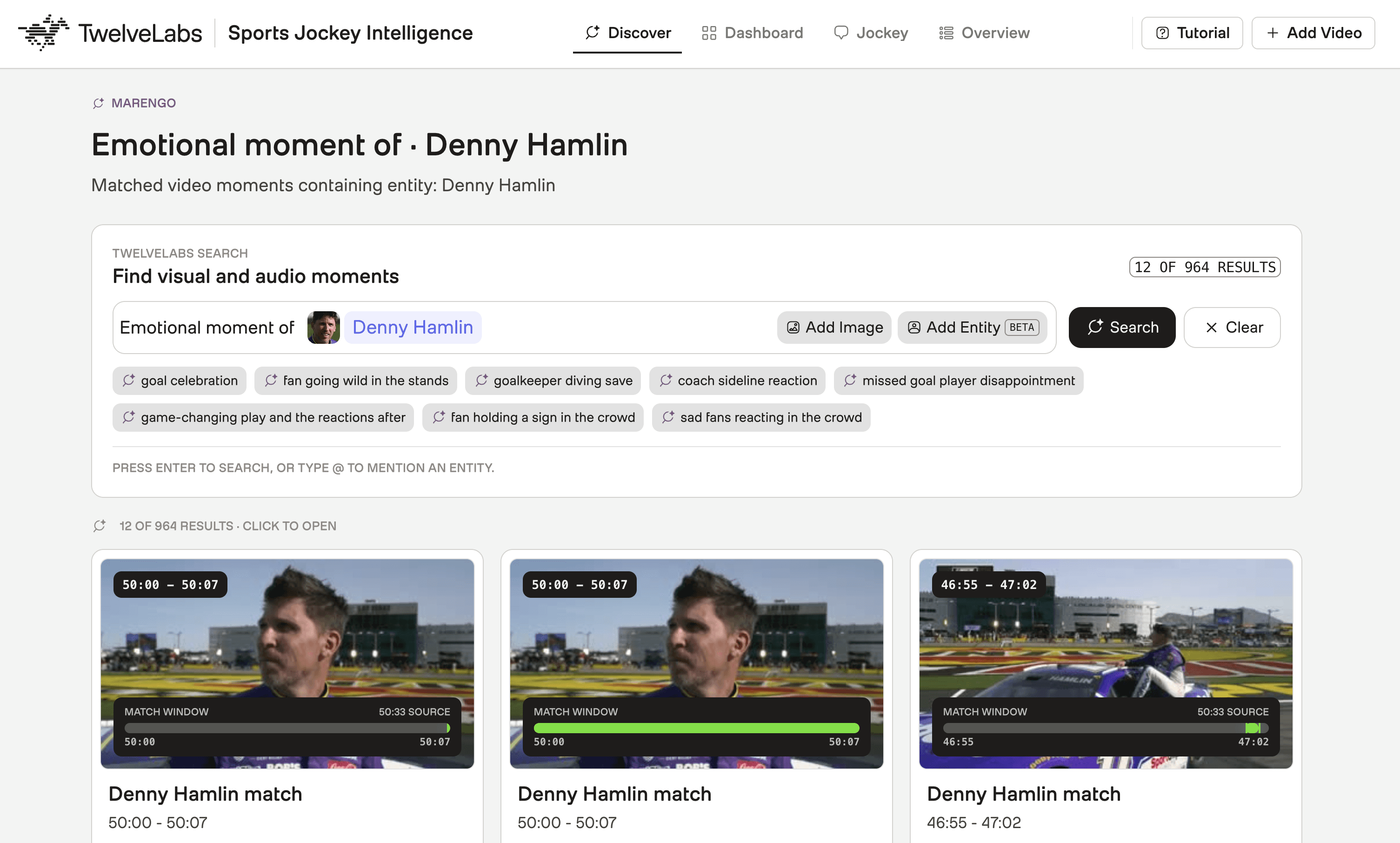
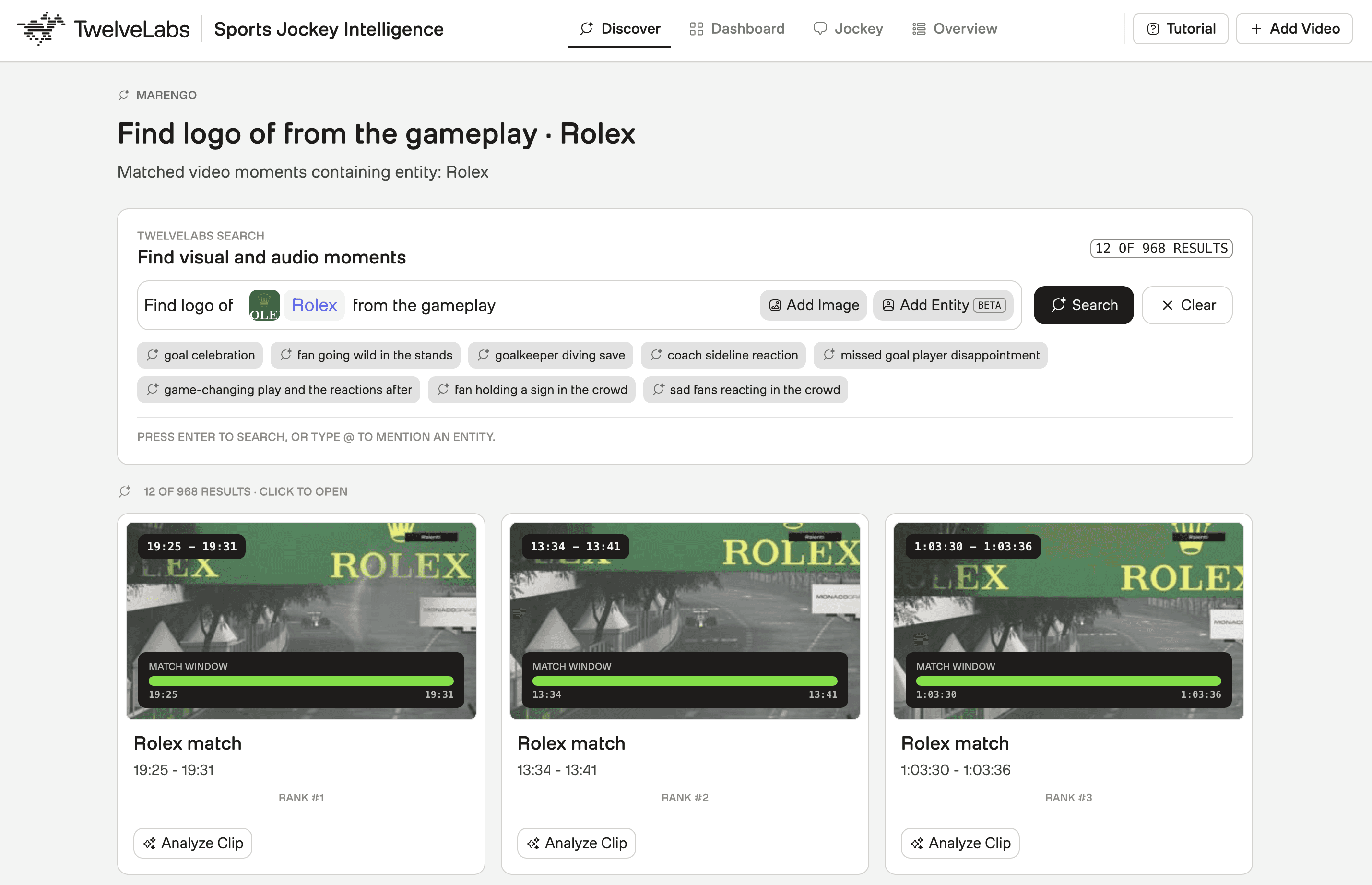
This is especially useful in sports media workflows where the important subject is visual rather than textual. The example below shows how the "Rolex" logo is found and tracked across indexed sports footage. Sponsor boards, jersey numbers, and team badges that never appear in any transcript are still fully searchable through this workflow.
Section 2: Analyze Only the Moment That Matters
A timestamp is not enough. A producer needs to understand what happens inside the clip, who appears, why the moment is useful, and which format it belongs in: a highlight reel, a social edit, a recap, or a rights-compliance review.
This section covers how the application uses Pegasus 1.5 to move from a discovered moment to structured, decision-ready video intelligence.
2.1 - Pegasus 1.5 for Clip-Scoped Analyze
Once Marengo surfaces a relevant moment, the application sends only that selected time range to Pegasus 1.5. The full match is not re-analyzed. Pegasus receives exactly the segment the producer selected, which keeps analysis fast, precise, and scoped to the actual production decision.
The backend receives the selected video name, timestamp range, and asset ID before calling Pegasus:
result = twelvelabs_analyze_video({
    "model_name": "pegasus1.5",
    "video": {
        "type": "asset_id",
        "asset_id": asset_id,
    },
    "start_time": analyze_start,
    "end_time": analyze_end,
    "prompt": prompt,
    "temperature": 0.2,
    "response_format": {
        "type": "json_schema",
        "json_schema": SELECTED_CLIP_ANALYSIS_SCHEMA,
    },
    "max_tokens": 3200,
})
result = twelvelabs_analyze_video({
    "model_name": "pegasus1.5",
    "video": {
        "type": "asset_id",
        "asset_id": asset_id,
    },
    "start_time": analyze_start,
    "end_time": analyze_end,
    "prompt": prompt,
    "temperature": 0.2,
    "response_format": {
        "type": "json_schema",
        "json_schema": SELECTED_CLIP_ANALYSIS_SCHEMA,
    },
    "max_tokens": 3200,
})
Pegasus handles multimodal understanding inside the selected clip with full-context awareness. The application controls the scope, schema, and workflow.
2.2 - Structuring Model Output as Editorial Metadata
The goal is metadata that supports a real cut decision, not a free-form description.
The application asks Pegasus 1.5 to return a structured JSON response instead of unstructured text. Each analyzed clip maps to a consistent editorial object:
SELECTED_CLIP_ANALYSIS_SCHEMA = {
    "type": "object",
    "properties": {
        "description": {"type": "string"},
        "emotional_tone": {"type": "string"},
        "key_action": {"type": "string"},
        "participants": {"type": "array"},
        "moment_types": {"type": "array", "items": {"type": "string"}},
        "tags": {"type": "array", "items": {"type": "string"}},
        "score_context": {"type": "string"},
        "producer_summary": {"type": "string"},
        "story_arc": {"type": "string"},
        "editorial_use": {"type": "string"},
        "recommended_formats": {"type": "array", "items": {"type": "string"}},
        "visual_evidence": {"type": "array", "items": {"type": "string"}},
        "audio_evidence": {"type": "array", "items": {"type": "string"}},
        "transcript_evidence": {"type": "array", "items": {"type": "string"}},
        "confidence": {"type": "number"},
    },
    "required": [
        "description",
        "key_action",
        "producer_summary",
        "editorial_use",
        "confidence",
    ],
}
SELECTED_CLIP_ANALYSIS_SCHEMA = {
    "type": "object",
    "properties": {
        "description": {"type": "string"},
        "emotional_tone": {"type": "string"},
        "key_action": {"type": "string"},
        "participants": {"type": "array"},
        "moment_types": {"type": "array", "items": {"type": "string"}},
        "tags": {"type": "array", "items": {"type": "string"}},
        "score_context": {"type": "string"},
        "producer_summary": {"type": "string"},
        "story_arc": {"type": "string"},
        "editorial_use": {"type": "string"},
        "recommended_formats": {"type": "array", "items": {"type": "string"}},
        "visual_evidence": {"type": "array", "items": {"type": "string"}},
        "audio_evidence": {"type": "array", "items": {"type": "string"}},
        "transcript_evidence": {"type": "array", "items": {"type": "string"}},
        "confidence": {"type": "number"},
    },
    "required": [
        "description",
        "key_action",
        "producer_summary",
        "editorial_use",
        "confidence",
    ],
}
The fields that drive cut decisions are editorial_use, recommended_formats, and confidence. A producer can compare moments across different clips using the same fields, save useful analysis for later, and reuse the metadata in a downstream reel assembly or review workflow. The visual_evidence and audio_evidence fields document what Pegasus saw and heard, making the rationale auditable rather than opaque.
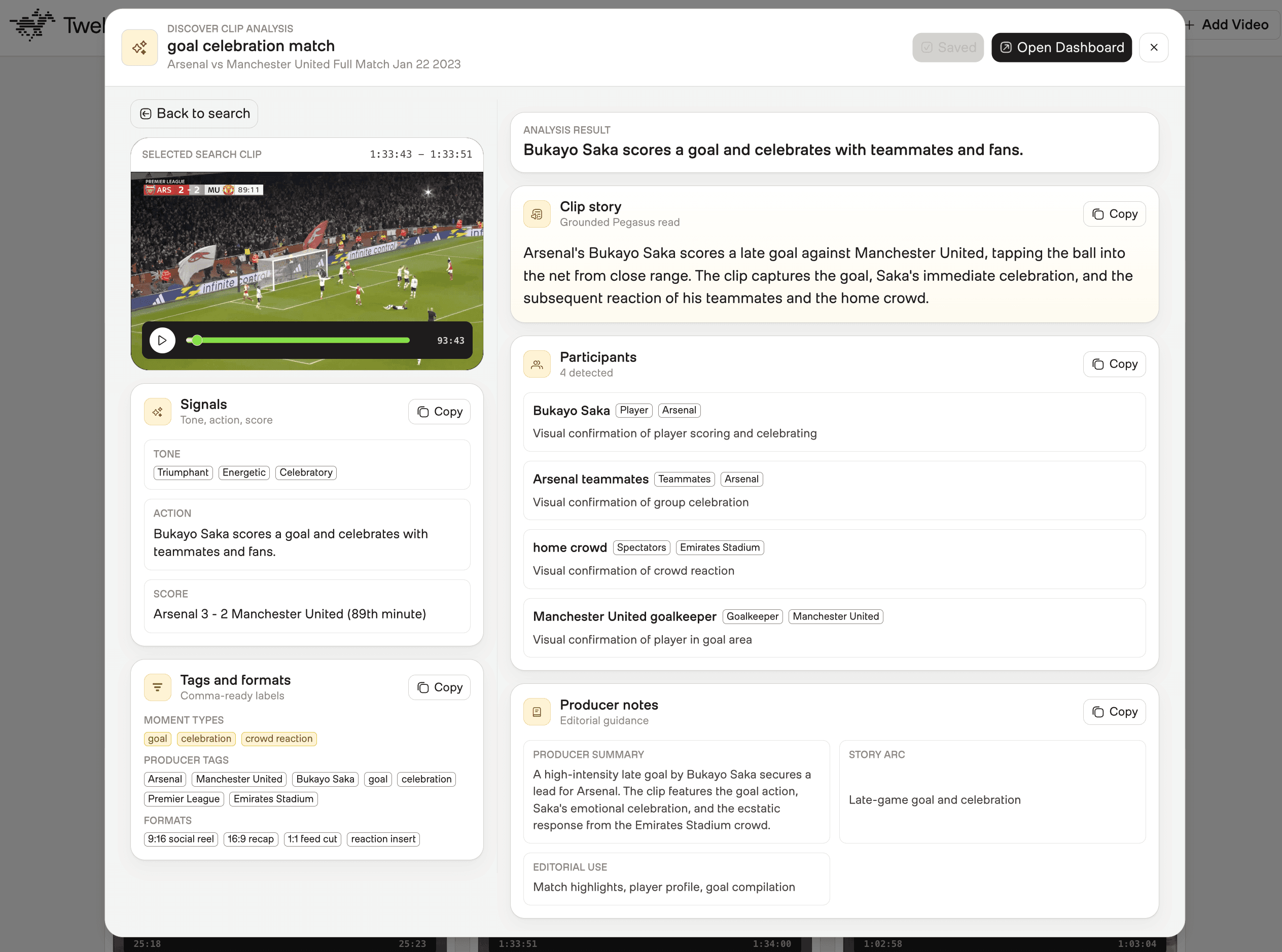
The application can save approved analysis back into the indexed asset metadata for the corresponding TwelveLabs video ID. This makes clip insights reusable across sessions: the context stays attached to the video asset and reloads on demand, rather than disappearing at the end of the review.
Section 3: Build Highlight Lanes with Jockey
Search finds the right moments. Pegasus explains a selected clip. Jockey takes the next step: it reasons across the prepared game knowledge and organizes the footage into production-ready categories.
This is where the workflow shifts from search and analysis toward something closer to a production assistant. Instead of asking a producer to build every reel manually from a clip list, the application uses Jockey over the Knowledge Store to generate structured highlight categories with timestamped clips, entity intelligence, and editorial context.
3.1 - Grounding Jockey in the Game Knowledge Store
Before Jockey can reason over the footage, the source videos need to be prepared as a knowledge store.
The ingestion flow starts by uploading source videos as TwelveLabs assets. Those assets are added to a TwelveLabs Knowledge Store, where they become searchable, referenceable items for Jockey. During this step, the application creates a new knowledge store if one does not already exist:
def create_knowledge_store(spec):
    metadata = {
        "game_tag": spec["tag"],
        "source": "sports-jockey",
    }

    return twelvelabs_create_knowledge_store(
        name=spec["knowledge_store_name"],
        ingestion_config={
            "enrichment_config": {
                "type": "json_schema",
                "json_schema": SPORTS_HIGHLIGHT_INGESTION_SCHEMA,
            }
        },
        metadata=metadata,
    )
def create_knowledge_store(spec):
    metadata = {
        "game_tag": spec["tag"],
        "source": "sports-jockey",
    }

    return twelvelabs_create_knowledge_store(
        name=spec["knowledge_store_name"],
        ingestion_config={
            "enrichment_config": {
                "type": "json_schema",
                "json_schema": SPORTS_HIGHLIGHT_INGESTION_SCHEMA,
            }
        },
        metadata=metadata,
    )
The Knowledge Store is created with an enrichment schema designed for sports contexts, focused on score changes, key plays, emotional moments, fan reactions, and broadcast context. This structured foundation gives Jockey reliable grounding before it is asked to build highlight lanes.
After creating the knowledge store, the backend uploads the source videos, adds the indexed video assets, and waits until the items are ready:
def run_ingestion(payload, progress=None):
    spec = parse_ingestion_payload(payload)

    store_id = spec["knowledge_store_id"]
    if not store_id:
        store = create_knowledge_store(spec)
        store_id = store["_id"]
        progress(f"created knowledge store {store_id}")
    else:
        progress(f"using existing knowledge store {store_id}")

    upload_source_assets(spec["source_videos"], state, progress)
    upload_index_assets(spec["index_videos"], state, progress)
    add_index_items(store_id, spec["index_videos"], state, progress)

    poll_items_until_ready(
        store_id=store_id,
        state=state,
        poll_attempts=spec["poll_attempts"],
        poll_interval_seconds=spec["poll_interval_seconds"],
        progress=progress,
    )

    game_payload = {
        "tag": spec["tag"],
        "label": spec["label"],
        "sport": spec["sport"],
        "knowledge_store_id": store_id,
        "source_videos": [video.name for video in spec["source_videos"]],
        "video_asset_ids": source_asset_ids_for_game(spec["source_videos"], state),
        "video_reference_map": build_video_reference_map(state, spec["index_videos"]),
    }

    register_game(game_payload)
def run_ingestion(payload, progress=None):
    spec = parse_ingestion_payload(payload)

    store_id = spec["knowledge_store_id"]
    if not store_id:
        store = create_knowledge_store(spec)
        store_id = store["_id"]
        progress(f"created knowledge store {store_id}")
    else:
        progress(f"using existing knowledge store {store_id}")

    upload_source_assets(spec["source_videos"], state, progress)
    upload_index_assets(spec["index_videos"], state, progress)
    add_index_items(store_id, spec["index_videos"], state, progress)

    poll_items_until_ready(
        store_id=store_id,
        state=state,
        poll_attempts=spec["poll_attempts"],
        poll_interval_seconds=spec["poll_interval_seconds"],
        progress=progress,
    )

    game_payload = {
        "tag": spec["tag"],
        "label": spec["label"],
        "sport": spec["sport"],
        "knowledge_store_id": store_id,
        "source_videos": [video.name for video in spec["source_videos"]],
        "video_asset_ids": source_asset_ids_for_game(spec["source_videos"], state),
        "video_reference_map": build_video_reference_map(state, spec["index_videos"]),
    }

    register_game(game_payload)
This structure keeps the output usable. Every moment has a timestamp, a reason for being selected, evidence from the footage, and guidance for how it can be used in an edit. The enhanced lanes can include semantic context such as momentum, emotion, celebration, fan energy, and production value.
3.2 - Generating Highlight Categories from the Knowledge Store
Once the footage is available in the Knowledge Store, the application asks Jockey to build highlight lanes directly. The backend sends a structured request to the TwelveLabs /responses API with the game's knowledge_store_id and a JSON schema defining the expected output.
The request is organized around four production categories: Best Plays, Emotional Moments, Fan Experience, and Behind the Scenes.
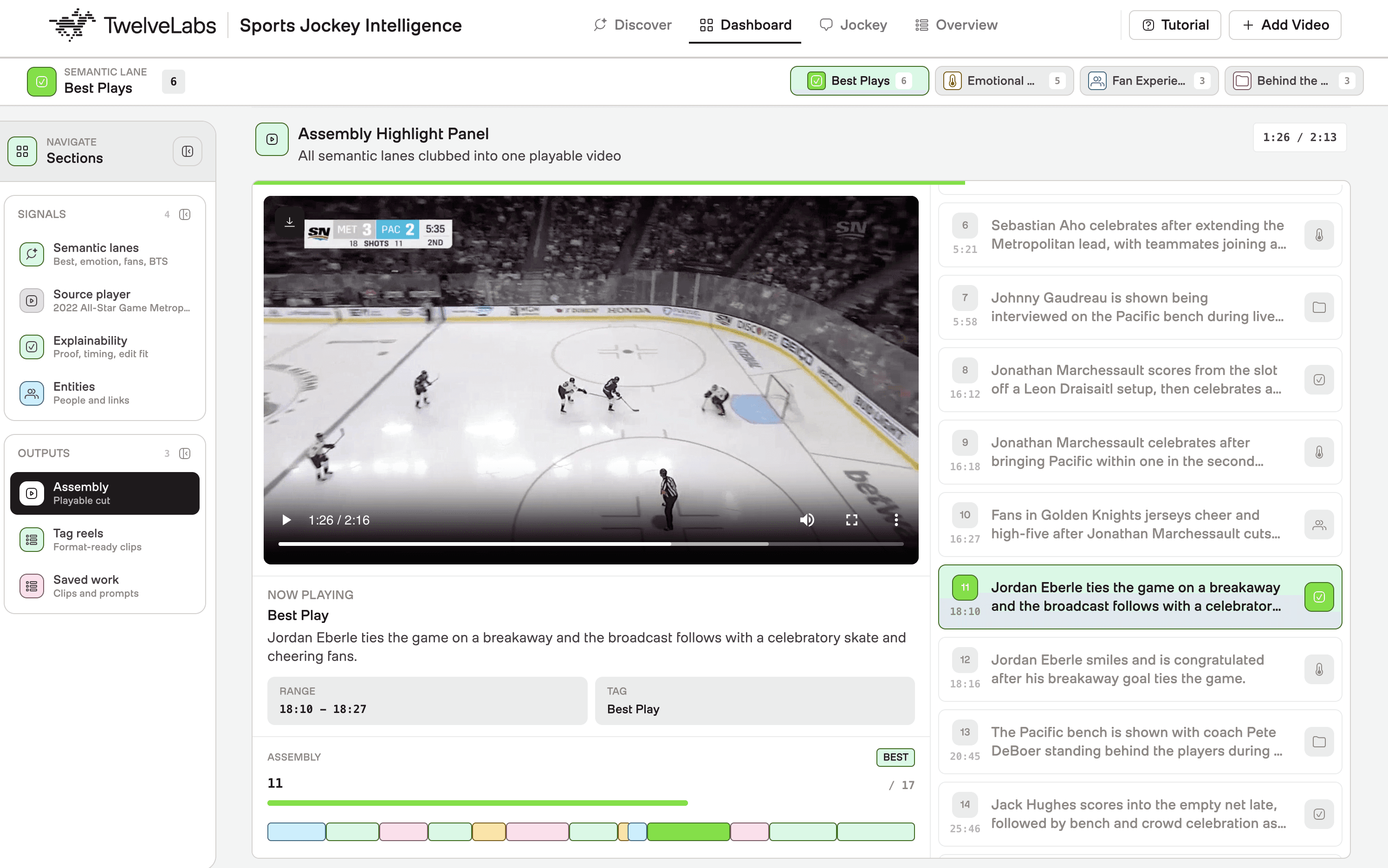
Every clip in the output includes a timestamp, the reason it was selected, evidence from the footage, and guidance for editorial use. Jockey surfaces semantic context that no stats feed carries: momentum shifts, emotional peaks, crowd energy levels, and production value signals. The recommended_formats field tells a producer whether the clip belongs in a 60-second social cut, a long-form recap, or a vertical-format reel.
3.3 - Tracking Who Appears, When They Matter, and How They Connect
Highlight lanes answer what moments matter. Entity tracking answers who is involved and how those individuals connect across the footage.
The application uses Jockey for entity intelligence through a dedicated tracking workflow. The backend asks Jockey to extract the most important grounded entities from the Knowledge Store: players, teams, coaches, officials, fan groups, benches, and broadcast subjects. Jockey can also return relationships when the footage supports them: a scorer celebrating with teammates, a coach reacting to a play, a crowd responding to a goal, or opponents contesting a call.
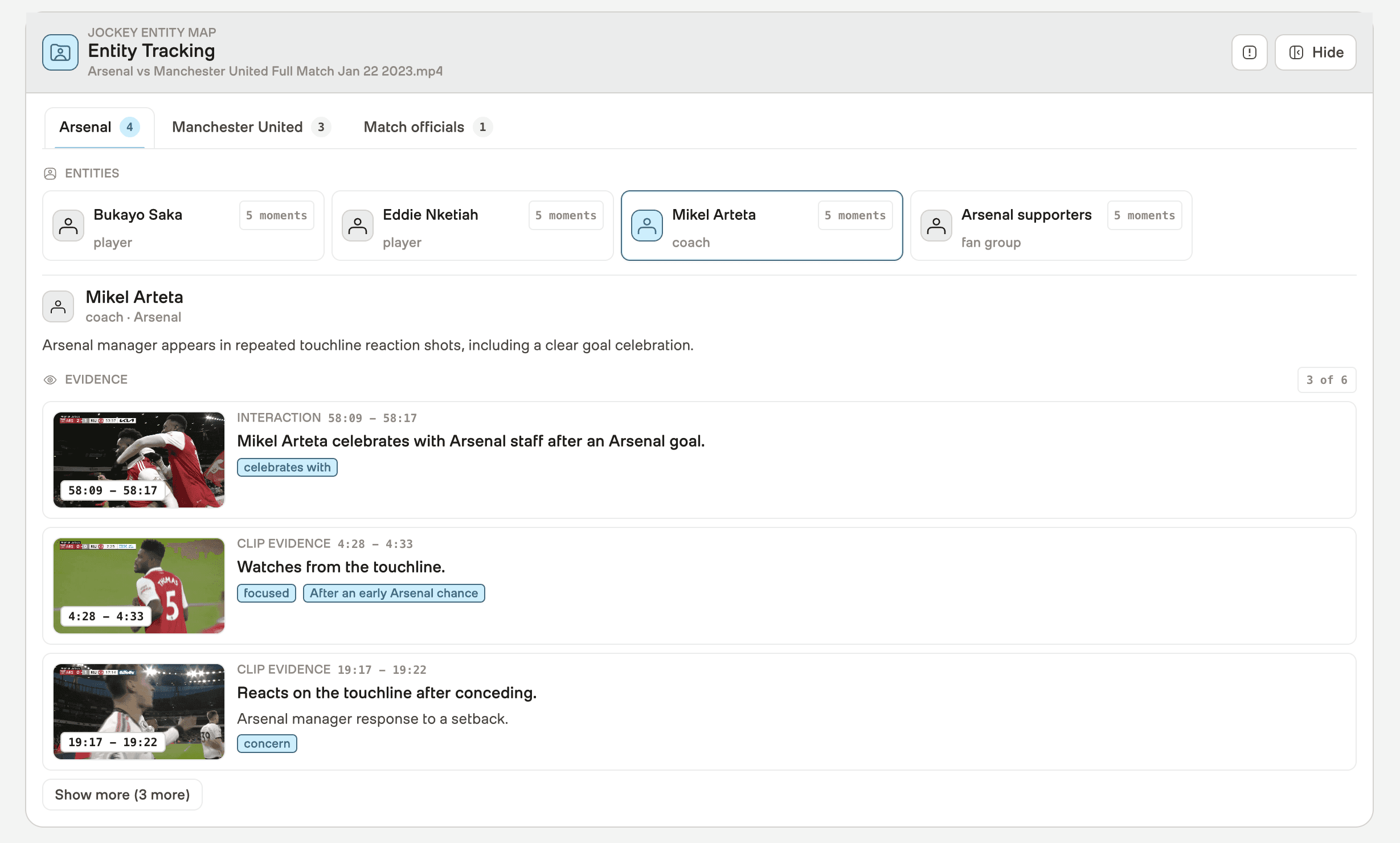
For sports rights holders, this workflow directly supports sponsor reporting, player-specific content packages, and compliance review. A producer can pull every frame where a sponsor's logo appears alongside a positive emotional moment, or extract all footage featuring a specific athlete across multiple games, without a manual search pass.
The workflow deliberately returns a focused set of high-confidence entities rather than an exhaustive list. A smaller, higher-quality set is more useful to a production team than a noisy inventory that requires its own curation pass.
When entity tracking output is generated, the application stores it back on the indexed asset metadata. The same intelligence becomes reusable across future sessions without triggering a fresh Jockey request.
Section 4: Talk to the Game with Jockey Chat
Highlight lanes are useful when the workflow knows what structure to generate. Production work is often more open-ended. A producer may want to ask for a specific moment they remember from watching the game live, explore a creative direction without knowing the exact search phrase, or refine a reel idea through iteration.
Live chat with Jockey turns the Knowledge Store into an interactive production assistant. A producer describes their intent. Jockey finds the matching footage.
4.1 - Natural Language Requests, Grounded in Actual Footage
Consider a producer who asks: "Find me the moment right after the lead changed where someone on the bench had the biggest reaction." That is not a keyword query. It requires understanding the game timeline, the score context, the specific location in frame, and the intensity of a physical reaction.
The backend routes chat messages through the Jockey /responses workflow. Each request includes the user message, the registered Knowledge Store, optional source-video scope, and conversation history:
request_body = {
    "model": "jockey1.0",
    "instructions": jockey_chat_instructions(),
    "input": [
        {
            "type": "message",
            "role": "user",
            "content": jockey_chat_prompt(
                game=game,
                message=message,
                limit=limit,
                video_name=video_name,
                include_reel=include_reel,
                conversation_history=conversation_history,
            ),
        }
    ],
    "knowledge_store_id": configured_knowledge_store_id(game),
    "text": {
        "format": {
            "type": "json_schema",
            "name": "jockey_highlight_manifest",
            "schema": JOCKEY_CHAT_SCHEMA,
        }
    },
}
request_body = {
    "model": "jockey1.0",
    "instructions": jockey_chat_instructions(),
    "input": [
        {
            "type": "message",
            "role": "user",
            "content": jockey_chat_prompt(
                game=game,
                message=message,
                limit=limit,
                video_name=video_name,
                include_reel=include_reel,
                conversation_history=conversation_history,
            ),
        }
    ],
    "knowledge_store_id": configured_knowledge_store_id(game),
    "text": {
        "format": {
            "type": "json_schema",
            "name": "jockey_highlight_manifest",
            "schema": JOCKEY_CHAT_SCHEMA,
        }
    },
}
Rather than letting the agent respond with an unstructured paragraph, the application asks Jockey to return a clean, typed object with two parts: a short narrative summary and a list of playable clips. The schema below defines the required structure:
JOCKEY_CHAT_SCHEMA = {
    "type": "object",
    "properties": {
        "narrative_summary": {"type": "string"},
        "clips": {
            "type": "array",
            "items": {
                "type": "object",
                "properties": {
                    "video_reference": {"type": "string"},
                    "start_time": {"type": "string"},
                    "end_time": {"type": "string"},
                    "moment_type": {"type": "string"},
                    "emotional_intensity": {"type": "string"},
                    "jockey_rationale": {"type": "string"},
                    "confidence": {"type": "number", "minimum": 0.01, "maximum": 1},
                    "highlight_potential": {"type": "number", "minimum": 0, "maximum": 1},
                },
                "required": [
                    "video_reference",
                    "start_time",
                    "end_time",
                    "moment_type",
                    "emotional_intensity",
                    "jockey_rationale",
                    "confidence",
                    "highlight_potential",
                ],
                "additionalProperties": False,
            },
        },
    },
    "required": ["narrative_summary", "clips"],
    "additionalProperties": False,
}
JOCKEY_CHAT_SCHEMA = {
    "type": "object",
    "properties": {
        "narrative_summary": {"type": "string"},
        "clips": {
            "type": "array",
            "items": {
                "type": "object",
                "properties": {
                    "video_reference": {"type": "string"},
                    "start_time": {"type": "string"},
                    "end_time": {"type": "string"},
                    "moment_type": {"type": "string"},
                    "emotional_intensity": {"type": "string"},
                    "jockey_rationale": {"type": "string"},
                    "confidence": {"type": "number", "minimum": 0.01, "maximum": 1},
                    "highlight_potential": {"type": "number", "minimum": 0, "maximum": 1},
                },
                "required": [
                    "video_reference",
                    "start_time",
                    "end_time",
                    "moment_type",
                    "emotional_intensity",
                    "jockey_rationale",
                    "confidence",
                    "highlight_potential",
                ],
                "additionalProperties": False,
            },
        },
    },
    "required": ["narrative_summary", "clips"],
    "additionalProperties": False,
}
The narrative_summary gives the producer a concise explanation of what Jockey found and why. The clips array turns that explanation into something immediately actionable: a source reference, a start and end time, the moment type, the emotional intensity, the rationale behind the selection, and confidence scores. The same object can power clip previews, reel assembly, save actions, or downstream editorial review.
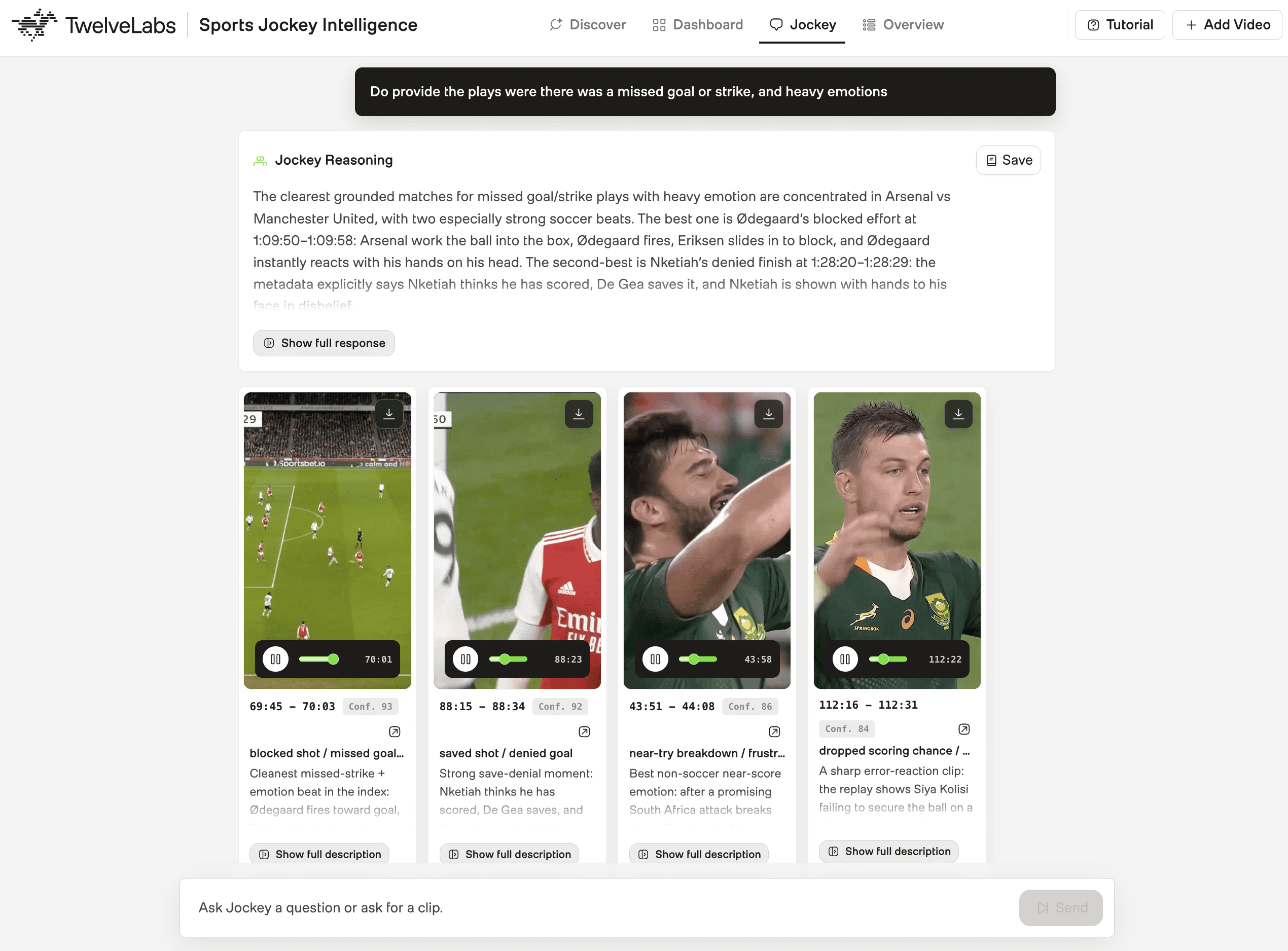
Jockey Chat supports iteration through conversation history. A producer can open with a broad request, narrow it in the next turn, and request a specific format in the turn after that, without restarting the workflow or losing context.

4.2 - Persisting Production Decisions on Indexed Assets
Sports production workflows often span multiple sessions and multiple team members. A producer who reviews footage on Tuesday should not have to redo the same discovery pass on Thursday. A coordinator handing off to an editor should not have to re-explain which clips were approved.
When a producer finds a strong Pegasus clip analysis or a useful Jockey Chat response, the application saves that result back to the source video's TwelveLabs indexed asset metadata:
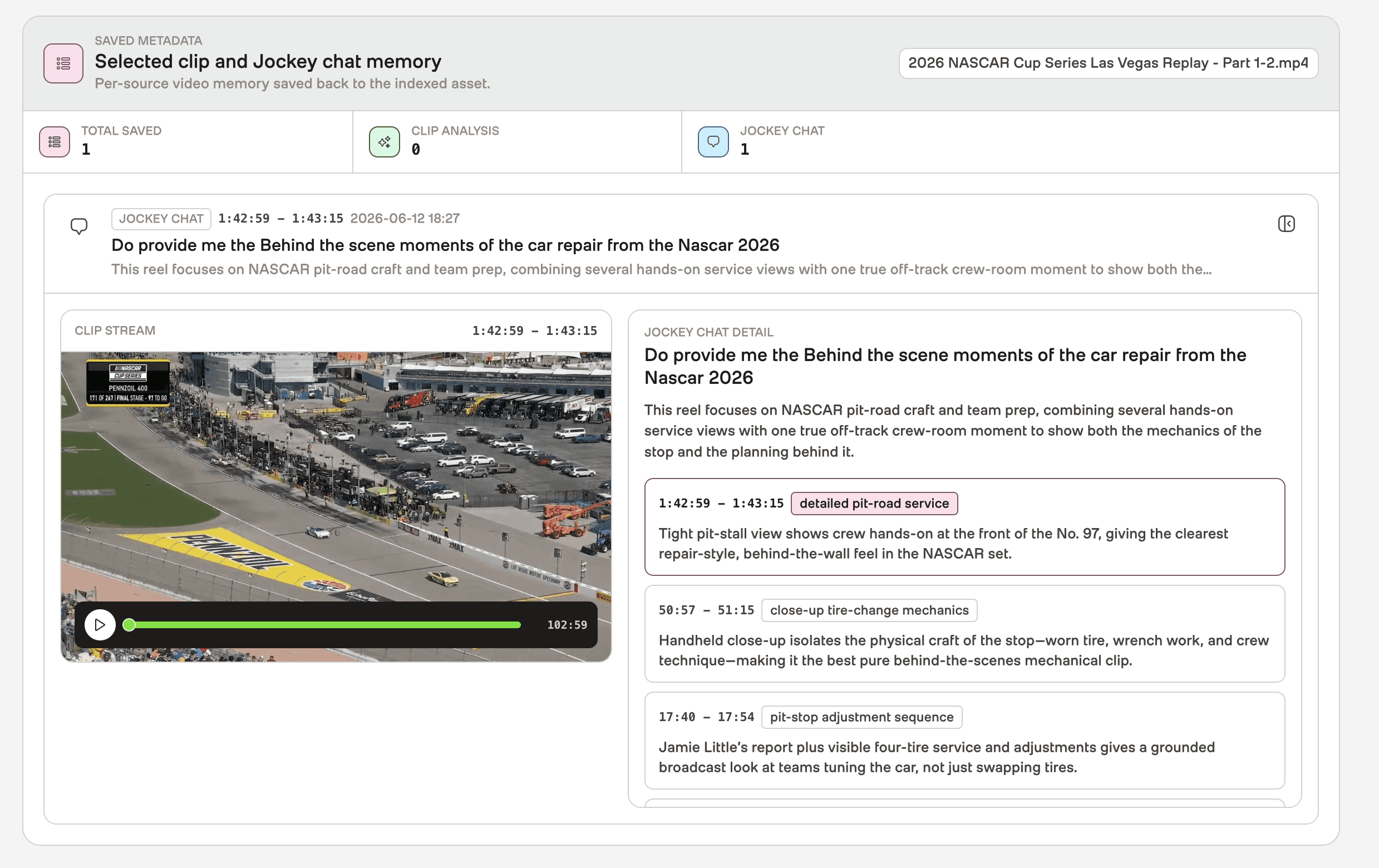
In the TwelveLabs integration layer, this is a PATCH request to the indexed asset:
def update_indexed_asset_user_metadata(index_id, indexed_asset_id, user_metadata):
    return request_json(
        "patch",
        indexed_asset_endpoint(index_id, indexed_asset_id),
        {"user_metadata": user_metadata},
    )
def update_indexed_asset_user_metadata(index_id, indexed_asset_id, user_metadata):
    return request_json(
        "patch",
        indexed_asset_endpoint(index_id, indexed_asset_id),
        {"user_metadata": user_metadata},
    )
Saved results reload on demand: clip ranges, Pegasus analysis, chat decisions, and summaries all come back with the video. For teams working across multiple sessions or sharing footage review across roles, the saved context is persistent and shared rather than siloed per user.
What This Approach Makes Possible
The shift this application demonstrates is not faster highlight generation. It is a different relationship between a production team and its footage.
A full match becomes something a team can ask, understand, and reuse rather than something they have to watch end to end. Marengo finds plays that no stats feed would surface. Pegasus converts a timestamp into a structured editorial decision with auditable evidence. Jockey organizes the game into production-ready lanes and responds to natural language requests with playable, structured results. Persistent metadata keeps useful decisions available across sessions and team members.
For sports rights holders, this translates to fewer hours between footage delivery and publishable output, and more content produced from a single match. A game does not have to yield one recap. It can yield a Best Plays reel, an Emotional Moments cut, a fan-focused social edit, and entity-tracked coverage of a specific player, all from the same footage, the same workflow, and the same knowledge store.
The source code and a live demo are available for teams who want to see the workflow before building.
Resources
TwelveLabs Pegasus 1.5 overview - Learn how Pegasus 1.5 enables deeper video understanding and structured analysis.
TwelveLabs Marengo 3.0 overview - Explore how Marengo 3.0 powers multimodal search across video.
TwelveLabs Jockey Workflow - Reference notebook implementation for the Jockey and Knowledge Store workflow.
Sports Jockey Intelligence repository - Source code for the sports video intelligence application.
TwelveLabs Jockey Knowledge Store guide - Follow the guide for creating a Knowledge Store used by Jockey.
TwelveLabs sample applications - Browse example applications built with TwelveLabs video intelligence.
Join the TwelveLabs Discord community - Connect with the TwelveLabs community, ask questions, and share what you build.
Introduction
The moments that move sports audiences are not in the box score. A scoreboard change records that a point was scored. It does not capture the bench erupting, the crowd holding its breath, the broadcaster's voice cracking, or the player sinking to their knees. Those are the moments that get shared, replayed, and monetized.
The NBA generated more than 5 billion social media views during the 2025 Finals, up 215% from the previous year. That growth is driven by fast, moment-specific short-form content. But the production gap is real: hour-long games require human review to find what matters, and manual workflows cannot scale to meet the distribution pace.
Production-ready sports intelligence requires three things in sequence: semantic discovery across raw footage, structured understanding of selected moments, and an agentic layer that reasons over the game the way a producer would. Finding a goal is a starting point. Understanding the goal's crowd response, the emotional arc, the broadcast context, and which of four different formats it belongs in is what makes it publishable.
This tutorial walks through Sports Jockey, a production-grade sports video intelligence application built with TwelveLabs. The application uses Marengo for semantic search across game footage, Pegasus 1.5 for clip-scoped analysis of selected moments, and Jockey as the agent layer reasoning over the knowledge store. By the end, you will have a clear picture of how these three capabilities connect into a single workflow that turns raw footage into searchable moments, structured editorial context, highlight lanes, entity intelligence, and production-ready outputs.
What the Application Does
The application supports four connected workflows:
Semantic search finds plays, reactions, celebrations, logos, fan moments, and atmosphere directly from video using Marengo. This includes text queries, image-based search, and entity-based search for registered players, logos, or any visual reference.
Clip analysis with Pegasus 1.5 takes a selected moment and returns structured editorial metadata: description, emotional tone, key action, participants, score context, editorial use, and recommended formats. Pegasus does not re-analyze the full match. It focuses on exactly the segment the producer selected.
Highlight lane generation uses Jockey over the Knowledge Store to organize footage into production-ready categories: Best Plays, Emotional Moments, Fan Experience, and Behind the Scenes. Each lane includes timestamped clips with evidence, rationale, and editorial guidance.
Live chat with Jockey turns the Knowledge Store into an interactive production assistant. A producer can ask for a specific moment in natural language, refine a reel idea, or explore footage conversationally across multiple turns.
Intelligence Stack Behind Sports with Jockey Application
Three TwelveLabs capabilities power the workflow, each with a defined role and a defined hand-off point.
Before any search or reasoning can happen, source videos are uploaded to TwelveLabs as assets. Each uploaded asset becomes the canonical video object referenced across the full workflow. The backend stores the returned asset ID and maps it to the registered source video name.
After upload, each asset connects to two TwelveLabs layers: the search index and the Knowledge Store. The index makes footage available for Marengo-powered semantic search and indexed playback. The Knowledge Store gives Jockey a grounded context layer for reasoning over the game.
The sections below break down how each capability fits into the workflow, what it produces, and how its output flows into the next step.
Prerequisites
Build the foundation once and reuse it across every workflow. To set up the application, do clone the code repository.
Create a TwelveLabs account and generate an API key.
Create a TwelveLabs index with Marengo enabled for semantic video search and record the Index ID.
Create the Entity Collection and record the Entity Collection ID in
.env.Create a TwelveLabs Knowledge Store for Jockey and record it for
.env.Install FFmpeg to generate or export assembled highlight reels.
Create
backend/.envwith the following variables:TWELVELABS_API_KEY,INDEX_ID,ENTITY_COLLECTION_ID, andKNOWLEDGE_STORE_ID.
If you would like to explore the notebook workflow for using Jockey with sports footage, refer to this repository.
Section 1: Search the Game Like a Producer Thinks
The most valuable production moments are often absent from the official game log. A scoreboard change records that a point was scored. It does not capture the bench reaction, the crowd energy, the broadcast replay, or the emotional pause before the next play. Finding those moments requires understanding that spans visuals, audio, motion, atmosphere, and context together.
Marengo is the search layer that makes this possible. Instead of forcing production teams to scrub through footage manually or depend on pre-written tags, the application lets users search game footage the way they naturally think about it: "a late comeback," "a bench reaction," "a fan in the stands after the score."
1.1 - Marengo for Semantic Discovery
The workflow begins by indexing source footage with TwelveLabs. Once the video is available in the index, Marengo can search across the game using natural language.
Marengo returns timestamped results across all indexed footage. Each result includes the time range, video reference, relevance information, and source mapping needed to open the exact moment in the application.
This matters most for the moments that live between the data points. Sponsor boards, player gestures, crowd signs, and emotional reactions never appear in any stats feed, but they are frequently the most shareable content in the footage.
1.2 - Search by Images, Entity, or Logo
Some production moments cannot be put into words. A producer may want footage matching a visual reference: a specific player's face, a jersey number, a sponsor logo, a team badge, or a sideline figure who appears in multiple games.
The application extends search beyond text for these cases. A user uploads an image and the application sends it to TwelveLabs as visual search input, returning footage that matches the reference visually.
The workflow also supports entity-based search. Each entity is created with a name, description, and reference image, then stored inside the entity collection in TwelveLabs for reuse across games. Once registered, the entity is searchable across all indexed footage without recreating the context each time.
This is especially useful in sports media workflows where the important subject is visual rather than textual. The example below shows how the "Rolex" logo is found and tracked across indexed sports footage. Sponsor boards, jersey numbers, and team badges that never appear in any transcript are still fully searchable through this workflow.
Section 2: Analyze Only the Moment That Matters
A timestamp is not enough. A producer needs to understand what happens inside the clip, who appears, why the moment is useful, and which format it belongs in: a highlight reel, a social edit, a recap, or a rights-compliance review.
This section covers how the application uses Pegasus 1.5 to move from a discovered moment to structured, decision-ready video intelligence.
2.1 - Pegasus 1.5 for Clip-Scoped Analyze
Once Marengo surfaces a relevant moment, the application sends only that selected time range to Pegasus 1.5. The full match is not re-analyzed. Pegasus receives exactly the segment the producer selected, which keeps analysis fast, precise, and scoped to the actual production decision.
The backend receives the selected video name, timestamp range, and asset ID before calling Pegasus:
result = twelvelabs_analyze_video({
    "model_name": "pegasus1.5",
    "video": {
        "type": "asset_id",
        "asset_id": asset_id,
    },
    "start_time": analyze_start,
    "end_time": analyze_end,
    "prompt": prompt,
    "temperature": 0.2,
    "response_format": {
        "type": "json_schema",
        "json_schema": SELECTED_CLIP_ANALYSIS_SCHEMA,
    },
    "max_tokens": 3200,
})
Pegasus handles multimodal understanding inside the selected clip with full-context awareness. The application controls the scope, schema, and workflow.
2.2 - Structuring Model Output as Editorial Metadata
The goal is metadata that supports a real cut decision, not a free-form description.
The application asks Pegasus 1.5 to return a structured JSON response instead of unstructured text. Each analyzed clip maps to a consistent editorial object:
SELECTED_CLIP_ANALYSIS_SCHEMA = {
    "type": "object",
    "properties": {
        "description": {"type": "string"},
        "emotional_tone": {"type": "string"},
        "key_action": {"type": "string"},
        "participants": {"type": "array"},
        "moment_types": {"type": "array", "items": {"type": "string"}},
        "tags": {"type": "array", "items": {"type": "string"}},
        "score_context": {"type": "string"},
        "producer_summary": {"type": "string"},
        "story_arc": {"type": "string"},
        "editorial_use": {"type": "string"},
        "recommended_formats": {"type": "array", "items": {"type": "string"}},
        "visual_evidence": {"type": "array", "items": {"type": "string"}},
        "audio_evidence": {"type": "array", "items": {"type": "string"}},
        "transcript_evidence": {"type": "array", "items": {"type": "string"}},
        "confidence": {"type": "number"},
    },
    "required": [
        "description",
        "key_action",
        "producer_summary",
        "editorial_use",
        "confidence",
    ],
}
The fields that drive cut decisions are editorial_use, recommended_formats, and confidence. A producer can compare moments across different clips using the same fields, save useful analysis for later, and reuse the metadata in a downstream reel assembly or review workflow. The visual_evidence and audio_evidence fields document what Pegasus saw and heard, making the rationale auditable rather than opaque.
The application can save approved analysis back into the indexed asset metadata for the corresponding TwelveLabs video ID. This makes clip insights reusable across sessions: the context stays attached to the video asset and reloads on demand, rather than disappearing at the end of the review.
Section 3: Build Highlight Lanes with Jockey
Search finds the right moments. Pegasus explains a selected clip. Jockey takes the next step: it reasons across the prepared game knowledge and organizes the footage into production-ready categories.
This is where the workflow shifts from search and analysis toward something closer to a production assistant. Instead of asking a producer to build every reel manually from a clip list, the application uses Jockey over the Knowledge Store to generate structured highlight categories with timestamped clips, entity intelligence, and editorial context.
3.1 - Grounding Jockey in the Game Knowledge Store
Before Jockey can reason over the footage, the source videos need to be prepared as a knowledge store.
The ingestion flow starts by uploading source videos as TwelveLabs assets. Those assets are added to a TwelveLabs Knowledge Store, where they become searchable, referenceable items for Jockey. During this step, the application creates a new knowledge store if one does not already exist:
def create_knowledge_store(spec):
    metadata = {
        "game_tag": spec["tag"],
        "source": "sports-jockey",
    }

    return twelvelabs_create_knowledge_store(
        name=spec["knowledge_store_name"],
        ingestion_config={
            "enrichment_config": {
                "type": "json_schema",
                "json_schema": SPORTS_HIGHLIGHT_INGESTION_SCHEMA,
            }
        },
        metadata=metadata,
    )
The Knowledge Store is created with an enrichment schema designed for sports contexts, focused on score changes, key plays, emotional moments, fan reactions, and broadcast context. This structured foundation gives Jockey reliable grounding before it is asked to build highlight lanes.
After creating the knowledge store, the backend uploads the source videos, adds the indexed video assets, and waits until the items are ready:
def run_ingestion(payload, progress=None):
    spec = parse_ingestion_payload(payload)

    store_id = spec["knowledge_store_id"]
    if not store_id:
        store = create_knowledge_store(spec)
        store_id = store["_id"]
        progress(f"created knowledge store {store_id}")
    else:
        progress(f"using existing knowledge store {store_id}")

    upload_source_assets(spec["source_videos"], state, progress)
    upload_index_assets(spec["index_videos"], state, progress)
    add_index_items(store_id, spec["index_videos"], state, progress)

    poll_items_until_ready(
        store_id=store_id,
        state=state,
        poll_attempts=spec["poll_attempts"],
        poll_interval_seconds=spec["poll_interval_seconds"],
        progress=progress,
    )

    game_payload = {
        "tag": spec["tag"],
        "label": spec["label"],
        "sport": spec["sport"],
        "knowledge_store_id": store_id,
        "source_videos": [video.name for video in spec["source_videos"]],
        "video_asset_ids": source_asset_ids_for_game(spec["source_videos"], state),
        "video_reference_map": build_video_reference_map(state, spec["index_videos"]),
    }

    register_game(game_payload)
This structure keeps the output usable. Every moment has a timestamp, a reason for being selected, evidence from the footage, and guidance for how it can be used in an edit. The enhanced lanes can include semantic context such as momentum, emotion, celebration, fan energy, and production value.
3.2 - Generating Highlight Categories from the Knowledge Store
Once the footage is available in the Knowledge Store, the application asks Jockey to build highlight lanes directly. The backend sends a structured request to the TwelveLabs /responses API with the game's knowledge_store_id and a JSON schema defining the expected output.
The request is organized around four production categories: Best Plays, Emotional Moments, Fan Experience, and Behind the Scenes.
Every clip in the output includes a timestamp, the reason it was selected, evidence from the footage, and guidance for editorial use. Jockey surfaces semantic context that no stats feed carries: momentum shifts, emotional peaks, crowd energy levels, and production value signals. The recommended_formats field tells a producer whether the clip belongs in a 60-second social cut, a long-form recap, or a vertical-format reel.
3.3 - Tracking Who Appears, When They Matter, and How They Connect
Highlight lanes answer what moments matter. Entity tracking answers who is involved and how those individuals connect across the footage.
The application uses Jockey for entity intelligence through a dedicated tracking workflow. The backend asks Jockey to extract the most important grounded entities from the Knowledge Store: players, teams, coaches, officials, fan groups, benches, and broadcast subjects. Jockey can also return relationships when the footage supports them: a scorer celebrating with teammates, a coach reacting to a play, a crowd responding to a goal, or opponents contesting a call.
For sports rights holders, this workflow directly supports sponsor reporting, player-specific content packages, and compliance review. A producer can pull every frame where a sponsor's logo appears alongside a positive emotional moment, or extract all footage featuring a specific athlete across multiple games, without a manual search pass.
The workflow deliberately returns a focused set of high-confidence entities rather than an exhaustive list. A smaller, higher-quality set is more useful to a production team than a noisy inventory that requires its own curation pass.
When entity tracking output is generated, the application stores it back on the indexed asset metadata. The same intelligence becomes reusable across future sessions without triggering a fresh Jockey request.
Section 4: Talk to the Game with Jockey Chat
Highlight lanes are useful when the workflow knows what structure to generate. Production work is often more open-ended. A producer may want to ask for a specific moment they remember from watching the game live, explore a creative direction without knowing the exact search phrase, or refine a reel idea through iteration.
Live chat with Jockey turns the Knowledge Store into an interactive production assistant. A producer describes their intent. Jockey finds the matching footage.
4.1 - Natural Language Requests, Grounded in Actual Footage
Consider a producer who asks: "Find me the moment right after the lead changed where someone on the bench had the biggest reaction." That is not a keyword query. It requires understanding the game timeline, the score context, the specific location in frame, and the intensity of a physical reaction.
The backend routes chat messages through the Jockey /responses workflow. Each request includes the user message, the registered Knowledge Store, optional source-video scope, and conversation history:
request_body = {
    "model": "jockey1.0",
    "instructions": jockey_chat_instructions(),
    "input": [
        {
            "type": "message",
            "role": "user",
            "content": jockey_chat_prompt(
                game=game,
                message=message,
                limit=limit,
                video_name=video_name,
                include_reel=include_reel,
                conversation_history=conversation_history,
            ),
        }
    ],
    "knowledge_store_id": configured_knowledge_store_id(game),
    "text": {
        "format": {
            "type": "json_schema",
            "name": "jockey_highlight_manifest",
            "schema": JOCKEY_CHAT_SCHEMA,
        }
    },
}
Rather than letting the agent respond with an unstructured paragraph, the application asks Jockey to return a clean, typed object with two parts: a short narrative summary and a list of playable clips. The schema below defines the required structure:
JOCKEY_CHAT_SCHEMA = {
    "type": "object",
    "properties": {
        "narrative_summary": {"type": "string"},
        "clips": {
            "type": "array",
            "items": {
                "type": "object",
                "properties": {
                    "video_reference": {"type": "string"},
                    "start_time": {"type": "string"},
                    "end_time": {"type": "string"},
                    "moment_type": {"type": "string"},
                    "emotional_intensity": {"type": "string"},
                    "jockey_rationale": {"type": "string"},
                    "confidence": {"type": "number", "minimum": 0.01, "maximum": 1},
                    "highlight_potential": {"type": "number", "minimum": 0, "maximum": 1},
                },
                "required": [
                    "video_reference",
                    "start_time",
                    "end_time",
                    "moment_type",
                    "emotional_intensity",
                    "jockey_rationale",
                    "confidence",
                    "highlight_potential",
                ],
                "additionalProperties": False,
            },
        },
    },
    "required": ["narrative_summary", "clips"],
    "additionalProperties": False,
}
The narrative_summary gives the producer a concise explanation of what Jockey found and why. The clips array turns that explanation into something immediately actionable: a source reference, a start and end time, the moment type, the emotional intensity, the rationale behind the selection, and confidence scores. The same object can power clip previews, reel assembly, save actions, or downstream editorial review.
Jockey Chat supports iteration through conversation history. A producer can open with a broad request, narrow it in the next turn, and request a specific format in the turn after that, without restarting the workflow or losing context.
4.2 - Persisting Production Decisions on Indexed Assets
Sports production workflows often span multiple sessions and multiple team members. A producer who reviews footage on Tuesday should not have to redo the same discovery pass on Thursday. A coordinator handing off to an editor should not have to re-explain which clips were approved.
When a producer finds a strong Pegasus clip analysis or a useful Jockey Chat response, the application saves that result back to the source video's TwelveLabs indexed asset metadata:
In the TwelveLabs integration layer, this is a PATCH request to the indexed asset:
def update_indexed_asset_user_metadata(index_id, indexed_asset_id, user_metadata):
    return request_json(
        "patch",
        indexed_asset_endpoint(index_id, indexed_asset_id),
        {"user_metadata": user_metadata},
    )
Saved results reload on demand: clip ranges, Pegasus analysis, chat decisions, and summaries all come back with the video. For teams working across multiple sessions or sharing footage review across roles, the saved context is persistent and shared rather than siloed per user.
What This Approach Makes Possible
The shift this application demonstrates is not faster highlight generation. It is a different relationship between a production team and its footage.
A full match becomes something a team can ask, understand, and reuse rather than something they have to watch end to end. Marengo finds plays that no stats feed would surface. Pegasus converts a timestamp into a structured editorial decision with auditable evidence. Jockey organizes the game into production-ready lanes and responds to natural language requests with playable, structured results. Persistent metadata keeps useful decisions available across sessions and team members.
For sports rights holders, this translates to fewer hours between footage delivery and publishable output, and more content produced from a single match. A game does not have to yield one recap. It can yield a Best Plays reel, an Emotional Moments cut, a fan-focused social edit, and entity-tracked coverage of a specific player, all from the same footage, the same workflow, and the same knowledge store.
The source code and a live demo are available for teams who want to see the workflow before building.
Resources
TwelveLabs Pegasus 1.5 overview - Learn how Pegasus 1.5 enables deeper video understanding and structured analysis.
TwelveLabs Marengo 3.0 overview - Explore how Marengo 3.0 powers multimodal search across video.
TwelveLabs Jockey Workflow - Reference notebook implementation for the Jockey and Knowledge Store workflow.
Sports Jockey Intelligence repository - Source code for the sports video intelligence application.
TwelveLabs Jockey Knowledge Store guide - Follow the guide for creating a Knowledge Store used by Jockey.
TwelveLabs sample applications - Browse example applications built with TwelveLabs video intelligence.
Join the TwelveLabs Discord community - Connect with the TwelveLabs community, ask questions, and share what you build.



Enterprise
©
2026
TwelveLabs, Inc. All Rights Reserved

Enterprise
©
2026
TwelveLabs, Inc. All Rights Reserved

Enterprise
©
2026
TwelveLabs, Inc. All Rights Reserved