" height="1.90314px" id="wtDTm6bEW" transform="translate(26.225 0)" width="2.4723000000000006px"/><path d="M 0.557 0 L 1.438 0 C 1.746 0 1.995 0.25 1.995 0.559 L 1.995 1.344 C 1.995 1.653 1.746 1.903 1.438 1.903 L 0.557 1.903 C 0.25 1.903 0 1.653 0 1.344 L 0 0.559 C 0 0.25 0.25 0 0.557 0 Z" fill="rgb(29, 28, 27)" height="1.9031500000000001px" id="GnmDnNra_" transform="translate(36.408 2.728)" width="1.9953000000000003px"/><path d="M 6.224 0 L 0.558 0 C 0.25 0 0 0.25 0 0.559 L 0 1.344 C 0 1.653 0.25 1.903 0.558 1.903 L 6.224 1.903 C 6.531 1.903 6.781 1.653 6.781 1.344 L 6.781 0.559 C 6.781 0.25 6.531 0 6.224 0 Z" fill="rgb(29, 28, 27)" height="1.9031500000000001px" id="hKTQ3dbw4" transform="translate(34.261 5.456)" width="6.781100000000002px"/><path d="M 6.955 0 L 0.558 0 C 0.25 0 0 0.25 0 0.559 L 0 1.344 C 0 1.653 0.25 1.903 0.558 1.903 L 6.955 1.903 C 7.263 1.903 7.513 1.653 7.513 1.344 L 7.513 0.559 C 7.513 0.25 7.263 0 6.955 0 Z" fill="rgb(29, 28, 27)" height="1.9031500000000001px" id="G1Zzk9CUU" transform="translate(28.298 8.243)" width="7.513100000000001px"/><path d="M 7.123 0 L 0.558 0 C 0.25 0 0 0.25 0 0.559 L 0 1.344 C 0 1.653 0.25 1.903 0.558 1.903 L 7.123 1.903 C 7.431 1.903 7.681 1.653 7.681 1.344 L 7.681 0.559 C 7.681 0.25 7.431 0 7.123 0 Z" fill="rgb(29, 28, 27)" height="1.9030999999999985px" id="fm7cHxIfJ" transform="translate(0 10.972)" width="7.68067px"/><path d="M 13.447 0 L 0.558 0 C 0.25 0 0 0.25 0 0.559 L 0 1.344 C 0 1.653 0.25 1.903 0.558 1.903 L 13.447 1.903 C 13.755 1.903 14.004 1.653 14.004 1.344 L 14.004 0.559 C 14.004 0.25 13.755 0 13.447 0 Z" fill="rgb(29, 28, 27)" height="1.9030999999999985px" id="LowSwDrtg" transform="translate(9.552 10.972)" width="14.0044px"/><path d="M 0.558 0 L 8.212 0 C 8.52 0 8.77 0.25 8.77 0.559 L 8.77 1.344 C 8.77 1.653 8.52 1.903 8.212 1.903 L 0.558 1.903 C 0.25 1.903 0 1.653 0 1.344 L 0 0.559 C 0 0.25 0.25 0 0.558 0 Z" fill="rgb(29, 28, 27)" height="1.9030999999999985px" id="xRiKc2od7" transform="translate(27.041 10.972)" width="8.769900000000003px"/><path d="M 0.557 0 L 5.4 0 C 5.708 0 5.958 0.25 5.958 0.559 L 5.958 1.344 C 5.958 1.653 5.708 1.903 5.4 1.903 L 0.557 1.903 C 0.25 1.903 0 1.653 0 1.344 L 0 0.559 C 0 0.25 0.25 0 0.557 0 Z" fill="rgb(29, 28, 27)" height="1.9031500000000001px" id="JWdNVicde" transform="translate(36.796 8.243)" width="5.957599999999999px"/><path d="M 1.438 0 L 0.558 0 C 0.25 0 0 0.25 0 0.559 L 0 1.344 C 0 1.653 0.25 1.903 0.558 1.903 L 1.438 1.903 C 1.746 1.903 1.995 1.653 1.995 1.344 L 1.995 0.559 C 1.995 0.25 1.746 0 1.438 0 Z" fill="rgb(29, 28, 27)" height="1.9031500000000001px" id="RfFYVCT_T" transform="translate(28.717 5.456)" width="1.9953000000000003px"/><path d="M 0.558 0 L 2.895 0 C 3.203 0 3.453 0.25 3.453 0.559 L 3.453 1.406 C 3.453 1.714 3.203 1.964 2.895 1.964 L 0.558 1.964 C 0.25 1.964 0 1.714 0 1.406 L 0 0.559 C 0 0.25 0.25 0 0.558 0 Z" fill="rgb(29, 28, 27)" height="1.964299999999998px" id="dngJ6MU2p" transform="translate(16.183 24.582)" width="3.4525000000000006px"/><path d="M 1.706 0 L 0.558 0 C 0.25 0 0 0.25 0 0.559 L 0 1.406 C 0 1.714 0.25 1.964 0.558 1.964 L 1.706 1.964 C 2.014 1.964 2.263 1.714 2.263 1.406 L 2.263 0.559 C 2.263 0.25 2.014 0 1.706 0 Z" fill="rgb(29, 28, 27)" height="1.964299999999998px" id="N_fstvKmR" transform="translate(22.18 24.582)" width="2.2631999999999977px"/><path d="M 0.558 0 L 5.544 0 C 5.852 0 6.101 0.25 6.101 0.559 L 6.101 1.406 C 6.101 1.714 5.852 1.964 5.544 1.964 L 0.558 1.964 C 0.25 1.964 0 1.714 0 1.406 L 0 0.559 C 0 0.25 0.25 0 0.558 0 Z" fill="rgb(29, 28, 27)" height="1.964299999999998px" id="t55XLYcgb" transform="translate(25.486 24.582)" width="6.101399999999998px"/><path d="M 1.976 0 L 0.558 0 C 0.25 0 0 0.25 0 0.559 L 0 1.406 C 0 1.714 0.25 1.964 0.558 1.964 L 1.976 1.964 C 2.284 1.964 2.533 1.714 2.533 1.406 L 2.533 0.559 C 2.533 0.25 2.284 0 1.976 0 Z" fill="rgb(29, 28, 27)" height="1.964299999999998px" id="ZrEKTVTAe" transform="translate(28.542 21.854)" width="2.5334000000000003px"/><path d="M 0.557 0 L 1.438 0 C 1.746 0 1.995 0.25 1.995 0.559 L 1.995 1.406 C 1.995 1.714 1.746 1.964 1.438 1.964 L 0.557 1.964 C 0.25 1.964 0 1.714 0 1.406 L 0 0.559 C 0 0.25 0.25 0 0.557 0 Z" fill="rgb(29, 28, 27)" height="1.964299999999998px" id="Z0fPTp9aR" transform="translate(11.425 24.582)" width="1.9953000000000003px"/><path d="M 0 0.559 C 0 0.251 0.251 0 0.558 0 L 1.438 0 C 1.745 0 1.995 0.251 1.995 0.559 L 1.995 1.405 C 1.995 1.713 1.745 1.964 1.438 1.964 L 0.558 1.964 C 0.251 1.964 0 1.713 0 1.405 Z" fill="rgb(29, 28, 27)" height="1.964299999999998px" id="Tj_PDHFDh" transform="translate(20.635 27.308)" width="1.9954px"/><path d="M 0.557 0 L 1.342 0 C 1.65 0 1.899 0.25 1.899 0.559 L 1.899 1.406 C 1.899 1.714 1.65 1.964 1.342 1.964 L 0.557 1.964 C 0.25 1.964 0 1.714 0 1.406 L 0 0.559 C 0 0.25 0.25 0 0.557 0 Z" fill="rgb(29, 28, 27)" height="1.9643000000000015px" id="AYq9dXkKz" transform="translate(18.686 30.036)" width="1.8994px"/><path d="M 0.558 0 L 5.768 0 C 6.076 0 6.326 0.25 6.326 0.559 L 6.326 1.344 C 6.326 1.653 6.076 1.903 5.768 1.903 L 0.558 1.903 C 0.25 1.903 0 1.653 0 1.344 L 0 0.559 C 0 0.25 0.25 0 0.558 0 Z" fill="rgb(29, 28, 27)" height="1.9031500000000001px" id="rspevfJcx" transform="translate(12.157 8.243)" width="6.325900000000001px"/><path d="M 3.285 0 L 0.558 0 C 0.25 0 0 0.25 0 0.559 L 0 1.344 C 0 1.653 0.25 1.903 0.558 1.903 L 3.285 1.903 C 3.593 1.903 3.842 1.653 3.842 1.344 L 3.842 0.559 C 3.842 0.25 3.593 0 3.285 0 Z" fill="rgb(29, 28, 27)" height="1.9031500000000001px" id="XRUAhGnph" transform="translate(23.887 2.728)" width="3.8424000000000014px"/><path d="M 0.558 0 L 5.644 0 C 5.952 0 6.202 0.25 6.202 0.559 L 6.202 1.344 C 6.202 1.653 5.952 1.903 5.644 1.903 L 0.558 1.903 C 0.25 1.903 0 1.653 0 1.344 L 0 0.559 C 0 0.25 0.25 0 0.558 0 Z" fill="rgb(29, 28, 27)" height="1.9031500000000001px" id="VsaVVIfke" transform="translate(21.528 5.456)" width="6.201600000000003px"/><path d="M 3.06 0 L 0.558 0 C 0.25 0 0 0.25 0 0.559 L 0 1.344 C 0 1.653 0.25 1.903 0.558 1.903 L 3.06 1.903 C 3.369 1.903 3.618 1.653 3.618 1.344 L 3.618 0.559 C 3.618 0.25 3.369 0 3.06 0 Z" fill="rgb(29, 28, 27)" height="1.9030999999999985px" id="wiAKEgyId" transform="translate(40.819 10.972)" width="3.6182000000000016px"/><path d="M 0.558 0 L 17.318 0 C 17.626 0 17.875 0.25 17.875 0.559 L 17.875 1.345 C 17.875 1.653 17.626 1.903 17.318 1.903 L 0.558 1.903 C 0.25 1.903 0 1.653 0 1.345 L 0 0.559 C 0 0.25 0.25 0 0.558 0 Z" fill="rgb(29, 28, 27)" height="1.9032px" id="FIE0ufK9m" transform="translate(6.666 13.7)" width="17.87506px"/><path d="M 6.426 0 L 0.558 0 C 0.25 0 0 0.25 0 0.559 L 0 1.345 C 0 1.653 0.25 1.903 0.558 1.903 L 6.426 1.903 C 6.734 1.903 6.984 1.653 6.984 1.345 L 6.984 0.559 C 6.984 0.25 6.734 0 6.426 0 Z" fill="rgb(29, 28, 27)" height="1.9032000000000018px" id="ut9UWny3L" transform="translate(22.892 19.156)" width="6.983599999999999px"/><path d="M 0.558 0 L 22.151 0 C 22.459 0 22.709 0.25 22.709 0.559 L 22.709 1.344 C 22.709 1.653 22.459 1.903 22.151 1.903 L 0.558 1.903 C 0.25 1.903 0 1.653 0 1.344 L 0 0.559 C 0 0.25 0.25 0 0.558 0 Z" fill="rgb(29, 28, 27)" height="1.9030999999999985px" id="VULnffgbk" transform="translate(9.552 16.428)" width="22.7089px"/><path d="M 7.886 0 L 0.558 0 C 0.25 0 0 0.25 0 0.559 L 0 1.345 C 0 1.653 0.25 1.903 0.558 1.903 L 7.886 1.903 C 8.194 1.903 8.443 1.653 8.443 1.345 L 8.443 0.559 C 8.443 0.25 8.194 0 7.886 0 Z" fill="rgb(29, 28, 27)" height="1.9032000000000018px" id="adZTYr4MR" transform="translate(6.078 19.156)" width="8.44303px"/><path d="M 0.558 0 L 2.211 0 C 2.519 0 2.769 0.25 2.769 0.559 L 2.769 1.406 C 2.769 1.714 2.519 1.964 2.211 1.964 L 0.558 1.964 C 0.25 1.964 0 1.714 0 1.406 L 0 0.559 C 0 0.25 0.25 0 0.558 0 Z" fill="rgb(29, 28, 27)" height="1.964299999999998px" id="bwdUdEmCH" transform="translate(13.784 21.854)" width="2.768600000000001px"/><path d="M 2.424 0 L 0.558 0 C 0.25 0 0 0.25 0 0.559 L 0 1.406 C 0 1.714 0.25 1.964 0.558 1.964 L 2.424 1.964 C 2.732 1.964 2.982 1.714 2.982 1.406 L 2.982 0.559 C 2.982 0.25 2.732 0 2.424 0 Z" fill="rgb(29, 28, 27)" height="1.964299999999998px" id="PUvesMJEj" transform="translate(23.556 21.854)" width="2.982199999999999px"/><path d="M 0.558 0 L 2.241 0 C 2.55 0 2.799 0.25 2.799 0.559 L 2.799 1.406 C 2.799 1.714 2.55 1.964 2.241 1.964 L 0.558 1.964 C 0.25 1.964 0 1.714 0 1.406 L 0 0.559 C 0 0.25 0.25 0 0.558 0 Z" fill="rgb(29, 28, 27)" height="1.964299999999998px" id="Wo2W7J3Zj" transform="translate(8.672 21.854)" width="2.799050000000001px"/><path d="M 6.661 0 L 0.558 0 C 0.25 0 0 0.25 0 0.559 L 0 1.345 C 0 1.653 0.25 1.903 0.558 1.903 L 6.661 1.903 C 6.969 1.903 7.219 1.653 7.219 1.345 L 7.219 0.559 C 7.219 0.25 6.969 0 6.661 0 Z" fill="rgb(29, 28, 27)" height="1.9032px" id="PpPVZXp9j" transform="translate(27.041 13.7)" width="7.218900000000001px"/><path d="M 0.621 1.905 C 0.218 1.905 0 1.687 0 1.283 L 0 0.622 C 0 0.218 0.218 0 0.621 0 L 11.225 0 C 11.628 0 11.846 0.218 11.846 0.622 L 11.846 1.283 C 11.846 1.687 11.628 1.905 11.225 1.905 L 6.934 1.905 L 6.934 14.926 C 6.934 15.33 6.716 15.548 6.313 15.548 L 5.537 15.548 C 5.134 15.548 4.916 15.33 4.916 14.926 L 4.916 1.905 Z" fill="rgb(29, 28, 27)" height="15.54825px" id="xr32fxeO6" transform="translate(52.177 8.243)" width="11.845599999999997px"/><path d="M 0.621 0 C 0.218 0 0 0.218 0 0.622 L 0 14.924 C 0 15.328 0.218 15.546 0.621 15.546 L 1.357 15.546 C 1.76 15.546 1.978 15.328 1.978 14.924 L 1.978 0.622 C 1.978 0.218 1.76 0 1.357 0 Z" fill="rgb(29, 28, 27)" height="15.546050000000001px" id="oSsO_UPVN" transform="translate(90.476 8.243)" width="1.9779000000000053px"/><path d="M 0.62 15.546 C 0.217 15.546 0 15.328 0 14.924 L 0 0.622 C 0 0.218 0.217 0 0.62 0 L 1.396 0 C 1.799 0 2.017 0.218 2.017 0.622 L 2.017 13.632 L 8.981 13.632 C 9.384 13.632 9.602 13.85 9.602 14.254 L 9.602 14.924 C 9.602 15.328 9.384 15.546 8.981 15.546 Z" fill="rgb(29, 28, 27)" height="15.546050000000001px" id="Sgj4z5osO" transform="translate(116.749 8.243)" width="9.602000000000004px"/><path d="M 1.974 14.924 C 1.974 15.328 1.756 15.546 1.353 15.546 L 0.621 15.546 C 0.218 15.546 0 15.328 0 14.924 L 0 0.622 C 0 0.218 0.218 0 0.621 0 L 1.357 0 C 1.76 0 1.978 0.218 1.978 0.622 L 1.978 5.747 C 2.634 4.721 3.806 4.079 5.309 4.079 C 8.18 4.079 10.356 6.358 10.356 9.948 C 10.356 13.538 8.18 15.817 5.309 15.817 C 3.801 15.817 2.627 15.175 1.971 14.145 L 1.971 14.922 Z M 8.36 9.95 C 8.36 7.362 6.881 5.928 5.121 5.928 C 3.361 5.928 1.863 7.362 1.863 9.95 C 1.863 12.539 3.361 13.972 5.121 13.972 C 6.881 13.972 8.36 12.539 8.36 9.95 Z" fill="rgb(29, 28, 27)" height="15.81665px" id="q13jjj7xd" transform="translate(138.401 8.243)" width="10.355999999999995px"/><path d="M 4.457 11.738 C 0.961 11.738 -0.019 9.872 0 8.318 C 0.005 7.929 0.253 7.735 0.645 7.735 L 1.344 7.735 C 1.748 7.735 1.922 7.949 1.961 8.352 C 2.063 9.315 2.693 9.907 4.433 9.907 C 6.174 9.907 7.012 9.269 7.012 8.289 C 7.012 7.425 6.522 7.108 5.305 6.899 L 3.209 6.539 C 1.453 6.238 0.29 5.247 0.29 3.468 C 0.29 1.467 1.774 0 4.518 0 C 7.263 0 8.838 1.491 8.814 3.23 C 8.81 3.614 8.553 3.808 8.165 3.808 L 7.457 3.808 C 7.054 3.808 6.908 3.595 6.851 3.202 C 6.749 2.477 6.159 1.818 4.518 1.818 C 2.878 1.818 2.249 2.508 2.249 3.403 C 2.249 4.175 2.695 4.516 3.81 4.714 L 5.906 5.083 C 7.72 5.404 8.98 6.292 8.98 8.198 C 8.98 9.976 7.908 11.74 4.455 11.74 Z" fill="rgb(29, 28, 27)" height="11.739799999999999px" id="tJ8syeWTW" transform="translate(150.024 12.325)" width="8.980269730401375px"/><path d="M 9.146 7.997 C 9.146 8.813 9.175 9.983 9.282 10.799 C 9.334 11.223 9.155 11.465 8.728 11.465 L 8.068 11.465 C 7.685 11.465 7.467 11.319 7.428 11.022 L 7.317 10.181 C 6.724 11.157 5.565 11.659 4.145 11.659 C 1.579 11.659 0 10.142 0 8.078 C 0 6.27 1.27 5.157 3.433 5.002 L 6.589 4.78 C 7.162 4.741 7.186 4.688 7.186 4.153 L 7.186 3.682 C 7.186 2.438 6.434 1.807 4.79 1.807 C 3.145 1.807 2.472 2.425 2.405 3.289 C 2.376 3.697 2.235 3.916 1.823 3.916 L 1.067 3.916 C 0.675 3.916 0.427 3.717 0.422 3.328 C 0.407 1.51 1.74 0 4.792 0 C 7.798 0 9.162 1.427 9.155 3.736 Z M 7.188 7.298 L 7.188 6.244 C 6.955 6.327 6.678 6.386 6.363 6.415 L 3.598 6.676 C 2.59 6.775 1.997 7.163 1.997 8.099 L 1.999 8.099 C 1.999 9.188 2.886 9.97 4.4 9.97 C 6.169 9.97 7.188 8.9 7.188 7.298 Z" fill="rgb(29, 28, 27)" height="11.658999999999999px" id="QPESIZvku" transform="translate(126.854 12.325)" width="9.290755130109668px"/><path d="M 5.224 0 C 8.313 0 10.295 2.255 10.295 5.456 L 10.295 5.694 C 10.295 6.098 10.077 6.316 9.674 6.316 L 1.998 6.316 C 2.168 8.547 3.447 9.898 5.407 9.898 C 6.768 9.898 7.598 9.363 7.934 8.431 C 8.06 8.078 8.243 7.892 8.618 7.892 L 9.33 7.892 C 9.746 7.892 9.994 8.125 9.923 8.538 C 9.598 10.433 7.834 11.74 5.409 11.74 L 5.407 11.738 C 2.168 11.738 0 9.424 0 5.797 C 0 2.169 2.135 0 5.224 0 Z M 5.222 1.74 C 3.494 1.74 2.405 2.818 2.074 4.64 L 8.282 4.64 C 8.054 2.842 6.949 1.74 5.222 1.74 Z" fill="rgb(29, 28, 27)" height="11.739799999999999px" id="PKmyQkwJE" transform="translate(104.541 12.325)" width="10.295000000000002px"/><path d="M 4.459 11.194 C 4.099 11.194 3.877 11.039 3.746 10.703 L 0.091 1.021 C -0.024 0.72 -0.031 0.511 0.076 0.297 C 0.178 0.094 0.381 0 0.732 0 L 1.274 0 C 1.633 0 1.86 0.155 1.986 0.495 L 4.958 8.503 L 5.123 9.018 L 5.289 8.503 L 8.262 0.495 C 8.388 0.155 8.615 0 8.974 0 L 9.517 0 C 9.865 0 10.07 0.092 10.172 0.297 C 10.279 0.511 10.275 0.72 10.157 1.021 L 6.502 10.703 C 6.371 11.039 6.149 11.194 5.79 11.194 Z" fill="rgb(29, 28, 27)" height="11.1941px" id="uUQr5Yl4B" transform="translate(93.807 12.595)" width="10.248961642504256px"/><path d="M 5.407 11.738 C 2.167 11.738 0 9.424 0 5.797 C 0 2.169 2.133 0 5.221 0 C 8.31 0 10.292 2.255 10.292 5.456 L 10.292 5.694 C 10.292 6.098 10.075 6.316 9.672 6.316 L 1.995 6.316 C 2.165 8.547 3.446 9.898 5.404 9.898 C 6.768 9.898 7.596 9.363 7.931 8.431 C 8.058 8.078 8.241 7.892 8.615 7.892 L 9.328 7.892 C 9.744 7.892 9.992 8.125 9.918 8.538 C 9.593 10.433 7.829 11.74 5.404 11.74 Z M 8.282 4.64 C 8.053 2.842 6.949 1.74 5.221 1.74 C 3.494 1.74 2.405 2.818 2.074 4.64 Z" fill="rgb(29, 28, 27)" height="11.739799999999999px" id="zo1nSBuSF" transform="translate(78.397 12.325)" width="10.29249999999999px"/><path d="M 3.057 10.677 C 3.163 11.026 3.392 11.192 3.756 11.192 L 3.749 11.194 L 4.987 11.194 C 5.35 11.194 5.579 11.028 5.69 10.679 L 8.173 2.654 L 8.237 2.401 L 8.3 2.654 L 10.787 10.679 C 10.894 11.028 11.123 11.194 11.487 11.194 L 12.733 11.194 C 13.096 11.194 13.325 11.028 13.432 10.679 L 16.418 1.006 C 16.516 0.7 16.512 0.498 16.41 0.288 C 16.307 0.089 16.109 0.002 15.76 0.002 L 15.218 0.002 C 14.848 0.002 14.626 0.168 14.519 0.522 L 12.094 8.547 L 12.046 8.761 L 11.999 8.542 L 9.506 0.517 C 9.4 0.168 9.171 0.002 8.807 0.002 L 7.683 0.002 C 7.319 0.002 7.091 0.168 6.984 0.517 L 4.492 8.542 L 4.449 8.745 L 4.405 8.551 L 1.98 0.519 C 1.874 0.166 1.649 0 1.281 0 L 0.728 0 C 0.38 0 0.181 0.087 0.079 0.286 C -0.021 0.493 -0.028 0.698 0.07 1.004 Z" fill="rgb(29, 28, 27)" height="11.194099999999999px" id="uboloLX99" transform="translate(61.282 12.598)" width="16.489163442184434px"/></svg>)
Tutorials
Turning Retail CCTV Footage into Actionable Intelligence with TwelveLabs Pegasus and Jockey
Transform raw retail CCTV footage into searchable, evidence-grounded operational intelligence. This tutorial builds Sentinel on TwelveLabs Pegasus 1.5 for schema-driven analysis across operations, security, customer behavior, and inventory, Knowledge Store Search for natural-language moment retrieval, and Jockey for conversational Q&A grounded in timestamped, playable citations.

Hrishikesh Yadav
Tutorials
Turning Retail CCTV Footage into Actionable Intelligence with TwelveLabs Pegasus and Jockey
Transform raw retail CCTV footage into searchable, evidence-grounded operational intelligence. This tutorial builds Sentinel on TwelveLabs Pegasus 1.5 for schema-driven analysis across operations, security, customer behavior, and inventory, Knowledge Store Search for natural-language moment retrieval, and Jockey for conversational Q&A grounded in timestamped, playable citations.
Hrishikesh Yadav

Sep 16, 2026
13 minutes
Copy link to article
Retail video at scale is not just a monitoring problem. It is an intelligence problem.
Retail store cameras continuously record operational details that can shape better decisions from growing checkout lines and customers waiting for assistance to declining shelf stock, replenishment activity, and incidents at the point of sale. The difficulty is not capturing these events but locating and understanding the relevant footage quickly enough to respond. That need is becoming more urgent. According to a 2025 study by the National Retail Federation and Loss Prevention Research Council, surveyed retailers experienced an 18% increase in average annual shoplifting incidents during 2024, while theft-related threats and acts of violence rose by 17%. Retailers already possess the visual evidence, and the challenge is extracting the insight hidden within hours of footage.
Turning retail footage into useful intelligence requires semantic search, structured interpretation of visible activity, and timestamped evidence that supports every finding. Metrics are also more trustworthy when reviewers can trace them directly to the source footage.
This tutorial walks through building Sentinel, an evidence-grounded retail video intelligence application using TwelveLabs. The application uses Knowledge Store Search to find relevant moments across the complete footage library or within a selected video. Pegasus 1.5 transforms the footage into schema-driven analysis for operations, security, customer behavior, and inventory, while Jockey lets retail operators ask questions in natural language and receive answers grounded in playable, timestamped citations.
Inside the Retail CCTV Intelligence Pipeline
Sentinel transforms retail CCTV footage into structured, evidence-grounded operational intelligence. Pegasus 1.5 analyzes each video across operations, security, customer behavior, and inventory, producing schema-validated findings, KPIs, summaries, and timestamped evidence. Jockey supports natural-language search and questions across indexed footage, while YOLO26m and ByteTrack ground selected Pegasus moments with object detections, anonymous customer and employee tracks, reviewable face or head crops, and calibrated floor-level movement paths.
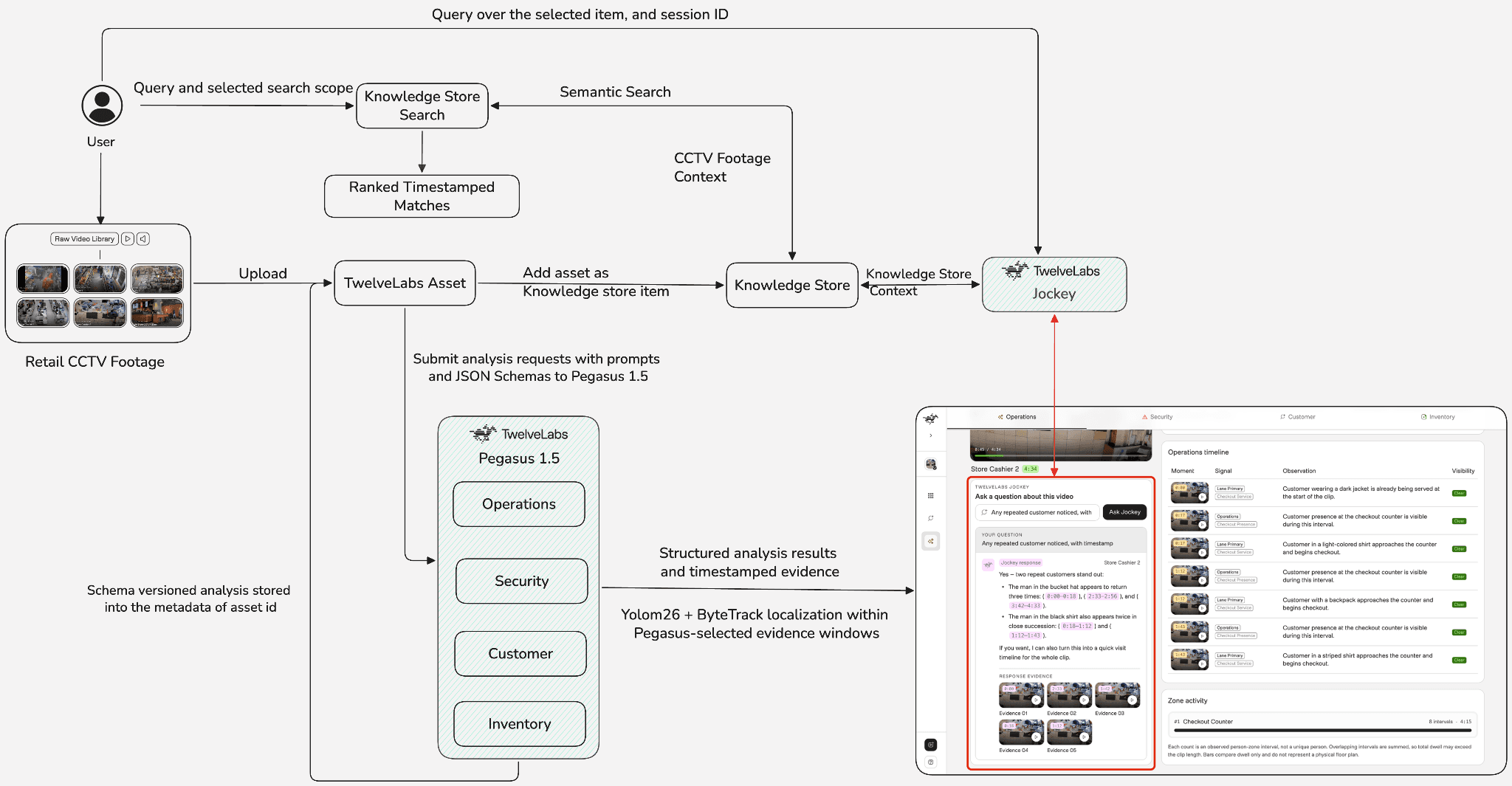
Every result remains connected to its source moment, allowing users to move directly from an insight to the exact section of footage that supports it. From video ingestion and semantic analysis to KPI review, evidence playback, suspicious-person inspection, customer tracking, inventory observations, and zone-aware movement heatmaps, a detailed walkthrough of the complete workflow is provided below—
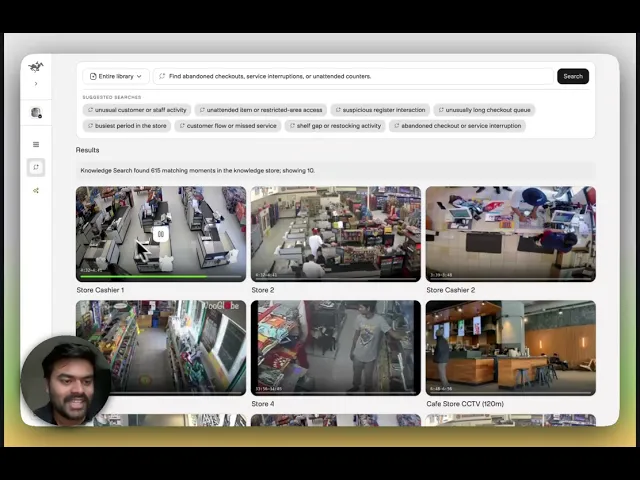
You can explore the demo of the application here: https://tl-retail.vercel.app/
Setting Up the Environment
Before building, complete the following prerequisites.
Clone the GitHub repository for the backend API endpoint source code.
Create a TwelveLabs account and generate an API key.
Create a TwelveLabs Knowledge Store for Jockey and record it for the .env.
Create backend/.env using the variables mentioned in .env.example.
Prepare Knowledge Store for Search and Reasoning
A checkout queue, a customer waiting for assistance, and a shelf being replenished may appear across different recordings of footage. Isolated recordings force investigators to repeatedly locate and review.
The workflow begins by organizing the footage into a shared intelligence layer. Each uploaded recording becomes a TwelveLabs asset that represents the source video and its playback resources. The asset is then added to a knowledge store as an item, where TwelveLabs processes it for semantic retrieval and grounded reasoning.
Creating a Knowledge Store for Retail Video Intelligence
A Knowledge Store defines the collection of footage available for search and agentic reasoning. TwelveLabs combines the uploaded media with derived temporal context, semantic representations, and embeddings that make the collection accessible through natural-language requests.
A Knowledge Store can use the default ingestion behavior or additional instructions describing which information should receive greater attention during processing. The knowledge store creation configuration provided below is built on retail-focused guidance covering checkout activity, customer assistance, shelf conditions, replenishment, and observable safety events.
The following snippet creates the Knowledge Store used to organize and process the retail footage.
import os
from twelvelabs import (
EnrichmentConfig_Description,
IngestionConfig,
TwelveLabs,
)
client = TwelveLabs(
api_key=os.environ["TWELVELABS_API_KEY"],
)
knowledge_store = client.knowledge_stores.create(
name="Retail Video Intelligence",
description=(
"Retail footage for semantic search, agentic reasoning, "
"and evidence-grounded analysis."
),
ingestion_config=IngestionConfig(
enrichment_config=EnrichmentConfig_Description(
description=(
"Prioritize observable retail activity, including checkout queues, "
"customer assistance, shelf conditions, replenishment activity, "
"and visible safety or security events."
)
)
),
metadata={
"domain": "retail",
"source": "retail-video-intelligence",
},
)
print(f"Knowledge Store ID: {knowledge_store.id}")
The returned Knowledge Store ID should be assigned to KNOWLEDGE_STORE_ID in the backend environment variable. The application uses this identifier when adding ready video assets as Knowledge Store items and when sending requests to Knowledge Store Search and Jockey, ensuring that ingestion, retrieval, and agentic reasoning operate over the same retail footage collection.
Turning the Retail Footage into TwelveLabs Assets and Knowledge Store Items
A newly uploaded retail store footage first becomes a TwelveLabs asset, which represents the original video and its playback resources. That asset is then added to the Knowledge Store as an item.
def add_asset_to_knowledge_store(
self,
knowledge_store_id: str,
asset_id: str,
metadata: dict[str, Any] | None = None,
) -> KnowledgeStoreItemRef:
item_metadata = {
str(key): str(value)
for key, value in (metadata or {}).items()
if value is not None
}
item_response = self.sdk_client.knowledge_store_items.create(
knowledge_store_id,
asset_id=asset_id,
asset_type="video",
metadata=item_metadata,
)
return KnowledgeStoreItemRef(
id=item_response.id,
asset_id=item_response.asset_id or asset_id,
status=item_response.status or "processing",
raw=item_response.model_dump(
mode="json",
by_alias=True,
exclude_none=True,
),
)
The application checks the file size before choosing direct or multipart upload. The direct-upload path creates the asset with HLS playback and thumbnail. An asset ID that becomes the stable reference for playback, Pegasus analysis, and persistent metadata.
After the asset and its preview resources are ready, the application creates a Knowledge Store item from that asset as defined below. The application coordinates the complete transition from uploaded asset to ready Knowledge Store item inside finish ingestion workflow. The Knowledge Store item turns that video into searchable and conversational knowledge.
Find Any Critical Retail Moment with Knowledge Store Search
Retail footage is valuable only when the right moment can be found, as it hides inside hours of recordings. A growing queue, an unattended counter, a shelf gap, or an unusual register interaction moment may last only a few seconds, yet locating it manually can take far longer.
Knowledge Store Search turns that review process into a simpler text query lookup. An operator describes the event they want to find, and the application searches content from the configured knowledge store. The search can cover the entire footage library of the knowledge store or focus on the selected store video.
Finding Retail Events Without Manual Tags or Timeline Scrubbing
Knowledge Store Search allows an operator to describe the critical moment in natural language search instead of scrubbing through the complete timeline.
The application is designed to support configurable search options, allowing users to search either across all video footage in the knowledge store or within footage from a specific retail store. With the entire library search, no scenario is supplied, and the configured knowledge store is searched across all video items. With the selection of the particular video, the backend uses the scenario identifier to resolve the knowledge_store_item_id associated with the video currently open in the application. That item ID becomes an explicit search filter.
The below core method performs the TwelveLabs Knowledge Store Search.
backend/app/services/twelvelabs_service.py (Line 476)
def search_knowledge_store(
self,
knowledge_store_id: str,
query: str,
*,
item_id: str | None = None,
modalities: list[str] | None = None,
page_size: int = 10,
group_by: Literal["none", "item"] = "none",
) -> dict[str, Any]:
selected_modalities = modalities or ["visual", "audio"]
search_filter = SearchKnowledgeStoreFilter(
asset_type=AssetTypeFilter(eq="video"),
item_id=ItemIdFilter(eq=item_id) if item_id else None,
)
search_response = self.sdk_client.knowledge_stores.search(
knowledge_store_id,
query=KnowledgeStoreSearchQuery(text=query),
filter=search_filter,
search_options=SearchKnowledgeStoreOptions(
video=VideoSearchOptions(
modalities=selected_modalities,
)
),
group_by=group_by,
page_size=page_size,
include_metadata=True,
)
return search_response.model_dump(mode="json",by_alias=True,
exclude_none=True,)
Knowledge Store Search locates matching clips and returns their source items and time ranges with the ranking of the most relevant to the query.
The example below searches for “find unusual or suspicious activity” within the selected retail video. The returned results highlight the moments whose visual content most closely matches the operator’s request.
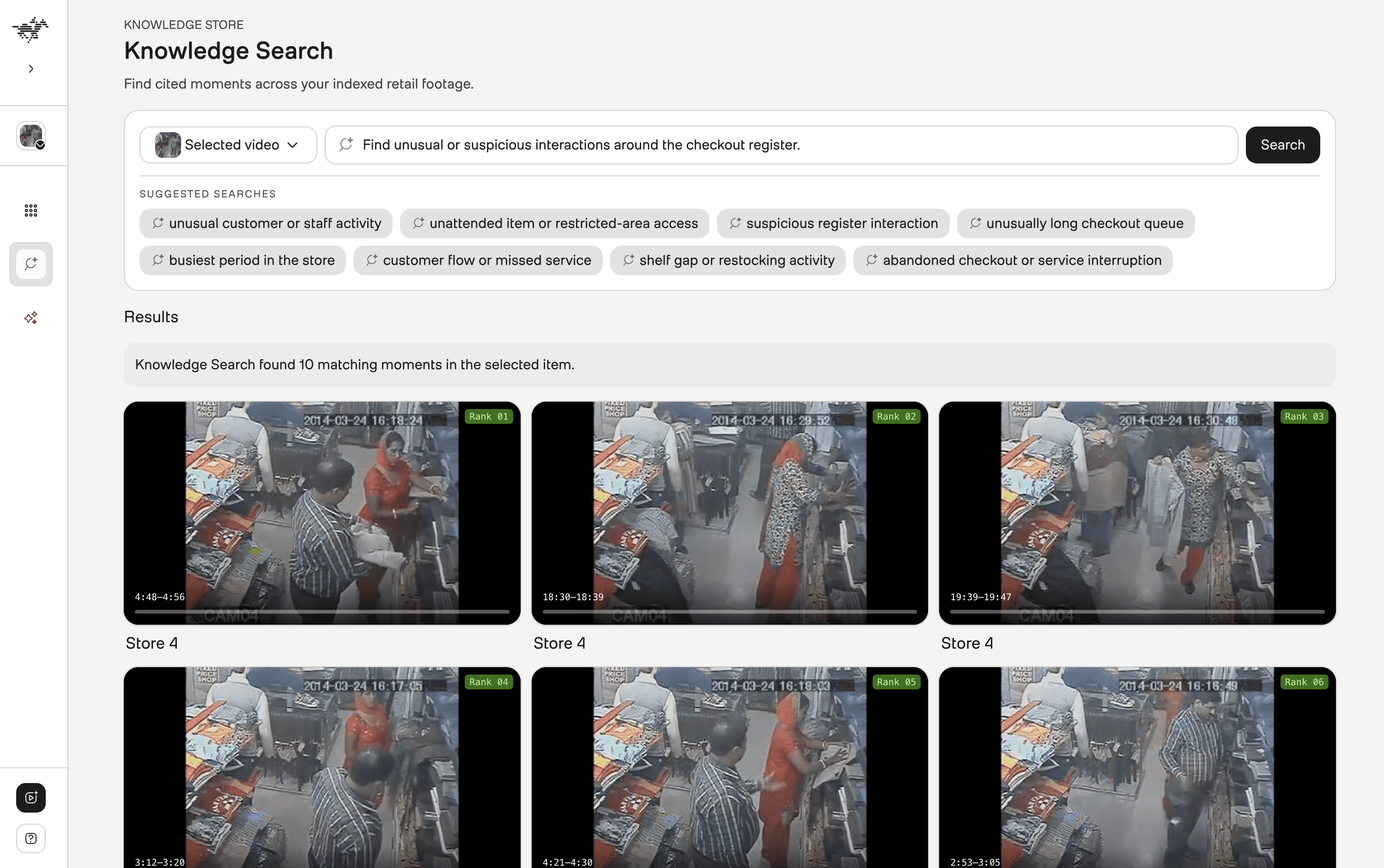
Each result provides a timestamped entry point for investigation and can be opened directly in the video player. The ranked matches turn a broad security question into a focused evidence trail, allowing the operator to move directly to the strongest moments and assess their significance in context.
Turn Footage into Retail Signals with Pegasus 1.5
Retail footage becomes valuable when it can take a team from "something happened” to “this is the operational impact, and here is the exact footage that supports it.”
TwelveLabs Pegasus 1.5 interprets the activity visible in the video. The backend converts those observations into measurable retail outcomes and actionable insights. Finally, the processed evidence is attached to the TwelveLabs asset metadata so it can be restored later.
For every ready video asset, the backend runs four separate Pegasus 1.5 analysis tasks in sequence. Each task uses its own retail prompt and JSON Schema for operations, security, customer flow, or inventory. This produces focused results instead of one broad summary attempting to represent every type of store activity at once.
Defining What Matters within Retail Analysis Schemas
Pegasus 1.5 returns structured JSON that conforms to the schema supplied through response_format. The schema defines the expected observations, field types, permitted values, and supporting evidence, enabling the backend to construct consistent retail metrics, timelines, alerts, and timestamped findings.
The backend supplies the category’s prompt and response schema when creating each analysis task.
backend/app/services/twelvelabs_service.py (Line 614)
created_task = self.sdk_client.analyze_async.tasks.create(
video=VideoContext_AssetId(asset_id=asset_id),
model_name="pegasus1.5",
custom_id=custom_id,
prompt_v_2=AnalyzePromptV2(input_text=prompt_text),
temperature=0.2,
max_tokens=max_tokens,
response_format=AsyncResponseFormat(
type="json_schema",
json_schema=build_pegasus_response_schema(response_schema),
),
)
The prompt_text contains the category-specific evidence rules and configured store zones. The response_format defines the structure Pegasus must follow, giving the backend predictable fields that can be validated before they are presented in the interface.
Operations
The operations schema captures checkout lanes and their customer observations, entries, counter waits, unattended-register intervals, merchandise-recovery events, and other visible store activity. It accepts people_count only when stable anonymous customer identifiers support a defensible count.
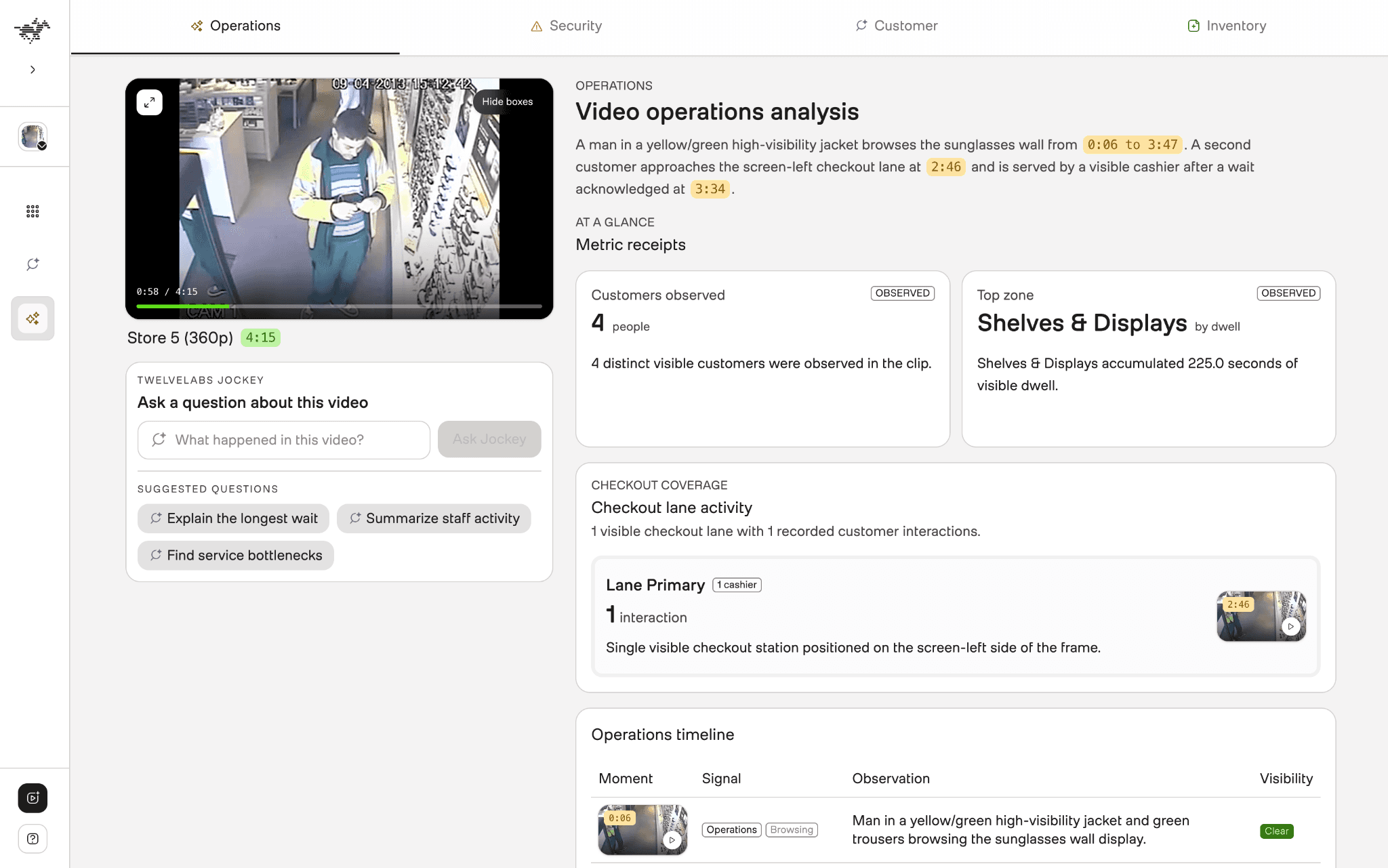
The backend turns these observations into metric receipts, checkout-lane summaries, service alerts, and a chronological operations timeline. As observed from the above operation view, it connects calculated performance signals with the checkout activity and timestamped events behind them.
Security
The security schema records directly observable incidents with their time ranges, zones, visibility, confidence, threat levels, threat types, rationales, and supporting indicators.
Its indicator families are suspicious_observation, concealment_tooling, and intrusive_action. This structure allows the interface to show the visible evidence supporting an assessment instead of presenting only a risk label.
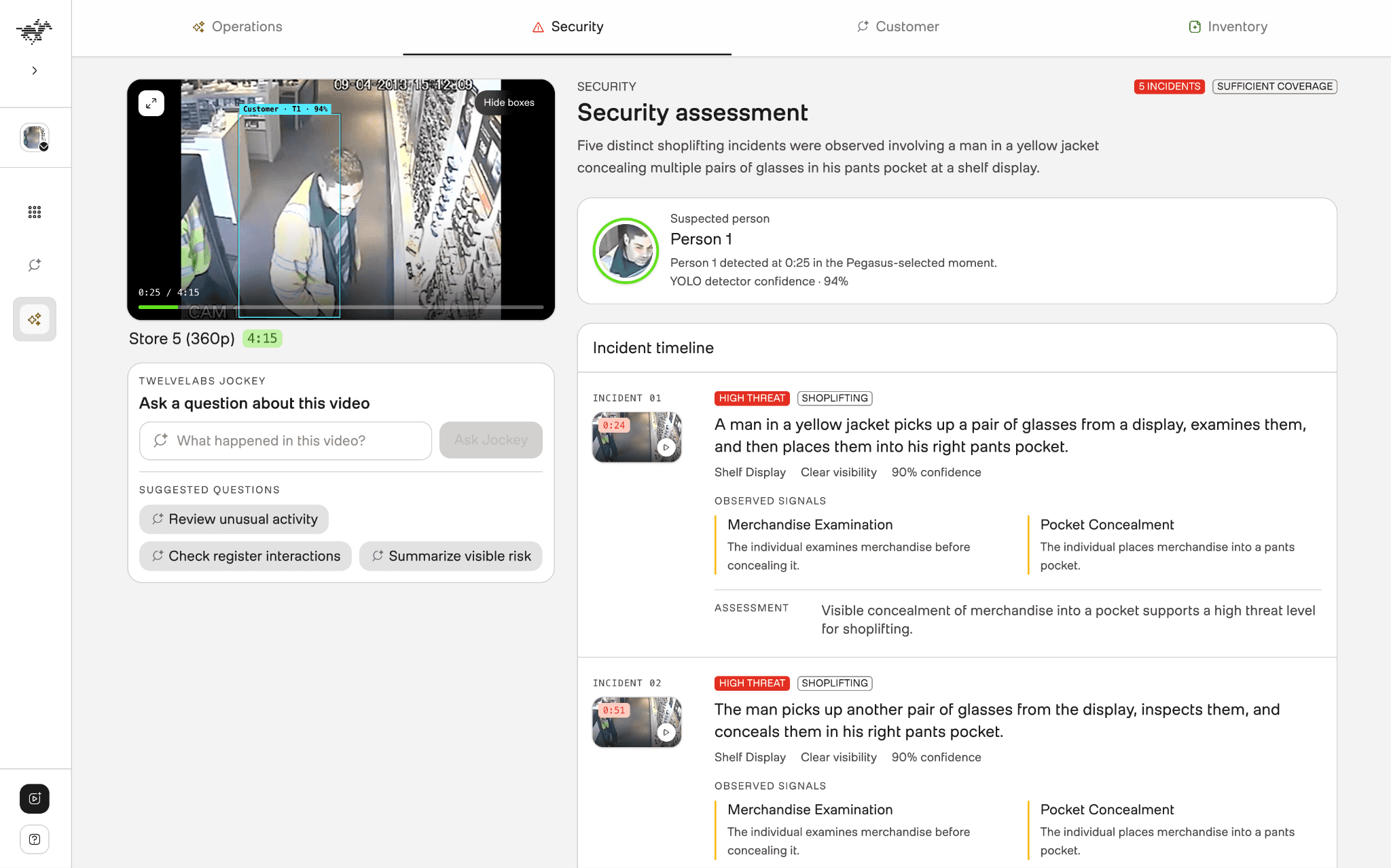
In this example above, five distinct concealment events are identified and organized into a chronological timeline. Each incident includes its timestamp, store zone, threat classification, and directly observed signals such as merchandise examination and concealment. Reviewers can select any incident to inspect the corresponding moment in the footage.
Customer
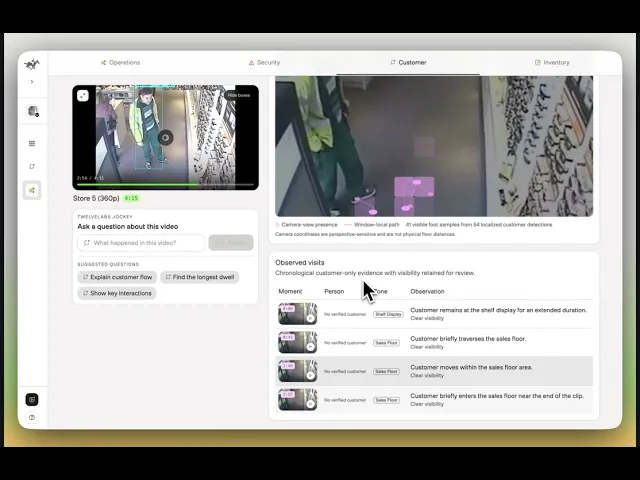
The customer-flow schema returns a chronological narrative and continuous anonymous customer visits to configured store zones. Each visit records its start and end times, visible activity, confidence, visibility, and a clip-local person identifier only when continuity can be maintained reliably.
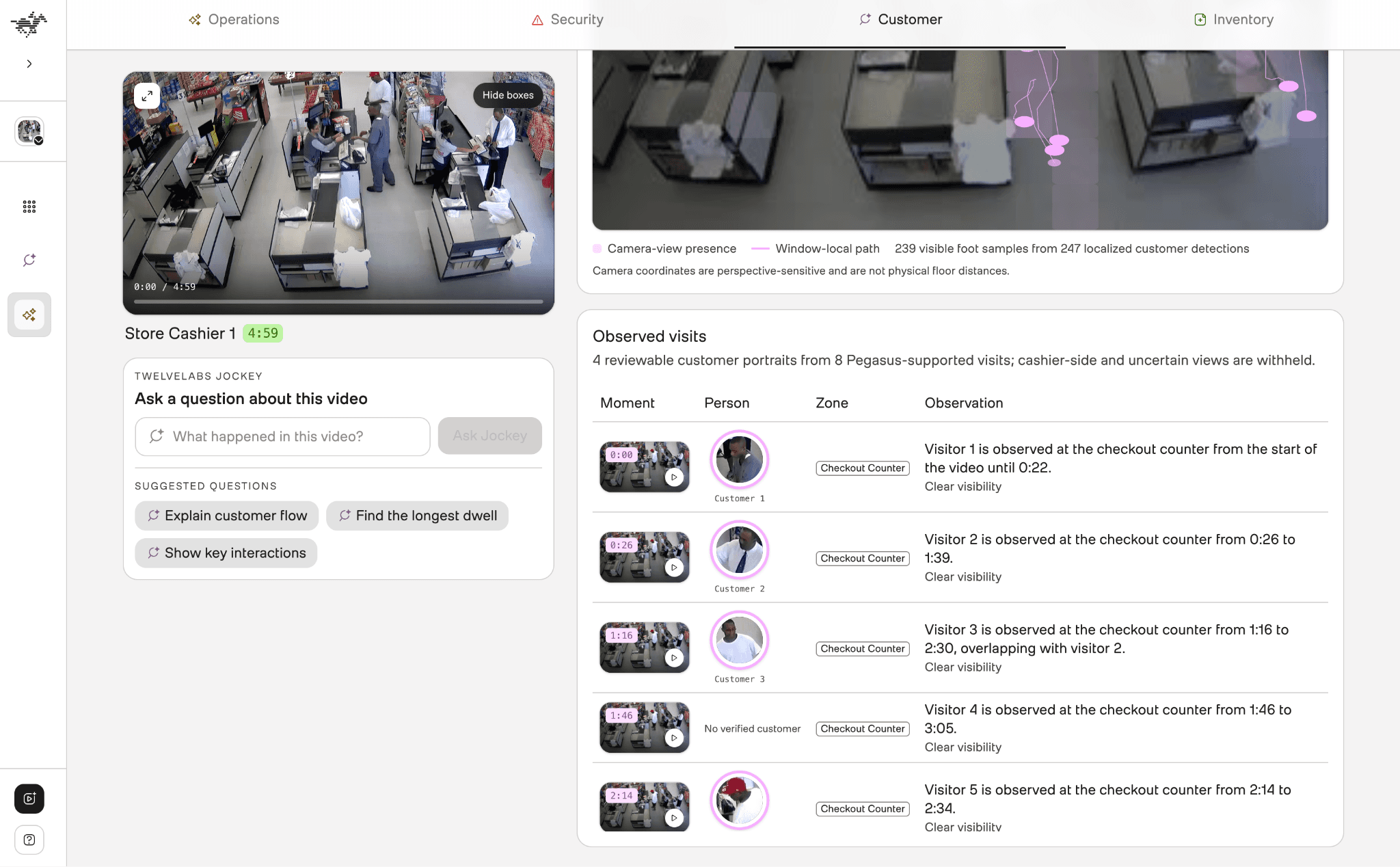
The Customer view turns Pegasus-supported observations into a chronological account of activity across configured store zones. In this example above, each checkout-counter visit records when the visitor appeared, how long the visit remained observable, whether it overlapped with another visit, and the quality of visibility. Moment thumbnails link every observation to the corresponding footage, helping operators examine customer flow, dwell patterns, and periods of concurrent demand.
Inventory
The inventory task returns timestamped shelf observations. These identify the shelf, visible stock state, change from an earlier observation, product description, confidence, and visibility. The allowed stock states are healthy, low_stock, empty, and needs_restock, while changes are recorded as unchanged, depleted, or recovered.
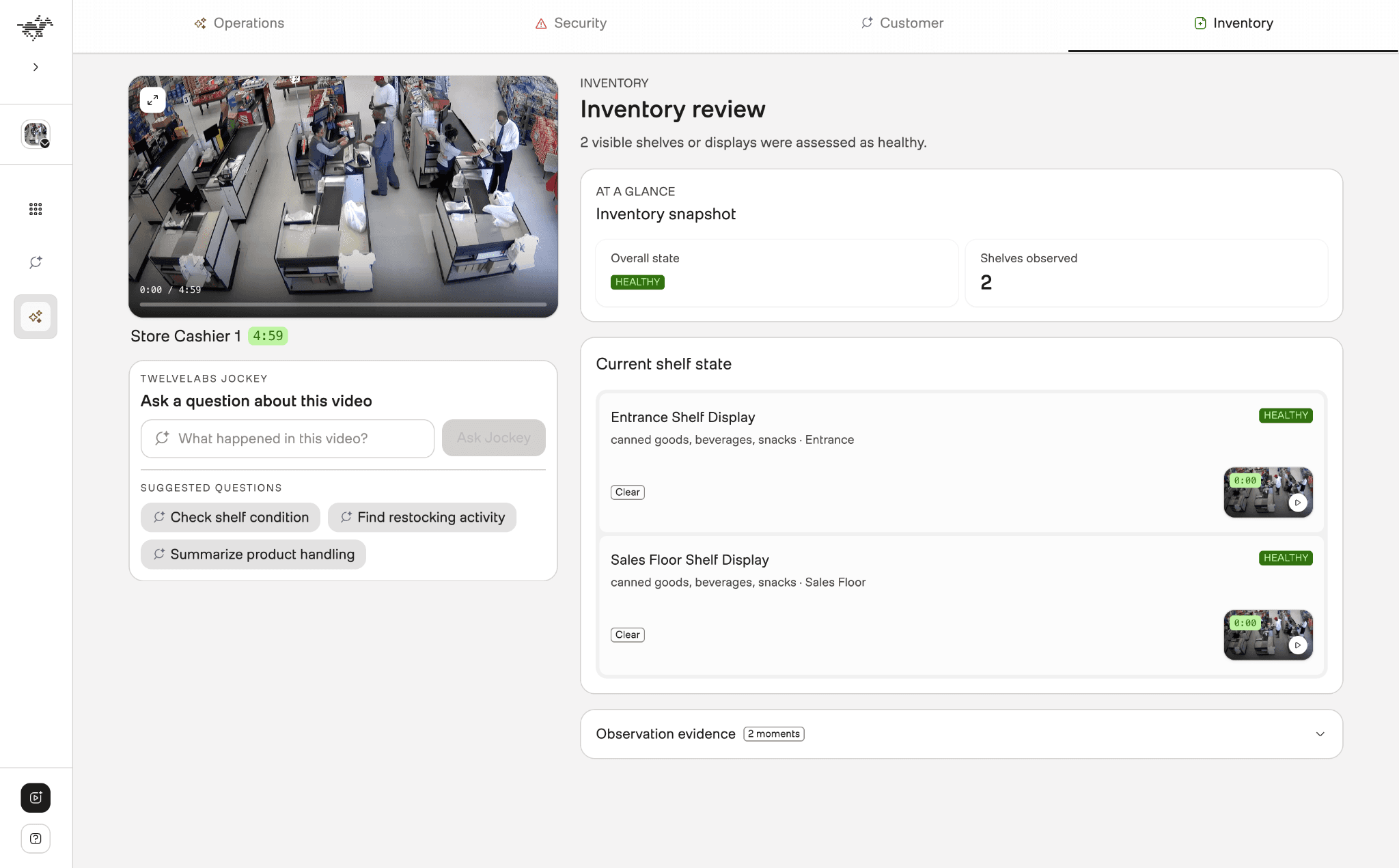
Every schema is also designed to capture the analysis_quality result with a status of sufficient, partial, or insufficient. Concrete limitations record conditions such as occlusion, interrupted continuity, an unsuitable camera angle, or limited shelf visibility. When the footage cannot support a category, the prompts instruct Pegasus to return an empty collection and explain the limitation.
Grounded Pegasus Evidence with the Yolo26 and ByteTrack
Pegasus explains what happened and when, while the localization layer shows where the supporting subject or object appears within the frame. For each cited moment, YOLO26m detects supported object classes, and ByteTrack connects consecutive detections using window-scoped track IDs.
Localization is limited to bounded evidence windows received from the Pegasus instead of processing the entire video for efficient usage. The application consolidates duplicate windows, caches completed results, and displays only detections that meet its 85% threshold. This produces precise visual overlays and review candidates while keeping every localization tied to the original Pegasus finding.
Employee and Customer Tracking
Within each Pegasus-selected window, YOLO26m detects visible people and ByteTrack links those detections across consecutive frames. The application then classifies anonymous tracks as 'customer' or 'employee' by calibrated or automatically learned staff-side zones and Pegasus context describing the event being reviewed.
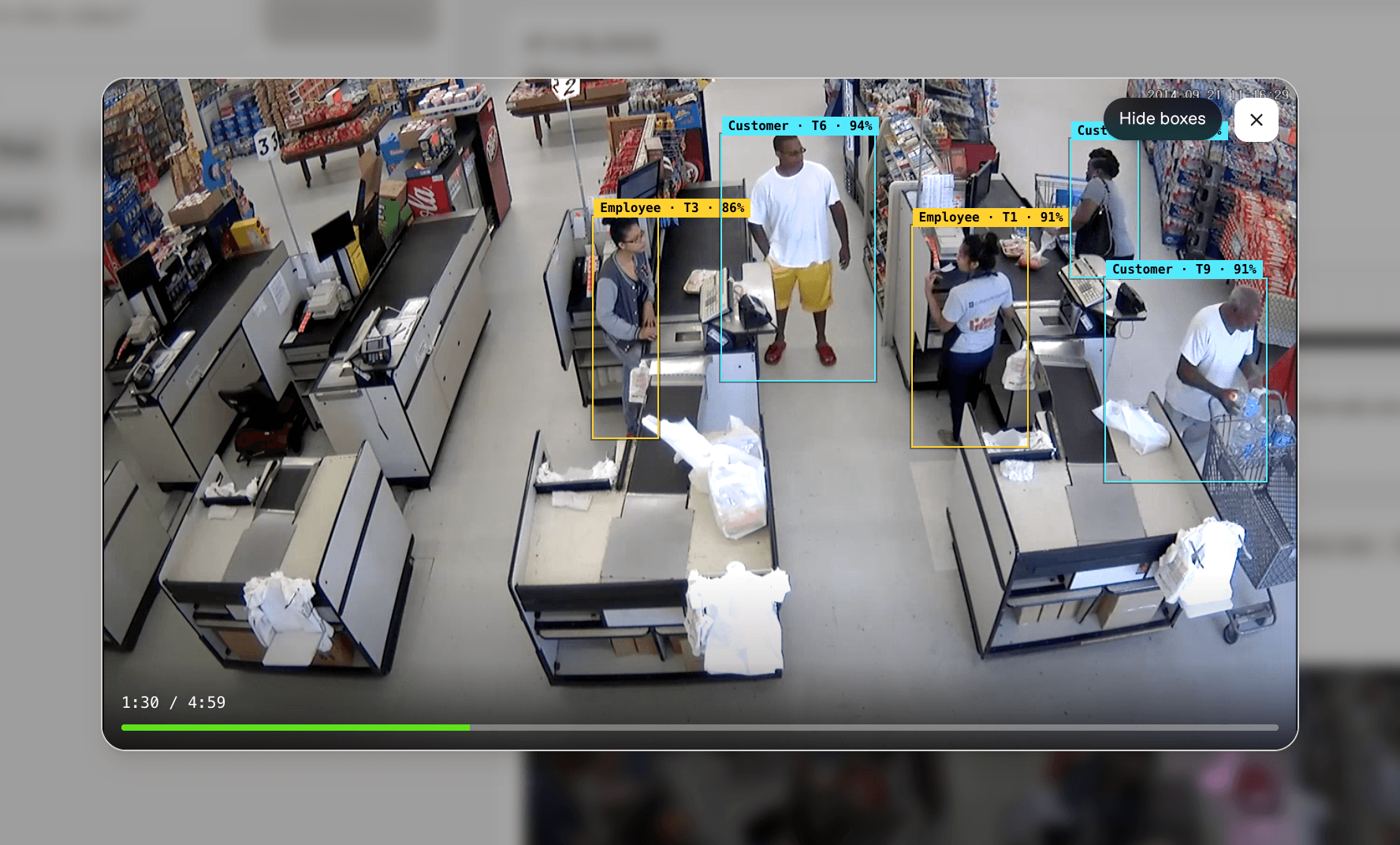
Customer Face Evidence
For customer analysis, the application searches only within customer-related evidence windows returned by Pegasus. YOLO26m and ByteTrack first locate and follow the relevant person tracks; the localizer then extracts the best reviewable face or head crop based on visibility, detection confidence, and image quality.
Staff-side tracks, weak matches, repeated candidates, and ambiguous customer versus employee observations are filtered out. The resulting portrait, therefore, acts as a timestamp-linked customer review candidate
Suspicious Person Review
When Pegasus identifies a security incident, its cited time range becomes the search boundary for suspicious person localization. The system detects visible person tracks, associates their movement with ByteTrack, and selects the strongest face or head candidate from the relevant moment.
Customer Movement Tracking Heatmap
Each eligible customer detection contributes a visible foot anchor taken near the bottom centre of its bounding box. When the camera has a valid four-point floor calibration, a homography projects that anchor from normalized camera coordinates onto a measured floor plane.
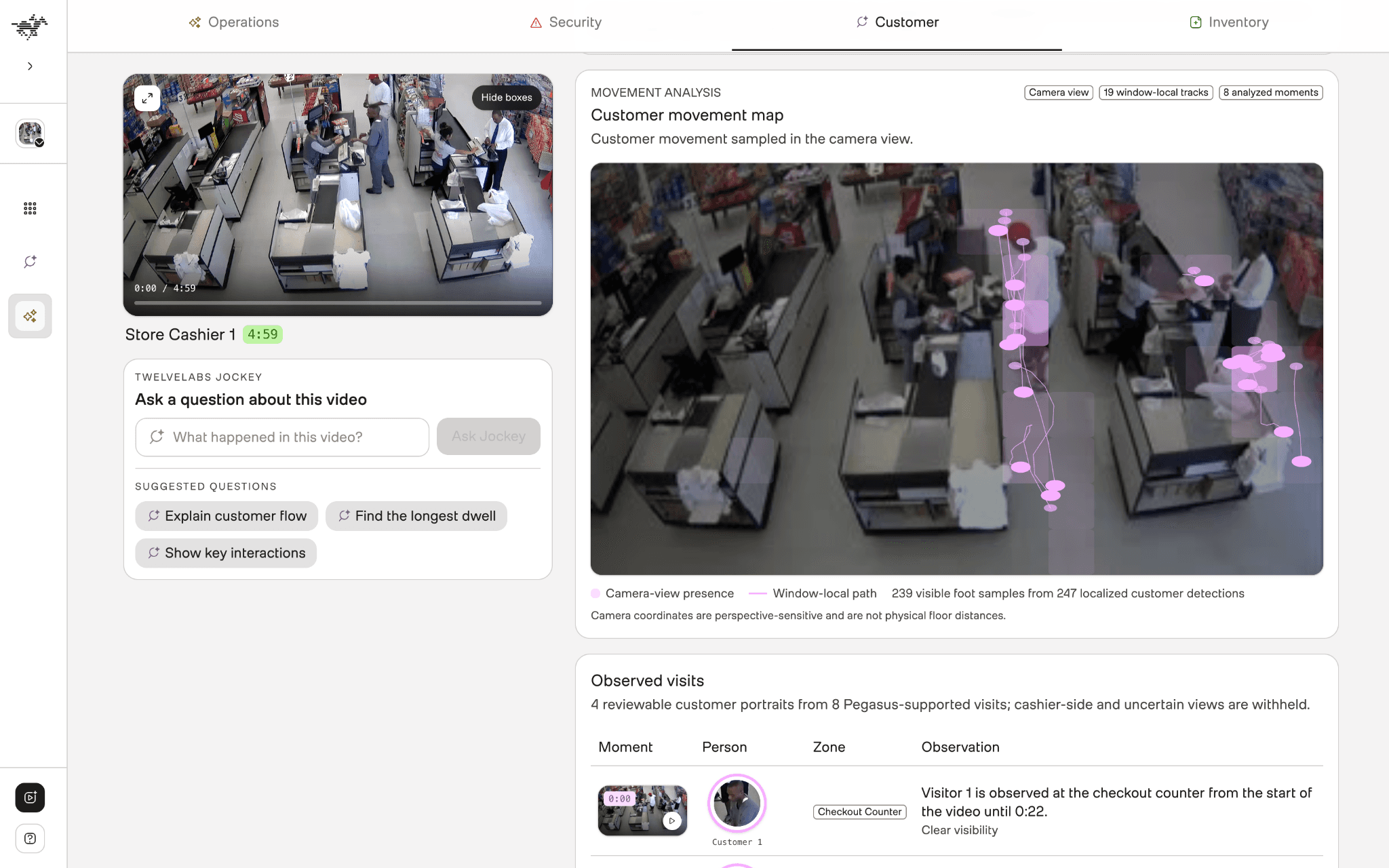
The byteTrack connects these projected anchors into short, anonymous movement paths. The application can then aggregate them into a zone-aware heatmap showing where customers moved or concentrated during the Pegasus-selected evidence windows. The heatmap represents movement only within the limited evidence supplied by Pegasus. This provides the spatial insights of the customer movement through a monitored zone and traffic density within the calibrated floor area.
Ask the Store with Jockey
Retail investigations are often less predictable. An operator may notice a long wait, an unusual register interaction, or a shelf issue and need to explore what happened through several related questions.
Jockey adds this agentic layer to the knowledge store. The application sends the operator’s question, focuses the request on the selected video item, and retains the returned session ID for follow-up questions. When Jockey provides timestamped references, the application converts them into playable evidence.
Ask Questions the Way Retail Operators Actually Speak
Operators can ask questions such as “What caused the longest customer wait?” “Where did service slow down?” or “Was there any unusual activity near the register?” They do not need to know the underlying schema fields or construct separate searches for every part of the event.
The following snippet captures the core Jockey request used by the application.
backend/app/services/twelvelabs_service.py (Line 684)
def ask_jockey(
self,
knowledge_store_id: str,
query: str,
session_id: str | None = None,
item_id: str | None = None,
) -> AskAnswer:
scoped_query = f"{{{{sel:0}}}} {query}" if item_id else query
request: dict[str, Any] = {
"knowledge_store_id": knowledge_store_id,
"input": [
ResponseInputItem(
type="message",
role="user",
content=scoped_query,
)
],
"session_id": session_id,
}
if item_id:
request["selections"] = [
ResponseSelection(kind="item", id=item_id)
]
response = self.sdk_client.responses.create(**request)
answer = " ".join(
part.text.strip()
for output in response.output or []
for part in output.content or []
if part.text and part.text.strip()
)
answer, citations = self.extract_inline_video_references(
answer or "Live answer returned no text."
)
return AskAnswer(
answer=answer,
citations=citations,
session_id=response.session_id or session_id,
live=True,
)
When a video item is available, reference that selection inside the question. This focuses Jockey on the footage open in the application. The selection acts as strong prompt guidance rather than a strict access boundary.
The first response returns a session_id, which the frontend sends with the next request. An operator can ask where service slowed down and then follow with “What happened immediately before that?” without repeating the original context. The session is cleared when another video is selected.
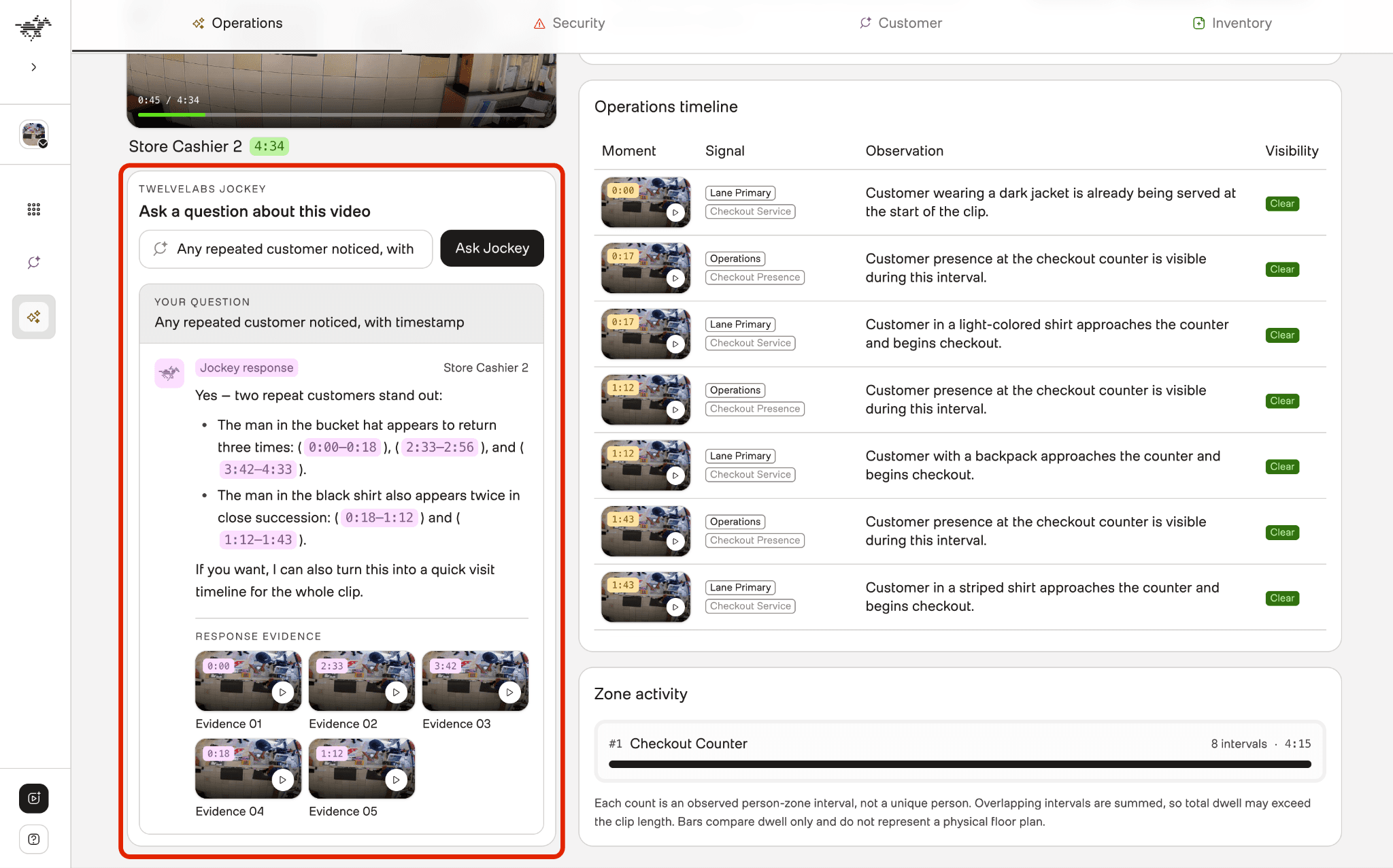
Returned moment references are normalized into citations containing start and end times. The interface presents them as clickable evidence and seeks the video player to the corresponding point in the footage. If Jockey does not return a specific moment, the application labels the answer with a scenario-level reference instead of presenting an unsupported timestamp as precise evidence.
What This Approach Makes Possible
This approach transforms disconnected retail footages into a searchable and explainable operational intelligence layer. Teams can locate critical moments using natural language search, convert footage into structured retail signals with Pegasus 1.5, and investigate events conversationally through Jockey without manually reviewing hours of video.
Combining semantic understanding with YOLO26m and ByteTrack-based localization ensures that each insight remains directly linked to timestamped, visually reviewable evidence. Operators can examine checkout delays, customer movement, shelf conditions, service gaps, and suspicious activity. The result is a unified workflow that transforms retail video into measurable performance signals, verifiable evidence, and faster operational intelligence.
Resources
Sentinel Retail CCTV Intelligence source code - Explore the complete implementation of the retail video search, structured Pegasus analysis, Jockey Q&A, and evidence-localization workflow.
Sentinel Retail CCTV Intelligence App - Explore the complete retail video intelligence workflow in the live application.
TwelveLabs Pegasus 1.5 overview - Learn how Pegasus 1.5 enables deeper video understanding and structured analysis.
TwelveLabs Jockey Knowledge Store guide - Follow the guide for creating a Knowledge Store used by Jockey.
TwelveLabs sample applications - Browse example applications built with TwelveLabs video intelligence.
Join the TwelveLabs Discord community - Connect with the TwelveLabs community, ask questions, and share what you build.
Retail video at scale is not just a monitoring problem. It is an intelligence problem.
Retail store cameras continuously record operational details that can shape better decisions from growing checkout lines and customers waiting for assistance to declining shelf stock, replenishment activity, and incidents at the point of sale. The difficulty is not capturing these events but locating and understanding the relevant footage quickly enough to respond. That need is becoming more urgent. According to a 2025 study by the National Retail Federation and Loss Prevention Research Council, surveyed retailers experienced an 18% increase in average annual shoplifting incidents during 2024, while theft-related threats and acts of violence rose by 17%. Retailers already possess the visual evidence, and the challenge is extracting the insight hidden within hours of footage.
Turning retail footage into useful intelligence requires semantic search, structured interpretation of visible activity, and timestamped evidence that supports every finding. Metrics are also more trustworthy when reviewers can trace them directly to the source footage.
This tutorial walks through building Sentinel, an evidence-grounded retail video intelligence application using TwelveLabs. The application uses Knowledge Store Search to find relevant moments across the complete footage library or within a selected video. Pegasus 1.5 transforms the footage into schema-driven analysis for operations, security, customer behavior, and inventory, while Jockey lets retail operators ask questions in natural language and receive answers grounded in playable, timestamped citations.
Inside the Retail CCTV Intelligence Pipeline
Sentinel transforms retail CCTV footage into structured, evidence-grounded operational intelligence. Pegasus 1.5 analyzes each video across operations, security, customer behavior, and inventory, producing schema-validated findings, KPIs, summaries, and timestamped evidence. Jockey supports natural-language search and questions across indexed footage, while YOLO26m and ByteTrack ground selected Pegasus moments with object detections, anonymous customer and employee tracks, reviewable face or head crops, and calibrated floor-level movement paths.
Every result remains connected to its source moment, allowing users to move directly from an insight to the exact section of footage that supports it. From video ingestion and semantic analysis to KPI review, evidence playback, suspicious-person inspection, customer tracking, inventory observations, and zone-aware movement heatmaps, a detailed walkthrough of the complete workflow is provided below—
You can explore the demo of the application here: https://tl-retail.vercel.app/
Setting Up the Environment
Before building, complete the following prerequisites.
Clone the GitHub repository for the backend API endpoint source code.
Create a TwelveLabs account and generate an API key.
Create a TwelveLabs Knowledge Store for Jockey and record it for the .env.
Create backend/.env using the variables mentioned in .env.example.
Prepare Knowledge Store for Search and Reasoning
A checkout queue, a customer waiting for assistance, and a shelf being replenished may appear across different recordings of footage. Isolated recordings force investigators to repeatedly locate and review.
The workflow begins by organizing the footage into a shared intelligence layer. Each uploaded recording becomes a TwelveLabs asset that represents the source video and its playback resources. The asset is then added to a knowledge store as an item, where TwelveLabs processes it for semantic retrieval and grounded reasoning.
Creating a Knowledge Store for Retail Video Intelligence
A Knowledge Store defines the collection of footage available for search and agentic reasoning. TwelveLabs combines the uploaded media with derived temporal context, semantic representations, and embeddings that make the collection accessible through natural-language requests.
A Knowledge Store can use the default ingestion behavior or additional instructions describing which information should receive greater attention during processing. The knowledge store creation configuration provided below is built on retail-focused guidance covering checkout activity, customer assistance, shelf conditions, replenishment, and observable safety events.
The following snippet creates the Knowledge Store used to organize and process the retail footage.
import os
from twelvelabs import (
EnrichmentConfig_Description,
IngestionConfig,
TwelveLabs,
)
client = TwelveLabs(
api_key=os.environ["TWELVELABS_API_KEY"],
)
knowledge_store = client.knowledge_stores.create(
name="Retail Video Intelligence",
description=(
"Retail footage for semantic search, agentic reasoning, "
"and evidence-grounded analysis."
),
ingestion_config=IngestionConfig(
enrichment_config=EnrichmentConfig_Description(
description=(
"Prioritize observable retail activity, including checkout queues, "
"customer assistance, shelf conditions, replenishment activity, "
"and visible safety or security events."
)
)
),
metadata={
"domain": "retail",
"source": "retail-video-intelligence",
},
)
print(f"Knowledge Store ID: {knowledge_store.id}")
The returned Knowledge Store ID should be assigned to KNOWLEDGE_STORE_ID in the backend environment variable. The application uses this identifier when adding ready video assets as Knowledge Store items and when sending requests to Knowledge Store Search and Jockey, ensuring that ingestion, retrieval, and agentic reasoning operate over the same retail footage collection.
Turning the Retail Footage into TwelveLabs Assets and Knowledge Store Items
A newly uploaded retail store footage first becomes a TwelveLabs asset, which represents the original video and its playback resources. That asset is then added to the Knowledge Store as an item.
def add_asset_to_knowledge_store(
self,
knowledge_store_id: str,
asset_id: str,
metadata: dict[str, Any] | None = None,
) -> KnowledgeStoreItemRef:
item_metadata = {
str(key): str(value)
for key, value in (metadata or {}).items()
if value is not None
}
item_response = self.sdk_client.knowledge_store_items.create(
knowledge_store_id,
asset_id=asset_id,
asset_type="video",
metadata=item_metadata,
)
return KnowledgeStoreItemRef(
id=item_response.id,
asset_id=item_response.asset_id or asset_id,
status=item_response.status or "processing",
raw=item_response.model_dump(
mode="json",
by_alias=True,
exclude_none=True,
),
)
The application checks the file size before choosing direct or multipart upload. The direct-upload path creates the asset with HLS playback and thumbnail. An asset ID that becomes the stable reference for playback, Pegasus analysis, and persistent metadata.
After the asset and its preview resources are ready, the application creates a Knowledge Store item from that asset as defined below. The application coordinates the complete transition from uploaded asset to ready Knowledge Store item inside finish ingestion workflow. The Knowledge Store item turns that video into searchable and conversational knowledge.
Find Any Critical Retail Moment with Knowledge Store Search
Retail footage is valuable only when the right moment can be found, as it hides inside hours of recordings. A growing queue, an unattended counter, a shelf gap, or an unusual register interaction moment may last only a few seconds, yet locating it manually can take far longer.
Knowledge Store Search turns that review process into a simpler text query lookup. An operator describes the event they want to find, and the application searches content from the configured knowledge store. The search can cover the entire footage library of the knowledge store or focus on the selected store video.
Finding Retail Events Without Manual Tags or Timeline Scrubbing
Knowledge Store Search allows an operator to describe the critical moment in natural language search instead of scrubbing through the complete timeline.
The application is designed to support configurable search options, allowing users to search either across all video footage in the knowledge store or within footage from a specific retail store. With the entire library search, no scenario is supplied, and the configured knowledge store is searched across all video items. With the selection of the particular video, the backend uses the scenario identifier to resolve the knowledge_store_item_id associated with the video currently open in the application. That item ID becomes an explicit search filter.
The below core method performs the TwelveLabs Knowledge Store Search.
backend/app/services/twelvelabs_service.py (Line 476)
def search_knowledge_store(
self,
knowledge_store_id: str,
query: str,
*,
item_id: str | None = None,
modalities: list[str] | None = None,
page_size: int = 10,
group_by: Literal["none", "item"] = "none",
) -> dict[str, Any]:
selected_modalities = modalities or ["visual", "audio"]
search_filter = SearchKnowledgeStoreFilter(
asset_type=AssetTypeFilter(eq="video"),
item_id=ItemIdFilter(eq=item_id) if item_id else None,
)
search_response = self.sdk_client.knowledge_stores.search(
knowledge_store_id,
query=KnowledgeStoreSearchQuery(text=query),
filter=search_filter,
search_options=SearchKnowledgeStoreOptions(
video=VideoSearchOptions(
modalities=selected_modalities,
)
),
group_by=group_by,
page_size=page_size,
include_metadata=True,
)
return search_response.model_dump(mode="json",by_alias=True,
exclude_none=True,)
Knowledge Store Search locates matching clips and returns their source items and time ranges with the ranking of the most relevant to the query.
The example below searches for “find unusual or suspicious activity” within the selected retail video. The returned results highlight the moments whose visual content most closely matches the operator’s request.
Each result provides a timestamped entry point for investigation and can be opened directly in the video player. The ranked matches turn a broad security question into a focused evidence trail, allowing the operator to move directly to the strongest moments and assess their significance in context.
Turn Footage into Retail Signals with Pegasus 1.5
Retail footage becomes valuable when it can take a team from "something happened” to “this is the operational impact, and here is the exact footage that supports it.”
TwelveLabs Pegasus 1.5 interprets the activity visible in the video. The backend converts those observations into measurable retail outcomes and actionable insights. Finally, the processed evidence is attached to the TwelveLabs asset metadata so it can be restored later.
For every ready video asset, the backend runs four separate Pegasus 1.5 analysis tasks in sequence. Each task uses its own retail prompt and JSON Schema for operations, security, customer flow, or inventory. This produces focused results instead of one broad summary attempting to represent every type of store activity at once.
Defining What Matters within Retail Analysis Schemas
Pegasus 1.5 returns structured JSON that conforms to the schema supplied through response_format. The schema defines the expected observations, field types, permitted values, and supporting evidence, enabling the backend to construct consistent retail metrics, timelines, alerts, and timestamped findings.
The backend supplies the category’s prompt and response schema when creating each analysis task.
backend/app/services/twelvelabs_service.py (Line 614)
created_task = self.sdk_client.analyze_async.tasks.create(
video=VideoContext_AssetId(asset_id=asset_id),
model_name="pegasus1.5",
custom_id=custom_id,
prompt_v_2=AnalyzePromptV2(input_text=prompt_text),
temperature=0.2,
max_tokens=max_tokens,
response_format=AsyncResponseFormat(
type="json_schema",
json_schema=build_pegasus_response_schema(response_schema),
),
)
The prompt_text contains the category-specific evidence rules and configured store zones. The response_format defines the structure Pegasus must follow, giving the backend predictable fields that can be validated before they are presented in the interface.
Operations
The operations schema captures checkout lanes and their customer observations, entries, counter waits, unattended-register intervals, merchandise-recovery events, and other visible store activity. It accepts people_count only when stable anonymous customer identifiers support a defensible count.
The backend turns these observations into metric receipts, checkout-lane summaries, service alerts, and a chronological operations timeline. As observed from the above operation view, it connects calculated performance signals with the checkout activity and timestamped events behind them.
Security
The security schema records directly observable incidents with their time ranges, zones, visibility, confidence, threat levels, threat types, rationales, and supporting indicators.
Its indicator families are suspicious_observation, concealment_tooling, and intrusive_action. This structure allows the interface to show the visible evidence supporting an assessment instead of presenting only a risk label.
In this example above, five distinct concealment events are identified and organized into a chronological timeline. Each incident includes its timestamp, store zone, threat classification, and directly observed signals such as merchandise examination and concealment. Reviewers can select any incident to inspect the corresponding moment in the footage.
Customer
The customer-flow schema returns a chronological narrative and continuous anonymous customer visits to configured store zones. Each visit records its start and end times, visible activity, confidence, visibility, and a clip-local person identifier only when continuity can be maintained reliably.
The Customer view turns Pegasus-supported observations into a chronological account of activity across configured store zones. In this example above, each checkout-counter visit records when the visitor appeared, how long the visit remained observable, whether it overlapped with another visit, and the quality of visibility. Moment thumbnails link every observation to the corresponding footage, helping operators examine customer flow, dwell patterns, and periods of concurrent demand.
Inventory
The inventory task returns timestamped shelf observations. These identify the shelf, visible stock state, change from an earlier observation, product description, confidence, and visibility. The allowed stock states are healthy, low_stock, empty, and needs_restock, while changes are recorded as unchanged, depleted, or recovered.
Every schema is also designed to capture the analysis_quality result with a status of sufficient, partial, or insufficient. Concrete limitations record conditions such as occlusion, interrupted continuity, an unsuitable camera angle, or limited shelf visibility. When the footage cannot support a category, the prompts instruct Pegasus to return an empty collection and explain the limitation.
Grounded Pegasus Evidence with the Yolo26 and ByteTrack
Pegasus explains what happened and when, while the localization layer shows where the supporting subject or object appears within the frame. For each cited moment, YOLO26m detects supported object classes, and ByteTrack connects consecutive detections using window-scoped track IDs.
Localization is limited to bounded evidence windows received from the Pegasus instead of processing the entire video for efficient usage. The application consolidates duplicate windows, caches completed results, and displays only detections that meet its 85% threshold. This produces precise visual overlays and review candidates while keeping every localization tied to the original Pegasus finding.
Employee and Customer Tracking
Within each Pegasus-selected window, YOLO26m detects visible people and ByteTrack links those detections across consecutive frames. The application then classifies anonymous tracks as 'customer' or 'employee' by calibrated or automatically learned staff-side zones and Pegasus context describing the event being reviewed.
Customer Face Evidence
For customer analysis, the application searches only within customer-related evidence windows returned by Pegasus. YOLO26m and ByteTrack first locate and follow the relevant person tracks; the localizer then extracts the best reviewable face or head crop based on visibility, detection confidence, and image quality.
Staff-side tracks, weak matches, repeated candidates, and ambiguous customer versus employee observations are filtered out. The resulting portrait, therefore, acts as a timestamp-linked customer review candidate
Suspicious Person Review
When Pegasus identifies a security incident, its cited time range becomes the search boundary for suspicious person localization. The system detects visible person tracks, associates their movement with ByteTrack, and selects the strongest face or head candidate from the relevant moment.
Customer Movement Tracking Heatmap
Each eligible customer detection contributes a visible foot anchor taken near the bottom centre of its bounding box. When the camera has a valid four-point floor calibration, a homography projects that anchor from normalized camera coordinates onto a measured floor plane.
The byteTrack connects these projected anchors into short, anonymous movement paths. The application can then aggregate them into a zone-aware heatmap showing where customers moved or concentrated during the Pegasus-selected evidence windows. The heatmap represents movement only within the limited evidence supplied by Pegasus. This provides the spatial insights of the customer movement through a monitored zone and traffic density within the calibrated floor area.
Ask the Store with Jockey
Retail investigations are often less predictable. An operator may notice a long wait, an unusual register interaction, or a shelf issue and need to explore what happened through several related questions.
Jockey adds this agentic layer to the knowledge store. The application sends the operator’s question, focuses the request on the selected video item, and retains the returned session ID for follow-up questions. When Jockey provides timestamped references, the application converts them into playable evidence.
Ask Questions the Way Retail Operators Actually Speak
Operators can ask questions such as “What caused the longest customer wait?” “Where did service slow down?” or “Was there any unusual activity near the register?” They do not need to know the underlying schema fields or construct separate searches for every part of the event.
The following snippet captures the core Jockey request used by the application.
backend/app/services/twelvelabs_service.py (Line 684)
def ask_jockey(
self,
knowledge_store_id: str,
query: str,
session_id: str | None = None,
item_id: str | None = None,
) -> AskAnswer:
scoped_query = f"{{{{sel:0}}}} {query}" if item_id else query
request: dict[str, Any] = {
"knowledge_store_id": knowledge_store_id,
"input": [
ResponseInputItem(
type="message",
role="user",
content=scoped_query,
)
],
"session_id": session_id,
}
if item_id:
request["selections"] = [
ResponseSelection(kind="item", id=item_id)
]
response = self.sdk_client.responses.create(**request)
answer = " ".join(
part.text.strip()
for output in response.output or []
for part in output.content or []
if part.text and part.text.strip()
)
answer, citations = self.extract_inline_video_references(
answer or "Live answer returned no text."
)
return AskAnswer(
answer=answer,
citations=citations,
session_id=response.session_id or session_id,
live=True,
)
When a video item is available, reference that selection inside the question. This focuses Jockey on the footage open in the application. The selection acts as strong prompt guidance rather than a strict access boundary.
The first response returns a session_id, which the frontend sends with the next request. An operator can ask where service slowed down and then follow with “What happened immediately before that?” without repeating the original context. The session is cleared when another video is selected.
Returned moment references are normalized into citations containing start and end times. The interface presents them as clickable evidence and seeks the video player to the corresponding point in the footage. If Jockey does not return a specific moment, the application labels the answer with a scenario-level reference instead of presenting an unsupported timestamp as precise evidence.
What This Approach Makes Possible
This approach transforms disconnected retail footages into a searchable and explainable operational intelligence layer. Teams can locate critical moments using natural language search, convert footage into structured retail signals with Pegasus 1.5, and investigate events conversationally through Jockey without manually reviewing hours of video.
Combining semantic understanding with YOLO26m and ByteTrack-based localization ensures that each insight remains directly linked to timestamped, visually reviewable evidence. Operators can examine checkout delays, customer movement, shelf conditions, service gaps, and suspicious activity. The result is a unified workflow that transforms retail video into measurable performance signals, verifiable evidence, and faster operational intelligence.
Resources
Sentinel Retail CCTV Intelligence source code - Explore the complete implementation of the retail video search, structured Pegasus analysis, Jockey Q&A, and evidence-localization workflow.
Sentinel Retail CCTV Intelligence App - Explore the complete retail video intelligence workflow in the live application.
TwelveLabs Pegasus 1.5 overview - Learn how Pegasus 1.5 enables deeper video understanding and structured analysis.
TwelveLabs Jockey Knowledge Store guide - Follow the guide for creating a Knowledge Store used by Jockey.
TwelveLabs sample applications - Browse example applications built with TwelveLabs video intelligence.
Join the TwelveLabs Discord community - Connect with the TwelveLabs community, ask questions, and share what you build.



Enterprise
©
2026
TwelveLabs, Inc. All Rights Reserved

Enterprise
©
2026
TwelveLabs, Inc. All Rights Reserved

Enterprise
©
2026
TwelveLabs, Inc. All Rights Reserved