" height="1.90314px" id="wtDTm6bEW" transform="translate(26.225 0)" width="2.4723000000000006px"/><path d="M 0.557 0 L 1.438 0 C 1.746 0 1.995 0.25 1.995 0.559 L 1.995 1.344 C 1.995 1.653 1.746 1.903 1.438 1.903 L 0.557 1.903 C 0.25 1.903 0 1.653 0 1.344 L 0 0.559 C 0 0.25 0.25 0 0.557 0 Z" fill="rgb(29, 28, 27)" height="1.9031500000000001px" id="GnmDnNra_" transform="translate(36.408 2.728)" width="1.9953000000000003px"/><path d="M 6.224 0 L 0.558 0 C 0.25 0 0 0.25 0 0.559 L 0 1.344 C 0 1.653 0.25 1.903 0.558 1.903 L 6.224 1.903 C 6.531 1.903 6.781 1.653 6.781 1.344 L 6.781 0.559 C 6.781 0.25 6.531 0 6.224 0 Z" fill="rgb(29, 28, 27)" height="1.9031500000000001px" id="hKTQ3dbw4" transform="translate(34.261 5.456)" width="6.781100000000002px"/><path d="M 6.955 0 L 0.558 0 C 0.25 0 0 0.25 0 0.559 L 0 1.344 C 0 1.653 0.25 1.903 0.558 1.903 L 6.955 1.903 C 7.263 1.903 7.513 1.653 7.513 1.344 L 7.513 0.559 C 7.513 0.25 7.263 0 6.955 0 Z" fill="rgb(29, 28, 27)" height="1.9031500000000001px" id="G1Zzk9CUU" transform="translate(28.298 8.243)" width="7.513100000000001px"/><path d="M 7.123 0 L 0.558 0 C 0.25 0 0 0.25 0 0.559 L 0 1.344 C 0 1.653 0.25 1.903 0.558 1.903 L 7.123 1.903 C 7.431 1.903 7.681 1.653 7.681 1.344 L 7.681 0.559 C 7.681 0.25 7.431 0 7.123 0 Z" fill="rgb(29, 28, 27)" height="1.9030999999999985px" id="fm7cHxIfJ" transform="translate(0 10.972)" width="7.68067px"/><path d="M 13.447 0 L 0.558 0 C 0.25 0 0 0.25 0 0.559 L 0 1.344 C 0 1.653 0.25 1.903 0.558 1.903 L 13.447 1.903 C 13.755 1.903 14.004 1.653 14.004 1.344 L 14.004 0.559 C 14.004 0.25 13.755 0 13.447 0 Z" fill="rgb(29, 28, 27)" height="1.9030999999999985px" id="LowSwDrtg" transform="translate(9.552 10.972)" width="14.0044px"/><path d="M 0.558 0 L 8.212 0 C 8.52 0 8.77 0.25 8.77 0.559 L 8.77 1.344 C 8.77 1.653 8.52 1.903 8.212 1.903 L 0.558 1.903 C 0.25 1.903 0 1.653 0 1.344 L 0 0.559 C 0 0.25 0.25 0 0.558 0 Z" fill="rgb(29, 28, 27)" height="1.9030999999999985px" id="xRiKc2od7" transform="translate(27.041 10.972)" width="8.769900000000003px"/><path d="M 0.557 0 L 5.4 0 C 5.708 0 5.958 0.25 5.958 0.559 L 5.958 1.344 C 5.958 1.653 5.708 1.903 5.4 1.903 L 0.557 1.903 C 0.25 1.903 0 1.653 0 1.344 L 0 0.559 C 0 0.25 0.25 0 0.557 0 Z" fill="rgb(29, 28, 27)" height="1.9031500000000001px" id="JWdNVicde" transform="translate(36.796 8.243)" width="5.957599999999999px"/><path d="M 1.438 0 L 0.558 0 C 0.25 0 0 0.25 0 0.559 L 0 1.344 C 0 1.653 0.25 1.903 0.558 1.903 L 1.438 1.903 C 1.746 1.903 1.995 1.653 1.995 1.344 L 1.995 0.559 C 1.995 0.25 1.746 0 1.438 0 Z" fill="rgb(29, 28, 27)" height="1.9031500000000001px" id="RfFYVCT_T" transform="translate(28.717 5.456)" width="1.9953000000000003px"/><path d="M 0.558 0 L 2.895 0 C 3.203 0 3.453 0.25 3.453 0.559 L 3.453 1.406 C 3.453 1.714 3.203 1.964 2.895 1.964 L 0.558 1.964 C 0.25 1.964 0 1.714 0 1.406 L 0 0.559 C 0 0.25 0.25 0 0.558 0 Z" fill="rgb(29, 28, 27)" height="1.964299999999998px" id="dngJ6MU2p" transform="translate(16.183 24.582)" width="3.4525000000000006px"/><path d="M 1.706 0 L 0.558 0 C 0.25 0 0 0.25 0 0.559 L 0 1.406 C 0 1.714 0.25 1.964 0.558 1.964 L 1.706 1.964 C 2.014 1.964 2.263 1.714 2.263 1.406 L 2.263 0.559 C 2.263 0.25 2.014 0 1.706 0 Z" fill="rgb(29, 28, 27)" height="1.964299999999998px" id="N_fstvKmR" transform="translate(22.18 24.582)" width="2.2631999999999977px"/><path d="M 0.558 0 L 5.544 0 C 5.852 0 6.101 0.25 6.101 0.559 L 6.101 1.406 C 6.101 1.714 5.852 1.964 5.544 1.964 L 0.558 1.964 C 0.25 1.964 0 1.714 0 1.406 L 0 0.559 C 0 0.25 0.25 0 0.558 0 Z" fill="rgb(29, 28, 27)" height="1.964299999999998px" id="t55XLYcgb" transform="translate(25.486 24.582)" width="6.101399999999998px"/><path d="M 1.976 0 L 0.558 0 C 0.25 0 0 0.25 0 0.559 L 0 1.406 C 0 1.714 0.25 1.964 0.558 1.964 L 1.976 1.964 C 2.284 1.964 2.533 1.714 2.533 1.406 L 2.533 0.559 C 2.533 0.25 2.284 0 1.976 0 Z" fill="rgb(29, 28, 27)" height="1.964299999999998px" id="ZrEKTVTAe" transform="translate(28.542 21.854)" width="2.5334000000000003px"/><path d="M 0.557 0 L 1.438 0 C 1.746 0 1.995 0.25 1.995 0.559 L 1.995 1.406 C 1.995 1.714 1.746 1.964 1.438 1.964 L 0.557 1.964 C 0.25 1.964 0 1.714 0 1.406 L 0 0.559 C 0 0.25 0.25 0 0.557 0 Z" fill="rgb(29, 28, 27)" height="1.964299999999998px" id="Z0fPTp9aR" transform="translate(11.425 24.582)" width="1.9953000000000003px"/><path d="M 0 0.559 C 0 0.251 0.251 0 0.558 0 L 1.438 0 C 1.745 0 1.995 0.251 1.995 0.559 L 1.995 1.405 C 1.995 1.713 1.745 1.964 1.438 1.964 L 0.558 1.964 C 0.251 1.964 0 1.713 0 1.405 Z" fill="rgb(29, 28, 27)" height="1.964299999999998px" id="Tj_PDHFDh" transform="translate(20.635 27.308)" width="1.9954px"/><path d="M 0.557 0 L 1.342 0 C 1.65 0 1.899 0.25 1.899 0.559 L 1.899 1.406 C 1.899 1.714 1.65 1.964 1.342 1.964 L 0.557 1.964 C 0.25 1.964 0 1.714 0 1.406 L 0 0.559 C 0 0.25 0.25 0 0.557 0 Z" fill="rgb(29, 28, 27)" height="1.9643000000000015px" id="AYq9dXkKz" transform="translate(18.686 30.036)" width="1.8994px"/><path d="M 0.558 0 L 5.768 0 C 6.076 0 6.326 0.25 6.326 0.559 L 6.326 1.344 C 6.326 1.653 6.076 1.903 5.768 1.903 L 0.558 1.903 C 0.25 1.903 0 1.653 0 1.344 L 0 0.559 C 0 0.25 0.25 0 0.558 0 Z" fill="rgb(29, 28, 27)" height="1.9031500000000001px" id="rspevfJcx" transform="translate(12.157 8.243)" width="6.325900000000001px"/><path d="M 3.285 0 L 0.558 0 C 0.25 0 0 0.25 0 0.559 L 0 1.344 C 0 1.653 0.25 1.903 0.558 1.903 L 3.285 1.903 C 3.593 1.903 3.842 1.653 3.842 1.344 L 3.842 0.559 C 3.842 0.25 3.593 0 3.285 0 Z" fill="rgb(29, 28, 27)" height="1.9031500000000001px" id="XRUAhGnph" transform="translate(23.887 2.728)" width="3.8424000000000014px"/><path d="M 0.558 0 L 5.644 0 C 5.952 0 6.202 0.25 6.202 0.559 L 6.202 1.344 C 6.202 1.653 5.952 1.903 5.644 1.903 L 0.558 1.903 C 0.25 1.903 0 1.653 0 1.344 L 0 0.559 C 0 0.25 0.25 0 0.558 0 Z" fill="rgb(29, 28, 27)" height="1.9031500000000001px" id="VsaVVIfke" transform="translate(21.528 5.456)" width="6.201600000000003px"/><path d="M 3.06 0 L 0.558 0 C 0.25 0 0 0.25 0 0.559 L 0 1.344 C 0 1.653 0.25 1.903 0.558 1.903 L 3.06 1.903 C 3.369 1.903 3.618 1.653 3.618 1.344 L 3.618 0.559 C 3.618 0.25 3.369 0 3.06 0 Z" fill="rgb(29, 28, 27)" height="1.9030999999999985px" id="wiAKEgyId" transform="translate(40.819 10.972)" width="3.6182000000000016px"/><path d="M 0.558 0 L 17.318 0 C 17.626 0 17.875 0.25 17.875 0.559 L 17.875 1.345 C 17.875 1.653 17.626 1.903 17.318 1.903 L 0.558 1.903 C 0.25 1.903 0 1.653 0 1.345 L 0 0.559 C 0 0.25 0.25 0 0.558 0 Z" fill="rgb(29, 28, 27)" height="1.9032px" id="FIE0ufK9m" transform="translate(6.666 13.7)" width="17.87506px"/><path d="M 6.426 0 L 0.558 0 C 0.25 0 0 0.25 0 0.559 L 0 1.345 C 0 1.653 0.25 1.903 0.558 1.903 L 6.426 1.903 C 6.734 1.903 6.984 1.653 6.984 1.345 L 6.984 0.559 C 6.984 0.25 6.734 0 6.426 0 Z" fill="rgb(29, 28, 27)" height="1.9032000000000018px" id="ut9UWny3L" transform="translate(22.892 19.156)" width="6.983599999999999px"/><path d="M 0.558 0 L 22.151 0 C 22.459 0 22.709 0.25 22.709 0.559 L 22.709 1.344 C 22.709 1.653 22.459 1.903 22.151 1.903 L 0.558 1.903 C 0.25 1.903 0 1.653 0 1.344 L 0 0.559 C 0 0.25 0.25 0 0.558 0 Z" fill="rgb(29, 28, 27)" height="1.9030999999999985px" id="VULnffgbk" transform="translate(9.552 16.428)" width="22.7089px"/><path d="M 7.886 0 L 0.558 0 C 0.25 0 0 0.25 0 0.559 L 0 1.345 C 0 1.653 0.25 1.903 0.558 1.903 L 7.886 1.903 C 8.194 1.903 8.443 1.653 8.443 1.345 L 8.443 0.559 C 8.443 0.25 8.194 0 7.886 0 Z" fill="rgb(29, 28, 27)" height="1.9032000000000018px" id="adZTYr4MR" transform="translate(6.078 19.156)" width="8.44303px"/><path d="M 0.558 0 L 2.211 0 C 2.519 0 2.769 0.25 2.769 0.559 L 2.769 1.406 C 2.769 1.714 2.519 1.964 2.211 1.964 L 0.558 1.964 C 0.25 1.964 0 1.714 0 1.406 L 0 0.559 C 0 0.25 0.25 0 0.558 0 Z" fill="rgb(29, 28, 27)" height="1.964299999999998px" id="bwdUdEmCH" transform="translate(13.784 21.854)" width="2.768600000000001px"/><path d="M 2.424 0 L 0.558 0 C 0.25 0 0 0.25 0 0.559 L 0 1.406 C 0 1.714 0.25 1.964 0.558 1.964 L 2.424 1.964 C 2.732 1.964 2.982 1.714 2.982 1.406 L 2.982 0.559 C 2.982 0.25 2.732 0 2.424 0 Z" fill="rgb(29, 28, 27)" height="1.964299999999998px" id="PUvesMJEj" transform="translate(23.556 21.854)" width="2.982199999999999px"/><path d="M 0.558 0 L 2.241 0 C 2.55 0 2.799 0.25 2.799 0.559 L 2.799 1.406 C 2.799 1.714 2.55 1.964 2.241 1.964 L 0.558 1.964 C 0.25 1.964 0 1.714 0 1.406 L 0 0.559 C 0 0.25 0.25 0 0.558 0 Z" fill="rgb(29, 28, 27)" height="1.964299999999998px" id="Wo2W7J3Zj" transform="translate(8.672 21.854)" width="2.799050000000001px"/><path d="M 6.661 0 L 0.558 0 C 0.25 0 0 0.25 0 0.559 L 0 1.345 C 0 1.653 0.25 1.903 0.558 1.903 L 6.661 1.903 C 6.969 1.903 7.219 1.653 7.219 1.345 L 7.219 0.559 C 7.219 0.25 6.969 0 6.661 0 Z" fill="rgb(29, 28, 27)" height="1.9032px" id="PpPVZXp9j" transform="translate(27.041 13.7)" width="7.218900000000001px"/><path d="M 0.621 1.905 C 0.218 1.905 0 1.687 0 1.283 L 0 0.622 C 0 0.218 0.218 0 0.621 0 L 11.225 0 C 11.628 0 11.846 0.218 11.846 0.622 L 11.846 1.283 C 11.846 1.687 11.628 1.905 11.225 1.905 L 6.934 1.905 L 6.934 14.926 C 6.934 15.33 6.716 15.548 6.313 15.548 L 5.537 15.548 C 5.134 15.548 4.916 15.33 4.916 14.926 L 4.916 1.905 Z" fill="rgb(29, 28, 27)" height="15.54825px" id="xr32fxeO6" transform="translate(52.177 8.243)" width="11.845599999999997px"/><path d="M 0.621 0 C 0.218 0 0 0.218 0 0.622 L 0 14.924 C 0 15.328 0.218 15.546 0.621 15.546 L 1.357 15.546 C 1.76 15.546 1.978 15.328 1.978 14.924 L 1.978 0.622 C 1.978 0.218 1.76 0 1.357 0 Z" fill="rgb(29, 28, 27)" height="15.546050000000001px" id="oSsO_UPVN" transform="translate(90.476 8.243)" width="1.9779000000000053px"/><path d="M 0.62 15.546 C 0.217 15.546 0 15.328 0 14.924 L 0 0.622 C 0 0.218 0.217 0 0.62 0 L 1.396 0 C 1.799 0 2.017 0.218 2.017 0.622 L 2.017 13.632 L 8.981 13.632 C 9.384 13.632 9.602 13.85 9.602 14.254 L 9.602 14.924 C 9.602 15.328 9.384 15.546 8.981 15.546 Z" fill="rgb(29, 28, 27)" height="15.546050000000001px" id="Sgj4z5osO" transform="translate(116.749 8.243)" width="9.602000000000004px"/><path d="M 1.974 14.924 C 1.974 15.328 1.756 15.546 1.353 15.546 L 0.621 15.546 C 0.218 15.546 0 15.328 0 14.924 L 0 0.622 C 0 0.218 0.218 0 0.621 0 L 1.357 0 C 1.76 0 1.978 0.218 1.978 0.622 L 1.978 5.747 C 2.634 4.721 3.806 4.079 5.309 4.079 C 8.18 4.079 10.356 6.358 10.356 9.948 C 10.356 13.538 8.18 15.817 5.309 15.817 C 3.801 15.817 2.627 15.175 1.971 14.145 L 1.971 14.922 Z M 8.36 9.95 C 8.36 7.362 6.881 5.928 5.121 5.928 C 3.361 5.928 1.863 7.362 1.863 9.95 C 1.863 12.539 3.361 13.972 5.121 13.972 C 6.881 13.972 8.36 12.539 8.36 9.95 Z" fill="rgb(29, 28, 27)" height="15.81665px" id="q13jjj7xd" transform="translate(138.401 8.243)" width="10.355999999999995px"/><path d="M 4.457 11.738 C 0.961 11.738 -0.019 9.872 0 8.318 C 0.005 7.929 0.253 7.735 0.645 7.735 L 1.344 7.735 C 1.748 7.735 1.922 7.949 1.961 8.352 C 2.063 9.315 2.693 9.907 4.433 9.907 C 6.174 9.907 7.012 9.269 7.012 8.289 C 7.012 7.425 6.522 7.108 5.305 6.899 L 3.209 6.539 C 1.453 6.238 0.29 5.247 0.29 3.468 C 0.29 1.467 1.774 0 4.518 0 C 7.263 0 8.838 1.491 8.814 3.23 C 8.81 3.614 8.553 3.808 8.165 3.808 L 7.457 3.808 C 7.054 3.808 6.908 3.595 6.851 3.202 C 6.749 2.477 6.159 1.818 4.518 1.818 C 2.878 1.818 2.249 2.508 2.249 3.403 C 2.249 4.175 2.695 4.516 3.81 4.714 L 5.906 5.083 C 7.72 5.404 8.98 6.292 8.98 8.198 C 8.98 9.976 7.908 11.74 4.455 11.74 Z" fill="rgb(29, 28, 27)" height="11.739799999999999px" id="tJ8syeWTW" transform="translate(150.024 12.325)" width="8.980269730401375px"/><path d="M 9.146 7.997 C 9.146 8.813 9.175 9.983 9.282 10.799 C 9.334 11.223 9.155 11.465 8.728 11.465 L 8.068 11.465 C 7.685 11.465 7.467 11.319 7.428 11.022 L 7.317 10.181 C 6.724 11.157 5.565 11.659 4.145 11.659 C 1.579 11.659 0 10.142 0 8.078 C 0 6.27 1.27 5.157 3.433 5.002 L 6.589 4.78 C 7.162 4.741 7.186 4.688 7.186 4.153 L 7.186 3.682 C 7.186 2.438 6.434 1.807 4.79 1.807 C 3.145 1.807 2.472 2.425 2.405 3.289 C 2.376 3.697 2.235 3.916 1.823 3.916 L 1.067 3.916 C 0.675 3.916 0.427 3.717 0.422 3.328 C 0.407 1.51 1.74 0 4.792 0 C 7.798 0 9.162 1.427 9.155 3.736 Z M 7.188 7.298 L 7.188 6.244 C 6.955 6.327 6.678 6.386 6.363 6.415 L 3.598 6.676 C 2.59 6.775 1.997 7.163 1.997 8.099 L 1.999 8.099 C 1.999 9.188 2.886 9.97 4.4 9.97 C 6.169 9.97 7.188 8.9 7.188 7.298 Z" fill="rgb(29, 28, 27)" height="11.658999999999999px" id="QPESIZvku" transform="translate(126.854 12.325)" width="9.290755130109668px"/><path d="M 5.224 0 C 8.313 0 10.295 2.255 10.295 5.456 L 10.295 5.694 C 10.295 6.098 10.077 6.316 9.674 6.316 L 1.998 6.316 C 2.168 8.547 3.447 9.898 5.407 9.898 C 6.768 9.898 7.598 9.363 7.934 8.431 C 8.06 8.078 8.243 7.892 8.618 7.892 L 9.33 7.892 C 9.746 7.892 9.994 8.125 9.923 8.538 C 9.598 10.433 7.834 11.74 5.409 11.74 L 5.407 11.738 C 2.168 11.738 0 9.424 0 5.797 C 0 2.169 2.135 0 5.224 0 Z M 5.222 1.74 C 3.494 1.74 2.405 2.818 2.074 4.64 L 8.282 4.64 C 8.054 2.842 6.949 1.74 5.222 1.74 Z" fill="rgb(29, 28, 27)" height="11.739799999999999px" id="PKmyQkwJE" transform="translate(104.541 12.325)" width="10.295000000000002px"/><path d="M 4.459 11.194 C 4.099 11.194 3.877 11.039 3.746 10.703 L 0.091 1.021 C -0.024 0.72 -0.031 0.511 0.076 0.297 C 0.178 0.094 0.381 0 0.732 0 L 1.274 0 C 1.633 0 1.86 0.155 1.986 0.495 L 4.958 8.503 L 5.123 9.018 L 5.289 8.503 L 8.262 0.495 C 8.388 0.155 8.615 0 8.974 0 L 9.517 0 C 9.865 0 10.07 0.092 10.172 0.297 C 10.279 0.511 10.275 0.72 10.157 1.021 L 6.502 10.703 C 6.371 11.039 6.149 11.194 5.79 11.194 Z" fill="rgb(29, 28, 27)" height="11.1941px" id="uUQr5Yl4B" transform="translate(93.807 12.595)" width="10.248961642504256px"/><path d="M 5.407 11.738 C 2.167 11.738 0 9.424 0 5.797 C 0 2.169 2.133 0 5.221 0 C 8.31 0 10.292 2.255 10.292 5.456 L 10.292 5.694 C 10.292 6.098 10.075 6.316 9.672 6.316 L 1.995 6.316 C 2.165 8.547 3.446 9.898 5.404 9.898 C 6.768 9.898 7.596 9.363 7.931 8.431 C 8.058 8.078 8.241 7.892 8.615 7.892 L 9.328 7.892 C 9.744 7.892 9.992 8.125 9.918 8.538 C 9.593 10.433 7.829 11.74 5.404 11.74 Z M 8.282 4.64 C 8.053 2.842 6.949 1.74 5.221 1.74 C 3.494 1.74 2.405 2.818 2.074 4.64 Z" fill="rgb(29, 28, 27)" height="11.739799999999999px" id="zo1nSBuSF" transform="translate(78.397 12.325)" width="10.29249999999999px"/><path d="M 3.057 10.677 C 3.163 11.026 3.392 11.192 3.756 11.192 L 3.749 11.194 L 4.987 11.194 C 5.35 11.194 5.579 11.028 5.69 10.679 L 8.173 2.654 L 8.237 2.401 L 8.3 2.654 L 10.787 10.679 C 10.894 11.028 11.123 11.194 11.487 11.194 L 12.733 11.194 C 13.096 11.194 13.325 11.028 13.432 10.679 L 16.418 1.006 C 16.516 0.7 16.512 0.498 16.41 0.288 C 16.307 0.089 16.109 0.002 15.76 0.002 L 15.218 0.002 C 14.848 0.002 14.626 0.168 14.519 0.522 L 12.094 8.547 L 12.046 8.761 L 11.999 8.542 L 9.506 0.517 C 9.4 0.168 9.171 0.002 8.807 0.002 L 7.683 0.002 C 7.319 0.002 7.091 0.168 6.984 0.517 L 4.492 8.542 L 4.449 8.745 L 4.405 8.551 L 1.98 0.519 C 1.874 0.166 1.649 0 1.281 0 L 0.728 0 C 0.38 0 0.181 0.087 0.079 0.286 C -0.021 0.493 -0.028 0.698 0.07 1.004 Z" fill="rgb(29, 28, 27)" height="11.194099999999999px" id="uboloLX99" transform="translate(61.282 12.598)" width="16.489163442184434px"/></svg>)
Tutorials
How to Build Automated GDPR-Compliant Video Redaction with TwelveLabs
This tutorial walks through building a production-ready GDPR video redaction application on TwelveLabs — combining Marengo 3.0 for entity-based retrieval, Pegasus 1.5 for structured timestamped privacy metadata, and a local face detection pipeline for stable identity-locked blur tracks. The result takes a reviewer from upload to audit-ready redacted output in a single interface, with documented rationale at every decision point.
Hrishikesh Yadav
Tutorials
How to Build Automated GDPR-Compliant Video Redaction with TwelveLabs
This tutorial walks through building a production-ready GDPR video redaction application on TwelveLabs — combining Marengo 3.0 for entity-based retrieval, Pegasus 1.5 for structured timestamped privacy metadata, and a local face detection pipeline for stable identity-locked blur tracks. The result takes a reviewer from upload to audit-ready redacted output in a single interface, with documented rationale at every decision point.
Hrishikesh Yadav

May 28, 2026
13 Minutes
Copy link to article
Introduction
Privacy review at scale is not an editing problem. It is an intelligence problem.
When a legal request lands and your team needs to locate, assess, and redact every appearance of a specific person across hours of footage, frame-by-frame review does not work. The GDPR Enforcement Tracker recorded more than €6.06 billion in cumulative fines across 2,793 cases by March 2026. Article 83 still permits penalties up to €20 million or 4% of global annual turnover for the most serious violations. The operational pressure is real, and manual workflows are not built to absorb it.
GDPR-compliant redaction requires three things working together: accurate identification of the right person or object, retrieval of every relevant appearance across a corpus, and redaction limited to what the legal purpose actually requires. Blurring everything is not a defensible strategy. The regulation's data minimization principle pushes toward precision, not blanket suppression.
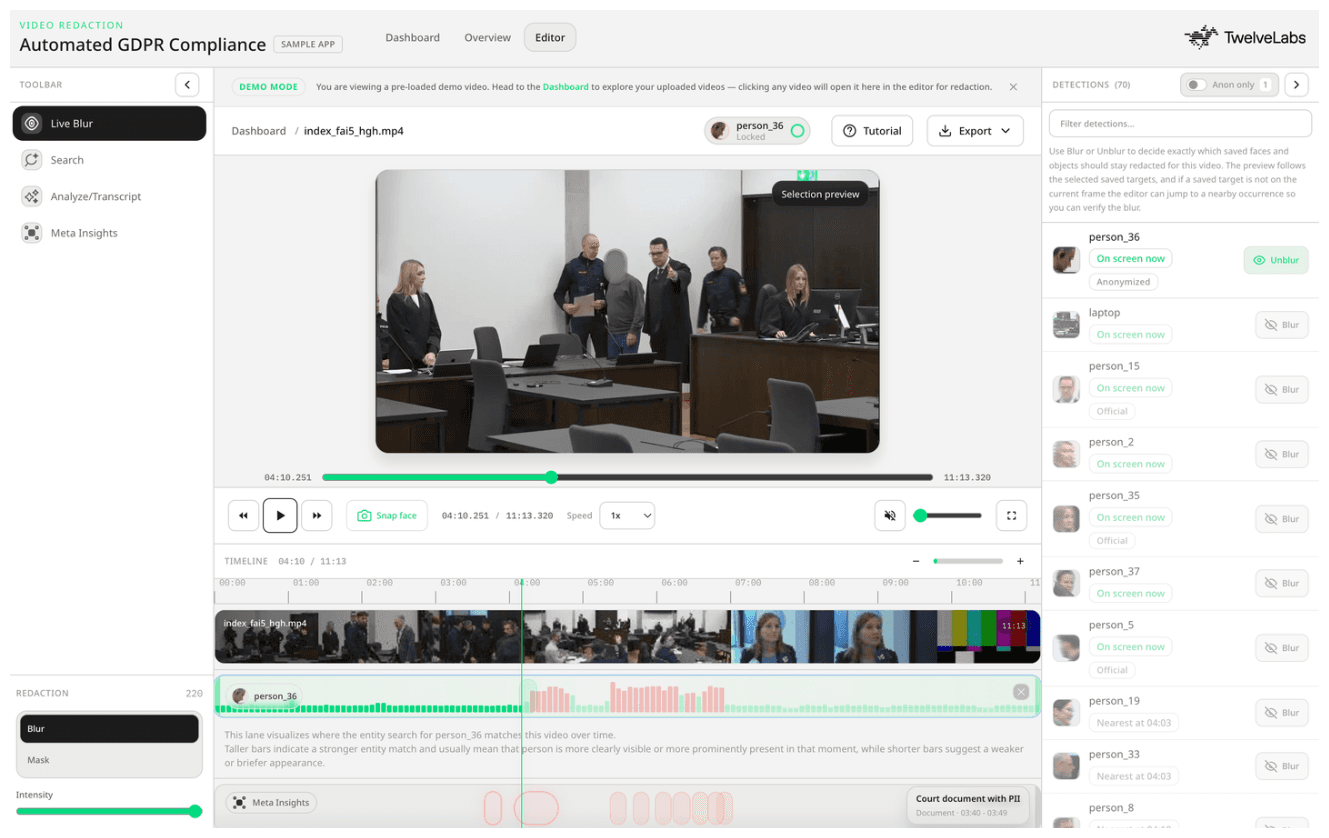
This tutorial walks through a production-ready GDPR video redaction application built on TwelveLabs. The application uses Marengo 3.0 for multimodal search and entity-based retrieval, Pegasus 1.5 for structured privacy metadata, and a local face detection pipeline for frame-level identity clustering. The result is a workflow that takes a reviewer from video upload to export-ready redacted output in a single interface.
You can explore the live deployment at tl-gdpr-compliance.vercel.app and find the source code at github.com/Hrishikesh332/tl-GDPR-compliance-redaction.
What the Application Does
Most redaction tools are built around manual selection: a reviewer watches footage, draws bounding boxes, and exports a blurred clip. That approach does not scale when the corpus is large, the person appears across multiple clips, or the legal obligation requires documented reasoning for each redaction decision.
This application approaches the problem differently. TwelveLabs serves as the video understanding layer throughout the workflow. Reviewers search across indexed footage using text, images, or registered identity entities. Pegasus 1.5 generates timestamped privacy metadata that surfaces high-risk moments before a reviewer watches a single frame. Local face detection clusters detections into stable per-person identities that persist through the export pipeline. Blur tracks follow a specific person across motion, profile turns, and camera cuts.
The workflow covers the full review cycle: upload and index footage, search for subjects using natural language or face images, review AI-generated privacy risk segments on an interactive timeline, select redaction targets by person identity, and export a stable, face-locked redacted video.
Inside the Redaction Pipeline
The application connects four distinct capabilities into a single review workflow.
Multimodal search with Marengo 3.0 lets reviewers locate any person, object, or scene using text queries, image uploads, or registered face entities. Marengo returns relevant clip segments with confidence scores, which the interface renders as a visual timeline lane with review markers at the strongest matches.
Privacy metadata with Pegasus 1.5 generates timestamped segment data focused on privacy risk. Rather than describing the full video, Pegasus is given a schema that targets specific categories: faces, documents, license plates, screens, sensitive objects, and protected individuals. Each segment includes a risk level, redaction reason, recommended action, and scene role.
Local detection and identity clustering uses Pegasus timestamps to guide keyframe extraction. The application then runs local face detection and InsightFace embeddings, clustering detected faces into stable per-person identities with consistent IDs across the full video.
Face-lock blur and export redaction converts the selected person's detection history into a frame-indexed bounding box lane. During export, the renderer applies blur from that lane on each matching frame, producing a stable, identity-aware redacted video.

Setting Up the Environment
Before building, complete the following prerequisites.
Create a TwelveLabs account and generate an API key. Create an index with Marengo 3.0 and Pegasus 1.5 enabled, and record the Index ID.
Create a TwelveLabs Entity Collection to support face registration and entity search.
Install Python 3 for the Flask backend and Node.js/npm for the React frontend. FFmpeg is recommended for video re-encoding on export.
Clone the repository and follow the setup instructions in the README.
Create backend/.env using the variables defined in .env.example.
Section 1: Entity Management with TwelveLabs
Locating a specific known person across indexed footage requires more than a text search. Registering a face as a TwelveLabs entity creates a reusable identity reference that can be combined with context queries: find this person near a document, in a specific scene type, or performing a specific action.
This matters for redaction precision. Instead of flagging every face in the video, the reviewer can anchor the search to a known identity and retrieve only the moments where that person is visible.
1.1 - Registering Face Assets in the Entity Index
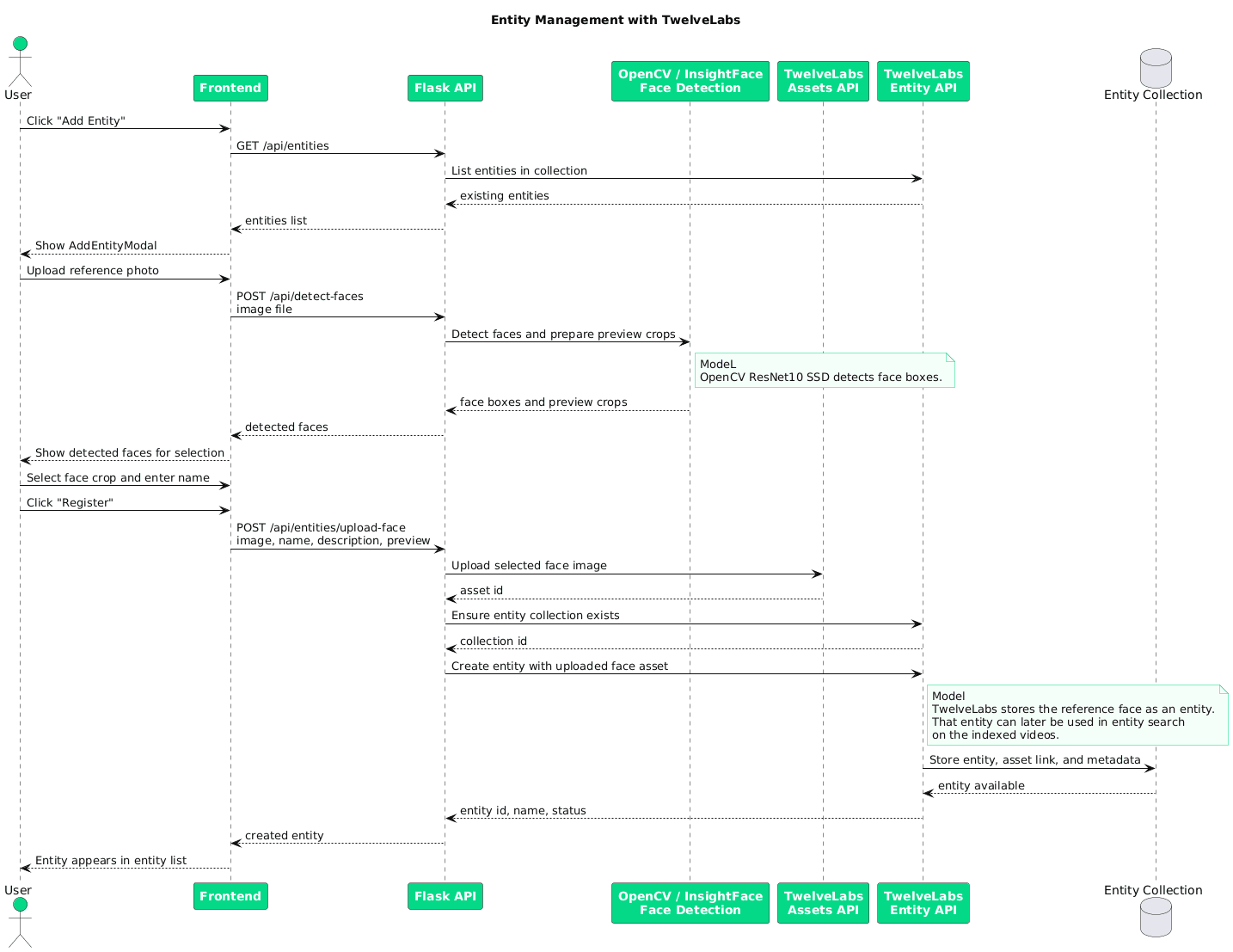
When the user uploads a face image and provides a name, the backend detects the face using a ResNet-10 Face Detector, generates a preview crop, and prepares a face asset for registration with TwelveLabs.
The flow has two steps: upload the face image as an asset, then create a named entity referencing the returned asset ID. This links the visual reference to a searchable identity.
asset_id = twelvelabs_service.upload_face_asset(tmp.name)
metadata = {"name": name}
if preview_base64:
    metadata["face_snap_base64"] = preview_base64

entity_result = twelvelabs_service.create_entity(
    name=name,
    asset_ids=[asset_id],
    description=description or f"Face entity: {name}",
    metadata=metadata,
asset_id = twelvelabs_service.upload_face_asset(tmp.name)
metadata = {"name": name}
if preview_base64:
    metadata["face_snap_base64"] = preview_base64

entity_result = twelvelabs_service.create_entity(
    name=name,
    asset_ids=[asset_id],
    description=description or f"Face entity: {name}",
    metadata=metadata,
After registration, the entity is available for identity-constrained search across any indexed video in the collection.
1.2 - Searching with Entity and Text
Search supports three modes: entity-based, text-based, and image-based. Reviewers can combine them depending on what they know at the start of the review.
For entity-based search, the backend wraps the entity ID in TwelveLabs' mention format (<@entity_id>). When the user adds a text qualifier, both are combined so the search is constrained by both identity and context.
backend/services/twelvelabs_services (Line 1214)
def entity_search(entity_id, query_suffix="", index_id=None):
    client = get_client()
    idx = resolve_index_id(index_id)

    query_text = f"<@{entity_id}>"
    if query_suffix:
        query_text = f"<@{entity_id}> {query_suffix}"

    logger.info("Entity search: %s", query_text)
    response = client.search.query(
        index_id=idx,
        search_options=["visual"],
        query_text=query_text,
        group_by="video",
        sort_option="score",
        page_limit=50,
    )
    return serialize_search_results(response)
def entity_search(entity_id, query_suffix="", index_id=None):
    client = get_client()
    idx = resolve_index_id(index_id)

    query_text = f"<@{entity_id}>"
    if query_suffix:
        query_text = f"<@{entity_id}> {query_suffix}"

    logger.info("Entity search: %s", query_text)
    response = client.search.query(
        index_id=idx,
        search_options=["visual"],
        query_text=query_text,
        group_by="video",
        sort_option="score",
        page_limit=50,
    )
    return serialize_search_results(response)
For image-based search, the backend passes the image as query_media_type="image" with either query_media_file or query_media_url.
if image_url:
    response = client.search.query(
        **kwargs,
        query_media_type="image",
        query_media_url=image_url,
    )

if image_path:
    with open(image_path, "rb") as image_file:
        response = client.search.query(
            **kwargs,
            query_media_type="image",
            query_media_file=image_file,
        )
if image_url:
    response = client.search.query(
        **kwargs,
        query_media_type="image",
        query_media_url=image_url,
    )

if image_path:
    with open(image_path, "rb") as image_file:
        response = client.search.query(
            **kwargs,
            query_media_type="image",
            query_media_file=image_file,
        )
1.3 - Search Timeline Lane and Review Markers
Search results are rendered not just as a ranked list but as a visual timeline lane. Each result segment has a start and end time, which the frontend maps onto the video scrubber. High-confidence matches are marked with red review indicators so reviewers can distinguish the strongest hits from surrounding context.
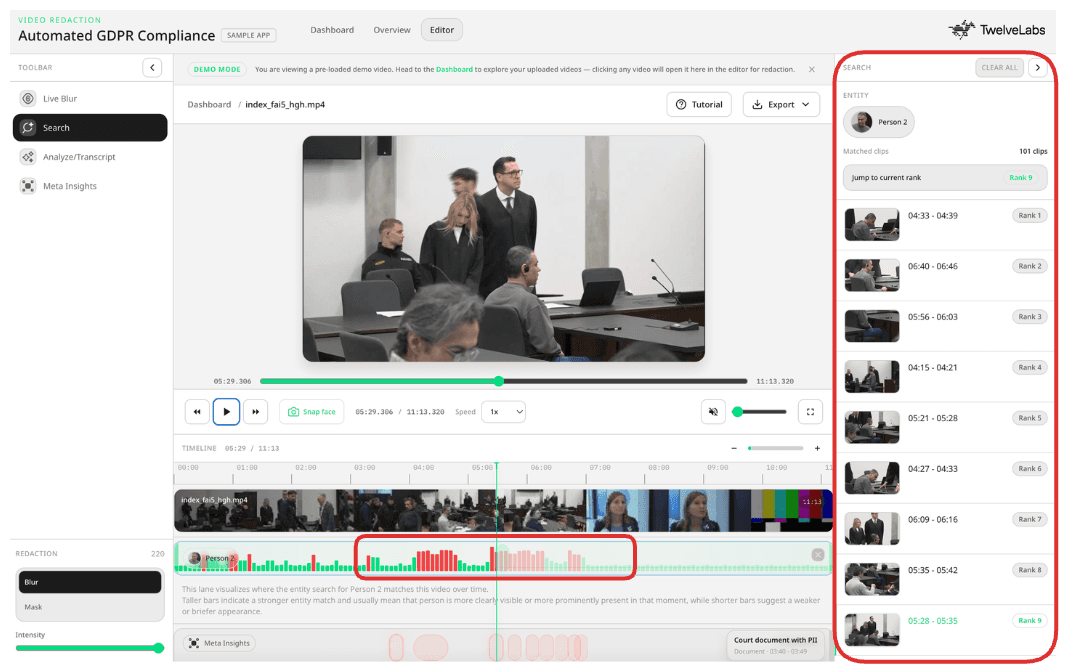
This turns search into a review workflow. The reviewer searches, inspects the timeline, and jumps directly to the moments most likely to require a redaction decision.
Section 2: Detection and Face-Lock Redaction
Detection connects TwelveLabs video understanding to the local computer vision pipeline. Rather than running face detection on every frame, Pegasus 1.5 first generates structured metadata about where people appear in the video. The backend uses those timestamps to guide keyframe extraction, making the detection pass faster and more targeted.
Detected faces are clustered into stable per-person identities. The reviewer selects from those identities, not from individual bounding boxes. The selection drives the face-lock lane used for export redaction.
2.1 - Combining TwelveLabs Context with Local Face Detection
The pipeline begins with a Pegasus structured analysis task. The schema defines two segment types: face_redaction_target (for people who may require redaction) and scene_segment (for broader scene context). Setting temperature: 0.1 keeps the output consistent and suitable for automated pipelines.
backend/services/twelvelabs_services (Line 102)
PIPELINE_METADATA_RESPONSE_FORMAT = {
    "type": "segment_definitions",
    "segment_definitions": [
        {
            "id": "face_redaction_target",
            "description": (
                "Return people segments for face redaction decisions. Create one segment per "
                "distinct face/person for each continuous time range where their face is visible "
                "enough to matter for redaction."
            ),
            "fields": [
                {"name": "name", "type": "string"},
                {"name": "description", "type": "string"},
                {"name": "should_anonymize", "type": "boolean"},
                {"name": "is_official", "type": "boolean"},
                {"name": "review_required", "type": "boolean"},
                {"name": "redaction_reason", "type": "string"},
                {"name": "confidence", "type": "number"},
            ],
        },
        {
            "id": "scene_segment",
            "fields": [
                {"name": "description", "type": "string"},
                {"name": "confidence", "type": "number"},
            ],
        },
    ],
}
PIPELINE_METADATA_RESPONSE_FORMAT = {
    "type": "segment_definitions",
    "segment_definitions": [
        {
            "id": "face_redaction_target",
            "description": (
                "Return people segments for face redaction decisions. Create one segment per "
                "distinct face/person for each continuous time range where their face is visible "
                "enough to matter for redaction."
            ),
            "fields": [
                {"name": "name", "type": "string"},
                {"name": "description", "type": "string"},
                {"name": "should_anonymize", "type": "boolean"},
                {"name": "is_official", "type": "boolean"},
                {"name": "review_required", "type": "boolean"},
                {"name": "redaction_reason", "type": "string"},
                {"name": "confidence", "type": "number"},
            ],
        },
        {
            "id": "scene_segment",
            "fields": [
                {"name": "description", "type": "string"},
                {"name": "confidence", "type": "number"},
            ],
        },
    ],
}
body = {
    "video": {
        "type": "asset_id",
        "asset_id": asset_id,
    },
    "model_name": "pegasus1.5",
    "analysis_mode": "time_based_metadata",
    "response_format": PIPELINE_METADATA_RESPONSE_FORMAT,
    "temperature": 0.1,
}
body = {
    "video": {
        "type": "asset_id",
        "asset_id": asset_id,
    },
    "model_name": "pegasus1.5",
    "analysis_mode": "time_based_metadata",
    "response_format": PIPELINE_METADATA_RESPONSE_FORMAT,
    "temperature": 0.1,
}
Once Pegasus returns the people metadata, the application extracts the time ranges and samples keyframes from those windows. Each keyframe passes through detect_faces(..., with_encodings=True), which uses InsightFace to locate faces, calculate bounding boxes, assess sharpness, and generate identity embeddings.
for kf in keyframes:
    faces = detect_faces(kf["frame"], with_encodings=True)
    for f in faces:
        f["frame_idx"] = kf["frame_idx"]
        f["timestamp"] = kf["timestamp"]
        all_faces.append(f)
for kf in keyframes:
    faces = detect_faces(kf["frame"], with_encodings=True)
    for f in faces:
        f["frame_idx"] = kf["frame_idx"]
        f["timestamp"] = kf["timestamp"]
        all_faces.append(f)
Each detection stores frame index and timestamp alongside the embedding, creating time-aware redaction metadata that the clustering step can group into consistent person identities.
2.2 - Selecting the Redaction Target
After detection and clustering, the reviewer selects a person identity from the list of detected individuals. That selection resolves into a list of face targets and their stored embeddings, which the export pipeline uses for face-lock tracking.
if person_ids:
    enriched = get_enriched_faces(job_id) or {}
    unique_faces = job.get("unique_faces") or enriched.get("unique_faces", [])
    for index, face in enumerate(unique_faces):
        stable_person_id = ensure_face_identity(face, fallback_index=index)
        if stable_person_id not in person_ids:
            continue
        face_targets.append(face)
        encoding = face.get("encoding")
        if encoding:
            face_encodings.append(encoding)
        matched_ids.append(stable_person_id)
if person_ids:
    enriched = get_enriched_faces(job_id) or {}
    unique_faces = job.get("unique_faces") or enriched.get("unique_faces", [])
    for index, face in enumerate(unique_faces):
        stable_person_id = ensure_face_identity(face, fallback_index=index)
        if stable_person_id not in person_ids:
            continue
        face_targets.append(face)
        encoding = face.get("encoding")
        if encoding:
            face_encodings.append(encoding)
        matched_ids.append(stable_person_id)
Reverse redaction uses the same identity resolution in the opposite direction: the reviewer selects the person to preserve, and all other detected faces are blurred in the export.
2.3 - Building Face-Lock Lanes and Rendering the Redacted Export
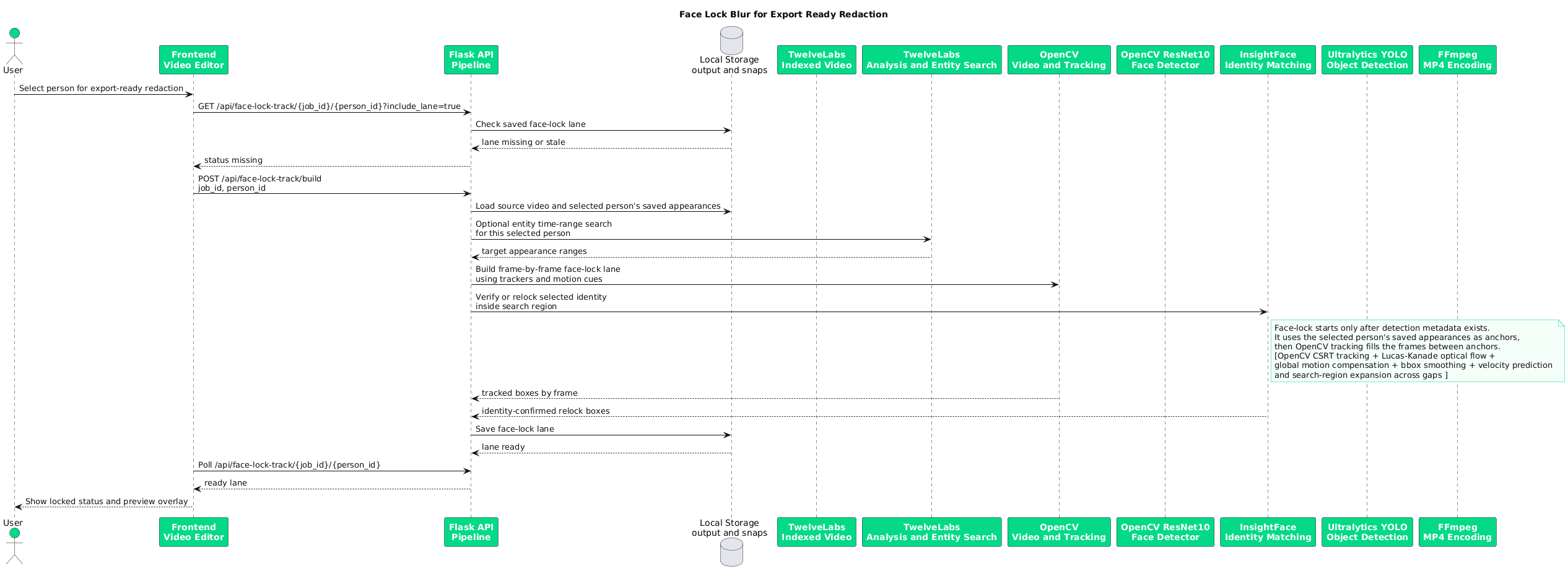
For each selected person identity, the pipeline calls build_face_lock_lane(job_id, person_id). The lane builder draws on three sources: stored InsightFace appearance records, TwelveLabs entity search time ranges, and saved semantic person ranges from Pegasus. The result is a lane document covering the full span of that identity across the video.
face_lock_tracks = {}
if face_targets and not reverse_face_redaction:
    from services.face_lock_track import build_face_lock_lane

    for face in face_targets:
        person_id = get_face_identity(face)
        if not person_id:
            continue

        lane_doc = build_face_lock_lane(job_id, person_id)
        if lane_doc:
            face_lock_tracks[person_id] = lane_doc
face_lock_tracks = {}
if face_targets and not reverse_face_redaction:
    from services.face_lock_track import build_face_lock_lane

    for face in face_targets:
        person_id = get_face_identity(face)
        if not person_id:
            continue

        lane_doc = build_face_lock_lane(job_id, person_id)
        if lane_doc:
            face_lock_tracks[person_id] = lane_doc
appearances = collect_person_appearances(selected_face)

video_id = str(job.get("twelvelabs_video_id") or "").strip()
entity_ranges = get_entity_search_ranges(selected_face, video_id)
saved_person_ranges = get_face_semantic_time_ranges(selected_face)
semantic_ranges = entity_ranges + saved_person_ranges

segments = build_face_lock_segments(
    appearances, semantic_ranges, fps, total_frames, duration_sec,
)
appearances = collect_person_appearances(selected_face)

video_id = str(job.get("twelvelabs_video_id") or "").strip()
entity_ranges = get_entity_search_ranges(selected_face, video_id)
saved_person_ranges = get_face_semantic_time_ranges(selected_face)
semantic_ranges = entity_ranges + saved_person_ranges

segments = build_face_lock_segments(
    appearances, semantic_ranges, fps, total_frames, duration_sec,
)
During export, the lane is converted into a frame-indexed bounding box lookup table (face_lock_bboxes_by_frame) and guided with YOLOv8-Face refinement. The renderer checks each frame against this table and applies apply_detection_redaction wherever a face-lock bounding box is registered.
if face_lock_bboxes_by_frame and not preview_only:
    for entry in face_lock_bboxes_by_frame.get(frame_idx, ()):
        lane_bbox = entry.get("bbox")
        if lane_bbox:
            apply_detection_redaction(frame, lane_bbox, "face")
if face_lock_bboxes_by_frame and not preview_only:
    for entry in face_lock_bboxes_by_frame.get(frame_idx, ()):
        lane_bbox = entry.get("bbox")
        if lane_bbox:
            apply_detection_redaction(frame, lane_bbox, "face")
The output is a stable blur that tracks the selected identity through motion, partial occlusion, and camera movement without requiring per-frame manual correction.
Section 3: Privacy Metadata with Pegasus 1.5
Pegasus 1.5 supports schema-driven time-based metadata, which means the application can define exactly what type of privacy risk to detect and what structured fields to return for each segment. This is the mechanism that powers Meta Insights in the review interface.
3.1 - Structuring the Privacy Risk Schema
The schema defines a single segment type, privacy_risk_segment, which keeps the Pegasus output focused on actionable review targets: faces, documents, screens, license plates, sensitive text, and protected individuals. Fields like risk_level, scene_role, redaction_decision, and reason give reviewers documented rationale for each flagged moment, not just a timestamp.
backend/services/pegasus_privacy (Line 75)
PEGASUS_RESPONSE_FORMAT = {
    "type": "segment_definitions",
    "segment_definitions": [
        {
            "id": "privacy_risk_segment",
            "description": (
                f"{PEGASUS_PRIVACY_PROMPT} Do not create broad background or crowd segments. Each "
                "segment must be narrow, actionable, and tied to one visible target that should be "
                "redacted or reviewed with care."
            ),
            "fields": [
                {
                    "name": "privacy_category",
                    "type": "string",
                    "description": (
                        "One of person, face, screen, document, text, license_plate, logo, object, scene. "
                        "Use scene only when the whole frame contains sensitive material; do not use it "
                        "for ordinary courtroom background."
                    ),
                    "enum": ["person", "face", "screen", "document", "text", "license_plate", "logo", "object", "scene"],
                },
                {
                    "name": "risk_level",
                    "type": "string",
                    "description": "One of low, medium, high.",
                    "enum": ["low", "medium", "high"],
                },
                {
                    "name": "label",
                    "type": "string",
                    "description": "Short target name, for example Main verdict subject, Protected witness, Visible ID, Phone screen, or License plate.",
                },
                {
                    "name": "description",
                    "type": "string",
                    "description": "What is visible and why this exact target needs redaction or careful review.",
                },
                {
                    "name": "reason",
                    "type": "string",
                    "description": (
                        "Specific reason this item should be redacted. For courtroom people, state why this is "
                        "the main verdict subject or another protected/private person; do not include generic "
                        "courtroom observers."
                    ),
                },
                {
                    "name": "scene_role",
                    "type": "string",
                    "description": (
                        "Role of the target in context. Use verdict_subject, defendant, respondent, or accused for "
                        "the main person whose verdict is being discussed. Ordinary judges, lawyers, clerks, officers, "
                        "jury, audience, reporters, and bystanders should not be segmented."
                    ),
                    "enum": [
                        "verdict_subject",
                        "defendant",
                        "respondent",
                        "accused",
                        "protected_witness",
                        "victim",
                        "minor",
                        "private_non_party",
                        "sensitive_item",
                        "unknown",
                    ],
				# More Segments Defined ...
                }
            ],
        }
    ],
}
PEGASUS_RESPONSE_FORMAT = {
    "type": "segment_definitions",
    "segment_definitions": [
        {
            "id": "privacy_risk_segment",
            "description": (
                f"{PEGASUS_PRIVACY_PROMPT} Do not create broad background or crowd segments. Each "
                "segment must be narrow, actionable, and tied to one visible target that should be "
                "redacted or reviewed with care."
            ),
            "fields": [
                {
                    "name": "privacy_category",
                    "type": "string",
                    "description": (
                        "One of person, face, screen, document, text, license_plate, logo, object, scene. "
                        "Use scene only when the whole frame contains sensitive material; do not use it "
                        "for ordinary courtroom background."
                    ),
                    "enum": ["person", "face", "screen", "document", "text", "license_plate", "logo", "object", "scene"],
                },
                {
                    "name": "risk_level",
                    "type": "string",
                    "description": "One of low, medium, high.",
                    "enum": ["low", "medium", "high"],
                },
                {
                    "name": "label",
                    "type": "string",
                    "description": "Short target name, for example Main verdict subject, Protected witness, Visible ID, Phone screen, or License plate.",
                },
                {
                    "name": "description",
                    "type": "string",
                    "description": "What is visible and why this exact target needs redaction or careful review.",
                },
                {
                    "name": "reason",
                    "type": "string",
                    "description": (
                        "Specific reason this item should be redacted. For courtroom people, state why this is "
                        "the main verdict subject or another protected/private person; do not include generic "
                        "courtroom observers."
                    ),
                },
                {
                    "name": "scene_role",
                    "type": "string",
                    "description": (
                        "Role of the target in context. Use verdict_subject, defendant, respondent, or accused for "
                        "the main person whose verdict is being discussed. Ordinary judges, lawyers, clerks, officers, "
                        "jury, audience, reporters, and bystanders should not be segmented."
                    ),
                    "enum": [
                        "verdict_subject",
                        "defendant",
                        "respondent",
                        "accused",
                        "protected_witness",
                        "victim",
                        "minor",
                        "private_non_party",
                        "sensitive_item",
                        "unknown",
                    ],
				# More Segments Defined ...
                }
            ],
        }
    ],
}
3.2 - Generating Timestamped Privacy Segments
The schema is passed to Pegasus with analysis_mode: "time_based_metadata". This instructs Pegasus to return the response as a structured timeline rather than a single document summary. Setting temperature: 0.1 keeps the output deterministic, which is important for compliance workflows where consistency across repeated runs matters.
backend/services/twelvelabs_services (Line 1044)
def create_pegasus_privacy_task(asset_id, *, response_format):
    """Create a Pegasus 1.5 async structured-analysis task from an existing asset id."""
    body = {
        "video": {
            "type": "asset_id",
            "asset_id": asset_id,
        },
        "model_name": "pegasus1.5",
        "analysis_mode": "time_based_metadata",
        "response_format": response_format,
        "temperature": 0.1,
    }
def create_pegasus_privacy_task(asset_id, *, response_format):
    """Create a Pegasus 1.5 async structured-analysis task from an existing asset id."""
    body = {
        "video": {
            "type": "asset_id",
            "asset_id": asset_id,
        },
        "model_name": "pegasus1.5",
        "analysis_mode": "time_based_metadata",
        "response_format": response_format,
        "temperature": 0.1,
    }
The backend saves an initial job artifact with empty timeline_events and recommended_actions fields, then polls until the task completes. Each Pegasus segment is converted into two objects: a timeline event (with start_sec, end_sec, severity, category, reason, and redaction_decision) and a recommended action that tells the reviewer what to do next.
event = {
    "id": event_id,
    "start_sec": round(start_sec, 3),
    "end_sec": round(end_sec, 3),
    "severity": severity,
    "category": category,
    "label": label[:120],
    "description": description[:600],
    "reason": reason[:600],
    "redaction_target": redaction_target[:120] or None,
    "scene_role": scene_role[:120] or None,
    "redaction_decision": redaction_decision[:120] or None,
    "subject_selection": subject_selection[:120] or None,
    "confidence": round(confidence, 3),
    "review_required": True,
    "recommended_action_ids": [action_id],
}
event = {
    "id": event_id,
    "start_sec": round(start_sec, 3),
    "end_sec": round(end_sec, 3),
    "severity": severity,
    "category": category,
    "label": label[:120],
    "description": description[:600],
    "reason": reason[:600],
    "redaction_target": redaction_target[:120] or None,
    "scene_role": scene_role[:120] or None,
    "redaction_decision": redaction_decision[:120] or None,
    "subject_selection": subject_selection[:120] or None,
    "confidence": round(confidence, 3),
    "review_required": True,
    "recommended_action_ids": [action_id],
}
3.3 - Rendering Privacy Metadata as a Review Interface
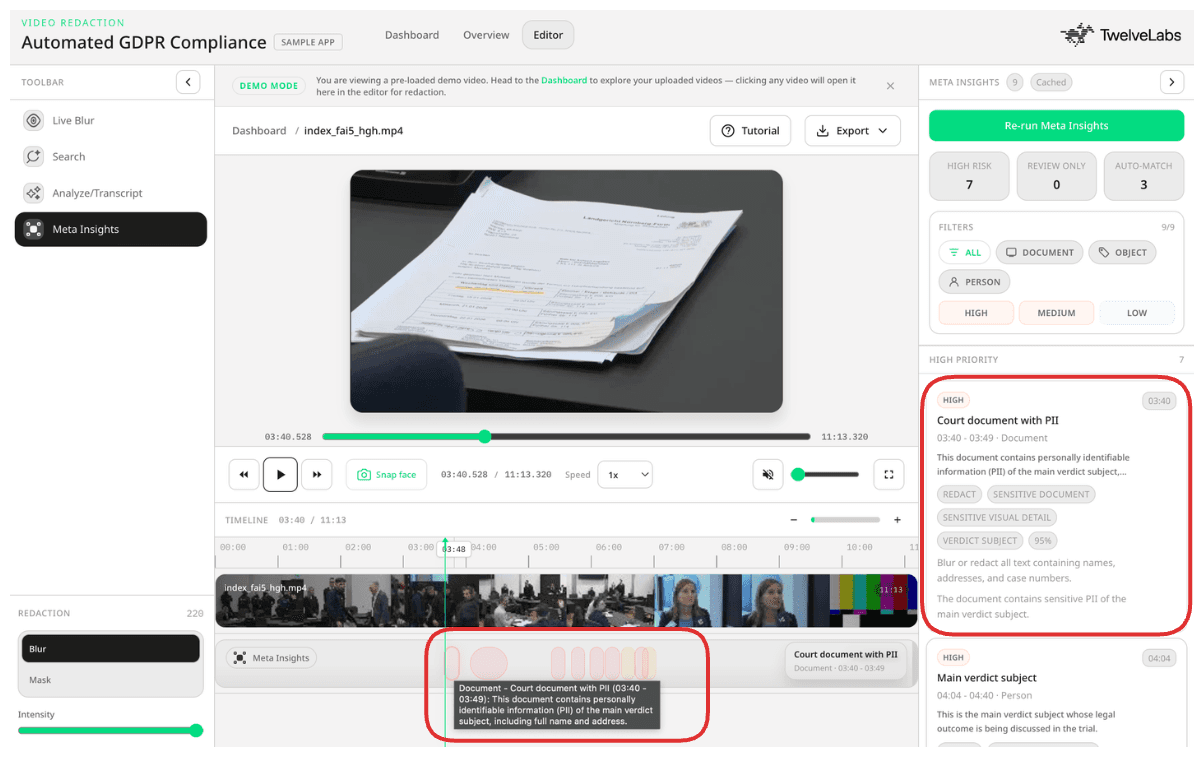
The timeline lane renders each Pegasus event as a clickable hotspot positioned at its start_sec and end_sec. Clicking a hotspot opens the Meta Insights panel, focuses the event, and seeks the video to that timestamp.
The sidebar surfaces the full event metadata: severity, category, reason, redaction decision, redaction target, subject selection, scene role, confidence, and handling note. Reviewers see not just where something requires attention, but why, which is the documented rationale a GDPR audit requires.
Section 4: Open-Ended Video Analysis for Review
In addition to structured metadata, the application supports free-form contextual questions against the indexed video. A reviewer can ask what sensitive information appears throughout the footage, which moments carry the highest compliance risk, or what is happening around a specific timestamp. This is useful for situations where the reviewer does not yet know what they are looking for.
The frontend sends the video_id and the reviewer's prompt to /api/analyze-custom. The backend prepends a formatting instruction that requests timestamps whenever specific moments are referenced, then passes the combined prompt to the TwelveLabs Analyze service.
backend/services/twelvelabs_services (Line 666)
def analyze_video_custom(video_id, prompt):
    client = get_client()
    logger.info("Custom analysis on video %s", video_id)
    enhanced_prompt = f"{ANALYZE_FORMAT_INSTRUCTION}\n\n{prompt}"
    result = client.analyze(
        video_id=video_id,
        prompt=enhanced_prompt,
        temperature=0.2,
        request_options={"timeout_in_seconds": TWELVELABS_ANALYZE_TIMEOUT_SEC},
    )
    return {"data": result.data, "id": result.id}
def analyze_video_custom(video_id, prompt):
    client = get_client()
    logger.info("Custom analysis on video %s", video_id)
    enhanced_prompt = f"{ANALYZE_FORMAT_INSTRUCTION}\n\n{prompt}"
    result = client.analyze(
        video_id=video_id,
        prompt=enhanced_prompt,
        temperature=0.2,
        request_options={"timeout_in_seconds": TWELVELABS_ANALYZE_TIMEOUT_SEC},
    )
    return {"data": result.data, "id": result.id}
The response returns a plain-language analysis grounded in the video content, with timestamps linking the reviewer directly to the relevant moments. This closes the gap between "I need to find something sensitive" and "here is exactly where to look."
What This Approach Makes Possible
GDPR compliance for video has historically required one of two tradeoffs: either a slow, expensive manual review process, or a blunt automated approach that redacts more than the law requires and cannot explain its decisions.
This application takes a different path. Marengo 3.0 retrieves the right moments across an entire corpus using text, images, or registered identity entities. Pegasus 1.5 generates structured, timestamped privacy metadata with documented rationale for each flagged segment. Local face detection clusters identities from AI-guided keyframes. Face-lock lanes maintain stable blur tracks across the full export.
The result is a redaction workflow that is targeted rather than broad, documented rather than opaque, and scalable rather than manual. Every decision point has a reviewable record, which is what defensible compliance actually requires.
Resources
Introduction
Privacy review at scale is not an editing problem. It is an intelligence problem.
When a legal request lands and your team needs to locate, assess, and redact every appearance of a specific person across hours of footage, frame-by-frame review does not work. The GDPR Enforcement Tracker recorded more than €6.06 billion in cumulative fines across 2,793 cases by March 2026. Article 83 still permits penalties up to €20 million or 4% of global annual turnover for the most serious violations. The operational pressure is real, and manual workflows are not built to absorb it.
GDPR-compliant redaction requires three things working together: accurate identification of the right person or object, retrieval of every relevant appearance across a corpus, and redaction limited to what the legal purpose actually requires. Blurring everything is not a defensible strategy. The regulation's data minimization principle pushes toward precision, not blanket suppression.
This tutorial walks through a production-ready GDPR video redaction application built on TwelveLabs. The application uses Marengo 3.0 for multimodal search and entity-based retrieval, Pegasus 1.5 for structured privacy metadata, and a local face detection pipeline for frame-level identity clustering. The result is a workflow that takes a reviewer from video upload to export-ready redacted output in a single interface.
You can explore the live deployment at tl-gdpr-compliance.vercel.app and find the source code at github.com/Hrishikesh332/tl-GDPR-compliance-redaction.
What the Application Does
Most redaction tools are built around manual selection: a reviewer watches footage, draws bounding boxes, and exports a blurred clip. That approach does not scale when the corpus is large, the person appears across multiple clips, or the legal obligation requires documented reasoning for each redaction decision.
This application approaches the problem differently. TwelveLabs serves as the video understanding layer throughout the workflow. Reviewers search across indexed footage using text, images, or registered identity entities. Pegasus 1.5 generates timestamped privacy metadata that surfaces high-risk moments before a reviewer watches a single frame. Local face detection clusters detections into stable per-person identities that persist through the export pipeline. Blur tracks follow a specific person across motion, profile turns, and camera cuts.
The workflow covers the full review cycle: upload and index footage, search for subjects using natural language or face images, review AI-generated privacy risk segments on an interactive timeline, select redaction targets by person identity, and export a stable, face-locked redacted video.
Inside the Redaction Pipeline
The application connects four distinct capabilities into a single review workflow.
Multimodal search with Marengo 3.0 lets reviewers locate any person, object, or scene using text queries, image uploads, or registered face entities. Marengo returns relevant clip segments with confidence scores, which the interface renders as a visual timeline lane with review markers at the strongest matches.
Privacy metadata with Pegasus 1.5 generates timestamped segment data focused on privacy risk. Rather than describing the full video, Pegasus is given a schema that targets specific categories: faces, documents, license plates, screens, sensitive objects, and protected individuals. Each segment includes a risk level, redaction reason, recommended action, and scene role.
Local detection and identity clustering uses Pegasus timestamps to guide keyframe extraction. The application then runs local face detection and InsightFace embeddings, clustering detected faces into stable per-person identities with consistent IDs across the full video.
Face-lock blur and export redaction converts the selected person's detection history into a frame-indexed bounding box lane. During export, the renderer applies blur from that lane on each matching frame, producing a stable, identity-aware redacted video.
Setting Up the Environment
Before building, complete the following prerequisites.
Create a TwelveLabs account and generate an API key. Create an index with Marengo 3.0 and Pegasus 1.5 enabled, and record the Index ID.
Create a TwelveLabs Entity Collection to support face registration and entity search.
Install Python 3 for the Flask backend and Node.js/npm for the React frontend. FFmpeg is recommended for video re-encoding on export.
Clone the repository and follow the setup instructions in the README.
Create backend/.env using the variables defined in .env.example.
Section 1: Entity Management with TwelveLabs
Locating a specific known person across indexed footage requires more than a text search. Registering a face as a TwelveLabs entity creates a reusable identity reference that can be combined with context queries: find this person near a document, in a specific scene type, or performing a specific action.
This matters for redaction precision. Instead of flagging every face in the video, the reviewer can anchor the search to a known identity and retrieve only the moments where that person is visible.
1.1 - Registering Face Assets in the Entity Index
When the user uploads a face image and provides a name, the backend detects the face using a ResNet-10 Face Detector, generates a preview crop, and prepares a face asset for registration with TwelveLabs.
The flow has two steps: upload the face image as an asset, then create a named entity referencing the returned asset ID. This links the visual reference to a searchable identity.
asset_id = twelvelabs_service.upload_face_asset(tmp.name)
metadata = {"name": name}
if preview_base64:
    metadata["face_snap_base64"] = preview_base64

entity_result = twelvelabs_service.create_entity(
    name=name,
    asset_ids=[asset_id],
    description=description or f"Face entity: {name}",
    metadata=metadata,
After registration, the entity is available for identity-constrained search across any indexed video in the collection.
1.2 - Searching with Entity and Text
Search supports three modes: entity-based, text-based, and image-based. Reviewers can combine them depending on what they know at the start of the review.
For entity-based search, the backend wraps the entity ID in TwelveLabs' mention format (<@entity_id>). When the user adds a text qualifier, both are combined so the search is constrained by both identity and context.
backend/services/twelvelabs_services (Line 1214)
def entity_search(entity_id, query_suffix="", index_id=None):
    client = get_client()
    idx = resolve_index_id(index_id)

    query_text = f"<@{entity_id}>"
    if query_suffix:
        query_text = f"<@{entity_id}> {query_suffix}"

    logger.info("Entity search: %s", query_text)
    response = client.search.query(
        index_id=idx,
        search_options=["visual"],
        query_text=query_text,
        group_by="video",
        sort_option="score",
        page_limit=50,
    )
    return serialize_search_results(response)
For image-based search, the backend passes the image as query_media_type="image" with either query_media_file or query_media_url.
if image_url:
    response = client.search.query(
        **kwargs,
        query_media_type="image",
        query_media_url=image_url,
    )

if image_path:
    with open(image_path, "rb") as image_file:
        response = client.search.query(
            **kwargs,
            query_media_type="image",
            query_media_file=image_file,
        )
1.3 - Search Timeline Lane and Review Markers
Search results are rendered not just as a ranked list but as a visual timeline lane. Each result segment has a start and end time, which the frontend maps onto the video scrubber. High-confidence matches are marked with red review indicators so reviewers can distinguish the strongest hits from surrounding context.
This turns search into a review workflow. The reviewer searches, inspects the timeline, and jumps directly to the moments most likely to require a redaction decision.
Section 2: Detection and Face-Lock Redaction
Detection connects TwelveLabs video understanding to the local computer vision pipeline. Rather than running face detection on every frame, Pegasus 1.5 first generates structured metadata about where people appear in the video. The backend uses those timestamps to guide keyframe extraction, making the detection pass faster and more targeted.
Detected faces are clustered into stable per-person identities. The reviewer selects from those identities, not from individual bounding boxes. The selection drives the face-lock lane used for export redaction.
2.1 - Combining TwelveLabs Context with Local Face Detection
The pipeline begins with a Pegasus structured analysis task. The schema defines two segment types: face_redaction_target (for people who may require redaction) and scene_segment (for broader scene context). Setting temperature: 0.1 keeps the output consistent and suitable for automated pipelines.
backend/services/twelvelabs_services (Line 102)
PIPELINE_METADATA_RESPONSE_FORMAT = {
    "type": "segment_definitions",
    "segment_definitions": [
        {
            "id": "face_redaction_target",
            "description": (
                "Return people segments for face redaction decisions. Create one segment per "
                "distinct face/person for each continuous time range where their face is visible "
                "enough to matter for redaction."
            ),
            "fields": [
                {"name": "name", "type": "string"},
                {"name": "description", "type": "string"},
                {"name": "should_anonymize", "type": "boolean"},
                {"name": "is_official", "type": "boolean"},
                {"name": "review_required", "type": "boolean"},
                {"name": "redaction_reason", "type": "string"},
                {"name": "confidence", "type": "number"},
            ],
        },
        {
            "id": "scene_segment",
            "fields": [
                {"name": "description", "type": "string"},
                {"name": "confidence", "type": "number"},
            ],
        },
    ],
}
body = {
    "video": {
        "type": "asset_id",
        "asset_id": asset_id,
    },
    "model_name": "pegasus1.5",
    "analysis_mode": "time_based_metadata",
    "response_format": PIPELINE_METADATA_RESPONSE_FORMAT,
    "temperature": 0.1,
}
Once Pegasus returns the people metadata, the application extracts the time ranges and samples keyframes from those windows. Each keyframe passes through detect_faces(..., with_encodings=True), which uses InsightFace to locate faces, calculate bounding boxes, assess sharpness, and generate identity embeddings.
for kf in keyframes:
    faces = detect_faces(kf["frame"], with_encodings=True)
    for f in faces:
        f["frame_idx"] = kf["frame_idx"]
        f["timestamp"] = kf["timestamp"]
        all_faces.append(f)
Each detection stores frame index and timestamp alongside the embedding, creating time-aware redaction metadata that the clustering step can group into consistent person identities.
2.2 - Selecting the Redaction Target
After detection and clustering, the reviewer selects a person identity from the list of detected individuals. That selection resolves into a list of face targets and their stored embeddings, which the export pipeline uses for face-lock tracking.
if person_ids:
    enriched = get_enriched_faces(job_id) or {}
    unique_faces = job.get("unique_faces") or enriched.get("unique_faces", [])
    for index, face in enumerate(unique_faces):
        stable_person_id = ensure_face_identity(face, fallback_index=index)
        if stable_person_id not in person_ids:
            continue
        face_targets.append(face)
        encoding = face.get("encoding")
        if encoding:
            face_encodings.append(encoding)
        matched_ids.append(stable_person_id)
Reverse redaction uses the same identity resolution in the opposite direction: the reviewer selects the person to preserve, and all other detected faces are blurred in the export.
2.3 - Building Face-Lock Lanes and Rendering the Redacted Export
For each selected person identity, the pipeline calls build_face_lock_lane(job_id, person_id). The lane builder draws on three sources: stored InsightFace appearance records, TwelveLabs entity search time ranges, and saved semantic person ranges from Pegasus. The result is a lane document covering the full span of that identity across the video.
face_lock_tracks = {}
if face_targets and not reverse_face_redaction:
    from services.face_lock_track import build_face_lock_lane

    for face in face_targets:
        person_id = get_face_identity(face)
        if not person_id:
            continue

        lane_doc = build_face_lock_lane(job_id, person_id)
        if lane_doc:
            face_lock_tracks[person_id] = lane_doc
appearances = collect_person_appearances(selected_face)

video_id = str(job.get("twelvelabs_video_id") or "").strip()
entity_ranges = get_entity_search_ranges(selected_face, video_id)
saved_person_ranges = get_face_semantic_time_ranges(selected_face)
semantic_ranges = entity_ranges + saved_person_ranges

segments = build_face_lock_segments(
    appearances, semantic_ranges, fps, total_frames, duration_sec,
)
During export, the lane is converted into a frame-indexed bounding box lookup table (face_lock_bboxes_by_frame) and guided with YOLOv8-Face refinement. The renderer checks each frame against this table and applies apply_detection_redaction wherever a face-lock bounding box is registered.
if face_lock_bboxes_by_frame and not preview_only:
    for entry in face_lock_bboxes_by_frame.get(frame_idx, ()):
        lane_bbox = entry.get("bbox")
        if lane_bbox:
            apply_detection_redaction(frame, lane_bbox, "face")
The output is a stable blur that tracks the selected identity through motion, partial occlusion, and camera movement without requiring per-frame manual correction.
Section 3: Privacy Metadata with Pegasus 1.5
Pegasus 1.5 supports schema-driven time-based metadata, which means the application can define exactly what type of privacy risk to detect and what structured fields to return for each segment. This is the mechanism that powers Meta Insights in the review interface.
3.1 - Structuring the Privacy Risk Schema
The schema defines a single segment type, privacy_risk_segment, which keeps the Pegasus output focused on actionable review targets: faces, documents, screens, license plates, sensitive text, and protected individuals. Fields like risk_level, scene_role, redaction_decision, and reason give reviewers documented rationale for each flagged moment, not just a timestamp.
backend/services/pegasus_privacy (Line 75)
PEGASUS_RESPONSE_FORMAT = {
    "type": "segment_definitions",
    "segment_definitions": [
        {
            "id": "privacy_risk_segment",
            "description": (
                f"{PEGASUS_PRIVACY_PROMPT} Do not create broad background or crowd segments. Each "
                "segment must be narrow, actionable, and tied to one visible target that should be "
                "redacted or reviewed with care."
            ),
            "fields": [
                {
                    "name": "privacy_category",
                    "type": "string",
                    "description": (
                        "One of person, face, screen, document, text, license_plate, logo, object, scene. "
                        "Use scene only when the whole frame contains sensitive material; do not use it "
                        "for ordinary courtroom background."
                    ),
                    "enum": ["person", "face", "screen", "document", "text", "license_plate", "logo", "object", "scene"],
                },
                {
                    "name": "risk_level",
                    "type": "string",
                    "description": "One of low, medium, high.",
                    "enum": ["low", "medium", "high"],
                },
                {
                    "name": "label",
                    "type": "string",
                    "description": "Short target name, for example Main verdict subject, Protected witness, Visible ID, Phone screen, or License plate.",
                },
                {
                    "name": "description",
                    "type": "string",
                    "description": "What is visible and why this exact target needs redaction or careful review.",
                },
                {
                    "name": "reason",
                    "type": "string",
                    "description": (
                        "Specific reason this item should be redacted. For courtroom people, state why this is "
                        "the main verdict subject or another protected/private person; do not include generic "
                        "courtroom observers."
                    ),
                },
                {
                    "name": "scene_role",
                    "type": "string",
                    "description": (
                        "Role of the target in context. Use verdict_subject, defendant, respondent, or accused for "
                        "the main person whose verdict is being discussed. Ordinary judges, lawyers, clerks, officers, "
                        "jury, audience, reporters, and bystanders should not be segmented."
                    ),
                    "enum": [
                        "verdict_subject",
                        "defendant",
                        "respondent",
                        "accused",
                        "protected_witness",
                        "victim",
                        "minor",
                        "private_non_party",
                        "sensitive_item",
                        "unknown",
                    ],
				# More Segments Defined ...
                }
            ],
        }
    ],
}
3.2 - Generating Timestamped Privacy Segments
The schema is passed to Pegasus with analysis_mode: "time_based_metadata". This instructs Pegasus to return the response as a structured timeline rather than a single document summary. Setting temperature: 0.1 keeps the output deterministic, which is important for compliance workflows where consistency across repeated runs matters.
backend/services/twelvelabs_services (Line 1044)
def create_pegasus_privacy_task(asset_id, *, response_format):
    """Create a Pegasus 1.5 async structured-analysis task from an existing asset id."""
    body = {
        "video": {
            "type": "asset_id",
            "asset_id": asset_id,
        },
        "model_name": "pegasus1.5",
        "analysis_mode": "time_based_metadata",
        "response_format": response_format,
        "temperature": 0.1,
    }
The backend saves an initial job artifact with empty timeline_events and recommended_actions fields, then polls until the task completes. Each Pegasus segment is converted into two objects: a timeline event (with start_sec, end_sec, severity, category, reason, and redaction_decision) and a recommended action that tells the reviewer what to do next.
event = {
    "id": event_id,
    "start_sec": round(start_sec, 3),
    "end_sec": round(end_sec, 3),
    "severity": severity,
    "category": category,
    "label": label[:120],
    "description": description[:600],
    "reason": reason[:600],
    "redaction_target": redaction_target[:120] or None,
    "scene_role": scene_role[:120] or None,
    "redaction_decision": redaction_decision[:120] or None,
    "subject_selection": subject_selection[:120] or None,
    "confidence": round(confidence, 3),
    "review_required": True,
    "recommended_action_ids": [action_id],
}
3.3 - Rendering Privacy Metadata as a Review Interface
The timeline lane renders each Pegasus event as a clickable hotspot positioned at its start_sec and end_sec. Clicking a hotspot opens the Meta Insights panel, focuses the event, and seeks the video to that timestamp.
The sidebar surfaces the full event metadata: severity, category, reason, redaction decision, redaction target, subject selection, scene role, confidence, and handling note. Reviewers see not just where something requires attention, but why, which is the documented rationale a GDPR audit requires.
Section 4: Open-Ended Video Analysis for Review
In addition to structured metadata, the application supports free-form contextual questions against the indexed video. A reviewer can ask what sensitive information appears throughout the footage, which moments carry the highest compliance risk, or what is happening around a specific timestamp. This is useful for situations where the reviewer does not yet know what they are looking for.
The frontend sends the video_id and the reviewer's prompt to /api/analyze-custom. The backend prepends a formatting instruction that requests timestamps whenever specific moments are referenced, then passes the combined prompt to the TwelveLabs Analyze service.
backend/services/twelvelabs_services (Line 666)
def analyze_video_custom(video_id, prompt):
    client = get_client()
    logger.info("Custom analysis on video %s", video_id)
    enhanced_prompt = f"{ANALYZE_FORMAT_INSTRUCTION}\n\n{prompt}"
    result = client.analyze(
        video_id=video_id,
        prompt=enhanced_prompt,
        temperature=0.2,
        request_options={"timeout_in_seconds": TWELVELABS_ANALYZE_TIMEOUT_SEC},
    )
    return {"data": result.data, "id": result.id}
The response returns a plain-language analysis grounded in the video content, with timestamps linking the reviewer directly to the relevant moments. This closes the gap between "I need to find something sensitive" and "here is exactly where to look."
What This Approach Makes Possible
GDPR compliance for video has historically required one of two tradeoffs: either a slow, expensive manual review process, or a blunt automated approach that redacts more than the law requires and cannot explain its decisions.
This application takes a different path. Marengo 3.0 retrieves the right moments across an entire corpus using text, images, or registered identity entities. Pegasus 1.5 generates structured, timestamped privacy metadata with documented rationale for each flagged segment. Local face detection clusters identities from AI-guided keyframes. Face-lock lanes maintain stable blur tracks across the full export.
The result is a redaction workflow that is targeted rather than broad, documented rather than opaque, and scalable rather than manual. Every decision point has a reviewable record, which is what defensible compliance actually requires.
Resources



Enterprise
©
2026
TwelveLabs, Inc. All Rights Reserved

Enterprise
©
2026
TwelveLabs, Inc. All Rights Reserved

Enterprise
©
2026
TwelveLabs, Inc. All Rights Reserved