" height="1.90314px" id="wtDTm6bEW" transform="translate(26.225 0)" width="2.4723000000000006px"/><path d="M 0.557 0 L 1.438 0 C 1.746 0 1.995 0.25 1.995 0.559 L 1.995 1.344 C 1.995 1.653 1.746 1.903 1.438 1.903 L 0.557 1.903 C 0.25 1.903 0 1.653 0 1.344 L 0 0.559 C 0 0.25 0.25 0 0.557 0 Z" fill="rgb(29, 28, 27)" height="1.9031500000000001px" id="GnmDnNra_" transform="translate(36.408 2.728)" width="1.9953000000000003px"/><path d="M 6.224 0 L 0.558 0 C 0.25 0 0 0.25 0 0.559 L 0 1.344 C 0 1.653 0.25 1.903 0.558 1.903 L 6.224 1.903 C 6.531 1.903 6.781 1.653 6.781 1.344 L 6.781 0.559 C 6.781 0.25 6.531 0 6.224 0 Z" fill="rgb(29, 28, 27)" height="1.9031500000000001px" id="hKTQ3dbw4" transform="translate(34.261 5.456)" width="6.781100000000002px"/><path d="M 6.955 0 L 0.558 0 C 0.25 0 0 0.25 0 0.559 L 0 1.344 C 0 1.653 0.25 1.903 0.558 1.903 L 6.955 1.903 C 7.263 1.903 7.513 1.653 7.513 1.344 L 7.513 0.559 C 7.513 0.25 7.263 0 6.955 0 Z" fill="rgb(29, 28, 27)" height="1.9031500000000001px" id="G1Zzk9CUU" transform="translate(28.298 8.243)" width="7.513100000000001px"/><path d="M 7.123 0 L 0.558 0 C 0.25 0 0 0.25 0 0.559 L 0 1.344 C 0 1.653 0.25 1.903 0.558 1.903 L 7.123 1.903 C 7.431 1.903 7.681 1.653 7.681 1.344 L 7.681 0.559 C 7.681 0.25 7.431 0 7.123 0 Z" fill="rgb(29, 28, 27)" height="1.9030999999999985px" id="fm7cHxIfJ" transform="translate(0 10.972)" width="7.68067px"/><path d="M 13.447 0 L 0.558 0 C 0.25 0 0 0.25 0 0.559 L 0 1.344 C 0 1.653 0.25 1.903 0.558 1.903 L 13.447 1.903 C 13.755 1.903 14.004 1.653 14.004 1.344 L 14.004 0.559 C 14.004 0.25 13.755 0 13.447 0 Z" fill="rgb(29, 28, 27)" height="1.9030999999999985px" id="LowSwDrtg" transform="translate(9.552 10.972)" width="14.0044px"/><path d="M 0.558 0 L 8.212 0 C 8.52 0 8.77 0.25 8.77 0.559 L 8.77 1.344 C 8.77 1.653 8.52 1.903 8.212 1.903 L 0.558 1.903 C 0.25 1.903 0 1.653 0 1.344 L 0 0.559 C 0 0.25 0.25 0 0.558 0 Z" fill="rgb(29, 28, 27)" height="1.9030999999999985px" id="xRiKc2od7" transform="translate(27.041 10.972)" width="8.769900000000003px"/><path d="M 0.557 0 L 5.4 0 C 5.708 0 5.958 0.25 5.958 0.559 L 5.958 1.344 C 5.958 1.653 5.708 1.903 5.4 1.903 L 0.557 1.903 C 0.25 1.903 0 1.653 0 1.344 L 0 0.559 C 0 0.25 0.25 0 0.557 0 Z" fill="rgb(29, 28, 27)" height="1.9031500000000001px" id="JWdNVicde" transform="translate(36.796 8.243)" width="5.957599999999999px"/><path d="M 1.438 0 L 0.558 0 C 0.25 0 0 0.25 0 0.559 L 0 1.344 C 0 1.653 0.25 1.903 0.558 1.903 L 1.438 1.903 C 1.746 1.903 1.995 1.653 1.995 1.344 L 1.995 0.559 C 1.995 0.25 1.746 0 1.438 0 Z" fill="rgb(29, 28, 27)" height="1.9031500000000001px" id="RfFYVCT_T" transform="translate(28.717 5.456)" width="1.9953000000000003px"/><path d="M 0.558 0 L 2.895 0 C 3.203 0 3.453 0.25 3.453 0.559 L 3.453 1.406 C 3.453 1.714 3.203 1.964 2.895 1.964 L 0.558 1.964 C 0.25 1.964 0 1.714 0 1.406 L 0 0.559 C 0 0.25 0.25 0 0.558 0 Z" fill="rgb(29, 28, 27)" height="1.964299999999998px" id="dngJ6MU2p" transform="translate(16.183 24.582)" width="3.4525000000000006px"/><path d="M 1.706 0 L 0.558 0 C 0.25 0 0 0.25 0 0.559 L 0 1.406 C 0 1.714 0.25 1.964 0.558 1.964 L 1.706 1.964 C 2.014 1.964 2.263 1.714 2.263 1.406 L 2.263 0.559 C 2.263 0.25 2.014 0 1.706 0 Z" fill="rgb(29, 28, 27)" height="1.964299999999998px" id="N_fstvKmR" transform="translate(22.18 24.582)" width="2.2631999999999977px"/><path d="M 0.558 0 L 5.544 0 C 5.852 0 6.101 0.25 6.101 0.559 L 6.101 1.406 C 6.101 1.714 5.852 1.964 5.544 1.964 L 0.558 1.964 C 0.25 1.964 0 1.714 0 1.406 L 0 0.559 C 0 0.25 0.25 0 0.558 0 Z" fill="rgb(29, 28, 27)" height="1.964299999999998px" id="t55XLYcgb" transform="translate(25.486 24.582)" width="6.101399999999998px"/><path d="M 1.976 0 L 0.558 0 C 0.25 0 0 0.25 0 0.559 L 0 1.406 C 0 1.714 0.25 1.964 0.558 1.964 L 1.976 1.964 C 2.284 1.964 2.533 1.714 2.533 1.406 L 2.533 0.559 C 2.533 0.25 2.284 0 1.976 0 Z" fill="rgb(29, 28, 27)" height="1.964299999999998px" id="ZrEKTVTAe" transform="translate(28.542 21.854)" width="2.5334000000000003px"/><path d="M 0.557 0 L 1.438 0 C 1.746 0 1.995 0.25 1.995 0.559 L 1.995 1.406 C 1.995 1.714 1.746 1.964 1.438 1.964 L 0.557 1.964 C 0.25 1.964 0 1.714 0 1.406 L 0 0.559 C 0 0.25 0.25 0 0.557 0 Z" fill="rgb(29, 28, 27)" height="1.964299999999998px" id="Z0fPTp9aR" transform="translate(11.425 24.582)" width="1.9953000000000003px"/><path d="M 0 0.559 C 0 0.251 0.251 0 0.558 0 L 1.438 0 C 1.745 0 1.995 0.251 1.995 0.559 L 1.995 1.405 C 1.995 1.713 1.745 1.964 1.438 1.964 L 0.558 1.964 C 0.251 1.964 0 1.713 0 1.405 Z" fill="rgb(29, 28, 27)" height="1.964299999999998px" id="Tj_PDHFDh" transform="translate(20.635 27.308)" width="1.9954px"/><path d="M 0.557 0 L 1.342 0 C 1.65 0 1.899 0.25 1.899 0.559 L 1.899 1.406 C 1.899 1.714 1.65 1.964 1.342 1.964 L 0.557 1.964 C 0.25 1.964 0 1.714 0 1.406 L 0 0.559 C 0 0.25 0.25 0 0.557 0 Z" fill="rgb(29, 28, 27)" height="1.9643000000000015px" id="AYq9dXkKz" transform="translate(18.686 30.036)" width="1.8994px"/><path d="M 0.558 0 L 5.768 0 C 6.076 0 6.326 0.25 6.326 0.559 L 6.326 1.344 C 6.326 1.653 6.076 1.903 5.768 1.903 L 0.558 1.903 C 0.25 1.903 0 1.653 0 1.344 L 0 0.559 C 0 0.25 0.25 0 0.558 0 Z" fill="rgb(29, 28, 27)" height="1.9031500000000001px" id="rspevfJcx" transform="translate(12.157 8.243)" width="6.325900000000001px"/><path d="M 3.285 0 L 0.558 0 C 0.25 0 0 0.25 0 0.559 L 0 1.344 C 0 1.653 0.25 1.903 0.558 1.903 L 3.285 1.903 C 3.593 1.903 3.842 1.653 3.842 1.344 L 3.842 0.559 C 3.842 0.25 3.593 0 3.285 0 Z" fill="rgb(29, 28, 27)" height="1.9031500000000001px" id="XRUAhGnph" transform="translate(23.887 2.728)" width="3.8424000000000014px"/><path d="M 0.558 0 L 5.644 0 C 5.952 0 6.202 0.25 6.202 0.559 L 6.202 1.344 C 6.202 1.653 5.952 1.903 5.644 1.903 L 0.558 1.903 C 0.25 1.903 0 1.653 0 1.344 L 0 0.559 C 0 0.25 0.25 0 0.558 0 Z" fill="rgb(29, 28, 27)" height="1.9031500000000001px" id="VsaVVIfke" transform="translate(21.528 5.456)" width="6.201600000000003px"/><path d="M 3.06 0 L 0.558 0 C 0.25 0 0 0.25 0 0.559 L 0 1.344 C 0 1.653 0.25 1.903 0.558 1.903 L 3.06 1.903 C 3.369 1.903 3.618 1.653 3.618 1.344 L 3.618 0.559 C 3.618 0.25 3.369 0 3.06 0 Z" fill="rgb(29, 28, 27)" height="1.9030999999999985px" id="wiAKEgyId" transform="translate(40.819 10.972)" width="3.6182000000000016px"/><path d="M 0.558 0 L 17.318 0 C 17.626 0 17.875 0.25 17.875 0.559 L 17.875 1.345 C 17.875 1.653 17.626 1.903 17.318 1.903 L 0.558 1.903 C 0.25 1.903 0 1.653 0 1.345 L 0 0.559 C 0 0.25 0.25 0 0.558 0 Z" fill="rgb(29, 28, 27)" height="1.9032px" id="FIE0ufK9m" transform="translate(6.666 13.7)" width="17.87506px"/><path d="M 6.426 0 L 0.558 0 C 0.25 0 0 0.25 0 0.559 L 0 1.345 C 0 1.653 0.25 1.903 0.558 1.903 L 6.426 1.903 C 6.734 1.903 6.984 1.653 6.984 1.345 L 6.984 0.559 C 6.984 0.25 6.734 0 6.426 0 Z" fill="rgb(29, 28, 27)" height="1.9032000000000018px" id="ut9UWny3L" transform="translate(22.892 19.156)" width="6.983599999999999px"/><path d="M 0.558 0 L 22.151 0 C 22.459 0 22.709 0.25 22.709 0.559 L 22.709 1.344 C 22.709 1.653 22.459 1.903 22.151 1.903 L 0.558 1.903 C 0.25 1.903 0 1.653 0 1.344 L 0 0.559 C 0 0.25 0.25 0 0.558 0 Z" fill="rgb(29, 28, 27)" height="1.9030999999999985px" id="VULnffgbk" transform="translate(9.552 16.428)" width="22.7089px"/><path d="M 7.886 0 L 0.558 0 C 0.25 0 0 0.25 0 0.559 L 0 1.345 C 0 1.653 0.25 1.903 0.558 1.903 L 7.886 1.903 C 8.194 1.903 8.443 1.653 8.443 1.345 L 8.443 0.559 C 8.443 0.25 8.194 0 7.886 0 Z" fill="rgb(29, 28, 27)" height="1.9032000000000018px" id="adZTYr4MR" transform="translate(6.078 19.156)" width="8.44303px"/><path d="M 0.558 0 L 2.211 0 C 2.519 0 2.769 0.25 2.769 0.559 L 2.769 1.406 C 2.769 1.714 2.519 1.964 2.211 1.964 L 0.558 1.964 C 0.25 1.964 0 1.714 0 1.406 L 0 0.559 C 0 0.25 0.25 0 0.558 0 Z" fill="rgb(29, 28, 27)" height="1.964299999999998px" id="bwdUdEmCH" transform="translate(13.784 21.854)" width="2.768600000000001px"/><path d="M 2.424 0 L 0.558 0 C 0.25 0 0 0.25 0 0.559 L 0 1.406 C 0 1.714 0.25 1.964 0.558 1.964 L 2.424 1.964 C 2.732 1.964 2.982 1.714 2.982 1.406 L 2.982 0.559 C 2.982 0.25 2.732 0 2.424 0 Z" fill="rgb(29, 28, 27)" height="1.964299999999998px" id="PUvesMJEj" transform="translate(23.556 21.854)" width="2.982199999999999px"/><path d="M 0.558 0 L 2.241 0 C 2.55 0 2.799 0.25 2.799 0.559 L 2.799 1.406 C 2.799 1.714 2.55 1.964 2.241 1.964 L 0.558 1.964 C 0.25 1.964 0 1.714 0 1.406 L 0 0.559 C 0 0.25 0.25 0 0.558 0 Z" fill="rgb(29, 28, 27)" height="1.964299999999998px" id="Wo2W7J3Zj" transform="translate(8.672 21.854)" width="2.799050000000001px"/><path d="M 6.661 0 L 0.558 0 C 0.25 0 0 0.25 0 0.559 L 0 1.345 C 0 1.653 0.25 1.903 0.558 1.903 L 6.661 1.903 C 6.969 1.903 7.219 1.653 7.219 1.345 L 7.219 0.559 C 7.219 0.25 6.969 0 6.661 0 Z" fill="rgb(29, 28, 27)" height="1.9032px" id="PpPVZXp9j" transform="translate(27.041 13.7)" width="7.218900000000001px"/><path d="M 0.621 1.905 C 0.218 1.905 0 1.687 0 1.283 L 0 0.622 C 0 0.218 0.218 0 0.621 0 L 11.225 0 C 11.628 0 11.846 0.218 11.846 0.622 L 11.846 1.283 C 11.846 1.687 11.628 1.905 11.225 1.905 L 6.934 1.905 L 6.934 14.926 C 6.934 15.33 6.716 15.548 6.313 15.548 L 5.537 15.548 C 5.134 15.548 4.916 15.33 4.916 14.926 L 4.916 1.905 Z" fill="rgb(29, 28, 27)" height="15.54825px" id="xr32fxeO6" transform="translate(52.177 8.243)" width="11.845599999999997px"/><path d="M 0.621 0 C 0.218 0 0 0.218 0 0.622 L 0 14.924 C 0 15.328 0.218 15.546 0.621 15.546 L 1.357 15.546 C 1.76 15.546 1.978 15.328 1.978 14.924 L 1.978 0.622 C 1.978 0.218 1.76 0 1.357 0 Z" fill="rgb(29, 28, 27)" height="15.546050000000001px" id="oSsO_UPVN" transform="translate(90.476 8.243)" width="1.9779000000000053px"/><path d="M 0.62 15.546 C 0.217 15.546 0 15.328 0 14.924 L 0 0.622 C 0 0.218 0.217 0 0.62 0 L 1.396 0 C 1.799 0 2.017 0.218 2.017 0.622 L 2.017 13.632 L 8.981 13.632 C 9.384 13.632 9.602 13.85 9.602 14.254 L 9.602 14.924 C 9.602 15.328 9.384 15.546 8.981 15.546 Z" fill="rgb(29, 28, 27)" height="15.546050000000001px" id="Sgj4z5osO" transform="translate(116.749 8.243)" width="9.602000000000004px"/><path d="M 1.974 14.924 C 1.974 15.328 1.756 15.546 1.353 15.546 L 0.621 15.546 C 0.218 15.546 0 15.328 0 14.924 L 0 0.622 C 0 0.218 0.218 0 0.621 0 L 1.357 0 C 1.76 0 1.978 0.218 1.978 0.622 L 1.978 5.747 C 2.634 4.721 3.806 4.079 5.309 4.079 C 8.18 4.079 10.356 6.358 10.356 9.948 C 10.356 13.538 8.18 15.817 5.309 15.817 C 3.801 15.817 2.627 15.175 1.971 14.145 L 1.971 14.922 Z M 8.36 9.95 C 8.36 7.362 6.881 5.928 5.121 5.928 C 3.361 5.928 1.863 7.362 1.863 9.95 C 1.863 12.539 3.361 13.972 5.121 13.972 C 6.881 13.972 8.36 12.539 8.36 9.95 Z" fill="rgb(29, 28, 27)" height="15.81665px" id="q13jjj7xd" transform="translate(138.401 8.243)" width="10.355999999999995px"/><path d="M 4.457 11.738 C 0.961 11.738 -0.019 9.872 0 8.318 C 0.005 7.929 0.253 7.735 0.645 7.735 L 1.344 7.735 C 1.748 7.735 1.922 7.949 1.961 8.352 C 2.063 9.315 2.693 9.907 4.433 9.907 C 6.174 9.907 7.012 9.269 7.012 8.289 C 7.012 7.425 6.522 7.108 5.305 6.899 L 3.209 6.539 C 1.453 6.238 0.29 5.247 0.29 3.468 C 0.29 1.467 1.774 0 4.518 0 C 7.263 0 8.838 1.491 8.814 3.23 C 8.81 3.614 8.553 3.808 8.165 3.808 L 7.457 3.808 C 7.054 3.808 6.908 3.595 6.851 3.202 C 6.749 2.477 6.159 1.818 4.518 1.818 C 2.878 1.818 2.249 2.508 2.249 3.403 C 2.249 4.175 2.695 4.516 3.81 4.714 L 5.906 5.083 C 7.72 5.404 8.98 6.292 8.98 8.198 C 8.98 9.976 7.908 11.74 4.455 11.74 Z" fill="rgb(29, 28, 27)" height="11.739799999999999px" id="tJ8syeWTW" transform="translate(150.024 12.325)" width="8.980269730401375px"/><path d="M 9.146 7.997 C 9.146 8.813 9.175 9.983 9.282 10.799 C 9.334 11.223 9.155 11.465 8.728 11.465 L 8.068 11.465 C 7.685 11.465 7.467 11.319 7.428 11.022 L 7.317 10.181 C 6.724 11.157 5.565 11.659 4.145 11.659 C 1.579 11.659 0 10.142 0 8.078 C 0 6.27 1.27 5.157 3.433 5.002 L 6.589 4.78 C 7.162 4.741 7.186 4.688 7.186 4.153 L 7.186 3.682 C 7.186 2.438 6.434 1.807 4.79 1.807 C 3.145 1.807 2.472 2.425 2.405 3.289 C 2.376 3.697 2.235 3.916 1.823 3.916 L 1.067 3.916 C 0.675 3.916 0.427 3.717 0.422 3.328 C 0.407 1.51 1.74 0 4.792 0 C 7.798 0 9.162 1.427 9.155 3.736 Z M 7.188 7.298 L 7.188 6.244 C 6.955 6.327 6.678 6.386 6.363 6.415 L 3.598 6.676 C 2.59 6.775 1.997 7.163 1.997 8.099 L 1.999 8.099 C 1.999 9.188 2.886 9.97 4.4 9.97 C 6.169 9.97 7.188 8.9 7.188 7.298 Z" fill="rgb(29, 28, 27)" height="11.658999999999999px" id="QPESIZvku" transform="translate(126.854 12.325)" width="9.290755130109668px"/><path d="M 5.224 0 C 8.313 0 10.295 2.255 10.295 5.456 L 10.295 5.694 C 10.295 6.098 10.077 6.316 9.674 6.316 L 1.998 6.316 C 2.168 8.547 3.447 9.898 5.407 9.898 C 6.768 9.898 7.598 9.363 7.934 8.431 C 8.06 8.078 8.243 7.892 8.618 7.892 L 9.33 7.892 C 9.746 7.892 9.994 8.125 9.923 8.538 C 9.598 10.433 7.834 11.74 5.409 11.74 L 5.407 11.738 C 2.168 11.738 0 9.424 0 5.797 C 0 2.169 2.135 0 5.224 0 Z M 5.222 1.74 C 3.494 1.74 2.405 2.818 2.074 4.64 L 8.282 4.64 C 8.054 2.842 6.949 1.74 5.222 1.74 Z" fill="rgb(29, 28, 27)" height="11.739799999999999px" id="PKmyQkwJE" transform="translate(104.541 12.325)" width="10.295000000000002px"/><path d="M 4.459 11.194 C 4.099 11.194 3.877 11.039 3.746 10.703 L 0.091 1.021 C -0.024 0.72 -0.031 0.511 0.076 0.297 C 0.178 0.094 0.381 0 0.732 0 L 1.274 0 C 1.633 0 1.86 0.155 1.986 0.495 L 4.958 8.503 L 5.123 9.018 L 5.289 8.503 L 8.262 0.495 C 8.388 0.155 8.615 0 8.974 0 L 9.517 0 C 9.865 0 10.07 0.092 10.172 0.297 C 10.279 0.511 10.275 0.72 10.157 1.021 L 6.502 10.703 C 6.371 11.039 6.149 11.194 5.79 11.194 Z" fill="rgb(29, 28, 27)" height="11.1941px" id="uUQr5Yl4B" transform="translate(93.807 12.595)" width="10.248961642504256px"/><path d="M 5.407 11.738 C 2.167 11.738 0 9.424 0 5.797 C 0 2.169 2.133 0 5.221 0 C 8.31 0 10.292 2.255 10.292 5.456 L 10.292 5.694 C 10.292 6.098 10.075 6.316 9.672 6.316 L 1.995 6.316 C 2.165 8.547 3.446 9.898 5.404 9.898 C 6.768 9.898 7.596 9.363 7.931 8.431 C 8.058 8.078 8.241 7.892 8.615 7.892 L 9.328 7.892 C 9.744 7.892 9.992 8.125 9.918 8.538 C 9.593 10.433 7.829 11.74 5.404 11.74 Z M 8.282 4.64 C 8.053 2.842 6.949 1.74 5.221 1.74 C 3.494 1.74 2.405 2.818 2.074 4.64 Z" fill="rgb(29, 28, 27)" height="11.739799999999999px" id="zo1nSBuSF" transform="translate(78.397 12.325)" width="10.29249999999999px"/><path d="M 3.057 10.677 C 3.163 11.026 3.392 11.192 3.756 11.192 L 3.749 11.194 L 4.987 11.194 C 5.35 11.194 5.579 11.028 5.69 10.679 L 8.173 2.654 L 8.237 2.401 L 8.3 2.654 L 10.787 10.679 C 10.894 11.028 11.123 11.194 11.487 11.194 L 12.733 11.194 C 13.096 11.194 13.325 11.028 13.432 10.679 L 16.418 1.006 C 16.516 0.7 16.512 0.498 16.41 0.288 C 16.307 0.089 16.109 0.002 15.76 0.002 L 15.218 0.002 C 14.848 0.002 14.626 0.168 14.519 0.522 L 12.094 8.547 L 12.046 8.761 L 11.999 8.542 L 9.506 0.517 C 9.4 0.168 9.171 0.002 8.807 0.002 L 7.683 0.002 C 7.319 0.002 7.091 0.168 6.984 0.517 L 4.492 8.542 L 4.449 8.745 L 4.405 8.551 L 1.98 0.519 C 1.874 0.166 1.649 0 1.281 0 L 0.728 0 C 0.38 0 0.181 0.087 0.079 0.286 C -0.021 0.493 -0.028 0.698 0.07 1.004 Z" fill="rgb(29, 28, 27)" height="11.194099999999999px" id="uboloLX99" transform="translate(61.282 12.598)" width="16.489163442184434px"/></svg>)
Company
Rebuilding Our HLS Pipeline In House: How TwelveLabs Eliminated a Costly Playback Bottleneck
Noah Seo, Yeonhoo Park
TwelveLabs rebuilt its HLS transcoding pipeline in-house after the outsourced vendor became too slow and expensive, achieving a 6.6x speed improvement and 87% cost reduction by optimizing data movement, local NVMe disk I/O, and parallel segment uploads rather than FFmpeg settings alone.
TwelveLabs rebuilt its HLS transcoding pipeline in-house after the outsourced vendor became too slow and expensive, achieving a 6.6x speed improvement and 87% cost reduction by optimizing data movement, local NVMe disk I/O, and parallel segment uploads rather than FFmpeg settings alone.
Apr 21, 2026
12 Minutes
Copy link to article
When people think about “video intelligence,” they often picture model training or retrieval quality. In practice, the user experience is just as dependent on the unglamorous infrastructure that turns raw video into something you can actually watch, scrub, and inspect while results are loading.
This post is a story about one of those unglamorous systems: HLS generation, which is the process of converting a newly uploaded video into a segmented streaming format that plays instantly in a browser. HLS (HTTP Live Streaming) delivers media using a playlist (commonly .m3u8) that points to many small media segments, so players can start quickly, adapt to network conditions, and seek efficiently.
Last year, we hit a painful mismatch: our indexing pipeline became extremely fast, but our playable streaming pipeline (initially outsourced to a managed third-party transcoding service) was comparatively slow and increasingly expensive. The result was a confusing product moment: indexing would finish, but users couldn’t actually watch the video in our Playground because HLS generation was still running.
So we rebuilt it.
1 - The bottleneck we couldn’t ignore
Our trigger was simple: we shipped Marengo 3.0 support for longer videos (up to 4 hours, previously ~2 hours) last year, and suddenly an old limitation became impossible to ignore. For long uploads, playback preparation could lag well behind indexing, which created a frustrating product gap: the system could already understand the video, but the browser still could not play it smoothly. This mismatch showed up both externally and internally. Users could see results before playback was ready, and teams naturally expected the experience to feel “done” once indexing finished.
2 - Build vs buy: why we moved away from the vendor pipeline
We did not immediately decide to rebuild the pipeline ourselves. Before taking that step, we tested whether the vendor's accelerated mode could close enough of the gap.
In our evaluation, acceleration improved throughput by roughly 3.9× compared with the baseline setup. But the result still fell short of the product experience we were aiming for.
It also came at a higher price point. The accelerated path required a more expensive tier, which in our analysis was about 60% costlier than the baseline configuration.
So while acceleration improved performance, it did not change the underlying tradeoff. It made the existing path better, but not good enough (and not cheaply enough) to be the long-term answer.
So our decision was driven by a trio of constraints:
Performance: the user experience was gated by HLS, not indexing.
Cost: the outsourced pipeline had become a material monthly line item and was trending up.
Future requirements: we want to support on-prem deployments, and relying on a specialized cloud vendor for key playback infrastructure makes that direction harder.
That last point is subtle but important. An on-prem, air-gapped deployment forces you to optimize for “what can we run ourselves?” and reduce dependencies that require managed cloud services. Our teams were already moving core async infrastructure toward primitives that can run in Kubernetes and in restricted environments.
An in-house HLS pipeline fits that strategic direction.
3 - What we built: a practical, scalable HLS pipeline
Before touching architecture, we needed to validate something basic: could we get raw FFmpeg transcoding fast enough?
HLS output typically involves segmenting media and writing a playlist file that references those segments. FFmpeg even provides a dedicated HLS muxer for this purpose.
But performance wasn’t the only requirement. We needed a system that could:
run continuously at scale,
integrate into our existing upload → ingest → index workflows, and
fail safely (retry, alert, triage) when real-world video inputs break assumptions.
Our first design proposal formalized a simple approach: build an in-house “HLS convert service” using FFmpeg, with a queue-driven worker fleet.
3.1 - The high-level flow
The rough architecture looks like this:
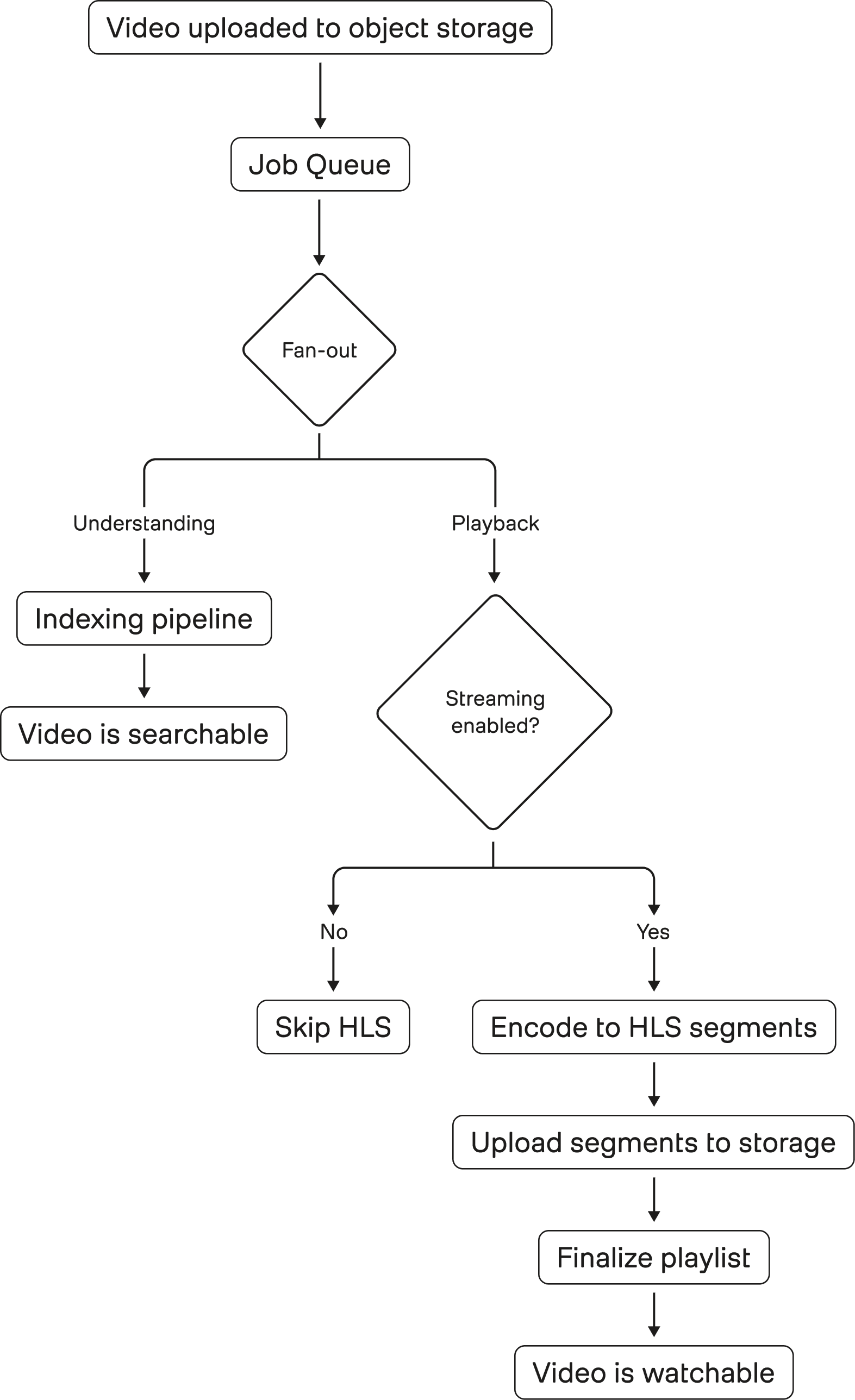
Figure 1: Video ingestion fans out into two independent paths. The understanding pipeline produces searchable representations, while the playback pipeline prepares HLS segments for streaming. These paths are decoupled in intent but share the same input, making any inefficiency in playback directly visible as a product bottleneck.
A backend orchestrator service that produces “convert tasks” into a Redis-based queue and consumes completion messages to update job state.
Redis used as both job queue and message broker, with separate streams for conversion tasks and completion signals (SUCCEEDED/FAILED).
Workers designed as “HLS converter pods” that run FFmpeg, write HLS segments + playlist, and upload results to storage.
3.2 - Autoscaling
Encoding workloads are bursty. A demo day or model rollout can create sudden spikes in “videos that need to become playable.” We didn’t want to over-provision a constantly running HLS fleet.
So we tied worker count to queue dynamics using KEDA, a Kubernetes event-driven autoscaler that can scale workloads based on event sources (including Redis).
Also, to ensure fair-usage across customers and overcome the noisy-neighbor problem, the queue's messages are produced at a target that is distributed across different customers.
3.3 - Reliability
Outsourcing HLS doesn’t eliminate failures; it just externalizes them. Bringing it in house meant accepting we’d own the last mile reliability.
From the beginning, we planned for fault tolerance:
retry on failure with backoff,
a dead-letter queue for “poison jobs,”
and clear failure reporting and observability so support and engineers can debug quickly.
And yes, we still hit incidents. An example incident log happens when an internal user reported “HLS is never ending,” and the root-cause investigation pointed to the in-house HLS consumer not processing the request as expected (“hls task is never activated”).
Owning this system forced us to build the operational muscle we’d previously gotten “for free”:
better logging at the start of handlers,
better alert coverage for consumer health,
and better guarantees that queued work doesn’t silently stall.
As a result, we adopted concrete reliability practices such as consumer cleanup via cronjob and heartbeat mechanisms to reduce timeouts.
4 - The real speed work wasn’t “FFmpeg flags”
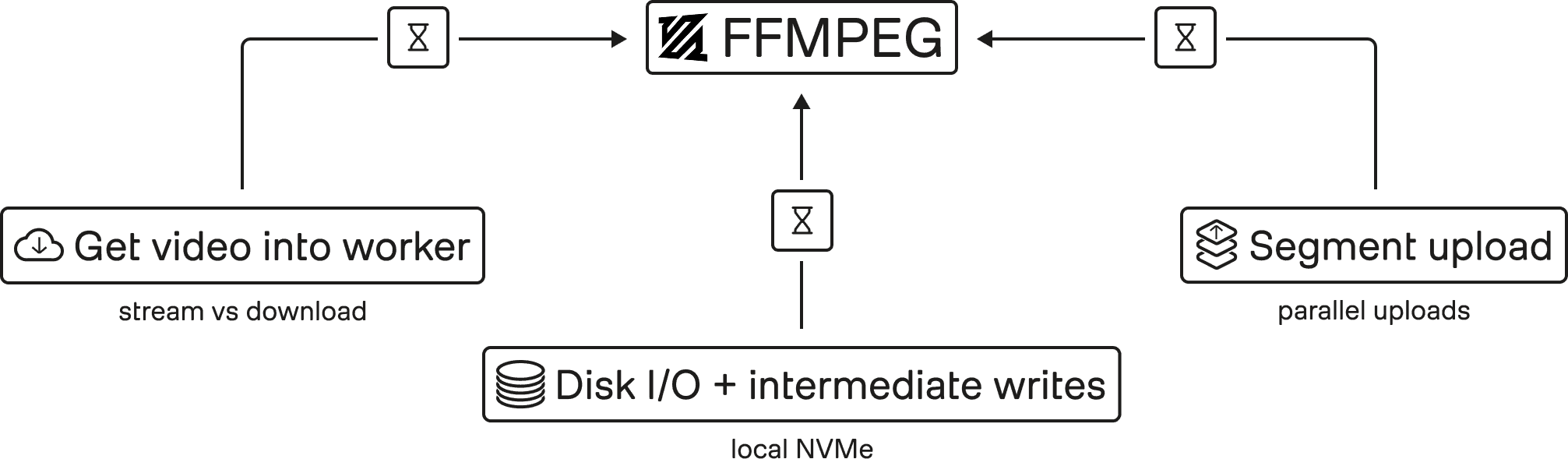
Figure 2: FFmpeg is only one stage in the pipeline. End-to-end latency is dominated by how video moves through the system: getting data into workers (stream vs. download), disk I/O and intermediate writes, and uploading segments back to storage. Optimizing these boundaries (not encoder flags) drives real throughput gains.
A common misconception about video pipelines is that performance is mostly about picking the “right FFmpeg command.” In practice, the big gains often come from everything around FFmpeg.
For us, initial targets weren’t reached immediately, and the bottlenecks we had to chase included moving video into workers, disk I/O, intermediate writes, and benchmarking CPU vs GPU choices.
Here are the kinds of design choices that mattered.
4.1 - Stream the source or download up front
Pulling video into a worker sounds trivial; until you do it at scale on large uploads.
In practice, we use a hybrid retrieval strategy: depending on file size and runtime heuristics, workers either stream from a presigned URL or download the asset locally. This lets us avoid unnecessary data movement on large uploads while keeping smaller jobs simple and efficient.
4.2 - Upload segments in parallel
HLS output is many files: a playlist plus hundreds or thousands of segments, depending on duration and segment size.
So upload behavior matters. Segment upload parallelism can become a first-order factor in end-to-end “time to playable,” especially when workers finish encoding but then serialize uploads.
We treated the pipeline holistically: encode + package + ship.
4.3 - Local NVMe and disk I/O realities
When you write intermediate outputs (and final HLS segments) to disk, storage throughput becomes part of the critical path. In workloads that process many videos with large HLS outputs, naive EBS-backed disk I/O became a surprisingly significant bottleneck: CPU and memory were available, but the pipeline still stalled on storage.
That is why we deliberately chose local NVMe, building on prior internal platform work to make high-throughput node-local storage usable in EKS. In practice, that meant the system could sustain the write and packaging rates the media pipeline actually needed.
5 - Results: the pipeline got faster, cheaper, and more deployable
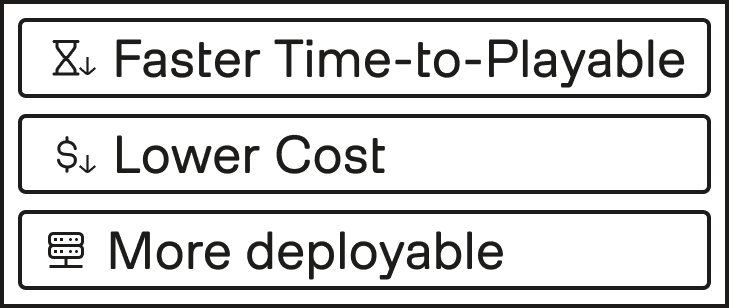
Figure 3: By redesigning the system around data movement instead of isolated encoding steps, the pipeline achieves three concrete improvements: faster time-to-playable, lower infrastructure cost, and greater deployment flexibility. The result is a playback system that scales with video volume instead of becoming a bottleneck.
We measured success in “time to playable,” cost, and whether we were on a path to vendor feature parity.
5.1 - Performance
Compared with the previous pipeline, average processing speed improved by about 6.6×, reducing the time required to make long videos playable from over an hour to just a few minutes.
We still track downstream bottlenecks (because the product experience is never one number) but this was enough to eliminate the most painful “indexing finished, playback isn’t ready” confusion.
5.2 - Cost
Using our previous managed setup as a baseline, HLS preparation cost dropped from roughly $0.045 to $0.006 per video hour in compute, an ~87% reduction. Even after accounting for storage, the in-house pipeline remained dramatically cheaper.
5.3 - Future requirements
Building HLS in house isn’t only about speed and cost. It’s also about compatibility with future deployment models.
We’re actively investing in infrastructure choices that work in air-gapped environments and reduce operational overhead for on-prem deployments.
An in-house HLS pipeline fits that same pattern: fewer external dependencies, more control over the operational envelope, and fewer “core product features” that are blocked on third-party cloud availability or pricing structures.
6 - Broader lessons for any engineering team
The story here is “HLS migration,” but the takeaways are broader.
First, optimize for the user’s critical path, not the team’s favorite subsystem. We were proud of fast indexing, but users experienced the product through a different bottleneck: playback readiness.
Second, benchmark end-to-end and don’t overfocus on the obvious hotspots. We pursued bottlenecks beyond FFmpeg itself (data movement, disk I/O, upload patterns, and queue orchestration) because “the command is fast” doesn’t mean “the system is fast.”
Third, bringing infrastructure in house isn’t purely a technical decision; it’s an economic and product decision. The driver wasn’t “we want to own transcoding”: it was (a) user-visible latency, (b) a cost curve that didn’t make sense, and (c) future deployment requirements.
Fourth, if you bring it in house, treat reliability as the product. We hit issues like consumers not activating tasks and had to improve logging, monitoring, and operational practices (heartbeats, cleanup cronjobs, alerting).
Finally, ship incrementally. Our goals were explicit: target a higher real-time ratio and reach feature parity with the vendor where it mattered for user experience. We didn’t need perfection on day one; we needed a safer, cheaper, faster path that could be iterated.
When people think about “video intelligence,” they often picture model training or retrieval quality. In practice, the user experience is just as dependent on the unglamorous infrastructure that turns raw video into something you can actually watch, scrub, and inspect while results are loading.
This post is a story about one of those unglamorous systems: HLS generation, which is the process of converting a newly uploaded video into a segmented streaming format that plays instantly in a browser. HLS (HTTP Live Streaming) delivers media using a playlist (commonly .m3u8) that points to many small media segments, so players can start quickly, adapt to network conditions, and seek efficiently.
Last year, we hit a painful mismatch: our indexing pipeline became extremely fast, but our playable streaming pipeline (initially outsourced to a managed third-party transcoding service) was comparatively slow and increasingly expensive. The result was a confusing product moment: indexing would finish, but users couldn’t actually watch the video in our Playground because HLS generation was still running.
So we rebuilt it.
1 - The bottleneck we couldn’t ignore
Our trigger was simple: we shipped Marengo 3.0 support for longer videos (up to 4 hours, previously ~2 hours) last year, and suddenly an old limitation became impossible to ignore. For long uploads, playback preparation could lag well behind indexing, which created a frustrating product gap: the system could already understand the video, but the browser still could not play it smoothly. This mismatch showed up both externally and internally. Users could see results before playback was ready, and teams naturally expected the experience to feel “done” once indexing finished.
2 - Build vs buy: why we moved away from the vendor pipeline
We did not immediately decide to rebuild the pipeline ourselves. Before taking that step, we tested whether the vendor's accelerated mode could close enough of the gap.
In our evaluation, acceleration improved throughput by roughly 3.9× compared with the baseline setup. But the result still fell short of the product experience we were aiming for.
It also came at a higher price point. The accelerated path required a more expensive tier, which in our analysis was about 60% costlier than the baseline configuration.
So while acceleration improved performance, it did not change the underlying tradeoff. It made the existing path better, but not good enough (and not cheaply enough) to be the long-term answer.
So our decision was driven by a trio of constraints:
Performance: the user experience was gated by HLS, not indexing.
Cost: the outsourced pipeline had become a material monthly line item and was trending up.
Future requirements: we want to support on-prem deployments, and relying on a specialized cloud vendor for key playback infrastructure makes that direction harder.
That last point is subtle but important. An on-prem, air-gapped deployment forces you to optimize for “what can we run ourselves?” and reduce dependencies that require managed cloud services. Our teams were already moving core async infrastructure toward primitives that can run in Kubernetes and in restricted environments.
An in-house HLS pipeline fits that strategic direction.
3 - What we built: a practical, scalable HLS pipeline
Before touching architecture, we needed to validate something basic: could we get raw FFmpeg transcoding fast enough?
HLS output typically involves segmenting media and writing a playlist file that references those segments. FFmpeg even provides a dedicated HLS muxer for this purpose.
But performance wasn’t the only requirement. We needed a system that could:
run continuously at scale,
integrate into our existing upload → ingest → index workflows, and
fail safely (retry, alert, triage) when real-world video inputs break assumptions.
Our first design proposal formalized a simple approach: build an in-house “HLS convert service” using FFmpeg, with a queue-driven worker fleet.
3.1 - The high-level flow
The rough architecture looks like this:
Figure 1: Video ingestion fans out into two independent paths. The understanding pipeline produces searchable representations, while the playback pipeline prepares HLS segments for streaming. These paths are decoupled in intent but share the same input, making any inefficiency in playback directly visible as a product bottleneck.
A backend orchestrator service that produces “convert tasks” into a Redis-based queue and consumes completion messages to update job state.
Redis used as both job queue and message broker, with separate streams for conversion tasks and completion signals (SUCCEEDED/FAILED).
Workers designed as “HLS converter pods” that run FFmpeg, write HLS segments + playlist, and upload results to storage.
3.2 - Autoscaling
Encoding workloads are bursty. A demo day or model rollout can create sudden spikes in “videos that need to become playable.” We didn’t want to over-provision a constantly running HLS fleet.
So we tied worker count to queue dynamics using KEDA, a Kubernetes event-driven autoscaler that can scale workloads based on event sources (including Redis).
Also, to ensure fair-usage across customers and overcome the noisy-neighbor problem, the queue's messages are produced at a target that is distributed across different customers.
3.3 - Reliability
Outsourcing HLS doesn’t eliminate failures; it just externalizes them. Bringing it in house meant accepting we’d own the last mile reliability.
From the beginning, we planned for fault tolerance:
retry on failure with backoff,
a dead-letter queue for “poison jobs,”
and clear failure reporting and observability so support and engineers can debug quickly.
And yes, we still hit incidents. An example incident log happens when an internal user reported “HLS is never ending,” and the root-cause investigation pointed to the in-house HLS consumer not processing the request as expected (“hls task is never activated”).
Owning this system forced us to build the operational muscle we’d previously gotten “for free”:
better logging at the start of handlers,
better alert coverage for consumer health,
and better guarantees that queued work doesn’t silently stall.
As a result, we adopted concrete reliability practices such as consumer cleanup via cronjob and heartbeat mechanisms to reduce timeouts.
4 - The real speed work wasn’t “FFmpeg flags”
Figure 2: FFmpeg is only one stage in the pipeline. End-to-end latency is dominated by how video moves through the system: getting data into workers (stream vs. download), disk I/O and intermediate writes, and uploading segments back to storage. Optimizing these boundaries (not encoder flags) drives real throughput gains.
A common misconception about video pipelines is that performance is mostly about picking the “right FFmpeg command.” In practice, the big gains often come from everything around FFmpeg.
For us, initial targets weren’t reached immediately, and the bottlenecks we had to chase included moving video into workers, disk I/O, intermediate writes, and benchmarking CPU vs GPU choices.
Here are the kinds of design choices that mattered.
4.1 - Stream the source or download up front
Pulling video into a worker sounds trivial; until you do it at scale on large uploads.
In practice, we use a hybrid retrieval strategy: depending on file size and runtime heuristics, workers either stream from a presigned URL or download the asset locally. This lets us avoid unnecessary data movement on large uploads while keeping smaller jobs simple and efficient.
4.2 - Upload segments in parallel
HLS output is many files: a playlist plus hundreds or thousands of segments, depending on duration and segment size.
So upload behavior matters. Segment upload parallelism can become a first-order factor in end-to-end “time to playable,” especially when workers finish encoding but then serialize uploads.
We treated the pipeline holistically: encode + package + ship.
4.3 - Local NVMe and disk I/O realities
When you write intermediate outputs (and final HLS segments) to disk, storage throughput becomes part of the critical path. In workloads that process many videos with large HLS outputs, naive EBS-backed disk I/O became a surprisingly significant bottleneck: CPU and memory were available, but the pipeline still stalled on storage.
That is why we deliberately chose local NVMe, building on prior internal platform work to make high-throughput node-local storage usable in EKS. In practice, that meant the system could sustain the write and packaging rates the media pipeline actually needed.
5 - Results: the pipeline got faster, cheaper, and more deployable
Figure 3: By redesigning the system around data movement instead of isolated encoding steps, the pipeline achieves three concrete improvements: faster time-to-playable, lower infrastructure cost, and greater deployment flexibility. The result is a playback system that scales with video volume instead of becoming a bottleneck.
We measured success in “time to playable,” cost, and whether we were on a path to vendor feature parity.
5.1 - Performance
Compared with the previous pipeline, average processing speed improved by about 6.6×, reducing the time required to make long videos playable from over an hour to just a few minutes.
We still track downstream bottlenecks (because the product experience is never one number) but this was enough to eliminate the most painful “indexing finished, playback isn’t ready” confusion.
5.2 - Cost
Using our previous managed setup as a baseline, HLS preparation cost dropped from roughly $0.045 to $0.006 per video hour in compute, an ~87% reduction. Even after accounting for storage, the in-house pipeline remained dramatically cheaper.
5.3 - Future requirements
Building HLS in house isn’t only about speed and cost. It’s also about compatibility with future deployment models.
We’re actively investing in infrastructure choices that work in air-gapped environments and reduce operational overhead for on-prem deployments.
An in-house HLS pipeline fits that same pattern: fewer external dependencies, more control over the operational envelope, and fewer “core product features” that are blocked on third-party cloud availability or pricing structures.
6 - Broader lessons for any engineering team
The story here is “HLS migration,” but the takeaways are broader.
First, optimize for the user’s critical path, not the team’s favorite subsystem. We were proud of fast indexing, but users experienced the product through a different bottleneck: playback readiness.
Second, benchmark end-to-end and don’t overfocus on the obvious hotspots. We pursued bottlenecks beyond FFmpeg itself (data movement, disk I/O, upload patterns, and queue orchestration) because “the command is fast” doesn’t mean “the system is fast.”
Third, bringing infrastructure in house isn’t purely a technical decision; it’s an economic and product decision. The driver wasn’t “we want to own transcoding”: it was (a) user-visible latency, (b) a cost curve that didn’t make sense, and (c) future deployment requirements.
Fourth, if you bring it in house, treat reliability as the product. We hit issues like consumers not activating tasks and had to improve logging, monitoring, and operational practices (heartbeats, cleanup cronjobs, alerting).
Finally, ship incrementally. Our goals were explicit: target a higher real-time ratio and reach feature parity with the vendor where it mattered for user experience. We didn’t need perfection on day one; we needed a safer, cheaper, faster path that could be iterated.



Platform
Enterprise
©
2026
TwelveLabs, Inc. All Rights Reserved

Platform
Enterprise
©
2026
TwelveLabs, Inc. All Rights Reserved

Platform
Enterprise
©
2026
TwelveLabs, Inc. All Rights Reserved